LinkedIn mass messaging can help you expand your professional network, promote your business, and start meaningful conversations at scale.
Here is a quick summary of key tips to help you send bulk messages on LinkedIn safely and strategically.
Stay safe: Follow SSI-based daily LinkedIn messaging limits—start with 10 actions for SSI below 20, gradually increase to 30-40 for SSI above 40. Use automation tools like Snov.io with warm-up modes, smart scheduling, and human-like delays to avoid account restrictions.
Get results: Personalize every DM using segmentation and dynamic content. Aim for 20-30% acceptance rates by leading with value rather than sales pitches. Respond within 24 hours to build sender reputation and strengthen relationships.
LinkedIn is ideal for B2B professionals to find new business partners and clients. It has even become a preferred channel for marketers engaging with their customers.
But how do you reach all the potential clients? LinkedIn posts and ads can help boost your brand awareness, but if conversions are low, sending mass LinkedIn messages can expand your reach.
In this article, we’ll explain how using this tactic can boost outreach and ultimately increase sales on social media.
Outline
LinkedIn mass messaging is the practice of sending the same message to multiple first-degree connections or prospects at once to save time, typically for marketing, networking, or event invitations.
Digital marketers and sales reps successfully leverage mass messaging for networking, lead generation, and sales. But taking advantage of it is not as straightforward as it might seem.
The platform imposes certain restrictions on DMs to prevent spam and maintain user engagement. Meaning, it must be used carefully and thoughtfully.
LinkedIn offers different mass messaging approaches, each serving distinct purposes in your outreach strategy:
Group chats are multi-person conversations where all participants share the same message thread and can see each other’s responses.
To create a group chat, you need to add multiple recipients (up to 50 members) in the LinkedIn composer. They will all have access to the complete conversation history.
✅ Do: Use LinkedIn group messages for team discussions, project collaboration, and multi-stakeholder conversations
❌ Don’t: Use group chats for LinkedIn mass messaging; every member sees all messages, which can be viewed as impersonal and unprofessional
Individual DMs are private, one-on-one conversations between you and a single recipient. These messages come in two forms, depending on your connection level:
Once connected, you can DM your 1st-degree connections directly from the LinkedIn Messaging page, conversation window, or their profile.
To privately DM someone outside your network, you’ll need InMails. This feature requires a Premium subscription along with LinkedIn InMail credits.
| 💡Expert tip LinkedIn mass messaging campaigns are time-consuming when done manually. For this reason, many professionals use LinkedIn automation tools like Snov.io for outreach. Such platforms let you send personalized DMs at scale, track engagement metrics, manage conversations in a centralized dashboard, etc. This frees you to focus on strategic relationship building rather than repetitive tasks. |
Note that some members opt out of receiving InMail in their privacy preferences. In those cases, we recommend sending connection requests instead.
LinkedIn limits the number of DMs a user can send for spam prevention. These limitations aim at improving user experience. But they can be a pain in the neck for sales as well as marketing professionals.
The volume of daily DMs one can send depends on their subscription type and Social Selling Index (SSI). While the platform doesn’t specify the exact number, users with higher SSI can send more DMs without triggering the algorithm and risking account restrictions.
Each Premium account type gets a monthly amount of InMail credits based on the subscription plan. Unused ones build up, but only to a certain limit.
Check out this table for more details:
| Premium account type | LinkedIn InMail credits | Maximum accumulation |
|---|---|---|
| Premium Career | 5 | 15 |
| Premium Business | 15 | 45 |
| Sales Navigator | 50 | 150 |
| Recruiter Lite | 30 | 120 |
Also, InMail credits renew on the first day of your billing cycle. Plus, any InMail that gets a response (accepted or declined) is added back to your account within 90 days.
Your SSI (Social Selling Index) is a reflection of how strong your presence and engagement are on LinkedIn. Based on that score, here are Snov.io’s recommended safe activity levels, which are essential for avoiding platform warnings and keeping your outreach effective:
Remember that each limit applies per action type, including profile views, connection requests, and DMs.
| 📍Safety note If your activity appears too frequent or repetitive, your account may be temporarily restricted or even blocked. Prevent this by always following our recommended LinkedIn safety limits. SSI score reflects your LinkedIn reputation and overall performance. Accounts with a higher SSI can safely perform more actions. Monitor your account for warnings and adjust your activity as needed. To grow your outreach, focus on increasing your SSI as well as expanding your network. This way, you’ll be able to send DMs in one go. |
Just remember that these are Snov.io expert recommendations, since the platform doesn’t openly disclose official LinkedIn messaging limits.
Users can send mass messages on LinkedIn manually or with the help of automation tools.
The first approach works well for people who don’t have to send bulk messages often. Someone who just wants to send a funny meme to their connections once in a while doesn’t need automation.
On the other hand, someone who must reach out to other users daily should invest in LinkedIn automation software. It significantly speeds up mass messaging and helps ensure brand consistency throughout all interactions.
You can alternate between approaches depending on your goals. Still, it’s worth knowing how to set up an outreach campaign both with and without LinkedIn automation software.
Sending messages on LinkedIn is quite straightforward. If you only need to message a couple of users, messaging them manually one by one is the easiest way to go.
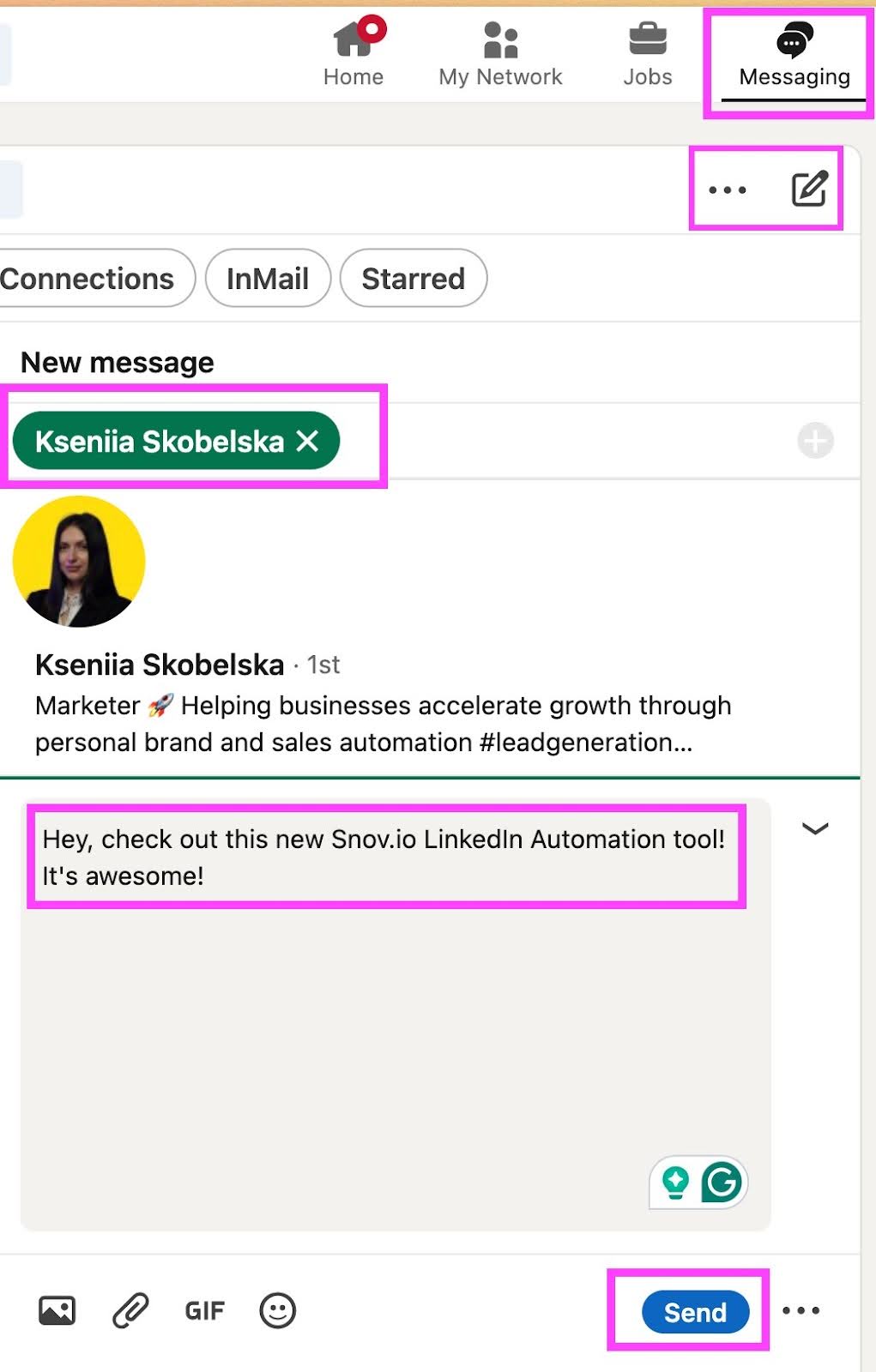
1. Find the LinkedIn Messaging tab at the top of your screen.
Alternatively, you can find this tab at the bottom right corner of your LinkedIn profile.
2. Click on the New Message icon.
3. Type in a recipient name or choose one from the suggestions below.
4. Write your message and hit “Send.”
5. Repeat the process for each of the recipients on your list.
❗️Important: Adding multiple recipients at once creates a group chat, not individual DMs. Before doing so, check this table to see if a LinkedIn group messsages aligns with your goals:
| Best for | Pros | Cons | |
|---|---|---|---|
| Group chat | Team collaboration, project discussions, brainstorming sessions, and ongoing conversations. | Everyone stays on the same page, shares a conversation history, and all members can contribute. | Lacks privacy, can become cluttered with notifications, and is not suitable for personalized outreach. |
| Individual messages | Sales outreach, personalized networking, confidential discussions, and one-on-one relationship building. | Private and personalized, tailored DMs for each recipient, professional appearance. | Time-consuming for large lists, requires manual effort for each person. |
Follow these recommendations for strategic communication.
Sending messages one by one is time-consuming. You can streamline this process by using our LinkedIn automation tool. To do this, you’ll have to create a Snov.io account and connect your LinkedIn account to it.
Before you can start your social media outreach campaign, you’ll need to gather a list of prospects. The quickest way is to use the Snov.io LinkedIn Email Finder. It’s a Chrome extension that allows you to save leads from personal, company, as well as search results pages on LinkedIn.
This extension scrapes leads’ contact information, including email addresses and LinkedIn page URLs, and adds it to your prospect list. It also acquires other public data from leads’ profiles, which can later be used to personalize mass messages.
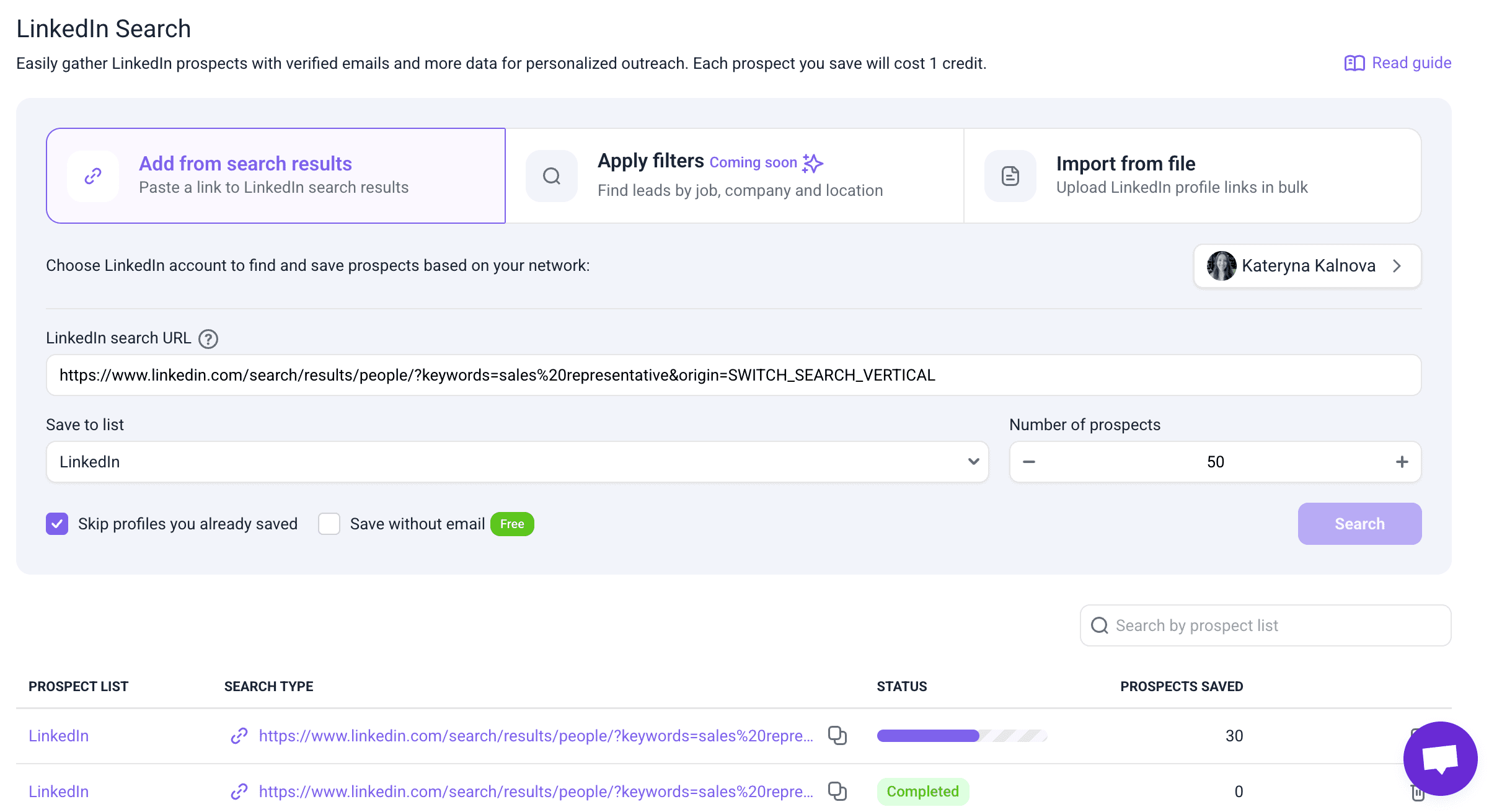
You can also take advantage of Snov.io’s LinkedIn Search feature. Just drop in your LinkedIn search results URL or upload profile links, and the tool will add the contacts straight to your prospect list.
Once you have a list of prospects you’d like to mass message, it’s time to set up the campaign.
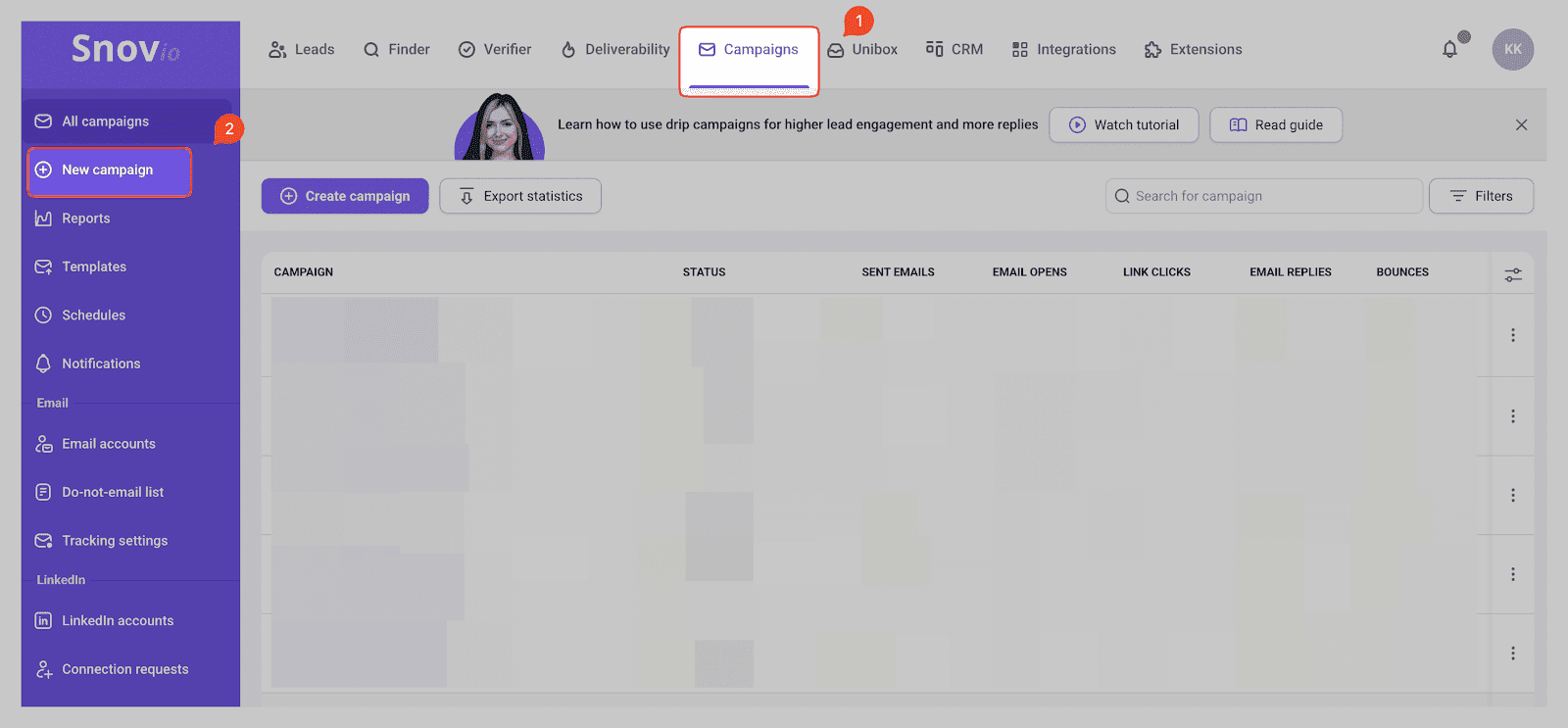
Step 1. Go to the Campaigns tab in your Snov.io account and click “New campaign” on the left-side panel.
Then, you’ll be able to create a new campaign from scratch or choose a pre-made template. While templates are invaluable for effective outreach, today, we’ll explore how to start from scratch.
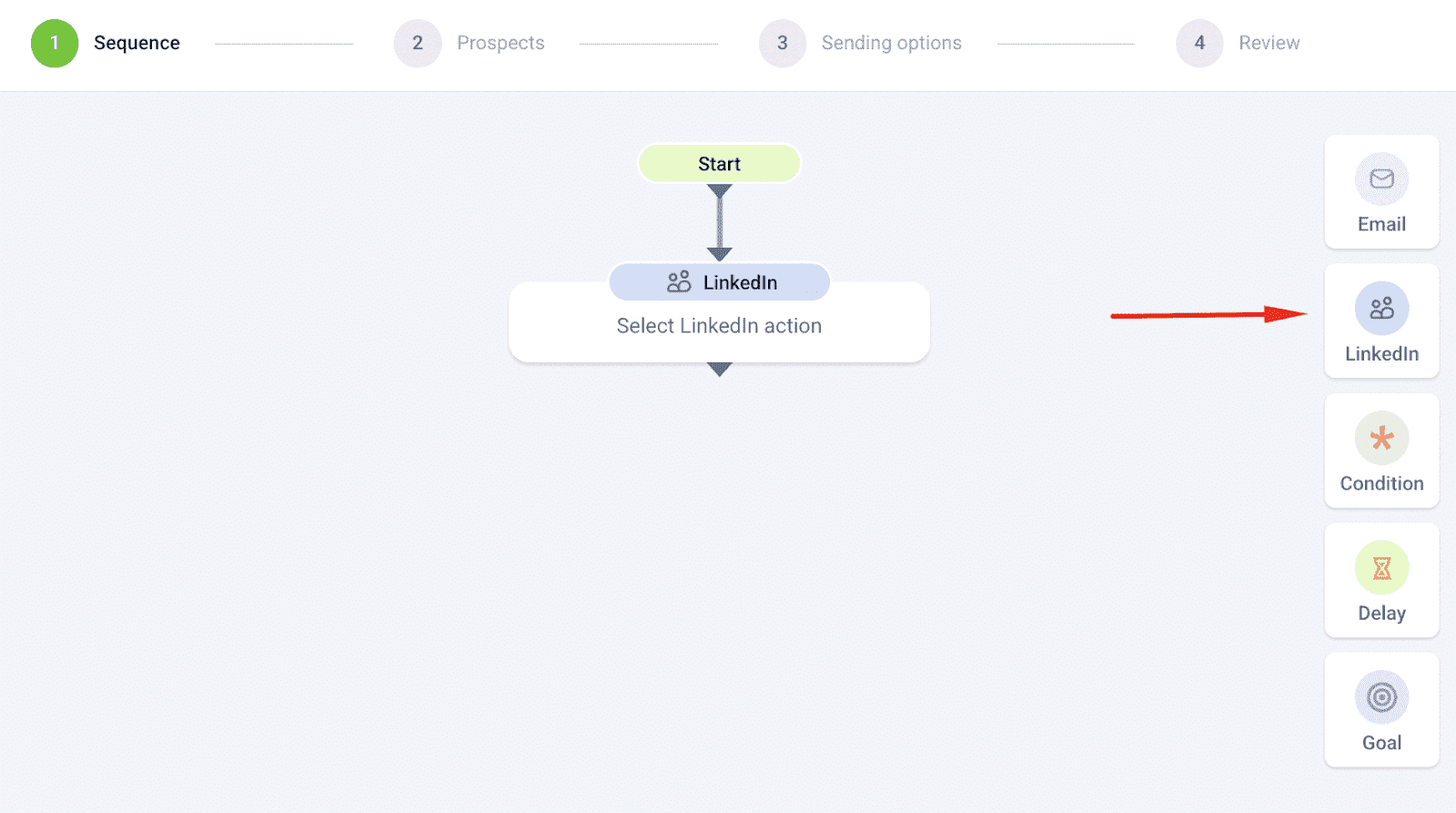
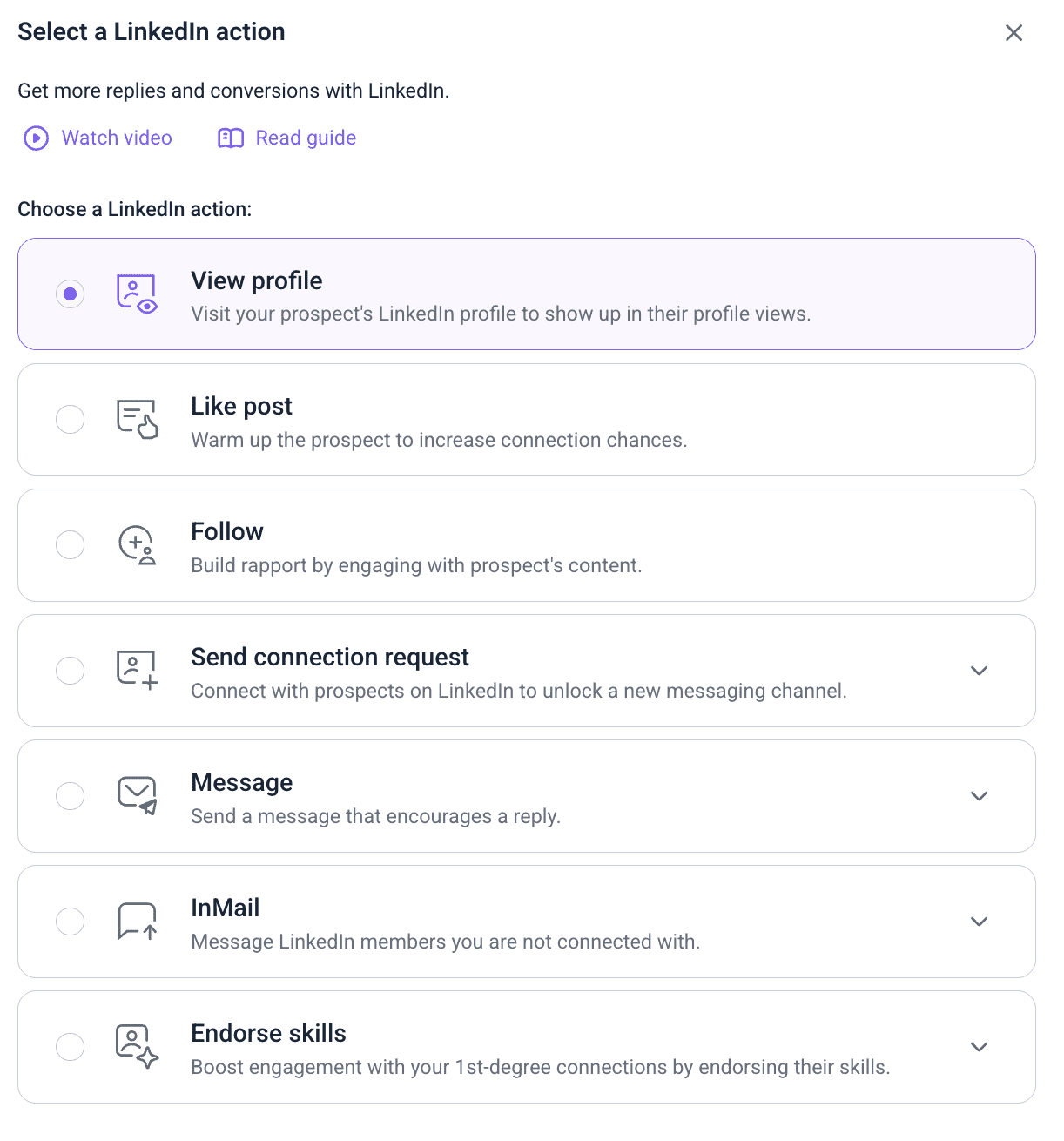
Step 2. Select the LinkedIn element on the right-side panel.
Step 3. Choose an action you’d like to start your sequence with. If you’ve already connected with users on your prospect list, simply start with a message.
Otherwise, send a connection request first. You might also want to add other LinkedIn touches to attract your recipients’ attention and build trust before contacting them.
Step 4. Configure the next step depending on whether you’ve connected with your lead or not. Remember, you can only send regular DMs to your connections. To reach other users, you can use InMails if you have a paid account.
You can set conditions and filter your sequences by connection level, so your messages and InMails are automatically sent only to 1st-, 2nd-, or 3rd-degree connections for more targeted outreach.
Step 5. After you’re satisfied with your sequence, click Next at the bottom of the page.
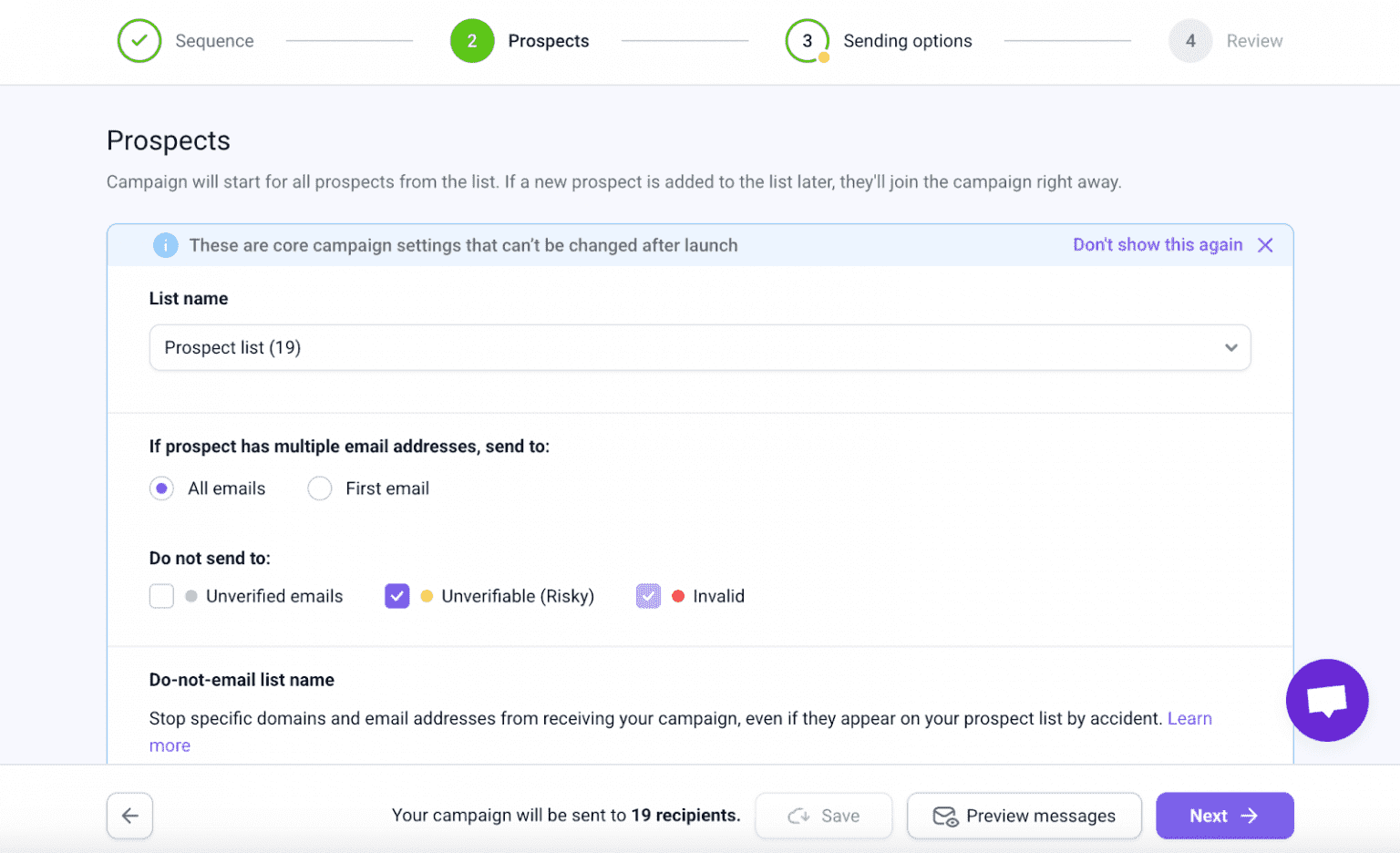
Now, choose a list of prospects you’re going to mass message on LinkedIn and fill out other campaign settings. Click Next.
Step 6. Select the LinkedIn account you want to send DM from. Then, configure other sending options according to your goals.
Step 7. Review your campaign before launching. Don’t worry; our smart outreach automation solution will notify you of any missing information or incomplete steps.
Step 8. Run your campaign and start receiving responses from your leads.
📍Why opt for Snov.io and not other tools?
LinkedIn mass messaging can indeed be risky, especially with tools that lack strong safety features. But Snov.io places a strong emphasis on account protection while simultaneously delivering powerful automation.
Here’s what truly sets Snov.io apart:
These features ensure that you send bulk messages on LinkedIn while staying safe.
If you’re still weighing your options, check out this detailed tool comparison below.
Often, choosing a LinkedIn automation tool can be paralyzing. We recommend looking at features, integrations, and pricing to find the best value for your outreach needs.
Here is a table to see how each tool compares:
| Tool | Key features | Native integrations | Price | Safety |
|---|---|---|---|---|
| Snov.io | InMail automation, Message automation, Filtering by connection degree, Account follow automation, account rotation | Calendly, Hubspot, Pipedrive, Zapier, Make, Integrately | $69 | Dedicated IP address, IP location change, Works when you’re offline, Safe limit control, Warm-up mode, Built-in SSI score analysis, Spintax for safer bulk outreach |
| Dripify | InMail automation, Message automation, Account follow automation | Zapier, Make, Integrately | $79 | Works when you’re offline |
| Reply | Message automation, Account follow automation | Calendly, Hubspot, Pipedrive, Zapier, Make, Integrately | $89 | – |
| Expandi | InMail automation, Message automation, Account follow automation | Zapier, Make, Integrately | $99 | Dedicated IP address, IP location change, Works when you’re offline, Safe limit control, Warm-up mode, Built-in SSI score analysis |
| Lemlist | Message automation, Account follow automation | Hubspot, Pipedrive, Zapier, Make, Integrately | $99 | – |
In terms of features, Snov.io is the absolute winner. But what’s most important is that it places a huge emphasis on safety, and that’s something definitely not worth cutting corners on.
It’s true that mass outreach is a valuable tactic for marketing and sales professionals, as well as event organizers. At the same time, it comes with a set of challenges. After all, users are professionals who can easily spot a LinkedIn mass message.
So, before starting a mass campaign, consider the potential benefits as well as drawbacks listed below.
| Pros | Cons |
| |
Despite the perceived downsides of mass messaging, you can utilize it in a safe and ethical way. To maintain a good reputation on LinkedIn and avoid penalties, follow the simple safety rules of mass messaging listed below.
It’s not humanly possible to send multiple messages with a couple of seconds between them. That’s why firing out lots of DMs over a short period of time makes you look like a bot. The LinkedIn algorithm doesn’t like this kind of activity and can penalize you.
If you’re interacting with your audience with the help of automation software, make sure it mimics human behavior. Our LinkedIn automation solution is designed to send DMs in a human-like way so your account doesn’t appear spammy.
| 💡 Expert tip: We recommend starting with 5-10 messages/day, then gradually increasing the number by a few each week until you reach 20-30 messages per day. After that, you can use this amount as a reference point: Safe: 10-20 per day. Moderate: 20-30 per day. Risky: 40-50 per day. |
LinkedIn users don’t tolerate generic DMs. Personalization is no longer a “nice-to-have” approach; it’s a must in business etiquette. What’s more, the LinkedIn algorithm distinguishes personalized messages from generic ones. It can flag your account if it detects too many generic messages being sent from it.
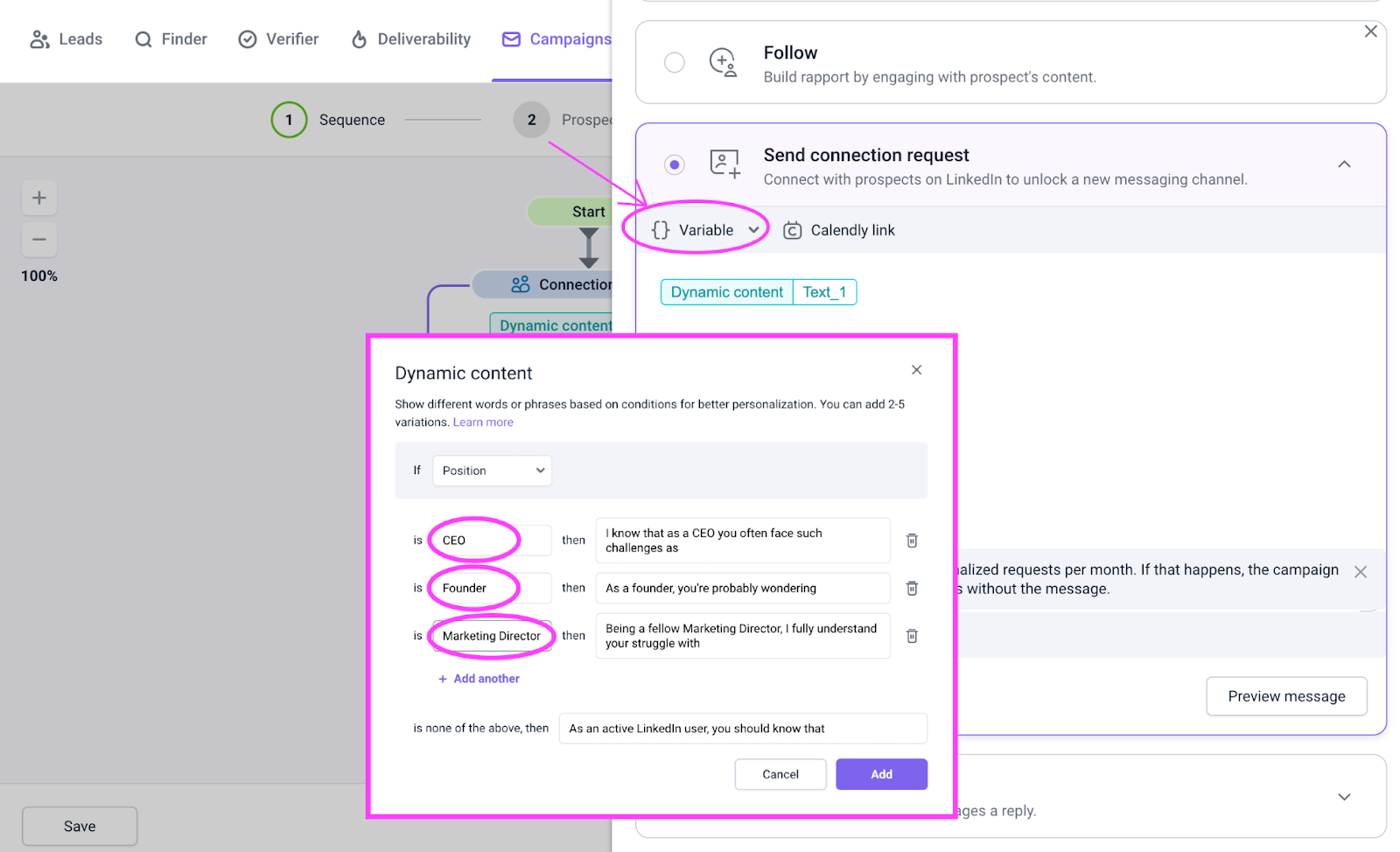
Researching your leads to understand their goals, pain points, and values. Segment your prospect list based on what these people have in common before setting up your mass messaging campaign. Send DMs that are relevant to each group’s interests and follow their preferred tone of voice.
Use variables and dynamic content while utilizing the Snov.io LinkedIn automation software to achieve the desired level of personalization.
Trying to push your product on your audience right away can annoy them and break their trust. It would be very hard to win back the users who have mentally put you in a “desperate sales rep” category.
Make sure to have a meaningful conversation and learn more about your prospect before trying to sell anything. Otherwise, annoyed recipients may not just refuse to do business with you but also report your messages as spam. Being reported several times can result in restriction or even suspension of your account.
The LinkedIn algorithm doesn’t favor users who drop out of the conversation or take a long time to reply. Once you receive responses from your bulk message send-out, don’t forget to write back.
The LinkedIn platform itself hasn’t shared any guidelines on what response time is appropriate. Still, we suggest interacting with your prospects’ replies within 24 hours. This will improve your sender reputation with the algorithm and strengthen relationships with your prospects.
This should go without saying. LinkedIn is a professional networking site, so interact with its users like you would in any professional setting. Keep your conversations polite, respectful, and relevant to your recipients’ interests. A violation of this rule will get your account suspended very quickly.
LinkedIn Account Restricted: Why And How To Get It Back?
January 14 2026
LinkedIn mass messaging can be tricky if you’re just starting out. You must balance the quantity and quality of your messages while also adhering to LinkedIn rules. It might feel overwhelming, but don’t worry. Our experts created a short list of best practices to help you keep your LinkedIn outreach effective and secure.
| LinkedIn mass messaging do’s | LinkedIn mass messaging don’ts |
|
|
Mass messages on LinkedIn can become a vital part of your outreach strategy if done correctly. Now, you know how to use LinkedIn mass messaging to build valuable connections without risking your account. It’s time to put this knowledge into practice. All the tools you need are waiting in your Snov.io account.
Remember that LinkedIn constantly updates its algorithm. We refresh our guides and add new tips on staying safe from restrictions when such updates happen. So come back to this article from time to time to get the most recent advice on safe and effective LinkedIn outreach.
Still, sending DMs in bulk is not the only way to grow sales on social media. Explore other ways to find new leads and convert them faster. Learn to use automation tools to save time and amplify your efforts. Join Snov.io Academy and become a social selling guru.
Discover the best business development tools to collect leads, automate outreach, track deals, and boost…
Learn how we tripled conversions by sending 3,000 personalized cold outreach emails with Snov.io’s AI…
Explore the top AI email marketing tools that boost replies in 2026. Learn each tool’s…
Learn how to use LinkedIn QR Codes to connect faster and grow your professional network…
Discover the 17 best B2B sales tools to accelerate your pipeline in 2026. Compare their…
Unlock growth and visibility with expert tips on building a personal brand through a smart…