
Apollo pricing starts at $0, with paid plans from $65 per user/month. Sounds straightforward, but credits, extra seats, and add-ons can quickly change the final bill.
So, how much does Apollo really cost? I’ll walk you through the ins and outs of the plans, credit limits, and real team expenses to help you decide if it’s worth the price.
TL;DR
Apollo offers four tiers: Free, Basic, Professional, and Organization. Paid subscriptions start at $65 per user/month for Basic with monthly billing.
Before choosing the right option for your team, keep a few things in mind:
- Credits are shared across your team: Everyone draws on the same pool, but admins can set individual credit limits.
- Credits don’t roll over: Unused credits expire at the end of the billing cycle. Annual-plan credits are generally issued upfront.
- Plan limits matter: Basic includes unlimited sequences, while Organization requires at least 3 seats.
- Add-ons can increase your bill: Additional credits renew with your subscription unless you reduce or remove them before the next billing cycle.
- Estimate the full cost: Factor in team size, expected credit usage, add-ons, and billing frequency before committing.
If the Apollo price structure doesn’t fit your needs, compare it with alternatives such as Snov.io.
Apollo pricing plans at a glance
Apollo.io currently offers 4 publicly listed pricing tiers: Free, Basic, Professional, and Organization. They vary in monthly credit allowances, features, and usage limits.
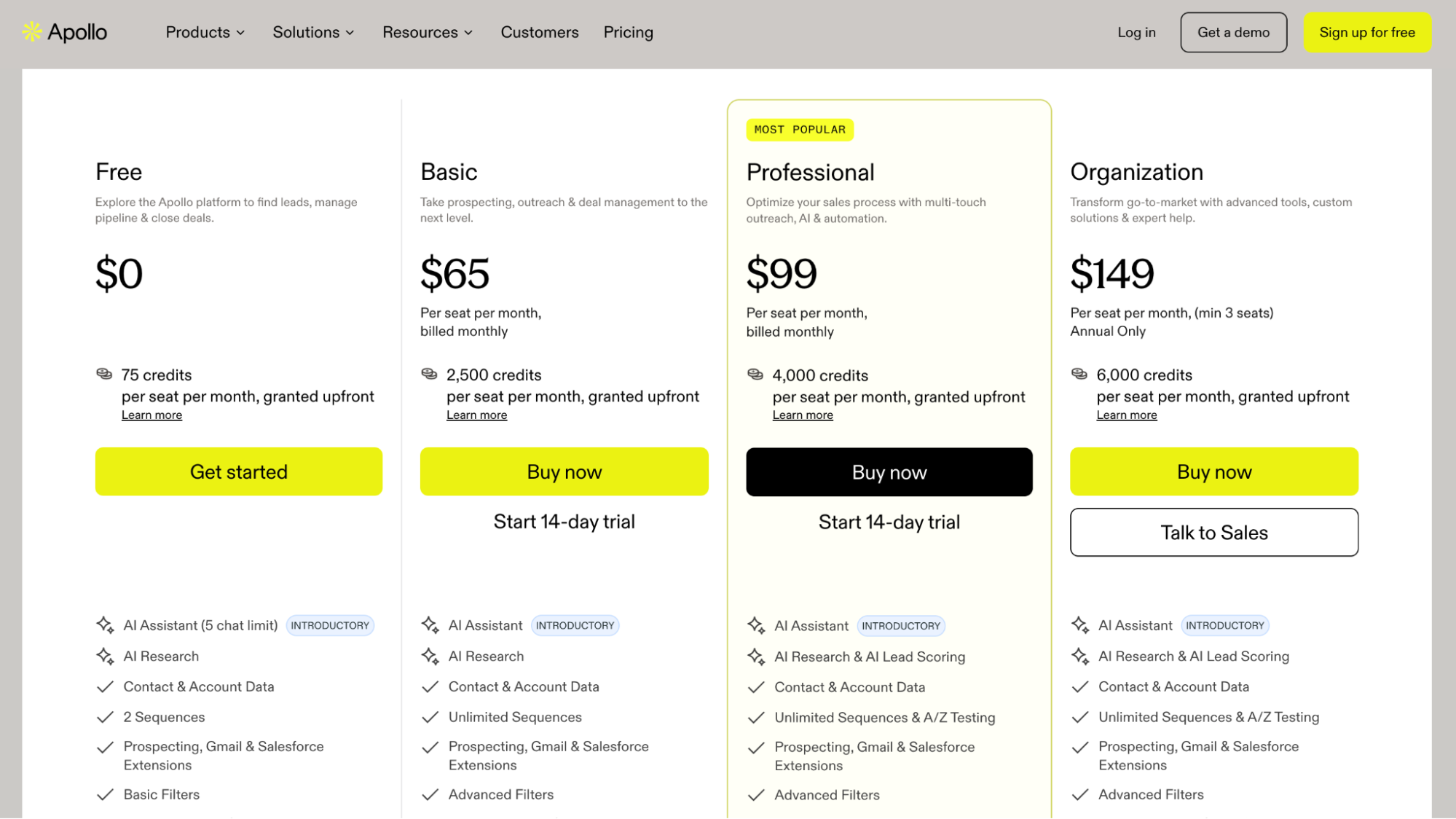
Here’s what each Apollo.io pricing plan costs with both monthly and annual billing:
| Plan | Price per seat/month (monthly billing) | Price per seat/month (annual billing) | Included credits per seat/month | Billing terms |
|---|---|---|---|---|
| Free | $0 | $0 | 75 | Free |
| Basic | $65 | $49 | 2,500 | Monthly or annual |
| Professional | $99 | $79 | 4,000 | Monthly or annual |
| Organization | $149* | $119 | 6,000 | Annual only; minimum 3 seats |
Source: Apollo.io official pricing page, as of November 2026
* Apollo displays $149 per seat/month under its monthly billing toggle, but marks this option as “Annual only”. Confirm the monthly billing terms for Organization with Apollo.
If you’re willing to commit for a year, you can get a lower rate. Basic and Professional plans also come with a 14-day free trial. One downside is that Apollo credits are issued all at once and expire at the end of your billing year.
If none of the standard plans quite fit your needs, you can reach out to Apollo about custom pricing.
Not sure which Apollo.io plan to choose? Let’s look at what each subscription includes and where the limitations begin.
Apollo.io pricing plans explained
Apollo offers 4 plans for different prospecting needs and team sizes. Here’s what each includes and when it’s worth upgrading.
Free plan
Price: $0
Apollo Free plan gives you 900 credits per year, granted monthly (75 credits), 2 email sequences per team, basic search filters, and access to Apollo’s prospecting tools. You can also identify up to 20 companies visiting your website each month and enrich up to 100 CRM records monthly.
It’s a reasonable place to start if you want to test Apollo before paying. But the monthly credit allowance is small, and 2 sequences won’t give you much room to run several campaigns at once.
Basic plan
Price: $65/user/month, billed monthly
Basic gives you 2,500 credits per user/month, unlimited email sequences, advanced search filters, CRM enrichment, and 5 automated workflows. It also includes email warm-up for one mailbox and deliverability tools, so you can manage more of your outreach in one place.
This plan makes sense if you’re prospecting regularly and want to automate follow-ups without managing everything manually. The main question is whether you’ll get enough use out of the extra features to justify the cost. At $65 per seat, a five-person team pays $325 per month, before add-ons and taxes.
Professional plan
Price: $99/user/month, billed monthly
Professional raises your allowance to 4,000 credits per user/month and adds A/Z testing for email sequences, unlimited lead scoring, and AI insights. It also includes automated workflows, CRM integrations, and the US dialer.
The upgrade is easier to justify if you’re running several campaigns, testing different messages, and need more ways to manage and analyze sales activity. But if you’re mostly finding contacts and sending straightforward email sequences, you may not need everything it offers.
Annual billing brings the price down to $79 per user/month. That’s a saving of $20 per seat each month compared with monthly billing, in exchange for paying upfront.
Organization plan
Price: $149/user/month equivalent, billed annually only
Organization includes 6,000 credits per user/month, 12 buying-intent options, unlimited meeting events, expanded call recording and AI insights. It also comes with a minimum of 3 seats.
That makes it a more substantial commitment than the other plans. At 3 seats, you’re looking at $447 per month equivalent, or $5,364 per year, billed annually.
This plan is more relevant to larger teams that need additional controls and more extensive sales workflows. If you don’t need those capabilities, paying for Organization just to get more credits may not be the best use of your budget.
How Apollo.io credits work
Apollo.io uses a credit-based system to control access to contact data and certain platform features. Your subscription determines how many you receive, but how quickly you use them depends on your prospecting activity.
For example, finding work emails, revealing mobile numbers, and enriching contact records may consume different amounts of credits.
How many credits does each action use?
Here’s what Apollo charges for common prospecting activities:
| Action | Credit cost |
|---|---|
| Reveal a verified work email | 1 credit per contact |
| Reveal a mobile number | 8 credits per verified number |
| AI research | 1 credit per run |
| Waterfall enrichment | Depends on the providers and data requested |
For example, revealing 1,000 verified work emails would use 1,000 credits. Running AI research on those same contacts across two columns would add another 2,000 credits. That’s 3,000 credits in total, before any additional enrichment.
🔎 Need to verify an email address? Check it in seconds with Snov.io:
Format Type Server status Auto-generated Catch-all

Waterfall enrichment can push the total even higher. This is essentially Apollo’s way of checking connected data providers one after another to find missing contact details. The final cost depends on the providers you use, requested data, and lookup rules. Please note that some providers can charge credits even when returning no data.
To get a more realistic estimate, I tried Apollo’s pricing calculator. Just enter your expected contact volume, pick the features you need, and it estimates your monthly credits and suggests a plan.
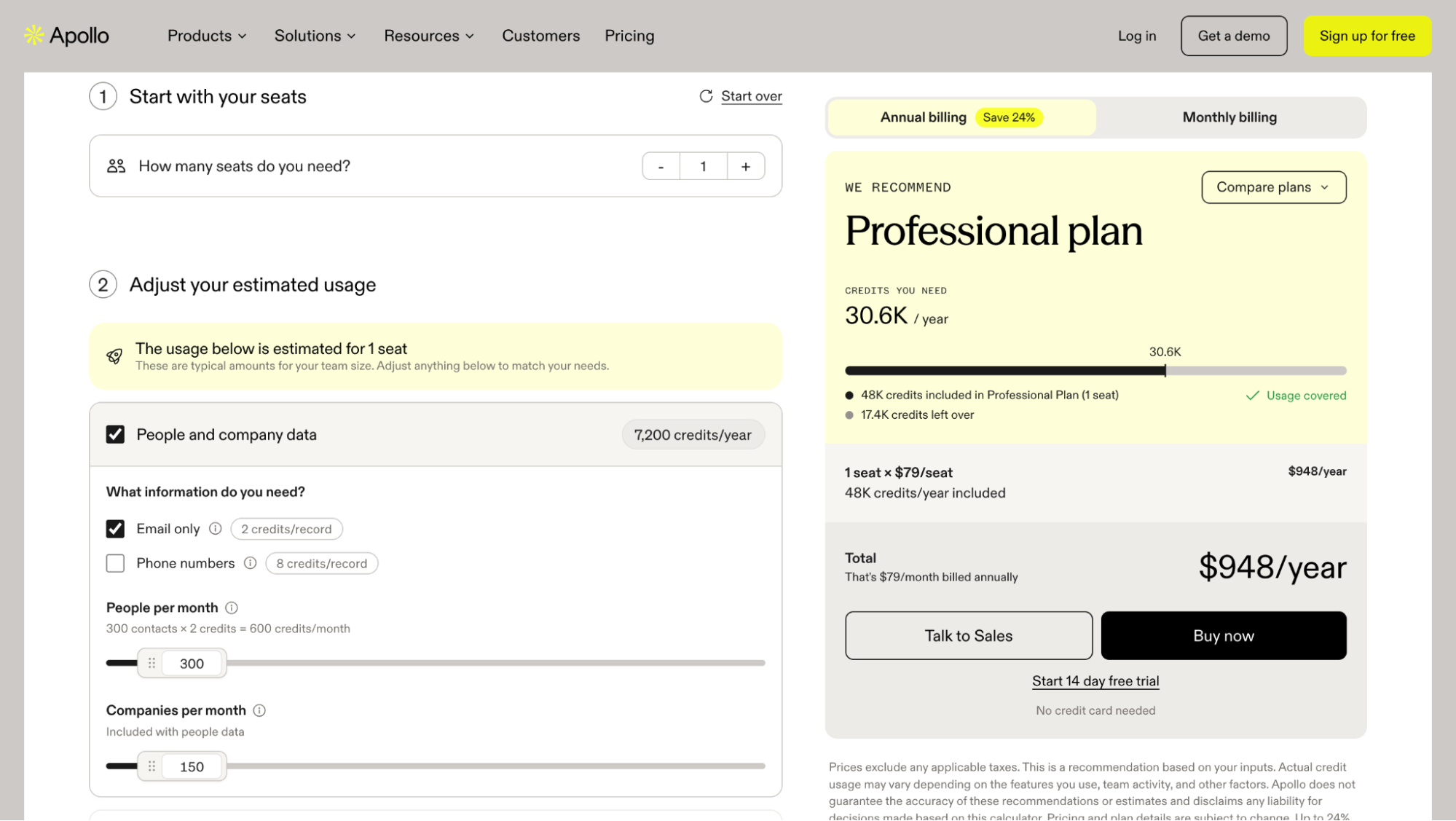
My result: 600 credits for 300 contacts’ emails, so roughly 2 credits per email, which differs from Apollo’s standard documented rate of 1 credit per verified email. Phone numbers cost more at 8 credits each.
You can also check the rates for your account under Settings → Credits and activity → About credits → Usage details. For bulk enrichment, Apollo also shows estimated credit usage before you run it.

Are Apollo credits shared across your team?
Yes, Apollo pools credits across your entire team, so users draw on a shared allowance rather than having separate, non-transferable credit balances.
For example, if 5 users share a Professional plan with an allowance of 4,000 credits per user per month, the team gets 20,000 credits per month in total. Those credits are shared across the account, so one person’s usage reduces the balance available to everyone else.
To keep usage in check, admins can set individual credit limits and monitor each team member’s usage.
Do Apollo credits roll over?
Any credits left over at the end of your billing cycle expire, including those you’ve bought separately.
Free users receive credits monthly, while annual subscribers get their full yearly allowance upfront. This means you could end up paying for credits that go unused.
Before upgrading, check how many credits your team actually uses each month. There’s little point paying for a bigger allowance if you won’t use it all.
What happens when you run out of credits?
Once you run out of credits, you’ll need to wait for your next allocation or purchase more to keep using those features. Apollo offers several monthly credit top-ups, including:
- 400 credits: $10/month
- 1,000 credits: $25/month
- 2,500 credits: $50/month
To add credits, go to Settings → Plan & billing → Plan overview → Manage Subscription and choose the add-on you need.
Note: Extra credits aren’t a one-time purchase; they renew with your subscription until canceled. Set a reminder to review or cancel the add-on before your next billing date.
Apollo.io additional costs and usage limits
Apollo’s subscription price isn’t the full cost. Extra credits, optional features, and billing commitments can all raise it. Here’s what to consider before subscribing.
Add-ons
A base plan won’t always cover everything, so Apollo sells add-ons for an additional monthly fee. They handle website visitor identification, inbound lead routing, form enrichment, and calling.
Here’s what you get with each:
- Inbound Essentials — $149/month per team: Identifies up to 1,000 website visitor contacts in the US and 5,000 companies globally per month; includes one lead router, three forms, and enrichment for 100 contacts per month.
- Inbound Max — $799/month per team: Includes up to 2,000,000 identified website visitor contacts per month (US only) and 2,000,000 identified companies per month (US and global), plus unlimited lead routing, forms, and form enrichment.
- Advanced Dialer — $149/month per team: Adds international calling, parallel and power dialing, local presence, voicemail drops, and automatic call logging.
The prices above use monthly billing.
Keep in mind that add-on credits renew automatically. If you don’t remove them, a temporary increase in prospecting activity can turn into an ongoing expense.
Email sending and other usage limits
Credits aren’t the only thing to consider when choosing an Apollo plan, because each of them also comes with different limits on sequences, daily email sends, and connected mailboxes.
| Feature | Free | Basic | Professional | Organization |
|---|---|---|---|---|
| Email sequences | 2 per team | Unlimited | Unlimited | Unlimited |
| Daily email sends | 250 | 250 | Unlimited | Unlimited |
| Connected mailboxes | 1 per user | 1 per user | Unlimited Google Workspace and Microsoft 365 mailboxes + 5 SMTP mailboxes | Unlimited Google Workspace and Microsoft 365 mailboxes + 15 SMTP mailboxes |
| A/B testing | Not included | Not included | Included | Included |
Take a look at the daily sending limit on Basic, for example. You can create as many sequences as you like, but you’re still limited to 250 emails a day. If that’s not enough for your team, Professional or Organization may be a better fit.
“Unlimited sending” isn’t a green light to ramp up overnight. Your email provider still has its own limits, and a sudden jump in volume can hurt deliverability.
If you’re sending large volumes, I recommend using Snov.io’s Email Deliverability Test to check whether there’s a problem you need to fix.
My advice? Look at what’s actually holding your team back. If it’s the number of sequences, Basic may be enough. If you need more sending capacity or more mailboxes, compare the higher tiers carefully before paying extra.
Seat requirements and billing terms
There are also several billing conditions worth knowing:
- Annual billing: Offers lower monthly-equivalent rates but requires paying for 12 months upfront
- Monthly billing: Costs more per month but allows you to cancel without committing to another year
- Seat minimums: Organization requires at least 3 paid seats.
- Plan consistency: All users within the same Apollo account must be on the same subscription tier
- Cancellation: You can cancel your subscription, but cancellation takes effect at the end of the current billing cycle
- Downgrades: Switching from annual to monthly billing requires waiting until the annual subscription ends
Any of these factors can change your Apollo bill, especially if your headcount changes or you switch up your prospecting approach. That’s why I’d skip the monthly sticker price and work out your expected annual spend. It’s a much smarter way to compare Apollo plans.
How much does Apollo.io cost for your team?
Because Apollo bills per seat, every person you add raises the total, and your tier and any add-ons push it further.
To make that concrete, here’s what different team sizes would pay each year on Apollo’s annual billing rates.
| Apollo plan | 1 user/year | 5 users/year | 15 users/year |
|---|---|---|---|
| Free | $0 | Subject to restrictions | Subject to restrictions |
| Basic | $588 | $2,940 | $8,820 |
| Professional | $948 | $4,740 | $14,220 |
| Organization | Not available | $7,140 | $21,420 |
Prices exclude taxes and add-ons. Organization requires at least three seats.
- Solo user or founder
If you only prospect now and then, Apollo Free plan is a good place to start. Once outreach becomes a regular habit, Basic at $588 a year gives you more credits and advanced search filters.
Professional, at $948 a year, is worth the step up if you need multiple mailboxes or more automation.
- Small sales team (5 users)
A five-person team pays $2,940-$7,140 annually, depending on the plan.
Basic covers regular prospecting, while Professional ($4,740/year) offers more flexibility for running multiple campaigns. Organization ($7,140/year) provides higher credit allowances and advanced features.
- Growing sales team (15+ users)
For 15 users, annual costs range from $8,820 to $21,420 before add-ons.
At this scale, credit consumption becomes especially important. Frequent phone lookups, data enrichment, and high-volume prospecting may require additional credits.
Cheaper options if Apollo doesn’t fit your budget
If budget is the sticking point, look for Apollo alternatives that could cover your needs without stretching your spending. Besides, a more focused tool may be enough if you only need a few core features. Some tools focus on finding contact data, while others combine prospecting with outreach.
Here’re five options to compare:
| Tool | Pricing | Free plan | Main features | Best for |
|---|---|---|---|---|
| Snov.io | from $39/month, or $29.25/month billed annually | Yes | AI-powered lead search, data enrichment, email verification, multichannel outreach, LinkedIn automation, warm-up, and deliverability tools | Lead generation and automated sales outreach |
| Hunter.io | from $49/month, or $34/month billed annually | Yes | Email search, cold email sequences, verification | Email search and cold email campaigns |
| Skrapp.io | from $39/month, or $29/month billed annually | Yes | LinkedIn prospecting, email search and verification, AI enrichment, CRM sync | Email search on LinkedIn |
| Lusha | from $49.90/month, or $37.45/month billed annually | Yes | Email and phone lookup, bulk enrichment, browser extension, CRM integrations, and buying-intent signals | Email and phone number lookup |
| Voila Norbert | from $49/month, or $39/month billed annually | No; 50 free credits on signup | Individual and bulk email searches, API access, and CRM integrations | Email list building |
Note that prices may change. Check each tool’s website for current pricing options before purchasing.
For teams that need more than email finding, Snov.io offers a broader toolkit at a lower starting price than Apollo. The Sales Suite starts at $39/month and combines prospecting, bulk email verification, outreach, email warm-up, and a built-in CRM in one platform.
We looked for a reliable tool to generate the contacts of decision-makers and pitch services to the found prospects in the most efficient and affordable way. Snov.io has all that and even more! With emails scraped using its finder tools, we consistently hit 40% open rates, which is our most important metric.
Director at Growth Hackers

The Starter tier includes 1,000 credits, 5,000 unique recipients, 75 enrichment tokens, and three warm-up slots, plus unlimited campaigns, senders, follow-ups, and team seats.
You can save 25% with annual billing, and larger plans lower the cost per credit and recipient, making it a sensible alternative to compare.
Key takeaways: Is Apollo.io worth the price?
Apollo can be well worth the money if you use its prospecting, outreach, and automation tools regularly. But per-seat pricing, expiring credits, and tier restrictions can make it a poor value for smaller teams or anyone who only prospects now and then.
Take a moment to calculate the annual cost for your team and estimate your credit needs before choosing. If you find you’re paying for features you seldom use, or credits regularly go to waste, you might want to compare alternatives such as Snov.io.