TL;DR:
LinkedIn is one of the richest sources of relevant leads for B2B companies, if you know how to use it properly. The secret is – reaching out to prospects on social media doesn’t come down to just personal messages. Here are the top 5 message types smart teams use for successful outreach:
In this guide, we’ll go into more detail on how to reach out on LinkedIn. We’ll also provide ready-to-use message templates, tips on building effective outreach campaigns, and ways to use LinkedIn automation to further streamline your prospecting efforts.
LinkedIn outreach has never been more important for B2B. Data speaks for itself: InMails alone are 4.6x more effective than cold emails for business communication.
Yet many sales representatives and business owners still don’t use LinkedIn messaging to its full potential. They pitch too soon or ignore other common rules of social media etiquette before sending a connection request.
We created this guide to help you avoid such mistakes.
Outline:
Does LinkedIn outreach work?
The short answer is yes – if it’s done right. In fact, B2B companies that use it strategically see up to 2x higher conversion rates than other social media channels. That’s the power of social selling for you.
Why is that so? Let me quickly break it down:
- Less traffic, more impact.
LinkedIn inboxes of your connections are typically less crowded than their email inboxes. With fewer marketers and sales reps playing the LinkedIn game, you have a better opportunity to make a memorable impression.
- Professional space with a social feel.
Even though LinkedIn is a platform for business professionals, it’s still a social network. People there are generally more open to receiving messages from new connections and engaging in meaningful conversations business-wise.
- Face to the name.
On LinkedIn, prospects can see your face and profile when they receive a connection request from you. It creates a more personal touch compared to regular emails. That is, if your profile page is optimized for social selling, of course.
How to reach out to people on LinkedIn?
When on LinkedIn, play by its rules: send personalized connection requests and direct messages, or, alternatively, InMails. Let’s explore how to message people on LinkedIn in various ways to add connections and boost your lead-generation efforts.
LinkedIn connection request
When you want to connect with someone, start by sending a friendly connection request. You can choose to add a short note if you want, but here’s a fact: LinkedIn connection requests without it often get accepted more readily.
And remember, the platform has a 200-character limit for LinkedIn connection request messages, counting spaces, so make each count! It doesn’t have to be complicated. Try this, for example:
“Hi [Prospect’s name],
I noticed we share a focus on [Topic/industry]. Would love to connect and exchange insights.
[Your name]”
Possible hurdles ⚠️:
Case #1: Your connection request has been pending for weeks, but you’re eyeing this lead like the last piece of pizza. Should you give up?
Case #2: Or picture this: You’ve maxed out your weekly LinkedIn connection limit, but you’re itching to connect with valuable leads without wasting time waiting for the restrictions to be lifted. Should you give up?
No matter what your situation is, the answer is a ‘NO.’ Remember, LinkedIn outreach is just one of the tactics in cold outreach, so leverage other options like failproof cold emails!
In case one, a gentle nudge via email might just do the trick:
Subject: Let’s seal the LinkedIn connection!
Hi [Prospect’s name],
I’m truly impressed by your expertise and would be delighted to connect for potential collaborations and valuable insights. I’d be genuinely grateful to become a part of your network.
Warm regards,
[Your name]
For case two, how about sending your lead a friendly email with a link to your LinkedIn profile, extending an invitation to connect with you? Be thoughtful about your reasons; after all, you’re reaching out to their inbox!
Subject: Let’s catch up on LinkedIn!
Hi [Prospect’s name],
I’ve been inspired by your work and saw that we have a lot in common, especially when it comes to sales and lead generation. Thought connecting on LinkedIn would be great to exchange ideas!
Here’s the link to my LinkedIn profile: [insert LinkedIn profile link]
Looking forward to having some fantastic conversations!
Warm regards,
[Your name]
Struggling to find their email? Tools like Snov.io’s LinkedIn Email Finder can come to your rescue. Simply grab it as a handy Chrome extension, blend it into your LinkedIn, and find your leads’ emails:
- Via the LinkedIn search results: scout for roles, companies, or content, find emails, and add them to your list.
- On a lead’s LinkedIn profile: grab their email and save it to your prospects list.
- On a company’s profile: type in the company’s name in the search field, go to its page, and collect the available email addresses of its employees.
Don’t need email? Use LinkedIn Email Finder to instantly expand your lead database with prospects’ LinkedIn profiles for free!
LinkedIn direct messages and InMails
Direct messages (DMs) and InMails are other platform-specific assets when it comes to messaging people on LinkedIn. They might look similar, but each has its special mission and unique traits when expanding your LinkedIn network. Let’s explore how they differ:
What are LinkedIn Direct Messages?
LinkedIn direct messages are private or group conversations between 1st-degree connections on the platform.
Sending direct messages on LinkedIn is the most common way of reaching out to potential leads. It usually starts with sending a connection request, and once it’s accepted, you can send a message to kickstart the conversation!
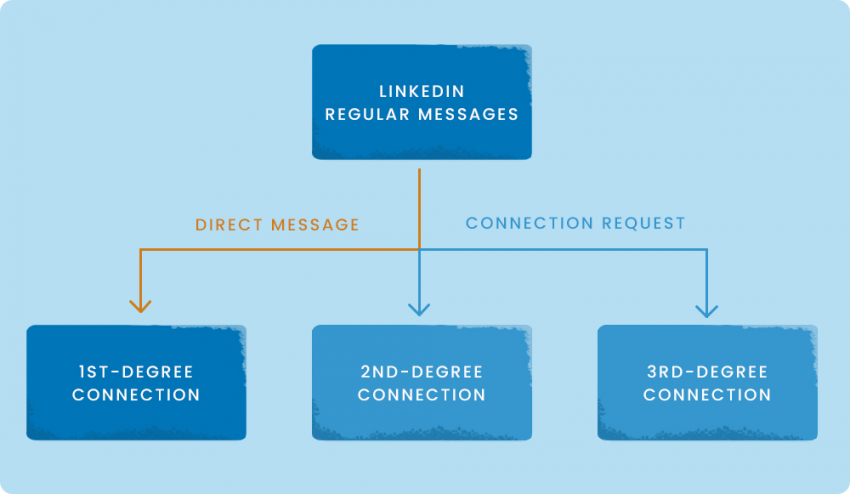
Direct messages are perfect for catching up with familiar faces, discussing shared interests, or even promoting LinkedIn posts you think might be relevant to them. Direct messages are all about relevancy, so make sure you’ve researched the recipient well before sending them a message.
1 sentence with only one placeholder is enough to spark a conversation, if it’s: 100% relevant the right audience straight to the point. Sometimes, all it takes is one relevant question to the right person to get noticed.
Outbound Outreach Specialist at Snov.io

Here’s an example of a simple yet effective direct message:
“Hi [Prospect’s name],
Saw your recent post on [Topic]. It got me really curious: how are you handling [Related challenge]?
[Your name]”
What are InMails on LinkedIn?
LinkedIn InMails are direct messages that you can send to any LinkedIn member, even those who are not in your network. This is a paid feature.
With LinkedIn InMails, you can send messages on LinkedIn to members outside your existing network. Whenever your connection requests don’t quite make it through, InMails give you a second shot at landing in your prospects’ inboxes, giving you another opportunity to add connections and finally get that convo going!
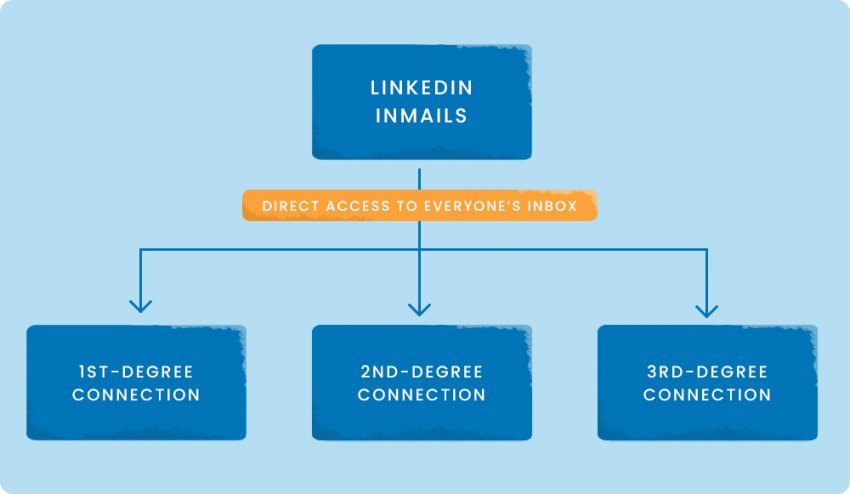
InMails are your ticket to tapping untouched potential – be it prospects, job seekers, or prospective business partners. But, unlike DMs, your recipient doesn’t already know much about you, so you’ll need to use a different formula.
InMails are more similar to cold emails. For example:
“Subject: [Pain point] – solved.
Hi [Prospect’s name],
Saw your post on [Topic]. Since we work with [Similar companies], thought it might be useful to share how they solved [Pain point]. Would you be open to a 10-min chat?
[Your name]”
Keep in mind, though, sending InMails requires a Premium LinkedIn subscription. Plus, just like DMs, there are some limitations on the quantity of InMails you can send.
❓How many messages can you send on LinkedIn in a day
The volume of daily messages one can send depends on their subscription type and Social Selling Index (SSI). Users with higher SSI can send more messages without risking account restrictions, though LinkedIn doesn’t officially specify the number.
In the case of DMs, the cap is stated clearly for different types of subscriptions:
- LinkedIn Premium Career account – 5 InMail credits per month
- LinkedIn Premium Business account – 15 InMail credits per month
- LinkedIn Sales Navigator accounts – 50 InMails per month
- LinkedIn Recruiter Lite account – 30 InMail credits per month (more can be purchased)
- LinkedIn Recruiter account – 150 InMail credits per month (more can be purchased)
So, in a nutshell, if you want to grow your outreach organically, work on increasing your SSI and expanding your network. On the other hand, if you want to outsmart LinkedIn limits, it would be wise to add InMails to your strategy.
LinkedIn group message requests
LinkedIn group message requests, aka special LinkedIn invite messages, stand for another effective LinkedIn outreach channel.
Being part of LinkedIn groups allows you to connect with fellow group members, even if you’re not connected on the platform.
It’s a great way to chat, collaborate, and network within your shared interests!
Another trick many people don’t know is that you can utilize LinkedIn event groups to connect with other attendees before and after the event. How? LinkedIn events have a comment section where event organizers and attendees can communicate.
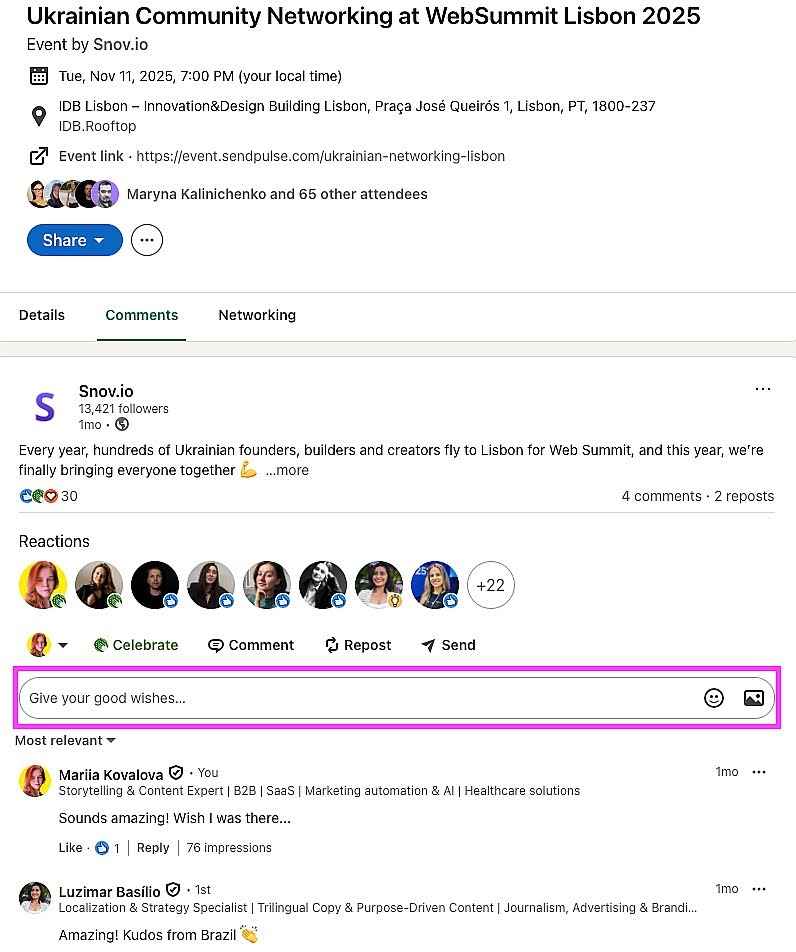
You can use this space to send event-related information, coordinate logistics, or engage with attendees.
Messages for LinkedIn Pages
LinkedIn Pages, commonly used by businesses and organizations, come equipped with a messaging feature that lets your followers send direct messages to your Page.
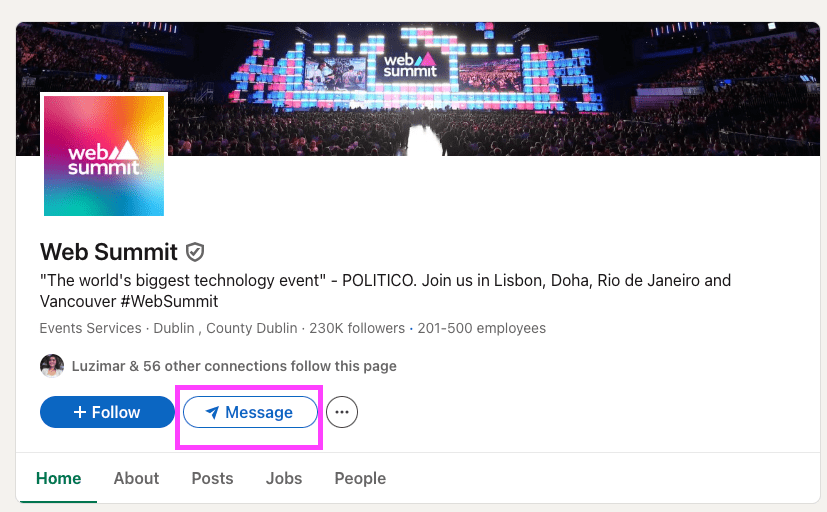
It’s a handy tool for answering customer questions, offering support, or simply connecting with your audience over your company’s content.
Sponsored InMails (LinkedIn Message Ads)
Sponsored InMails are targeted conversation ads and native messages sent to your prospects’ inboxes to ignite immediate action. These features give you the freedom to communicate your objectives to potential contacts without fretting over character limits, allowing for an effective LinkedIn outreach.
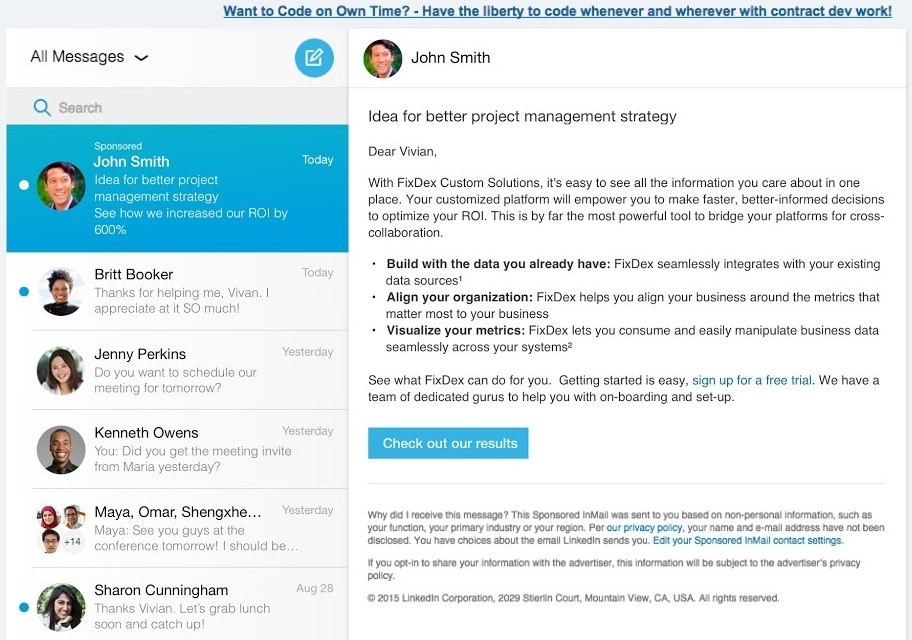
Plus, you can even include a Lead Generation Form in your LinkedIn message to effortlessly gather leads right here on LinkedIn!
LinkedIn recommendation requests
LinkedIn makes it super easy for you to reach out to your connections and ask for recommendations. You can simply send a friendly message requesting a recommendation for your skills, work history, or projects.
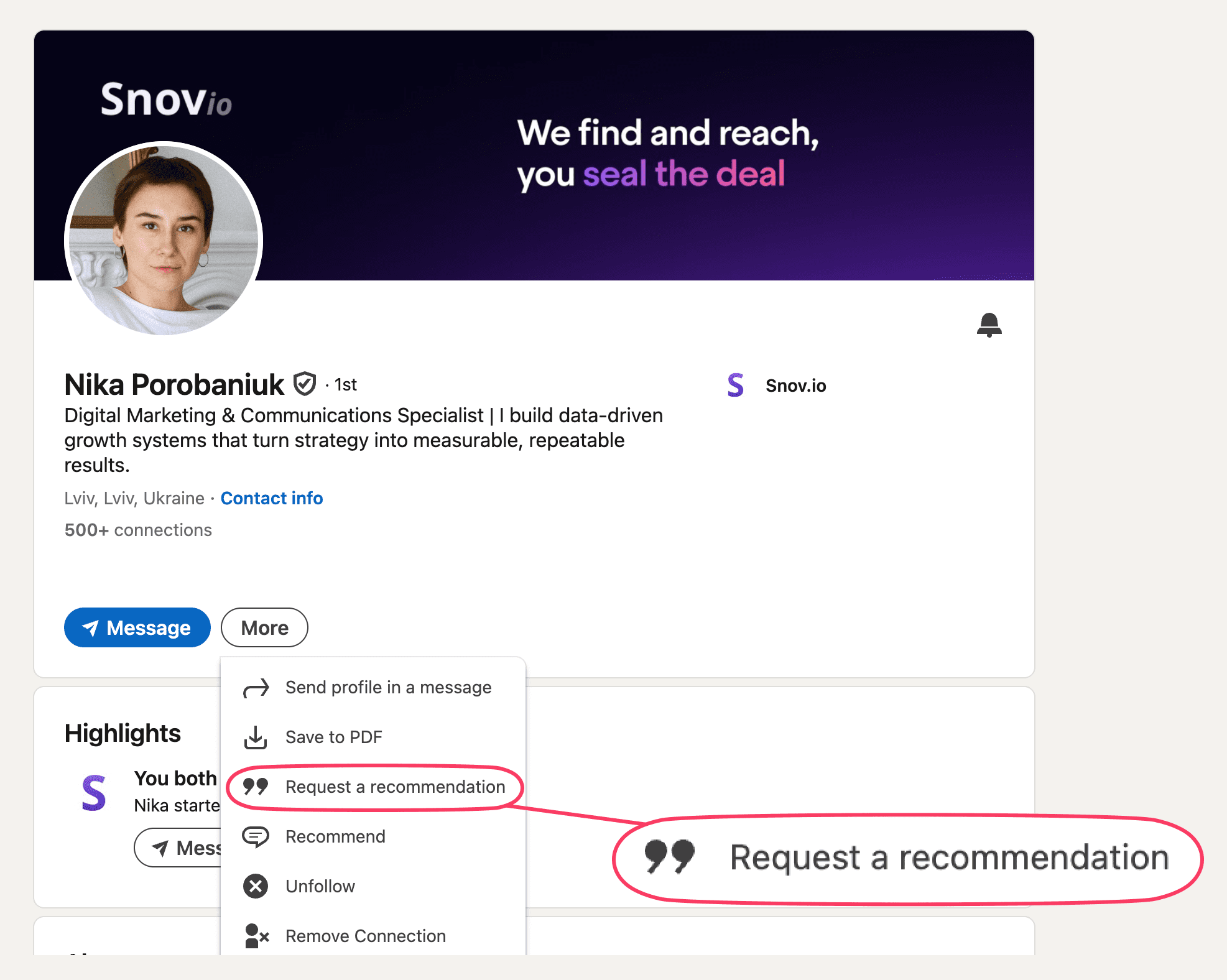
These recommendations can boost your LinkedIn profile’s credibility so that leads and prospects trust you more!
LinkedIn voice messages
This option is only available on mobile. It’s a perfect way to add a personal touch to your conversations and show your excitement when explaining things in greater detail.
Pro-tip! Before you hit record, draft out a crisp script. Ensuring your message is clear and free of “umms” will keep your listeners engaged!
Multi-channel outreach campaigns
While LinkedIn outreach can score you multiple leads, combining several outreach strategies, such as LinkedIn and email, can double your chances of getting positive responses from LinkedIn leads.
That’s why top-performing sales teams use multi-channel campaigns by combining LinkedIn, email, and even voice messages into one consistent workflow.
Here’s why it works:
- More visibility.
If your LinkedIn invite goes unnoticed, a follow-up email or voice note ensures you’re seen.
- Higher trust.
Engaging across different touchpoints makes you look persistent, not spammy.
- Better timing.
Prospects may ignore LinkedIn at work but check emails on mobile, or vice versa.
The trick here is to configure a natural flow of messages via multiple channels. For example, the simplest sequence can look like this:
- Get yourself noticed by viewing your prospect’s profile and liking their posts.
- Send a personalized connection request.
- After acceptance, drop a short DM or voice note.
- If there’s no reply, follow up with a personalized email.
The best part? Setting up such a sequence takes only a couple of minutes when using the Snov.io Multichannel Outreach Tool.
This kind of outreach feels natural, consistent, and 2-3x more likely to generate replies compared to single-channel efforts.
Best LinkedIn outreach messages: The ‘DOs’ and ‘DON´Ts’ guide
It’s easy to get caught up in routines and forget that, like any professional space, LinkedIn has a set of unspoken rules when it comes to communication. Let’s recap some of the dos and don’ts of LinkedIn outreach.
The ‘DOs’
First things first – any social platform is about human connection. Approach social selling with this mindset, and you’ll never forget the key ‘Do’s’ of LinkedIn outreach.
- Interact with their page first.
LinkedIn gives you more than one way to engage with someone before connecting. When you follow someone and react to their posts, it means you’re interested in their content and what they have to say, even if you don’t have a direct connection.
Consider this straightforward but effective workflow:
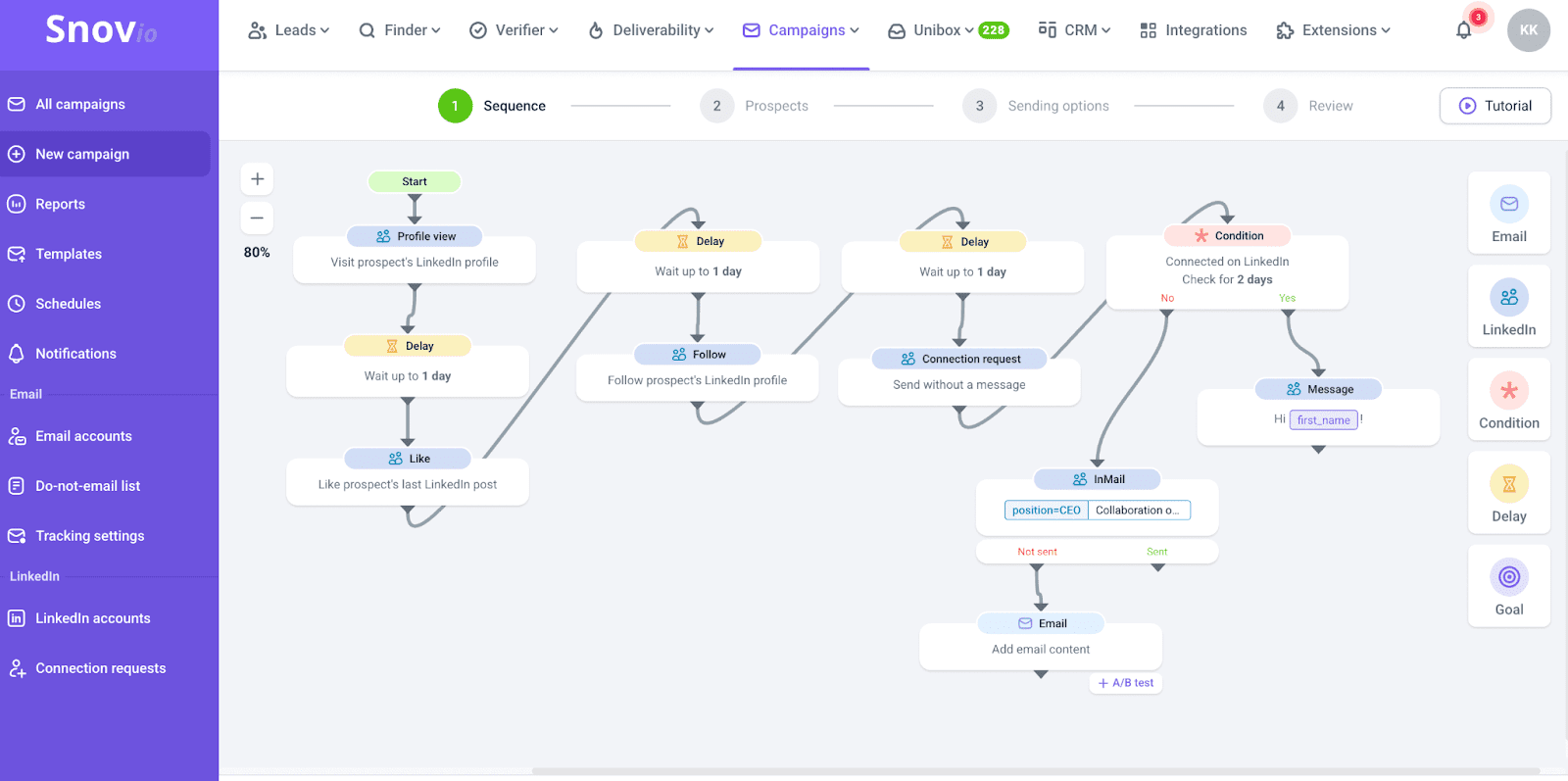
It helps to build trust with your prospects by reacting to their content before sliding into the DMs. By the time you actually connect, they will already feel like you’re a familiar face.
- Write compelling subject lines.
Just like a warm greeting, your subject line is the first thing your prospect sees. Craft a catchy, personalized, and concise one to grab their attention. For example, if your prospect just scored a big promotion, how about a friendly ‘Congratulations on your awesome new role [Role]?
- Find common ground.
Before sending your message, take a moment to research your prospect on LinkedIn. You can quickly find details like their current role, career, and interests. The platform usually highlights the details you have in common, such as skills, educational institutions, and places of work.
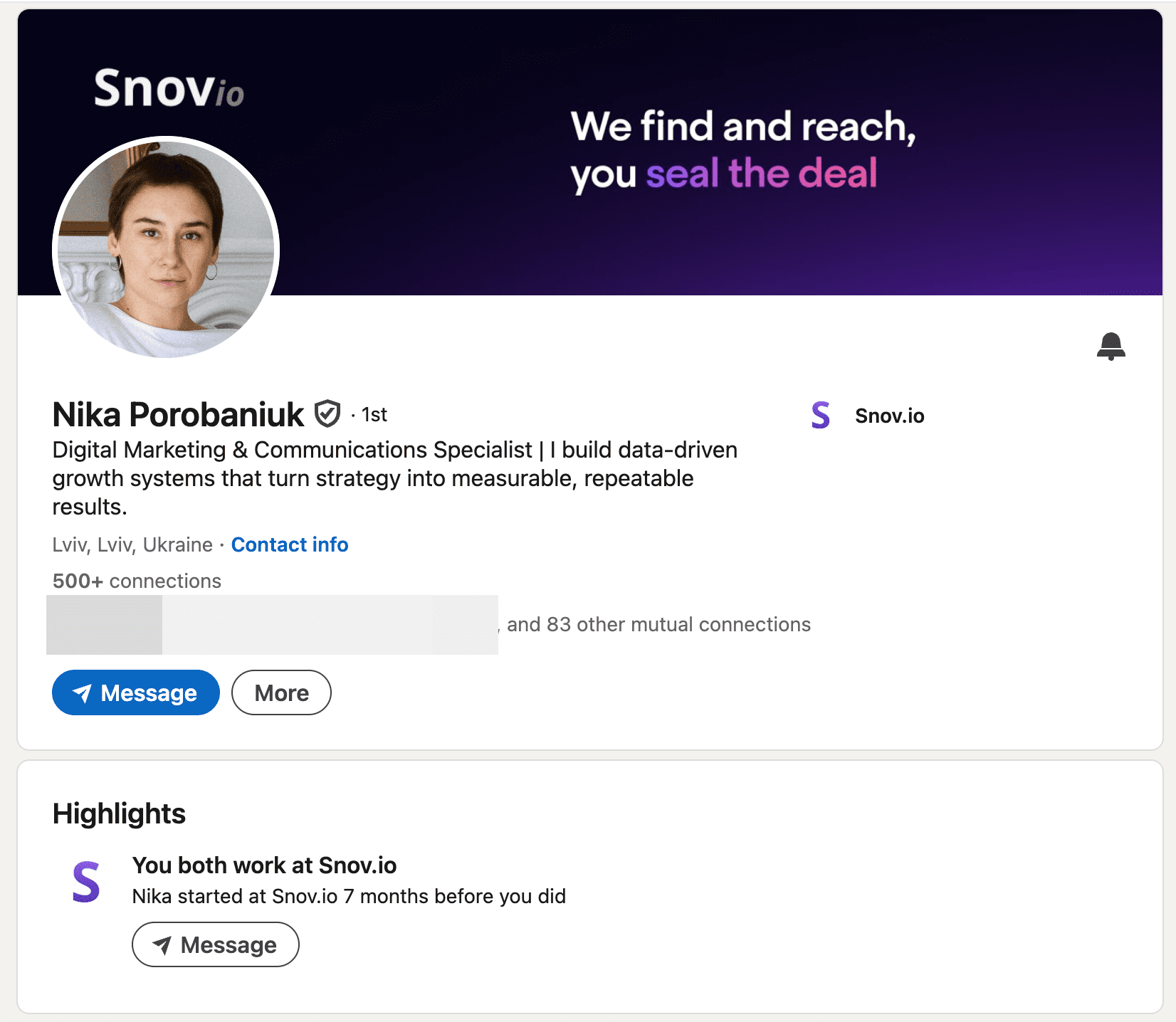
Try to connect over a shared interest or experience — it makes for a great icebreaker and helps personalize your message.
- Mention a mutual connection.
In addition to discovering shared interests, why not explore the possibility of a mutual connection? If you happen to share a common acquaintance, you might even consider reaching out to them for a charming introduction.
- Keep it short and sweet.
LinkedIn messages come with a 1900-character limit, but the ideal length for a message is around 500 characters or roughly 100 words. Aim for brevity and keep it to 3-4 sentences to make your point!
- Bring value.
Sharing a free resource with your LinkedIn connections boosts your credibility and shows your willingness to help them grow. You can share eBooks, newsletters, case studies, and more. Just ask for permission before sending!
- Personalize.
While it’s okay to use some automation for the initial message, the real magic happens when you personalize your LinkedIn outreach. Thus, when sending messages in bulk, employ Dynamic Content to add a layer of personalization.
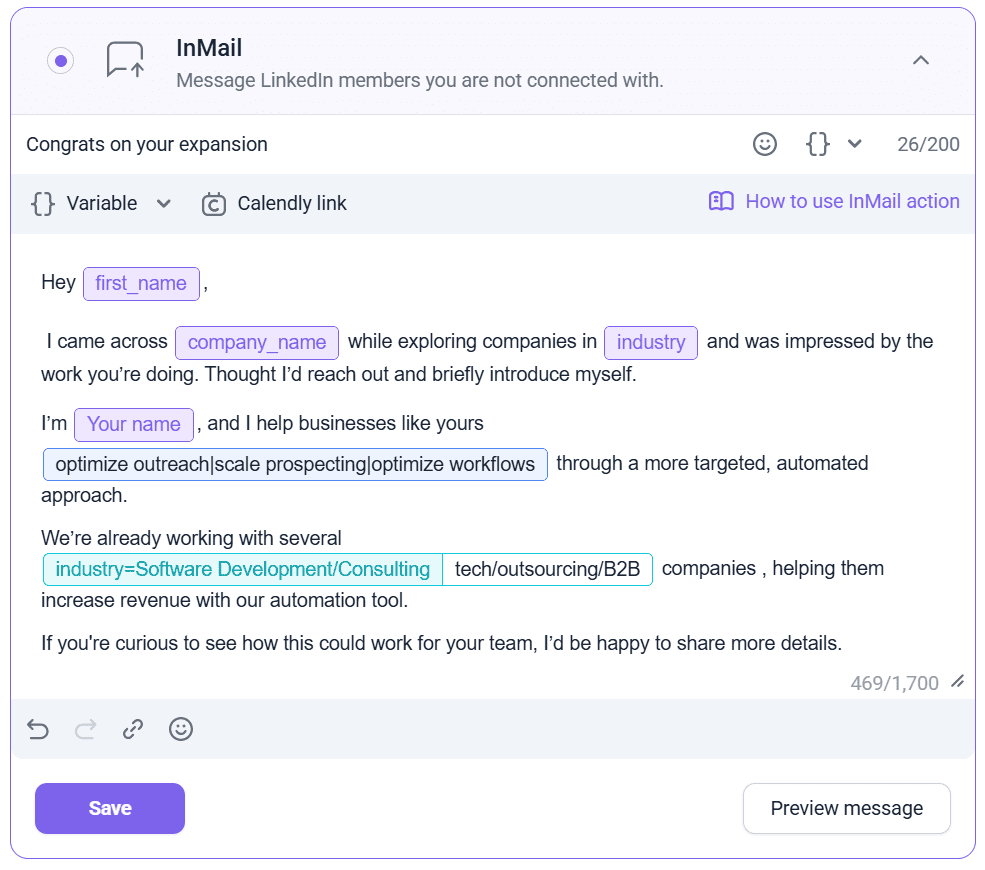
The most effective way to do this is to segment your audience beforehand by the challenges their businesses face. By addressing their pain points with targeted solutions, you increase your chances of getting them to get back to you.
- Follow up without being obnoxious.
Remember that not everyone you reach out to will respond to your first message. It can be discouraging, but don’t lose heart. Persistence pays off! It’s a good practice to follow up at least 4-5 times to increase your chances of getting a response.
The ‘DON’Ts’
Now, let’s dive into what you should steer clear of when reaching out to someone on LinkedIn.
- Pitching right away.
When you send your first message, it’s best to hold off on giving a sales pitch right away. Instead, let your new connection get to know you and explore the content you’ve shared on your profile. Engage with their posts by reacting to them or leaving thoughtful comments.
- Being a narcissist.
Remember that effective LinkedIn outreach isn’t all about you! When reaching out to someone new, it’s all about them. You’re genuinely interested in becoming a part of their network and learning more about who they are and what they do.
- Sounding fake.
When reaching out to someone you don’t know well or a total stranger, it’s important to start off on the right foot by being genuine and avoiding any false or exaggerated information in your outreach. Honesty is key, especially if you share mutual connections, as any excessive flattery or exaggeration can be quickly discovered.
Best LinkedIn outreach templates
Now that we’ve covered the theoretical knowledge, let’s put it into practice! Below, you’ll find a couple of examples of LinkedIn outreach message templates that you can use as a helpful reference.
#1 LinkedIn connection request template
|
Hello [First Name], Been admiring your work at [Company or Project Name] over the past few months. I’d like to connect and learn more about how you achieved such remarkable results in such a short time. Best, [Your Name] |
#2 LinkedIn direct message template
|
Subject: Thank you! Hi [First Name], I’m excited to connect with someone as accomplished in the [Industry] as you are. Having worked on projects similar to [Project Name], I’m positive we can exchange valuable ideas to achieve even better results. Shall we set a date? Cheers, [Your Name] |
#3 Initial InMail template
|
Subject: Wonderful to Connect, [First Name]! Hi [First Name], Noticed your post about [Problem] your company is grappling with. Perhaps I’d introduce you to some folks in my network who could help. Would you be open to a brief 15-minute chat to network and share our stories? Pick a slot that suits: [Insert Calendar Link]. Or just ping back, and we’ll figure it out. Cheers, [Your Name] |
#4 LinkedIn group member invitation template
|
Hey [Member’s Name], That comment on [Topic] in our group? Brilliant advice! Your insights really hit the mark, and your depth of understanding is something I’d love to tap into. I’d be thrilled to connect and chat more about this sometime. It would be fantastic to hear your thoughts in greater detail and perhaps even exchange some ideas. When you have a moment, let’s schedule a call or continue the conversation here. Catch you soon, [Your Name] |
#5 LinkedIn event message template
|
Hello, fellow sales networking pros! I’m thrilled to announce the venue for our upcoming sales event. We’ll be gathering at [Venue Name], [Venue Address]. It’s a prime location that promises a top-notch networking experience. Don’t forget to mark your calendars and keep an eye out for updates on the event program and featured speakers. We’re counting down the days until we can connect and achieve [Results] together! Got questions? Don’t hesitate to get in touch. Let’s make this sales networking event a remarkable success! [Your Name] |
#6 LinkedIn Pages message template
|
Subject: Inquiry on [Company Name]’s Product Plans Hello [Company Page Name] Team, I’ve been closely following your company and am impressed by your innovations. As someone deeply interested in your industry, I’d love to learn more about your upcoming product plans. Could you please share any insights into your product roadmap and future developments? I’m particularly interested in:
Any direction toward the appropriate team member or resources would be appreciated. Kind regards, [Your Name] |
#7 Sponsored InMail template
|
Subject: Achieve [Impressive Result] with [Your Company Name]! Hello [Recipient’s Name], Ready to level up your business? Here’s what we can do for you: ✅ [Benefit #1] ✅ [Benefit #2] ✅ [Benefit #3] Let’s talk! Schedule a free consultation: [Link] or simply ping me back. Excited to connect, [Your Name] |
#8 LinkedIn recommendation request message template
|
Hi [ Specialist’s Name], I’ve greatly valued our time working together at [Company Name]. Your insights into marketing have been invaluable to me. If you could spare a moment to write a brief LinkedIn recommendation, I’d be incredibly grateful. Your endorsement would mean a lot as I continue to grow in this field. Thank you for considering it. Best regards, [Your Name] [Your LinkedIn Profile URL] |
Key takeaways
There’s no doubt that LinkedIn outreach works – if done strategically. Master different ways to reach out on LinkedIn, apply them in relevant scenarios, and don’t forget to use the best LinkedIn prospecting tools to avoid being swamped by routines.
Also, don’t shy away from utilizing templates and tips from our experts. Come back to this article any time you need inspiration or ideas on how to proceed with your cold outreach on social media. We update our content regularly to keep up with changes in the industry, so you’ll always find the most recent information here.