
According to Chili Piper’s recent report, allowing leads to book meetings immediately after submitting a form can increase conversion rate from 30% to 66.7%. Honestly, that’s just too good to ignore.
So when I found 42min — a platform that combines lead qualification, routing, and scheduling and claims to be completely free — I had to test it immediately.
Here’s what I discovered after a few weeks of using 42min, plus my verdict on whether it’s worth building your lead-gen flow around it.
TL;DR
42min is a meeting scheduling platform that helps users book meetings easily. I tested it for a few weeks to see how it could help me with lead generation.
- What I tested: I built a booking form with a few qualifying questions, set up if-then routing rules so leads land with the right person, and connected everything to my CRM with a webhook.
- What stood out: I could manage the entire flow without hitting a paywall. No card, no paid plan, no separate lead-gen tool, just one booking page doing double duty.
- My early takeaway: 42min is a strong solution for teams that need qualification and routing alongside scheduling. I also believe 42min may be a good alternative to tools such as Calendly or TidyCal because it is free and has no artificial limits on bookings or team members.
- The result: Unlike a basic scheduler, 42min helped me turn a standard booking page into a lead-capture flow. I could qualify leads before ever speaking with them and automatically route them to the right teammates.
Below I’ll share more details on how I set it up, what worked well, and where I’d push back if you’re considering building your own lead-gen process on top of it.
What is 42min?
42min is a meeting scheduling platform that allows teams and individuals to share booking pages, manage availability, and automate other steps surrounding each meeting.
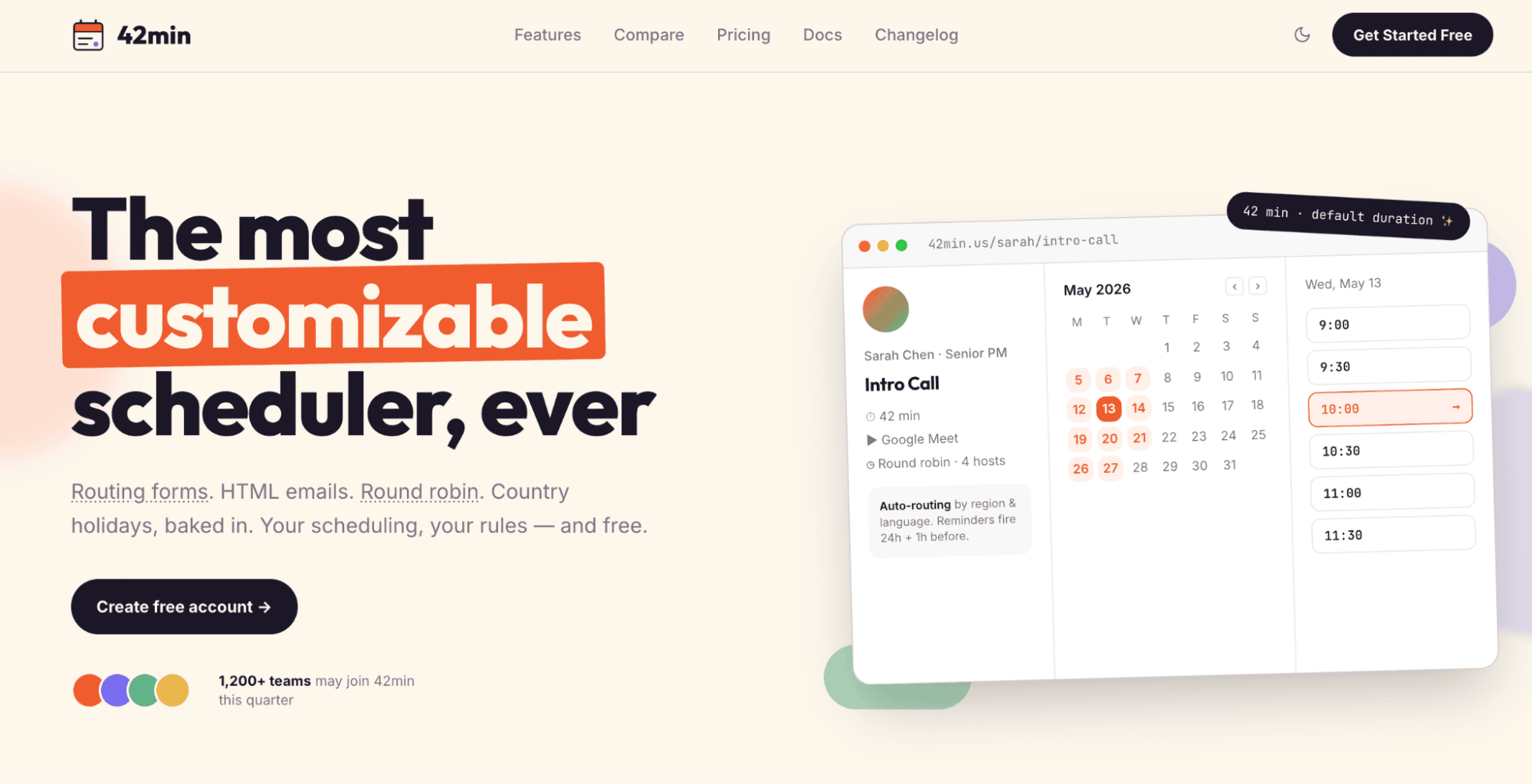
However, I wouldn’t call it just a scheduler. The platform also includes lead qualification forms, conditional routing, round-robin assignment, and other features.
During my test, what impressed me most was how these features work together. After all, what do we usually think of when we hear “meeting scheduler”? A tool that simply lets someone choose a convenient time from available slots.
But with 42min, I could do much more: collect a prospect’s details, ask qualifying questions, send them to the right manager, and even pass the booking data to the right system. And all that during the same process.

Key 42min features
Let me briefly focus on the most useful features for scheduling and managing leads I discovered during my test:
- Custom booking pages and event types: You can create one-to-one, round-robin, and group meetings and customize availability, add buffers, and set booking limits. You can also generate booking links that can be shared as public URLs, embedded in a website, or opened through a pop-up.
- Meeting polls: With 42min Roundtables, you can share one poll with several participants (even those without a 42min account) and let everyone vote for the most convenient time. This saves time, as you don’t need to send separate links or contact each person individually.
- Lead qualification forms: Booking and routing forms can include standard contact fields and custom questions presented as text inputs, dropdowns, checkboxes, or multiple-choice options. This feature allowed me to collect more information about each prospect before speaking with them.
- Conditional lead routing: You can set specific conditions and destinations to route people to a particular booking page, URL, message, or other form. This was exactly the feature that made 42min feel more like a lightweight lead-capture tool than a traditional scheduler for me.
- Team and round-robin scheduling: With 42min, you can automatically distribute meetings among available team members. The platform also supports teamwork, including roles, permissions, workflow templates, and even organization branding.
- Automated reminders and follow-ups: 42min provides lightweight workflow automation, which includes sending emails or messages when a meeting is booked, before and after it takes place, or if it is canceled or rescheduled. Messages can include booking details and answers from the form your recipient has submitted.
- Analytics: 42min stores contacts and meeting data, tracks routing-from submissions, captures campaign parameters, and allows you to export this information. Without advanced analytics, you can still quickly understand where booked leads came from and how they moved through the routing process.
I also liked that 42min connects with popular calendar and conferencing services, including Google Calendar, Outlook, Google Meet, Microsoft Teams, and Zoom.
You can also integrate the platform with Pipedrive and Snov.io to sync contact data and streamline lead nurturing. For custom workflows, 42min provides API access and webhooks.
What is 42min best for?
My experience shows that 42min may be especially useful for qualifying inbound leads before the meeting and reducing manual work between form submission and a booked call.
It can also help collect the necessary info about prospects in advance and use it to make the first conversation more relevant from the start.


How I used 42min to generate leads
I’ll admit I was skeptical at first. A “free scheduling tool” doesn’t exactly sound like a lead-generation weapon. But after using 42min for a few weeks to book calls for my own pipeline, I started treating every booked meeting as a lead-capture opportunity rather than just a calendar entry.
What surprised me most is how customizable 42min is. I built routing forms with conditional logic, set up automated reminders and follow-ups, and connected my calendar — all without hitting a paywall. Below is the workflow I set up and tested myself, not a feature list pulled from a spec sheet.
How I captured lead data with 42min’s booking forms
Before I changed anything, my booking page just asked for a name and email — that was it. It was enough to schedule a call, but it gave almost no idea who I was about to speak with or what they might need.
So I wanted to fix that. I created an event type, connected it to my calendar, and configured the meeting duration and availability. Then I started working on the booking form. My goal was to gather enough information to prepare for the conversation and understand whether the person might be a good fit.
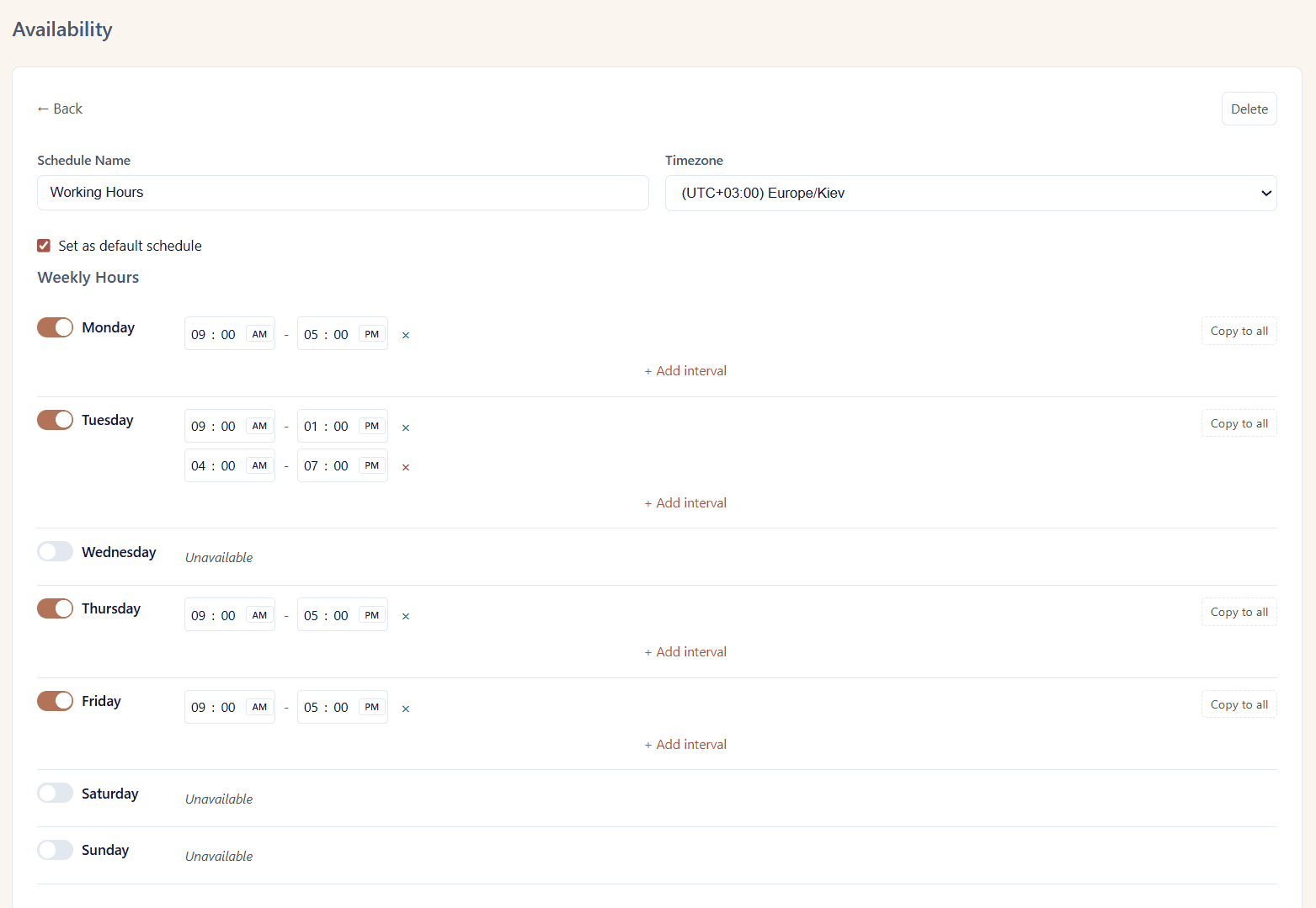
Of course, I didn’t want to turn the booking page into an application form. But to be honest, I didn’t keep it short from the start. I initially tried to add more questions, and then watched my completion rate drop.
Lessons learned, so I trimmed the form down to only what actually changes how I follow up with someone, mainly company size and budget, since every extra field is one more reason for someone to abandon the form halfway through.
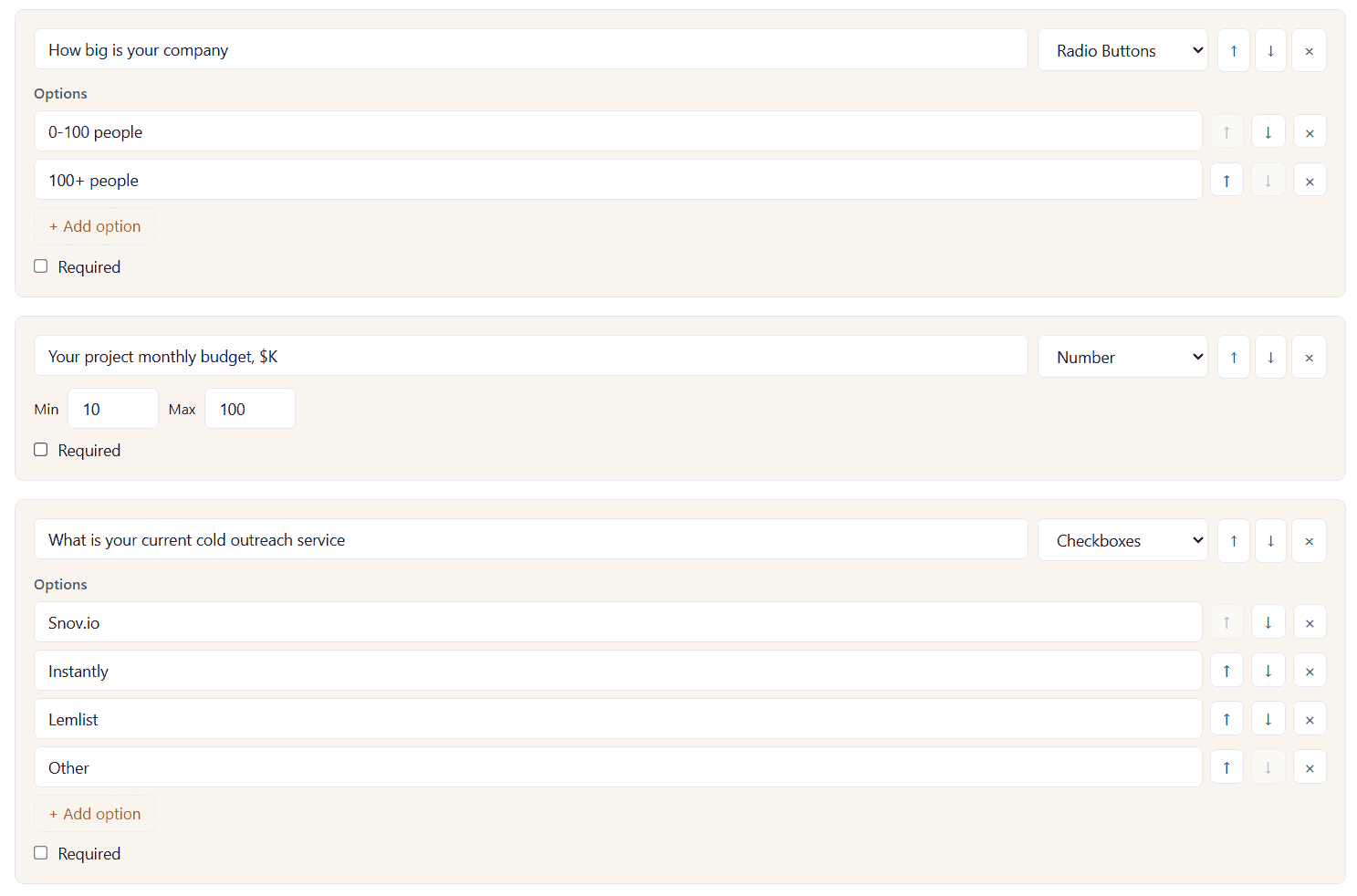
Now I use my booking page to ask the two or three questions my sales conversations always start with anyway: company size, budget range, and current tooling. As a result, leads began qualifying themselves before we ever talk.
The setup itself was easy. I added questions with answer formats, marked the most important ones as required, and saved the changes. They appeared on the public booking page immediately.
What I particularly liked about 42min was that the answers didn’t disappear after the form was submitted. All information was saved with the booking, so I could review responses before the meeting.
How I routed and qualified leads automatically
Capturing the data was only half the win. The bigger difference came when I started using those answers to decide what should happen next.
I mapped each answer to an outcome, so bigger accounts go straight to me, and smaller ones go to a self-serve flow. Note that the order of the routing rules you set matters. 42min checks them from top to bottom and applies the first matching one. So it’s better to place the most specific conditions first and broader ones below.
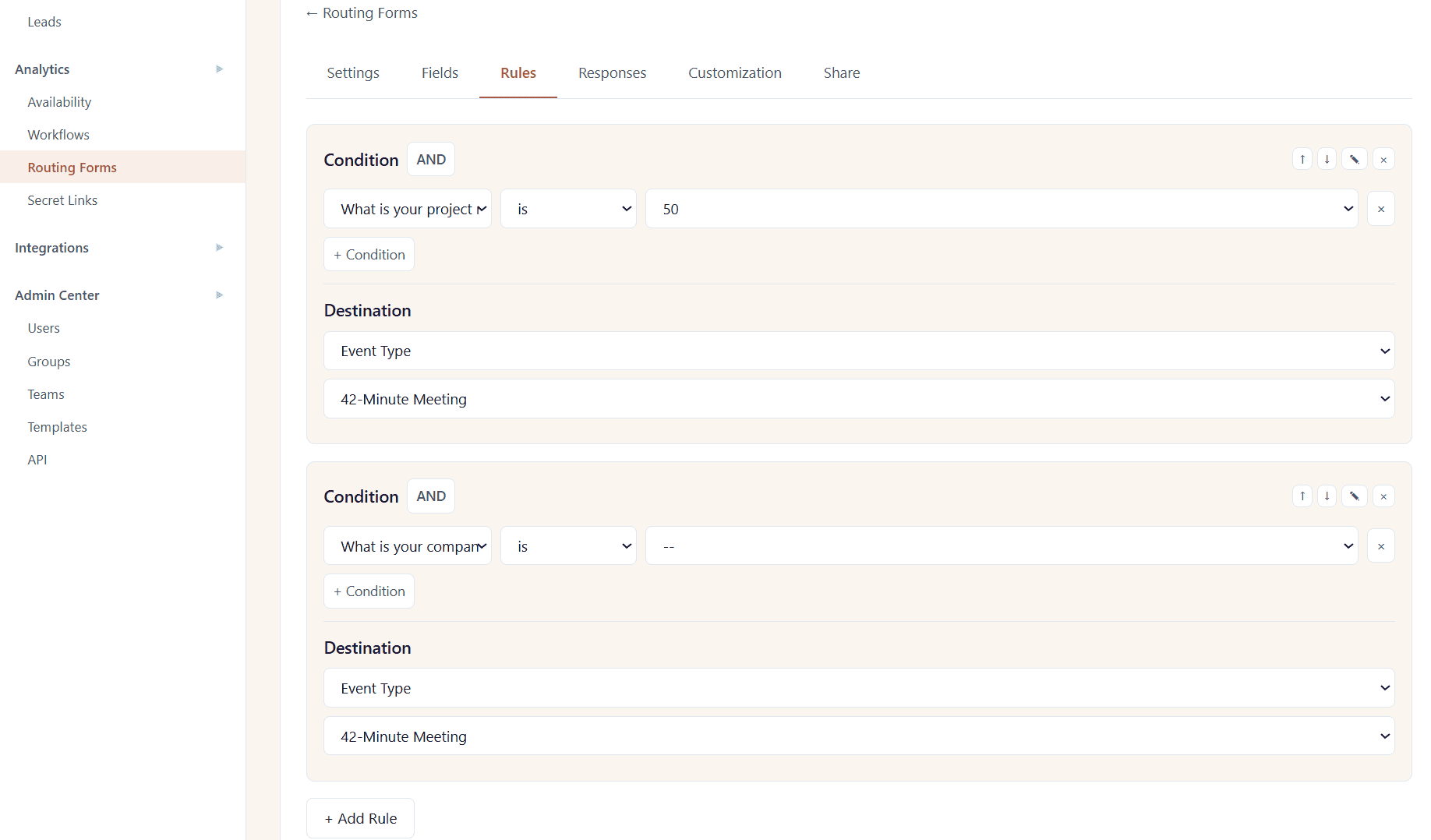
I also added the default rule as a fallback for anyone who didn’t match the main criteria. This helped me ensure that a person would still reach a sensible destination instead of hitting a dead end.
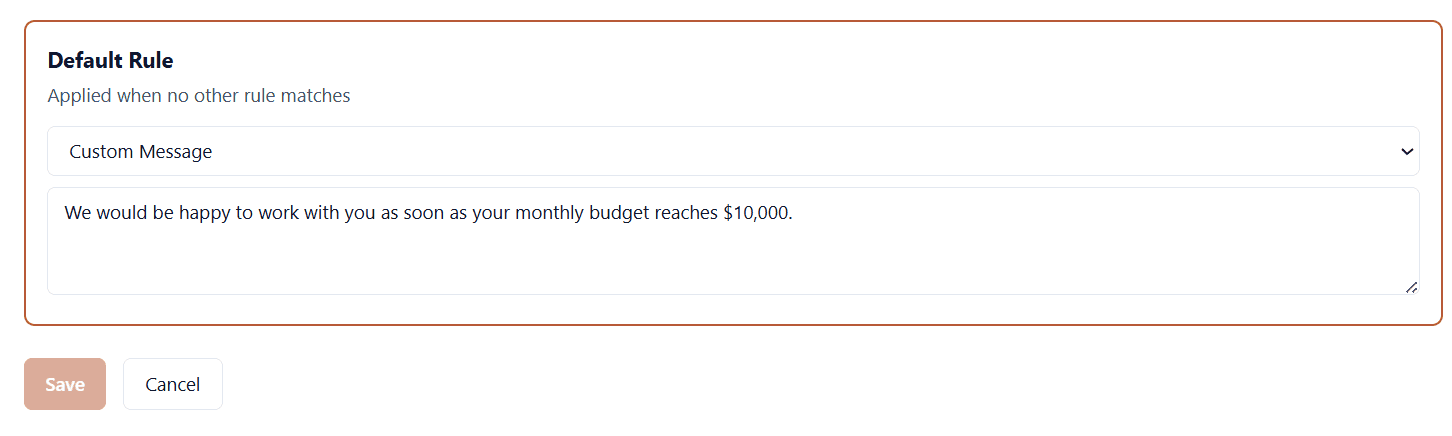
Before sharing the form, I tested it several times with different answers to ensure every route led to the correct booking page.
What I also liked is that 42min keeps routing responses connected to the booking, so it is possible to use that context later. For example, I reused form answers as variables later in the booking experience, which let me personalize follow-ups without any extra manual work.
How I used Round robin for team scheduling
Once I brought a teammate into the process, I created a round-robin event type. This way, inbound meetings were split evenly between us instead of piling up in one inbox. We shared a single booking link, and 42min assigned each meeting to an available host.
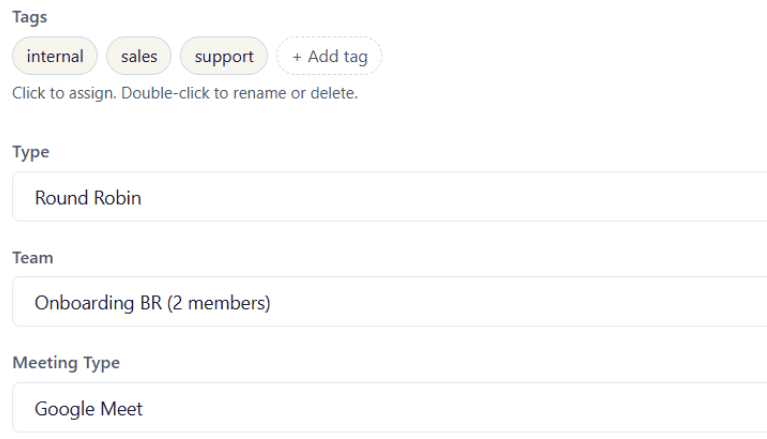
I then combined round robin with geo and language routing. As a result, people landed with whoever actually fit their region and timezone. Being a bit of a scattered team, the automatic timezone detection and holiday handling for most of the countries also saved me from double-booking someone across a local holiday I didn’t know about.
Overall, routing made the booking page feel much more useful for lead generation. By the time a meeting appeared on my calendar, I already knew useful context about the lead and was sure they were placed in the right flow and assigned to the most suitable teammate.
How I automated follow-ups so leads didn’t go cold
I used to lose people simply because I hadn’t gotten back to them fast enough. When follow-up is manual, a new lead can sit for a day or two before anyone reaches out, and by then they’ve often already talked to someone else.
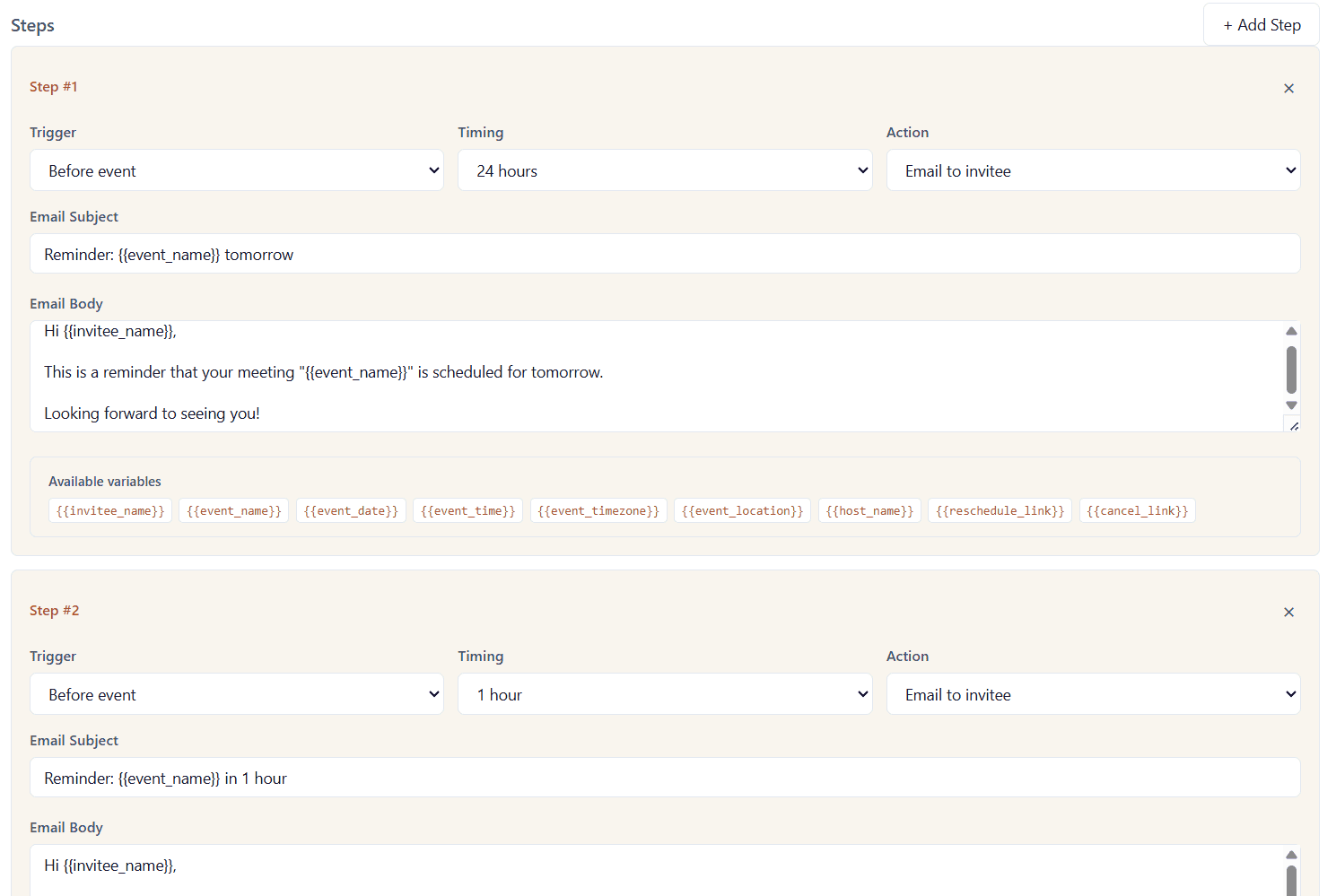
I created a simple workflow in 42min with two automated reminders — 24 hours and 1 hour before a call. And that fixed most of my no-show problem: fewer people missing the call meant more real conversations happening, and more conversations converting into actual pipeline.
I also used a native Snov.io integration so that every booking and form answer feeds straight into my CRM the moment someone books. That’s the piece that turned the booking form into an actual lead funnel for me.
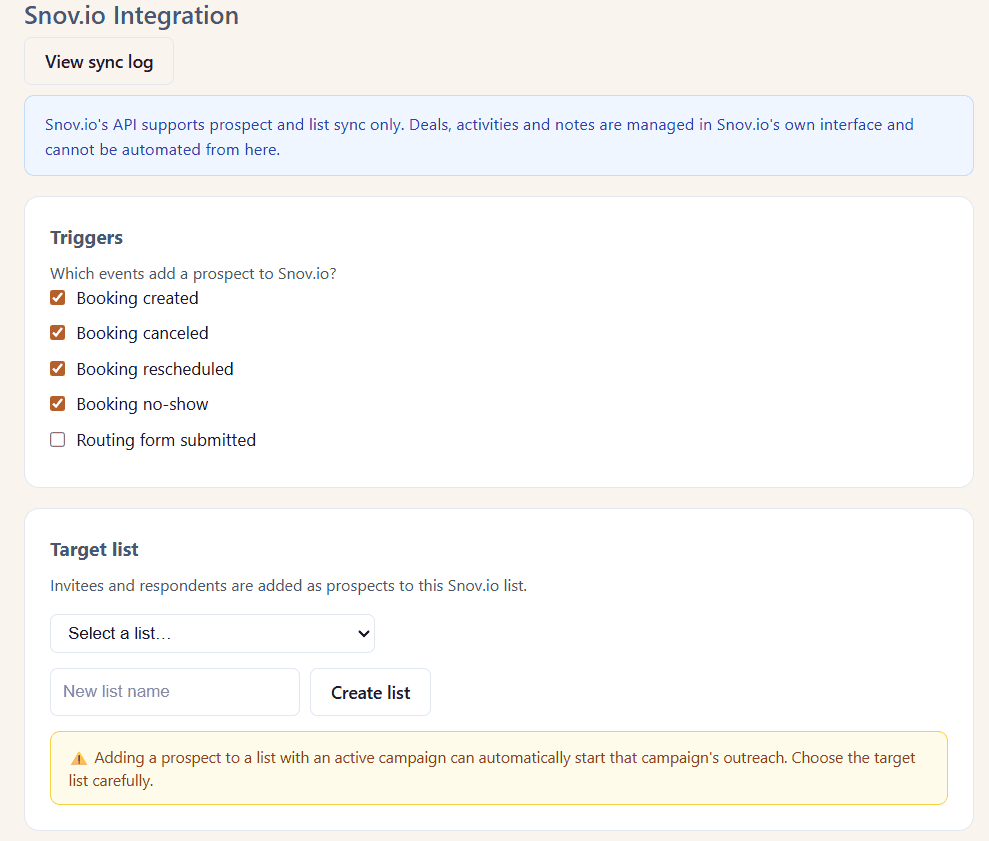
Booking invitees and routing-form respondents landed in a dedicated prospect list in Snov.io, with the meeting statuses updated automatically and answers mapped to relevant prospect fields. This gave me a way to continue nurturing leads instead of letting the conversation end there.
I used the details received via the form as custom variables in my follow-up sequences built in Snov.io. I didn’t add every prospect to the same campaign. Leads who were ready to move forward stayed in the direct sales process, while those who were still unsure entered a lighter nurture sequence.
Below is a quick overview of how Snov.io outreach actually works:
The best part was that I could also feed the information collected through the form and during the meeting into Snov.io’s AI Email Writer. A simple prompt with the relevant details — and I got a tailored draft generated in seconds instead of writing from scratch.
In addition to emails, I also added softer LinkedIn touches, such as profile views, post likes, and connection requests, to build familiarity before the next message or call. I used in-app LinkedIn search in Snov.io to find and save the relevant profiles and then include them in my multichannel campaign.
This practical split worked amazingly: 42min captured the lead and the context, while Snov.io handled the next steps.


What 42min actually costs
This is the part that genuinely surprised me: the free plan isn’t a stripped-down trial. At the moment, the platform has one plan priced at $0, with no card or time limit. Round robin, routing forms with logic, workflows, webhooks, API access, calendar sync, and the analytics dashboard are all included.
Everything I described above, I built entirely on the free tier. So if all you need is to qualify and route leads through your booking page as I did, the free plan covers it end to end.
My verdict: Is 42min worth it for lead generation?
Based on my experience, I’d say yes. Though 42min can’t substitute a complex lead gen tool, it provides a reliable base for a lead-gen workflow, especially if you don’t want to stitch together a separate form builder and scheduler.
I think 42min can be especially useful for:
- Sales and marketing teams that want to qualify inbound leads before assigning calls
- Startups and SMBs looking to build a practical lead-gen workflow without adding several paid tools
- Agencies and consultants that need to collect project details and filter inquiries before an initial call
- Recruiting teams so they can direct people to the right specialist based on their answers automatically
What sold me wasn’t any single feature. It was how everything worked together: the booking page itself became a qualifying step, the routing logic did the sorting, and the integration handled the handoff to my CRM. All without requiring me to build or pay for anything extra.
Combined with Snov.io outreach automation, 42min offers far more lead generation value than I expected from a free scheduling tool.