TL;DR:
In 2026, outreach automation covers the full outbound process, including prospecting, sequencing, personalization, sales engagement, and reporting. When used strategically, it helps sales teams save significant time and close more opportunities with less manual effort.
Below is a quick summary of outbound workflows where automation adds the most value:
Read on to learn how outreach automation works today and how to implement it efficiently and safely.
Have you noticed how much outreach has changed in 2026? The tactics most sales teams relied on do not deliver the same results anymore. Simply sending more emails or adding a few automated follow-ups with basic “first name” personalization is no longer enough to increase outreach performance.
Today’s buyers expect more relevant messages. According to Salesforce’s State of Sales, 67% of sales professionals say personalization is even more important to customers in 2026 than it was a year ago.
In this guide, we’ll explore how to build an outreach automation system that helps you scale without losing relevance, consistency, and deliverability.
Key points you’ll learn:
- What is outreach automation?
- Key use cases for outreach automation
- Benefits of outreach automation
- Automation tools businesses need in 2026
- How to choose the right outreach automation software
- Best practices on how to implement outreach automation
- Common mistakes to avoid in outreach automation
- Snov.io playbook: A practical framework for building a modern outreach automation system
What is outreach automation?
Outreach automation is the use of tools and technologies to manage and scale outbound activities through automated workflows.
We used to think of outreach automation as a way to send simple email sequences and scheduled follow-ups. However, it’s no longer just about increasing activity and eliminating manual tasks.
Today, outreach automation covers the full outbound workflow, from prospecting and personalization to multichannel engagement, deliverability monitoring, and pipeline management.
Powered with AI, it helps teams find the right leads, reach out with more relevant messaging, coordinate touchpoints across channels, and move deals forward in a more structured way.
Key use cases for outreach automation
Let’s see where outreach automation makes the biggest difference for 2026 business growth:
- Prospecting: Using automation tools, marketers and sales reps can identify and collect target accounts faster based on ICP criteria such as industry, company size, job title, or buying signals.
- Lead enrichment: Automation helps teams fill prospect records with details such as company name, job title, and contact data that can later be used to segment leads and personalize outreach more effectively.
- Personalization: You can use automation to deliver personalization at scale. Many outreach tools, especially AI-powered ones, can generate tailored messages based not only on prospect data, but also on value proposition, sales funnel stage, and other factors.
- Email outreach: Automating email outreach makes it easier to send timely and consistent follow-ups without extra manual effort.
- Multichannel sequences: By implementing automation, sales professionals can coordinate cold outreach across multiple channels, like email, LinkedIn, WhatsApp, and other touchpoints, making the buyer journey more consistent.
- Deliverability monitoring: Automation tools help teams regularly track bounce rates, monitor domain health, and improve inbox placement over time.
- Pipeline management: Automation can assign follow-up tasks, update deal records, route engaged prospects, and sync outreach activity to CRM systems. This helps both small and enterprise sales teams keep pipeline progression more organized and efficient.
- Analytics and optimization: With automated reporting, teams can track reply rates, booked meetings, and other key metrics to measure campaign performance and refine their outreach strategy based on real-time data.
As you can see, automation can strengthen almost every part of outbound. That’s exactly why more teams are making it part of their day-to-day outreach execution.
Benefits of outreach automation
Here are the key benefits outreach automation can bring to your outbound sales process:
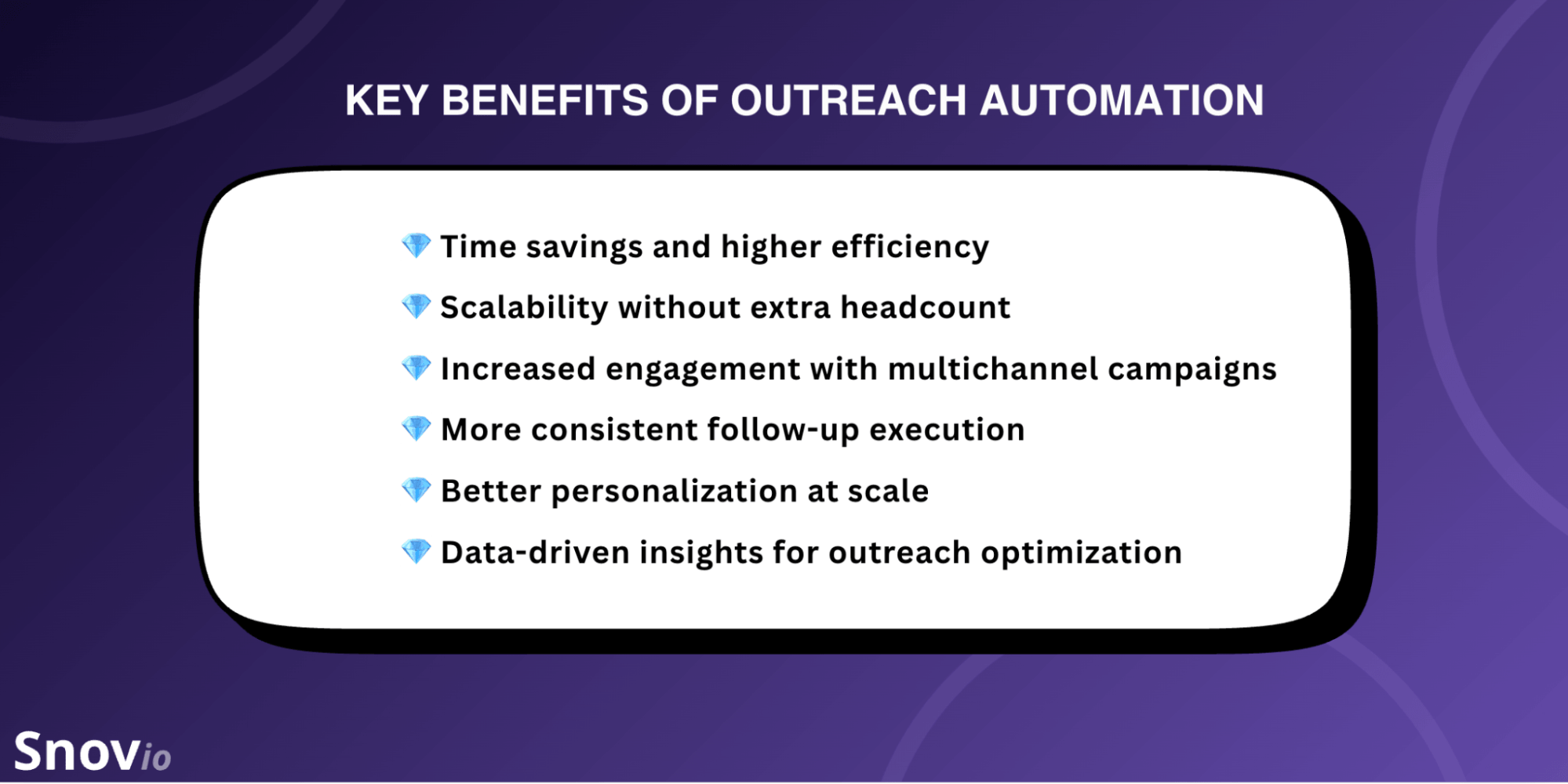
Of course, these are not the only benefits of outreach automation. They may also include stronger pipeline management, cost savings, more deals closed, etc. But these are the most common perks every team gains after implementing automation tools.
💎 Time savings and higher efficiency
Outreach automation reduces the amount of time sales teams spend on repetitive tasks. No more manual data entry, follow-ups, or sequence management — with the right tools, this all can be done automatically. By putting most routine tasks on autopilot, sales reps and marketers can spend more time on strategy planning, engaging with key contacts, and actually closing deals.
💎 Scalability without extra headcount
Automation can be especially valuable for small teams that want to scale outbound with the resources they already have. It helps them reach more prospects while keeping interactions personalized and timely without needing to hire extra staff right away.
💎 Increased engagement with multichannel campaigns
Automation makes it easier to align email sequences, LinkedIn outreach, and other touchpoints in one workflow. This helps marketing and revenue teams manage communication across channels more effectively. As a result, outreach feels more consistent and relevant to prospects, which can lead to higher engagement rates.
💎 More consistent follow-up execution
Outreach tools help you maintain timely follow-ups without relying on manual reminders or forcing your sales reps to be available around the clock. With automated triggers, you can ensure that the right message will be sent to the right prospect at the right time, so no opportunity will be missed.
💎 Better personalization at scale
Automation tools offer various features that let teams personalize outreach even at high volume. What’s more, many solutions now include AI-powered writing assistants that help you create messages tailored to your audience, product, or goal. So you can adapt your outreach to different prospect segments, which will definitely increase reply rates and overall campaign performance.
💎 Data-driven insights for outreach optimization
Outreach tools provide analytics on campaign performance and track key metrics, such as reply rates, clicks, website visits, and other engagement data. This gives you a clearer view of what’s working and what needs fixing for better results. Some sales automation platforms even offer AI-powered lead scoring, helping you prioritize outreach and focus on high-value prospects.
As you may see, the impact of outreach automation goes beyond saving time on repetitive tasks. Used strategically, it helps teams scale faster while keeping outreach relevant, organized, and measurable.
Automation tools businesses need in 2026
Below are some of the key types of automation tools companies use to boost their business processes.
AI agents to automate prospecting and outreach
AI is now one of the most important drivers of outreach automation — right after skilled sales reps, of course. It doesn’t replace humans in the process. But by handling about 80% of research and sequencing, AI agents accelerate the parts of the workflow that slow most sales teams down.
It’s like having a reliable assistant that can do preparation work and take most of your manual tasks, so you can focus on actual selling. Just think, 54% of professionals already use AI agents across different parts of the sales cycle, and 34% plan to implement them within 2 years.
Let’s take a quick look at how teams use AI across the sales process:
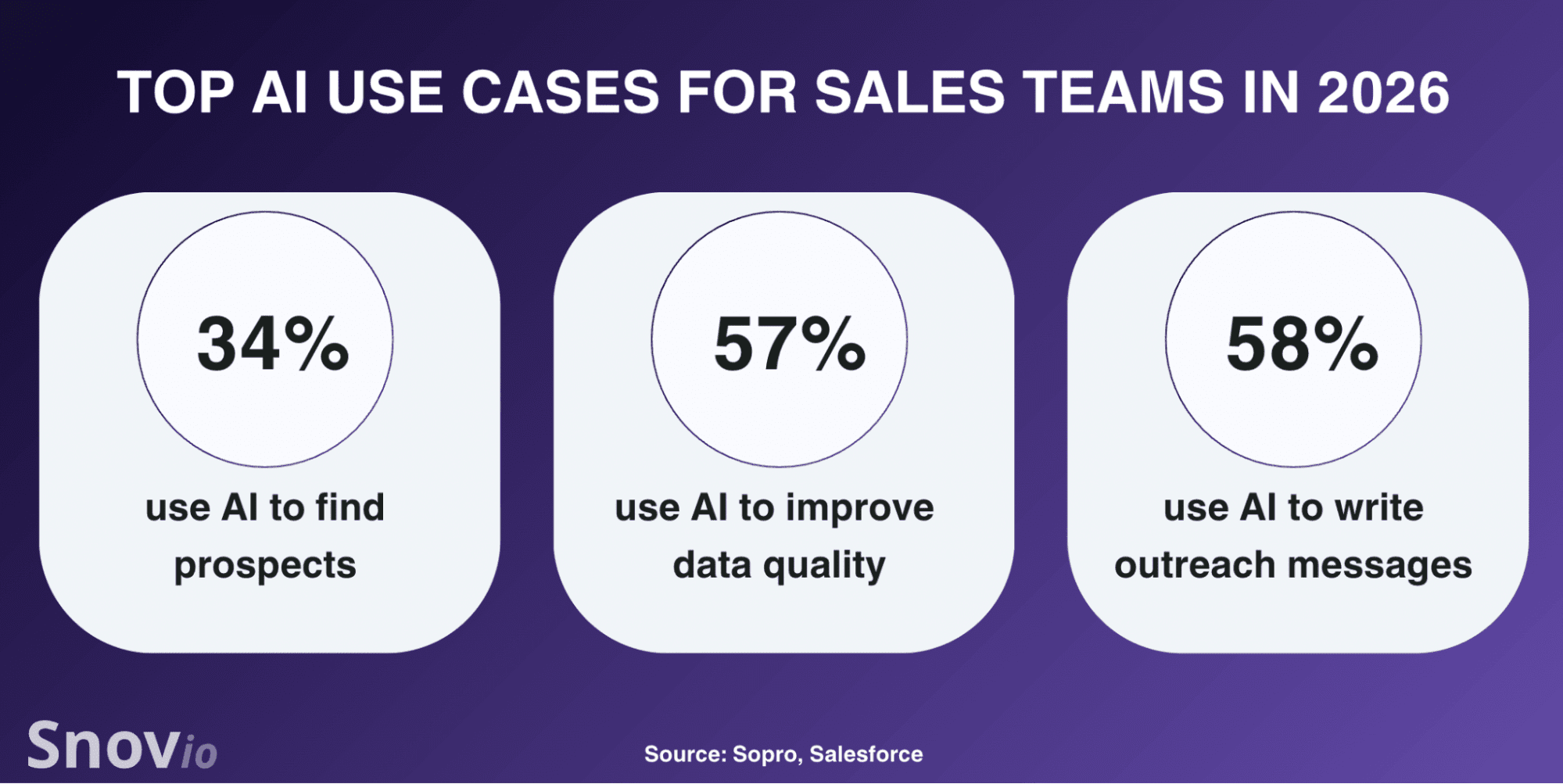
AI agents help automate one of the most time-consuming parts of outbound: prospecting, research, and message drafting. They can analyze company data, job titles, hiring activity, and other context, and use these insights to generate highly personalized outreach emails, suggest multichannel sequences, and prepare outreach assets for different personas.
👉 Practical ways to use AI agents:
- Train AI agents on your ideal customer profiles.
AI works much better when it knows what a strong-fit account looks like. Give your agent clear ICP inputs, including industry, location, headcount, pain points, buying triggers, and other qualification signals. The better the ICP guidance, the more useful research outputs and message drafts will be.
- Schedule agents to run prospect research automatically.
Set AI workflows to regularly scan new accounts, enrich missing data, and highlight leads that fit your targeting criteria. Thus, you’ll keep your pipeline up-to-date without needing to restart research from scratch every week.
- Use AI to draft personalized first-touch messages.
Speed up your campaign creation by letting AI generate messages based on your product info, prospect data, and intent signals. This way, you can not only save time but also make your outreach more relevant. However, I strongly recommend reviewing the AI-generated copy before launch to check data accuracy and ensure your message sounds natural and reflects your brand voice.
The biggest win with using AI in outreach automation is efficiency with relevance. When used smartly, AI agents help outbound sales teams scale prospecting and support personalization even as volume grows.
🤔 Still not sure about using AI for sales emails? Read how we increased our reply rates by 30% by sending personalized emails with the Snov.io AI sales agent.
Email deliverability and warm-up tools
Even the best-written cold emails won’t work if they don’t land in prospects’ inboxes. That’s why automation is not only about sending scheduled sequences. It also includes protecting the infrastructure behind those campaigns so your emails can actually reach inboxes.
That is where deliverability and warm-up tools come in. Email deliverability tools help you monitor domain health, check the authentication setup, and track important signals like spam placement, bounce rates, and blacklist risks.
Warm-up tools prepare your account for outreach and help build sender reputation. They gradually increase sending activity and create realistic engagement signals to show email providers you’re trustworthy.
👉 Practical ways to use email deliverability and warm-up tools:
- Use an automated warm-up before launch.
This is especially crucial if you’re launching outbound from a new (or long-time inactive) domain or mailbox. However, I recommend warming up any account before scaling outreach. Use an automated warm-up to build a reputation more safely and lower the risk of landing in spam too early.
By the way, did you know that you can also use warm-up tools to secure LinkedIn automation? Platforms like Snov.io provide an automated warm-up mode for LinkedIn to protect your account from the platform’s restrictions and safely increase your daily action limits.
- Maintain list hygiene.
Use a reliable email verifier to remove invalid or risky email addresses automatically. Automated verification helps you keep your list clean with less effort and avoid sending to uncertain contacts. This also protects domain health, reduces bounces, and prevents your sender reputation from being damaged by poor data.
- Monitor deliverability metrics regularly.
Daily or weekly checks help catch warning signs before they hurt deliverability. Use automated reports to monitor bounce rates, spam triggers, inbox placement, and reputation signals. I recommend treating deliverability as an ongoing process. Don’t check it only when the results drop. Regular monitoring makes it easier to catch problems before they affect campaign performance.
I run inbox placement tests regularly and usually use two different tools to double-check results. Sometimes the numbers differ, and that alone is a signal to review your campaign setup and sender inboxes more carefully. If even one test shows a 30% spam rate, it’s worth pausing to troubleshoot before scaling. My rule of thumb is to check email placement weekly.
Outbound Outreach Expert at Snov.io

Strong deliverability workflows make the rest of the outreach automation more reliable. When everything is set up properly, you can evaluate the campaign performance more accurately and scale without unpleasant surprises.
Multichannel outreach tools to streamline the sales process
Modern outbound rarely relies on a single platform. Adding multichannel touchpoints to your outreach sequences increases your chances of getting a response and drives revenue growth. For example, a prospect may ignore your email but respond on LinkedIn, engage after a quick follow-up call, or schedule a meeting after several conversations on social media.
What’s more, using multiple channels for outreach lowers cost per lead by 31% compared to single-channel campaigns. And automation helps teams coordinate that process more effectively.
With multichannel outreach tools, you can schedule sequences across email, LinkedIn, SMS, sales calls, and other channels and adjust each step based on prospect behavior.
👉 Practical ways to use multichannel outreach tools:
- Use each channel for a different purpose
Multichannel outreach works best when each channel has a clear role in the sales process. So instead of repeating the same message everywhere, use each touchpoint for a specific purpose. For example, email can carry a more detailed offer, LinkedIn can be used for building relationships, and phone calls can help move high-intent prospects toward a description faster or handle objections more directly.
- Tailor sequences to prospect behavior
Adapt automated sequences to how prospects actually respond. Keeping all recipients in the same generic flow will be hardly effective and can even trigger spam complaints or damage your business reputation. Instead, adjust the next step, including timing, channel, and interaction type, based on engagement signals such as opens, clicks, profile views, and other actions.
- Keep timing realistic
Sending too many touches in a short period of time can feel automated, even with personalized messaging. So timing is actually as important as message quality. Use realistic delays, consider recipients’ time zones, and set action limits to avoid unnatural bursts of activity. This will help you stay on the prospect’s radar without overwhelming them.
- Build different sequences for different personas
Segment your prospects by industry, role, company size, or other criteria to make outreach more relevant. Different audiences may respond better to different channels and messages. That’s why building one sequence that resonates equally with everyone is hardly possible. Instead, create persona-based cadences to keep the workflow flexible and increase multichannel outreach results.
The real value of multichannel automation for sales teams is that it creates a more connected buyer journey and makes outreach intentional, timely, and easier for reps to manage.


Deal management and sales engagement platforms to close deals
Once a prospect starts engaging, outreach automation shifts from lead generation to deal progression. To empower the sales process at this stage, teams need a structured way to track conversations, trigger next steps, and keep pipeline data accurate.
This is where sales automation tools become especially useful. In 2026, AI sales platforms automatically sync engagement activity into the CRM, create tasks based on qualification signals, and route leads to the right rep.
They can also record calls, summarize conversations into noted insights, and recommend follow-up actions. Some tools can also detect deal risks, predict deal outcomes, and analyze engagement patterns to help sales teams prioritize accounts with stronger buyer intent.
👉 Practical ways to use deal management and sales engagement platforms:
- Sync outreach activity to the CRM
Syncing sales engagement activity to the CRM systems keeps your pipeline up to date without requiring reps to manually update every record. When emails, calls, meetings, and replies are logged automatically, the team gets a clearer view of each opportunity and its current status. Automatic sync also reduces the risk of missed information, outdated records, and other errors caused by manual entry.
- Automate task creation
The more active your pipeline becomes, the easier it is to miss a next step. Automated task creation helps reps act faster when prospects show interest. In practice, this means that when a potential customer responds, requests more details, or moves into a qualified stage, sales automation tools create a task immediately, so momentum is not lost.
- Create playbooks for common deal scenarios
Increase your team’s efficiency by building playbooks for recurring situations. This way, you can turn common deal scenarios into repeatable workflows that your reps can easily follow without unnecessary guesswork. At the same time, make sure this standardized process still leaves room for personalization and sales judgment.
- Surface at-risk deals for immediate action
Sometimes a deal looks active in the CRM while already losing momentum in practice. Automated risk alerts help identify such stalled opportunities before they quietly drop out of the pipeline. Whether it is a missed follow-up, low engagement, or a long period without progress, your sales automation tool will flag it so reps can step in earlier.
- Connect prospecting and pipeline workflows
Push prospecting data into your CRM in real-time using your sales automation tool’s integration features. By connecting prospecting with pipeline management, you can turn qualified leads into active opportunities faster. This also helps teams avoid delays and accelerate the sales process from first touch to deal creation.
- Route opportunities based on ICP and territory
Not every qualified lead should follow the same path once it enters the pipeline. Set specific routing rules so that your sales automation tool can assign leads based on ICP fit, geography, account ownership, or other conditions. This way, you can significantly improve response time and ensure each opportunity goes to the rep best equipped to handle it.
The most value of sales automation tools lies in the ability to align prospecting data, follow-up processes, and ownership. With such a structured pipeline movement, teams can focus less on admin work and more on closing, reducing the risk that promising leads slip away.
Tracking and reporting tools to measure success
When putting your outreach activity on autopilot, it’s important to closely monitor performance. To get a clearer view of what’s working across targeting, channels, or cadences, you can use dedicated reporting tools built to analyze engagement patterns, campaign trends, and conversion outcomes.
Modern outreach tools include built-in tracking, so you can access in-depth analytics and custom reports directly within your sales automation platform. Instead of manually checking results in separate systems, you can monitor performance in one place.
Automated reports connect campaign data to outcomes and help you understand which workflows create value and which ones need improvement. Some platforms also provide AI-powered outreach analytics that offer insights into what drives these results, whether it’s targeting, messaging, deliverability, or other factors.
👉 Practical ways to use tracking and reporting tools:
- Track metrics that reflect business impact
Do not rely on opens or clicks alone. Focus your reporting on reply rates, meetings booked, and pipelines created. These metrics show whether your automated outreach moves deals forward and drives real business outcomes, not just generating engagement that leads nowhere.
- Review deliverability trends weekly
Review bounce rates, spam placement, mailbox health, and other metrics weekly. This will help you keep your sending setup secure and identify issues in time if any arise. Doing it weekly also makes it easier to understand what caused performance changes by excluding or proving technical problems.
- Measure outreach influence on revenue
Revenue growth is actually one of the best indicators showing whether outreach automation is worth scaling. So, besides engagement tracking, measure also how campaigns contribute to actual outcomes. Connect automated activities to closed-won opportunities, where possible, to see whether these efforts create meaningful business returns.
- Use reporting to optimize workflows
Performance tracking makes more sense if you use data insights to make decisions. Treat reporting as your optimization tool. Analyze where workflows need adjustment, what parts of the process are effective and why, and plan further steps accordingly. This way, you can build a solid data-driven strategy and rely on proven tactics that drive real results.
Good reporting allows sales teams to better manage outreach automation and prioritize resources more effectively. Regular monitoring and tracking show you which workflows deserve more investments, where higher volume is needed, and which campaigns are a real waste of time and budget.
How to choose the right outreach automation software
Automated outreach works best when your strategic approach is supported by reliable software. But with so many email outreach tools and sales engagement platforms on the market, how do you actually choose the right option?
Here are my top recommendations proven by practical experience on how to select reliable outreach automation software:
Start with your actual workflow
Before choosing any platform, define exactly what part of your current workflow you want to automate. Consider your team setup, sales process, and goals to clarify which functionality you truly need and what features the right tool must include.
Think about your operating model: What channels will you use? How many reps are involved? Do you need native CRM sync? Answering these questions will help you find the software that supports your real process and prevent you from paying for features you do not need.
Look for features that support growth
When comparing outreach tools, look for features that make it easier to scale once your team or outreach volume grows. Check whether the platform supports scalable personalization, multiple email accounts, safe mailbox management, and flexible pricing.
Here are the key features that matter most if you want to scale outreach:
✔️ Strong segmentation logic: It can be challenging to effectively manage broad targeting when outreach volume grows. Segmentation features help you group your prospects by shared criteria, so your campaigns stay relevant even at scale.
✔️ Conditional-based sequencing: Conditional logic helps you build sequences that adapt based on the recipient’s behavior, making automation more responsive and less generic. See whether you can create flows based on connection degree, opens, replies, or other actions, so your automated campaigns stay timely and relevant at scale.
✔️ Deliverability controls: The more you send, the more important it becomes to protect sender reputation. Look for tools that offer deliverability controls such as warm-up, email verification, blacklist monitoring, sending limits for LinkedIn automation, and other features that will help you ensure safer outreach at high volume
✔️ Flexible account capacity: You’ll need multiple accounts to increase sending volume safely, so check whether the email outreach tools you’re choosing from support this. It’s also worth checking how pricing changes as you add more senders. For example, Snov.io provides unlimited email accounts on all paid plans, so you don’t have to pay extra for each additional mailbox.
✔️ Advanced personalization: Basic variables may not be enough to keep your messages personalized at scale. Look for solutions that let you create custom variables, use spintax, or add dynamic fields to adapt copy based on specific conditions. For AI-powered platforms, check whether they can generate personalized messages while maintaining your brand voice and quality.
✔️ Clear reporting: If you’re planning to scale, clear reporting options are a must-have in your automation tool. The platform should track performance across segments, channels, sequences, and team members, so you can see the overall picture in more detail. See if reporting dashboards are easy to read and customizable, so you can focus on the data most relevant to your goals.
✔️ Manageable pricing: A platform may look affordable at first, but it becomes expensive very quickly as volume grows. Check how pricing changes when you add team members, accounts, credits, advanced features, or higher sending capacity to avoid unexpected costs once you decide to scale. Prioritize platforms with clear pricing options and free plans, so you can try before you purchase.
Evaluate CRM sync and integrations
Integrations should support your real operational flow. Look closely at how well the software connects with your CRM, whether it syncs activity in real time, and how easily automated engagement stays aligned with contact records. Also, check whether the platform integrates smoothly with the tools you already use.
Prioritize tools with built-in deliverability features
Instead of juggling multiple tools for infrastructure setup, inbox placement testing, or spam checking, look for automation platforms that already include all that. Tools with built-in deliverability features make it easier to catch problems, reduce bounce risk, and maintain more secure sending.

Consider your team’s stage
The right software for small teams isn’t always the right one for growing companies. Early-stage teams often need simplicity and quick setup, while larger sales teams may look for more advanced workflows, permissions, and strong collaboration features.
Choose software your team can use every day
Never underestimate usability. If the platform is too complex, reps may underuse key features, make mistakes, or even avoid the tool altogether. Pay attention to onboarding, interface clarity, and the overall learning curve. The easier the adoption and usability are, the faster the software delivers real value.
Overall, the right outreach automation software should make your strategy easier to execute and manage. Look for a platform that aligns with your workflow, supports the necessary channels and integrations, provides clear visibility into results, and fits your budget.
Best practices on how to implement outreach automation
Now that you’ve seen practical ways to apply automation across different parts of outreach workflows, it’s time to focus on implementation. Below are the best practices from Snov.io experts to help you set up automation effectively and avoid common mistakes:
➡️ Try automation within a small group
Pilot with a small sales group for two weeks before rolling automation out to the entire team. It gives you enough time to test workflows, identify setup issues, and gather rep feedback before scaling further.
➡️ Iterate sequences based on reply and meeting rates
These metrics show real outcomes driven by your sequences. If reply and meeting rates remain weak, it’s a signal to refine your message copy, targeting, channel mix, or sequence logic rather than simply increasing sending volume.
➡️ Roll out training for reps and AI agents
Adoption won’t happen naturally once the tool is live. Reps need structured onboarding to understand the workflow and learn how to use key features effectively. At the same time, AI agents need the right training data, clear inputs, and guardrails to generate truly useful outputs.
➡️ Create messaging frameworks
Automation will streamline the process more if you don’t write every message from scratch. Instead, build messaging frameworks that define your core value propositions, personalization angles, and common objections path. This will help standardize how your team communicates and make it easier to scale while maintaining consistency.
➡️ Enforce sending limits per mailbox to avoid throttling
Sending too many emails from one sender account in a short period can trigger provider restrictions and hurt deliverability. Set clear daily limits for each mailbox and increase volume gradually. The safety limit for cold emails, recommended by Snov.io outbound experts, is 15-30 emails per day from a single account.
➡️ Document opt-outs and suppression rules
Ensure you’ve got a centralized place where you register all opt-outs. This makes compliance easier to maintain and helps ensure that prospects are not contacted again after they have unsubscribed.
Common mistakes to avoid in outreach automation
Even with the right setup, automation can still underperform if mistakes are overlooked. So, an effective implementation plan is not only about what to do, but also what to avoid. Here are the most common mistakes that often weaken automated outreach performance:
❌ Automate without proper targeting: If your audience is too broad or poorly segmented, even well-built campaigns won’t bring positive replies or qualified opportunities.
❌ Use generic prompts for AI tools: A vague prompt like “Write a cold email for my product” will generate a generic message that lacks relevance and a clear value prop. To achieve stronger results, specify your ICP, unique selling points, tone, and email goal.
❌ Launch too much too early: Many teams make this mistake when adding multiple channels, many branches, complex logic, and other heavy settings before the basic process has proven itself. And this usually creates more confusion than more deals. That’s why it’s better to start with automating the most repetitive tasks before expanding to more advanced features.
❌ Ignore deliverability: Yes, I’ll say it again, but only because deliverability is extremely important to overlook. If you neglect it, the damage can go beyond weaker performance and lead to spam placement, throttling, or even long-term domain health issues.
❌ Measure activity instead of impact: High open rates or lots of clicks can make a campaign look successful. But the real question is how many of those people take action that leads to a meaningful outcome.
❌ Rely on automation without human oversight: AI and automation can save teams a huge amount of time by handling research, drafting, and workflow execution. Still, they can’t replace human judgment when it comes to tone, context, or message quality.
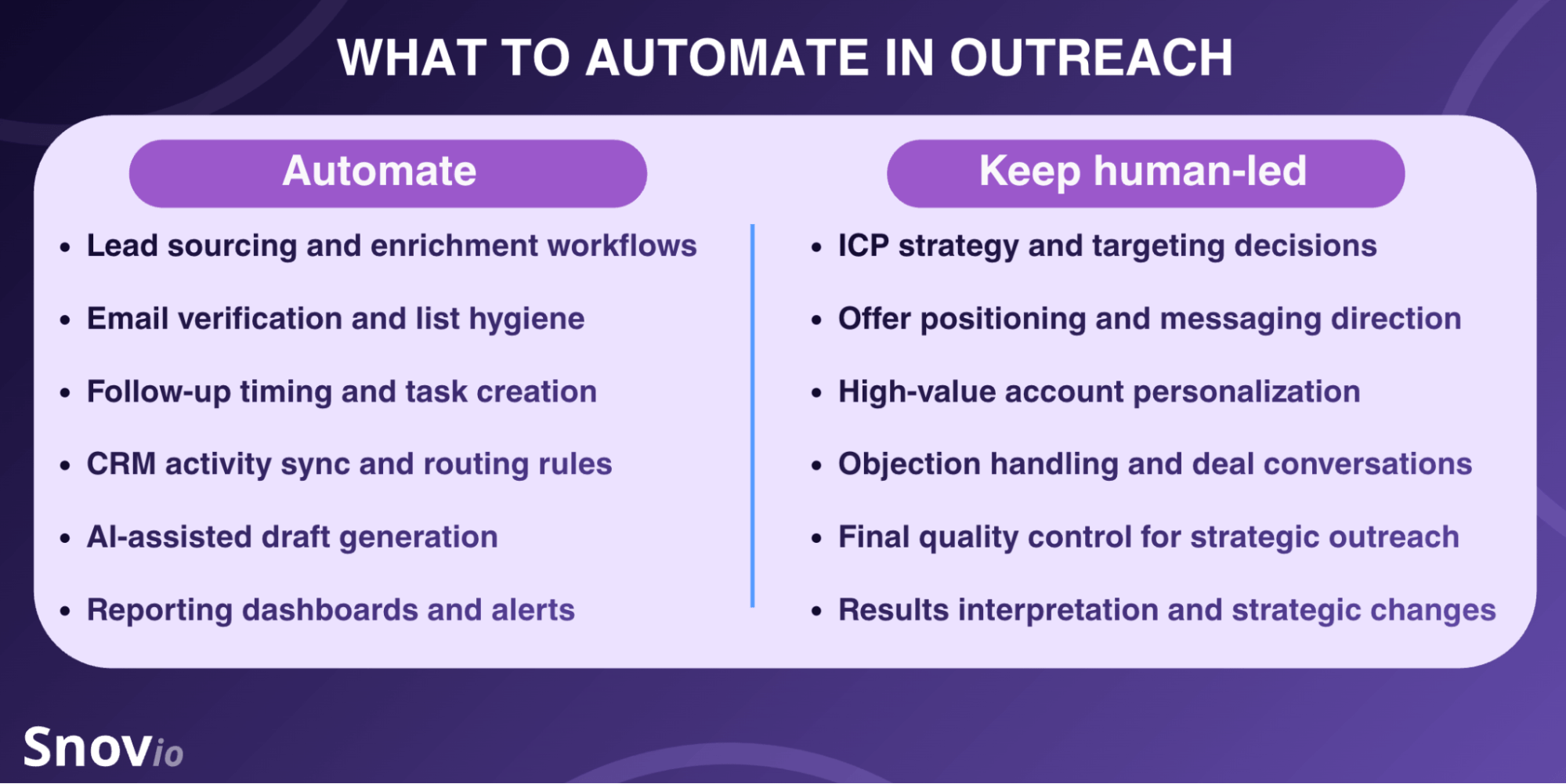
People are better at spotting nuances, so despite the temptation to put everything on autopilot, some parts of outreach can’t run equally effectively without human input. Use the infographic below as a helpful clue on what to automate and what to keep human-led to ensure quality and relevance:
To make automation work in practice, you need to implement it gradually, test workflows against real results, and build rules and standards around execution. It’s also important to remember that automation should support reps, not replace them, and that some parts of workflows should remain human-led.
Snov.io playbook: A practical framework for building a modern outreach automation system
I hope the strategic framework is clear by this point. Now it’s time to see what it looks like in practice and how to translate these recommendations into an outreach workflow.
Let’s map a real execution flow inside a real platform. Using Snov.io as an example, I’ll walk through the process step by step so you can see how to structure effective outreach automation in practice.
-
Set up email infrastructure
Start by building a reliable foundation for sending. Connect your mailbox to Snov.io and run a deliverability test. It conducts a comprehensive domain health diagnostics, including DNS records, email placement, and blacklists, and provides personalized recommendations for improvement.
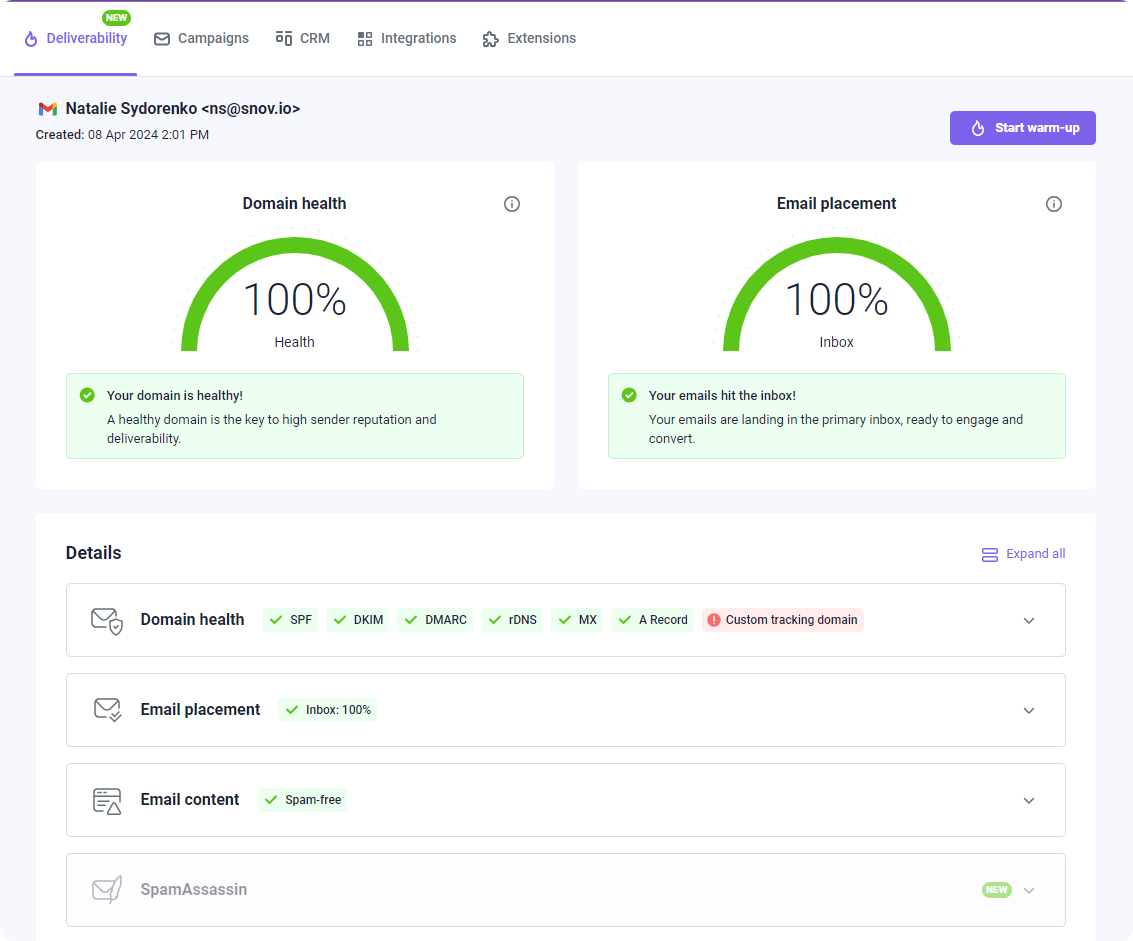
I recommend paying very close attention to the authentication setup. Snov.io’s recent research revealed that proper configuration of SPF, DKIM, and DMARC records significantly improves deliverability and reply rates, especially for Microsoft recipients.
If your team lacks a specific technical background or you simply want to skip this complicated tech stage, you can use a done-for-you email account setup in Snov.io. In practice, it means you can buy domains and mailboxes already configured for cold outreach, including DNS records and custom tracking domains.
Once your cold email infrastructure is set up, use Snov.io’s Warm-up tool to strengthen deliverability and inbox placement. The warm-up runs fully automatically, yet you can customize every setting — from starting volume to warm-up messages and mailbox providers.
-
Define your ICP
Before you start lead search, you need to define who you actually want to reach. To streamline the process, use AI ICP and Buyer Persona Generator in Snov.io.
All you need to do is add your company profile, describe your product or services, and sales-trained AI will generate up to 8 unique personas tailored to your value proposition. Each ideal customer profile will include key details such as industry, location, job title, pain points, and other data you can use to prospect further.
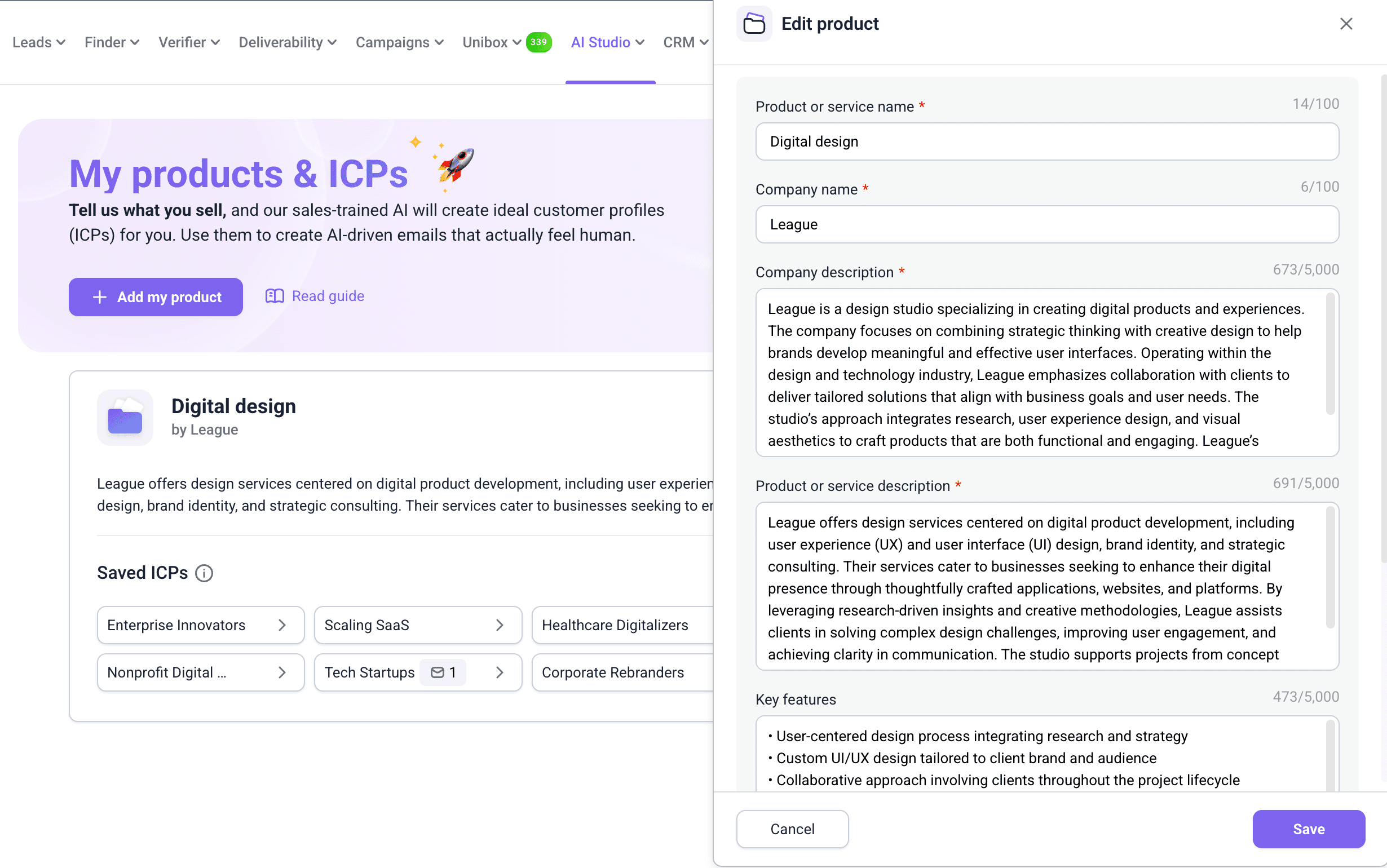
You can generate as many ICPs as you need. For example, if your company offers several products, it makes more sense to create separate buyer personas for each product to reflect different target audiences.
-
Build targeted lead lists
Once you’ve created your ICPs, it’s time to find prospects that match your criteria. Snov.io provides several ways to collect leads with their email addresses. You can combine direct email lookup, database search, LinkedIn prospecting, and other lead finder tools to build lists enriched with contact data.
Use AI Prospect Search to quickly get contacts from Snov.io’s built-in database. Enter a prompt describing your ICP best, for example, “Marketing leads from SaaS companies in Canada with 50-200 employees”, and Snov.io AI agent will automatically set the search filters based on your request. The more details you provide, the more accurate the results you get.
You can also set filters manually, specifying location, position, management level, and other parameters to narrow the search in Snov.io’s B2B database, which contains 500M+ prospects and 50M+ companies.
If you know your prospect’s name and company, try Email Search to find their email using these details. You can also do this in bulk by applying this tool to your CSV file with names and websites. If you’re targeting a specific company, try Domain Search to find email addresses associated with this domain.
You can also streamline enrichment flows with Snov.io extensions that let you collect prospects while you browse and automatically add them to your lists without manual data entry. Use Email Finder to gather leads from any website. Or apply LinkedIn Prospect Finder to scrape contacts from profile or search result pages.
Snov.io reduced our prospecting time by 10% to 20% per rep, and that helped us increase prospecting meetings by over 30% in the last 12 months.
Co-founder at Digital Media Stream

⚠️ Important note:
Whichever method you choose, always verify contacts before launching outreach. Sending to invalid or risky email addresses increases bounce rate and can damage your mailbox reputation. Snov.io Verifier uses a 7-tier verification process and supports both individual and bulk checks, so you can quickly verify your email list to keep outreach safe.
-
Create condition-based sequences
The practical way to build automated outreach sequences is to start with core steps and then add condition-based triggers. Snov.io supports conditional logic, so you can create different flows based on a prospect’s behavior.
Personalize the next steps by setting conditions based on key engagement signals, such as opens, clicks, and other actions. This way, you can move prospects into a different branch of the same sequence and create a more relevant follow-up path for each recipient, even at scale.
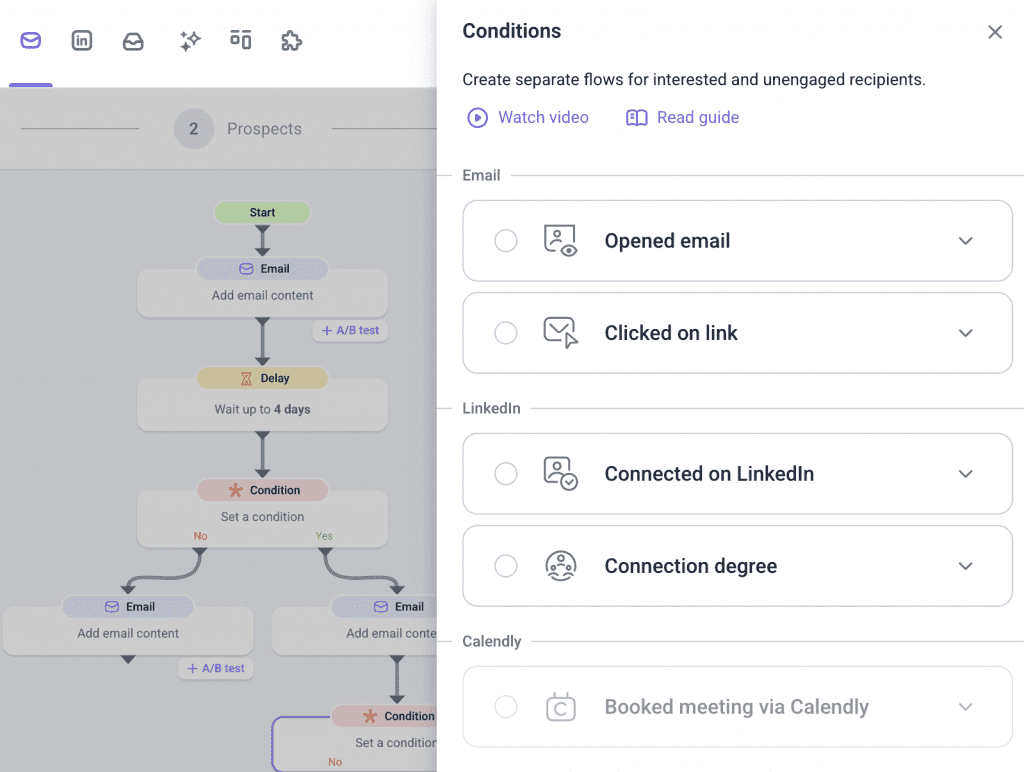
In Snov.io, you can also combine email outreach with LinkedIn automation and build alternative flows based on LinkedIn engagement. Add automated actions, such as connection requests, profile visits, post likes, skill endorsements, InMails, and messages, then define the conditions that trigger them. For more convenience, manage emails and LinkedIn conversations in a unified inbox.
With multichannel sequences, you make outreach more efficient by switching to another channel when one doesn’t get a response. You can also set a condition around a booked meeting via Calendly, so your sequence stops automatically, and the prospect doesn’t receive unnecessary follow-ups.
-
Draft ICP-tailored messages with the AI email writer
Remember building the ideal customer profiles with the AI Buyer Persona Generator? Now it’s time to turn them into outreach copy. Use AI email writing to create messages and subject lines tailored to your target audience, product context, and value proposition.
If you’re new to writing prompts, no worries, you can skip them for now. Instead, select one of your saved ICPs so that AI can suggest unique selling points based on the selected persona or product. Then, choose the strongest options, and AI Email Writer will draft emails that reflect your offer.
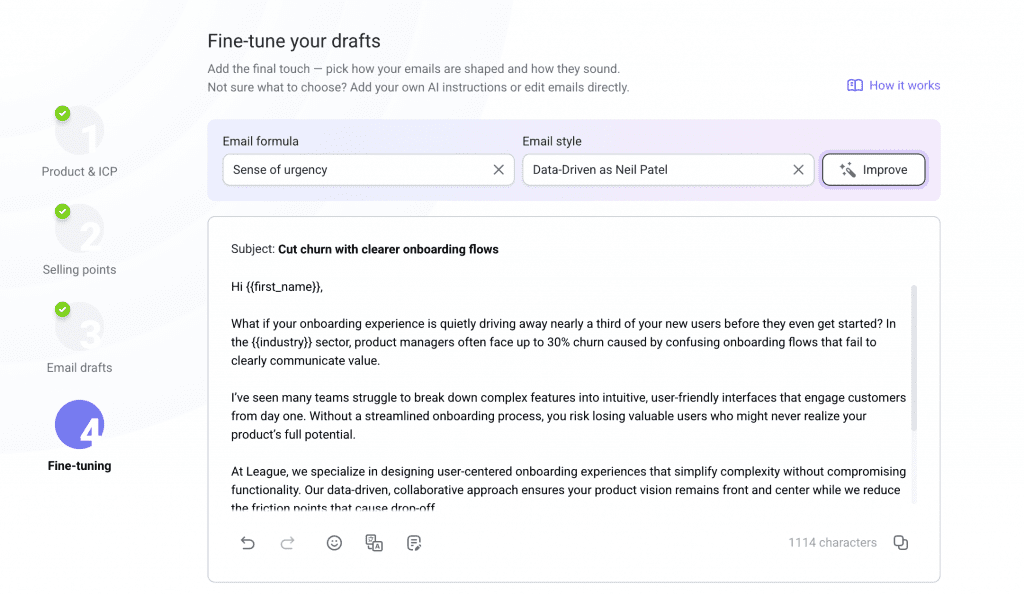
Once the draft is ready, review the copy to ensure it sounds natural and matches your campaign goal. Edit the email manually or use AI tools to adjust the writing style, tone, and overall flow. You can also translate your emails into the language your audience speaks to convey a sense of familiarity and make the message easier to engage with.
-
Automate deal creation and progression in CRM
A sales automation workflow doesn’t stop at replies. In Snov.io, you can use campaign activity to automatically create deals and manage those opportunities inside a built-in CRM. This helps move prospects from outreach into pipeline management without losing context or relying on manual handoffs that create data silos.
In practice, it means that once a prospect shows meaningful interest, the opportunity can be routed straight into the right pipeline. As soon as the deal is created, your team can track its stage, add notes, assign tasks, and coordinate the next steps from one place.
Snov.io has taken our outreach to the next level. In less than 6 months, we’ve built an email-based client engagement system from scratch. It’s time-saving, fully automated, personalized, and scalable.
CEO at inseed.marketing

-
Refine your strategy based on AI-powered analytics
In Snov.io, you can review key metrics for both email and LinkedIn in a single reporting dashboard, making it easier to see the full picture of your outreach performance. Compare results across accounts, channels, or team members to identify which workflows perform better.
Beyond standard performance metrics, you can also use AI-driven insights to prioritize your outreach efforts. Snov.io provides Sentiment Analysis that uses AI to classify replies based on a recipient’s interest.
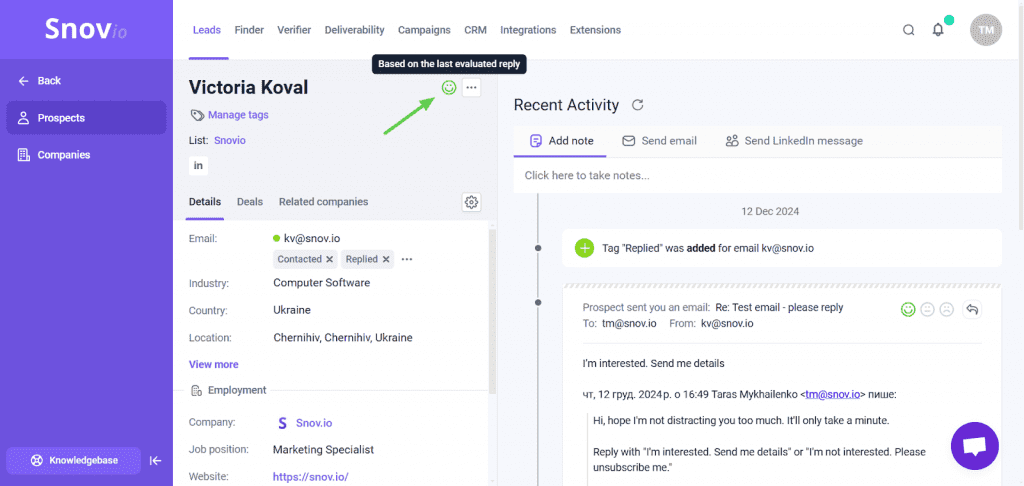
Instead of treating every reply the same, you can see which prospects show real buying intent, which ones reflect hesitation, and which contacts are unlikely to convert. To make these insights actionable, treat them as practical instructions for the next steps:
- Prioritize follow-up with warmer leads who show positive engagement
- Nurture neutral prospects by addressing common objections or sharing more context, proof, or other valuable content
- Exclude low-intent or negative replies from active campaign to avoid spam complaints and use them instead to refine targeting and messaging
With such a practical approach, analytics help you not only measure results but also refine your strategy to improve them.
Key takeaways
Today, outreach automation supports the full outbound workflow, from lead sourcing and multichannel sequences to deal management and optimization. Its biggest value lies in helping teams save time, scale outreach efficiently, and maintain consistency across the sales process.
Here’s a quick recap from this guide on how to automate outreach efficiently:
- Use AI strategically to speed up prospecting and message drafting, but keep human oversight in place.
- Protect deliverability before you scale so your campaigns actually reach prospects. Regularly monitor deliverability metrics to spot and fix issues early.
- Build sequences around buyer behavior using condition-based triggers that adapt follow-up flows based on engagement.
- Connect outreach with pipeline management to route engaged prospects into CRM workflows and keep deal progression organized.
- Track real outcomes, not just vanity metrics, to understand the real impact of automated outreach on pipeline and revenue.
- Choose the automation software that supports your actual workflow, includes built-in deliverability toolkits, and helps you scale with confidence.
- Implement outreach automation gradually so you can test workflows and identify setup issues before scaling further.
All these practices work best when each part of the workflow functions as one connected system. And platforms like Snov.io help bring these stages together in one place, making outreach easier to manage, optimize, and scale.