
Thinking about trying Expandi for LinkedIn outreach, but still hesitating? You’ve probably seen tons of “best tool”, “safe automation”, and “more booked meetings” claims, plus mixed users’ reviews, which leave you with more questions than answers.
That’s exactly why you’re in the right place: this article is your complete Expandi review for 2026.
I’ll give you a clear breakdown of its features, pricing, and practical use. I’ll also help you understand whether Expandi is enough for your goals, or if you need to consider alternatives, like Snov.io’s LinkedIn automation tool, to cover these gaps.
Outline:
TL;DR: Expandi Overview
Here’s the quick overview of Expandi before we go deeper:
*Please note that pricing may change, so always check the latest details on the product’s website.
In a nutshell, Expandi is a solid choice if your priority is LinkedIn-first automation with customizable sequences, dedicated IP, and team features. It’s strong for LinkedIn messaging flows and supports lightweight multichannel campaigns (LinkedIn + email).
However, Expandi doesn’t provide native email discovery and contact enrichment. So, if your strategy is truly multichannel and you want to add verified emails to the same outbound motion, consider Expandi alternatives with built-in finding features. For LinkedIn automation combined with email outreach, native prospecting, and verification, Snov.io is a reliable solution.

What is Expandi?
Expandi.io is a LinkedIn automation tool that helps streamline outreach with smart sequences. Instead of manual follow-ups, you can build campaigns with connection requests, messages, and engagement activities, and the platform will run them automatically.
Expandi also supports email outreach, so you can include both emails and LinkedIn actions in the same sequence. Overall, the platform automates outreach workflows, enabling professionals to manage multiple campaigns from a single dashboard.
Expandi use cases
Expandi is mainly focused on LinkedIn outreach automation, making it a good fit for:
- SDR or sales teams running LinkedIn-first outbound campaigns
- Lead generation and marketing agencies managing multiple client LinkedIn accounts and keeping workflows in one space:
- Recruiters looking to automate connection requests, InMails, and follow-ups
Now, let’s take a closer look at Expandi features to see how it works.
Key Expandi features
Expandi is built around structured sequences that help users safely and effectively automate LinkedIn touches and emails at scale. Below are the core Expandi features that make this workflow possible in day-to-day outreach:
LinkedIn lead generation
In Expandi’s LinkedIn automation tool, you can collect leads for your campaigns right in the app. The platform lets you gather prospects from different LinkedIn surfaces by simply copying the URL from where they should be scraped. You can collect leads from search results, groups, events, company following, or the “People you may know” section.
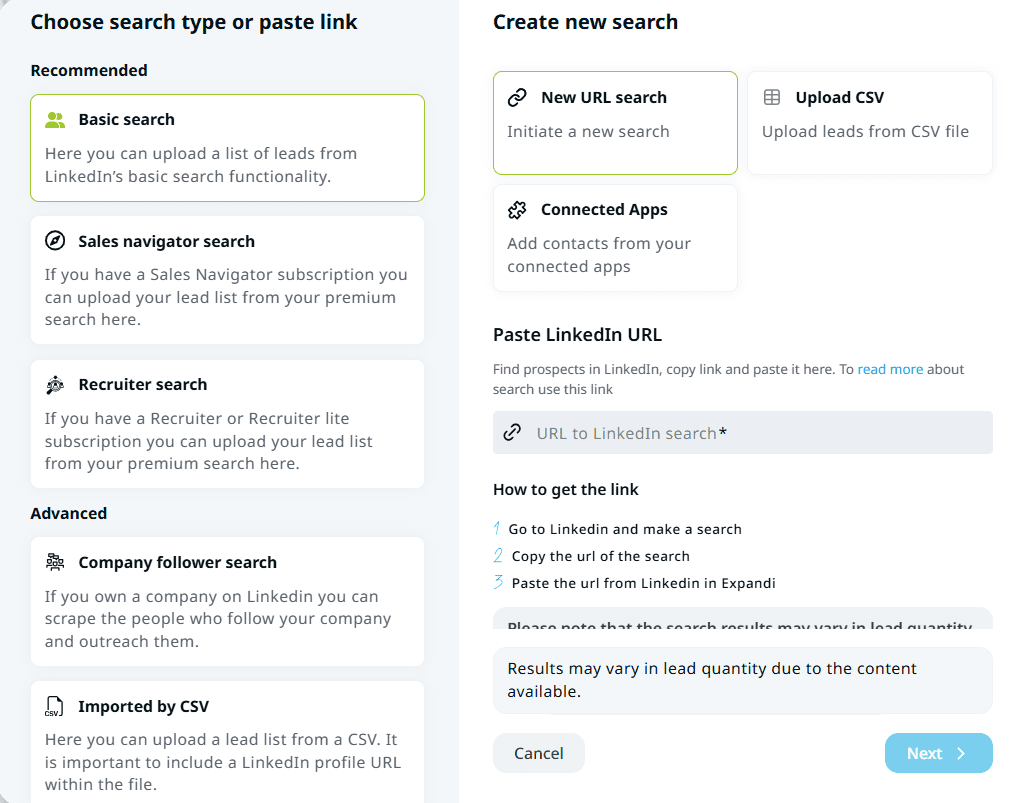
You can also add prospects from Sales Navigator, Recruiter, or Recruiter Lite search lists, if you have a LinkedIn Premium subscription.


Smart LinkedIn campaigns
Expandi’s smart sequences let you adapt your outreach flow based on users’ behavior. The main difference from classic scheduled campaigns is that you’re not just sending a fixed set of follow-ups – you build a scenario where each step is adjusted in real-time based on how the recipient interacts.
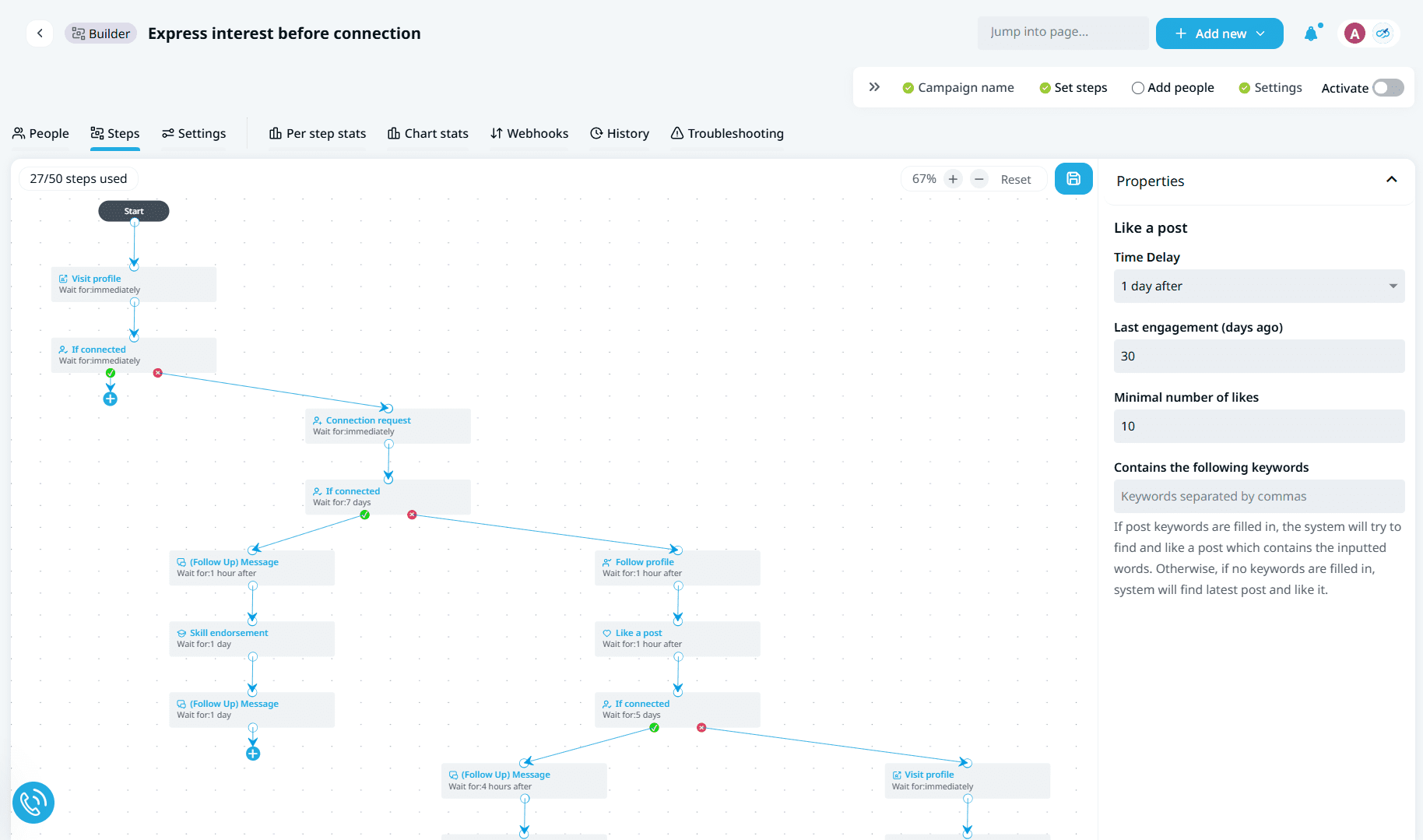
In practice, this means that if you lead qualifies for several actions, Expandi runs the first one that matches, even if it’s not the next step in the order. In regular campaigns, steps run on fixed timelines, so if the set condition isn’t met at that moment, the step is usually skipped and won’t be triggered again.
You can create sequences by selecting a specific campaign type or by using pre-made templates for specific use cases in the Expandi LinkedIn automation tool.
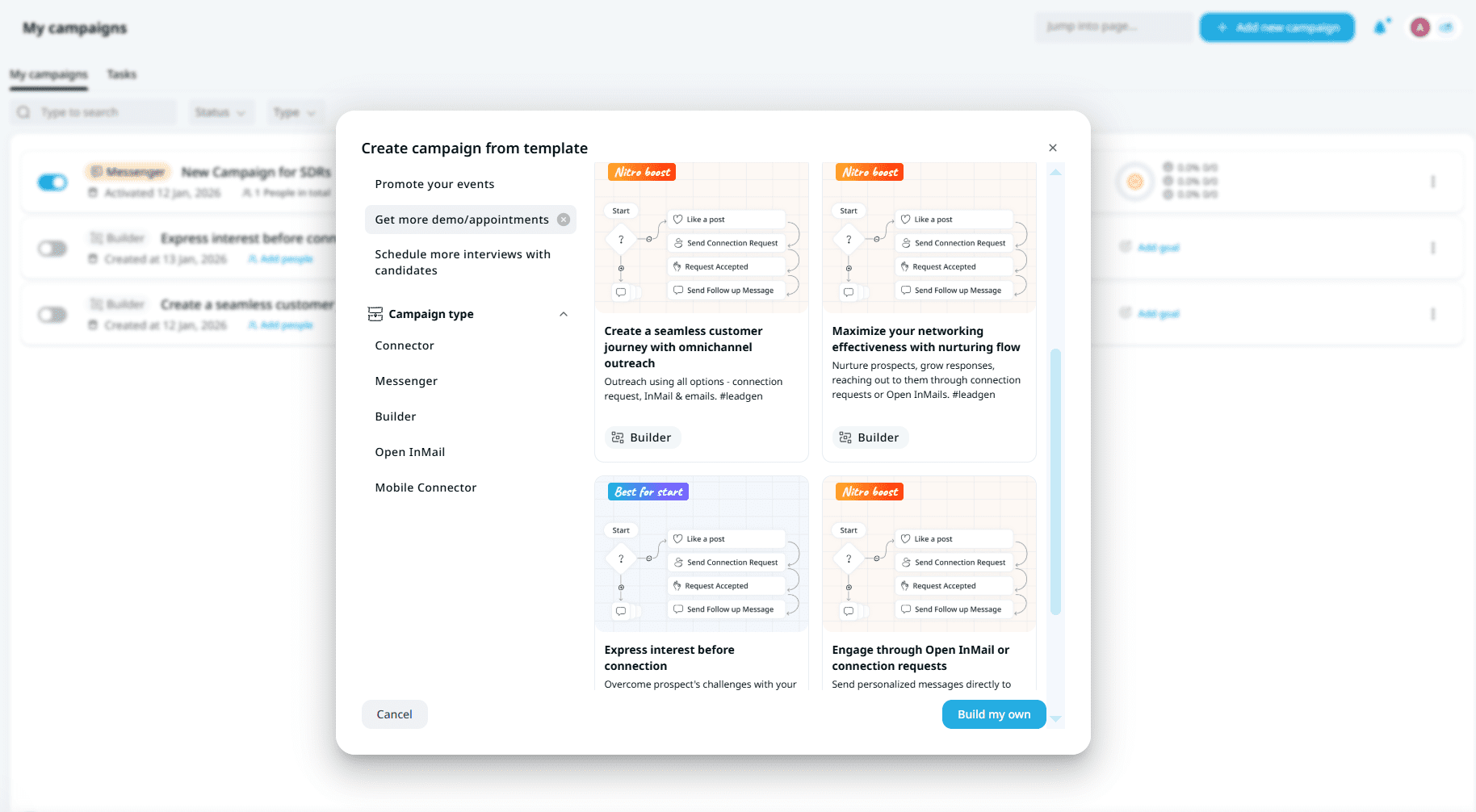
You can also build your own sequence and add connection requests, engagement actions, and follow-up messages based on your outreach goals.
Omnichannel sequences
One of the Expandi features for outreach is the ability to add email steps to automated sequences. If you connect your email account to the platform, you can send email follow-ups alongside LinkedIn actions within the same campaign flow.
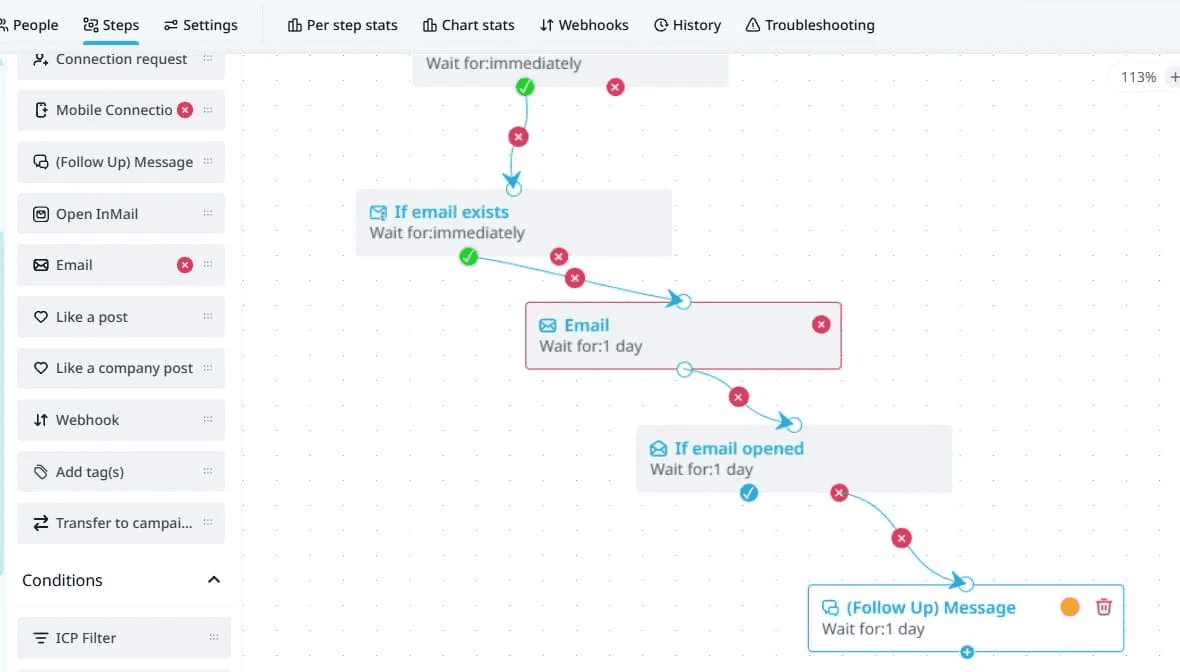
Note that Expandi doesn’t provide a native email finder, so an email will be sent only if your LinkedIn lead has a public email address on their profile.
👉 Alternatively, you can use a separate tool, for example, Snov.io LinkedIn Email finder, to gather contact data and upload it as a CSV file to Expandi.


AI-powered tools
These Expandi features are packaged in its AI Analyzer, which assists you at every stage of your campaigns. Define your goal and target audience to generate personalized LinkedIn messages or use AI to draft tailored replies directly in conversations.
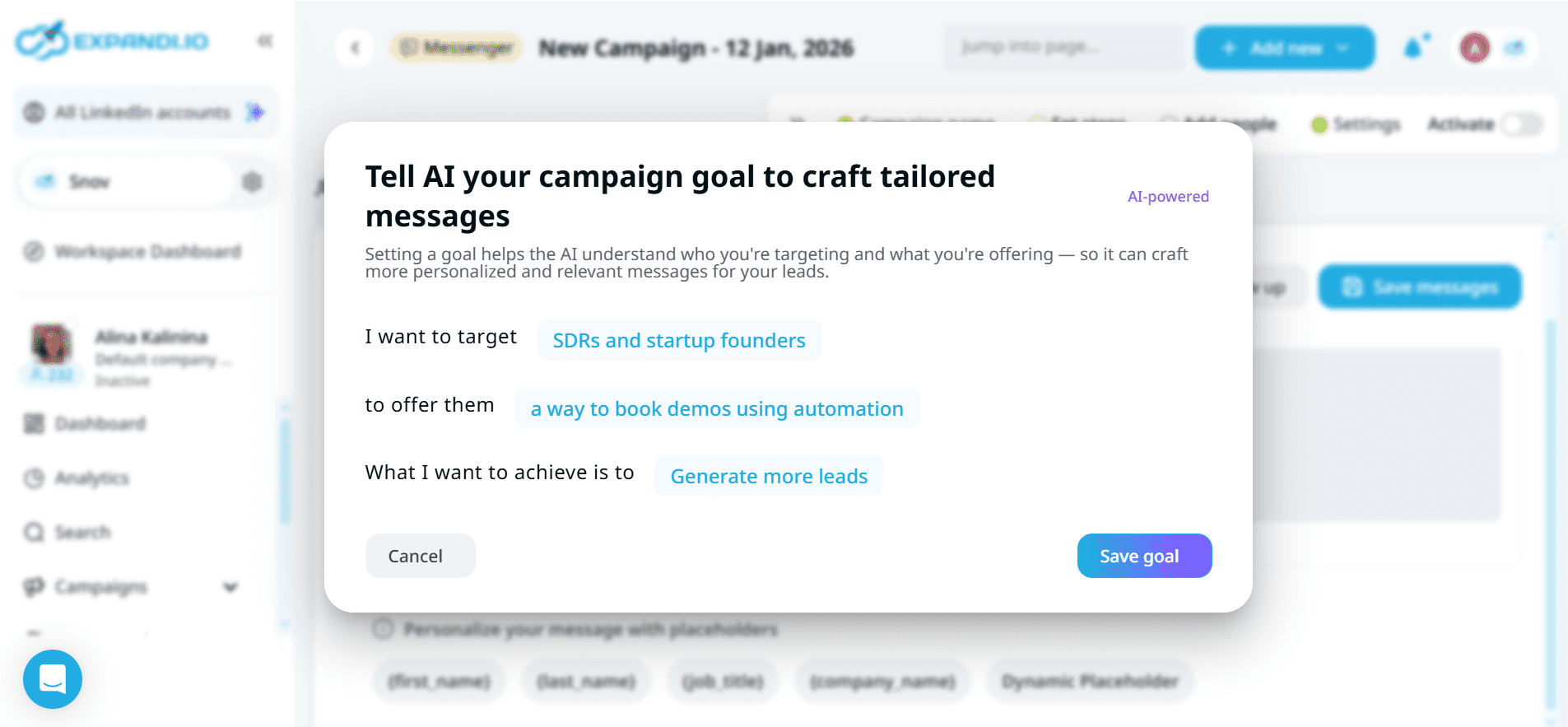
You can also use AI Analyzer to classify replies based on recipients’ intent and categorize leads by their level of interest. However, keep in mind that sentiment analysis is available only for one active campaign per LinkedIn account.
🤔 Curious how AI can boost your cold outreach results? This video breaks it down in a couple of minutes:
Personalization features
Expandi offers various features that let you create personalized LinkedIn messages even in bulk. This functionality starts with dynamic fields called placeholders that automatically insert lead data into your copy. You can use default placeholders that pull personalized information directly from LinkedIn (first name, last name, job title, etc.) or create custom fields with imported data.
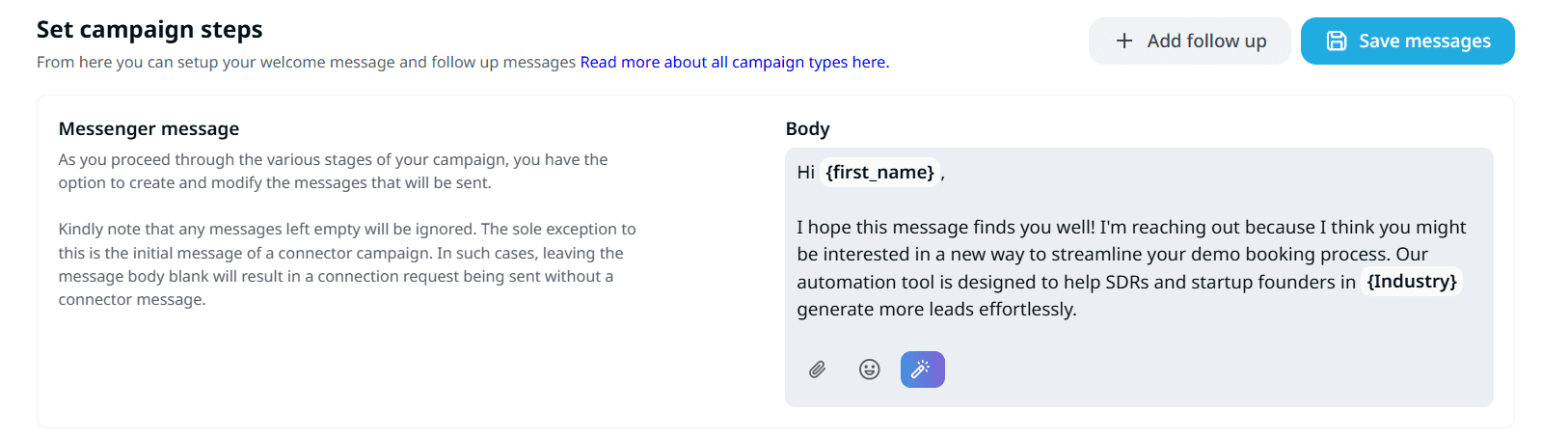
Expandi also supports personalized images and GIFs through the integration wth Hyperise. You can add custom-made visuals that include lead profile pictures or other elements to your messages and make them more captivating.
It’s also worth noting that the Expandi LinkedIn automation platform helps keep your account safe with dedicated IP addresses, built-in throttling, and human-like behavior patterns.
So, what does it cost to access all these Expandi features in 2026? Let’s break down the pricing next.
Expandi pricing plans
Expandi pricing is simple compared to many LinkedIn automation tools, offering a wide range of plans. The platform lists two options based on the number of seats.
Business
The Expandi pricing for this tier is based on the plan duration:
- Monthly plan: $99/month
- Annual plan: $79/month paid upfront for the whole year
No matter which subscription type you choose, the Business tier gives access to all Expandi features, including LinkedIn automation, AI tools, multichannel outreach, analytics, and more. Note that each LinkedIn account you account requires its own subscription.
Agency
This tier offers custom pricing for teams requiring 10+ seats or seeking a white-label solution. This plan includes everything from
Business, plus role-based permissions, centralized campaign management, dedicated support, and other capabilities that can be handy for agencies and larger teams.
Bonus: Expandi also offers a 7-day free trial, so you can try the tool first before making your final decision.
Using Expandi: pros and cons
Even the most robust LinkedIn automation tools come with both strengths and weaknesses. And that’s completely normal. The key is to know all potential drawbacks upfront, so you can consider them when making decisions and avoid unpleasant surprises.
To get you equipped, I want to share the key Expandi pros and cons I found during testing.
Expandi pros:
➕ Expandi is a cloud-based solution, so your LinkedIn sequences can run even if your browser is closed.
➕ Smart sequences support flexible campaign logic, checking conditions at each step
➕ The platform supports omnichannel outreach, allowing you to add email steps alongside LinkedIn actions
➕ Expandi provides safety and LinkedIn compliance, making outreach automation safer
➕ A wide range of campaign types and templates helps streamline outreach workflows
➕ Granular conditions and various engagement actions let you create more tailored, consistent, and effective outreach sequences
➕ Expandi offers an AI Analyzer that instantly generates replies in LinkedIn conversations based on their context
➕ The human support team is fast and responsive, plus, you can even schedule a 1:1 call for even more personalized assistance
Expandi cons:
➖ You can’t start using Expandi without a paid subscription
➖ A 7-day free trial isn’t enough to fully test the platform, as well as confirm it fits your workflows and skill level
➖ The onboarding can take more time because of a multi-step sign-up process and steep learning curve
➖ The interface can feel cluttered, making navigation a bit difficult, especially for non-experienced users
➖ Performance can be inconsistent at times, with occasional slow loading or other platform hiccups
➖ Using personalization provided via Hyperise integration requires both Expandi and Hyperise subscriptions
➖ AI-generated copy usually needs refinement
➖ Email automation is not as robust as in many similar cold outreach platforms
Now, let’s also see what users highlight most often in their Expandi reviews.
Real-user feedback on Expandi LinkedIn automation
G2 rating: 4.2 ⭐
Capterra rating: 4.4 ⭐
To make my Expandi review more complete, I also checked what people think of this platform. Beyond G2 ratings and Capterra scores, I analyzed real-user feedback to identify the most common strengths and complaints.
One of the first things that stands out to me across many Expandi G2 reviews is the strong support quality. Many users highlight quick response times and helpful assistance when issues arise or extra guidance is needed.
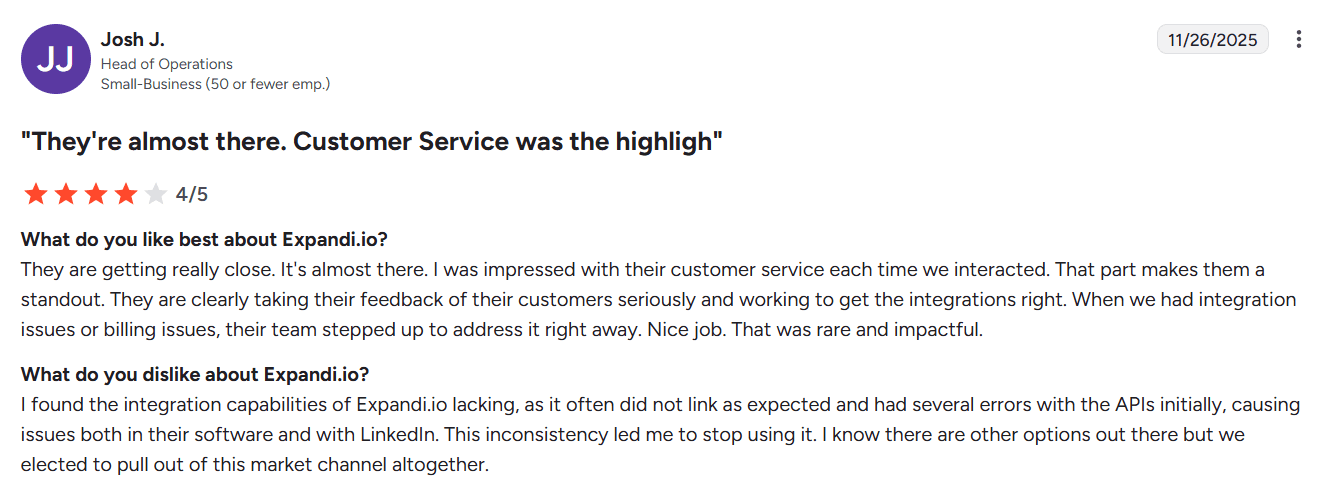
From my experience, customer support was also fast, responsive, and proactive.
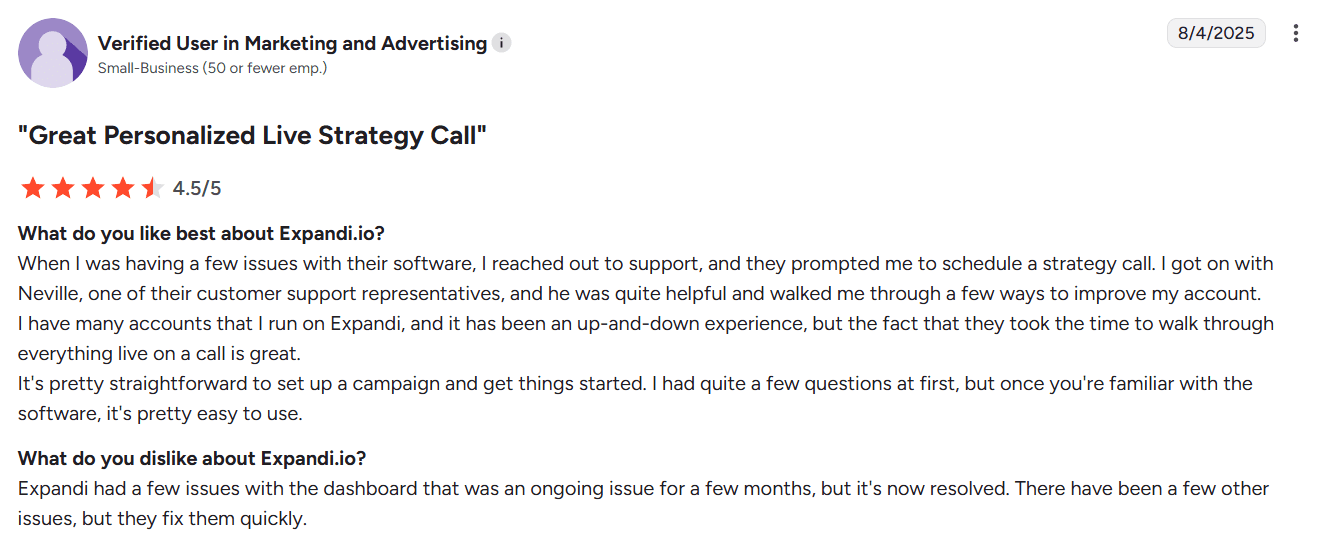
People also mention seamless integration with LinkedIn and a wide range of campaign types that cover various outreach goals.
On the downside, some Expandi G2 reviews report occasional technical hiccups across various parts of the platform. These issues usually don’t seem critical; however, they can interrupt the workflow and require support team assistance.
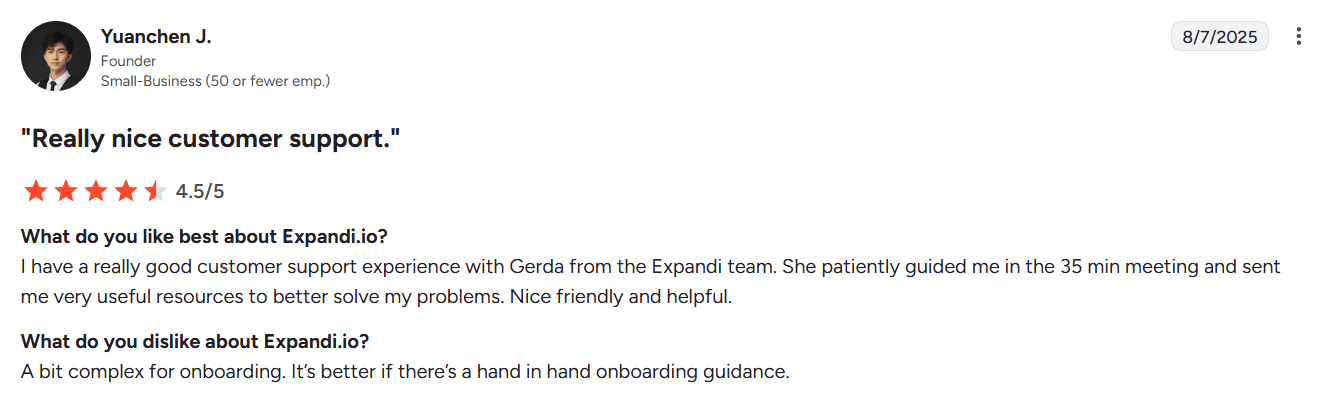
Some reviewers also note a steeper learning curve and a UI that could be more user-friendly.
Expandi G2 reviews are helpful, but I always like to complement user feedback with a first-hand view. Let’s look at what I found during my testing.
Expandi review: my testing takes
I’ll be honest: getting started with Expandi took longer than I expected. In my test, it took over 10 minutes to activate the free trial and just reach the point where I could begin using the platform.
After sign-up and email confirmation, I still couldn’t access the main platform’s dashboards. I had to add my LinkedIn credentials first, enter card details, confirm my account again, and wait for the account sync (about 5 minutes). Then there was one more required step, setting a working schedule, before I could finally access the platform.
The UI also felt busy and non-intuitive, even though I have extensive experience with LinkedIn automation tools. Some actions were not obvious, and I actually had to contact support to launch my first campaign. It appeared that completing the setup steps wasn’t enough: an extra toggle in settings needed to be enabled before my campaign would run.
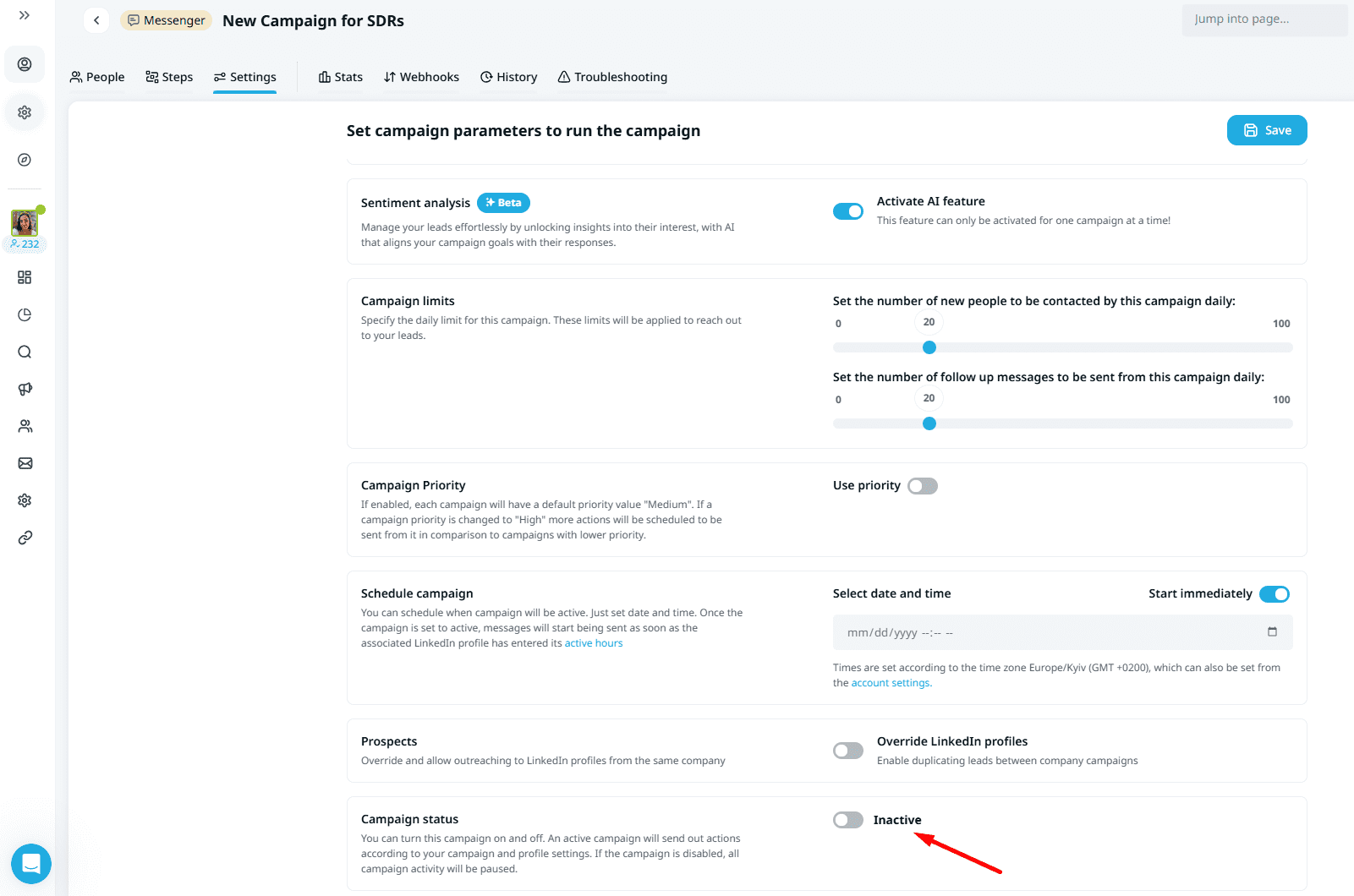
One more practical detail: all actions run strictly within the working schedule you set at the beginning. Even if you launch your campaign properly, it won’t actually perform if this schedule is off. So, don’t forget to edit these settings if you plan to run outreach outside standard hours.
On the positive side, Expandi gives you a lot of flexibility once you get past the learning curve. There are many campaign types and templates for different use cases (recruitment, marketing, sales, event promotion, and more) that can help speed up your workflow.
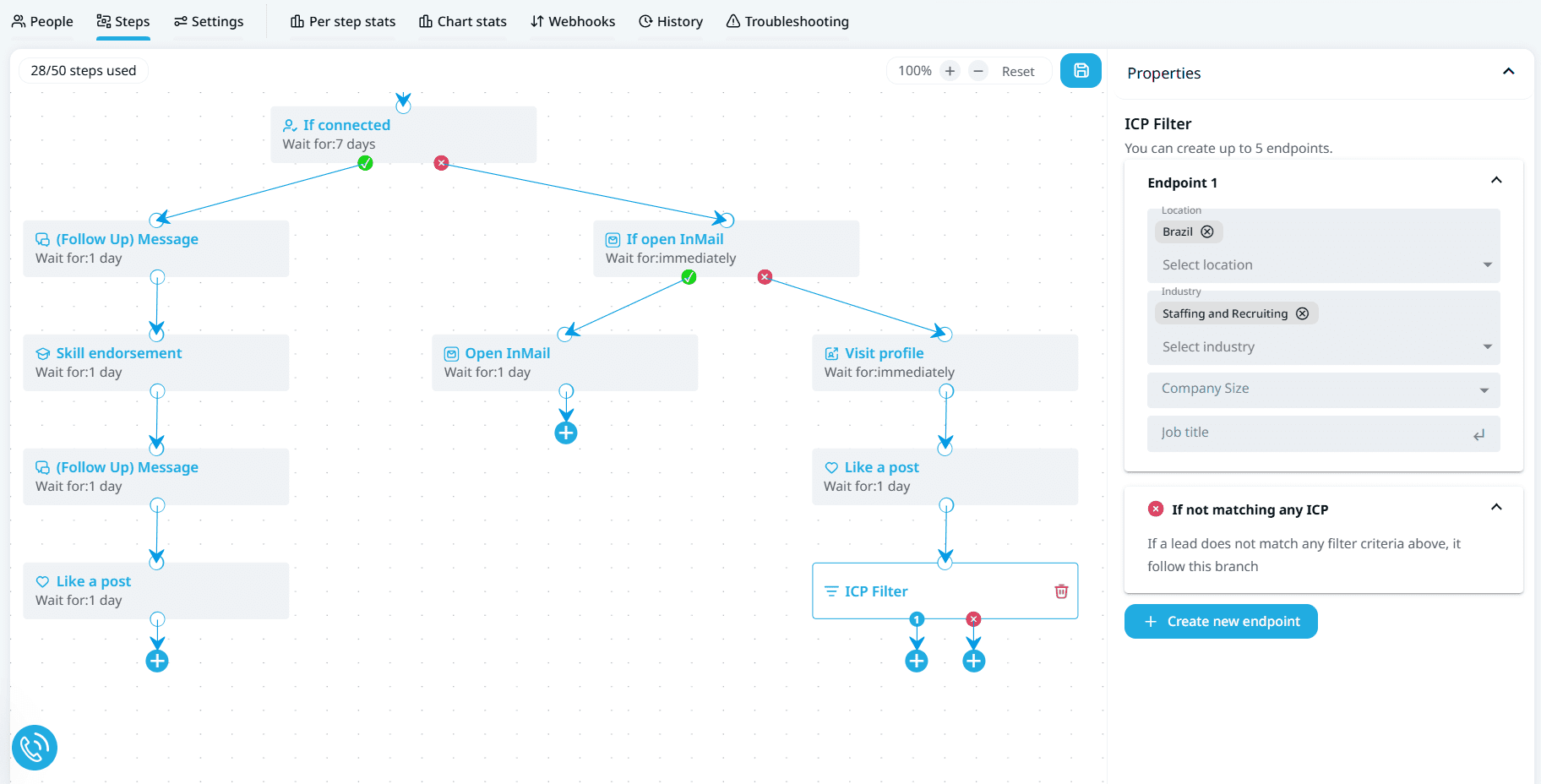
Another advantage is the number of conditions you can configure in sequences with Expandi LinkedIn automation, including ICP matching criteria. Plus, the platform supports a wide range of LinkedIn engagement activities that let you warm up your cold outreach with “lighter touches” before direct messaging.
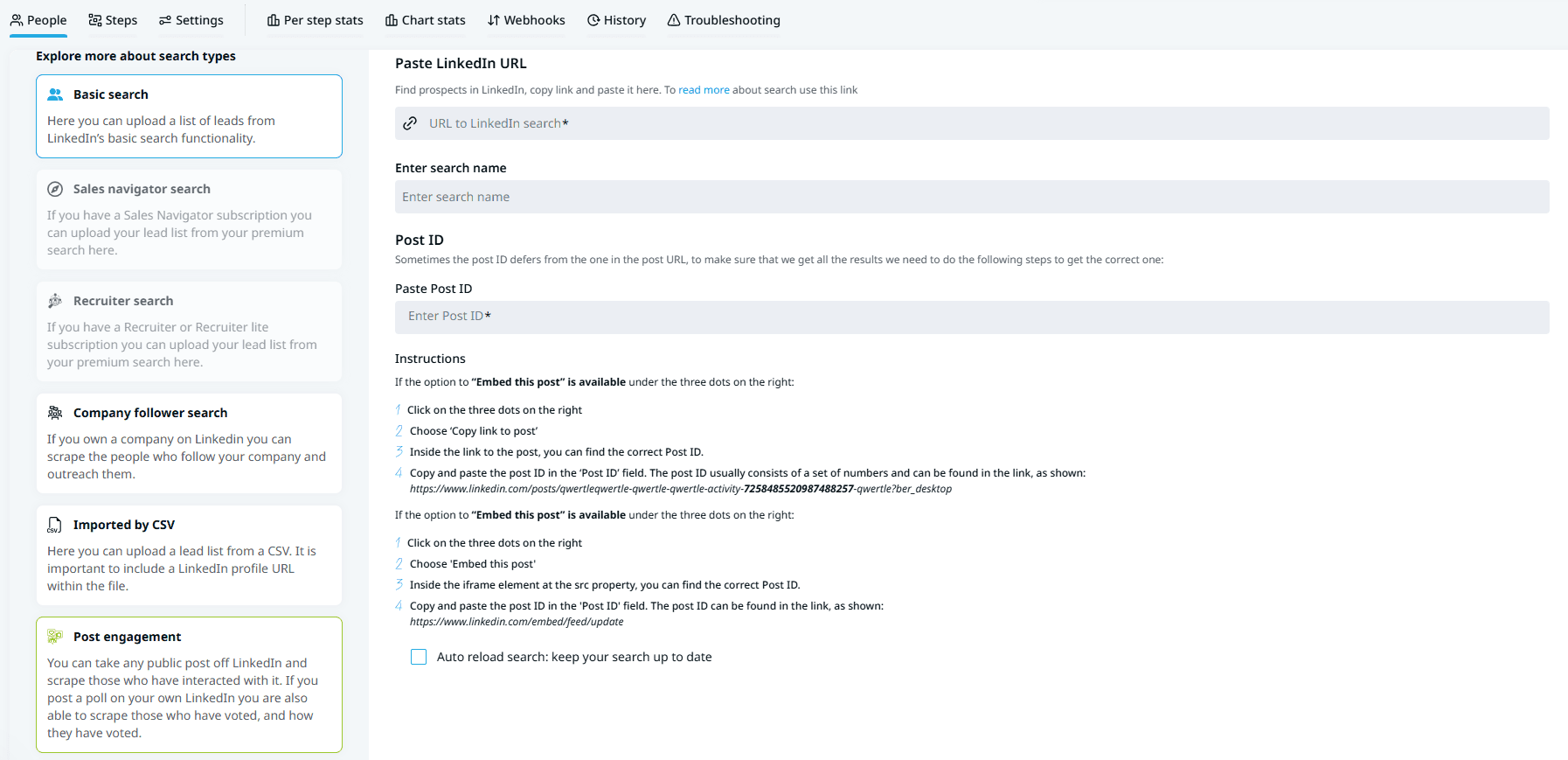
What I truly like about Expandi’s campaign workflow is the ability to scrape leads who have engaged with specific LinkedIn posts and add them to sequences. For example, you can search for content related to your product or services and reach out to people who have already shown active interest in this topic. This ensures higher relevance of your outreach and increases the likelihood of a positive reply.
And to the weak points. Expandi’s AI message features are a nice add-on, but there are a few usability gotchas. Once your copy is generated, don’t forget to click “Save” right away, so you don’t lose the result. In my testing, my draft disappeared after I went to another tab for details and came back, even without refreshing the page. However, the credit for that AI draft was deducted.
I also recommend treating generated messages as a starting point rather than a final copy. The tool can suggest direction, but the output still needs editing. Also, note that I features are only available in English.
Multichannel is another area that isn’t as “ready out of the box” as it is promised to be. First of all, I couldn’t even find email steps in the campaign builder, and after turning to support, I found out that these steps aren’t available until you connect an email account. To do so, I had to look through the Help Center articles as the flow wasn’t really intuitive.
Another nuance discovered is that even after enabling email steps, they will be sent only if a lead has a public email address on LinkedIn. Otherwise, this follow-up will be skipped. The platform claims that you can import emails via CSV, but I’m not sure how smoothly these email addresses will be added to LinkedIn lead records inside campaign lists.
I also noticed occasional performance hiccups: the platform felt a bit slow at times, and some sections didn’t load correctly on the first try, so I had to refresh the page.
Overall, I liked the experience with Expandi as a LinkedIn-first outreach automation tool. However, if you are looking for a strong multichannel solution, Snov.io can make more sense. With that in mind, let’s compare Expandi and Snov.io.
Expandi vs. Snov.io
Generally, the main difference between Expandi and Snov.io is the scope. Expandi is built primarily for running LinkedIn-first sequences, while Snov.io is a broader outbound outreach and sales automation platform.
Key differences
Instead of going deep into every single detail, let’s point out the key differences between Expandi vs Snov.io.
Lead sourcing and enrichment
Expandi lets you gather leads from LinkedIn. However, this is not a typical LinkedIn scraping, as the leads come without contact details and can only be used for LinkedIn sequences. At the same time, Snov.io gives you multiple ways to build target lead lists enriched with data:
- In-app LinkedIn search that lets you find LinkedIn leads directly in your Snov.io account using a single URL
- Email Finder that enables both individual and bulk email discovery on corporate websites and other web sources
- LinkedIn Email Finder extension that you can use to quickly collect prospects enriched with data from various LinkedIn pages
What’s more, Snov.io LinkedIn Email Finder lets you gather contacts in bulk. The best part is that all emails are already pre-verified, so you can quickly build high-quality lists for your campaigns or for CRM integration.
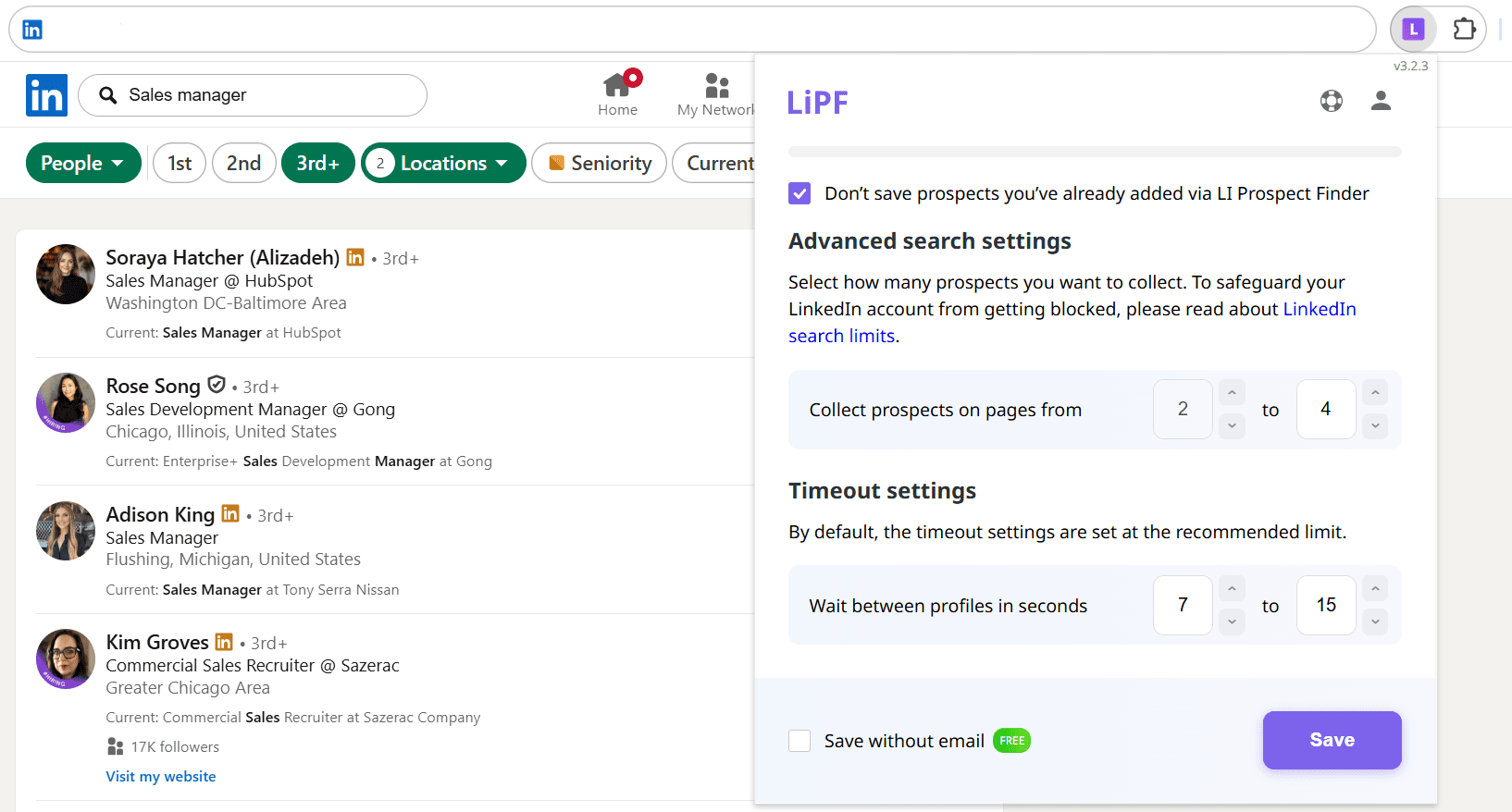
Besides email addresses, leads collected with Snov.io’s LinkedIn scraping extension are enriched with details such as name, job title, company, location, and more, which can be used for segmentation or personalization.
Multichannel campaigns
Snov.io provides robust email outreach support, including personalized sequences, built-in email verification, AI-powered analytics, and an ICP-based email builder that lets you create high-quality messages tailored to your target audience.
Expandi also supports multichannel sequences, but they work best if you already have reliable email addresses. So, to run truly LinkedIn plus email outreach campaigns, you may need additional software to build verified contact lists.
Safety features
Both platforms offer reliable safeguards to protect your LinkedIn automation, including dedicated location-based IP addresses, realistic delays, and daily activity caps. The key difference is that Snov.io ads LinkedIn account rotation, enabling teams to scale volume by spreading actions across several accounts.
In other words, both Expandi and Snov.io let you connect multiple accounts to the app. But with Snov.io, you can also rotate these multiple accounts inside a campaign, which helps expand reach while staying within LinkedIn safety limits.
AI features
Both platforms offer AI features for message generation and campaign analytics. Like Expandi, Snov.io also supports AI-powered sentiment analysis that classifies replies based on lead interest and helps you prioritise prospects for outreach.
One of Expandi’s standout advantages is real-time reply generation inside LinkedIn conversations, which can be especially useful for solo outreach or highly targeted campaigns with key accounts.
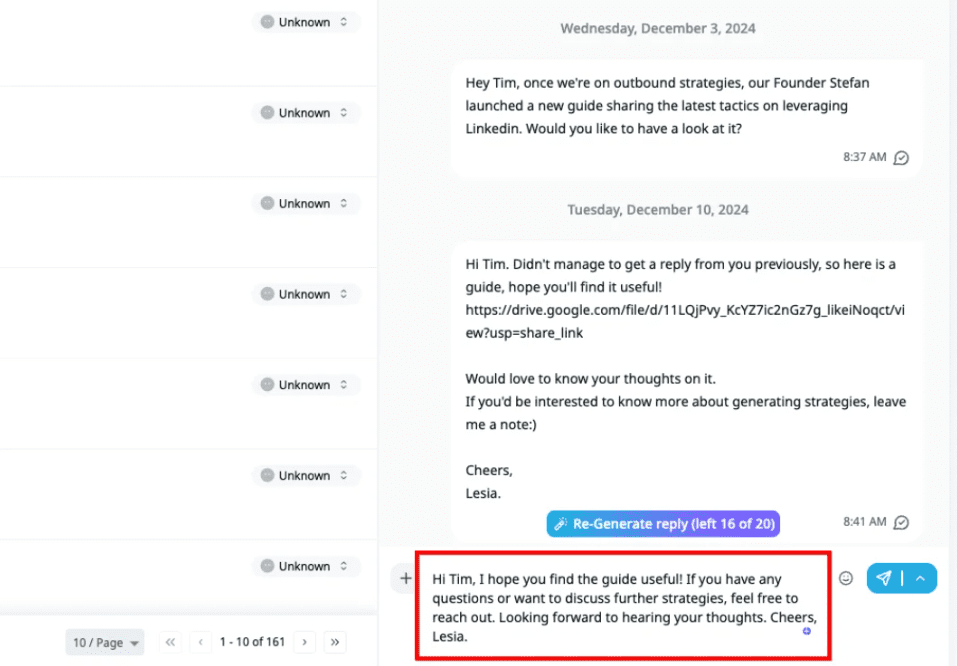
However, when it comes to copy creation for campaigns, the AI-generated output feels very basic and often requires extra editing, especially for outreach at scale.
Snov.io doesn’t focus on reply management in the same way, but it offers stronger AI for ICP building, including key details such as roles, location, company size, and pain points. This helps you better understand who you are targeting and identify them on LinkedIn faster.
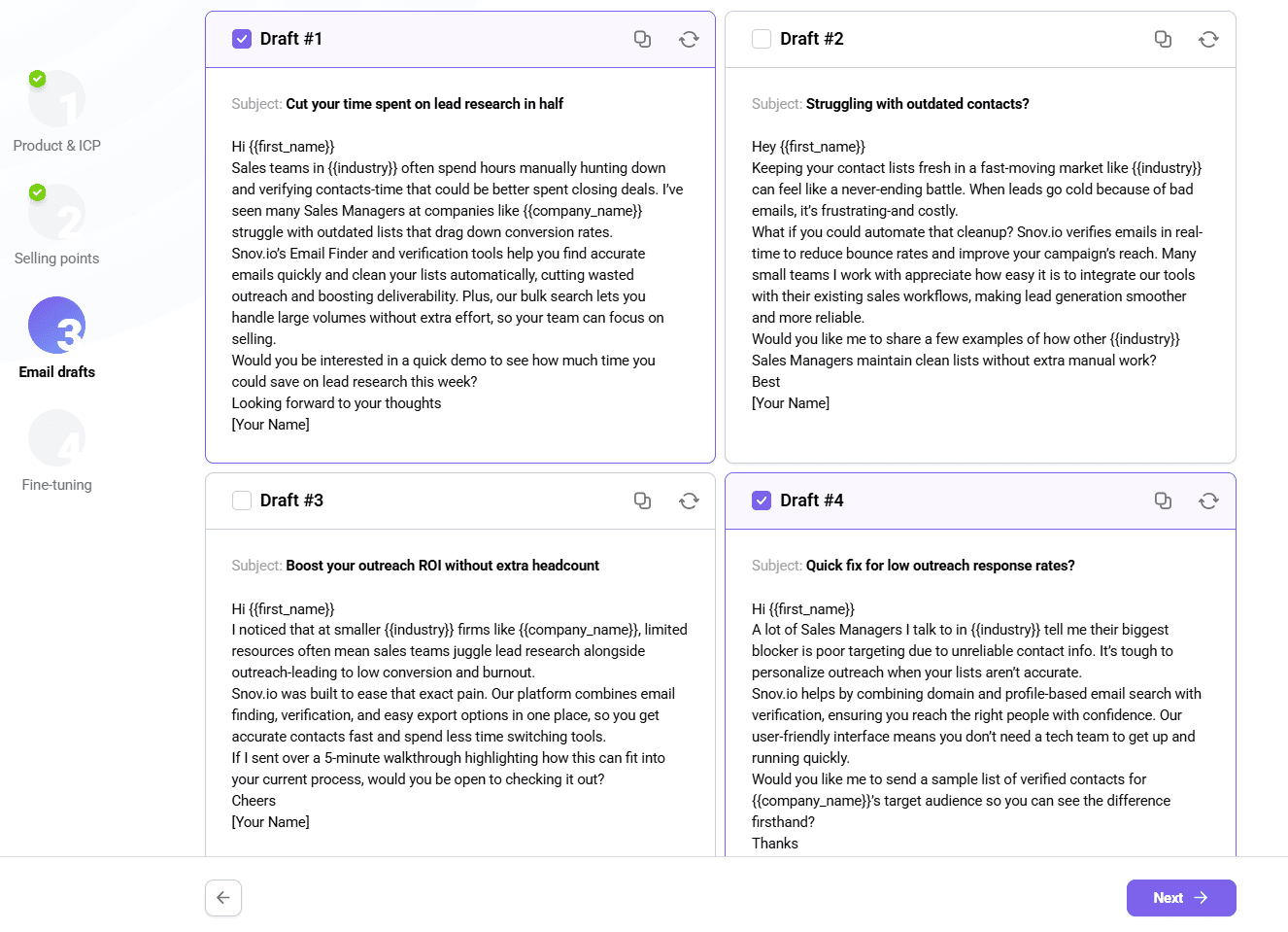 Snov.io also provides an ICP-based AI writer that generates outreach copy tailored to your audience and campaign goals. Besides, while Expandi’s AI is available only in English, with Snov.io AI writing tools, you can translate your message into 36 languages in seconds.
Pricing
While both Expandi and Snov.io offer a 7-day free trial for their LinkedIn automation tools, Expandi’s starting price is significantly higher—$99/month compared to Snov.io’s $69/month per slot. Additionally, when used with a Snov.io Sales Suite plan, each LinkedIn slot costs $10 less, making it a more cost-effective option overall.
Key takeaway:
To sum it up, Expandi delivers strong smart-sequence logic for LinkedIn-first campaigns and helps handle replies with AI. However, Snov.io feels like a stronger choice for outreach overall, especially because it supports multichannel more completely and offers more tools to build, enrich, and scale campaigns in one place.

How to choose the right LinkedIn automation tool
Your choice should start from your goals, desired volume, and budget. But before picking a LinkedIn automation tool, I recommend checking these practical factors that directly impact your outreach results:
Safety measures
This is the most important thing to consider. Your LinkedIn automation tool should support conservative limits and human-like pacing to keep activity consistent and realistic. Look for platforms that provide control over daily actions and safety guardrails to avoid suspicious activity spikes that can trigger automation detection and lead to account restrictions.
For instance, here is how the Snov.io LinkedIn automation tool keeps your outreach safer:
- Location-based proxy for each LinkedIn account
- Granular control over daily activity limits
- Automatic activity pause to stay within safety caps
- Smart randomized delays between actions to mimic natural human behavior
- Automated LinkedIn warm-up tool to prepare an account for outreach
- LinkedIn account rotation to increase outreach volume more safely by splitting it across multiple accounts
To keep your account safe and your acceptance rate high, it’s also important to monitor pending requests. Check whether the LinkedIn automation tools you’re considering let you manage them easily. In Snov.io, you can even enable an automated mode that removes pending requests daily to ensure you don’t exceed safe limits.
Personalization features
The eneric approach to LinkedIn outreach stopped working long ago, so in 2026 it’s almost a crime to use it 😃. That’s why I recommend ensuring your tool lets you send personalized LinkedIn messages at scale. Check how the platform handles variables, dynamic fields, and lead segmentation to make your outreach feel more tailored.
Multichannel support
If emails are also a part of your cold outreach strategy, look for platforms that combine LinkedIn and email automation. Check whether the tool supports your email service provider so you can connect your account smoothly. I also recommend looking for platforms that have a built-in email finder so you can add leads enriched with contact details directly to your multichannel campaigns.
Integrations and CRM sync
Check whether a LinkedIn automation tool integrates with the rest of your other outreach stack. Look for CRM integration to seamlessly sync lead statuses, conversation updates, and key events without manual copying. Also, review which import options are supported so you can add prospects from your lists to LinkedIn sequences.
Reporting and analytics
Strong analytics help optimize your message copy and targeting more effectively. See what reporting options the platform provides and how easy it is to analyze and compare campaigns over time in the native dashboard. Look for clear metrics beyond basic activity counts, such as acceptance rate, reply rate, sentiment analysis, and other actionable insights.
⮕ Discover the best LinkedIn analytics tools for 2026
I also recommend reviewing the platform’s support quality. Check which channels you can use to get assistance and what response time you can realistically expect. Prioritize LinkedIn automation tools with clear onboarding and human-agent support to ensure a smoother experience and faster troubleshooting.
Final verdict: Is Expandi worth it?
After testing the platform and analysing user feedback for the most complete Expandi review, I am ready to give my verdict.
Yes, Expandi is worth considering if your main outreach efforts are focused primarily on LinkedIn and you want smart, behavior-based automated sequences with a cloud-based setup.
However, from my testing experience, Expandi feels less complete for true multichannel outreach, mainly because email steps heavily depend on the availability of email data.
So, if you need a robust solution for LinkedIn and email automation or simply want to use emails for bypassing the platform’s limits, Expandi is not really what you’re looking for.
If multichannel outreach is a core part of your strategy, Snov.io is the stronger choice overall thanks to its built-in prospecting, verified email discovery, and advanced outbound capabilities.