TL;DR: How to avoid spam filters
Even the most legitimate emails sometimes fail to reach the inbox, despite the best outreach practices. To make sure yours don’t, follow the proven expert tips to avoid spam filters in Outlook, Gmail, Yahoo Mail, or other email service providers (ESPs):
- Verify your email lists regularly to steer away from spam traps and reduce bounce rates
- Warm up email accounts before doing outreach at scale
- Set up SPF, DKIM, and DMARC authentication properly
- Avoid spam trigger words and misleading subject lines
- Don’t overload messages with attachments, visuals, links, or heavy HTML formatting
- Maintain a stable sending volume
- Segment and personalize emails to improve engagement and reduce spam complaints
- Comply with email regulations (GDPR, CAN-SPAM Act, or others, depending on your location)
- Monitor your deliverability rate and ask recipients to whitelist you if emails keep landing in spam
Keep reading to dig deeper and get expert guidance on each.
What if I told you that about 46% of all emails get buried in people’s spam boxes? Just think of it. You hit send, and practically every 2nd email ends up in the recipient’s spam or junk folder. Whether you’re an email marketing pro or a sales rep sending cold emails, you’d definitely want to find sure-fire ways to avoid spam filters.
This article will provide you with the key guidelines on how to avoid spam folders, so your marketing emails (or cold emails) will never be marked as spam or blocked by ESP algorithms.
Key points of this guide:
- What are spam filters, and what triggers them?
- How do spam filters work in different email providers – Gmail, Outlook, and Yahoo Mail?
- How to avoid the spam folder and improve email deliverability
- How to reduce your spam score and get emails out of the junk folder
- How to avoid spam filters: a simple takeaway formula
What are spam filters, and what triggers them?
Spam filters are algorithm-driven systems that help email service providers (ESPs) detect potentially harmful or undesirable messages before they hit users’ main inboxes. After detection, each unsolicited email is sent either to the junk/spam folder, quarantine (or greylist), Offers/Promotions, or other tabs.
The goal of spam filters is to protect users from phishing, malicious software, or low-quality, unwanted emails sent in large piles by spammers.
The most common triggers of spam filters are as follows:
- Missing authentication protocols, such as SPF, DKIM, and DMARC
- Poor sender reputation
- High bounce rates
- Spam complaints from users
- Image-heavy emails
- Too many links
- Large files attached to messages
- Inconsistent sending patterns (especially with volume spikes going above 5,000 emails)
- Spam trigger words
- Sending from new accounts without warming them up first
Modern ESPs typically rely on a combination of those, not just one trigger. Yet, even a single issue may hurt your deliverability.
How do spam filters work in different email providers – Gmail, Outlook, and Yahoo Mail?
Let’s look at the spam-detection algorithms implemented by the most popular email service providers.
Gmail spam filters
When evaluating emails, Gmail primarily relies on AI-powered algorithms and considers the following factors:
- Sender’s reputation: Domains/subdomains, IP address characteristics
- Email domain authentication: SPF, DKIM, and DMARC
- Bulk sending patterns: “Bulk senders are scanned more closely,” according to Google
- User feedback (spam complaints) and engagement signals: Opens, replies, clicks
- Content: Subject line phrasing, obfuscation tricks (e.g., replacing letters like “fr€€” instead of “free”)
🔍 Note: Google Workspace users can turn on more aggressive filtering or make it a bit “milder” by applying a custom spam filter.
Microsoft Outlook spam filters
Similar to Gmail, Outlook uses machine learning and AI algorithms but runs a unique SmartScreen filtering process. It assigns a spam confidence level (SCL) to each message.
Here’s what it evaluates when deciding whether to send emails to the Junk folder:
- Sender reputation: IP addresses and domains
- SPF, DKIM, and DMARC
- Spam complaint rate
- Sending anomalies, especially high-volume spikes (e.g., sending 30 marketing emails one day and 10,000 in the next campaign)
- Email content: Suspicious links, Rich Text formatting, and attachments are more likely to be blocked automatically
🔍 Note: Microsoft actively collects user feedback. Some users participate in Outlook’s junk email classification program to help train AI algorithms detect spammers.
Yahoo spam filters
Referred to as SpamGuard, Yahoo’s automatic filtering system moves unwanted emails to the Spam folder based on:
- Spam complaints
- Low user engagement: Opens and interactions
- Poor sender reputation
- Improper authentication: SPF, DKIM, and DMARC
- Malicious links
- Suspicious-looking content in subject lines, headers, copies, or metadata
Yahoo Mail is perhaps the most complaint-first email provider. If people report spam, it is a critical negative indicator for its filters.
How to avoid the spam folder and improve email deliverability
For this section, I’ve rounded up professional recommendations from experts on tackling email deliverability issues and bypassing spam filters. They will help you make every email campaign actually arrive in the right place — where it belongs — your recipients’ inboxes.
So, here’s how to avoid spam filters.
Beware of spam traps and verify your email list
Spam traps are email addresses used by anti-spam organizations (e.g., Barracuda or Spamhaus) or email providers to catch and blocklist spammers. Hitting at least one such trap would be a red flag, signaling that you scrape emails in bulk, have poor list hygiene, or buy contacts for spamming purposes.
Spam traps differ by type:
- Pristine trap: Concealed within lines of code on websites or forums to identify email senders who use scraped lists
- Typo trap: Contacts with typos like @gnail.com or @yahhoo.com
- Recycled trap: Abandoned and repurposed email accounts
So, it’s always better to verify your email lists to ensure your messages reach real recipients. Plus, email verification will save you a big chunk of your budget.
For example:
Learn from the hands-on experience of Arquitetura de Vendas. The company used Snov.io’s Bulk Email Verifier to validate hundreds of email addresses from CSV files for cold outreach. It turned out that from 2,100 contacts, only 446 were valid. So, bulk email verification helped their emails land in the Inbox instead of the Spam folder.
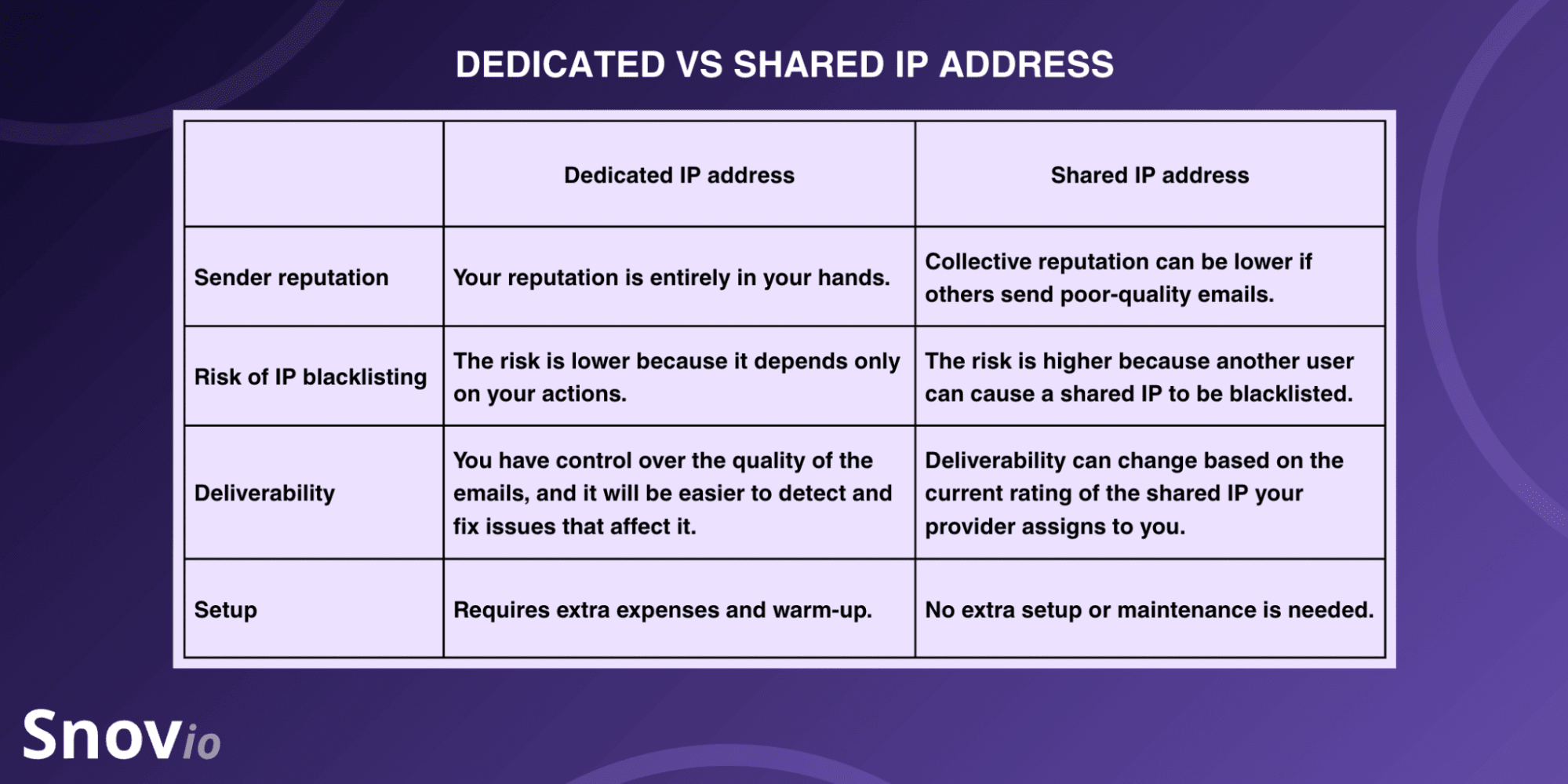
Use dedicated instead of shared IPs
Shared IP addresses are IPs used by two or more people simultaneously when having the same Internet service provider or local Wi-Fi connection (at work or in a cafe). What if such an IP address is used for illegal purposes and gets blocklisted? If it is, you’ll get a poor sender reputation, which means a higher chance of getting flagged as a spammer.
In this situation, set up a dedicated IP address to take a cautious approach and avoid spam filters. Dedicated IP addresses are unique IPs associated with a specific hosting account that only you can access.
However, shared IPs don’t necessarily have poor ratings. In some cases, it’s better to choose a shared IP with a good sender score rather than a new IP with zero reputation. Compare the pros and cons of both before deciding on the right option for sending emails.
In any case, check your IP reputation regularly. There are numerous free tools, such as EasyDMARC’s IP Reputation Lookup tool, IP Fighter, or Sender Score, to check IP addresses and see whether they are not blocklisted.
Warm up your account before a high-volume email campaign
Spam filters may be triggered when email accounts, especially new ones, suddenly start sending tons of messages. So, whether you have a new or old account and want to send cold emails in large volumes, warm it up first to improve your sender reputation and email deliverability.
To automate this process, rely on tried-and-tested email warm-up tools. Consider Snov.io, Warmbox.ai, Mailwarm, or other reliable platforms.
For better deliverability, we use built-in Email Warm-up to grow our account’s sender reputation, meaning email service providers never flag our emails as Spam or even Promotions. Now our emails always land in the Inbox, where they get the most attention.
CEO at inseed.marketing

Snov.io’s Email Warm-Up tool automatically sends realistic emails, generates replies, and even “unspams” them if they land in spam or junk folders to “polish” your reputation.
💡 Expert tip:
Warm up your new mailbox at least 30-40 days before your future campaigns. But if it’s an existing account with deliverability issues, run a warm-up for at least 6 weeks. As for daily email volume, experts recommend starting with 2 emails/day and gradually increasing it to 40 emails/day.
Check your technical setup (SPF, DKIM, DMARC) and deliverability
Another proven tactic on how to avoid spam folders and stay absolutely safe on the tech side is to ensure your SPF, DKIM, and DMARC are properly set up.
- SPF, aka Sender Policy Framework, is a special DNS record that contains all the IP addresses from which you can send emails from your domain name.
- DKIM, aka DomainKeys Identified Mail, is a mechanism that uses two encryption keys, private and public. This is the second step in preventing spoofing.
- DMARC, aka Domain-based Message Authentication, Reporting, and Conformance, is a protocol that defines what to do when a message fails the first two authentication steps (SPF and DKIM).
To find out whether you have any technical or deliverability issues, turn to free tools such as Google Postmaster Tools or Snov.io Deliverability Check.
Within the latter, for instance, you can run an inbox placement test that will calculate your email deliverability rate and Domain Health score to ensure it doesn’t trigger spam filters.
You can also check whether your SPF, DKIM, and DMARC records are properly set up (if they are, you’ll see green ticks next to each).
Use a clear and trustworthy sender name
Not a standalone trigger, the sender name might still influence filtering decisions when it goes in tandem with other common triggers. Moreover, it affects how recipients treat your campaigns: if they don’t recognize you, they might mark your emails as spam.
I’ve compiled several name-related “dos and don’ts” to help you avoid spam filters (and spam complaints, too):
❌ Don’t use numbers or characters like salesrep947724@company.name.
✅ Stick to consistency and don’t change your sender name too frequently.
❌ Avoid a sender identity mismatch. Ensure your sending domain relates to your company’s name and main domain.
✅ Make it more recognizable by adding your full name or your company name to the email sign-off: e.g., “Best regards, Maryna Toryshchak from the Snov.io team.”
❌ Avoid vague addresses like noreply@company.name. Replace them with your actual name.
Here’s what a seasoned email marketing strategist says about noreply@ addresses:
noreply@ is the biggest sin in email marketing. It looks small but it kills trust faster than a bad subject line! That noreply@ sender name signals 1 thing: We do not want to hear from you. […] Email is not a billboard, it’s a conversation. The moment you block replies, you turn a relationship channel into a one-way announcement.
Owner of Polaris Growth

If you want to send from a generic address, it’s much better to use something that matches what the email is about: e.g., updates@company.name for product changes or recent articles on your blog.
Avoid spam trigger words
The language of your email message is also thoroughly analyzed by spam filters. If you overuse the words that trigger spam filters in your email subject lines and copies, your emails may be automatically sent to the spam folder.
Below, I’ve categorized the most widespread spam trigger words and phrases:
- Excessively hyped: Best-ever, exclusive, once-in-a-lifetime
- Aggressive and salesy: Click here, don’t miss out
- Financially overpromising: Make money fast, the lowest price, no hidden costs, earn extra cash
- Urgent and pressing: Act now, don’t delete, last chance
- Guaranteeing zero risk: Guaranteed, risk-free
- Freebie-offering: 100% free, bonus deal
As for cold emails, sales outreach experts also recommend avoiding several outdated phrases that may trigger both users’ spam complaints and algorithmic filters. Among them:
- “Quick question for you…”
- “I hope this message finds you well.”
- “I’d love to pick your brain about…”
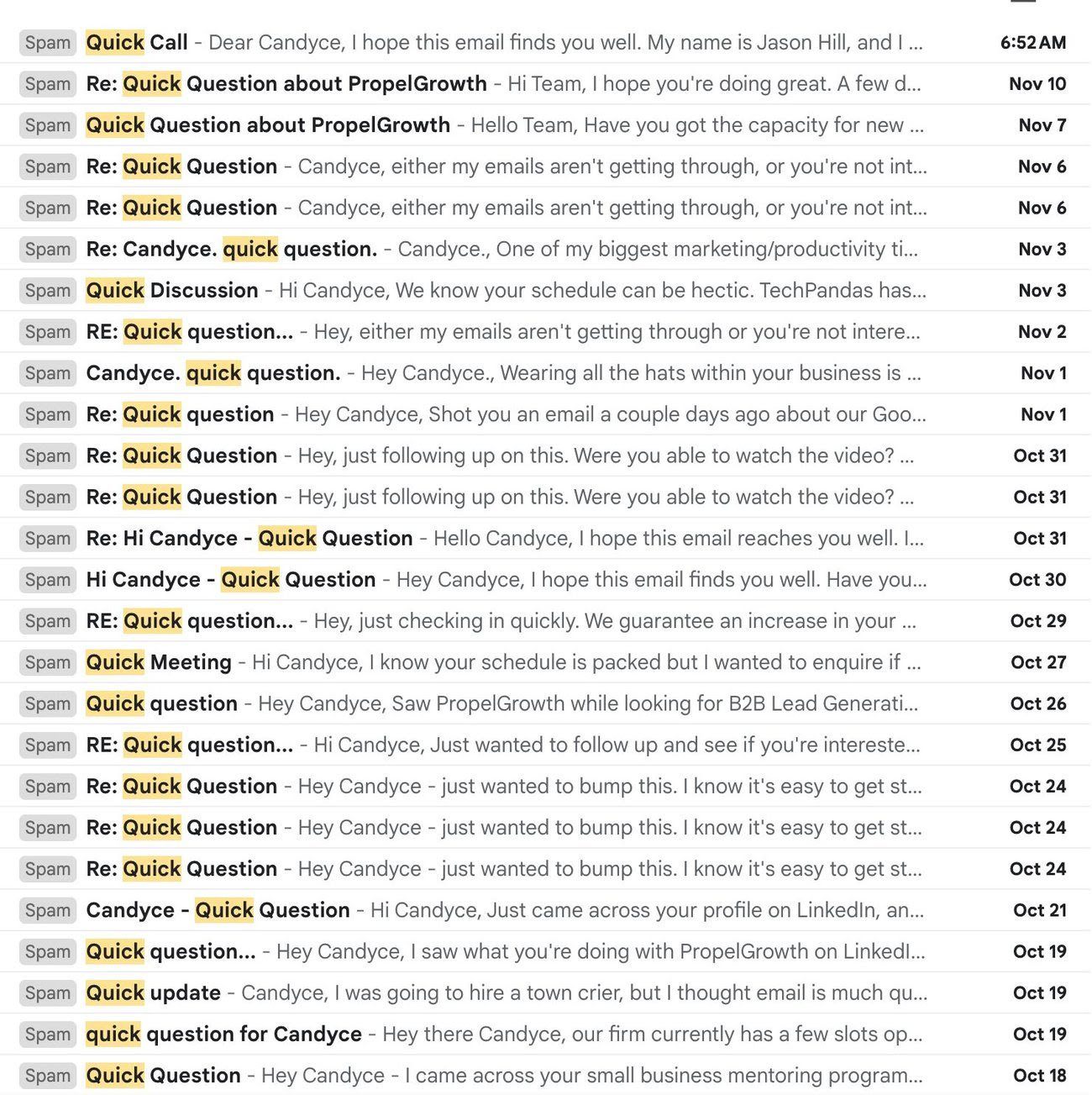
For example, if you review this screenshot from the Spam box, you’ll see that literally every subject line contains either a “Quick question,” Quick call,” or “Quick meeting.”
👉 Read and download a list of 550+ spam trigger words to ensure you avoid them in your emails.
Don’t overload emails with HTML-heavy content and attachments
Email deliverability may also be affected by HTML-heaviness.
Here are the elements that make emails “heavier”:
- Attachments: Instead of sending a file as an email attachment, include a Google Drive link (which, by the way, is automatically scanned for viruses and looks trustworthy to both email providers and recipients).
- Too many CTA buttons: Too many CTAs distract people and look suspicious to spam filters. Aim for one, but a clear call to action.
- Too many links: Insert only one link if possible.
- High-resolution images or interactive elements (e.g., a countdown timer or a GIF): Resize visuals to ~150 KB.
These nuances may seem too petty, but, in fact, they affect your inbox placement more than you may think.
💡 Expert tip:
Stick to a healthy text-to-image ratio in messages. Email marketing and cold outreach professionals suggest the following.
Still hesitating which to stick to? Slightly change and A/B test them to see which works best for your email campaigns.
Comply with relevant email regulations
Compliance shows that you respect your recipients, reducing the likelihood that they click the “Report spam” or “Report Junk” buttons, which can affect your email deliverability. In practice, it presupposes that you use double opt-in and opt-out mechanisms in email communication.
Below are the two key regulations every email sender should comply with in 2026:
- The GDPR (EU) → It obliges email senders to collect people’s consent to receive messages from them. It is also advisable to enable double opt-in for newsletter subscriptions.
- The CAN-SPAM Act (US) → It obliges email senders to provide straightforward opt-out mechanisms.
Under the CAN-SPAM Act, in particular, every sender must follow even more specific rules to be on the legal side. They include:
- Accurate header
- Non-deceptive subject line
- Valid physical address
- Ad disclosure: If it’s a promotional message, it should be explicitly disclosed (e.g., “This is an advertisement from [Company Name]”)
- Clear opt-out mechanism with an unsubscribe link at the bottom of the email copy.
Also, don’t forget to clarify the regulations of your (and your recipients’) country. For example, CASL (Canada’s Anti-Spam Legislation) for Canadians or the Spam Act 2003 for Australians.
⚠️ Note:
As of February, 2024, Gmail has added obligatory requirements for bulk senders with over 5,000 email marketing messages per day. They must support a one-click unsubscribe button and include a clearly visible unsubscribe link in every message body.
Monitor your metrics regularly
Having low open rates and high spam rates is the quickest way to get suspended by ESPs. Then, there are bounced emails. The higher your bounce rate, the more damage to your reputation. The lower your sender reputation, the closer you get to being blocked by email service providers.
So, you should always monitor your email campaign’s performance and make the necessary adjustments to improve the results. If you need something to compare your rates to, check the average numbers in the table below.
⚠️ Note:
Be extra careful while tracking open and click-through rates if you want to avoid spam filters. Email providers may treat tracking pixels as a promotion. For example, emails with UTM parameters often go straight to the “Promotions” tab in Gmail. It would be better to set up a custom tracking domain to achieve stable email deliverability.
How to reduce your spam score and get emails out of the junk folder
But what if your email campaign is already landing in the spam folder? Actually, it’s possible to get out of there and even decrease your spam score.
Use the following tips to do that.
Stop writing misleading, salesy, or manipulative email subject lines
Do not give false promises if you are not going to keep them. Using a misleading subject line will destroy the trust your recipients have in you when they open your emails and will increase your spam rate.
But then, there’s aggressive email marketing when senders sound too pushy. Others try to trick people into opening.
Just like in these email subject lines in marketing emails I’ve received lately:
- “Your order is ready with 2 prizes” (I didn’t place any orders on the website)
- “Re: work.” (highly manipulative because “Re:” is typically associated with replies in email threads)
- “[Reply Required] Everything You’ve Ever Wanted”
- “Urgent Action Required: Protect Your Firm from SRA Fines & Reputational Damage”
And here’s one more example of a dramatic and salesy-sounding “Grow or Die” subject line:
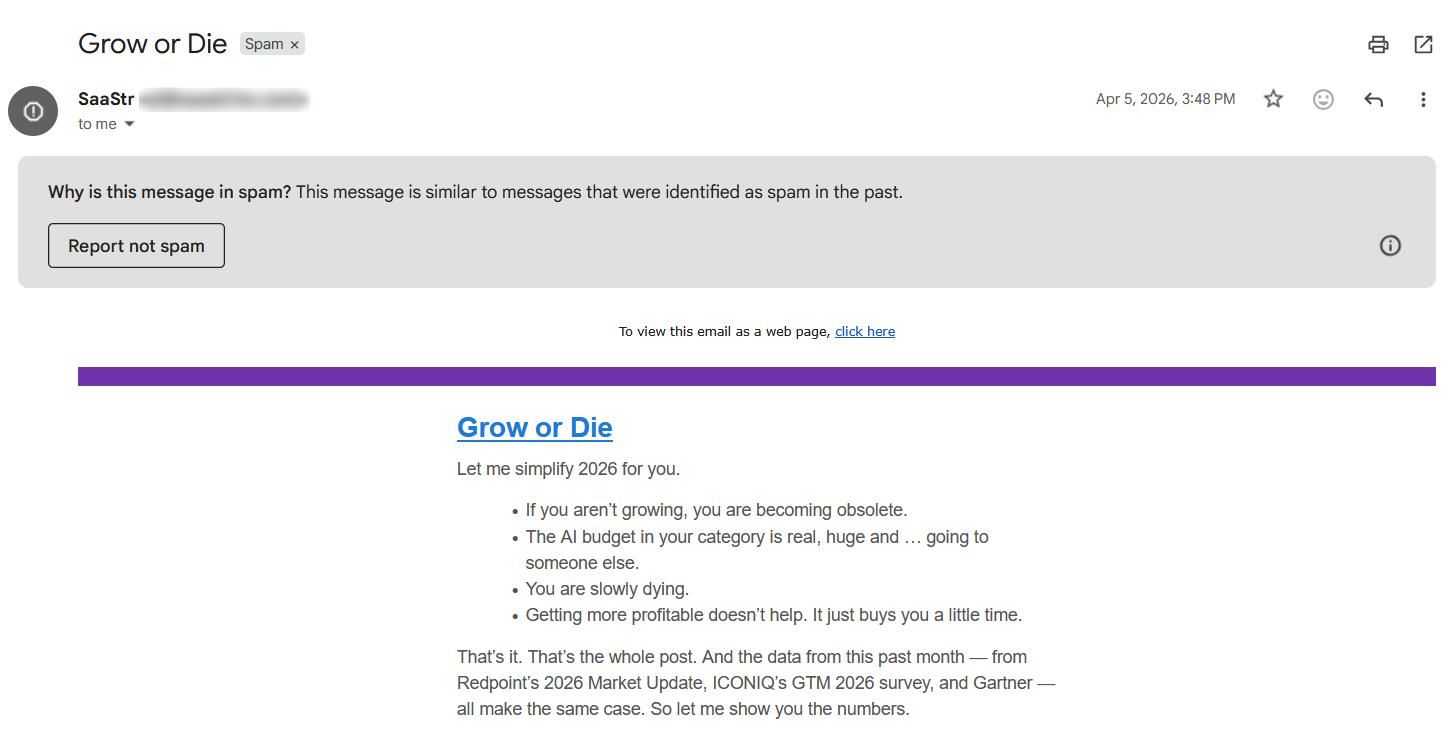
As you see, it landed right in my Spam folder, which is not a surprise.
Good emails don’t push. They remove friction, create confidence, and make the next step feel natural.
Marketing Delivery Manager at Sopro

Learn how to write relevant, non-salesy email subject lines for cold emails and follow-ups from our blog guides.👇

Double-check your grammar, spelling, and punctuation
Avoiding any kind of mistakes is particularly relevant in the context of spam complaints. Poor grammar and spelling, accompanied by excessive punctuation, are distinct features of spammers.
Here’s what to double-check and get rid of (if any):
- Grammar: Awkward phrases, missing articles, wrong verb tenses
- Spelling: Typos, misspelled names, broken personalization tags (e.g., “Hey [FirstName]” instead of the actual name), ALL CAPS, symbol substitutions or obfuscations to deceive filters and sneak spam trigger words inside: “Gu@ranteed” or “L0west pr1ce”
- Punctuation: Too many exclamation points or question marks (e.g., “Act now!!!!!” or “Interested in this offer????”), combinations of symbols like dollar signs “$$$”
Such emails look unprofessional to say the least. An overwhelmingly large number of mistakes can cause enough disappointment and anger to send them to the spam folder.
Stick to a consistent and safe sending volume
When you send 20 messages a day, that’s one thing. But quite another is when your volume is suddenly jumping to 1,000 or more emails. Spikes like that, as if out of the blue, are red flags for most email service providers.
See the Gmail sending limits explained by Snov.io’s outreach experts in the table below.
Cold outreach experts also advise distributing your email volume across several sending domains for high-volume email campaigns.
I stick to 30 emails/day per mailbox, max. Spread your volume across several domains. Fewer red flags, more consistency.
Founder of Pipeline.tech

And for that, Snov.io offers a done-for-you email account setup with as many DFY domains as you need.
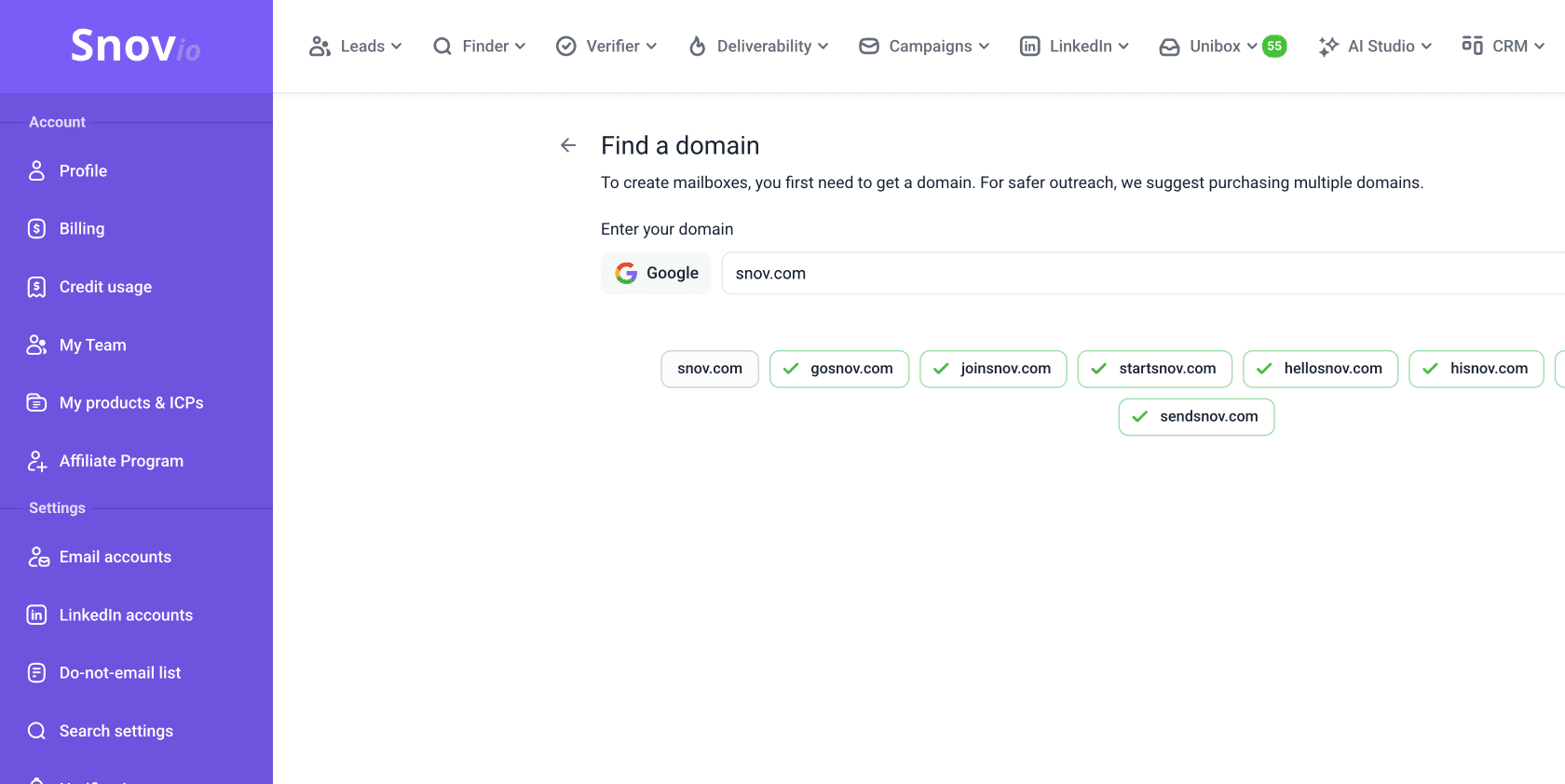
You can start your cold email outreach with 2-3 domains (up to 5 mailboxes per domain) and rotate them as needed.
👉Learn how to send 10,000 emails at once without triggering spam filters and undermining your email deliverability rate.
Ask for whitelisting
Sometimes it’s the simplest way to minimize unnecessary risk, reduce spam rate, and improve your email deliverability, or even extract your messages from junk folders when they’re already there.
Just ask your recipients to whitelist your email address (send a request from another account). They can easily do that by reporting “Not Spam” or “Not Junk” and adding it to their “Contacts” list in Gmail or “Safe Senders” list in Microsoft Outlook. This will be a clear user action notifying spam filters that your marketing or cold emails are actually wanted.
Consider the following example:
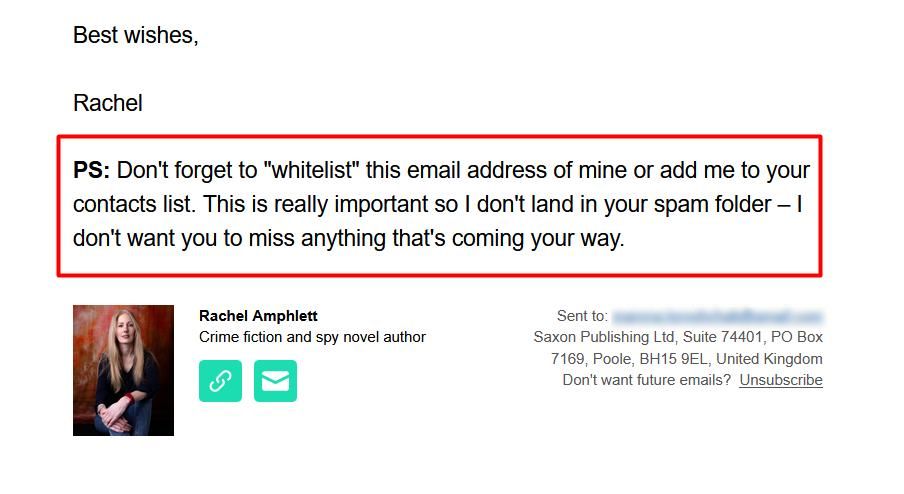
As an option, you may ask your recipients to create a custom filter that will always allow messages from your email address.
Segment and personalize your emails
Spammers don’t bother with targeting, and their messages are practically identical. If yours are alike, spam filters will detect this similarity in the blink of an eye. People, too, will notice it pretty quickly and redirect emails to their junk/spam folders.
So, if you haven’t done it yet, segment your target audience and create your ideal customer profiles (ICPs) based on the following factors.
Email segmentation factors for B2C:
- Demographics: Occupation, income, gender, marital status, age
- Location: Country, language, climate
- Psychographics: Pain points, hobbies, goals
- Behavior: Purchase history, email open and click-through rates, loyalty signals
- Needs and values: Price sensitivity, sustainability, ethical values
Plus, a couple of additional email segmentation factors for B2B specifically:
- Firmographics: Industry, company size, annual revenue, growth stage, job role
- Technographics: Website platform, CRM system, team collaboration app
After that, personalize segmented emails by adding your recipient’s first name, company, industry, and more specifics — there is no limit. Use custom email variables to add a human touch that will look real and relevant to both ESP filters and recipients.

How to avoid spam filters: a simple takeaway formula
Avoiding spam filters and improving your deliverability comes down to establishing and maintaining trust with both email service providers and recipients. It is only possible if you follow the legal, technical, and ethical guidelines when writing and sending emails.
The shorter takeaway formula is:
[Verified lead lists + Warmed-up mailbox + Proper technical setup + Personalized email subject lines and copies + Consistent, safe sending limits = No spam and Better inbox placement]
If you want to always stick to the safer side of email marketing or cold outreach, tools like Snov.io can help you verify email lists, warm up domains, generate and automate personalized messages at scale, and monitor deliverability issues before they ruin your campaigns.