Salesforce’s 2026 State of Sales report has revealed that sales reps spend only around 40% of their time selling. Much of the rest goes to administrative work and tracking customer information. Pipedrive’s research highlights another challenge: 62% of sales professionals say disconnected tools cause them to miss deals at least once a week.
Jevu.ai aims to address these challenges by bringing call recordings, transcripts, summaries, and specific tasks and next steps from each conversation together in one workspace.
I decided to put it to the test and see how much it actually helps with everyday sales work.
TL;DR
Jevu.ai is an AI notetaker that transcribes sales calls, creates summaries, extracts action items, and analyzes conversations.
- You can use its Google Meet bot, upload existing audio or video recordings, or record directly through your microphone.
- Jevu offers speaker-labeled transcripts, AI summaries, call scoring, an AI Agent that can analyze up to 60 recent meetings, and call analytics.
- Snov.io users can connect call insights to their CRM, update prospect records, link calls to deals, and create follow-up tasks.
- I tested Jevu with 10 recordings, and it handled them well. Transcription was both quick and accurate, speakers were identified correctly, and summaries followed shortly after the transcripts were ready. The Google Meet bot also worked as expected.
- Jevu uses a minute-based pricing model. Snov.io subscribers also receive a monthly transcription allowance as part of their plan.
My verdict: Jevu is easy to use and offers practical tools for reviewing calls and keeping track of follow-ups. If you spend a lot of time replaying recordings and taking notes, it’s worth trying.
What is Jevu.ai?
Jevu.ai is an AI notetaker. It transcribes your sales calls, generates summaries, and extracts action items so you can review conversations without replaying entire recordings.
There are 3 ways to add calls to Jevu:
- Have its bot join a Google Meet meeting
- Upload an existing recording from another platform
- Record a conversation directly using your microphone
The tool currently supports English, Ukrainian, and Brazilian Portuguese. It can also handle conversations that mix these languages with English sales and IT terminology.
Jevu integrates directly with Snov.io CRM, making it easy to turn a call into action. With one click, you can create a CRM deal, log the AI-generated summary as a call activity, and create follow-up tasks based on the action items, all within your Snov.io pipeline.
Jevu.ai is primarily designed for sales representatives, sales managers, customer success teams, and founders who want to take repetitive tasks off their plate and focus on more strategic work.
Jevu.ai key features
Now, let’s look at Jevu.ai’s main features and what you can use each one for:
- AI-powered transcription and summaries: Turn conversations into speaker-labeled transcripts and summaries covering key points, action items, and next steps.
- AI call scoring: Receive scores for calls based on templates for discovery, demos, and negotiations, with assessments of discovery questions, objection handling, talk time, and next steps.
- AI Agent: Ask questions about up to 60 recent calls and uncover recurring themes, pricing objections, open tasks, and deal risks.
- Snov.io CRM integration: Sync call insights with Snov.io CRM, including prospect updates, deal creation, call activity logs with AI summaries, and follow-up tasks based on action items.
- Multiple recording options: Capture meetings through a Google Meet bot, upload existing audio or video recordings, or record directly through a microphone.
- Call analytics: View an overview of call activity, including call volume, talk time, topics, and sentiment.
These features look useful on paper. Here’s how I put them to the test.
How I tested Jevu.ai
To see how Jevu.ai handles real sales conversations, I tested it with 10 call recordings. All were in English, lasted 3-15 minutes, included at least 2 speakers, and varied in audio quality. Alongside uploading recordings, I tried the Google Meet bot and AI Agent.
When evaluating the tool, I mainly looked at the following:
- Transcription accuracy: How well it captured the conversations, including the harder-to-hear sections
- Speaker identification: Whether Jevu told participants apart correctly
- Summary quality: How well the summaries captured the main points and takeaways
- Call scoring: How relevant the scores were and whether transcript evidence backed them up
- AI Agent performance: How well it answered questions about sales conversations and surfaced useful insights
With this in mind, let’s see how Jevu.ai performed.
How I used Jevu.ai to turn sales calls into actionable insights
You can try Jevu.ai for free, and that’s exactly how I got started. Also, if you already have a paid Snov.io plan, it’s available at no extra cost.
Uploading recordings: Transcription and summaries
I started by uploading the 10 recordings one by one to Jevu to see how quickly each file was processed, how accurately the conversations were transcribed, and how useful the summaries were.
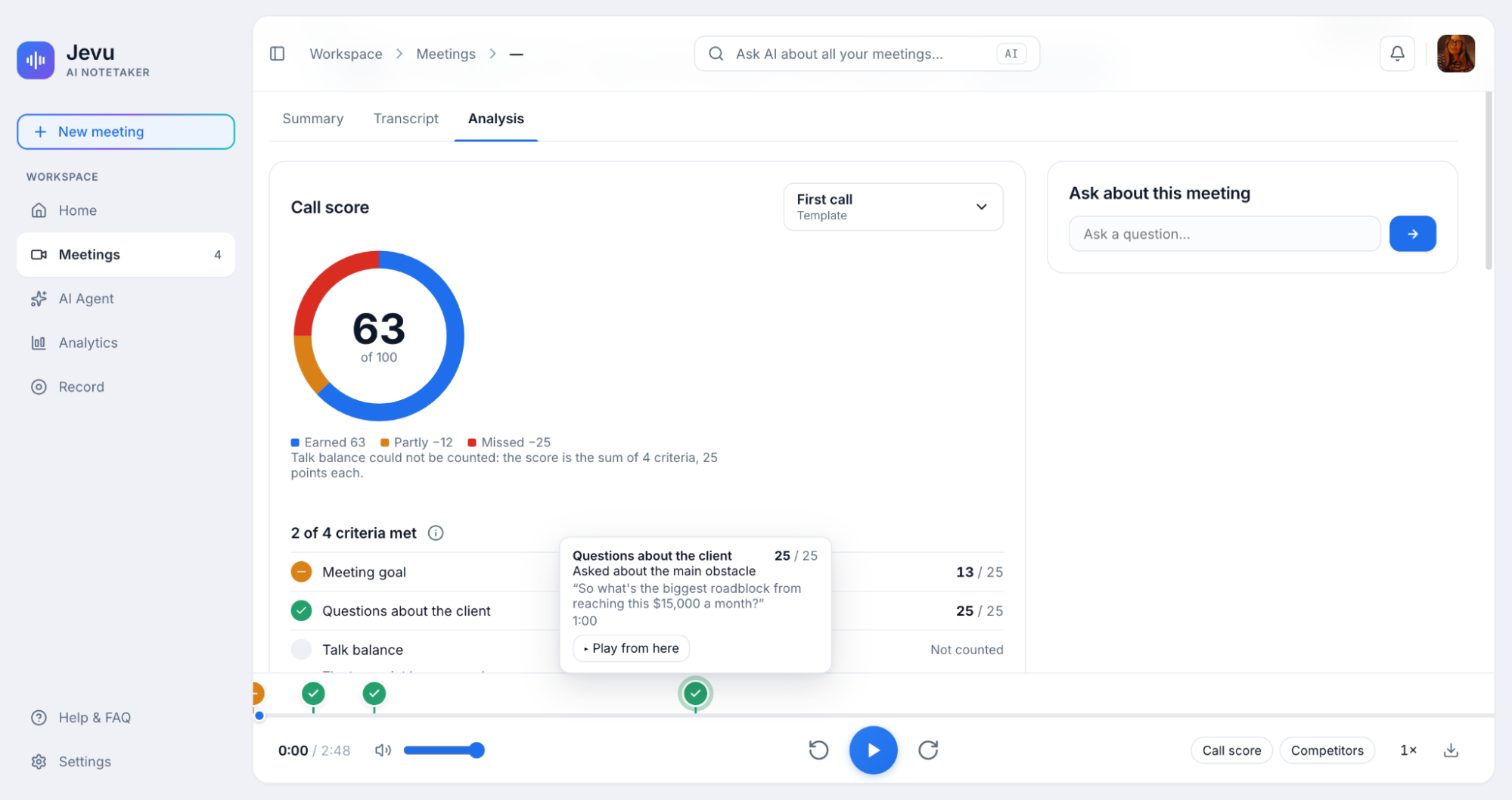
Each recording opens into 3 tabs: Summary, Transcript, and Analysis.
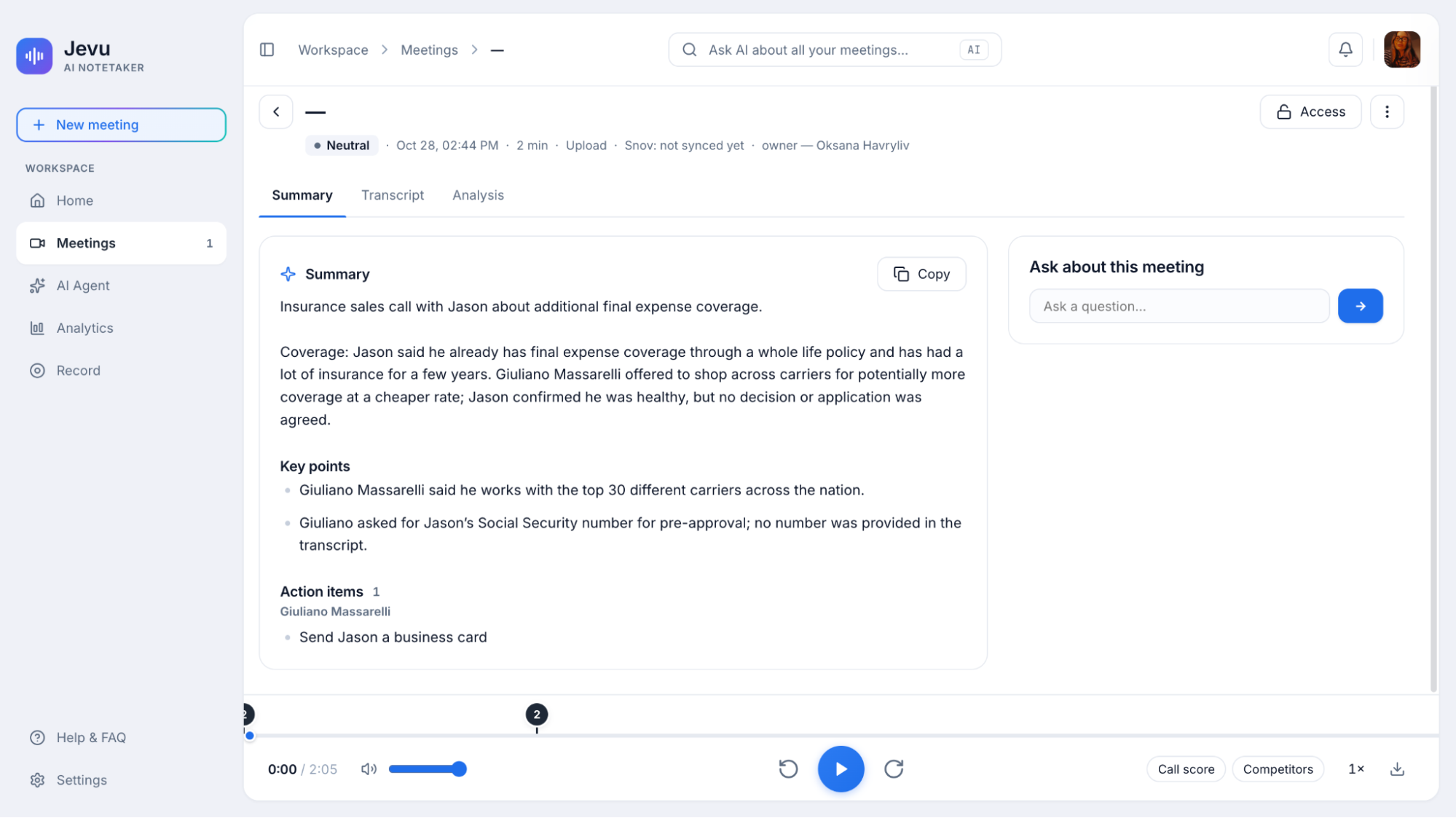
Transcripts were ready within seconds, and summaries followed shortly after. Of course, I went back to the harder-to-follow parts against the original audio, and Jevu captured them well. It also had no trouble identifying the speakers correctly.
One detail I liked was that Jevu.ai highlighted key moments directly in the player, as shown in the screenshot below. Very useful, if you ask me, and definitely saves time when looking for specific parts of a conversation.

Jevu also instantly labeled the conversations as either positive or neutral (in my case), which could come in handy when prioritizing calls.
|
💡 Tip: Turn Jevu’s insights into automated follow-ups Use Jevu’s summaries and action items to decide what to include in your next outreach. In Snov.io, build an automated sequence combining personalized emails and LinkedIn steps. Add delays between messages, set conditions to adjust the next step based on prospect engagement, and use goals to stop the sequence when someone replies or books a meeting. |
Reviewing calls: AI scoring and analysis
In the Analysis tab, Jevu gives each call a score. You can choose from different scoring templates, including first call, demo, negotiation, and others.
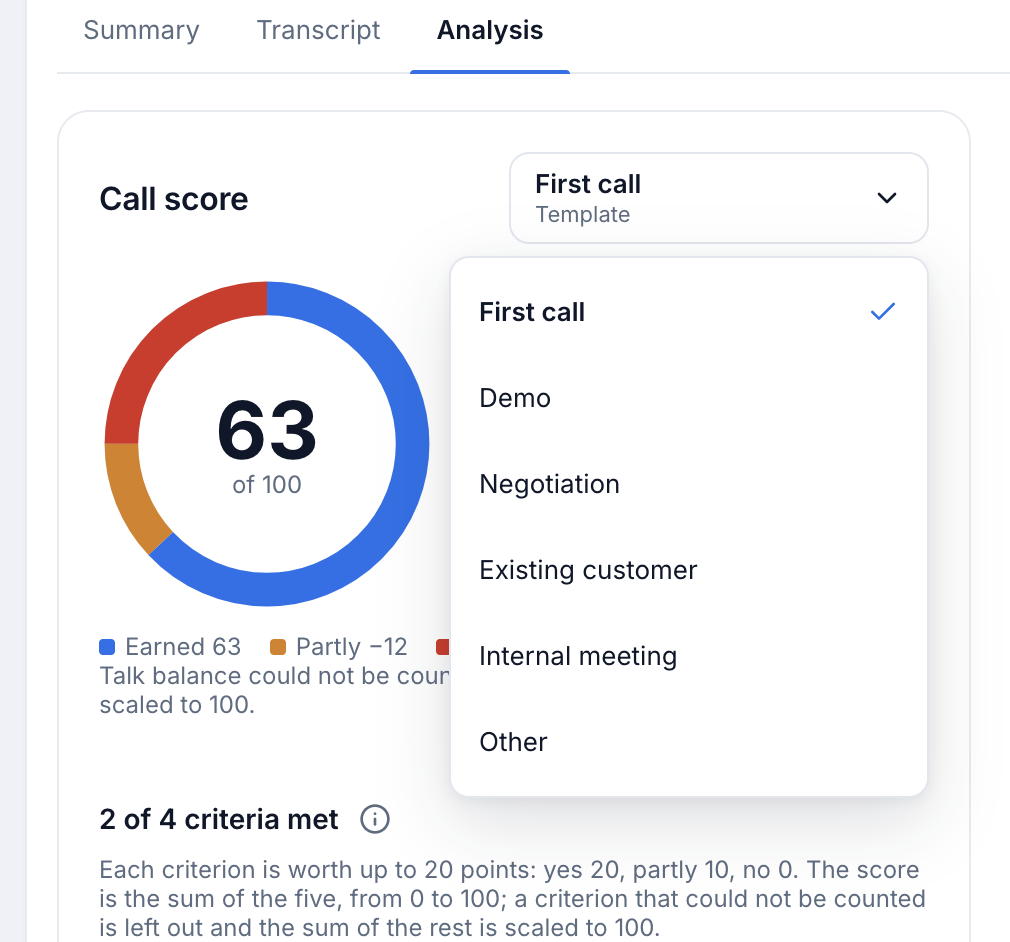
You can also check the criteria Jevu uses to evaluate each conversation, with every score backed by excerpts from the transcript. I found that reassuring because it showed what the assessment was based on, rather than asking me to take an AI-generated score at face value.
Testing the Google Meet bot
I then tested the Jevu bot with a Google Meet call.
To set it up, you simply enter the meeting link and title, add the contact’s email address, and send the bot an invitation.
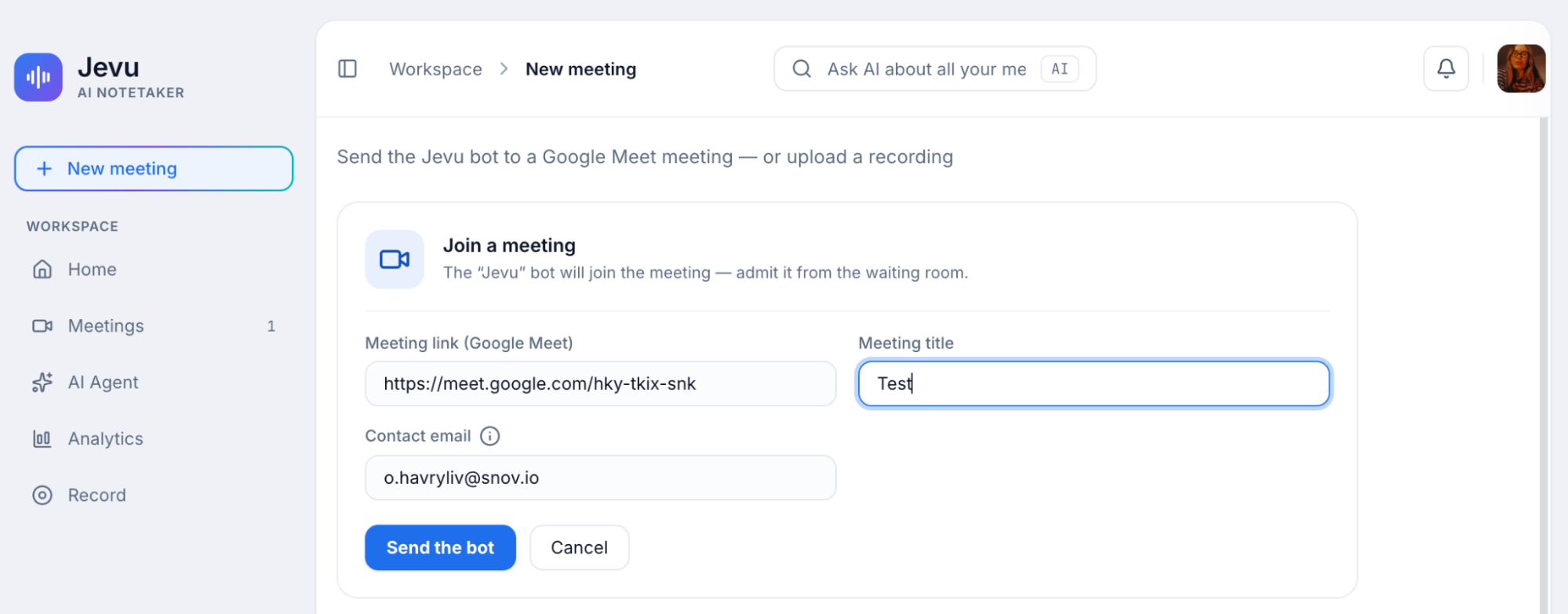
The bot then waits in the virtual waiting room until someone admits it. You can also stop the recording at any point if you need to end it early. Jevu will keep and process everything recorded up to that moment, but it won’t capture anything that happens after the bot is stopped.
Overall, the bot worked well. Transcription took a little longer than with uploaded recordings, but speaker identification was just as accurate.
|
💡 Helpful tip You can use Jevu’s meeting bot for Zoom meetings as well. To do so, add the Jevu app to your Zoom account so the bot can join your calls. You can remove the app whenever you no longer need it. |
Asking the AI Agent for insights
Next, I tried the AI Agent. It works much like ChatGPT or other LLMs, but focuses specifically on your meetings, analyzing up to 60 of your most recently processed calls. You simply enter a prompt and click Run analysis.
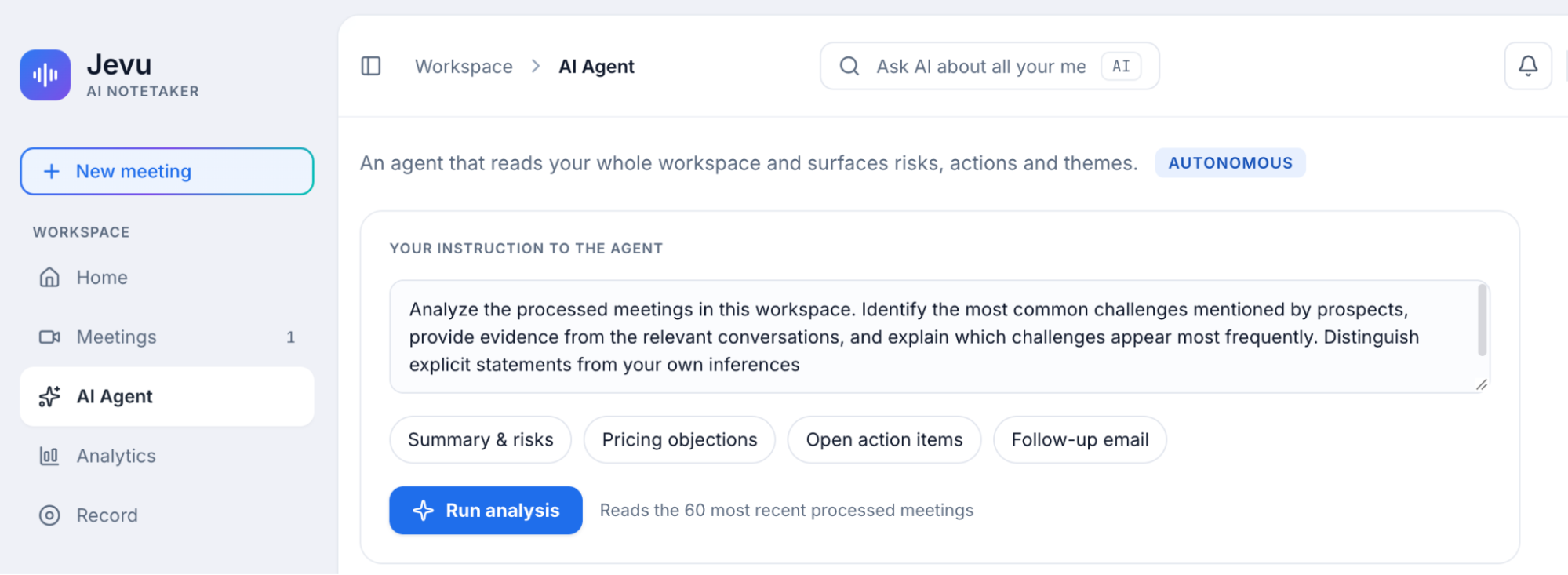
Honestly, I didn’t spend that much time exploring the AI Agent, but I tested it with two practical requests: identify a prospect’s main challenges and find patterns across prospects. It backed up its first answer with relevant transcript excerpts and acknowledged when there wasn’t enough data to identify broader patterns.
💡 Want to get more out of AI for your sales? See how to connect Snov.io to ChatGPT or Claude and run outreach workflows right from your AI chat:
Other details
As for the rest of the interface, it’s pretty simple. The Analytics section gives you a quick look at your meeting stats, including how many meetings you’ve processed and their average duration.
There’s also a Record tab, where you can basically record something straight from your mic and get it transcribed using the same engine as your calls.


How much does Jevu.ai cost?
Jevu.ai uses a minute-based pricing model, so you pay for the audio you transcribe. One minute equals one minute of audio transcribed. For example, a 30-minute call uses 30 minutes from your allowance.
If you already have a Snov.io subscription, you get a monthly transcription allowance included in your plan.
Jevu also offers 3 monthly packages:
| Package | Price per month | Minutes included |
|---|---|---|
| Plus | $12 | 1,200 |
| Pro | $29 | 3,000 |
| Scale | $69 | 8,000 |
*Prices and package details may change, so check the official Jevu.ai pricing page for the latest information.
Is Jevu.ai worth it?
So far, I’ve had a good experience with Jevu.ai. The transcripts were accurate, summaries arrived quickly, and the AI Agent backed up its answers with quotes from the calls.
I also found the tool to be intuitive and easy to pick up, so getting started didn’t feel like another headache. Basically, it’s a low-risk, high-reward solution.
All in all, if you regularly review sales calls and want to spend less time taking notes, Jevu is a solid choice and definitely worth trying.