
Today, LinkedIn Chrome extensions eliminate hours of manual prospecting. They help you scan profiles, find emails, add verified contacts to your CRM, and enrich lead data automatically. Finding these LinkedIn tools isn’t really hard — picking the one that fits your goals and budget is.
To save you time, I’ve personally tested 15 popular LinkedIn Chrome extensions, analyzing their features, pricing, data accuracy, and automation capabilities. Whether you’re a sales rep, recruiter, or an entrepreneur running outbound, the findings I’ve shared in this article will help you choose the right solution without wasting weeks experimenting.
Outline:
- TL;DR: Top Chrome extensions for LinkedIn in 2026 (in my honest opinion)
- How I selected these LinkedIn extensions
- 15 Best LinkedIn Chrome Extensions for 2026 (my test and review)
- Best LinkedIn extensions for lead generation
- Best LinkedIn extensions for enrichment
- Best LinkedIn extensions for sales teams
- Best LinkedIn extensions for recruiters
- How to choose the right LinkedIn Chrome extension
TL;DR: Top Chrome extensions for LinkedIn in 2026 (in my honest opinion)
Based on my testing insights, I’ve compiled a table of the 5 best LinkedIn Chrome extensions I’d personally recommend for lead gen in 2026. Click on each solution for a quick navigation to my detailed description of its features, pricing, real testing results, and my verdict:
*Pricing and credit amount may change, so always consider checking the product’s pricing page for actual data.
Keep reading for a detailed breakdown of all LinkedIn extensions I’ve tested.

How I selected these LinkedIn extensions
For my test, I compiled a list of the most popular (according to user reviews on G2) LinkedIn prospecting tools used by sales and recruiting teams to assess their effectiveness. Here is a list of my evaluation criteria:
Real testing results
I tested LinkedIn Chrome extensions in real time, checking how each email finder extension handles searching contacts from the profile, company, and search results pages. I also evaluated how quickly LinkedIn extensions from the list can capture lead data and smoothly transfer it into my workflow.
Usability
B2B lead generation tools, whether LinkedIn email scrapers or data enrichment solutions, must be not only powerful but also easy to use. So, I assessed how comfortable it is to work with each Chrome extension, how easily they integrate into your typical workflow, and how much time it takes to onboard.
Feature set
LinkedIn email lookup is fine, but as a user, I would like to know what else I’ll get to support effective lead generation. I looked for additional functionality each solution offers — list building, bulk extraction from search results or Sales Navigator, built-in email validation, etc.
Plus, I checked whether each software offers helpful integrations that let me seamlessly plug captured lead data into my CRM or LinkedIn outreach tools.
User feedback
I reviewed what users say about each solution on trusted platforms like G2 to spot recurring opinions about data accuracy, support quality, and overall effectiveness. As users prioritize LinkedIn tools with strong average ratings, I’ve also shared the G2 ratings with you.
Pricing
That’s what’s always a painful moment, especially for small teams or solo professionals. I checked whether the LinkedIn Chrome extensions on my list offer a free trial, what pricing model they use, and how quickly costs scale as your team grows.
Ready to see the results? Let’s go!
15 Best LinkedIn Chrome Extensions for 2026 (My test and review)
I grouped LinkedIn Chrome extensions into four categories based on their primary use case as well as target users:
- Best LinkedIn extensions for lead discovery
- Best LinkedIn extensions for data enrichment
- Best LinkedIn extensions for sales teams
- Best LinkedIn extensions for recruiters.
Each of these categories is discussed separately.
Best LinkedIn extensions for lead discovery
In this section, I’ve compiled a list of LinkedIn Chrome extensions to enhance B2B lead generation through fast lead capture, list building, and CRM sync.
-
Snov.io LinkedIn Email Finder
Best for: B2B sales or marketing teams, startups, agencies, as well as solo founders that need safe bulk LinkedIn email discovery with built-in verification, lead management, and multichannel outreach in one workspace.
G2 rating: ⭐4.5 out of 5
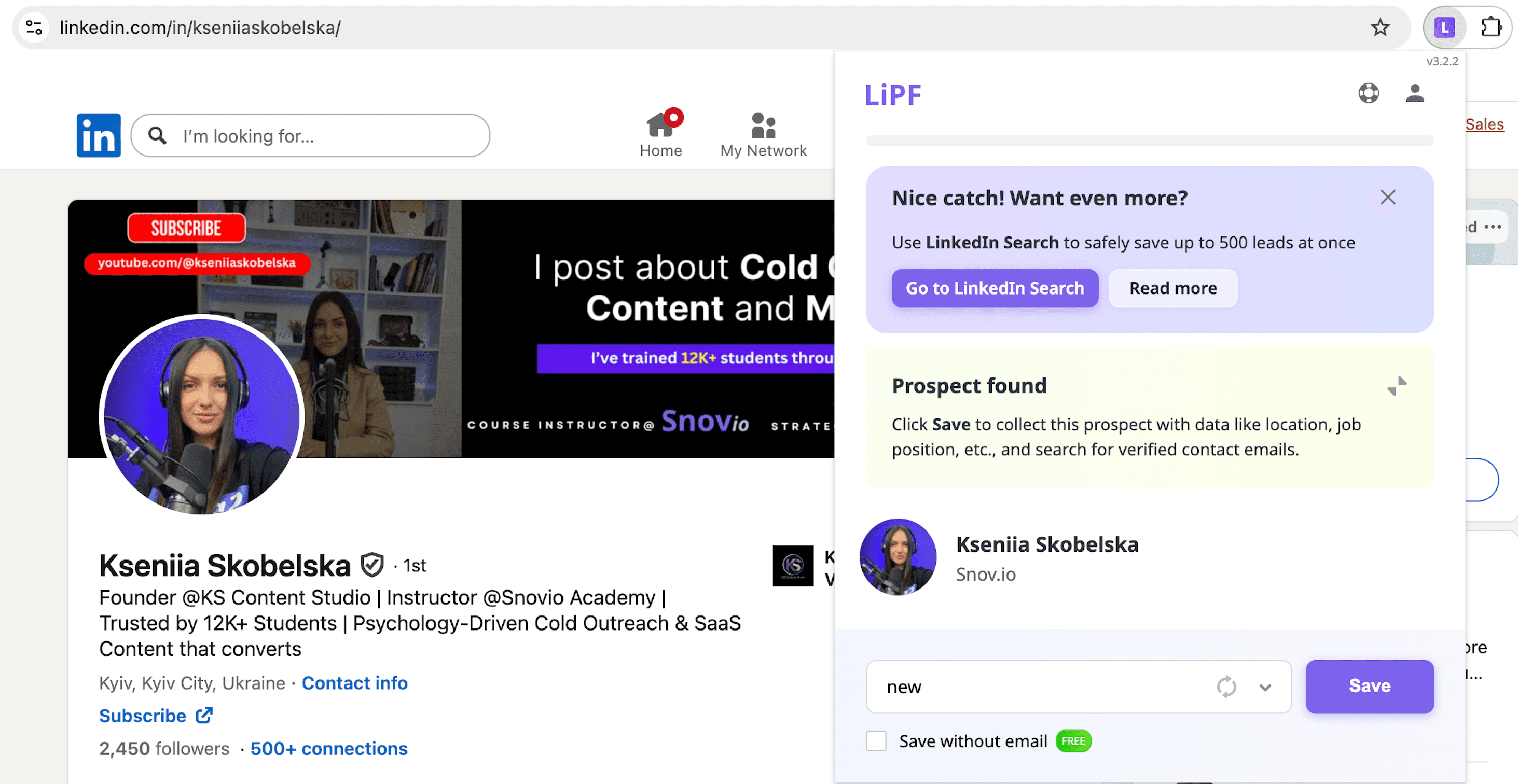
Snov.io LinkedIn Email Finder is a free Chrome extension that lets users easily discover email addresses from business profiles, company pages, or search results. It is a part of an all-in-one cold outreach platform with a built-in CRM and LinkedIn automation tools, which works similarly effectively for Sales Navigator.
Snov.io’s key features:
- Email discovery on individual profiles
- Lead capture from company, event, search results pages, plus Sales Navigator
- Built-in verification for found emails
- Contact data enrichment, including name, job title, company, location, etc.
- Built-in CRM for prospect data management
- Contact duplicate handling
- Multichannel automation (LinkedIn + email outreach)
- Direct CRM integration for seamless data flow
Pricing: Free plan with 50 email credits. Paid subscription starts at $39/month with 1000 pre-verified email addresses and bulk search.
✅ Pros:
- Streamlines prospecting with a fast and easy-to-use extension
- Supports both individual and bulk email discovery
- Works on Sales Navigator as well
- High accuracy with reliable email verification
- Saves prospect data for further outreach personalization
- Works as part of Snov.io’s robust outreach workflow
- Syncs to sequences and built-in CRM
- Integrates with all CRMs, including Salesforce, HubSpot, Pipedrive, + more than 5,000 apps.
❌ Cons:
- No direct phone number discovery as Snov.io LinkedIn Chrome extension focuses mostly on emails (you may still find company HQ or office numbers)
- Limited enrichment options if a prospect hides contact details
My testing insights:
Getting started with Snov.io LinkedIn Email Finder was quick. The extension works across individual profiles, company pages, search result pages, plus Sales Navigator. This lets you maintain a single workflow regardless of where you source leads on LinkedIn.
A strong point about the Snov.io LinkedIn Chrome extension is bulk email funding. When you are using this prospecting on search results, you can choose how many pages you want to process and collect prospects automatically.
In my test, I processed 3 search result pages. As a result, I got 30 leads enriched with details that I collected in under 10 minutes. All prospects were added to a new list I created, including their profile data and verified email addresses. In addition to contact data, Snov.io captured extra details such as industry, location, job title, etc., which can be used later to personalise the outreach.
As you’ve added prospects to your list, you can initiate a multichannel outreach right in the Snov.io app: you can send a personalized email, LinkedIn message, or even an InMail. Plus, this software automates other LinkedIn activities such as profile views, followings, connection requests, etc.
The most important part here is safety: in the extension settings, you can set delays between profile switches or use the default delays recommended by Snov.io experts. These delays let mimic human behaviour, making bulk LinkedIn prospecting safe. Plus, when collecting prospects in bulk, you can use an option to skip the ones that you already have in your lists. This helps avoid wasting credits on duplicates.
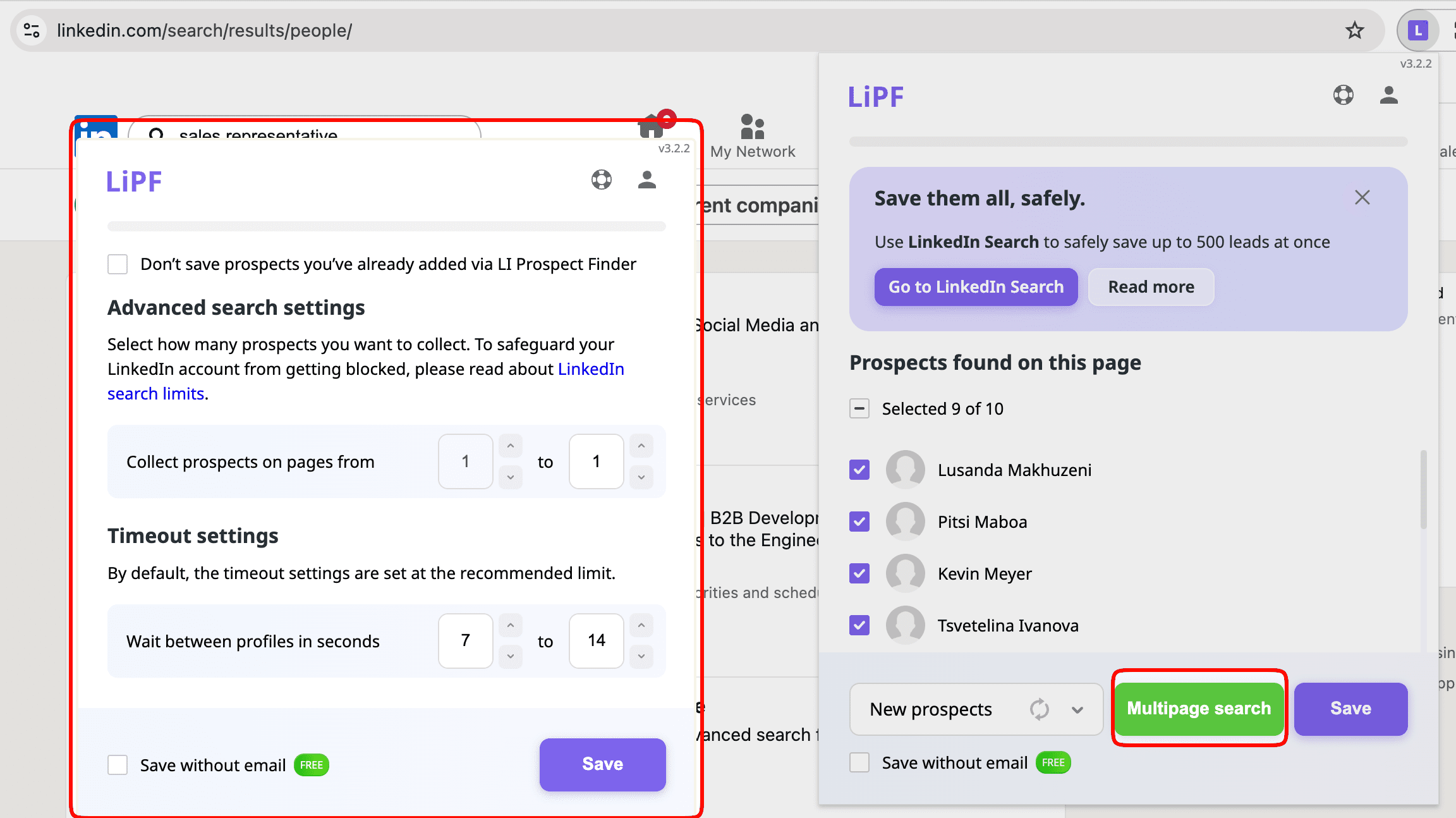
Another detail that can be helpful in practice is the Knowledgebase button right in the extension tab. If you need extra onboarding, you can quickly access a step-by-step guide to working with the Snov.io Chrome extension.
The only limitation I’ve noticed is that Snov.io focuses on email discovery, not phone numbers.
📌 My verdict: If you want a fast, safe, and email-focused prospecting tool that works across multiple page types and supports multichannel outreach, Snov.io feels like one of the best options on this list.

-
Wiza
Best for: Sales or marketing teams building high-volume contact lists from LinkedIn, especially via Sales Navigator searches.
G2 rating: ⭐4.5 out of 5 on G2
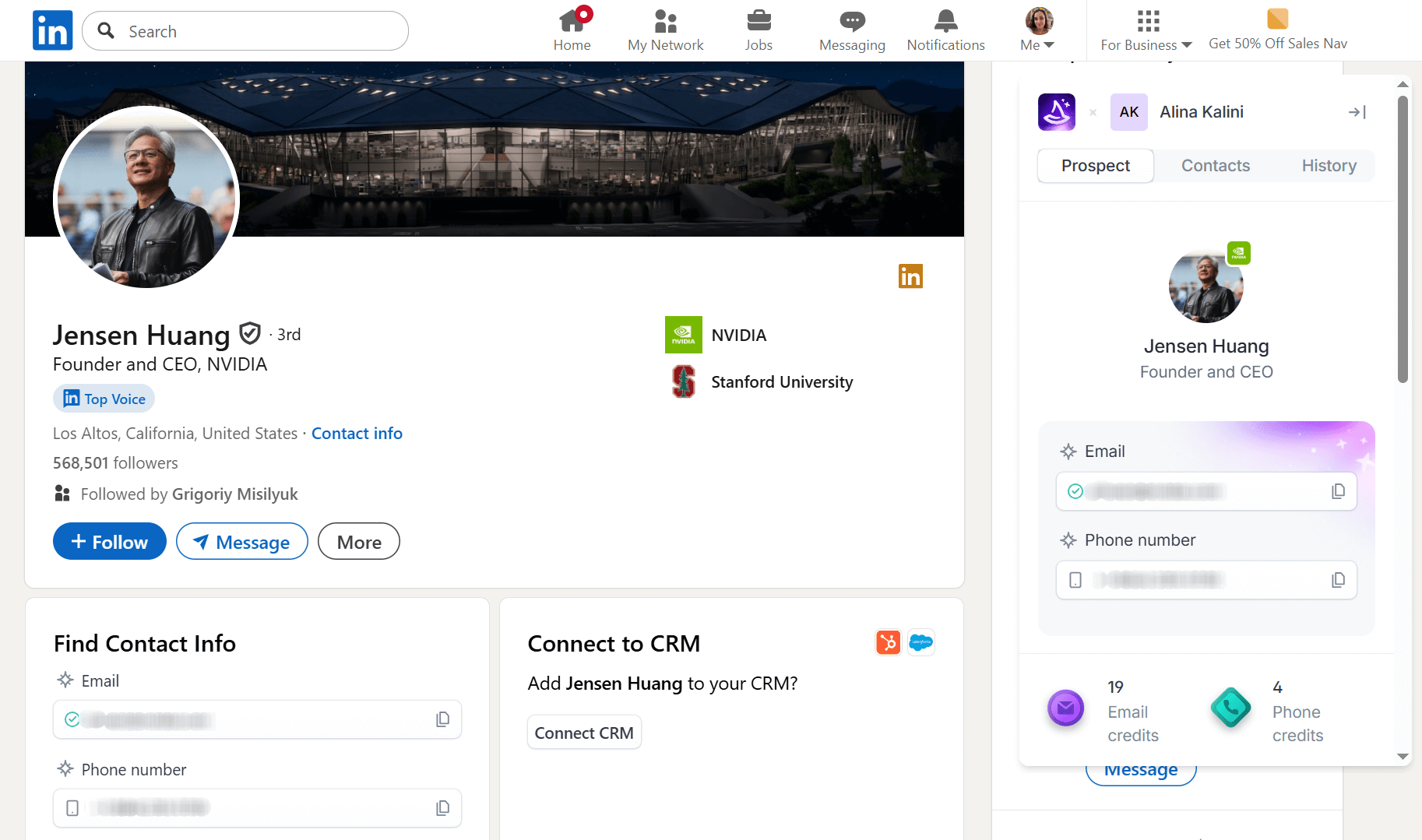
Wiza is a Chrome extension for LinkedIn that helps find phone numbers and email addresses on professional social media profiles. You can connect the tool to Salesforce, Pipedrive, Hubspot, and Outreach, or send leads directly to your CRM.
Wiza’s key features:
- Lead capture from LinkedIn profile pages and Sales Navigator searches
- Email and phone discovery
- Real-time email verification
- Enrichment with contact and company data
- Bulk export to CSV, Excel, or your CRM
- CRM sync
- Alerts on job and company changes (Wiza Monitor)
Pricing: Free plan with 20 email credits and 5 phone credits. Paid options start at $49/month, with 100 email + 100 phone credits. Additional credits cost $0.15 per email and $0.35 per phone.
✅ Pros:
- Bulk capture from Sales Navigator searches
- Real-time data verification
- Integrations with CRMs and popular sales tools
- Pay-as-you-go pricing
- Phone number revealing alongside email addresses
- Free plan with limited phone and email credits
- Web app for list management and additional contact discovery
❌ Cons:
- No lead capture on search results and company pages
- Profile-by-profile workflow for collecting many prospects on LinkedIn
- Bulk list building only for Sales Navigator (more Sales Navigator-centric extension)
- Occasional bugs requiring page refresh
- High pricing for high-volume use
My testing insights:
Wiza was easy to start with: install the extension, create an account, and you’re ready to go. The extension works as a Chrome plugin for LinkedIn, so you’ll see its widget when you’re on any LinkedIn page. One thing to note about the signup process: my confirmation email landed in Spam, so if you don’t see it in your inbox, check that folder.
On individual LinkedIn profiles, you can pull both email address and phone number or choose only one of these options if necessary. The data appears almost instantly (a second or two), so you can easily save your lead by adding it to your list or creating a new one right in the extension tab.
An inconveniency I’ve noticed is that after switching between profiles, Wiza continues to show the previous prospect. So, I occasionally needed to refresh the page to collect new contact information.
What else I found out during my testing is that this LinkedIn Chrome extension doesn’t work with search results or company pages, unlike Snov.io, for instance. While on a search results page, I had to open each profile individually to capture all contacts from there.
While Wiza’s web app allows searching by business names, its LinkedIn Chrome extension doesn’t.
📌 My verdict: It looks to me that Wiza is more Sales Navigator-centric, especially for bulk exports. However, it can be a good option if you need to discover a prospect’s phone and email contact information.
-
Lusha
Best for: B2B teams who need global contact coverage, particularly for outbound calling.
G2 rating: ⭐4.3 out of 5 on G2
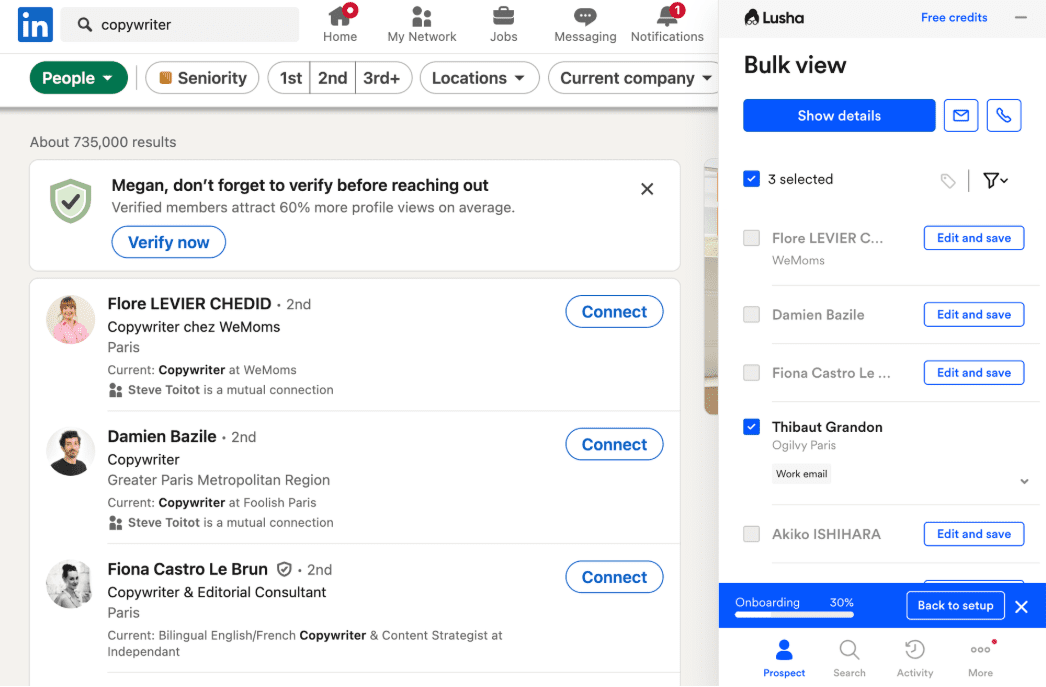
Lusha is an email finder extension primarily used for B2B lead generation, especially when phone outreach is a core channel. It lets you uncover professional email addresses and phone numbers on LinkedIn, plus save leads for later use.
Lusha’s key features:
- Bulk enrichment on LinkedIn
- Verified contact information (email addresses + phone numbers)
- Email grade scoring
- Contact discovery on LinkedIn and Sales Navigator
- CRM integrations
Pricing: Lusha offers 40 credits per month for free. However, please note that email costs 1 credit, while phone discovery requires 5 credits. Paid options start at $29/month with 250 credits.
✅ Pros:
- High accuracy according to user reviews
- Bulk contact finding from search results and Sales Navigator pages
- Global data coverage
- Integrations with popular CRMs
❌ Cons:
- Occasional work email domain restrictions during signup
- Fast credit depletion for phone numbers
- Data accuracy varies by region
- Missing classification of phone numbers (direct dials versus switchboards)
My testing insights:
As I only signed up, Lusha refused to register me with my work email, even though it meets all the outlined requirements. I contacted support, but their AI chatbot’s guidance was unhelpful, repeatedly sending me to irrelevant articles.
After a few back-and-forth messages, their bot offered to escalate my request to the human support team, but the estimated wait time was at least 2 days.
From what I found out, Lusha works on individual profiles, LinkedIn results pages, and Sales Navigator. What I like is that this extension supports bulk contact discovery, which can help streamline prospecting with less time spent. Also, as G2 reviews reveal, users frequently highlight high data accuracy, though this may vary by region. Another advantage is that Lusha is GDPR and CCPA-compliant.
On the downside, not every work email can be used for signup, and you can’t quickly find out why your domain is rejected. Some reviewers also note that Lusha doesn’t mark phone numbers as direct dials or company switchboards, which can lead to wasted call attempts.
📌 My verdict: Lusha’s credit model can get truly expensive at scale, as each phone number consumes 5 credits (unlike many similar LinkedIn tools). So, if you need bulk workflows for phone discovery, this option can be pricey. However, Lusha is still a solid pick for low-volume contact enrichment unless you need quick guidance from a human support team.
-
GetProspect
Best for: Sales, marketing, and recruiting teams that need a simple email-finding extension for LinkedIn, providing easy exports.
G2 rating: ⭐4 out of 5 on G2
 Source: GetProspect
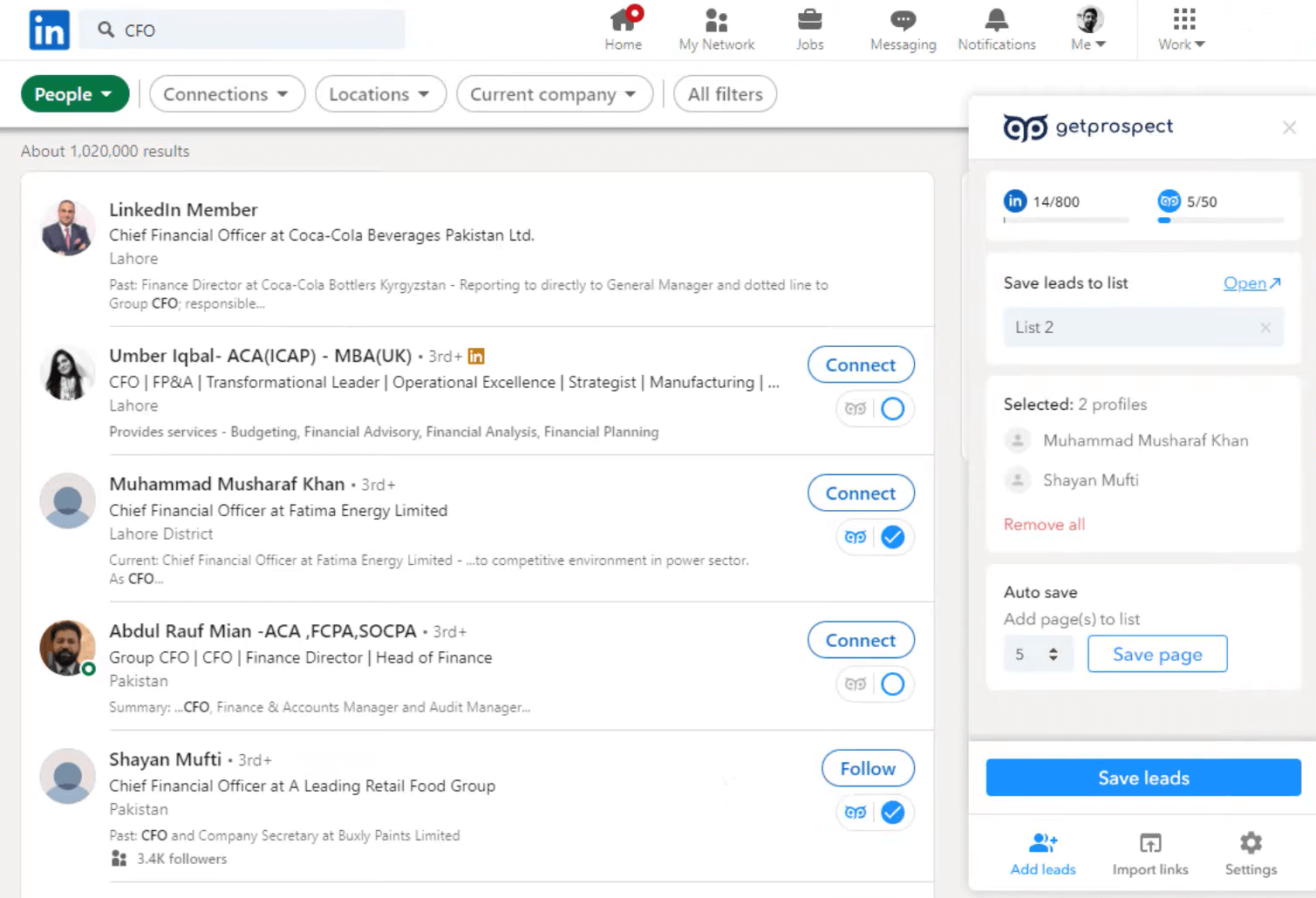
GetProspect is a Chrome plugin for LinkedIn that lets you quickly get professional email addresses and save them in a native web-based CRM. It also supports exporting saved contacts into your workflow for further outreach.
GetProspect’s key features:
- Finds email addresses on profile, group, event, and search results pages
- Works with Sales Navigator lists
- Provides web-based CRM for lead list management
- Pre-verifies found email addresses
- Offers integrations with CRMs and marketing tools
Pricing: GetProspect offers 50 free emails per month. Paid options start at $49/month for 1000 valid email addresses.
✅ Pros:
- Free monthly credits
- Bulk lead capture from different LinkedIn pages
- Built-in email verification
- CSV and XLSX export options
- Native integrations with external tools, including Zapier
- Safety controls for LinkedIn daily activity limits
- Basic cold email sequence functionality
❌ Cons:
- The signup process can be buggy
- No phone number discovery on LinkedIn
- Occasional data inaccuracies
My testing insights:
The signup process was a bit confusing. To start using the GetProspect LinkedIn Chrome extension, you need to create an account by verifying not only your email address but also your phone number. My number, for unknown reasons, kept triggering an error stating that numbers from my country couldn’t be used, so I had to contact support to proceed.
GetProspect is handled by human agents, not AI chatbots, which seems like a plus. However, in my case, it took over 12 hours to get a reply. I assume that was because of a difference in time zones and working hours. After the support team helped me complete my account, I was finally ready to test.
This Chrome extension for LinkedIn is quite simple and straightforward. Once installed and enabled in your browser, it appears as an embedded widget right on the platform. You can use GetProspect on individual profiles, search results pages, or LinkedIn groups.
The extension surfaces a prospect’s email address alongside additional details for enrichment. On search results pages, the workflow is similar: as you activate the extension, it pulls the leads displayed on this page. You can save all of them or choose only specific profiles you want to collect.
Lists are saved in the web app from where you can import leads in CSV or XLSX formats for further use or organize contacts right in GetPospect.
A thing worth noting: some users report that emails marked as valid sometimes appear invalid, resulting in bounces.
📌 My verdict: Overall, I liked the experience with this LinkedIn Chrome extension. It can be a good choice if you need a simple email finder with easy list building that works across different page types. However, I recommend running an extra email verification before outreach, just in case, to avoid email deliverability issues.

-
Waalaxy
Best for: Small teams, solo founders, and freelancers looking for contact discovery plus basic LinkedIn outreach automation.
G2 rating: ⭐4.6 out of 5 on G2
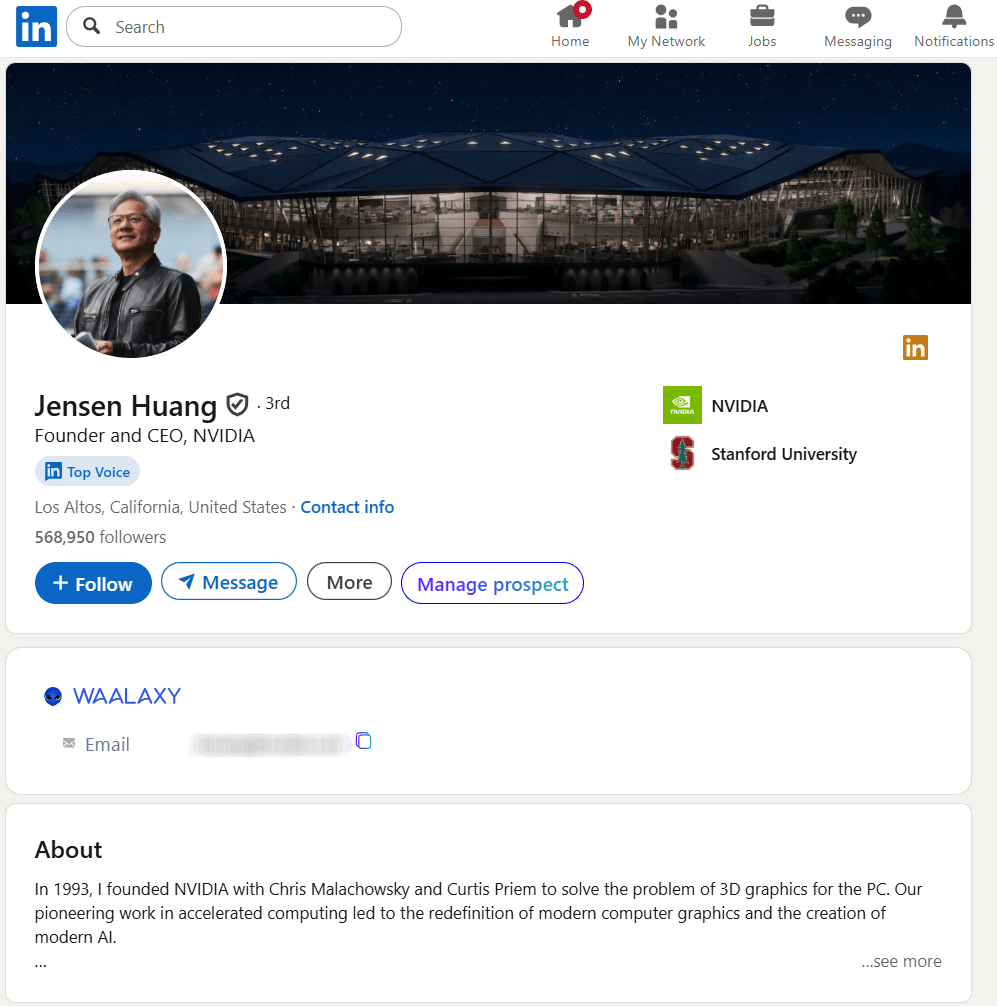
Waalaxy is a Chrome extension for LinkedIn that lets you collect leads from the platform and save them in a dedicated workspace. This tool also supports automated outreach activities with built-in sequences for connection requests and follow-up messages.
Waalaxy’s key features:
- Professional email address discovery
- Lead capture across LinkedIn searches, groups, events, and profiles
- Bulk contact export
- Multichannel sequences (LinkedIn + email)
- LinkedIn outreach automation for invitations and follow-ups
- CSV import options
- Integration with Dropcontact for better B2B prospecting
Pricing: Waalazy offers a freemium with 25 email credits per month. The lowest-priced plan at $43/month includes 25 credits, but with more automation activities per day.
✅ Pros:
- Anti-duplication control for imported prospects
- Built-in LinkedIn outreach automation
- Multichannel capability in one platform
❌ Cons:
- Onboarding isn’t easy
- Missing data when importing in bulk
- Weak support
- Slow enrichment process
My testing insights:
For me, the setup wasn’t very intuitive. The Waalaxy tab that appeared after installing the extension had a cluttered UI, and the Sign in button wasn’t very noticeable. It also wasn’t immediately clear that signing up doesn’t mean creating a Waalaxy account, but entering your LinkedIn credentials.
Honestly, it’s somewhat uncomfortable for me to share my account data when I haven’t even seen the app from the inside. Unfortunately, this is obligatory for this extension to start working.
Waalaxy sign appears on LinkedIn a bit inconsistently. On some pages, I saw a persistent right-side tab, while on profile pages, the functionality was embedded directly in the profile. What I liked was the Manage prospect section, where I could quickly view brief information about a prospect and add them to any campaign.
The discovery speed was one of the main drawbacks for me during the test. It took about a minute to reveal an email address from an individual profile. I also tried bulk importing from search results pages — pulling 15 leads took 3-5 minutes. The results Waalaxy generated were displayed in its app in the list I created.
Although leads were enriched with basic details, contact data were missing. I tried to figure out what I was supposed to do next, but I didn’t find any clear guidance. Finally, I noticed that my credits didn’t decrease after import and clicked them to see why. There, I found an option to look up professional email addresses by creating a separate email-finding campaign.
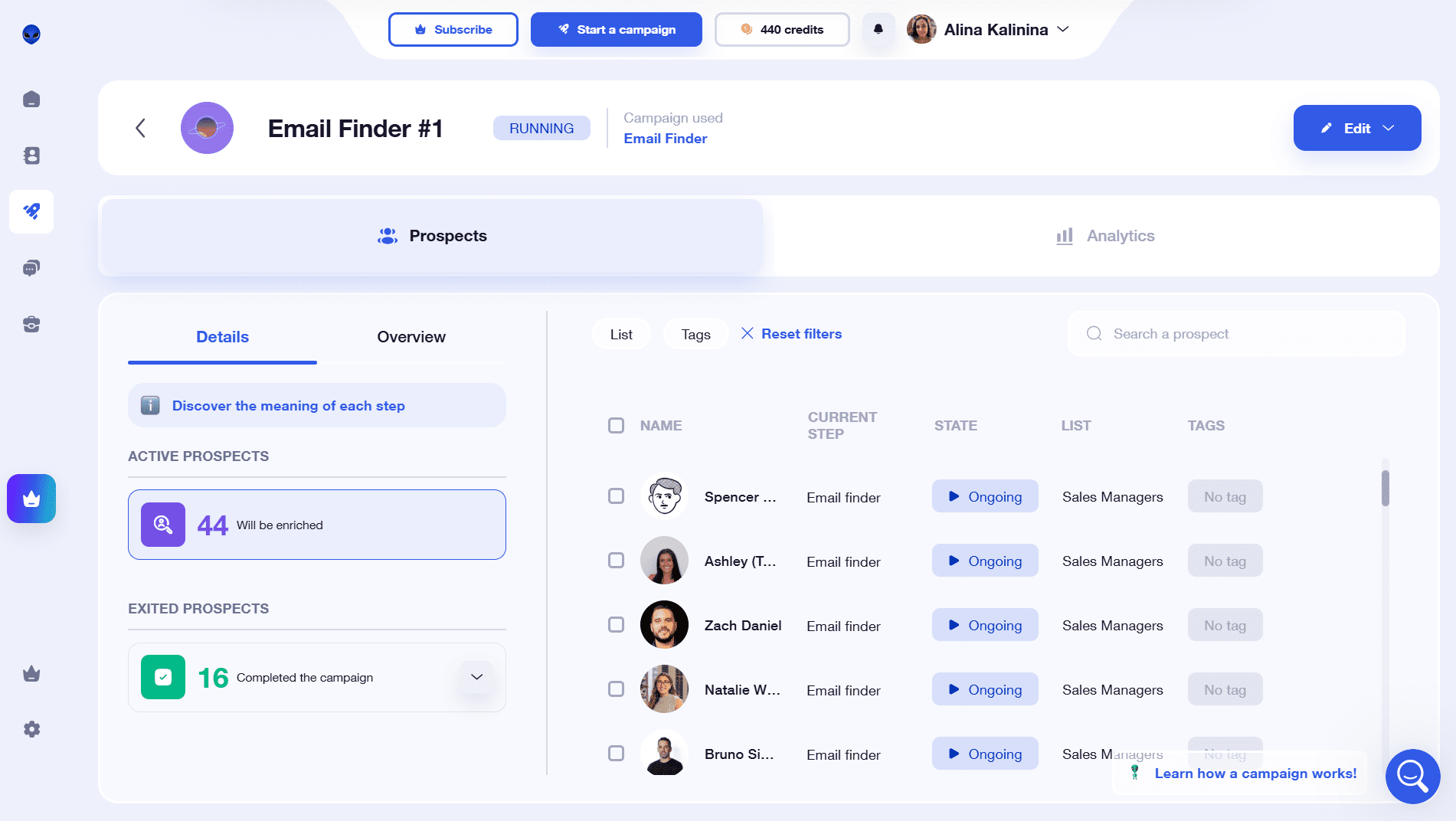
Once I selected my list for this campaign, the enrichment workflow started. The process wasn’t fast; however, almost all prospect profiles on my list were enriched with emails.
📌 My verdict: In general, given the platform’s basic functionality, I think Waalaxy is a bit hard to navigate. The setup isn’t intuitive, and it’s hard to understand how everything is supposed to work. For occasional individual email discovery, Waalaxy’s freemium plan can be a good option. But if your main goal is to find contacts on LinkedIn consistently, I’d recommend considering other prospecting tools.
Best LinkedIn extensions for data enrichment
These LinkedIn Chrome extensions can be used when you already have leads and want to enrich profiles with contact details.
-
Skrapp
Best for: Small B2B teams looking for quick email enrichment and verification with straightforward list building, export options, and basic outreach tools.
G2 rating: ⭐4.4 out of 5 on G2
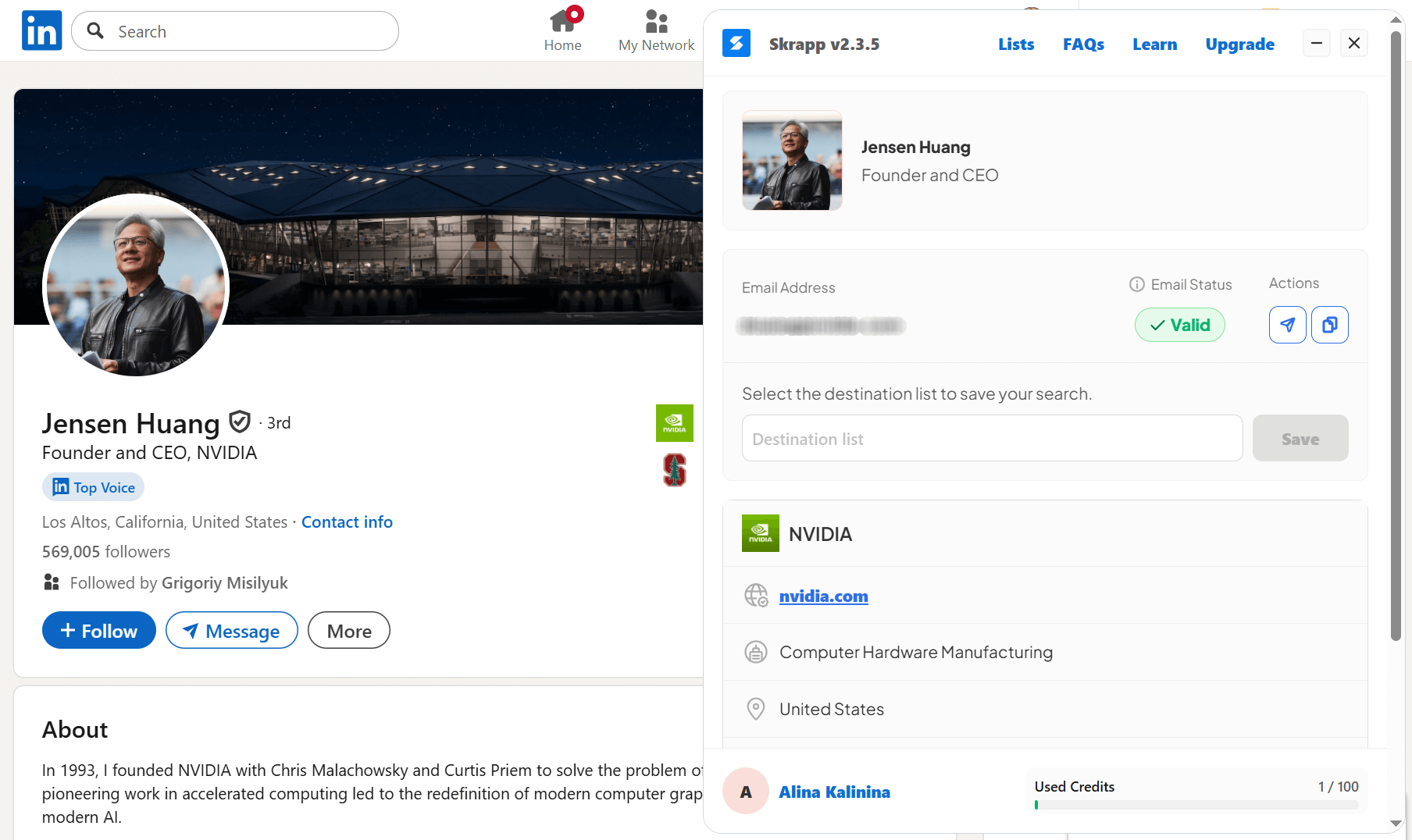
Skrapp is a Chrome extension that discovers email addresses from LinkedIn profiles and Sales Navigator search results. It lets you save prospects into lists, add them to your outreach tools for follow-ups, and sync data with CRMs.
Skrapp’s key features:
- Business email discovery on profile pages
- Bulk email enrichment from LinkedIn and Sales Navigator searches
- Contact list export
- Built-in verification
- CRM integrations and data sync
- Auto-connect and auto-follow
Pricing: Skrapp offers 100 free credits for email finding and verification. Paid options start from $39/month for 1,000 credits.
✅ Pros:
- Fast email discovery
- Built-in email verification
- Bulk list enrichment and export
- Catch-all email status indication
- You can auto-connect and auto-follow prospects (on some plans)
❌ Cons:
- Credit usage for invalid results on the free plan
- Multi-list export availability on paid tiers only
- No phone number enrichment
- No custom credit refills without a full plan upgrade
- No native outreach or engagement workflows
My testing insights:
Getting started with Skrapp was genuinely easy. This LinkedIn Chrome extension works on both LinkedIn profiles and search pages; however, Skrapp can’t be used for company or event pages.
I tested Skrapp on both options, and it performed consistently quickly. On the profile page, finding an email took a fraction of a second. With my set filters applied, the search results page returned emails for 20 people within a few seconds.
Once emails are found, Skrapp provides a simple next-step flow. You can choose the destination list or create a new one right in Skrapp’s tab on LinkedIn.
This extension also captured additional lead data, such as role, company, and location, and saved it to the list. All email addresses were already saved in the app with verification statuses. Skrapp labels emails as valid, invalid, or catch-all, which helps prioritize safer addresses and avoid wasting outreach efforts on risky domains.
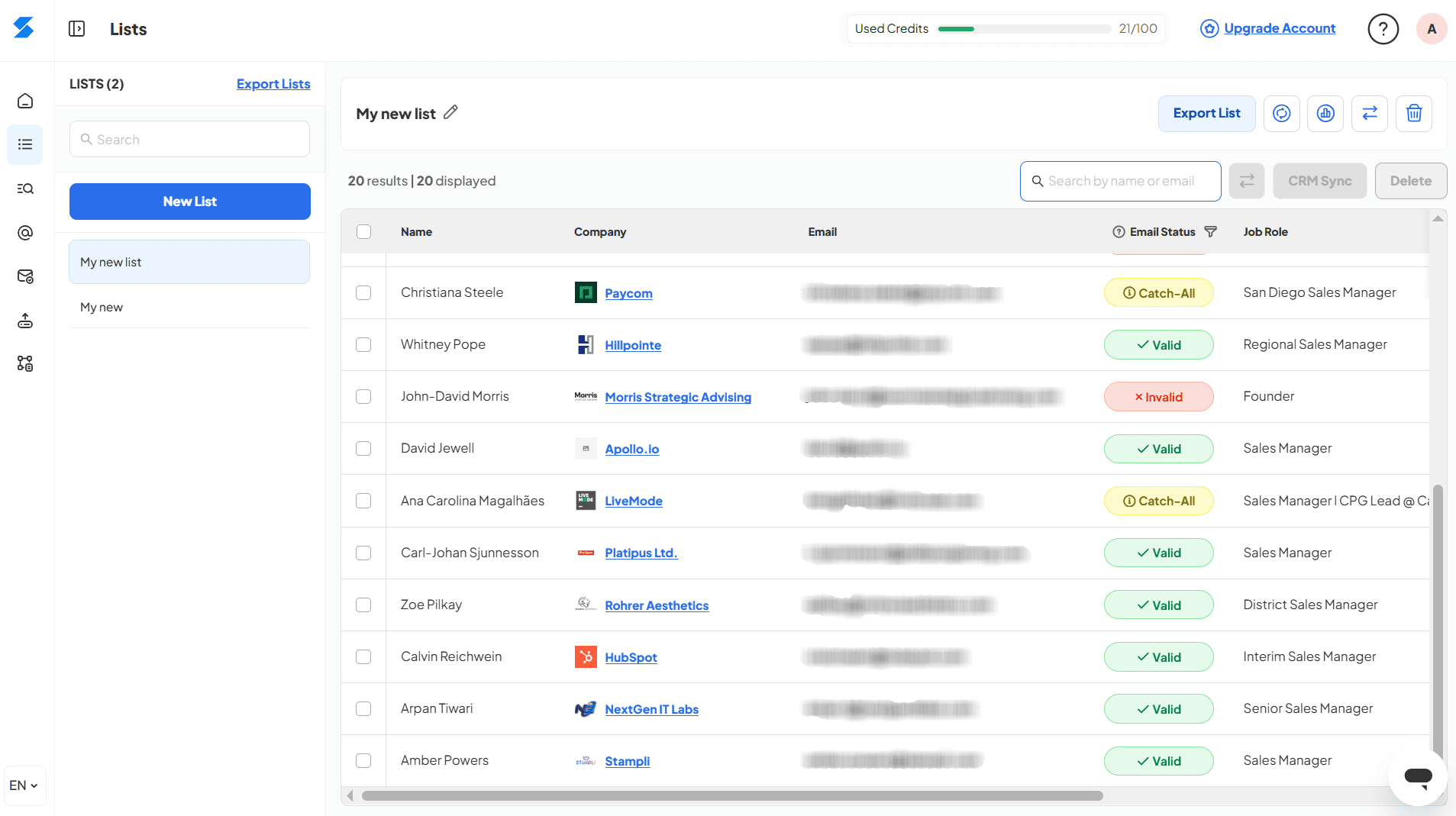
According to Skrapp’s credit policy, your credits are consumed only for valid contacts. However, I noticed this benefit applies only to paid tiers, which, for me, is a key drawback, as the free plan feels tight on credits.
Besides, Skrapp doesn’t offer built-in email outreach workflows or engagement sequences. The platform shows an option to send an email immediately, but the corresponding button opens a pop-up prompting you to select your system email app.
📌 My verdict: Overall, Skrapp is a good LinkedIn prospecting tool and, in my opinion, feels best suited for quick email finding and verification with list building and export.
-
Uplead
Best for: Sales and marketing teams looking for verified B2B contact enrichment across LinkedIn, corporate websites, and social platforms.
G2 rating: ⭐4.7 out of 5 on G2
Uplead is a B2B prospecting tool that lets you find email addresses as well as phone numbers from LinkedIn and company websites. This email finder extension helps you collect contact details as you browse and easily export them to your CRM or other tools.
Uplead’s key features:
- Email and phone discovery on LinkedIn profiles
- Real-time email verification
- Data enrichment
- Contact discovery on corporate websites and other social platforms
- CRM integrations and workflow automation via Zapier
Pricing: No free plan, only a 7-day free trial including 5 credits. Paid plans start from $99/month with 170 credits, plus a $0.6 cost per extra credit.
✅ Pros:
- Verified email discovery
- Mobile direct dial access
- In-page contact widget without leaving LinkedIn
- Contact discovery beyond LinkedIn
- Zapier integration for workflow automation
- Fast contact reveal
❌ Cons:
- No free plan
- Very limited free trial credit allowance
- Credit card requirement for a free trial
- Credit-based model that may feel expensive at scale
- Higher pricing compared to similar extensions
My testing insights:
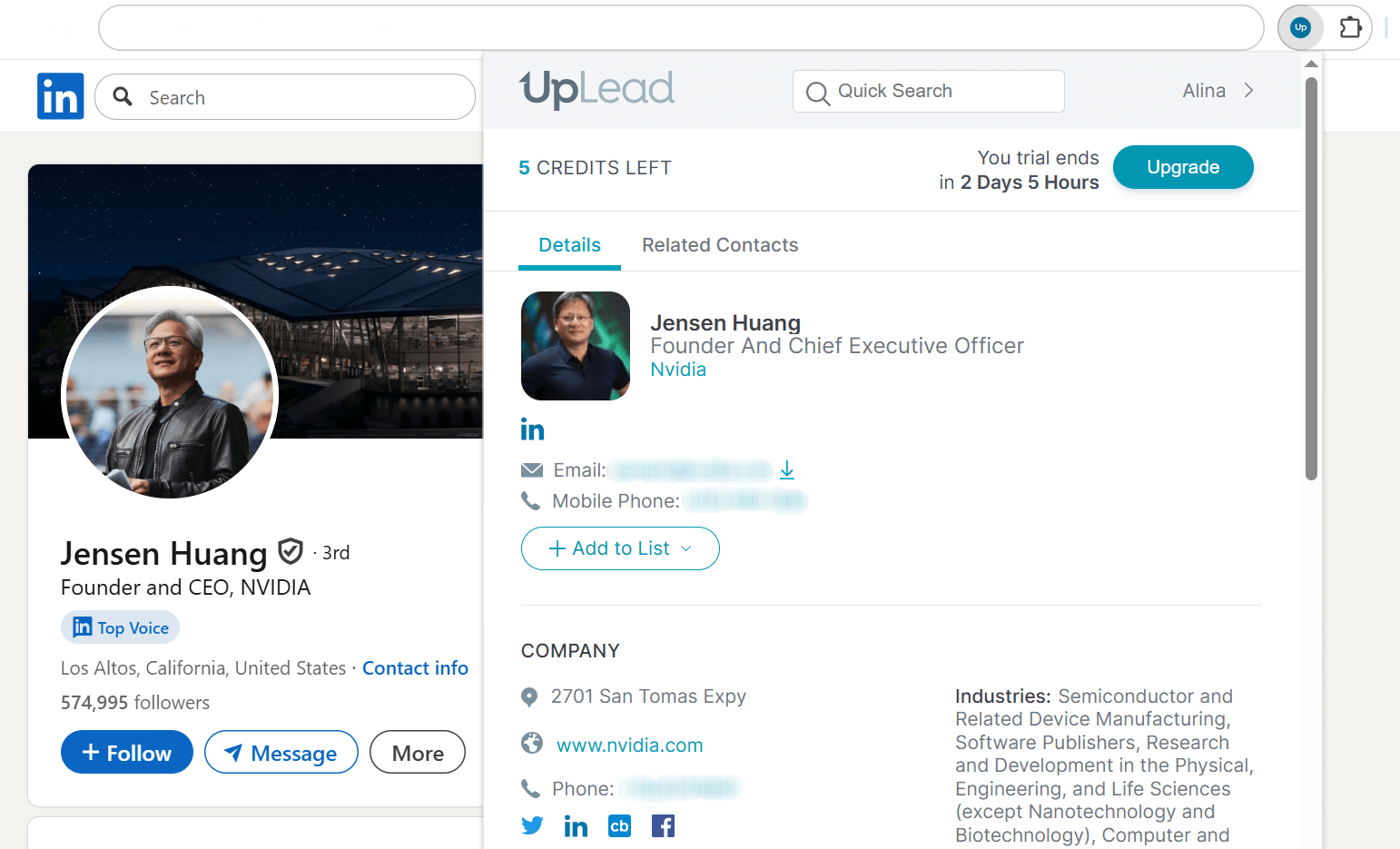
Uplead works as a classic Chrome extension, meaning you need to click on the extension icon on your browser’s toolbar to use it on a LinkedIn page. I like that this prospecting tool can be applied across multiple surfaces: individual profiles, company pages, and search results.
When I used Uplead on the profile page, it opened like a complete lead card with core contact details, company info, and extra data like relevant tags, industries, etc. From this tab, you can save contact details into your CRM or export them as an Excel file.
One detail I didn’t expect was social links: alongside email addresses and phone numbers, Uplead’s LinkedIn Chrome extension also pulled links to the prospect’s profiles on Facebook, Twitter, and others. I also liked the Related Contacts section, where you can browse similar prospects and instantly reveal their contact details or add them to your lists.
Workflows on the company and search results pages are similar. Uplead detects all prospects on the page, letting you reveal their contact details and save or export them as needed. You can also build lists in the Uplead app to organize saved leads.
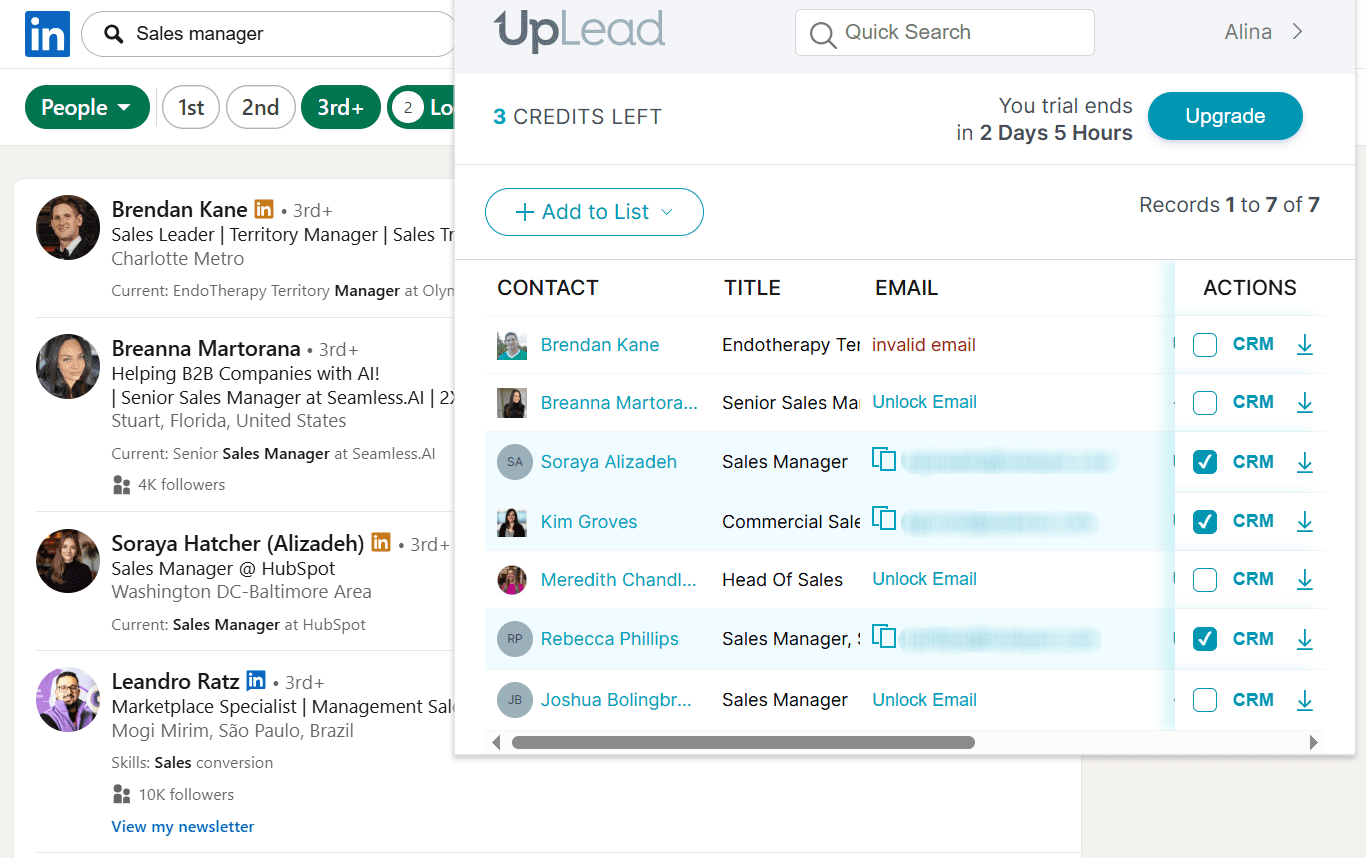
A few practical nuances came up during my testing. On the company and search results pages, it wasn’t clear how to export all the contacts I found at once. The only way to save all contacts without manual selection is through the Uplead app (by creating a new list or adding prospects to an existing one).
What I like is that this LinkedIn tool pre-verifies email addresses, so you won’t spend credits on invalid contacts. During my testing, Uplead displayed a pop-up flagging the email’s verification status as catch-all, explaining why it is risky for outreach.
Another advantage is that Uplead provides responsive human support that helped me resolve my issues very quickly.
The main drawback I see is that this LinkedIn Chrome extension doesn’t offer a free plan; it only provides a 7-day trial with very limited credits for contact discovery. Paid tiers can feel expensive, especially for solo professionals or small teams.
📌 My verdict: Overall, Uplead works quickly and consistently across LinkedIn pages, so this extension is worth considering if it meets your budget.
-
Kaspr
Best for: Sales representatives, small marketing teams, and solo founders looking for a simple tool with EU-based phone number lookup on LinkedIn.
G2 rating: ⭐4.4 out of 5 on G2
Kaspr is one of the best LinkedIn Chrome extensions focused on contact enrichment. It helps you find phone numbers and email addresses from profiles, groups, and event pages and easily push enriched records directly to your stack.
Kaspr’s key features:
- Contact capture on LinkedIn profiles, Sales Navigator, and Recruiter Lite
- Phone number, direct email, and B2B email address discovery
- Bulk export
- CSV enrichment
- Integrations with external CRMs
Pricing: Kaspr offers a free plan with 15 B2B email credits, 5 phone credits, and 5 direct emails. The lowest-paid tier starts at $59/month, offering unlimited B2B email addresses, 100 phone credits, and 5 direct email credits.
✅ Pros:
- Contact enrichment on profile, event, group, and search results pages
- CRM export and integrations
- Automated enrichment and in-app list building
- Convenient plugin for LinkedIn
- Team workspace
- One credit for all numbers and email addresses associated with one lead
❌ Cons:
- No option to buy extra credits on a free plan
- Missing emails or phone numbers for some captured leads
- Limited pricing flexibility with fixed extra credit quantity
- High pricing for bulk capture and export
My testing insights:
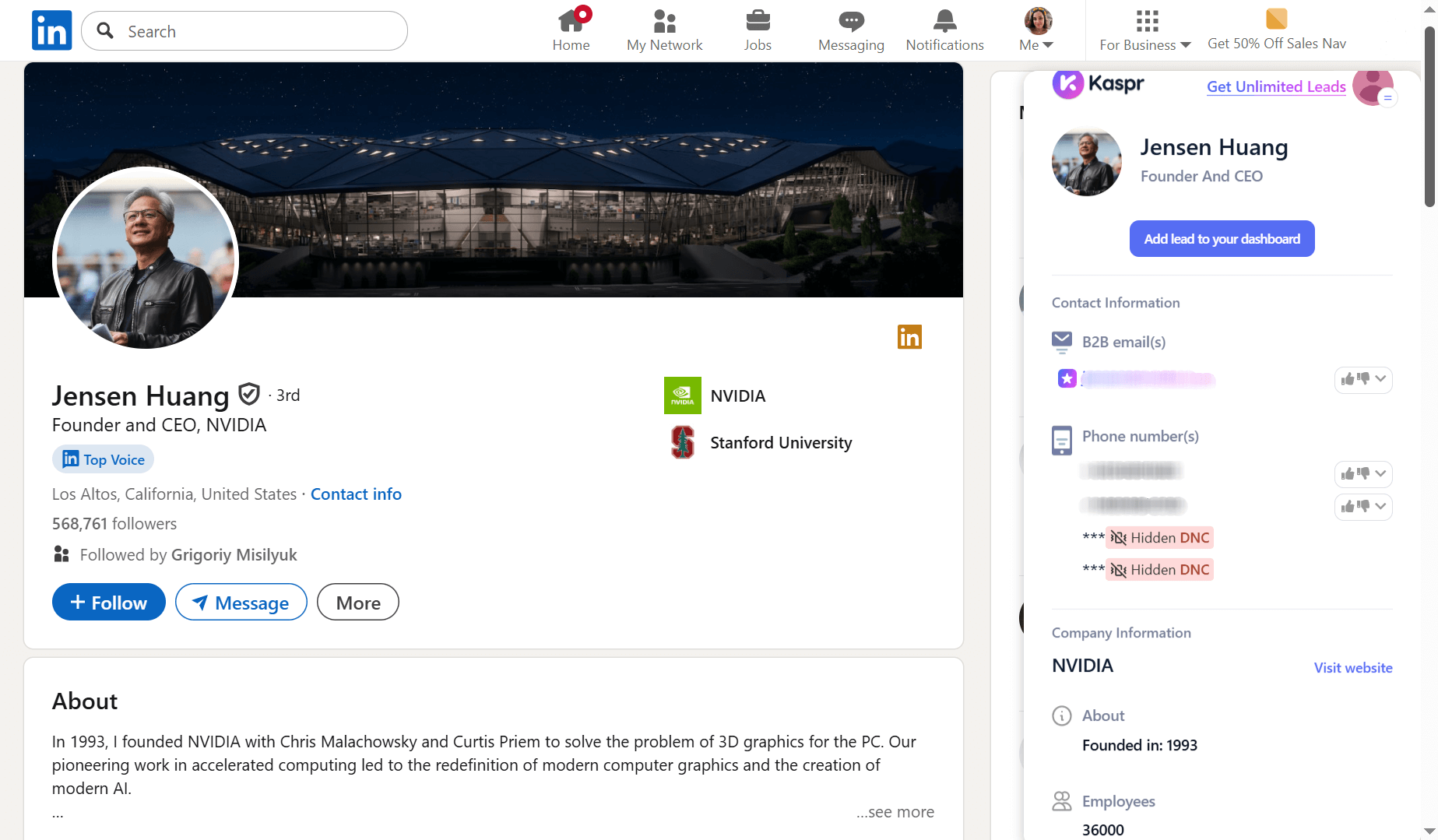
Kaspr’s Chrome extension for LinkedIn is easy to install. After you set it up, the tool always stays at your fingertips, visible in the right sidebar on all LinkedIn pages. During my tests, it usually took Kaspr 2 to 6 seconds to display a profile’s contact details. I think the speed depends on how many email addresses or phone numbers were found.
One good point is that no matter how many phone numbers or emails are discovered, only one credit is charged per prospect. Overall, using this LinkedIn prospecting tool feels intuitive.
However, bulk contact capture was less obvious to me at first glance. The thing is that it is called Sales Automation, and to gather many prospects from one page, you need to select your workflow. Workflows in Kaspr refer to the data you want to capture.
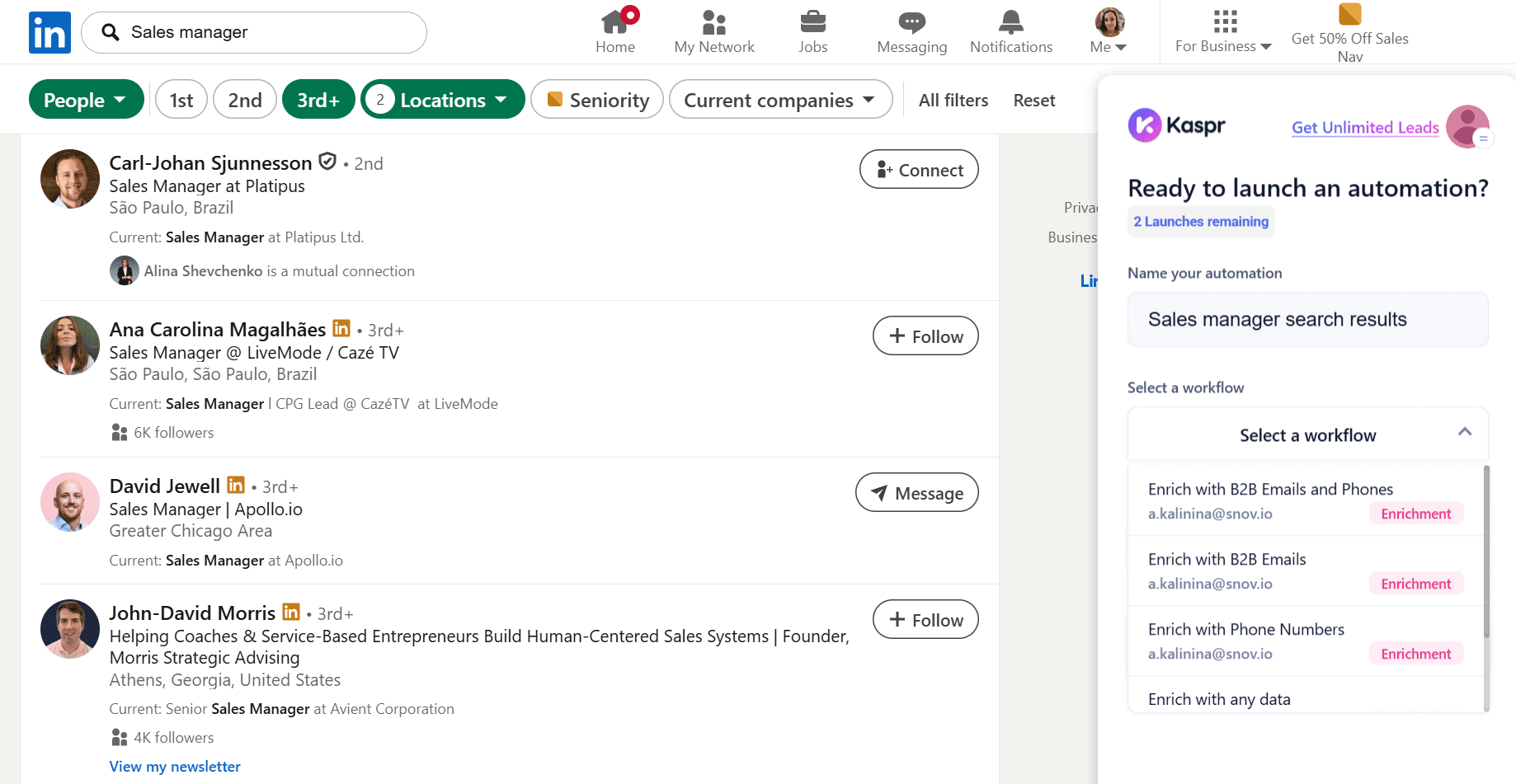
Once I made my choice, named my list, and selected how many prospects I wanted to collect, the platform began to process the data. It took Kaspr a couple of minutes to pull 10 leads from my search results page. You can see your automatically created lead list in the app.
Unfortunately, in my test, contact details, including B2B email addresses and phone numbers, were found only for 3 prospects from 10. All leads came enriched with role and location data, and a few profiles contained company names.
Another drawback is that the free plan does not allow buying additional credits. The only option is to upgrade to a paid plan, then select how many extra credits you need. You can choose from fixed credit tiers, and, frankly, I don’t really like such limited pricing flexibility. Export options are also limited by the number of credits, with 100 per month available in the free tier.
📌 My verdict: In general, although Kaspr is easy and fast to use, it can be too expensive when you need volume. However, this extension can be a good option for occasional, day-to-day lookups.
Best LinkedIn extensions for sales teams
These Chrome extensions for LinkedIn help sales reps quickly find contact details, save prospects to lists or CRMs, and plug them directly into sequences in outreach tools.
-
Apollo
Best for: Sales teams who want to discover contacts, build lists, and run sequences in one platform with CRM integration.
G2 rating: ⭐4.7 out of 5 on G2
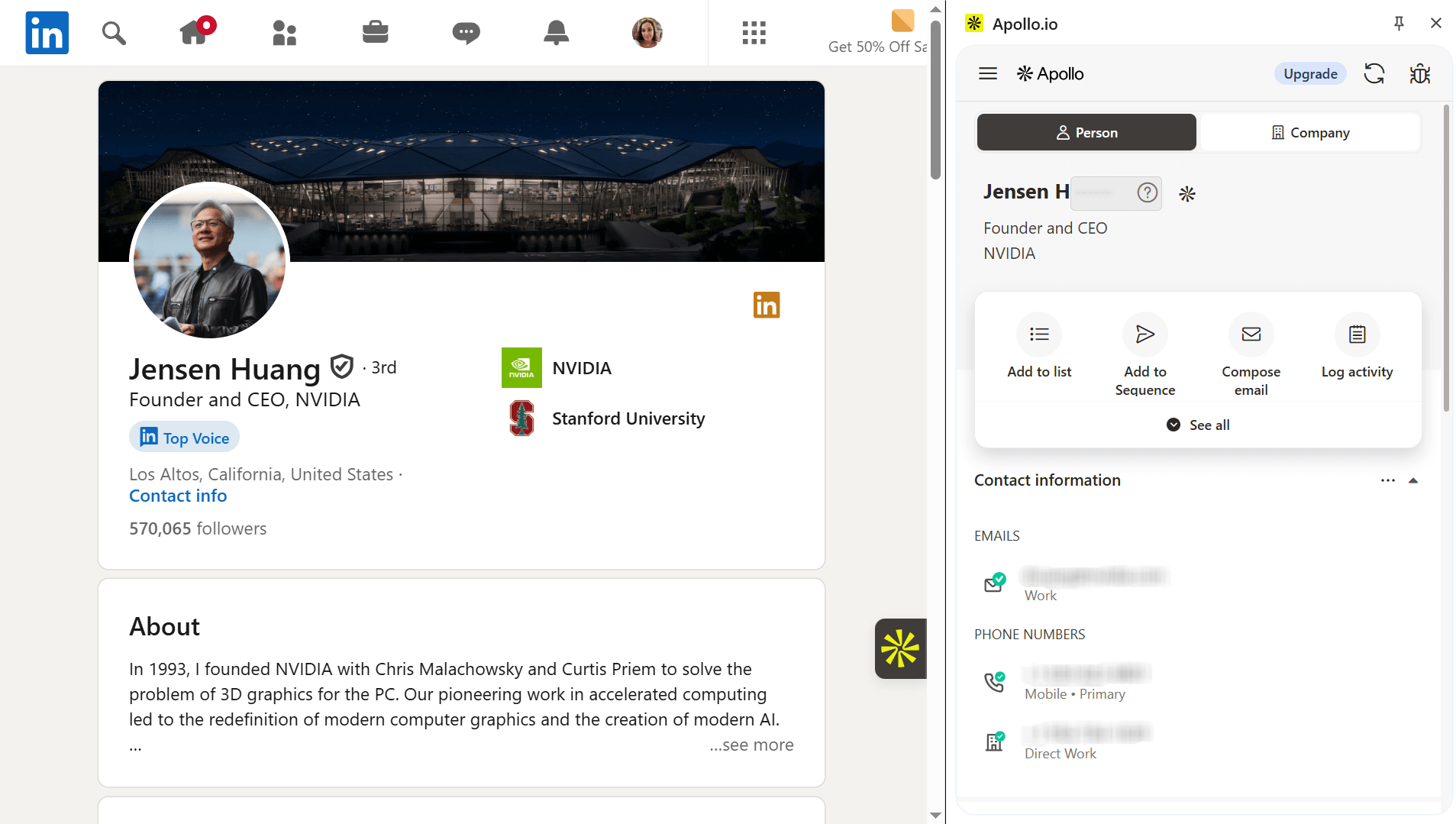
This email finder extension is part of Apollo’s outreach platform. It reveals phone numbers, email addresses, job titles, and other details, helping to enrich your prospect data. You can add contacts directly to Apollo or sync it with your existing outreach tools via integrations.
Apollo’s key features:
- Email and phone number discovery
- Lead list building
- Bulk contact export
- Lead data enrichment
- Adding prospects to Apollo sequences
- Salesforce & HubSpot integrations
Pricing: Apollo offers a free plan with 100 credits. Paid plans start at $59/month with 2,500 credits.
✅ Pros:
- Instant data discovery
- Built-in email and phone verification
- Free-plan access for email and phone number lookups
- High accuracy (according to user reviews)
- Email outreach sequences
- LinkedIn and corporate websites prospecting coverage
❌ Cons:
- Higher credit cost for phone numbers reveals
- Chat support availability on paid tiers only
- Data accuracy issues for non-U.S. markets
My testing insights:
Getting started with Apollo felt pretty straightforward. I already had an account, so once I logged in, the extension appeared directly on LinkedIn as a right-side panel.
During my test, Apollo worked seamlessly on profile and search results pages. When I used it on an individual profile, a side tab opened with key lead details, such as job title and company, along with contact information. You can reveal both email addresses and phone numbers.
What I liked is that this extension surfaces not only work but also personal contacts if available. From the same tab, you can save a lead to your list in the Apollo app, add them to a sequence, or even compose an email without leaving LinkedIn. This flow feels genuinely time-saving for me.
Apollo’s LinkedIn tool works fast on search results pages as well. It pulls all leads from the page into the sidebar, so you can discover the contact information you need. Contact details are pre-verified and marked with a green check if verification is successful. This helps quickly spot invalid data.
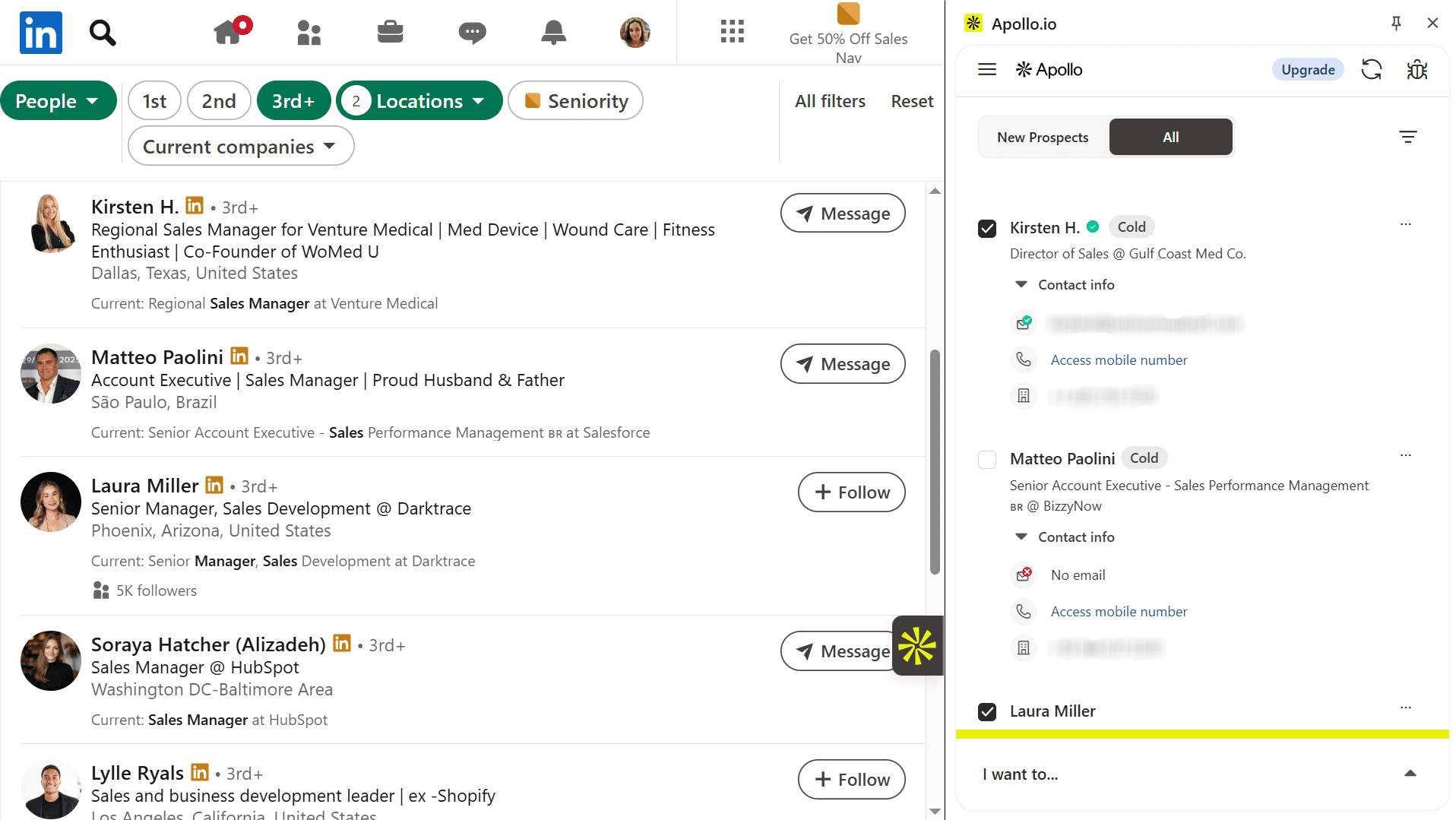
I ran into a few minor hiccups while testing the Apollo extension, but they were easy to fix because, in most cases, I only had to refresh the page, and the extension loaded correctly again. What I didn’t like about Apollo, however, is that the live chat support is limited to higher-paid plans.
📌 My verdict: Overall, I liked the experience with Apollo’s Chrome extension for LinkedIn because it consistently revealed contacts, including both work and personal details when available. This adds greater flexibility to outreach and makes it easier to build larger contact lists more quickly.
🔎Did you know you can close 60% more deals with LinkedIn automation? Watch this quick video to know how:
-
LeadLeaper
Best for: Sales teams, small businesses, and startups looking for a LinkedIn prospecting tool with unlimited exports for found contacts.
G2 rating: ⭐4.5 out of 5 on G2
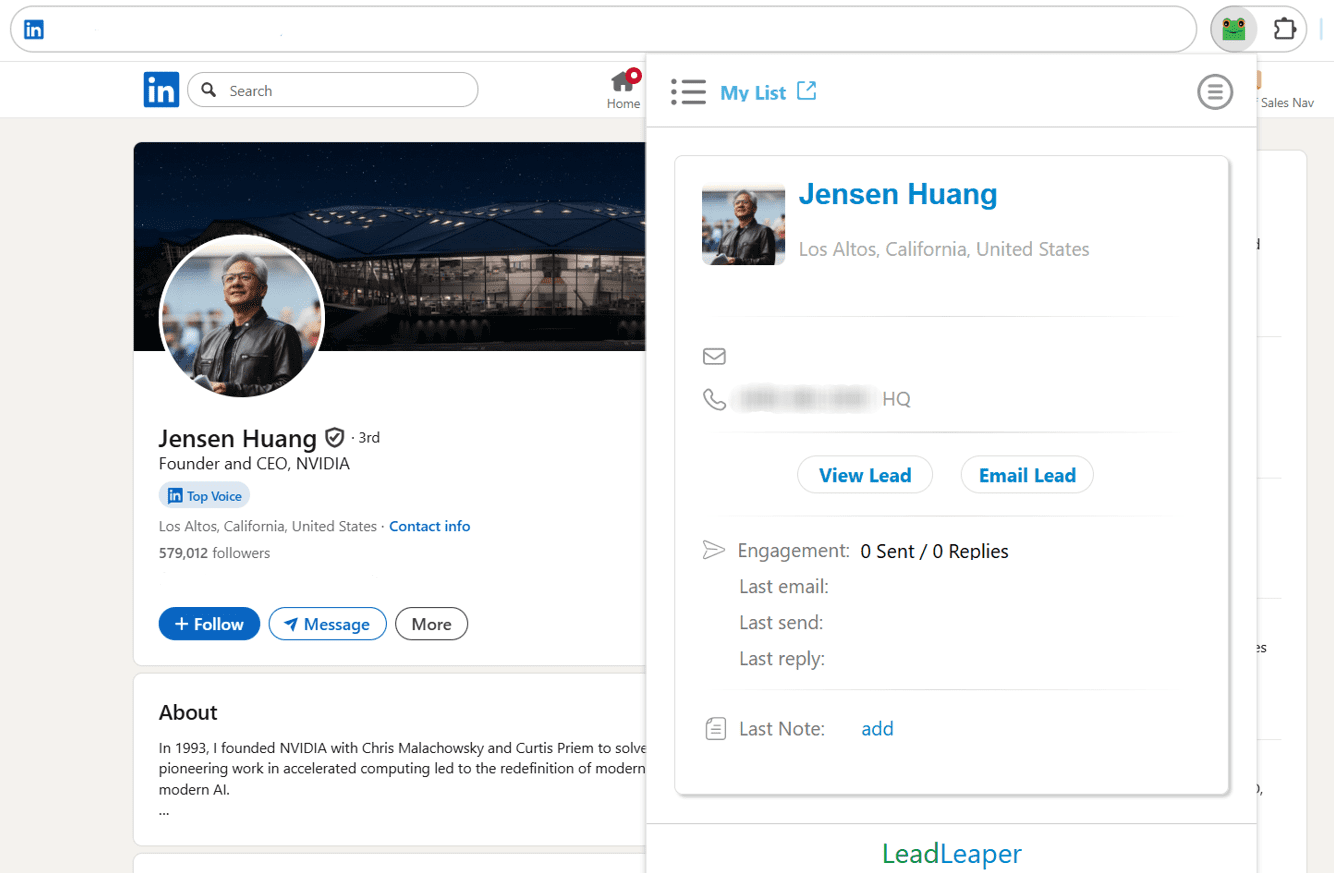
LeadLeaper is a LinkedIn email extractor that lets you collect individual email addresses or capture contacts in bulk. Since this extension is a part of a broader outreach setup, you can save lists and send enriched contacts directly to sequences with multi-step flows.
LeadLeaper’s key features:
- Verified business email access
- Phone number discovery on LinkedIn profiles
- Lead capture from LinkedIn searches and lists
- Native lead list storage and organization
- Email campaign sending
- Lead engagement tracking
Pricing: LeadLeaper offers a free plan with 100 credits and unlimited export options. Paid subscriptions start from $49/month with 3,000 credits.
✅ Pros:
- Unlimited export without export-credit requirements
- Lead engagement history on online profiles
- LinkedIn Premium and Sales Navigator support
- Credit usage only when a business email is provided
- Built-in email sequences and engagement tracking
- Phone number discovery
❌ Cons:
- Limited support options
- Email-credit dependency for high-volume prospecting
- Incomplete contact details in some cases
- A bit outdated UI
My testing insights:
Like with other LinkedIn Chrome extensions, my LeadLeaper test started with creating an account. In practice, LeadLeaper behaves like a typical extension: you open a LinkedIn profile, click the tool’s icon in your browser, and it surfaces available contact data.
My experience with LeadLeaper was dubious, as this extension worked well only on individual profile pages. On the search results page, it informed that leads were found, but the panel didn’t let me actually view them. So, I couldn’t access the contacts from that view. Many users mention that LeadLeaper performs best with Sales Navigator.
On the profile page, LeadLeaper worked as expected: it pulled up a lead card with available details. In my case, for the same test profile I used for all LinkedIn prospecting tools in this article, this extension surfaced only a phone number.
I decided to test LeadLeaper on additional profile pages, where the results appeared more consistent. In these cases, the extension found both email addresses and headquarters phone numbers. I’m not fully sure whether contacts pass a reliable verification check before they appear, so I strongly recommend using an extra email verifier before outreach.
What I liked most about this extension is the Lead Notes option. When applying LeadLeaper on the profile page, you can leave short notes or reminders right in the in-page tab. This can be useful if you share your LeadLeaper account with your team or colleagues, so they can see the context at a glance.
You can email your leads or save them to lists in the platform’s web app. LeadLaeper supports outreach and engagement tracking. However, the interface felt dated and not very intuitive. Support is also limited, as there is no live chat or AI bot; you must email their team to request assistance.
📌 My verdict: On the one hand, LeadLeaper is one of the few prospecting tools I tested that offers unlimited export credits, even on its free plan. Still, given the inconsistencies I observed in lead detection, I think this extension is worth considering if your priority is exporting large lists – LeadLeaper sometimes finds contacts with missing data.
-
Saleshandy Connect
Best for: B2B sales teams, small businesses, and startups who already use Saleshandy for cold outreach and need LinkedIn prospecting in the same workflow.
G2 rating: ⭐4.6 out of 5 on G2
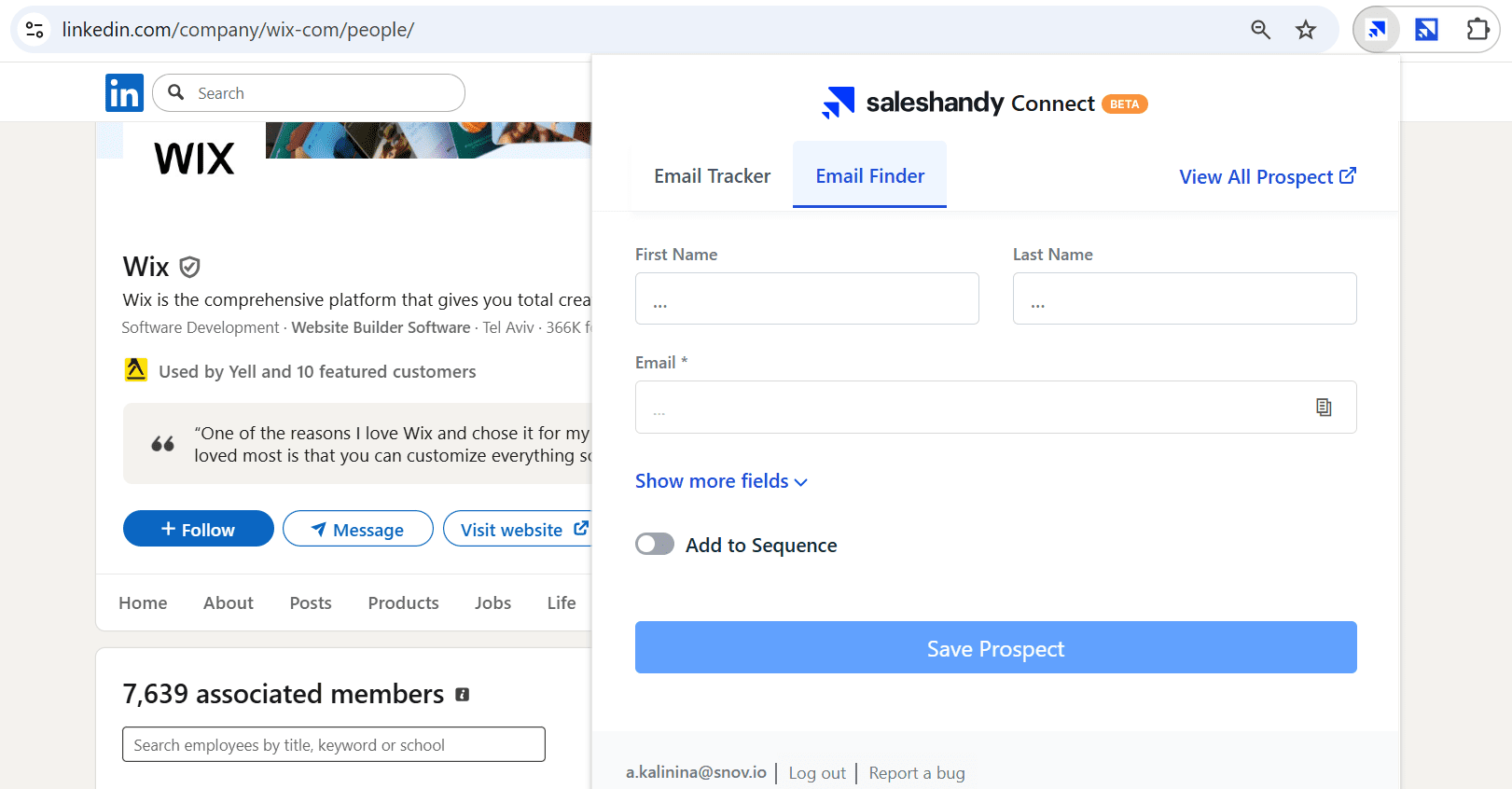
Saleshandy Connect is a Chrome extension by the Saleshandy outreach platform. It lets you discover email addresses on LinkedIn pages and automatically export contacts in bulk. You save and download captured leads or add them directly to the Saleshandy workspace for further outreach.
Key features of Saleshandy Connect:
- Verified email and phone number discovery from LinkedIn profiles, search results, and company people pages
- Bulk lead capture
- Integration with Saleshandy cold email sequences
- Export options
- Basic lead management
- Real-time email engagement tracking
Pricing: Saleshandy offers a free plan with 5 credits per month. Paid plans for B2B contact finding start at $29/month with 1000 credits included. The minimum add-on pack is 1,000 credits at $57.
✅ Pros:
- Both email and phone number contact reveal
- Bulk contact extraction
- Direct integration into Saleshandy outreach workflows
- Credit refund for unsuccessful finds plus unused credit rollover
- Saleshandy’s own CRM as well as data sync with other CRMs
- In-extension email tracking
❌ Cons:
- Very limited free plan compared to similar LinkedIn tools
- Low credit amount, even on paid plans
- Can be expensive for high volumes
- Higher credit cost for email+phone reveals
- Missing contact data in some cases
My testing insights:
When I selected LinkedIn tools for this article, I originally included Saleshandy Connect on my list because of positive feedback, an affordable entry-level price point, and a free plan. On top of that, Saleshandy offers more than just a finder, with light outreach tools and a basic built-in CRM. So for me, it looked like a good sales-focused option.
My first impression of this tool was promising. The extension was supposed to work on individual profile pages, search results, and company pages. But once I moved to deeper testing, it stopped working: no data loaded on any LinkedIn page.
I reached out to support, and the experience was somewhat frustrating. The chatbot was not just helpful; it provided generic advice even though I said I had already tried the suggested options. I asked to be connected with a human agent, and after a few hours, I finally received a response. But the guidance was still limited.
The agent advised me to try a new extension, Saleshandy Connect 2.0, by simply sending the link to their Help Center article. However, after following the installation instructions provided by a customer representative, the extension didn’t behave as described in the documentation.
First of all, Saleshandy Connect 2.0 was supposed to appear as a right-side in-page widget on LinkedIn, but in my case, it looked like a regular extension icon in the top toolbar. Secondly, according to the shared documentation, the extension should work on company pages in the People section, profiles, and search results. However, in my test, it worked only on some profile pages and was not consistent.
For example, when I applied it to the profile I used for my testing, Saleshandy didn’t recognize the page as the profile, showing a message that the extension wasn’t active there. On the company page, the tool also didn’t display the results, even though I used it on the employee list with the proper link (linkedin.com/company/{company-name}/people/), as documented.
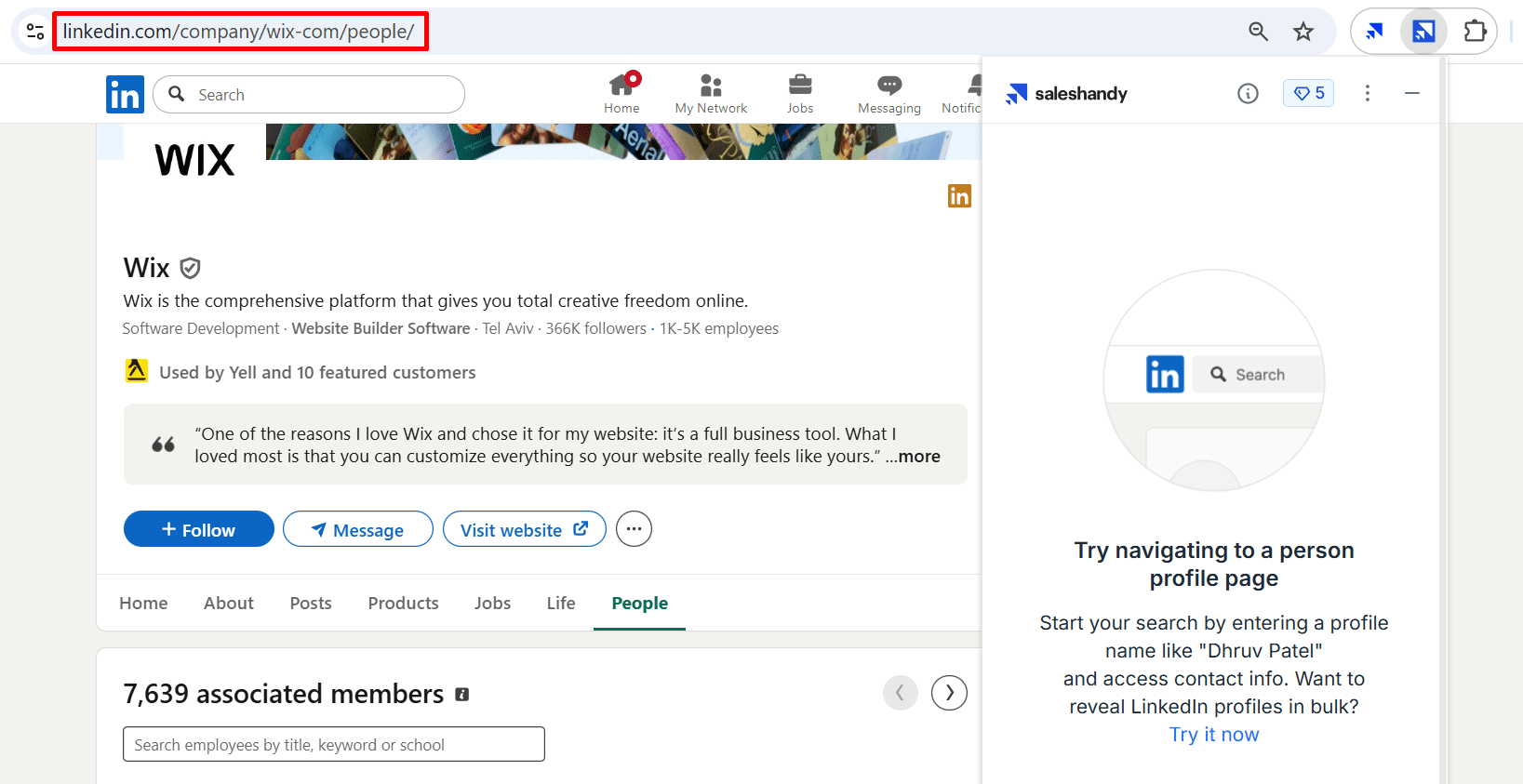
I continued my conversation with support and shared fresh screenshots showing that the updated extension was also not working as described. But I received a follow-up response only after 6 hours (a longer wait than for the initial message), even though our thread was already open. Besides, the agent’s answer didn’t fully address my request and created further confusion between their response, the instruction, and the actual extension performance.
When I tested it on more profiles, I got positive results on some of them – Saleshandy revealed emails and phone numbers. Besides, this extension may provide links to the prospect’s other social profiles. The load time was slightly slower than most LinkedIn Chrome extensions I tested, but still acceptable, at around 5-6 seconds per profile.
One more practical note: Saleshandy’s free plan feels very limited, and certain actions, for example, pushing leads directly into sequences from the extension, are not available.
📌 My verdict: Saleshandy’s ecosystem, with list building, a lightweight CRM, and built-in sequences, can be useful for sales teams. However, I can’t call this Chrome extension a reliable prospecting tool until these bugs are fixed. I’d recommend testing it first to ensure it works correctly before considering it for your sales suite.
-
SalesQL
Best for: Sales teams and small businesses looking for a reliable tool to capture bulk contacts from LinkedIn pages.
G2 rating: ⭐4.6 out of 5 on G2

SalesQL is an email finder extension that reveals business and personal email addresses, as well as phone numbers, across LinkedIn pages, Sales Navigator, and Recruiter. The tool integrates with leading CRMs, allowing you to save and manage captured leads within a native dashboard.
SalesQL’s key features:
- Email and phone number discovery
- Real-time contact verification
- Compatibility with LinkedIn, Sales Navigator, and Recruiter
- Bulk contact export
- Contact list organization in the native dashboard
Pricing: SalesQL offers a free plan with 100 credits. Paid plans start at $39/month with 2,000 credits.
✅ Pros:
- Work and personal email discovery
- Favorable credit consumption (one credit for both email and phone discovery of one profile)
- Native integrations to popular CRMs
- User-friendly interface
- CSV export support
❌ Cons:
- Difficult access to human support agents
- Limited chatbot assistance with scripted Q&A only
- LinkedIn account access requirement
- Unclear free-plan credit breakdown
- Occasional extension bugs
My testing insights:
To start using the SalesQL Chrome extension for LinkedIn, you first need to create an account in their app. Note that the platform will ask you for permission to access your LinkedIn account. After signing up, you receive 100 credits for email and phone number discovery, plus 100 credits for verification.
I liked the quick onboarding tour directly in the SalesQL panel on LinkedIn, where I could see how and where it could be applied. That’s why this extension is suitable for both experienced professionals and newcomers to LinkedIn lead generation.
SalesQL’s extension performs an in-page LinkedIn plugin on the right side, so you can easily access it from any page. However, it can only be used on the profile and search results pages.
When applied to an individual profile, the extension surfaces both email addresses and phone numbers. All contacts are pre-verified. From that tab, you can also add the prospect to the folder in the SalesQL app. Additionally, the extension provides links to the prospect’s other social media profiles.
On search results pages, this tool displays all prospects, allowing you to select the ones whose contacts you want to reveal. I personally like that you can discover and add all contacts at once without manually selecting each one.
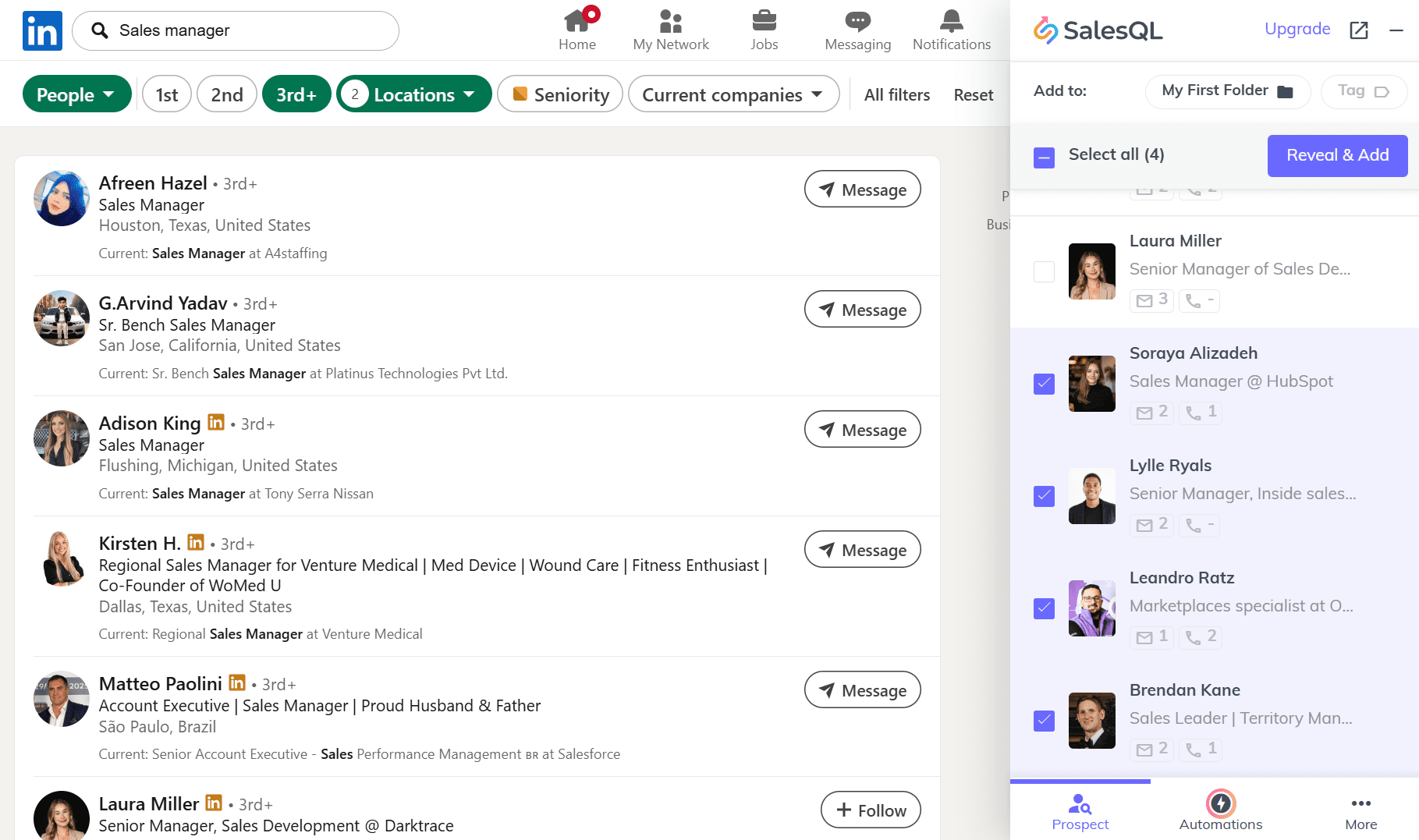
Another advantage is the ability to automate high-volume contact capture. This feature is available in “Automations” on the extension’s panel. From there, you can run a bulk collection from search results, profile connections, or profile URLs.
The main downside I noticed was the support team. Reaching a human agent isn’t straightforward. Plus, the AI chatbot doesn’t allow free-form questions, letting you choose only from very broad preset options and, in most cases, leading to Help Center articles (which aren’t always relevant to what you need).
To contact support directly, you must complete several steps with the bot, then select this option and submit a ticket form with your email and issue details. This adds extra friction when you need quick help.
📌 My verdict: I liked the prospecting experience with SalesQL because it quickly surfaces pre-verified contacts on profile and search results pages. Yet, my experience with their customer care team leaves much to be desired.
💡 Expert tip
Although many LinkedIn Chrome extensions support bulk email extraction, tempting you to quickly push large numbers of leads into your CRM, I recommend you avoid this practice.
The email finder extension simulates manual profile searches, which are treated by LinkedIn’s algorithms as profile views and are counted toward the daily action limits. To keep your account safe, our experts recommend staying within the following limits:
- For a free LinkedIn account: ≈ 150 prospects per day
- For a premium LinkedIn account: ≈ 550 prospects
So, if your LinkedIn lead scraper technically lets you collect more contacts, it’s safer to keep these limits and spread your activity reasonably throughout the day.
Let’s move to the next category of LinkedIn Chrome extensions.
Best LinkedIn extensions for recruiters
Here, I gathered the best LinkedIn extensions for recruiters and talent acquisition specialists. They help find personal contact details for potential candidates so you can run email outreach without relying solely on InMails.
-
ContactOut
Best for: Recruiters sourcing candidates across and beyond LinkedIn and building lists for cold outreach.
G2 rating: ⭐4.4 out of 5 on G2
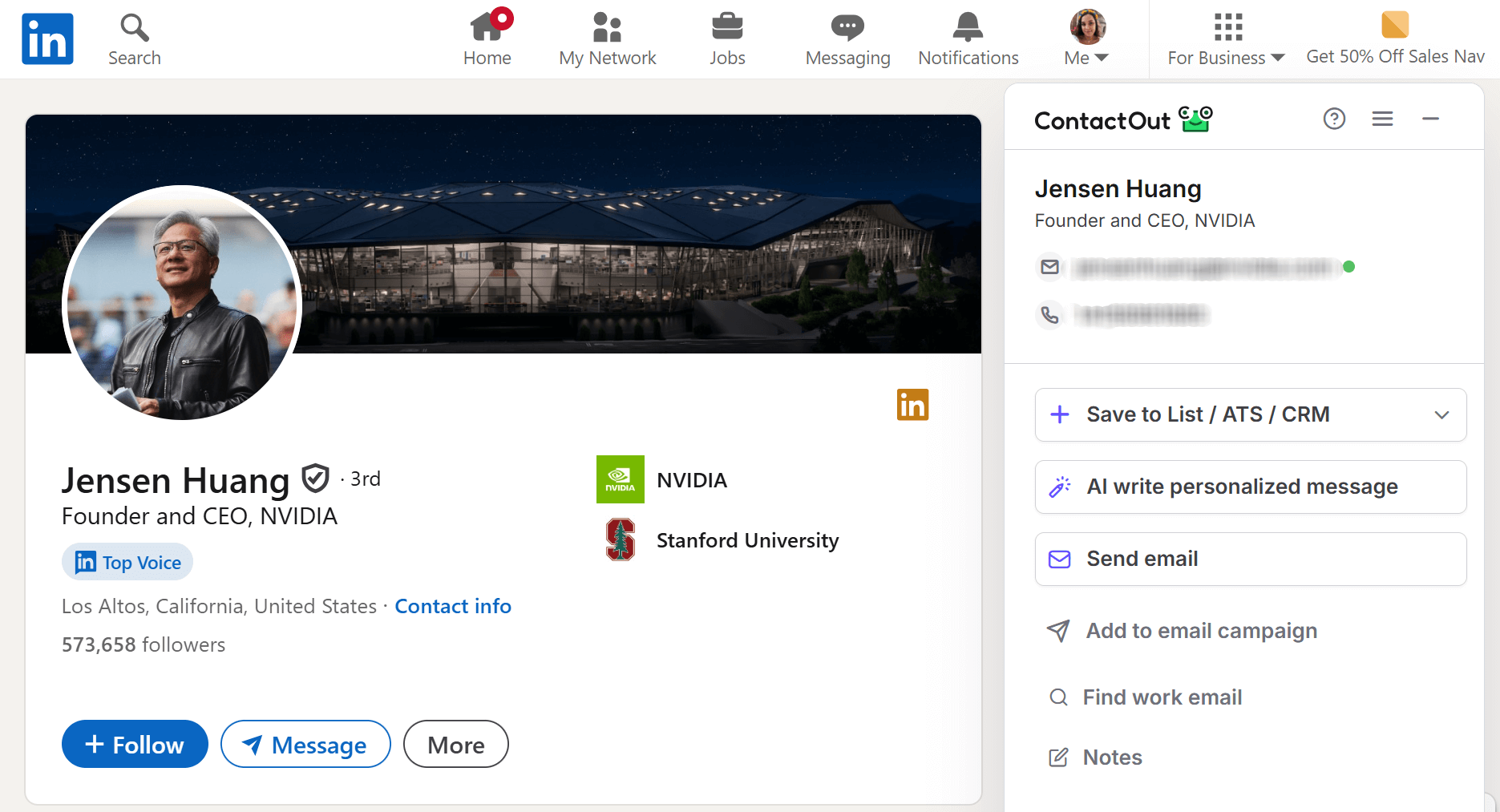
ContactOut is an email finder extension designed to help recruiters uncover contact details from LinkedIn profiles. Using this tool, you can find professional email addresses and phone numbers and easily export them to your CRM or ATS. You can also apply this extension to corporate websites for additional contact info.
ContactOut key features:
- Email and phone number discovery on LinkedIn, including Recruiter
- AI-powered contact data verification
- Contact discovery on company websites
- Lead list building and management
- CRM and ATS integrations
- Bulk data enrichment
- Multi-stage email campaigns
Pricing: ContactOut offers a free plan with 100 email credits and 5 phone credits. Paid subscriptions that include UK/US coverage start from $49/month, while plans without UK/US data cost from $25/month. Each paid option includes 2,000 email credits (per their user policy).
✅ Pros:
- Strong global coverage
- Lead capture on various LinkedIn pages, including company pages, search results, and event attendee lists
- Work and personal email discovery
- High data accuracy in user feedback
- Free plan with daily credits and no credit card requirement
- Native email outreach toolset
- Extensive database of contacts
❌ Cons:
- Phone discovery on higher-paid tiers only
- Form-based support requests only
- Occasional bulk list processing delays
- Unlimited emails, they mention on their pricing page, are not actually unlimited
My testing insights:
Getting started with ContactOut was easy. I only had to confirm my email address to create an account, and could use the extension right away. The Chrome extension appears on the right side of LinkedIn as a kind of plugin, so it’s always within reach.
I like that this extension can be applied broadly across the platform: individual profiles, search results, company pages, and even attendee lists.
On a profile page, the extension shows quick action buttons to save the lead to a list, ATS, or CRM, create a personalized message with AI, or send an email. All that can be done directly from the in-page tab without leaving LinkedIn. This can be especially convenient for recruiters so they don’t have to switch between tabs to reach a candidate once they discover a perfect profile.
The company page workflow was a nice surprise. I didn’t even have to go to the People section to find decision-makers associated with this business. The extension also surfaces a quick company overview (headcount, annual revenue, and other insights) and similar businesses on LinkedIn in separate tabs.
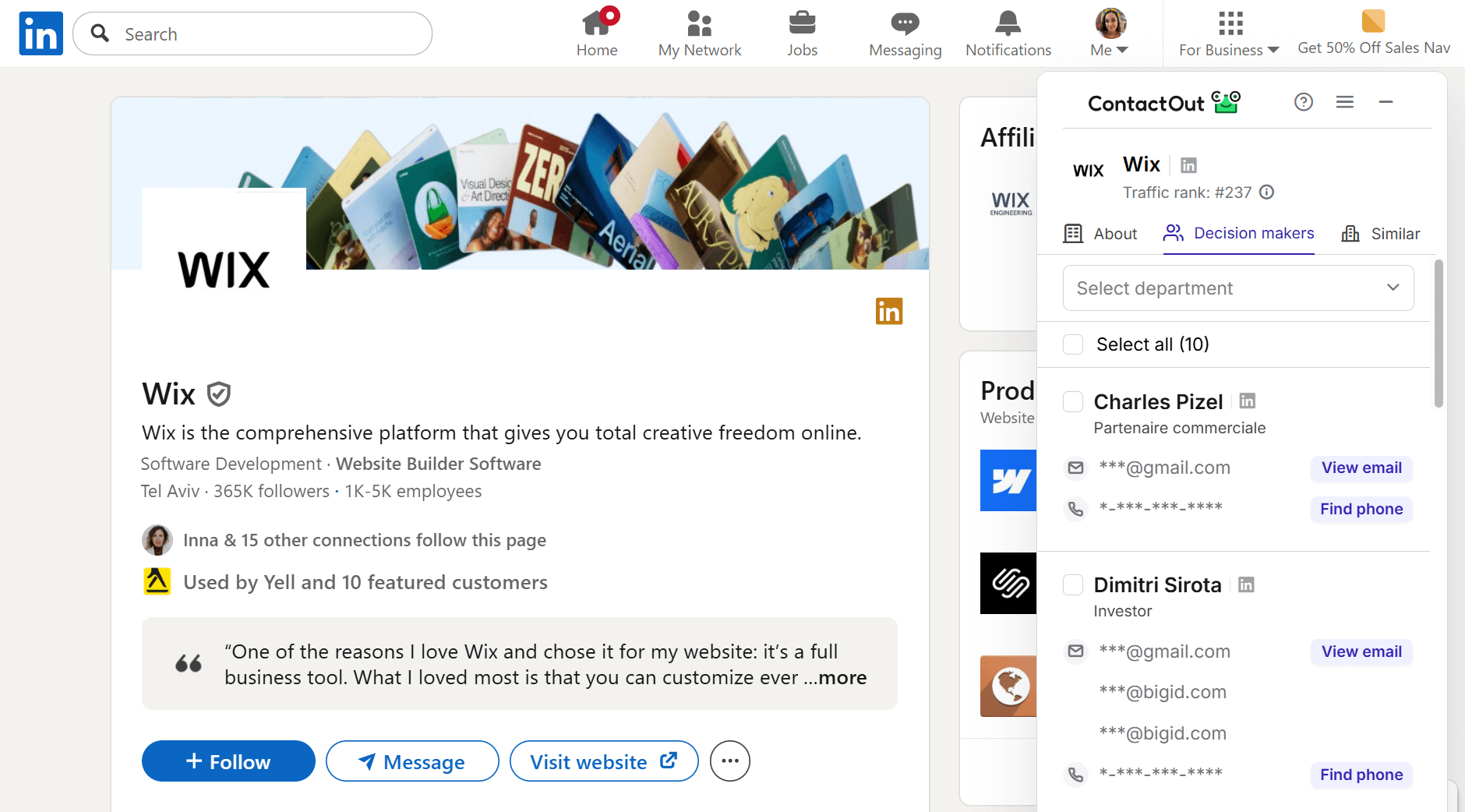
Overall, this LinkedIn Chrome extension works fast and smoothly. I like that it discovers both work and personal email addresses if available. However, many users report occasional delays when processing contacts in bulk.
Another drawback for me was the support: you can only submit a request via the in-app form and wait. In my case, I received an automated message stating that the team was away on holiday and would respond after they returned, which meant over a week. By the way, this email landed in my spam folder, so I didn’t even notice it initially.
Another point of confusion was pricing. The pricing page doesn’t provide a detailed breakdown of the features each plan offers. The page states that the free plan includes 5 phone and 5 email credits per day; however, after signing up for this option, I was confused to see 100 email credits and 5 phone credits for a month on my dashboard.
Finally, they state that each paid plan offers unlimited email credits, but when you dive deeper, you’ll find out that their unlimited plans operate under a fair use policy, which presupposes 2,000 email credits per account per month unless you enter into a separate agreement with the company. Personally, I don’t like such a vague policy.
📌 My verdict: Generally, I think ContactOut is a good LinkedIn prospecting tool in day-to-day use, given its speed and coverage across various pages. I recommend reviewing their pricing policy and customer support options before using their extension.
-
RocketReach
Best for: Recruiters looking for multi-source contact lookup with real-time verification and strong phone coverage.
G2 rating: ⭐4.6 out of 5 on G2
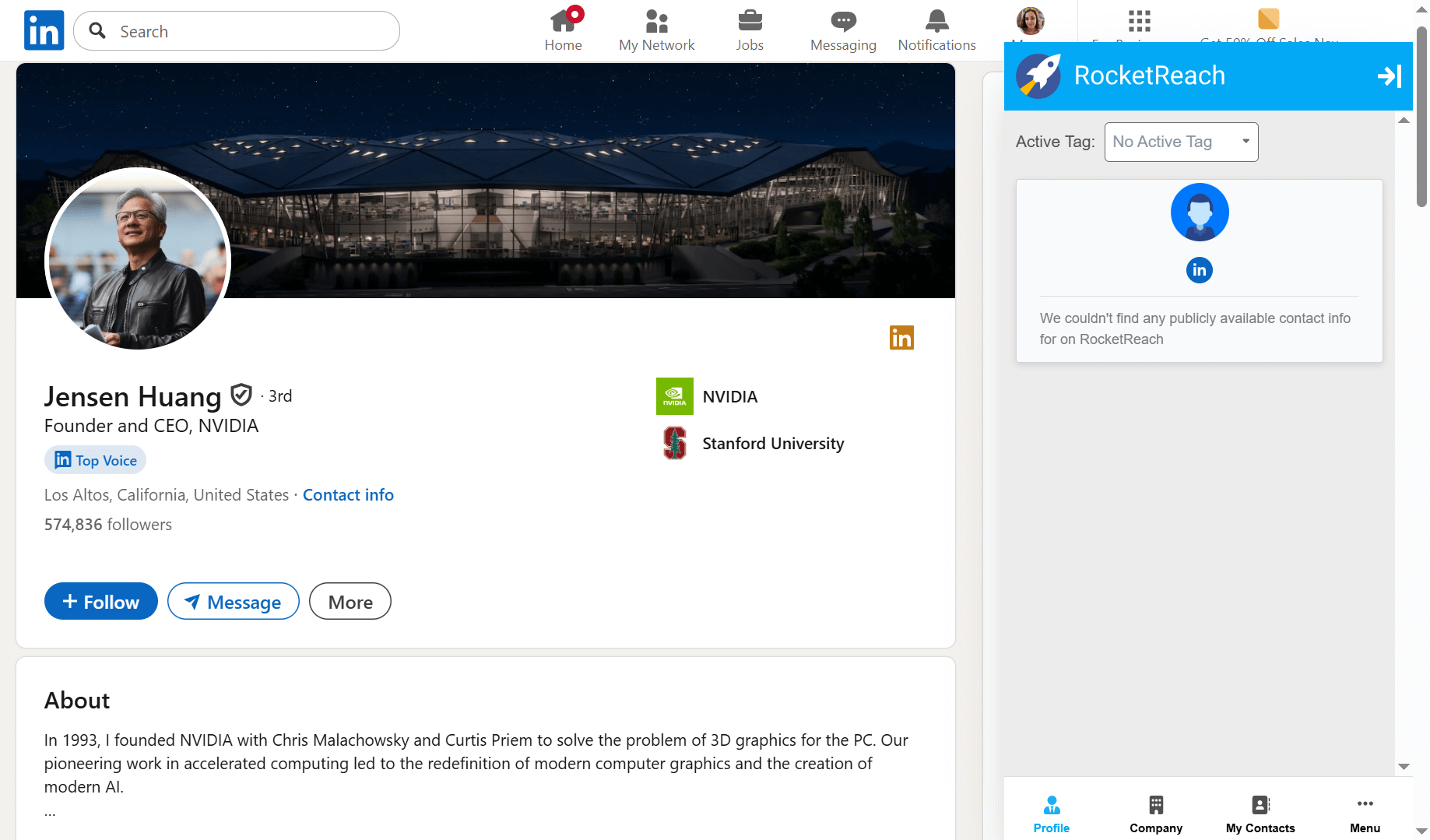
RocketReach is a LinkedIn prospecting tool that helps recruiters enrich profiles with contact details, including email addresses and phone numbers. The extension works directly on LinkedIn pages, so you can capture contacts without copying links into a separate tool. You can also save leads to your RocketReach account for list building and export.
RocketReach key features:
- Email address and phone number lookup on LinkedIn profiles
- Contact discovery on company websites and other web sources
- Real-time verification
- Contact list organization in the web app
- Direct export to CRM and ATS
Pricing: RocketReach offers a free plan with 3 email lookups. Paid options start at $49/month with 70 email-only credits, and $99/month for 200 email + phone lookups.
✅ Pros:
- Fast in-page contact lookup without leaving LinkedIn
- Broad sourcing coverage beyond LinkedIn
- Easy setup and simple list building
- Credit usage on verified contacts only
- Mobile and direct-dial phone number discovery
- CRM and ATS integration
❌ Cons:
- No export credits on the free plan
- Steep pricing compared to similar prospecting tools
- Restrictive free plan with 5 email-only credits per month
- Occasional lead detection failures on profile pages
My testing insights:
After I installed RocketReach and created a free account, the extension started showing up on LinkedIn as an embedded in-page tab. Because it appeared on literally every page, browsing felt heavier than usual: pages loaded much more slowly than without the extension.
I tested RockerReach the same way as the other email prospecting tools on this list. However, what surprised me most was that it didn’t work on the exact profile I used to explore all the LinkedIn Chrome extensions in this article. RocketReach didn’t detect the lead with their contact details at all.
However, it worked on other pages used in my test – search results and company pages. But to view employee prospects and their contact details, I had to open the People section first.
On my search results page, the LinkedIn contact finder worked more predictably. To reveal prospects’ email addresses, you have to add them to your Contacts by clicking the button. If the contact data is available, it appears directly in the tab.
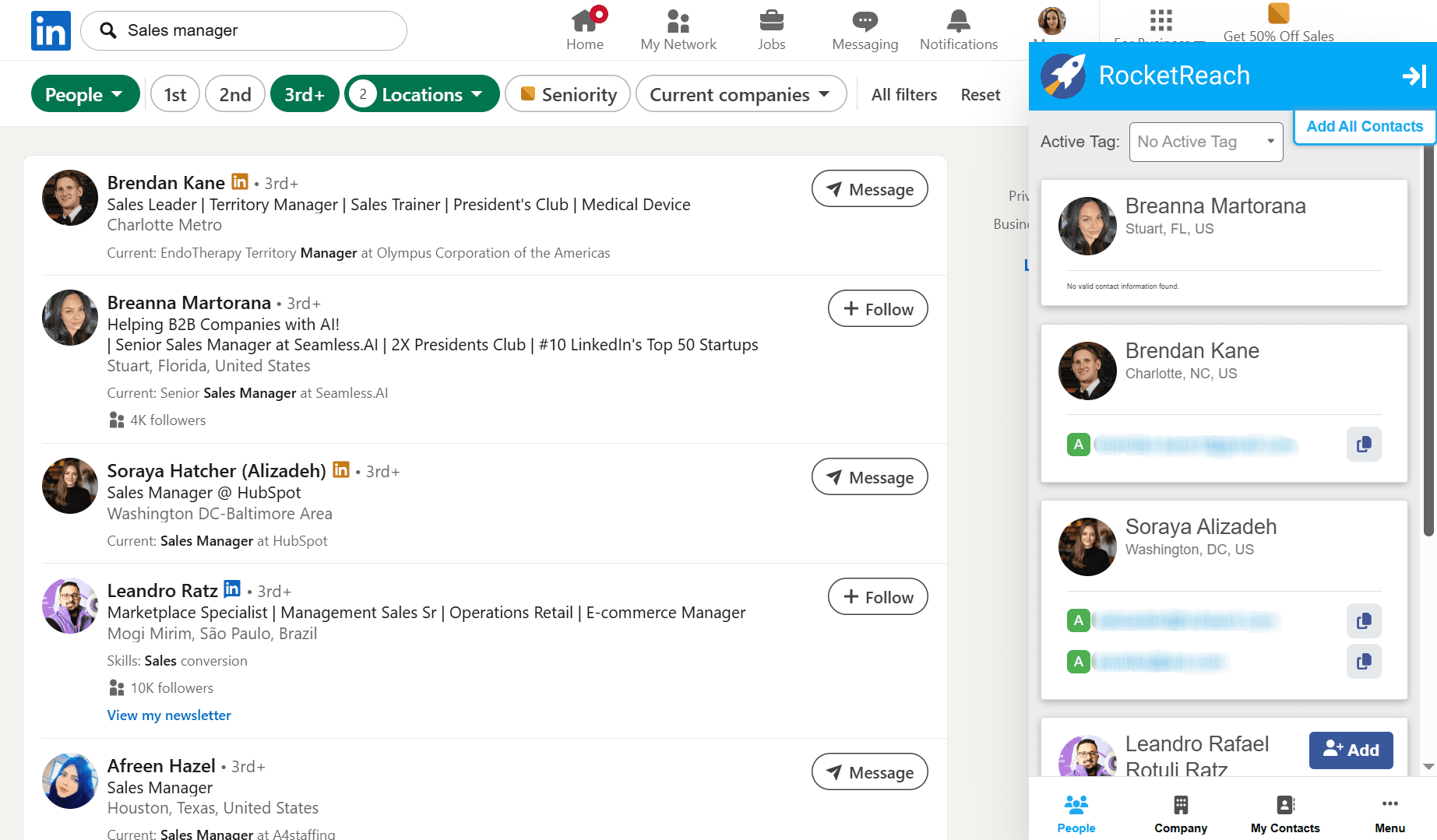
Another point worth mentioning is the RocketReach UI. Sometimes the tab didn’t load correctly, so I couldn’t access the bottom options unless I zoomed out my browser window. Besides, frankly, the app looks somewhat outdated, which can make it harder to navigate, especially if you’ve never worked with similar LinkedIn prospecting tools.
📌 My verdict: Overall, RocketReach can be useful for sourcing, but the slower performance and clunky interface make it less helpful for high-volume search than other Chrome extensions for LinkedIn lead generation.
-
SignalHire
Best for: Recruiters who need maximum contact coverage per profile (corporate and personal email addresses plus phone numbers).
G2 rating: ⭐3.7 out of 5 on G2
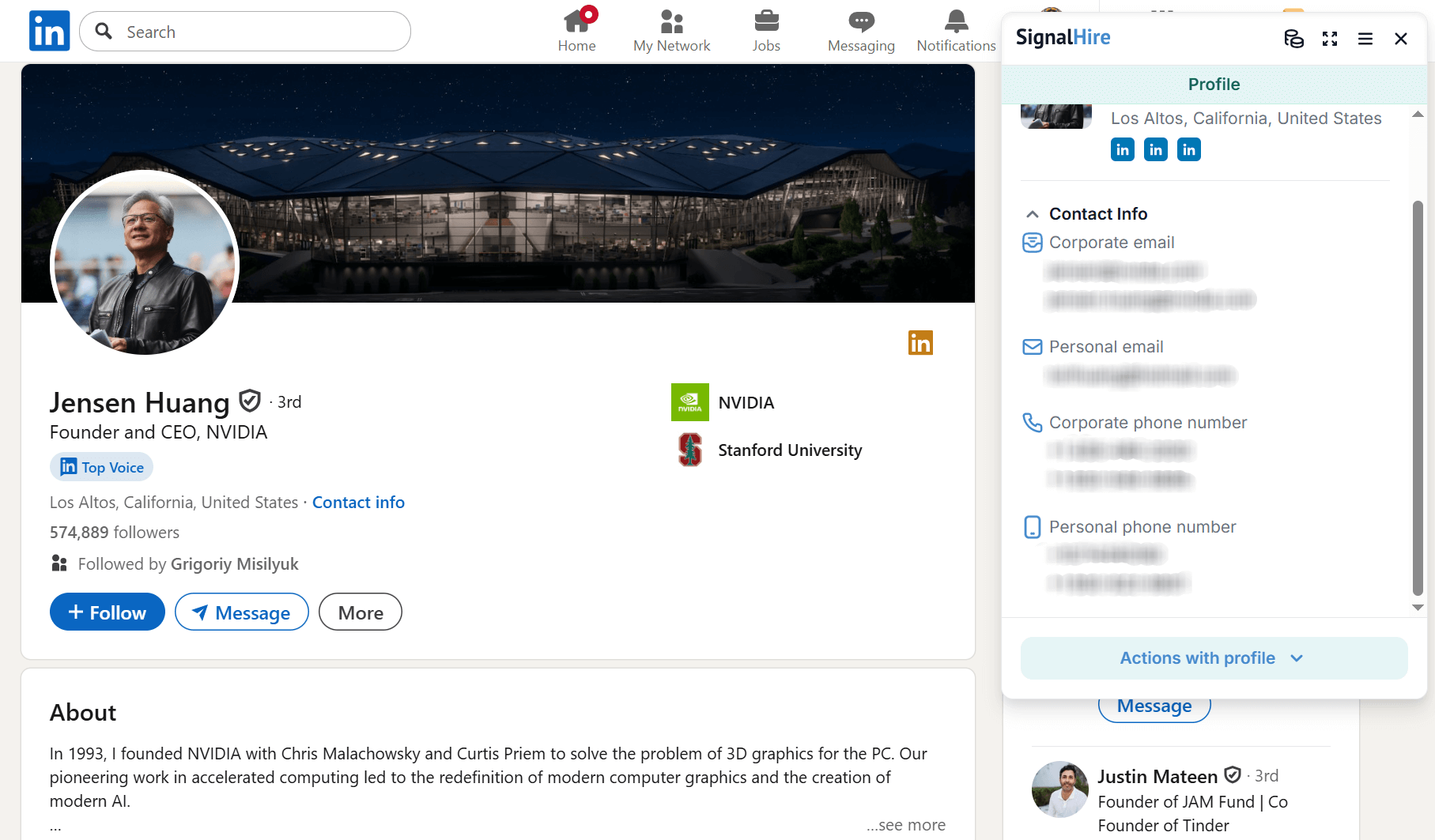
SignalHire is a recruiting Chrome extension that helps find contact details tied to professional profiles, including LinkedIn pages. It helps recruiters discover email addresses and phone numbers and export them to enrich their candidate lists.
SignalHire’s key features:
- Email address discovery on LinkedIn profile and search results pages
- Phone number reveals
- Bulk contact extraction
- Company data enrichment
- Direct export to CRM or ATS from the extension
- Lead list management in the web app
Pricing: SignalHire offers a free plan with 10 credits. Paid subscriptions start at $29/month, with 150 email credits per month.
✅ Pros:
- Email and phone discovery
- Bulk contact capture from LinkedIn pages
- Integrations with major CRM and ATS providers
- Multi-platform contact discovery beyond LinkedIn
- In-app lead management
❌ Cons:
- Occasional missing contact data for some profiles
- High scaling costs, especially for email plus phone reveals
- Outdated and cluttered interface
My testing insights:
SignalHire was one of the best LinkedIn Chrome extensions for recruiters I tested, mostly because of the amount of data it surfaces per profile. It can reveal both corporate and personal email addresses, phone numbers, and, in some cases, multiple contact details for the same person, enabling recruiters to streamline outreach.
Regarding LinkedIn coverage, I met one limitation: the extension didn’t work on company pages. However, it performed well on my search results page.
Although it took slightly longer for SignalHire to load than an individual profile, the results were worth it. The extension correctly identified all leads on the page and revealed multiple contacts for every selected prospect. You can add any profile to your list or project in the SignalHire app or export it to ATS or CRM.
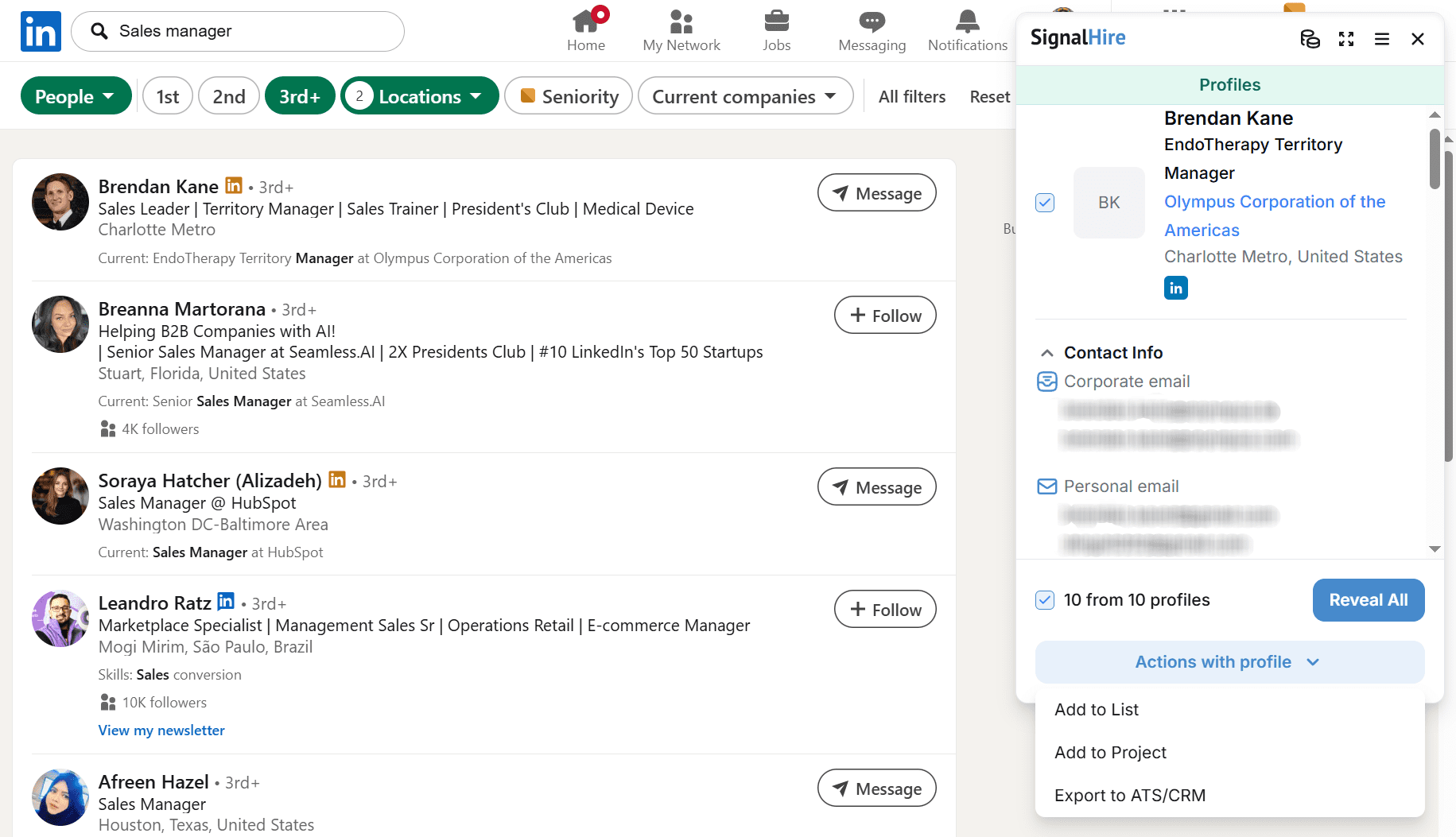
I like that this LinkedIn Chrome extension behaves more like a plugin and only runs on your request. It doesn’t expand on every page until you click to open it, making the browsing experience lighter than it was with RocketReach, for example.
However, like the previous tool, SignalHire’s interface looks cluttered, outdated, and unintuitive. Even though the design is simple, the navigation is complex due to the functionality, pop-up blocks, and menus.
💡 Expert recommendation:
In my test, the extension discovered four email addresses for one profile, and all of them passed an instant check with Snov.io Email Verifier. As a best practice, I recommend running an additional verification pass before outreach to avoid bounces and protect deliverability.
📌 My verdict: If evaluating SignalHire purely as a Chrome extension for LinkedIn prospecting, it can be a great find for recruiters. It works reliably across profiles and pulls as much contact data as possible for a given prospect.
How to choose the right LinkedIn Chrome extension
My reviews aim to help you pick the solution that best fits your goals and needs. But if you’re still hesitating or need extra guidance, here are a few key points to pay attention to when choosing Chrome extensions for LinkedIn:
Define your main goal
Decide what you actually need the LinkedIn extension for: lead generation, recruiting, just email enrichment, etc. Consider also how often you plan to use it. Will you look up contacts for individual email outreach? Or do you need bulk prospecting? When you know your goals, you can choose the LinkedIn contact finder that best fits your workflow, without overpaying.
Consider the pricing
Free plans with limited features are great, but you’ll most likely need more scale to meet your goals, won’t you? Carefully review the pricing plans to see the real cost of active use. See how the cost scales with more credits, seats, or features, so you don’t end up with the LinkedIn scraping tool that suddenly becomes too expensive.
Check how the tool fits your current stack
Whatever LinkedIn prospecting tools you choose, they should easily plug into your existing system. Look how each solution connects with the software you already use, for example, your CRM or email outreach platform, or Sales Navigator. The easier it is to push leads into your system, the more manual work you can cut out.
Evaluate usability and data quality
Your team may use Chrome extensions for LinkedIn every day, so it should feel fast and intuitive. If the tool requires too many complicated steps for basic actions, it will hardly streamline your workflow. Also, check whether the solution offers email verification to ensure your contact lists are free from invalid addresses or phone numbers.
Check compliance
As LinkedIn Chrome extensions process personal data, it’s crucial to evaluate how the platform handles privacy, security, and compliance. A trustworthy platform will clearly explain where its data comes from, how it’s stored and protected, plus what control you have over exporting, deleting, and managing this data.
For example, at Snov.io, we comply with GDPR and CCPA, offering strong security guarantees and informing our users about it openly. This way, our customers can protect both their company and the people they’re reaching out to.

Key takeaways
I hope my testing insights and practical tips will help you pick the best LinkedIn Chrome extension for your business needs. Here’s just a quick recap of what I’ve discovered:
- To streamline lead generation and outreach efforts, consider the Snov.io extension. It enables safe end-to-end LinkedIn prospecting with bulk email capture, reliable verification, and a robust outreach suite in a single workspace.
- Opt for Lusha if you need to enhance outbound calling,
- Try Wiza if your lead gen efforts are mainly focused on Sales Navigator.
- Consider GetProspect for simple extraction with lightweight lead organization and sequences.
- Waalaxy can be a good choice if you also need simple follow + connect sequences.
- Try UpLead for data enrichment if you need to discover both email and phone numbers.
- Skrapp can be a good option if you’re looking for email-only enrichment.
- Pick Kaspr if you focus on the EU market and need an extension for occasional LinkedIn contact discovery.
- Apollo’s LinkedIn Chrome extension can be s a solid sales tool for quickly pushing found prospects into multichannel sequences.
- Consider SalesQL if you need phone number plus email lookups with bulk workflows.
- LeadLeaper can be a good choice for teams looking for simple contact discovery and unlimited exports.
- If you leverage Saleshandy for email sequences, consider their native Chrome extension for LinkedIn to keep sales workflow in one place.
- SignalHire is a good option for recruiting teams looking for maximum contact coverage per candidate’s LinkedIn profile.
- Choose ContactOut if you source people worldwide and need strong global coverage for email finding.
- Consider RocketReach if you also need candidates’ phone numbers.
If you want a single platform that combines contact discovery, bulk email finder, verification, list building, outreach sequences, and a sales CRM, start with Snov.io. It offers a unified budget-friendly toolset that takes your sales from the first lead to the final handshake.