Cold outreach still works in 2026. But the playbook has changed. Even though 73% of B2B decision-makers prefer to be contacted by email, Hunter’s 2025 study reports an average reply rate of only 4.1%. That’s why modern outbound rarely relies solely on email cadence.
Instead, teams build multichannel sequences to drive results. For example, LinkedIn touches help warm up leads faster. Adding calls to cold sequences, according to Belkin’s 2025 Benchmark Report, can bring 30% more appointments from the same prospect lists.
This is why a sales engagement platform that supports multichannel outreach seems no longer optional today. And tools like Reply.io are built exactly for this reality. This platform lets you build cold sequences across emails, calls, LinkedIn, and more. Still, Reply.io pricing makes the decision less obvious.
So, is it actually worth it in 2026? In this Reply.io review, I break down the key features, real user feedback, and trade-offs to help you make the right choice.
TL;DR: A quick Reply.io review
Reply.io is an AI-driven sales engagement platform for multichannel outbound. It is built around structured campaigns that can combine email, LinkedIn, WhatsApp, calls, and SMS within a single sequence.
Beyond conditional sequences, Reply.io features also include a built-in B2B database, deliverability-focused capabilities, email analytics, and reporting tools.
Here is a quick summary table based on my Reply.io review:
Below is a practical Reply.io review, with my testing takes on the product’s functionality, onboarding experience, and pricing model. Read further to explore the platform in more detail.
What is Reply.io?
Reply.io is an AI-driven sales automation platform designed to help B2B teams run outbound campaigns at scale. The platform lets sales professionals, marketers, and agencies connect prospects across multiple channels, including email, LinkedIn, WhatsApp, SMS, and calls.
Reply.io provides tools to personalize sequences, manage deliverability, and track performance across campaigns. Beyond outreach sequences, the platform also offers built-in prospecting options, so you can source, enrich, and engage leads in a single workspace.
Unlike some other sales automation tools, Reply.io has a deep focus on AI. It provides AI-powered capabilities for personalization, messaging, and other routine tasks, including its Jason SDR agent for more advanced workflows.
Reply.io features
In practice, Reply.io covers full outbound workflows – from prospecting to outcome tracking. It also integrates with other tools, so you can sync outreach workflows with your CRM or other sales stack.
Now, let’s take a closer look at Reply.io features.
Email sequences & cadence builder
One of the core Reply.io features is email sequences. You can build an email cadence by combining steps, setting timing, and defining rules for what happens next. The platform supports conditional sequences, so you can adjust your campaign flow based on your prospect’s behaviour or available data about them.
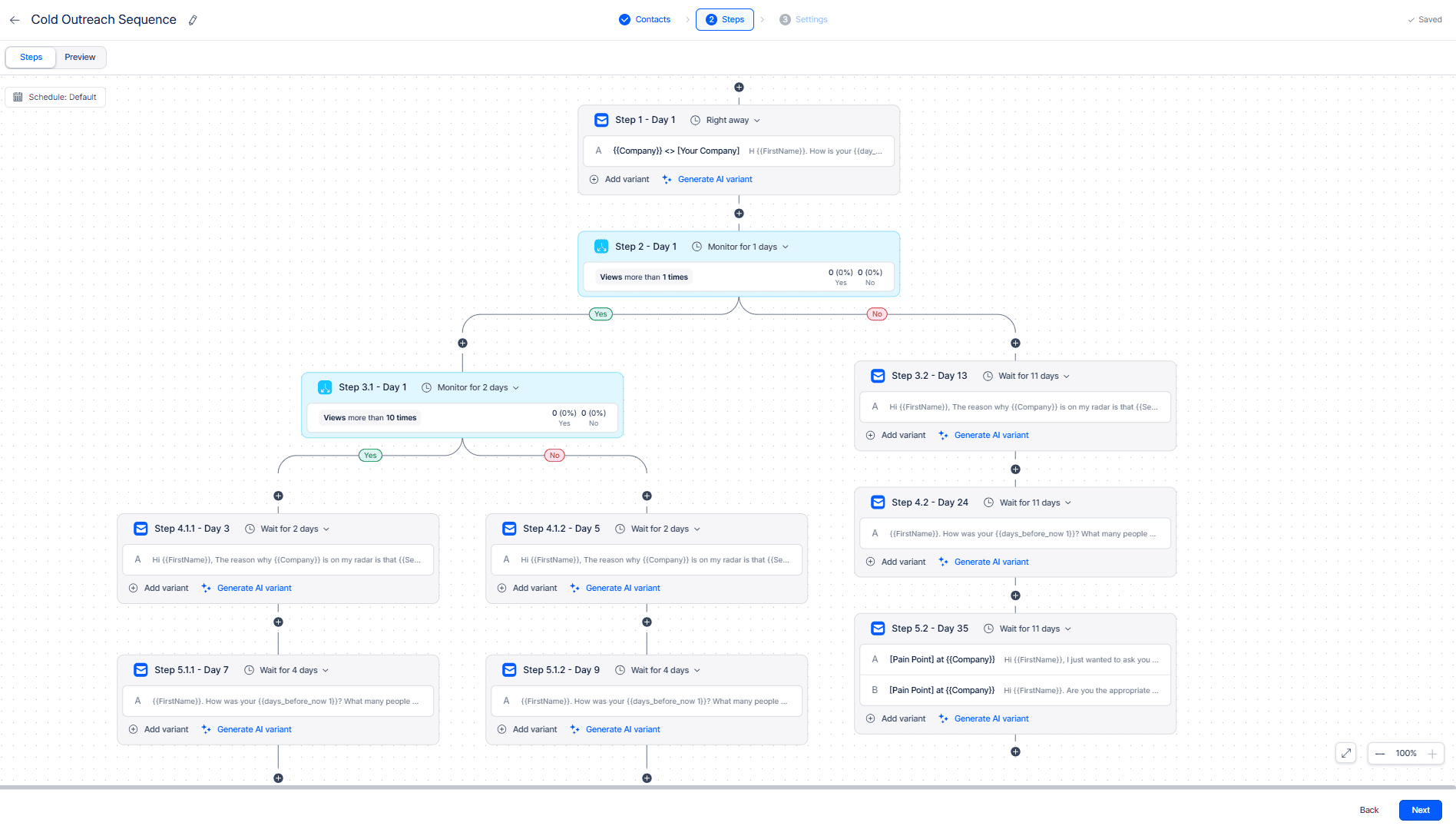
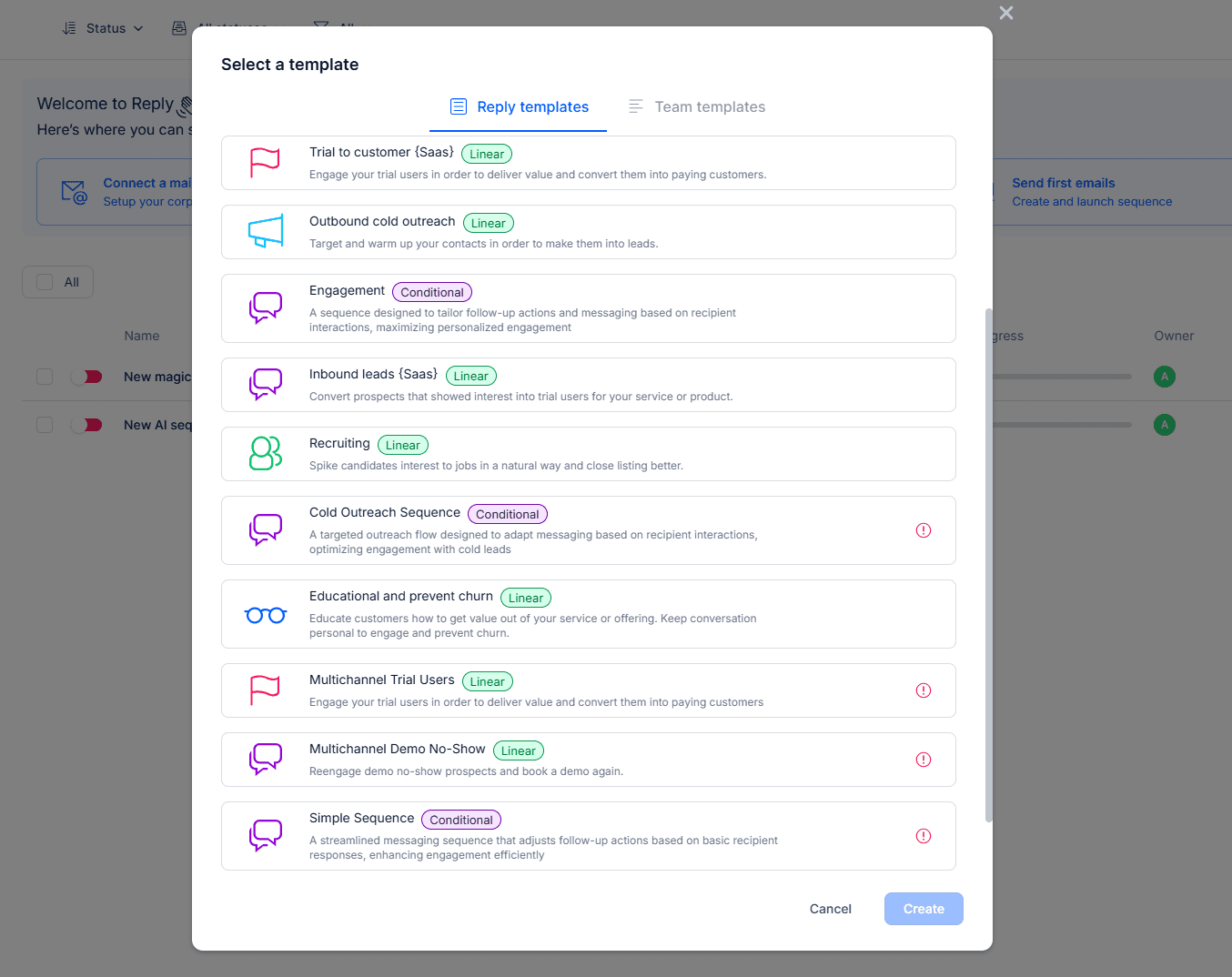
In Reply.io, you can build email sequences in several ways: from scratch, using a template, or with the help of AI.
The platform offers a set of templates tailored for different use cases (cold outbound, demo requests, recruiting, and more). Such a layout includes a ready-to-use sequence with preset conditions and timing, plus customizable messages for each step. You can also create your own templates and save them for further team use.
Another way is to build a sequence with AI. You only need to write a prompt, and Jason AI will generate an email for your business case.
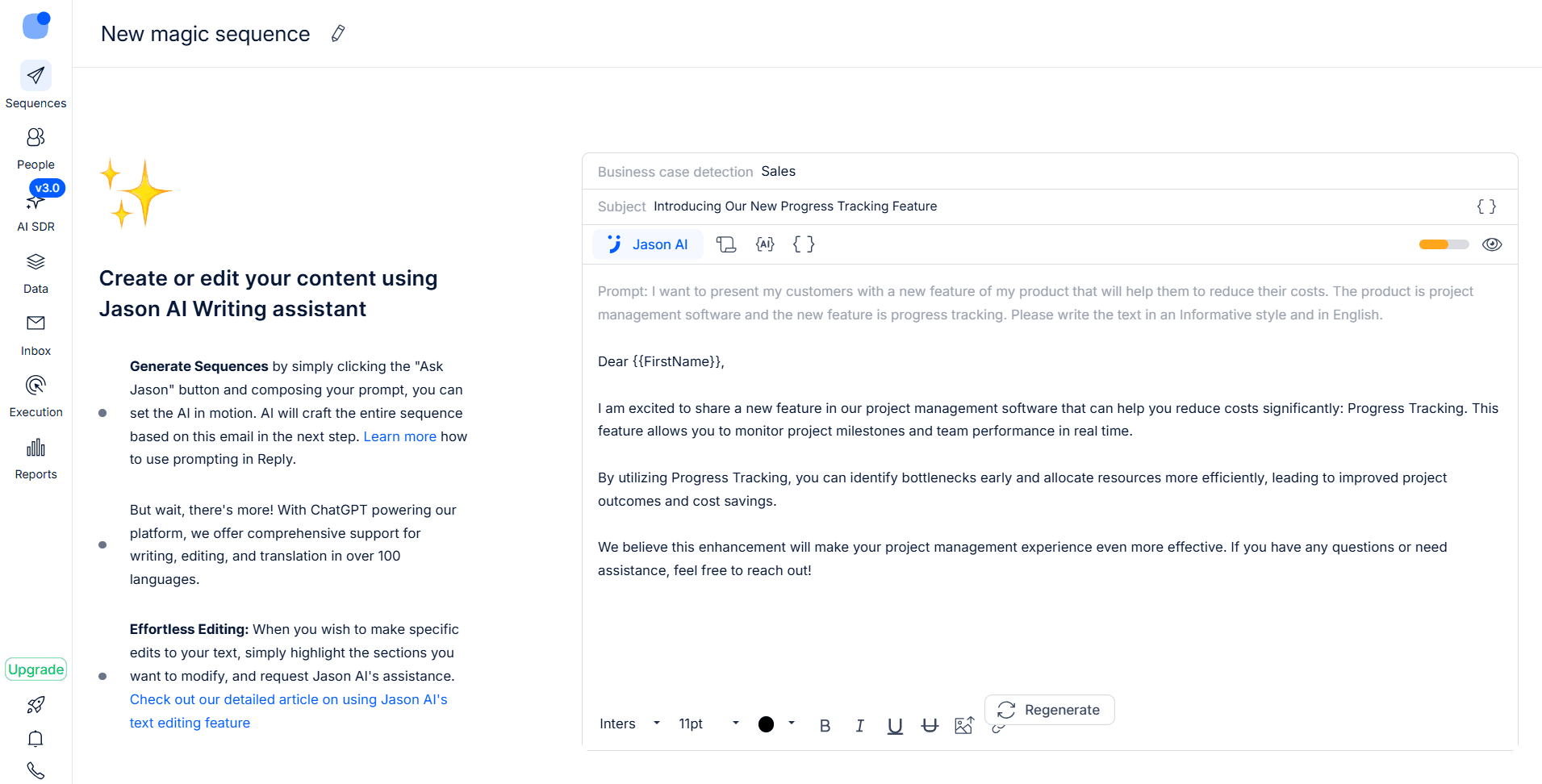
You can edit the message yourself or adjust your prompt with additional instructions or by setting parameters, such as tone, formality, language, or length, to help AI generate a better fit. Once you’re satisfied with the initial email, the platform’s AI will generate the next steps of your email cadence.
|
⚠️ Important note Although the AI-generated follow-ups are logically connected to the previous email, I strongly recommend reviewing them before sending. Human oversight is important to ensure message quality and brand fit. For more practical tips on using AI for cold email automation, check our case study on sending 3,000 messages using an AI agent. |
Multichannel outreach
The Reply.io features for multichannel outreach are fairly capable. Beyond email sequence tools, the platform provides calling/SMS workflows, supports LinkedIn touchpoints, and lets you add other channel steps via Zapier.
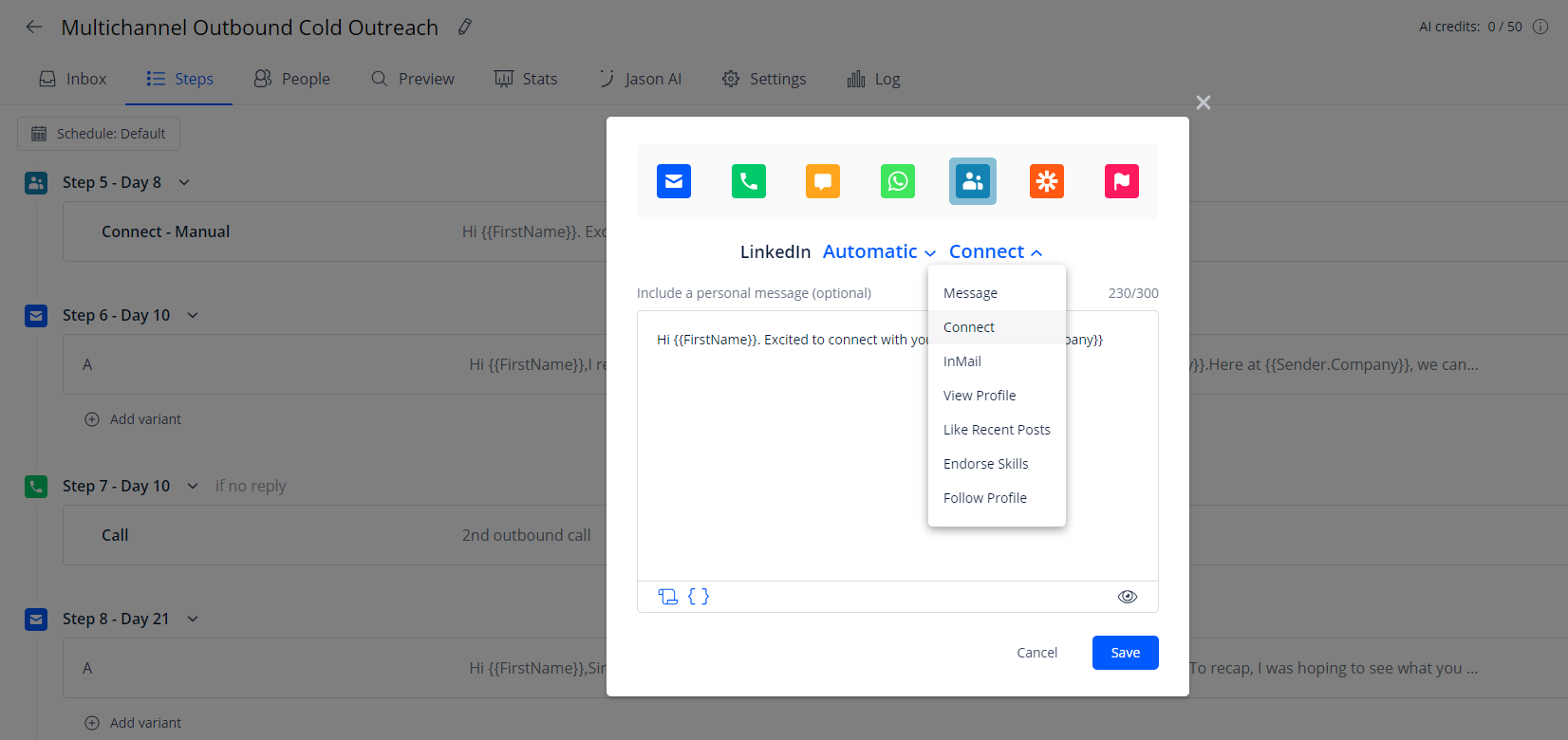
Based on your Reply.io plan, you can add the following steps to your email cadence:
- LinkedIn actions (connection requests, profile visits, likes, messages, and more)
- WhatsApp tasks
- Calls (via the integrated dialer)
- SMS (manual or automatic)
- Tasks (manual touchpoints)
I like that, some steps run automatically while others can be assigned as manual tasks. This keeps multichannel outreach more controlled and helps prevent irrelevant or inconsistent messaging.
When adding multichannel to your email cadence in Reply.io, you can choose a channel for each step, select an action, and set the desired sending time. You can also use “Conditions” to determine when to skip the step or create different paths based on specific criteria.
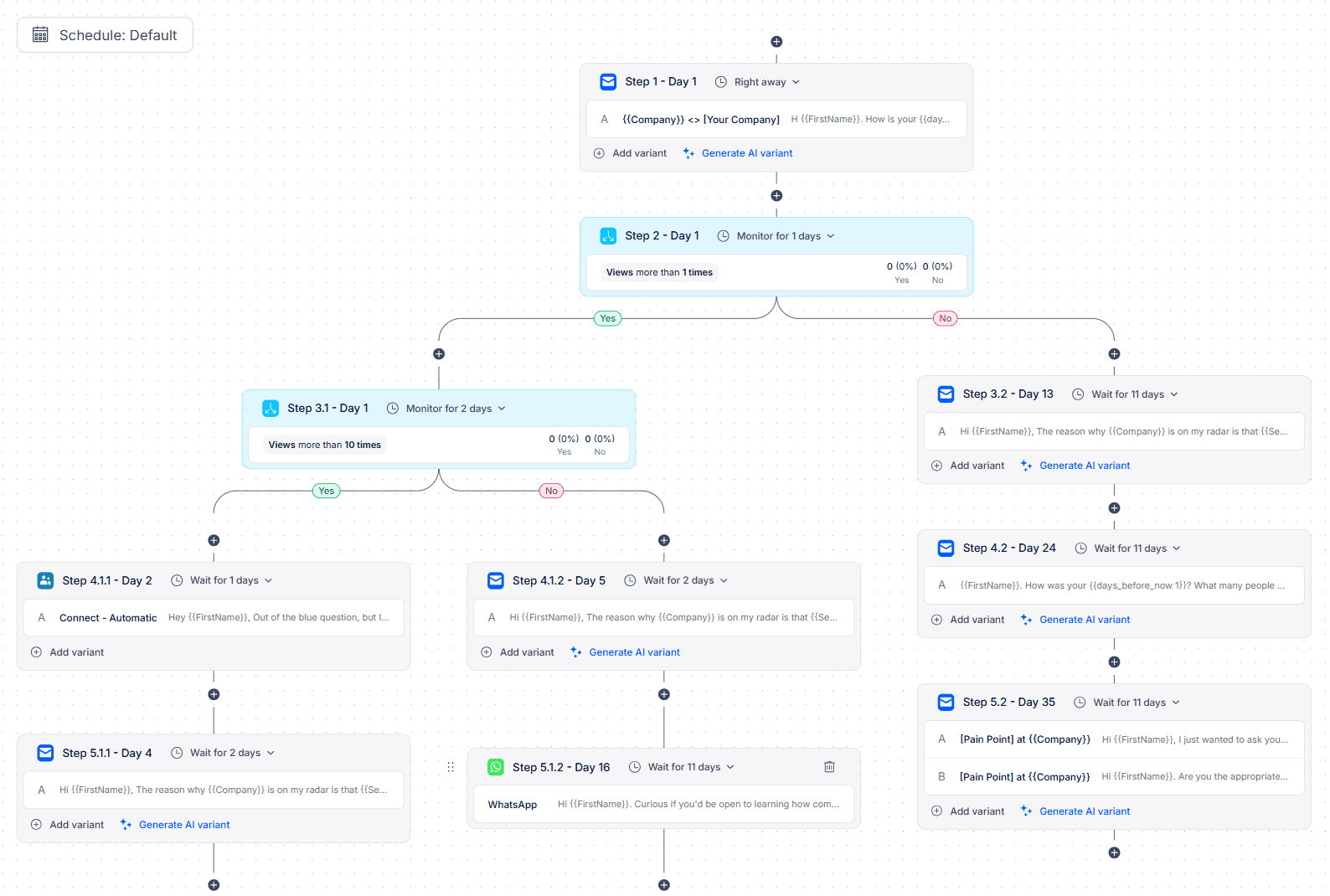
The Reply.io conditional logic also lets you adjust sequence flows based on engagement signals. For example, if your prospect opens an email but doesn’t reply, they can be automatically followed up with a LinkedIn step or routed to a softer lead nurturing path.
Personalization & dynamic variables
Reply.io supports standard merge fields for personalization. Such variables cover the basics, for example, first name, company, job title, or custom fields with data you import. The platform also offers more robust personalization with its advanced variables, which come in handy when data is missing (fallbacks) or when you need a specific logic (if 1 is true, then 2).
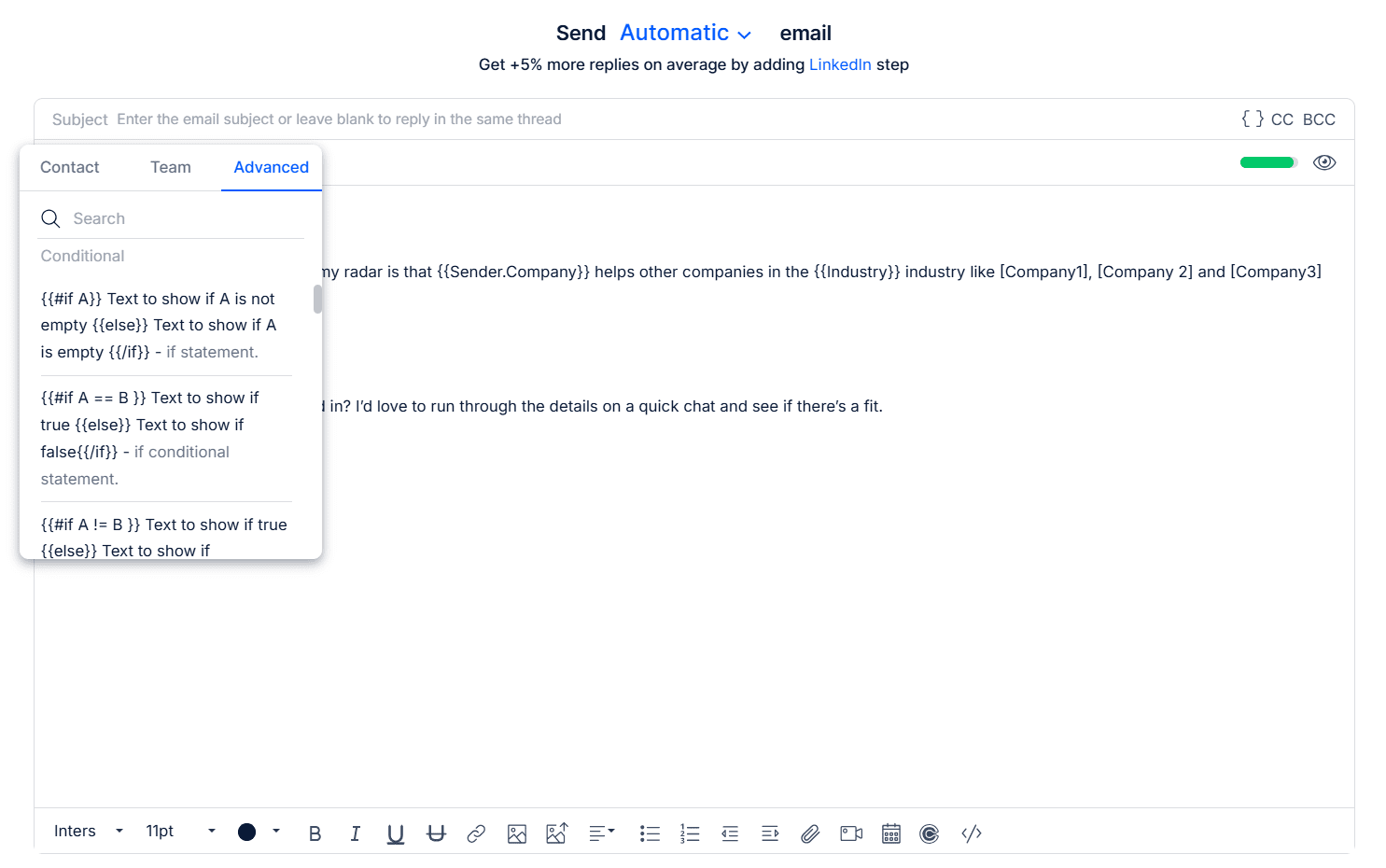
These dynamic variables will help you avoid awkward blanks in your messages and adapt messaging at scale, taking into account data availability or specific conditions.
Reply.io also supports personalization with AI Variables. They work somewhat like smart placeholders, letting you tailor your email copy for each recipient.
How it works: you create a short instruction or choose one of the ready-made prompts, and insert this AI variable into your copy. When the message is sent, the platform generates content, for example, a unique opener, value point, or CTA, for each contact based on their background and online data.
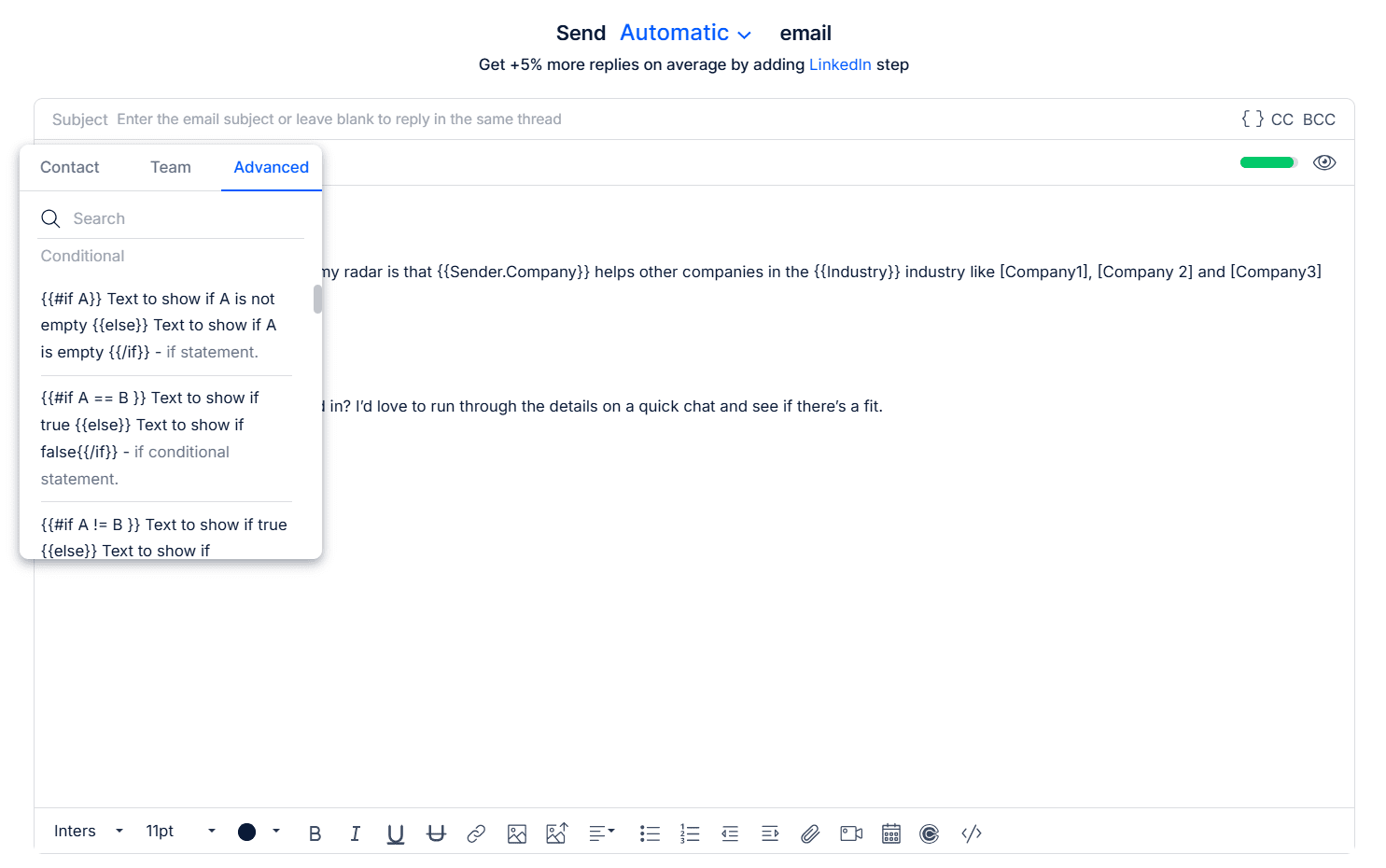
AI Variables help you make your messaging more relevant, even at scale, improving deliverability and overall campaign performance. Reply.io also offers Spintax for creating multiple unique versions of the same email copy by rotating synonyms and alternative phrasing.

Email warm-up & deliverability controls
Sender reputation is one of the biggest success factors in cold outreach. Even the strongest and most personalized copy won’t work if your messages land in Spam. Since Reply.io provides cold email software, it also includes deliverability toolkits to monitor mailbox health and reduce spam risk.
Here are the key Reply.io features for managing deliverability:
- Email Health Checker that helps you monitor SPF, DKIM, DMARC, and other DNS settings to spot common configuration issues
- Google Postmaster integration for tracking spam rates and domain reputation
- Ramp-up mode that gradually increases sending volume over time to avoid sudden spikes in activity that may look suspicious
- Email warm-up (with MailToaster) that helps build sender reputation by simulating realistic mailbox activity with positive signals to providers
- Email verification that lets you check your list quality before sending and get rid of invalid or risky email addresses
Reply.io also provides advanced deliverability features, including provider matching, blacklist monitoring, and Gmail API-based sending.
Analytics & reporting tools
Reply.io provides comprehensive analytics across campaigns, covering the basics you need for outbound decisions. You can track deliverability health, including bounce rates, spam-related issues, and inbox placement. You can also monitor key engagement metrics, such as opens, clicks, replies, and conversion rates from contact to meeting.
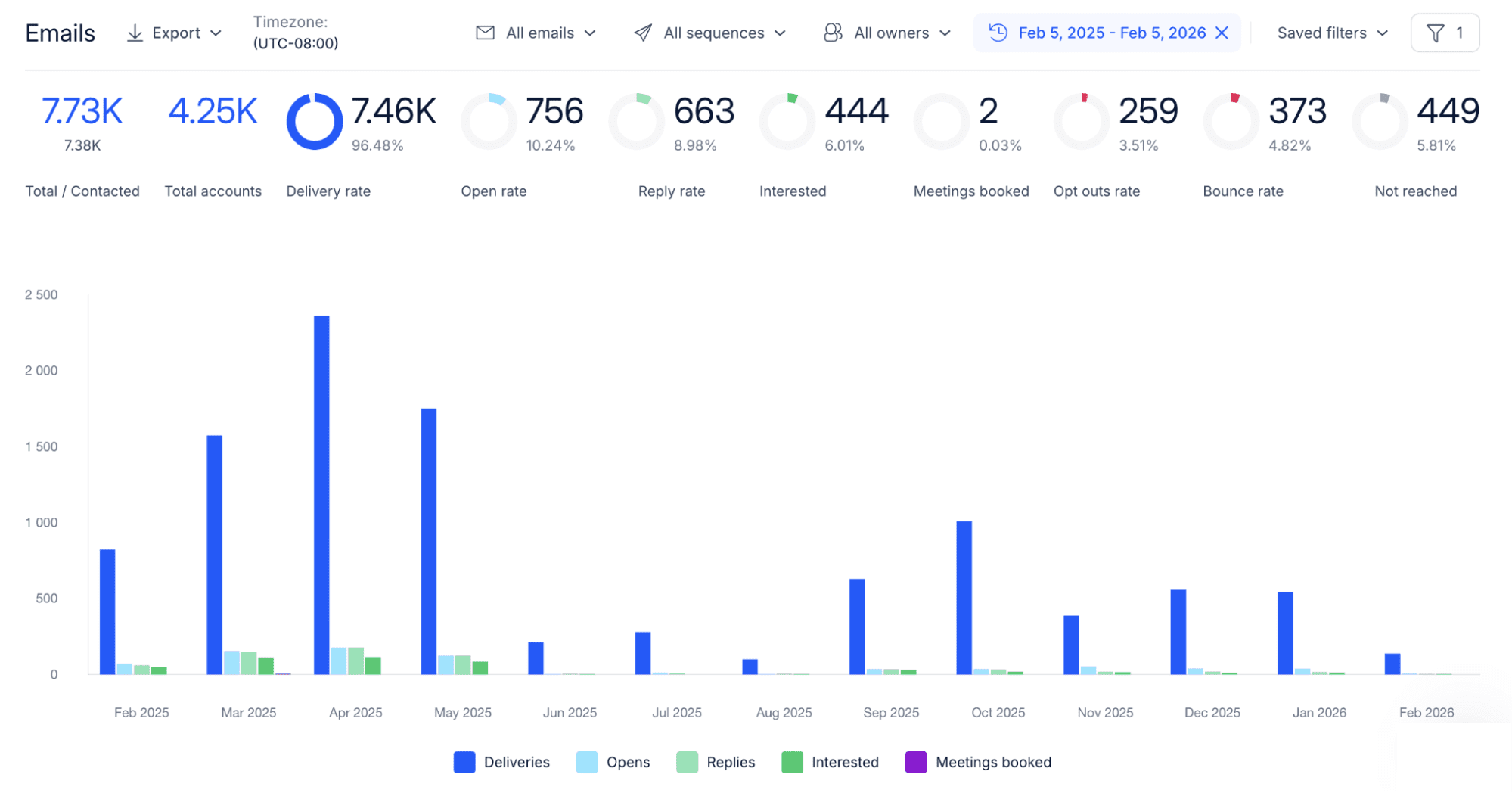
The platform also provides step-level analytics, showing exactly where performance drops within your email cadence. These insights help you optimize your campaigns more effectively. Plus, you can add A/B testing to your sequence steps to see what resonates more with your audience.
For multichannel outreach, Reply.io offers reporting dashboards that compare channels side-by-side. This makes it easier to evaluate performance across email, LinkedIn, calls, SMS, and WhatsApp and select the option with the biggest outcome.
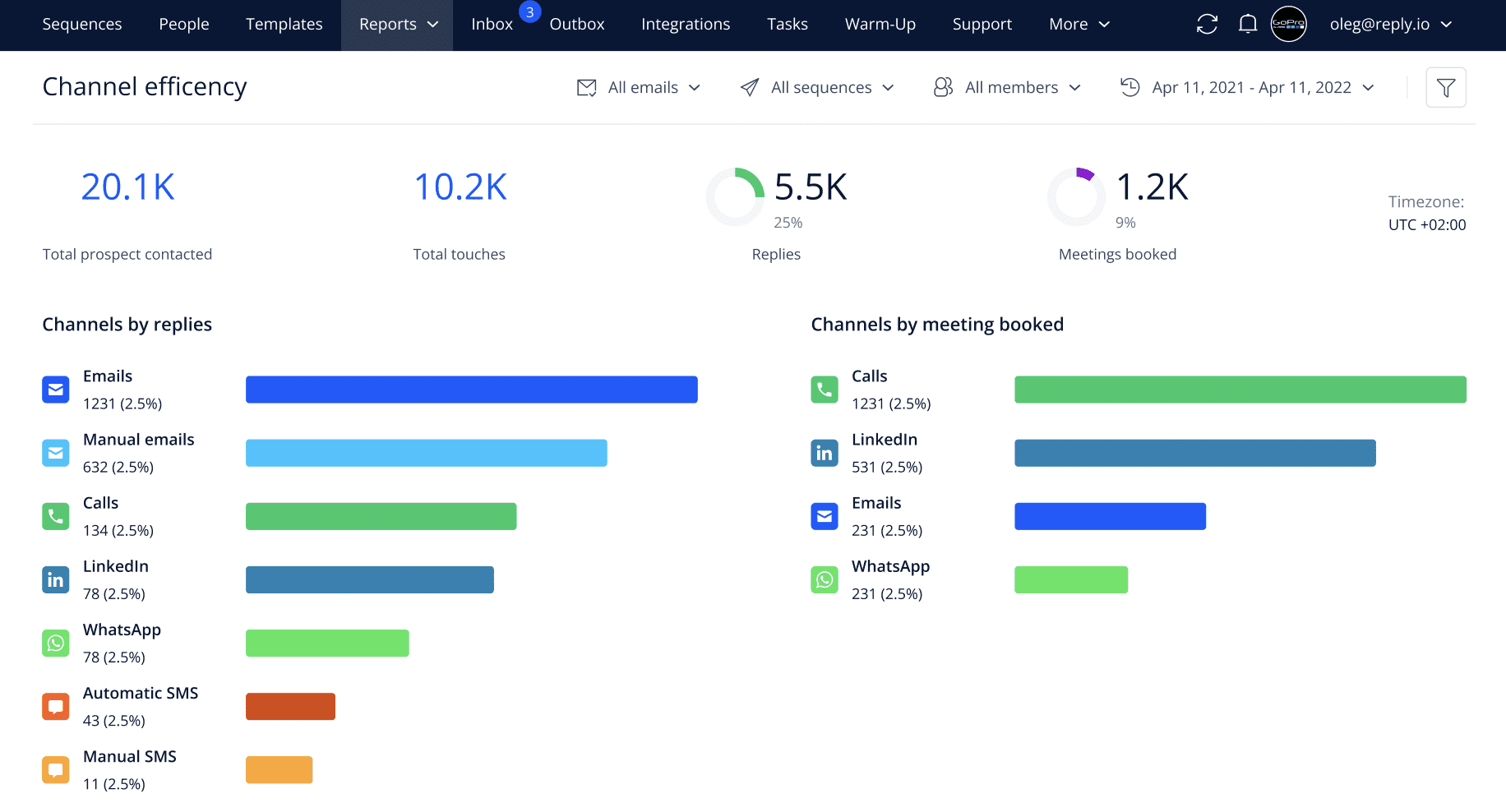
Reply.io also lets you track team productivity, including individual rep stats, meeting conversions, and other metrics. If you have an agency plan, you also get access to client reporting with KPI tracking and performance comparisons.
Jason AI SDR
This is probably one of the strongest Reply.io features. Jason AI SDR is positioned as an AI-driven agent trained specifically for B2B outreach and sales conversations. It is designed to handle more of the outbound workflow, from prospecting and personalization to follow-ups and reply management.
Here are some of the key tasks Jason AI covers:
- Sequence creation: It can generate sequences from a few prompts, including multichannel steps
- Lead search: Jason AI helps define your ICP and find matching profiles in Reply.io’s database or from LinkedIn based on your filters
- Personalization: This agent can draft tailored messages based on the context and available data
- Automation: Jason AI can perform as your SDR, meaning it can execute outreach automatically with less manual input from your side
- Analytics: It provides real-time insights, forecasts lead behavior based on engagement patterns, and automatically scores your prospects across various criteria
Jason AI can also analyze your website and generate campaign ideas, positioning angles, and new potential audiences for outreach. This planning aspect is realized with the AI Strategist mode.
In short, Jason AI SDR works like your own agent by automating many parts of outbound. Sounds great, doesn’t it? However, the main trade-off is the cost and packaging: Jason AI SDR isn’t included in any of the core plans and requires a separate tier, which is very expensive.
Integrations
Reply.io offers native CRM integrations with popular platforms like Salesforce, HubSpot, Pipedrive, and Cooper CRM. This helps you sync leads and keep your records more organized without manual copypasting.
Reply.io also supports Zapier, which lets you connect to 500+ other apps, including Slack, Basecamp, PandaDoc, and other tools, without code. If you need more advanced CRM integration or deeper controls, you can use the API to build custom connections.
Reply.io pricing overview
Reply.io pricing is split into three tiers based on the functionality you’ll use: Email Volume, Multichannel, or Jason AI SDR. The platform also offers a separate pricing model for agencies.
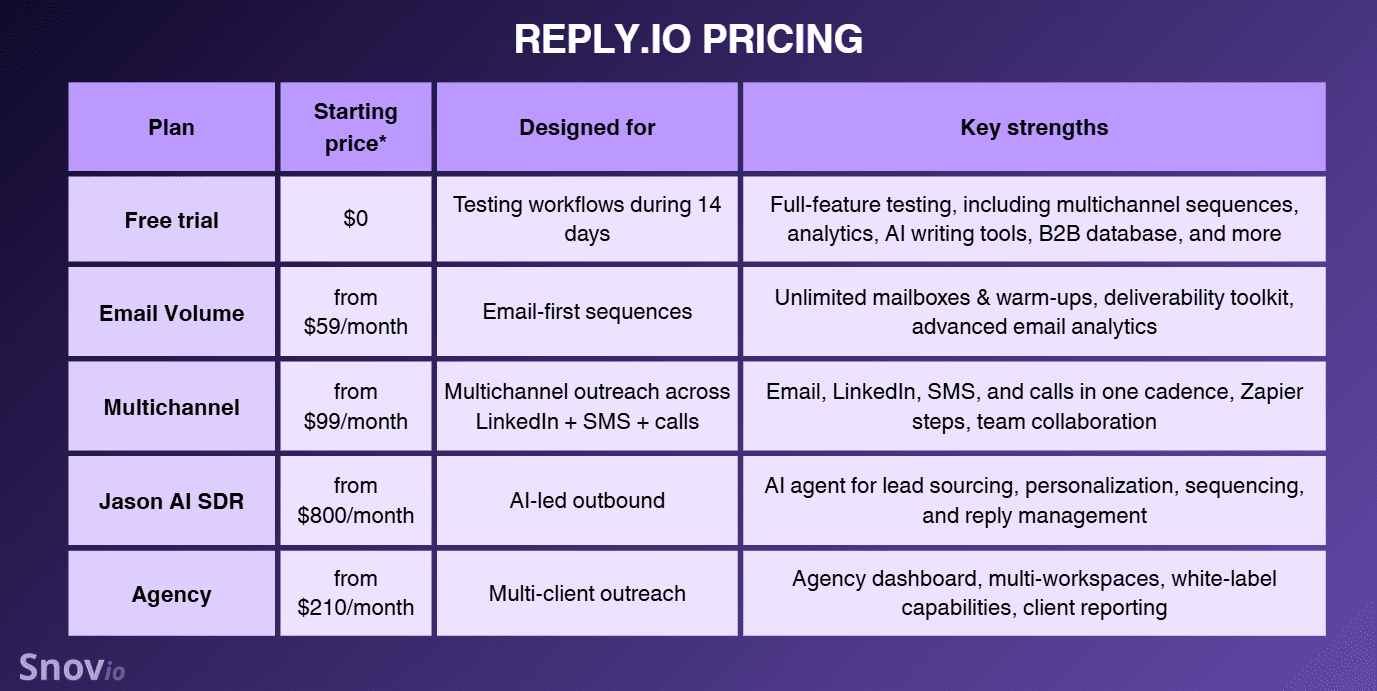
* Please note that all pricing listed in this Reply.io review reflects monthly billing and is accurate at the time of writing. Plans and rates may change, so always verify current pricing on the official website.
Email Volume
Reply.io pricing for this tier depends on the number of active contacts—unique prospects you can send an initial email and unlimited follow-ups to. The cost starts at $59/month for 1,000 contacts.
Within this plan, you can connect unlimited mailboxes and get unlimited email warm-ups, 50 live data credits, deliverability tools, and limited AI features. This subscription type works best for teams focused primarily on high-volume email outreach.
Multichannel
If LinkedIn can be added to the previous plan as a paid add-on, this tier already includes LinkedIn, calls, and SMS capabilities. Reply.io pricing for multichannel outreach starts at $99/user per month and is based on the number of users.
With this subscription, you also get unlimited contacts, team collaboration features, and priority support. Like with Email Volume, you can also use 50 data credits and unlimited warm-ups; however, the number of mailboxes is limited to 5 per user.
This plan has a strict focus on multichannel outreach, letting you also add any channel step via Zapier. That’s why this option is a good fit for teams looking for outbound sales tools with strong multichannel engagement.
Jason AI SDR
Reply.io pricing plans that include Jason AI SDR start from $800/month. With the entry tier, you receive 1,000 active contacts, 2 LinkedIn accounts, done-for-you deliverability, plus unlimited mailboxes and email warm-ups.
The strongest feature of these plans is access to robust AI capabilities, specifically an all-in-one AI sales agent. It helps you define ICP, source leads in real time, build sequences, write personalized messages, and even handle replies.
Although Jason AI SDR offers strong experience with an AI agent that can run outbound on autopilot, it may feel pricey. Given that, this paid option is best for enterprises and well-funded teams selling complex, expensive solutions where one booked meeting can justify the monthly cost.
Reply.io pricing for agencies
This paid option is designed specifically for managing outreach for multiple clients in a single dashboard. The entry agency plan starts from $210/month and includes unlimited clients and users.
Key features include multi-workspace management, an agency dashboard, role-based access controls, AI voicemails on LinkedIn, and white-label options. Reply.io Agency plans are best for marketing and lead gen agencies that want to manage outbound for multiple clients on a single outreach platform.
Given the Reply.io pricing models, the best approach is to decide which channels and automation you’ll actually use, then select the plan that best fits those needs. Thanks to paid add-ons (extra active contacts or channels), you can keep it lean and scale up later.

What users say about Reply.io?
Now that you’ve seen how the Reply.io pricing plans compare, let’s check what real users say about this sales outreach software in day-to-day work.
On review platforms, Reply.io’s scores are consistently strong:
User feedback around Reply.io frequently mentions strong campaign customization and deep personalization as key strengths. Reviewers also mention reporting dashboards as a plus, with flexible filters that let teams see results across steps and channels.
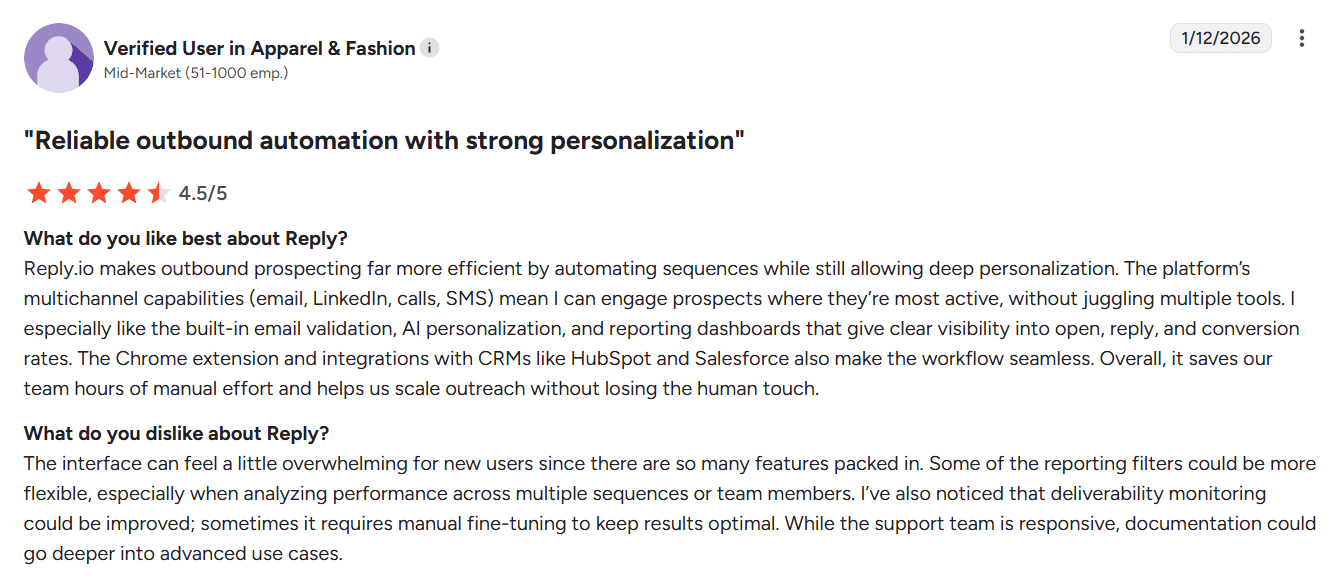
Some users say the interface feels convenient overall and that it’s easy to manage all campaigns from one platform. However, many Reply.io reviews also note that the platform isn’t intuitive at first and requires extra time to learn how everything works.
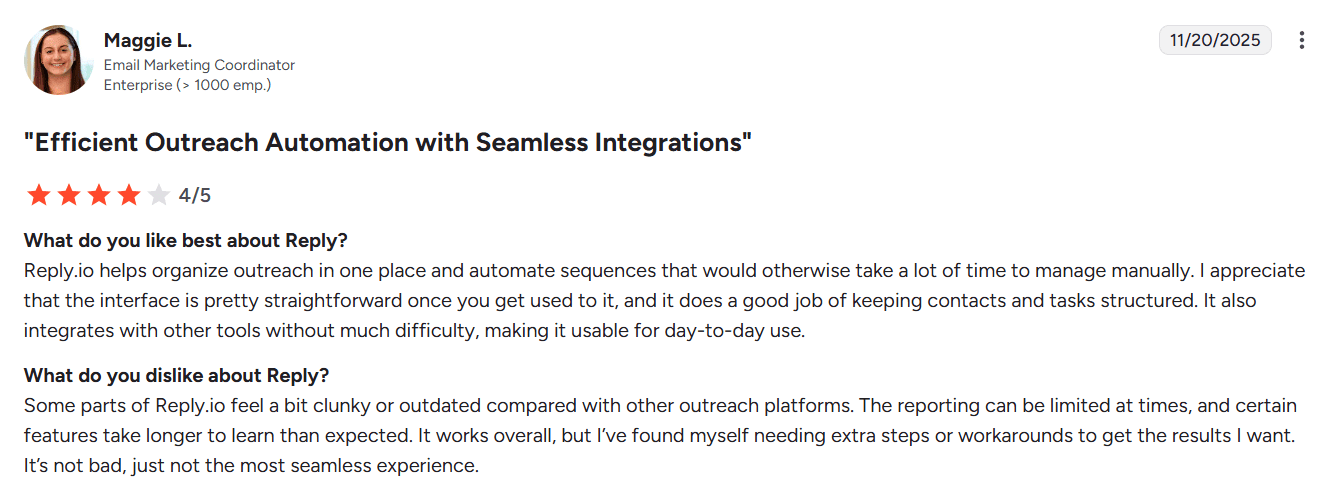
The good news is that users often note that Reply.io’s support team helps smooth that learning curve. People describe the assistance as fast and friendly, with quick responses whenever extra guidance is needed.
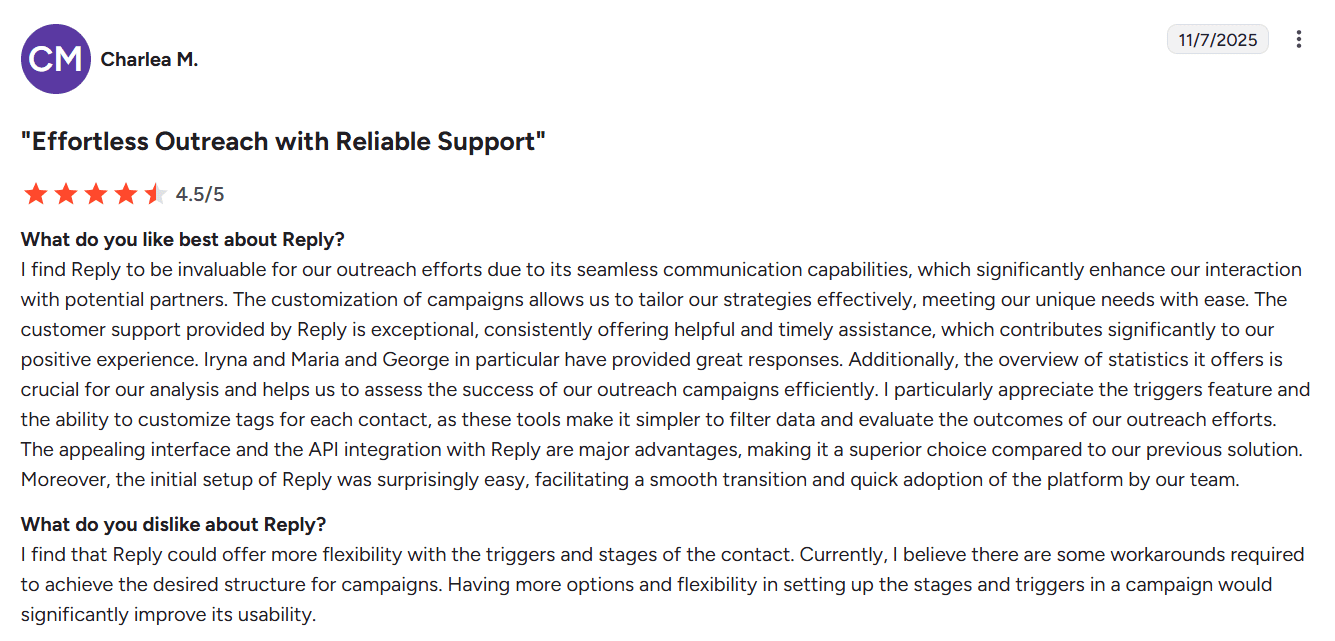
Another advantage users usually highlight is multichannel capabilities as well as CRM integrations. Some reviewers also praise a solid API. At the same time, many of them add that the API still doesn’t cover all features, which can limit certain custom workflows.
Reply.io review: my testing takes
To balance user feedback with real testing, I also wanted to share my own experience with Reply.io. Let’s start with onboarding, then the workflow complexity, and finally, who I think this platform fits best.
Onboarding experience
The initial setup was easy. Registration took less than a minute, and I could start working on the platform right away. I appreciated that Reply.io provides a dedicated onboarding guide with step-by-step instructions for getting started and setting up outreach on their platform.
What I liked most is that the onboarding isn’t a one-time pop-up you lose after day one. It stays available as a separate tab on the left toolbar, so you can keep coming back to it when necessary.
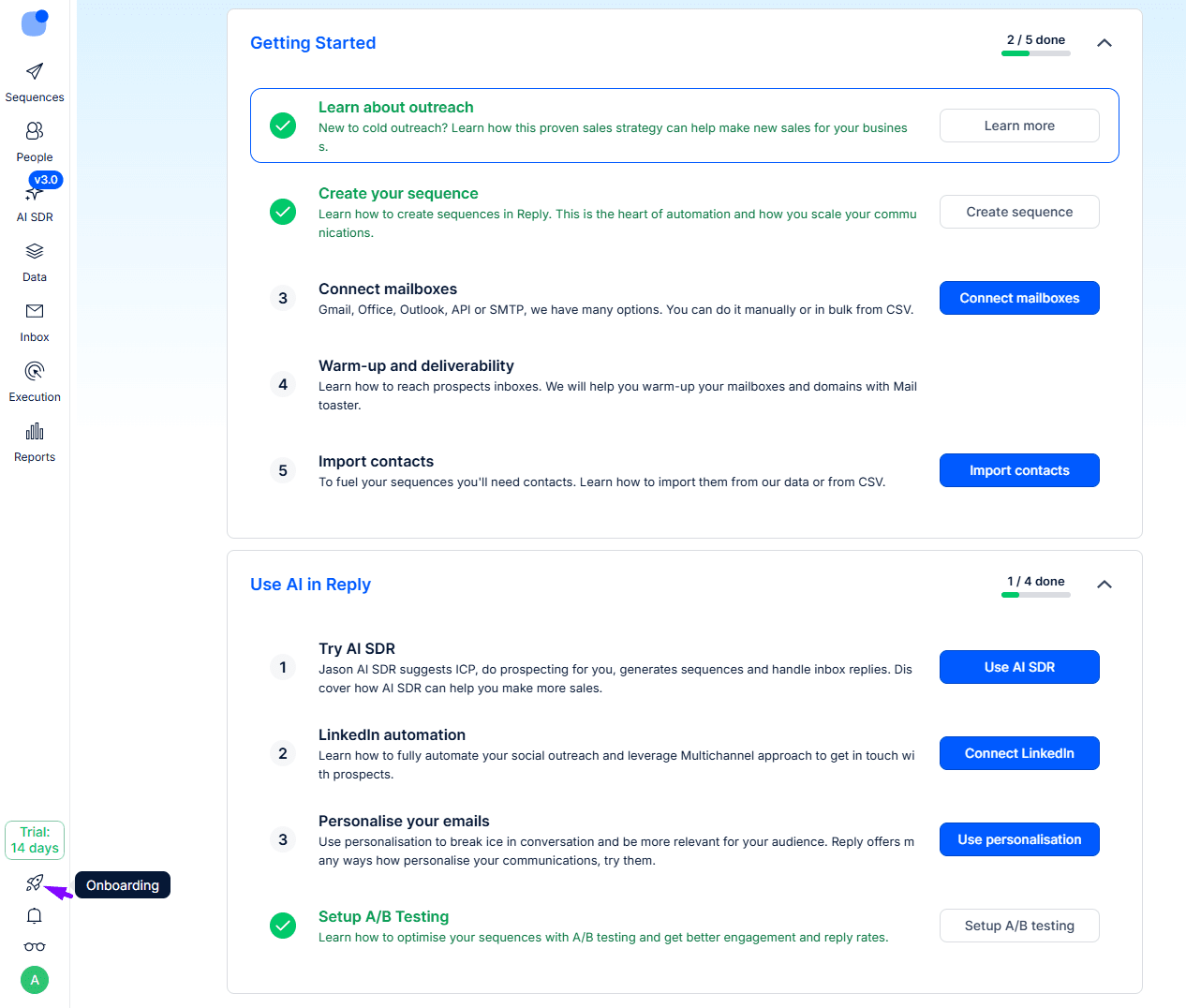
Reply.io also has separate onboarding guidance for its AI features, which I consider truly useful, since many teams choose this sales engagement platform specifically for its AI capabilities.
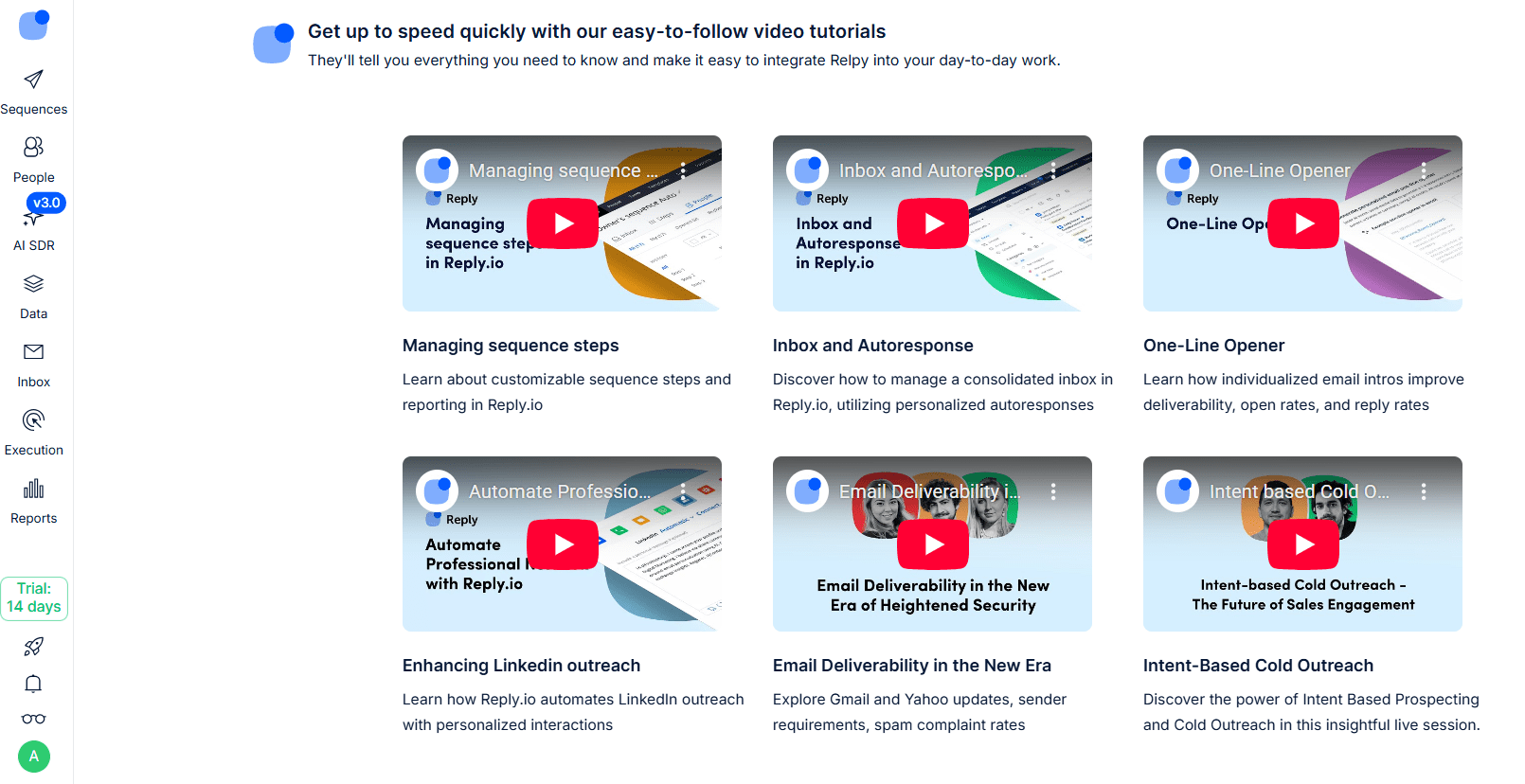
Even though the interface can feel overwhelming at first and not fully intuitive for new users, the short video walkthroughs inside the onboarding section make navigation easier. Videos are brief yet informative and cover the core features you’re likely to need first. Overall, the onboarding with Reply.io felt positive to me, thanks to clear, accessible guidance.
UI & workflow complexity
Although the setup and onboarding were quite smooth for me, I can’t say Reply.io is easy to use. It comes with a moderate learning curve. I think most users, especially those without prior experience with email sequence tools, will need time to understand the workflow. Even for me, not every feature was obvious right away.
I do like that Reply.io provides multiple entry points for building campaigns, including AI generation and ready-made templates. The template section is especially useful because it covers different outreach scenarios, including both conditional and linear sequences.
That said, the sequence builder itself can feel overwhelming. Even though you build steps visually, each step comes with many options, making it less obvious where to adjust the most important settings.
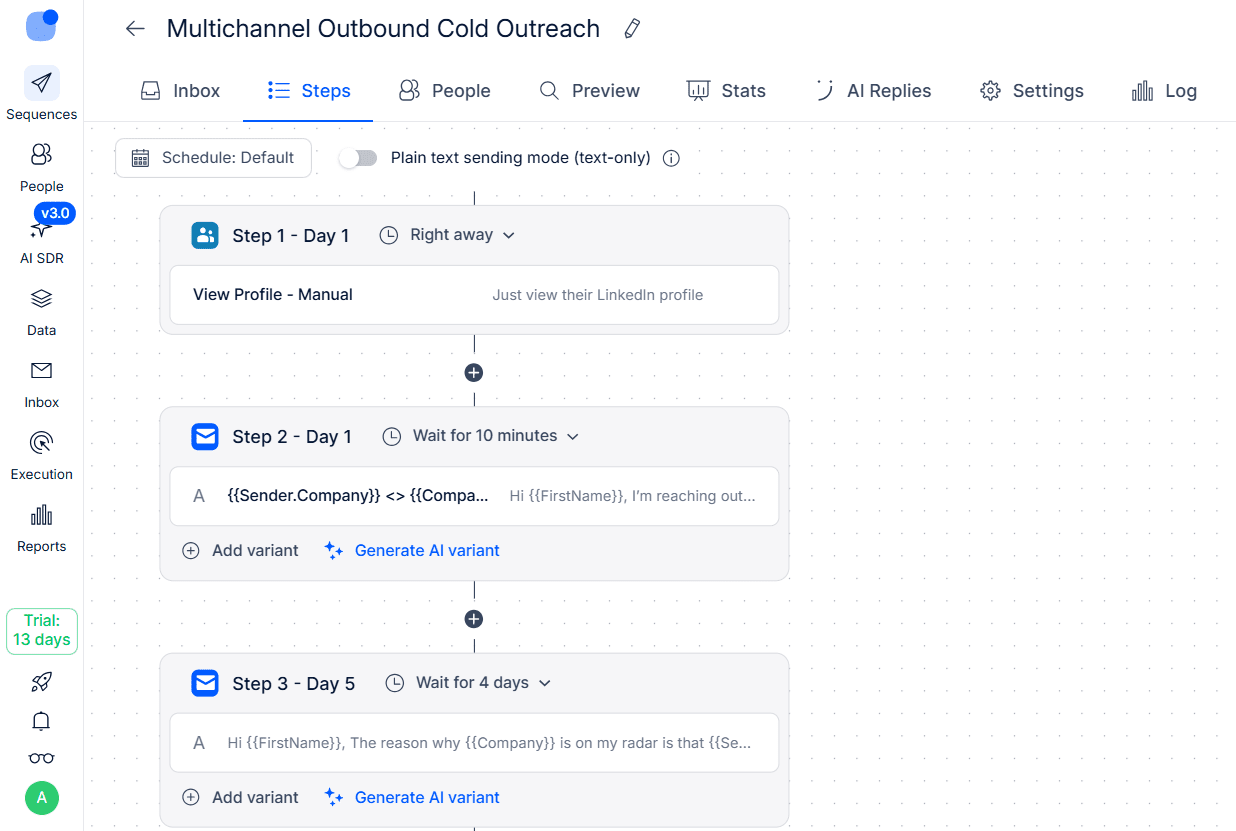
I also experienced friction with AI generation and needed to explore Help Center resources to understand how to prompt the tool correctly. Initially, my prompt, written in accordance with instructions, generated only the first email. And it was a surprise to me when I moved to the builder and saw only that single step instead of the multi-step sequence as promised.
Besides, the platform was sometimes buggy, and I had to refresh the page to make the functions clickable again. Luckily, Reply.io constantly autosaves your sequence, which, as I think, is a big plus, as you won’t lose your progress if unexpected errors occur.
Another advantage worth mentioning is the quality of support. During my testing, the team was very responsive and usually answered quickly. The AI bot was also helpful, providing detailed explanations rather than just linking to the relevant documentation.
Overall, Reply.io definitely has a steep learning curve and a not very intuitive UI. But once you learn where things live and how the logic works, the platform becomes quite manageable, especially given its advanced functionality.
Reply.io use cases
From what I saw during my testing, Reply.io is best for:
- Sales teams running heavy outbound and needing structured workflows with strong multichannel coverage
- Mid-market and enterprise teams with multiple reps and pipelines looking for a platform with solid AI-led outbound
- Marketing and lead generation agencies looking for outreach tools with scalable personalization, multi-client management, and agency dashboards
- Small or medium-sized businesses looking for email sequence tools with conditional logic and CRM integration capabilities
Overall, Reply.io is a good fit for businesses looking for capable sales outreach software and willing to invest time in learning the workflow.
💡 Small business growth doesn’t have to mean big spending. Here’s how to do it in 2026:
Pros and cons of Reply.io
After reviewing Reply.io’s core workflows and user feedback, you probably agree that it is a robust sales automation platform with strong advantages. At the same time, there are limitations that definitely need to be considered.
So, let’s highlight the Reply.io pros and cons to make it clearer whether this tool is the right fit for your outbound team.
Reply.io pros:
➕ The platform offers strong multichannel sequencing options, letting you add LinkedIn touchpoints, WhatsApp tasks, SMS, calls, and other channel steps in your email cadence.
➕ Reply.io supports an all-in-one-workflow that combines lead search, outreach, personalization, and reporting in one sales engagement platform.
➕ Whether you’re looking for email sequence tools, multichannel outreach software, or fully AI-driven sales automation, Reply.io has a suitable plan to offer.
➕ Reply.io includes a built-in B2B database, which lets you run outbound prospecting right in the platform.
➕ Reply.io provides AI tools that optimize sequence building, generate messages and replies, and support personalization at scale.
➕ The Reply.io pricing is clear, making it easier to estimate your outreach spend upfront and forecast how your cost per scale will change as you add users, contacts, or channels.
➕ Reply.io includes a wide range of deliverability tools, which help teams protect sender reputation while running cold email automation.
➕ Reply.io offers built-in CRM integrations and offers API access for teams that want to sync custom workflows with external email outreach tools.
Reply.io cons:
➖ Reply.io has a learning curve, especially if you want to use advanced multichannel workflows and sales automation.
➖ Some advanced Reply.io features are locked behind higher tiers or sold as paid add-ons, which can increase total cost.
➖ Reply.io can feel expensive for small teams or startups with limited budgets that only need basic cold email software.
➖ Some users report occasional bugs and UI friction, which can make the overall experience less smooth.
Considering the Reply.io pros and cons, the key takeaway is simple: it is a powerful sales engagement platform, but it makes the most sense for teams that truly need its multichannel depth.
Reply.io alternatives: Reply.io vs. Snov.io
Even with a solid feature set, Reply.io won’t be the right fit for every outbound team, so it’s quite normal to consider alternatives. You may need a different outreach workflow, more specialized email sequence tools, or simply more cost-effective pricing.
When searching for Reply.io alternatives, I recommend focusing on fundamentals. In other words, prioritize tools that still offer conditional sequences, a true multichannel focus, and a deliverability suite you can rely on.
One of the Reply.io alternatives that checks these boxes while staying even more budget-friendly is Snov.io. So let’s compare Snov.io vs. Reply.io.
Snov.io is a lead gen automation software with in-built features for multichannel outreach, warm-up, and deliverability.
To start with, here is a brief breakdown of Snov.io features:
- Email sequence tools: In Snov.io, you can build drip campaigns with automated follow-ups, custom delays, conditional triggers, and personalized messages.
- Multichannel outreach support: You can combine emails with LinkedIn actions, such as profile views, post likes, InMails, messages, endorsements, and more, in one sequence
- AI-powered email warm-up: Snov.io helps you build or restore your sender reputation with the built-in warm-up tool that creates realistic engagement signals and prepares inboxes for safe outreach scaling
- Lead generation toolkit: Snov.io offers many ways for targeted prospecting, including a built-in B2B database with AI search, email finder tools for LinkedIn and corporate websites, plus Domain Search to discover contacts tied to a company domain
- DFY cold email infrastructure setup: You can buy domains and mailboxes already set up for outreach directly from your dashboard
- Strong deliverability suite: Snov.io has a strong focus on deliverability and sender reputation protection, providing domain health diagnostics, inbox placement testing, spam checks, and 7-tier email verification
- Sales-trained AI: The platform’s AI tools help you build your ICPs, identify target leads, generate highly tailored emails with strong selling points, and translate your messaging into up to 36 languages
- Reporting tools: Snov.io provides comprehensive analytics on campaign performance, including AI Sentiment analysis, which helps you identify high-potential prospects based on their interest
- Built-in CRM: As a part of the sales automation toolkit, you can use the built-in CRM to manage deals and campaigns in one place
Overall, both Snov.io and Reply.io offer a robust outreach suite, so let’s see how they compare across key areas that matter for outbound:
As you can see from the table, both solutions are strong, but they win in slightly different areas.
Reply.io emphasizes true multichannel support, letting you combine email with a variety of touchpoints in a single sequence. At the same time, Snov.io provides a broader suite of lead generation tools, helping you easily find high-quality prospects with pre-verified contact details.
Deliverability is another area where both sales engagement platforms offer meaningful value. Reply.io protects sender reputation during active outreach with unlimited warm-ups and built-in deliverability controls that support day-to-day sending. Snov.io covers the same essentials, but it feels stronger on diagnostics.
It provides structured, in-depth deliverability reports, including issues and personalized recommendations to fix them. Plus, if you need to constantly maintain list hygiene, Snov.io makes it easier with a built-in email verifier available across all plans. Reply.io also offers verification, but as a paid add-on.
Our sales revenue has grown by 18% since we started using Snov.io. It helped us find lead info almost automatically, so we could contact 40% more leads in the same time.
Automation & Customer Success Specialist at SpotOn

Pricing is actually where Snov.io can fairly win for many teams, with an entry plan at $39/month for 5,000 recipients versus $59/month for 1,000 active contacts. Plus, while most advanced AI features in Reply.io are locked within the expensive Jason AI SDR, in Snov.io, you can use robust AI capabilities, including ICP Generator and Persona-driven Email Builder, on all paid tiers.
One more advantage is that Snov.io includes a native CRM, which can be handy if you want fewer sales outbound tools. At the same time, Reply.io offers dedicated solutions for agencies, with client reporting dashboards and multi-workspace management.
Finally, even though Snov.io isn’t as broad in its outreach channels as Reply.io, it takes LinkedIn safety more seriously with strict daily limits, human-like sending patterns, and location-based proxies.
Key takeaway: Is Snov.io a better fit?
Overall, both Snov.io and Reply.io are worth considering if you’re looking for sales outreach software. So, the question here is less about which tool is better. The right choice mostly comes down to your outreach volume, channel mix, and budget.
Reply.io is the stronger pick when you need deep multichannel execution in one system. Snov.io is the better fit if you prioritize email-first outreach with built-in lead discovery, deliverability diagnostics, and LinkedIn touches in sequences.
Besides, as Snov.io provides mailbox and LinkedIn account rotation with deliverability controls and safety measures, it is a good choice for high-volume campaigns. This platform can also be a good fit for teams seeking reliable cold email software with AI-powered personalization and a more affordable cost per scale.

Final verdict: Is Reply.io worth it in 2026?
After testing Reply.io for this review, I’d say that it’s a solid option for multichannel outbound in 2026. Reply.io also offers robust personalization features, making it easier to keep messaging relevant even as you scale. Plus, it provides deliverability tools to protect your sender reputation and improve placement.
That said, the trade-offs become obvious pretty quickly. Reply.io has a real learning curve, and many of its more advanced capabilities come with higher-tier pricing. The cost also rises quickly as your email outreach volume increases, which can be a drawback for smaller teams that want a simple cold email software.
So, if you want a simpler setup or more cost-effective solution, you may end up paying for complexity you don’t actually use. But if your team runs high-volume outbound and genuinely needs broad multichannel coverage, structured workflows, and personalization at scale, Reply.io is a strong choice.
If you want a more affordable option with strong deliverability, email discovery, and AI-powered personalization, Snov.io is a solid Reply.io alternative to compare.