This guide explains how to control the total sending across mailboxes and what limits to set before and after warm-up.
What to do with limits before and after warm-up

Before you start, connect a mailbox and check its default limit in your account settings.
This guide is for newly connected accounts that will start warm-up.
Two separate limits: account sending limit and warm-up limits
Campaign emails and warm-up emails both need to be considered as the total volume your mailbox sends.
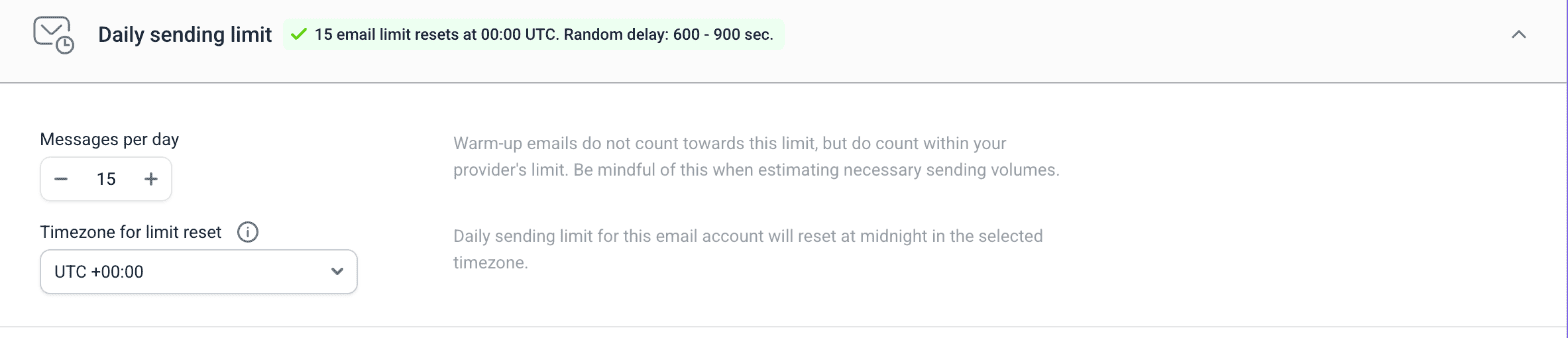
- Account limit: You set it in email account settings as Messages per day. It counts outreach emails sent to prospects
- Email warm-up limit: You set it in warm-up settings and it counts only warm-up emails
Account limit
Account limit is the maximum number of outreach emails a mailbox can send in 24 hours. It counts emails sent to prospects from Campaigns or from their profile.
Warm-up limit
Warm-up emails have a separate counter in warm-up settings and do not appear in the Sent count shown in your email accounts list. Only emails sent to prospects count there. However, warm-up emails are still real emails and do count toward the total volume.

Total sending volume
Warm-up emails don't count toward the account limit, but your provider still counts them as real emails sent. This is why it's important to control the total volume your mailbox sends across outreach and warm-up.

Important: Because warm-up has its own limit, it keeps running after a mailbox reaches its account sending limit.
Warm-up emails still count toward the total volume the mailbox sends.
The recommended total limit is around 50 emails/day per account, split between campaigns and warm-up. To increase your total volume gradually, see this guide.
What to do with limits before and after warm-up
During your first warm-up
Before you start warm-up, we recommend setting the warm-up limit to 40 emails/day. This will be your warm-up's goal. It will ramp up to this number automatically.
While the first warm-up is active, don't send outreach at all or start with the recommended starting limit and scale gradually each week. See this guide.
After warm-up
After warm-up finishes, set the account limit to 40 emails/day.
While outreach is running
Even after you start a campaign, we recommend reserving part of your daily limit for warm-up. It helps offset the negative signals that come with cold emailing.
Set the warm-up limit to 10 emails/day and use the rest of account limit for sending. See this guide.
Next steps
If you already started outreach, read this guide on how you can control sending volume at the campaign level.


Sorry about that 😢
How can we improve it?