

September usually means getting back into full swing — and our product team clearly got the memo.
Prospecting, enrichment, personalization, and outreach all got an upgrade this month. And there’s a good chance at least one of these will save you a few steps in your daily workflow.
Buckle up, there’s a lot to unpack!
- More enrichment tokens
- New contact data sources
- More LinkedIn data
- AI-powered message writing
- File attachments on LinkedIn
- Sales Navigator search
- More MCP tools
- Team usage limits
- Automatic token refills
- Prospect search via API
Enrichment tokens in Sales Suite plans
If you’ve been meaning to try enrichment more often, here’s your sign to start. Every Sales Suite plan now comes with a monthly quota of enrichment tokens, with no change to your plan price.
Already subscribed? Your tokens are in your account now. Just head to Billing to see how many you have (the exact amount depends on your plan tier).
You can spend your tokens across Enrich & AI tools to:
- Find emails and phone numbers
- Pull LinkedIn insights
- Run web research
- Create personalized messages
💡 One thing to keep in mind: Plan tokens renew monthly and don’t roll over. Purchased tokens can accumulate and stay valid for 90 days.
👉 You can find the exact token amounts and other details in our tokens guide.
Find phone numbers and emails with Zeliq
Hit a dead end looking for a prospect’s contact details? You’ve got another data source to try.
Zeliq is now available as a data provider in Enrichment, expanding your coverage for both email addresses and phone numbers.
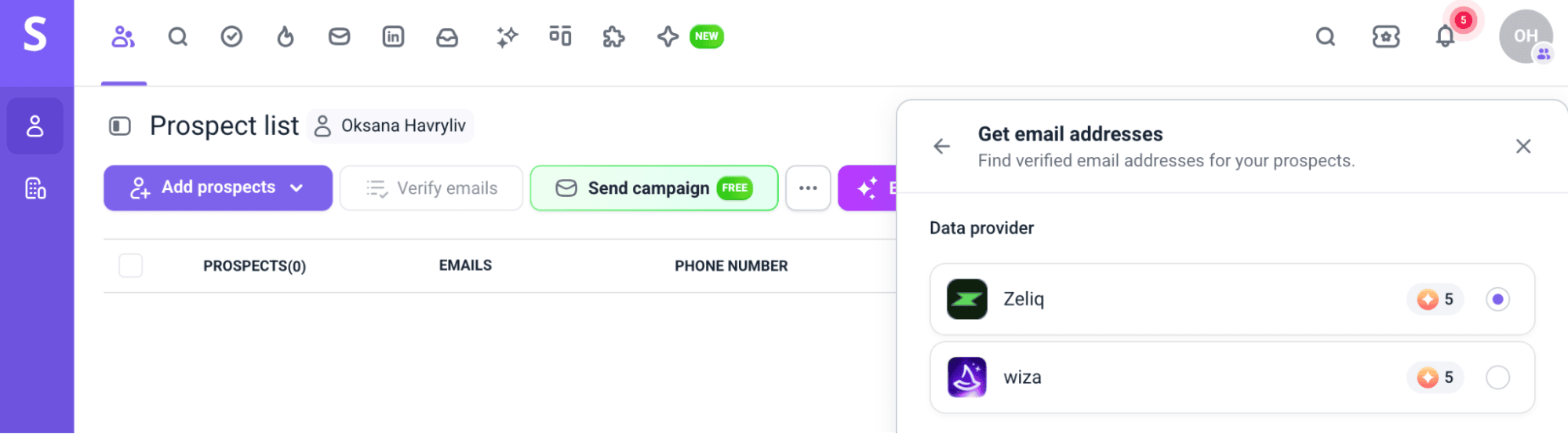
You can search using a prospect’s LinkedIn URL or their name and company. Just get your tokens ready and head to Prospects → Enrich & AI tools.
👉 See all the enrichment actions available in our Enrichment & AI tools guide.
Enrich LinkedIn data from Generect
Sometimes a name, job title, and company aren’t enough to write outreach that actually feels relevant. That’s where our next enrichment addition comes in.
With Generect, you can pull 30+ data points from LinkedIn in real time, including personal and company information, experience, skills, and more.
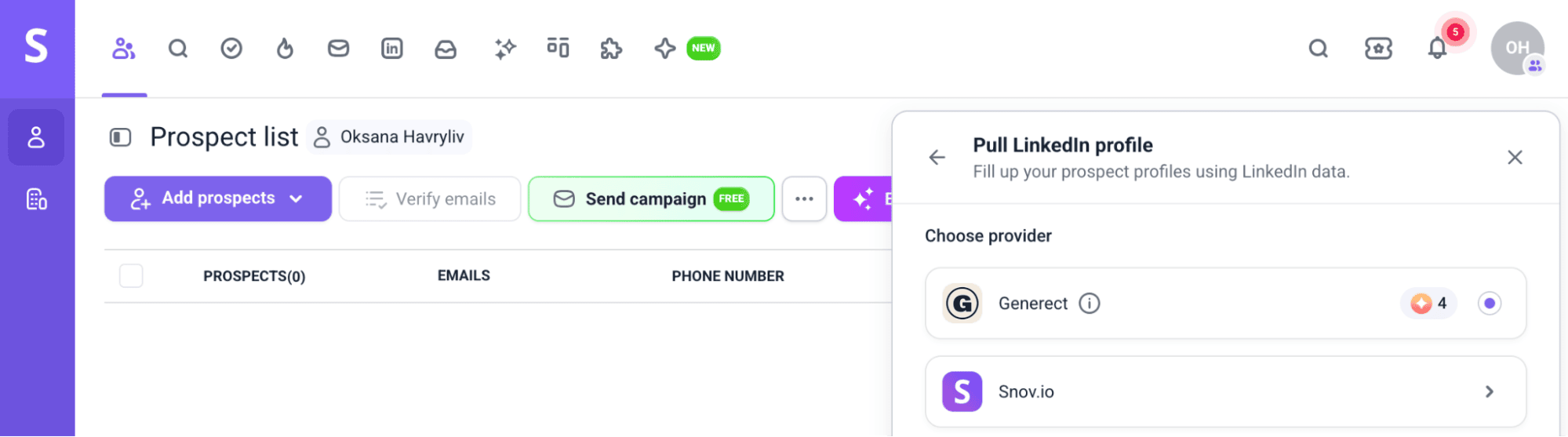
When enriching LinkedIn data, you can choose between two providers: Snov.io at 1 token per prospect or Generect at 4.
Why the difference?
Snov.io checks our regularly updated database, while Generect goes straight to LinkedIn for a fresh, more detailed profile pull. So, if speed and cost matter most, go with Snov.io. But if you need the freshest LinkedIn data available, Generect is your pick.
Ready to enrich your data?
Start with a prospect’s profile URL or email address in Prospects → Enrich & AI tools, and choose the provider that fits what you need.
Send files in LinkedIn messages and InMails
Sometimes a message could use a little backup. A relevant case study, presentation, or sales deck can help make your point, and you can send it directly from Snov.io.
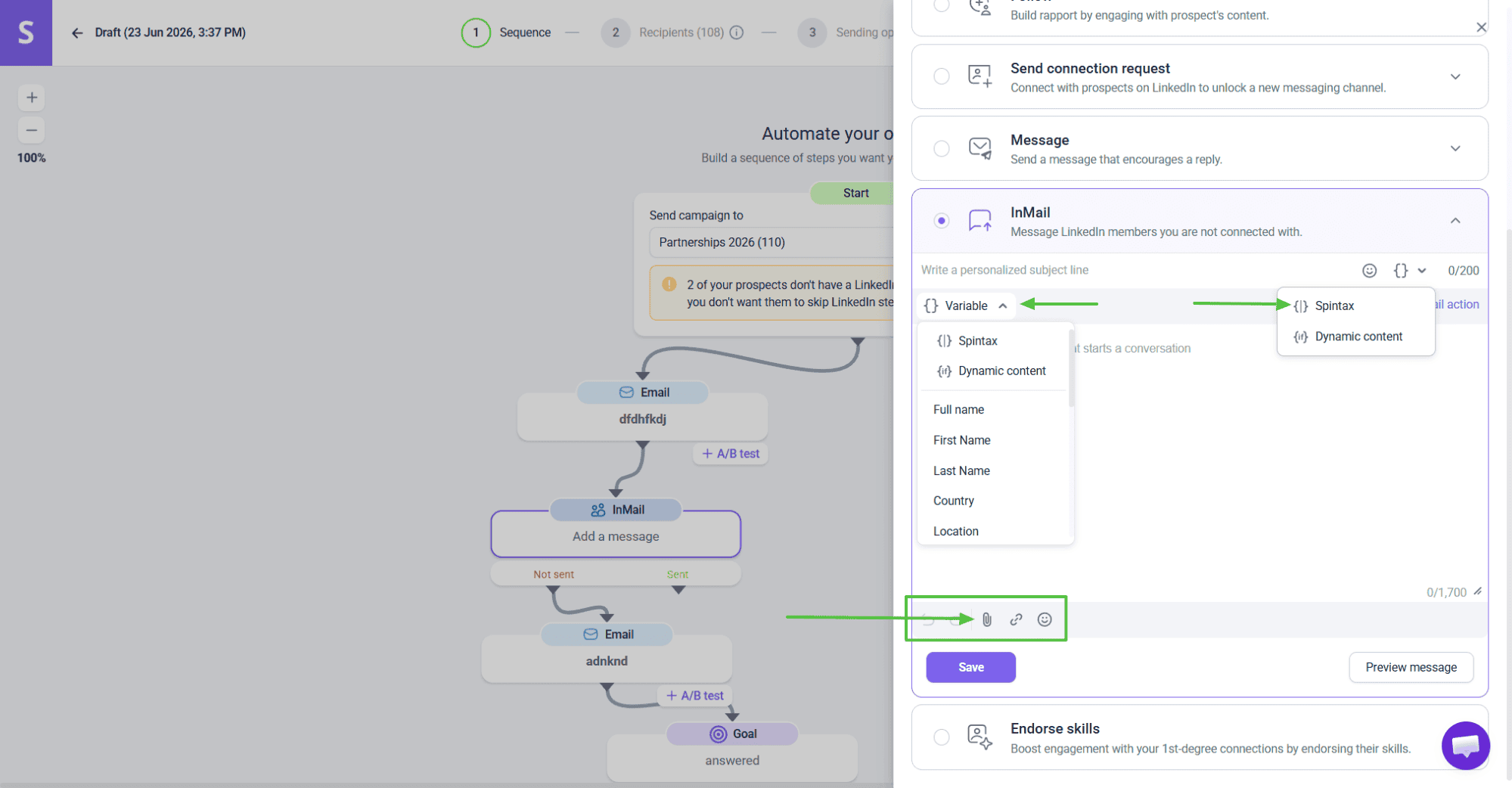
File attachments are now available across LinkedIn automation and our messaging tools. Add them to Message and InMail steps in automated sequences, or send them one-to-one from Unibox or the My Network page.
To get started, just sync your connections, build your LinkedIn sequence, and add the right resource when it makes sense in the conversation.
📍A quick heads-up on limits: You can attach up to 5 files per message, with a maximum size of 5 MB per file.
Make your name familiar before asking a prospect to open a file.
A profile view, post like, or connection request gives them some context for who’s reaching out and makes the attachment feel less out of the blue.
Haven’t tried LinkedIn automation yet? Watch a quick video to evaluate all the benefits:
Auto-refill enrichment tokens
Speaking of enrichment tokens, Auto-refill can keep you from running out mid-workflow.
Once your balance drops below 100 tokens, it tops it up with your selected package. You can also set a monthly spending cap to stay in control.
After your first token purchase, simply enable Auto-refill in Billing and set your preferences.
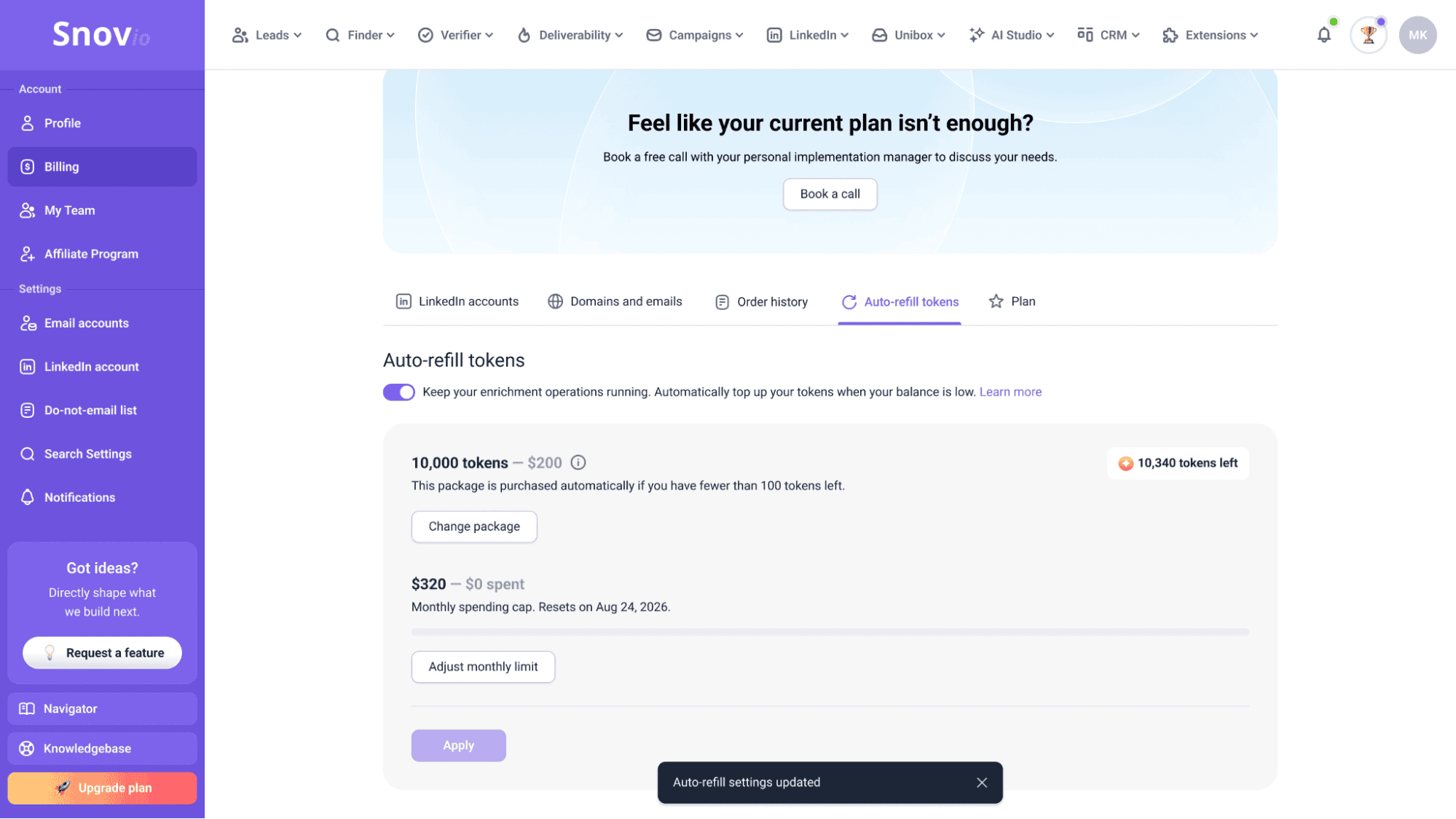
👉 See our guide on Auto-refill.
Campaigns and Unibox in MCP
MCP can now take you further into the actual outreach process.
Alongside lead finder, prospecting, and verification tools, Snov.io MCP now covers Campaigns and Unibox. So instead of stopping once you’ve found and verified your prospects, you can continue working with them from your AI assistant.
Here’s what that includes:
- Build and launch campaigns: Create a campaign, put together the sequence, add recipients, and launch.
- Track campaign results: Check campaign stats and see how your outreach is performing.
- Handle multiple inboxes in Unibox: Catch new replies and follow up with prospects.
👉 Follow our MCP setup guide to connect everything and try it yourself.
AI Writer for relevant outreach
Got your list enriched with the features above? Now you can put that extra context to work with AI Writer.
And it’s worth doing, as LinkedIn reports an average 28% lift in responses from AI-powered personalized outreach.
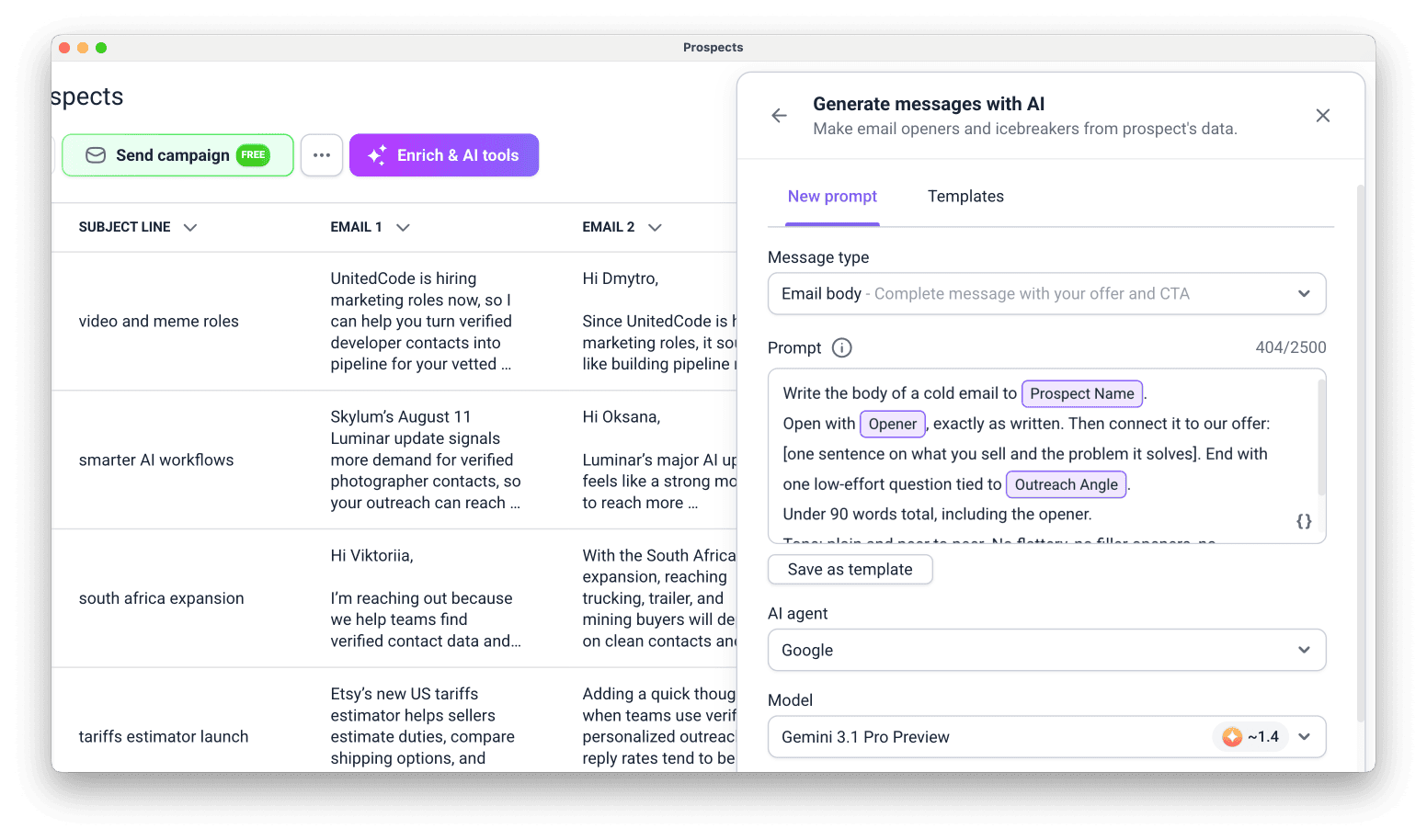 You can use the feature to:
- Create full outreach copy: Generate one-liners, intros, subject lines, email bodies, follow-ups, and LinkedIn messages.
- Provide full context: Bring any existing, custom, or enriched column into your prompt using { } enrichment variables.
- Reuse prompts across segments: Pick a template or save your own prompt for the next list.
- Personalize at scale: Once your generated messages are in the list, use variables to pull them straight into your campaigns.
Excited to try the AI Writer?
Open Prospects → Enrich & AI tools → Generate messages with AI to get started.
Email result: Suggestion: Write a follow-up email after a job interview Write a thank-you email to a client after closing a deal Write an email requesting partnership opportunities Write an email requesting a meeting with your manager Write an email apologizing for a delayed response Write an email asking for a deadline extension Write a cold email pitching your services Write an email introducing yourself to a new team Write an email requesting feedback on your work Write an email confirming an appointment Write an email declining a job offer politely Write an email requesting a letter of recommendation Write an email to a customer addressing a complaint Write an email announcing a company update Write an email inviting colleagues to an event Write an email asking for a salary increase Write an email requesting time off Write an email welcoming a new employee Write an email reminding a client about an overdue invoice Write an email following up on a sales leadTry Snov.io AI Email Writer for free

Monthly usage limits for teams
Sharing resources across a team is useful. But realizing someone has already used most of them before renewal? Not quite as much.
With monthly usage limits for teams, everyone gets a bit more control:
- In a Team leader role
Set an individual monthly limit for each member from the Team dashboard. If you upgrade your subscription, you can adjust those limits to match the new plan.
- In a Team member role
You’ll be able to see how much you’ve already used and get a notification when you’re getting close to the limit, so no surprise stops in the middle of your workflow.
Sales Navigator search by URL
Found the right prospects in Sales Navigator? No need to search for them all over again in Snov.io.
Just copy the URL of your search results and paste it into LinkedIn Search. We’ll bring those leads into your Snov.io list with their email addresses and profile data, so you can pick up right where you left off.
⚠️ Before you start: Make sure you’ve connected a LinkedIn account with an active Sales Navigator subscription.
👉 See the full workflow in our LinkedIn Search guide.
Database Search API
And to wrap things up, we’ve got something for API users.
Want to run prospect searches from your own workflow? The new Database Search API lets you do just that, without going through the Snov.io app.
- Find prospects by job title, seniority, department, skills, and location.
- Find companies by industry, size, and revenue.
- And you only spend credits when the search returns a verified email and full profile.
👉 Check the API documentation for input parameters and response fields.
And that’s it for September. Stay tuned for more updates! 💜
With love,
Snov.io team