This guide explains why tracking hurts deliverability, what changes when you turn it off, and how to lower the risk if your sequence needs opens.
Why open tracking hurts deliverability
What changes when you turn off open tracking
How to make open tracking safer
When to turn open tracking on or off
Why open tracking hurts deliverability
Open tracking adds a small invisible image (a tracking pixel) to each email.
- Spam filters can treat that image as a sign of bulk email, so your email is more likely to land in spam
- The pixel adds another domain to your email. Without a custom tracking domain, it uses a default tracking domain, which is not the same as your own email's domain
- Providers such as Gmail can detect the pixel and show recipients a banner saying the message looks suspicious
Each of these lowers the number of emails that reach the inbox, and fewer emails in the inbox means fewer replies.

What changes when you turn off open tracking
Open tracking is off by default in new campaigns. If you keep it off, here is how it affects your outreach.
Deliverability
Your emails go out without the pixel and without a link to a tracking server. They look like regular emails written to one person, so spam filters have one less reason to flag them.
This helps most for new mailboxes and domains, which have no sending history yet.
Reports
Snov.io stops counting opens for the campaign, so the Email opens metric stays empty. Every other metric still works: sent emails, replies, bounces, unsubscribes, and interest level.
You lose less data than it seems, because open rates are not reliable. Privacy features in email apps and security scanners load the pixel before a person sees the email. These automatic opens raise your open rate, and Snov.io cannot always tell them apart from real ones.
Replies are a more accurate measure of interest. Track them for email and LinkedIn messages on the campaign statistics dashboard and the Reports dashboard. Sentiment analysis marks the interest level of each reply for you.
Sequence conditions
The "Opened email" condition needs open tracking. Without it, Snov.io cannot split recipients into those who opened and those who did not.
You can still build a sequence that reacts to prospects:
- Keep Stop follow-ups for prospects who reply on in Sending options, so people who answered leave the sequence
- Use the "Connected on LinkedIn" and "Connection degree" conditions in multichannel campaigns, since they do not depend on email tracking
- Send follow-ups after a Delay step to everyone who has not replied, and write each one so it makes sense whether or not the previous email was read
How to make open tracking safer
If your sequence depends on the "Opened email" condition, these steps lower the risk of tracking. They do not remove it.
1) Set up a custom tracking domain
A custom tracking domain replaces Snov.io's default tracking domain with a subdomain of your own, such as track.yourdomain.com. The pixel then loads from a domain only you use, so other senders' activity does not affect it.
Create the subdomain on the domain you send from. Snov.io issues an SSL certificate for it automatically. Set it up with this guide.
2) Warm up the tracking domain
A new tracking domain has no reputation, so providers treat it with caution. In Email Warm-up, turn on the Custom tracking domain option. Warm-up emails then include a link with your tracking domain, and the domain builds a positive reputation. Learn how in this guide.
3) Turn on tracking only in campaigns that need it
Open tracking is a campaign setting. Turn on Track opens only in campaigns where the sequence has an "Opened email" condition, and keep it off in all others.
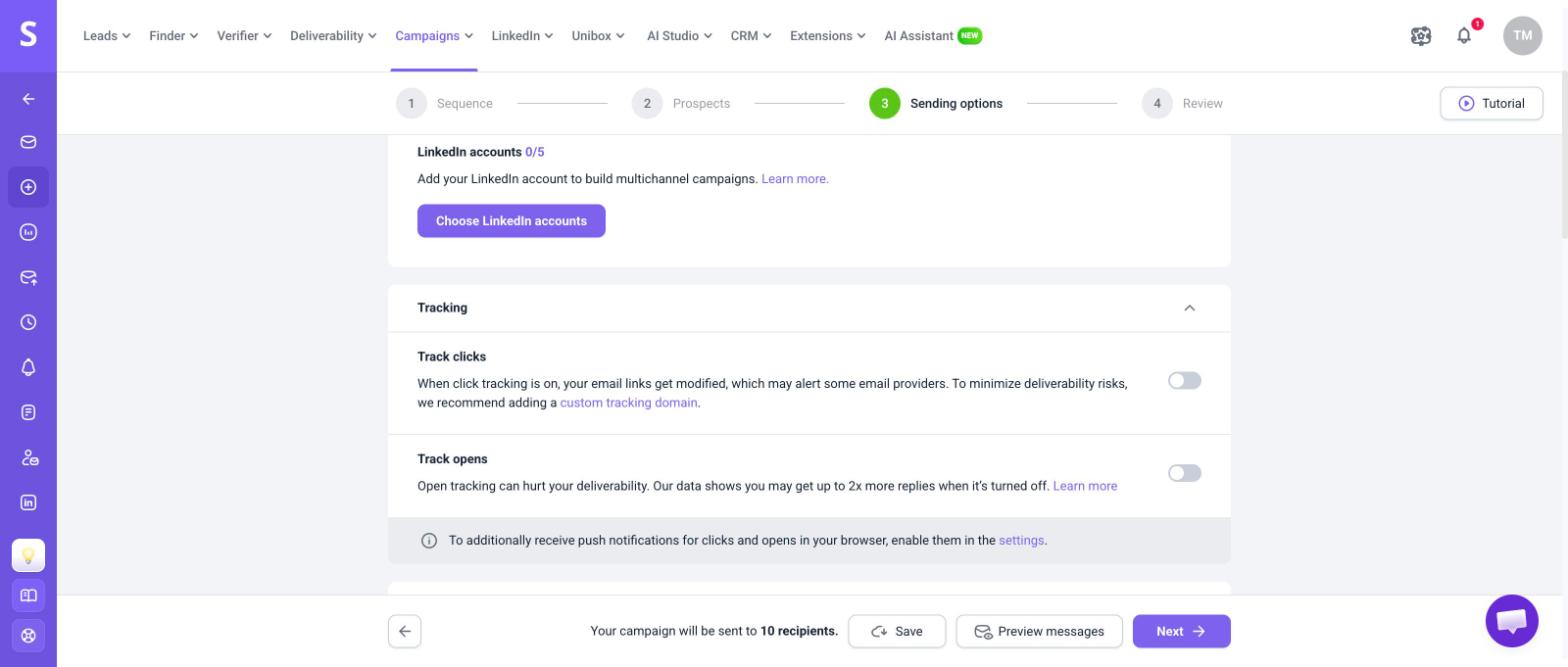
4) Keep click tracking off
Click tracking changes every link in your email to a tracking link, which adds one more risk. Leave Track clicks off unless your sequence uses the "Clicked on link" condition.
5) Plan the "Yes" flow for automatic opens
Some recipients go to the "Yes" flow because a scanner loaded the pixel, not because they read the email. Write follow-ups in that flow so they work for someone who has not read the previous email. For example, skip lines such as "I noticed you opened my last email."
When to turn open tracking on or off
To turn tracking on or off and check opens in your reports, see this guide.
| Open tracking | Choose it when |
|---|---|
| Off (recommended) |
|
| On |
|


Sorry about that 😢
How can we improve it?