
One email address can leave quite a trail. Follow it, and you may connect the address to a real person, their work, and the rest of their online footprint.
That’s what an email background check is all about.
In this guide, how to run it step by step, what it can reveal in practice, and where email verification fits in.
TL;DR:
An email background check is a way to gather more information about a lead, contact, or business using an email address as a starting point.
Follow these steps to background check an email:
- Verify the email to ensure it’s valid.
- Inspect the domain, including its SPF record, DKIM authentication, and DMARC configuration, to see whether it matches the company and has a credible email setup.
- Research public sources to connect the address with a person, role, or company.
- Cross-check your findings using reverse email lookup tools.
Keep in mind that employment, credit, housing, and other regulated decisions may require specific legal procedures. Below, we’ll break down how to do an email background check step by step.

Format
Type
Server status
Auto-generated
Catch-all
What is an email background check?
An email background check is the process of using an email address to find publicly available information about its owner. This research may reveal a person’s name, company, job title, social profiles, domain information, and other details.
In practice, a background check on email may include checking the domain associated with the address, searching for online mentions of the contact, or validating the email without sending a message.
An email background check isn’t the same as a formal employment, criminal, or credit background check. Think of it as an additional way to gather online information linked to a specific email address.
Email background check vs. a traditional (employment) background check
An employment background check is a formal, multi-step screening process primarily conducted during the hiring stage. An email background check, on the other hand, is more of a technical lookup and public data research tied to a specific email address.
Here’s a side-by-side look at the two:
| Criteria | Email background check | Employment background check |
|---|---|---|
| Main goal | Gather extra context about a person or business connected to an email address | Verify a candidate’s identity, work history, or qualifications before or during employment |
| Starting point | An email address | The candidate’s full name or other identifying information |
| Information it may reveal | Name, company, job title, social media profile links, online mentions, email validity, domain details | Legal identity, employment and education history, professional licenses, criminal records, and other details depending on the check |
| Data sources | Public websites, search engines, social networks, email verification and lookup tools | Official records, databases, educational institutions, and specialized screening providers |
| Typical use cases | Lead research, contact validation, sender checks, fraud prevention, data enrichment | Hiring, onboarding, employee screening, risk assessment |
| Legal consent | Usually not required (though privacy laws and platform rules still apply) | Often require consent and disclosure (depending on the jurisdiction and the type of screening) |
| Result | Additional context that will help assess whether the contact or business is legitimate | A formal background report that may be used in an employment decision |
Essentially, an email background check gives you extra context for everyday research, while an employment background check provides a formal report for hiring decisions.
In both cases, you’re trying to get information about a person, just for different purposes.
Why people and businesses run email background checks
A background check on an email address is useful for both personal and business purposes. It can help inspect an unfamiliar sender, validate contact data, research a lead, or confirm that the person is connected to the company they claim to represent.
Interestingly, a quick email background check can be worth doing even when the email itself gives no reason to question it. For example, Microsoft detected 10.7M business email compromise attacks in Q1 2-26, with 82–84% of initial contact messages being generic outreach.
Meanwhile, 2 years earlier, the FTC had already recorded 371,651 fraud reports involving contact by email. 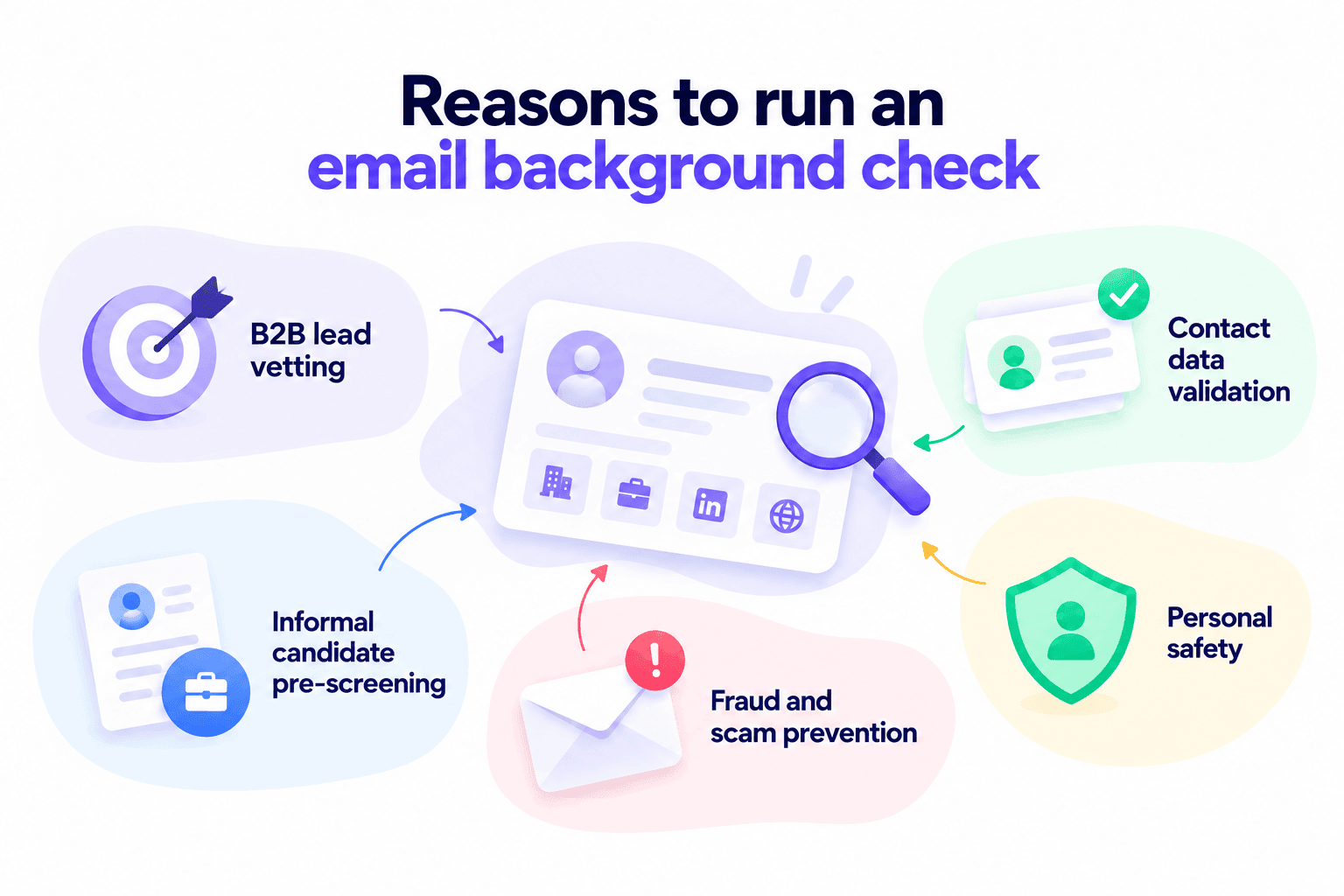
These cases aside, there are plenty of other reasons why people as well as businesses run email background checks:
- B2B lead vetting: Run a background check with email to verify whether a prospect is legitimate, confirm their company connection, and gather more context before outreach.
- Contact data validation: Cross-check names, job titles, company details, and other information associated with an email before adding it to your CRM or database.
- Informal candidate pre-screening: Review publicly available professional information about the candidate to complement formal employment background checks.
- Fraud and scam prevention: Check unfamiliar senders, suspicious inquiries, or potential impersonation attempts before taking any action.
- Personal safety: With email background checks, you can learn more about someone before an online meeting, date, marketplace transaction, or other interaction where extra information may be helpful.
Across these scenarios, an email background check adds context that can support better, safer decisions before you contact or move forward with someone.
How does an email background check work?
An email background check process usually combines technical email verification with public data research to build a clearer picture of who is behind the address. This may involve DNS lookup, domain analysis, and other stages.
Let’s explore each of them:
Stage 1: Email verification
An email background search usually starts by checking whether the address itself is valid. This stage includes both email validation and verification. Email validation works as a basic check of an address format, structure, and syntax, revealing missing symbols or formatting errors.
Meanwhile, email verification looks past the format to confirm the mailbox itself is real and reachable. It can also flag invalid, disposable, or risky addresses.
This step helps separate technically valid emails from unreliable ones so you can continue further email background search with more confidence.
🤔 Need to check a long list of emails? Here’s a quick video showing how to verify them in bulk:
Stage 2: Domain and infrastructure analysis
If the address uses a business domain, that domain can also provide a layer of useful context. For example, SPF, DKIM, DMARC setup, MX configuration, and other DNS records can indicate whether the domain is active and properly configured for email. This stage can also show you whether the address you’re checking is connected to a functioning business domain.
Of course, this step doesn’t answer who is behind the address. But it provides valuable technical context and helps you assess whether the email infrastructure looks consistent with a legitimate business domain.
Stage 3: Public data research
A background check with email also involves searching for mentions of the address across public resources. They may include company websites, social networks, event pages, directories, and other platforms where you can find information connected to the contact.
Such research can link the email address to a person, role, organization, social profile, or other data that provides more context about who is behind it.


Stage 4: Cross-checking
A reliable background check always involves cross-checking with email lookup tools to bring together all the data connected with the address.
Once the tool reveals a name, job title, company, and other details, you compare this information with findings from the other stages. The more details match, the more context you have to assess whether the person or business behind the email address seems legitimate and worth contacting.
How to background-check an email address: A practical step-by-step workflow
The best way to background-check an email address is to combine several methods.
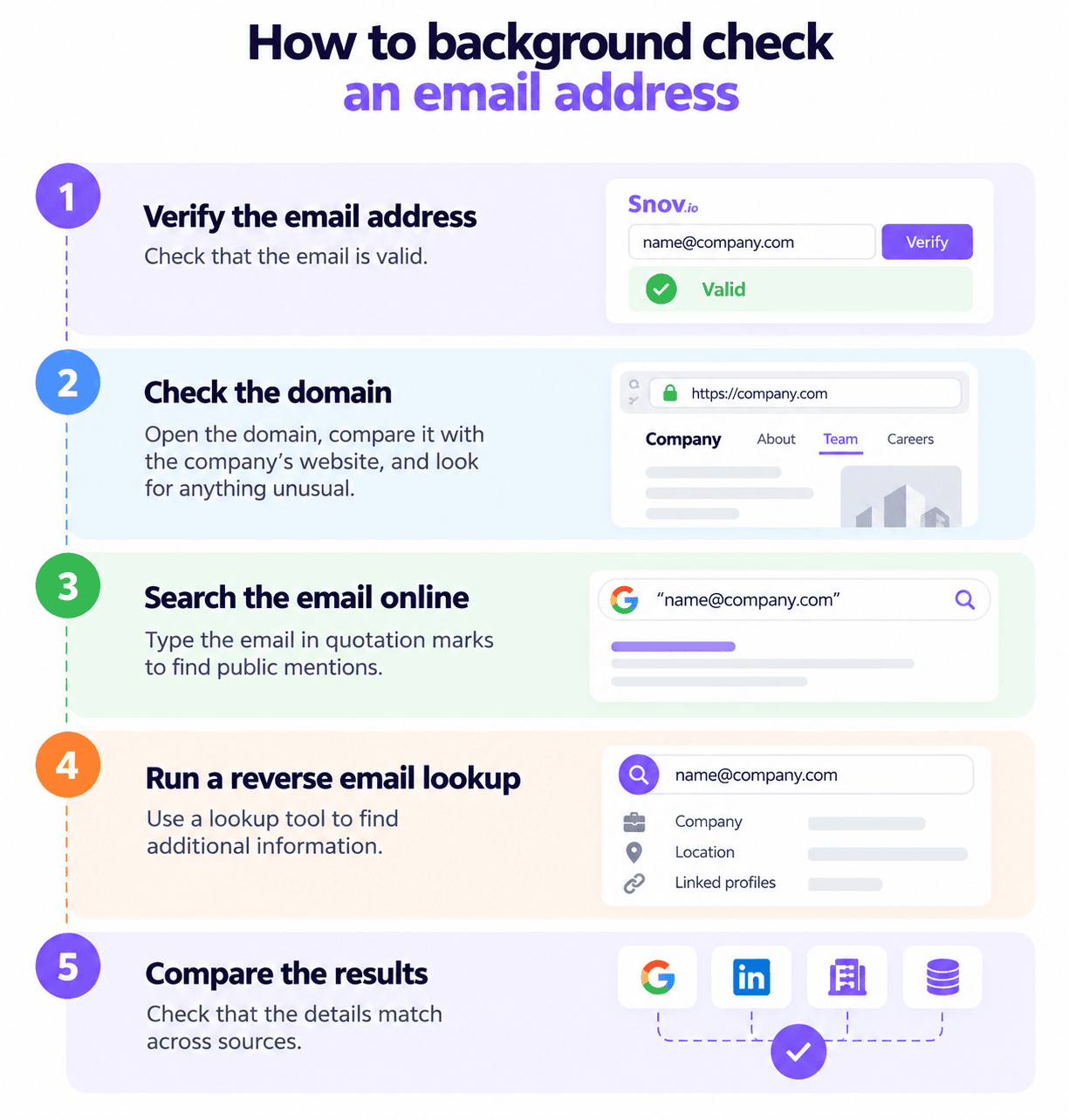
Here is a practical workflow you can follow to reveal the most accurate results:
Step 1: Verify the email address
Always verify an email before doing deeper research.
Why is email verification important? Simply put, it prevents you from wasting time and effort on invalid or non-existent mailboxes.
Think of email verification as a filter before a deeper check. Once you confirm that the address is valid and can receive incoming messages, you have a more reliable starting point for researching the person or business behind it.
With Snov.io Email Verifier, you can check individual emails or verify an entire list in bulk without even sending a message.
The tool uses a 7-tier verification process that checks both the address’s syntax and technical parameters automatically. So you don’t have to inspect everything manually and can quickly identify invalid, risky, or catch-all emails before continuing your research.
After testing 90% of similar tools, I’ve concluded that Snov.io’s email verifier is the best on the market. You can be sure that if it’s verified (green), then it will hit the inbox.
Full-Cycle Sales Specialist at JetOctopus

Step 2: Check the domain
If you want to background check a business email address, inspect its domain next. Open it in your browser and compare it with the organization the sender claims to represent. If a custom domain matches the company’s official website, it’s a positive signal.
However, this signal alone doesn’t confirm who’s behind the email. Even one swapped letter, extra character, or subtle misspelling can point to a site impersonating the real company. And according to the FTC, consumers reported losing $2.95 billion to impersonation scams in 2024.
To check further, go to the Contact or Team section on the website to see any available employee contacts. Compare the email format of your address with other company addresses to see whether they match. You can also look for the company’s location and other business details to double-check them in further steps.
Finally, review the domain’s email setup, including MX configuration, DKIM, DMARC, and SPF records. For example, a valid MX record shows the domain can receive emails. This suggests that the company likely uses it for business communications, making the address you’re checking more credible.
Step 3: Search the email address online
Now look for publicly available information connected to the email address. To do so, type the full address in quotation marks, for example, “name@companyname.com”, into a search engine to look for exact mentions.
This search may lead to company websites, author bios, LinkedIn, and other professional platforms. Sometimes the email address may also appear in press releases, conference pages, business directories, industry communities, and similar sources.
In some cases, a Google AI overview at the top of the search results can also surface professional details and other useful information about the contact: 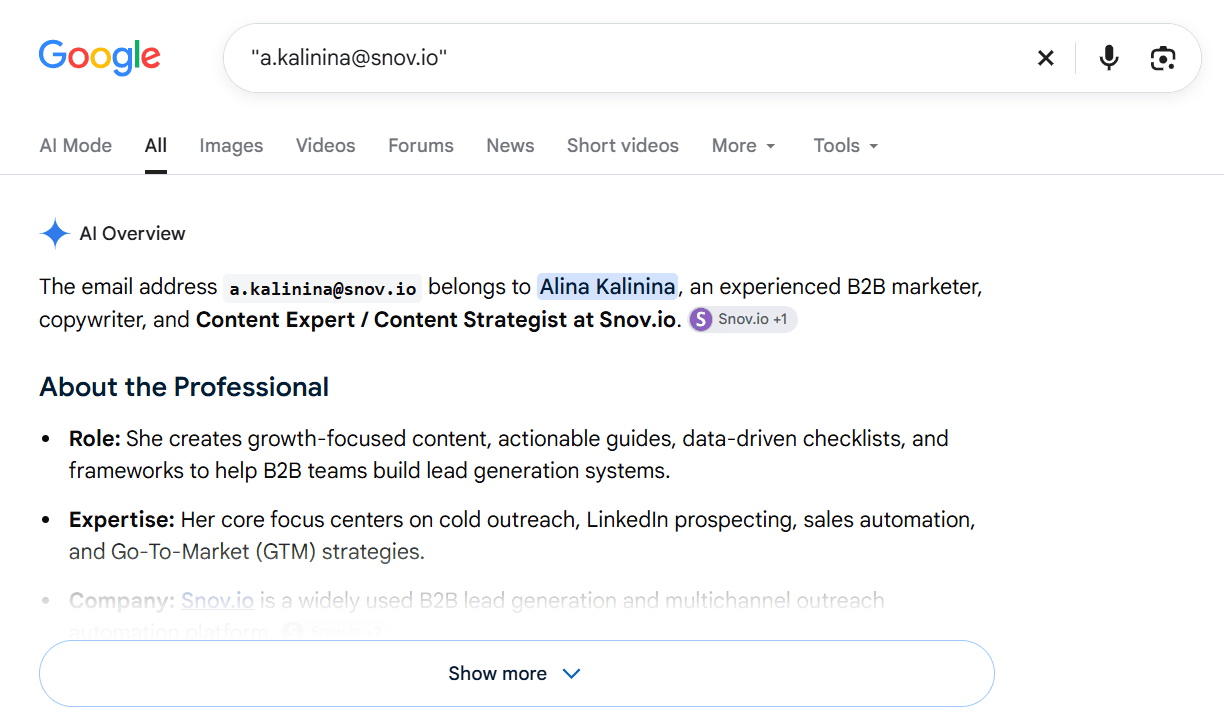
Don’t focus on deep research or expect comprehensive results at this point. The goal here is simply to confirm that the email address is connected to a real professional or organization.
No results don’t automatically mean fraud. Some people just have little online presence, so don’t treat missing data as a red flag.
Step 4: Run a reverse email lookup
Use email lookup services to see whether they can find additional information connected to the address.
A reverse lookup works the opposite way from an email finder: instead of finding an email address from a person’s details, you enter the address and see what data is linked to it.


Depending on the tool and available data, you may uncover first and last name, job title, company, location, social media profiles, and linked domains.
Lookup databases can contain outdated, incomplete, or incorrect information. So don’t treat reverse lookup results as final proof.
Step 5: Compare the results
Finally, cross-check the information from previous steps.
Look for consistency across the various sources you’ve used for the background check. Compare the name, company, position, professional profiles, and other public mentions. The more details match, the more confident you can be that you’ve identified the right person or that the contact is legitimate.
If you uncover adverse items, for example, conflicting employment details or suspicious domain information, treat the result with caution and keep researching before concluding.
Email background check limitations and legal considerations
An email background check can provide useful context, but it isn’t identity verification or a guaranteed picture of the person behind an address. So I recommend treating your findings as signals, not proof.
Here are the limitations and legal considerations to keep in mind:
Data may be outdated or incorrect
People change jobs, companies rebrand, and old profiles can still stay online. Lookup databases may also contain corrections or dispute information, so use reliable email verification and lookup tools and always cross-check important details with another source.
Not every address can be tied to one person
For generic inboxes like sales@company.com or hello@company.com, shared email accounts, and addresses with little public presence, you may reveal less information. At the same time, finding no data doesn’t automatically make an email suspicious.
One match isn’t enough
A name, company, or LinkedIn profile that appears connected to an email address is a useful clue. However, I recommend looking for several consistent signals before drawing a conclusion. Try to confirm important information through more than one source.
Public data still comes with privacy rules
If the information is publicly accessible, it doesn’t mean you can collect or use it for any purpose. Data protection and privacy requirements vary by country, so always check the applicable regulations before collecting or using personal data.
If you collect data from social networks, directories, or other email lookup platforms, review their terms and policies as well to ensure you can use the data legally for your intended purpose. Choose only reliable tools and platforms that collect and process information in a compliant way.
Employment decisions require extra care
An informal email background search isn’t a substitute for a formal employment background check. For example, in the UK, recruiters must have a valid legal basis to process candidate data and should only collect information that is relevant and necessary for recruitment purposes.
At the same time, in the US, background reports conducted by third-party screening companies require disclosure forms and written permission from candidates under the Fair Credit Reporting Act (FCRA).
Based on the Equal Employment Opportunity Commission (EEOC), employers should apply background checks consistently and without discrimination. State and local rules may add further requirements as well.
For B2B research or contact validation, think of an email background check as an additional source of context about your lead. If the information you find may influence a decision related to employment, credit, housing, or another sensitive area, make sure you follow applicable legal requirements before relying on this data.
Key takeaways
The main thing to understand about an email background check is that its goal isn’t to prove identity or provide you with a 100% guarantee of who a certain address belongs to. You need a background check to get more context about the contact so you can then make a better-informed decision.
That’s why you should always compare several sources, question anything that doesn’t match, and treat the information you find as a supporting signal. If your research may influence a regulated decision, also check applicable legal requirements before using the background check results.