
DNS Lookup Tool
Check your domain’s DNS records to detect technical issues and improve your email deliverability
Is your domain protected? Check and safeguard it.
Monitor your DMARC, DKIM, and SPF records — fix errors before deliverability drops.
Start for free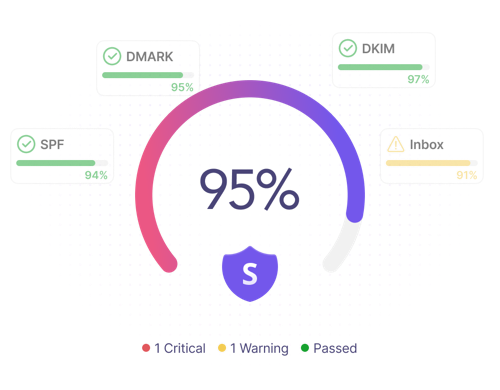
What Is a DNS Lookup?
A DNS lookup is a process of converting human-readable domain names into machine-comprehensible IP addresses. Simply put, it’s like an “interpreter” between people and machines, translating a domain name into a corresponding IP address from human to machine language.
For example: yourdomain.com → 203.0.113.200
DNS lookups retrieve stored DNS records that contain domain information, such as IP addresses (A and AAAA records), as well as other records, including NS, MX, SOA, CNAME, SRV, and TXT.
Since various DNS record types are responsible for many critical things, from website accessibility and email deliverability to third-party integrations, it is important to check them all regularly. A DNS checker or lookup tool can help you do that quickly and fix technical problems before they hit your business hard.
Fast DNS Record Lookup
Our DNS lookup tool queries DNS servers within seconds to fetch quick results. Check multiple record types at once to get the full picture of your domain's health. Just enter your domain name and get an immediate result with Snov.io’s DNS lookup tool.
DNS Record Error Detection
Detect every issue across various DNS record types — an invalid AAAA record, a missing MX record, a syntax error in any of the TXT records — with our DNS checker. Ensure nothing slips through, not a single error. Receive a comprehensive report on all DNS configuration issues inside the Snov.io app.
DNS Record Recommendations
After a thorough DNS lookup, receive additional actionable steps to handle misconfigurations, from publishing DNS records for the first time (if missing) to fixing an IP address typo (if any), on the Snov.io platform.
How to Perform a DNS Record Lookup?
Here’s how to check DNS records in 5 simple steps.
Pick a DNS lookup tool
Choose a global tool like Snov.io’s DNS checker to cover all major record types, including A, AAAA, MX, and TXT records, in a session.
Enter your domain name
Type or paste your main domain name into the search bar to run a DNS lookup in seconds and ensure your DNS records are valid.
Query DNS servers
Click the lookup button to send a query through the automatic DNS resolution chain. No command-line tools needed.
Check DNS records
Get your DNS lookup results in a human-readable format. See your domain-associated records, once found, along with their details.
Fix and double-check
Resolve issues and re-run your DNS lookup to ensure your updates have propagated and taken effect across global servers.
Frequently Asked Questions on DNS Lookup
What is DNS in simple terms?
DNS stands for Domain Name System — the Internet’s variant of a phone book. It matches human-readable domain names with machine-understandable IP addresses that correspond to those. For example, yourdomain.com is converted into the corresponding IP address.
Once you search for a domain name in your browser, a DNS lookup translates it into the correct IP address by retrieving specific DNS record types. This translation happens automatically in just a couple of milliseconds every time you visit a site or send an email. It's possible thanks to a global network of DNS servers that store each domain's DNS records.
What are DNS records?
DNS records are individual instructions stored in authoritative DNS servers. Some record types, like A and AAAA records, translate human-readable domain names into machine-friendly IP addresses during the DNS lookup process. Other DNS records perform other functions.
Without an accurate domain configuration and properly set DNS records, you may face website downtime or reputational damage, with your emails landing in the spam folder instead of the primary inbox. That’s when you need a DNS record lookup tool to pinpoint and solve DNS configuration problems before they weaken or ruin your domain (and business!) reputation entirely.
What are the most common DNS record types?
The most typical record types in DNS settings include A, AAAA, CAA, MX, CNAME, SRV, NS, TXT, SOA, and PTR. They fall into two categories: 5 essential (core) + 5 administrative & specialized.
- Core DNS records: A, AAAA, CNAME, NS, and MX. These record types are the fundamentals required for adequate and smooth functioning of websites, apps, or email services.
- Administrative & specialized DNS records: SOA, PTR, SRV, CAA, and TXT. These record types are responsible for DNS zone administration, reverse DNS lookup, service discovery, certificate authorization, and email authentication, respectively.
Each is responsible for a unique function within the Domain Name System.
Why is DNS record lookup important?
Here’s why you need to perform a thorough DNS lookup and check DNS records in bulk:
- Avoid website downtime. Your site may become unreachable if your A or AAAA record connects to the wrong IP address, for instance, or if you have migrated to a new hosting provider but forgot to update your DNS configuration.
- Protect email deliverability. Your emails may simply end up in spam or get blocked entirely when your TXT record is misconfigured (e.g., a broken DKIM signature or a too-relaxed DMARC policy). Running a DNS lookup before launching an email campaign can help you address issues with your TXT records and save your sender reputation.
- Detect security vulnerabilities. You may have outdated records, exposing your domain or subdomain to takeover attacks. Regular DNS queries will help you find and remove incorrect or out-of-date records and avoid cyber threats.
- Integrate smoothly with third parties. Most services, such as inbox providers or web analytics platforms, require specific DNS records for verification. For example, Microsoft 365 uses MX, CNAME, and TXT records to verify your domain name and route emails. If one of those is missing, it can’t properly connect to your infrastructure.
- Check DNS propagation. After publishing DNS records, whether new or slightly updated, a DNS record lookup will let you confirm that changes have propagated across global servers.
A quick DNS checker, like Snov.io’s DNS lookup tool, makes it easy to audit all records at once and spot all the issues to fix them immediately and safeguard your domain name and reputation.
How does DNS lookup work?
The entire DNS lookup process, or DNS resolution, consists of several stages that sequentially involve a local cache, a recursive resolver, a root nameserver, a TLD nameserver, and an authoritative nameserver. This automatic procedure takes milliseconds.
Here’s how it works when you enter a domain in your browser to resolve it into a machine-friendly IP address:
Stage 1. The local cache is checked. First, your system checks the local cache before even making any external DNS queries. In case the IP address for the given domain was recently looked up, it may already be stored locally.
Stage 2. The recursive DNS server (or resolver) is contacted. Once the recursive DNS resolver receives a query, it checks its own local cache first. If the answer isn't there either, the recursive resolver sends the query to the next DNS server in the hierarchical order: the root nameserver.
Stage 3. The root nameserver is contacted. The root nameserver doesn't keep the IP address for your specific domain — but it knows which TLD nameserver is responsible for the top-level domain (e.g., .com, .io, or .org). So, the root nameserver returns a referral that points to the TLD nameserver.
Stage 4. The TLD nameserver is contacted. The TLD nameserver manages all domains under a particular top-level domain. It doesn't have the final answer either, yet it returns a referral to the appropriate authoritative nameserver responsible for your domain.
Stage 5. The authoritative nameserver is contacted. The authoritative nameserver holds the actual domain's DNS records as the definitive “source of truth.” It returns the correct IP address and/or the requested records (e.g., the SRV record or the MX record) directly to the recursive resolver.
Stage 6. The answer is returned and cached. The recursive resolver sends the information it obtained back to your device and stores it in the local cache as long as the record's Time to Live (TTL) permits. So, future DNS queries for the same domain skip the full DNS lookup chain and use the cached result until the TTL expires.
What is the difference between forward and reverse DNS lookup?
The major difference between a forward and reverse DNS lookup lies in their opposite functions. A forward DNS lookup is a traditional DNS resolution process: it takes a specific domain name and converts it to its corresponding IP address (e.g., example.com → 198.51.100.25). A reverse DNS lookup works in the opposite direction: it takes an IP address and resolves it back to a domain name (e.g., 198.51.100.25 → example.com).
Note: A forward DNS lookup can also return multiple record types (MX, SRV, TXT, CNAME, SOA record) if requested. A reverse DNS lookup, in contrast, relies solely on the PTR (Pointer) record to map an IP address back to a domain name.
How do I check my DNS records without command-line tools?
Start by choosing a dedicated DNS checker. You can check DNS records with Snov.io’s DNS lookup tool. Just enter your domain name and run a comprehensive search across multiple record types. Our tool queries DNS servers on your behalf and returns clear, understandable results in an intuitive, user-friendly interface.
So, you don’t necessarily have to run commands and manually query DNS servers via dig or nslookup. Such command-line tools have a steep learning curve with difficult-to-understand outputs, especially for non-technical users.
Can I use your DNS lookup tool to check a domain I don't own?
Yes. You can look up any domain information — not just your own — with Snov.io’s DNS checker. DNS records are stored on authoritative DNS servers, which anyone on the Internet can query. So, our tool queries publicly available data. It means that you can check any registered domain name.
Whether you need it for your client or competitor analysis, it’s as easy as entering any domain name into the search bar of our tool. It launches a quick, automatic DNS lookup process, with results available for review instantly.
Is your DNS checker free?
Yes. The DNS record lookup tool offered by Snov.io is completely free to use. Simply paste or type your domain name into the search bar at the top of this page, click the lookup button, and get the results returned to you in split seconds.
And if you would like to receive a full domain health report with technical issues and recommendations on what to fix, register a free account with Snov.io to gain deeper insights into your DNS configuration problems and expert-recommended improvements.
What is a DNS record type A?
The A record is the fundamental DNS record that maps a domain name to an IPv4 IP address type (e.g., example.com → 192.0.2.55). It points to the server hosting a particular site or app.
What does an AAAA DNS record do?
The AAAA record maps a domain name to a corresponding IPv6 IP address type (e.g., example.com → 2001:0db8:abcd:1234:5678:9abc:def0:1234). Its name comes from the fact that IPv6 addresses are 4 times as large as IPv4 addresses.
What is the purpose of a DNS MX record?
The major goal of the Mail Exchange (MX) record is to identify the mail server responsible for receiving email for a given domain (e.g., example.com → mail.example.com).
What does SOA record?
The Start of Authority (SOA) record keeps administrative details of a domain’s authoritative DNS zone, including the master node and timing parameters.
What is a DNS SRV record used for?
The Service (SRV) record is used to hold domain information, including the hostname and port number, for particular services, such as instant messaging apps or VoIP.
What is a common use of TXT records?
Two of the most significant use cases of DNS TXT records are domain ownership verification and email authentication as a security measure against cyberattacks.
DKIM, DMARC, and SPF records are the TXT records used to prevent email spoofing, phishing, or any other unauthorized use of your domain:
- SPF stands for Sender Policy Framework. It is the first security protocol and TXT record that authorizes email servers to send messages on behalf of your domain.
- DKIM stands for DomainKeys Identified Mail. It is the second security protocol that uses a DNS TXT record to add a cryptographic signature to ensure that messages are not modified during email delivery.
- DMARC stands for Domain-based Message Authentication, Reporting, and Conformance. It is the third security protocol and TXT record, deciding what to do with emails that failed the two previous checks (SPF and DKIM): monitor, quarantine, or reject.
Each makes a separate protective layer. Together, they act as a three-layer security system against hackers who may steal your domain identity and send malicious emails on your behalf. These are the exact DNS records you need to earn a more positive sender reputation among email providers and achieve higher inbox placement rates.