TL;DR
If you’re short on time, here are the key points this guide covers:
- Email validation checks each address in several ways: it analyzes the format, domain, and MX records, performs an SMTP handshake, and identifies catch-all, disposable, and role-based addresses.
- Just because an address looks correct does not mean it is valid. Only the SMTP check can confirm if a real mailbox exists.
- Email lists lose at least 23% of their accuracy each year, so you should verify them every 3-4 months. It’s also recommended to validate your list 24 to 48 hours before each campaign.
The main point: if you consistently get no replies, the quality of your list is probably the issue. Email validation helps you avoid this problem.

Format
Type
Server status
Auto-generated
Catch-all
You send out your cold email campaign, but it brings back bounces and a lower deliverability rate instead of expected responses. Sounds familiar?
While many teams rush to blame the email copy, the real issue might hide beneath – the list quality.
In 2025, ZeroBounce verified over 11 billion addresses and reported 2.6 billion of them as invalid. 38% of emails could bounce!
The way out is indisputable: You should validate your email list.
By the end of this article, you will understand how email validation works and how to run it most efficiently to get desired conversions.
What is email validation?
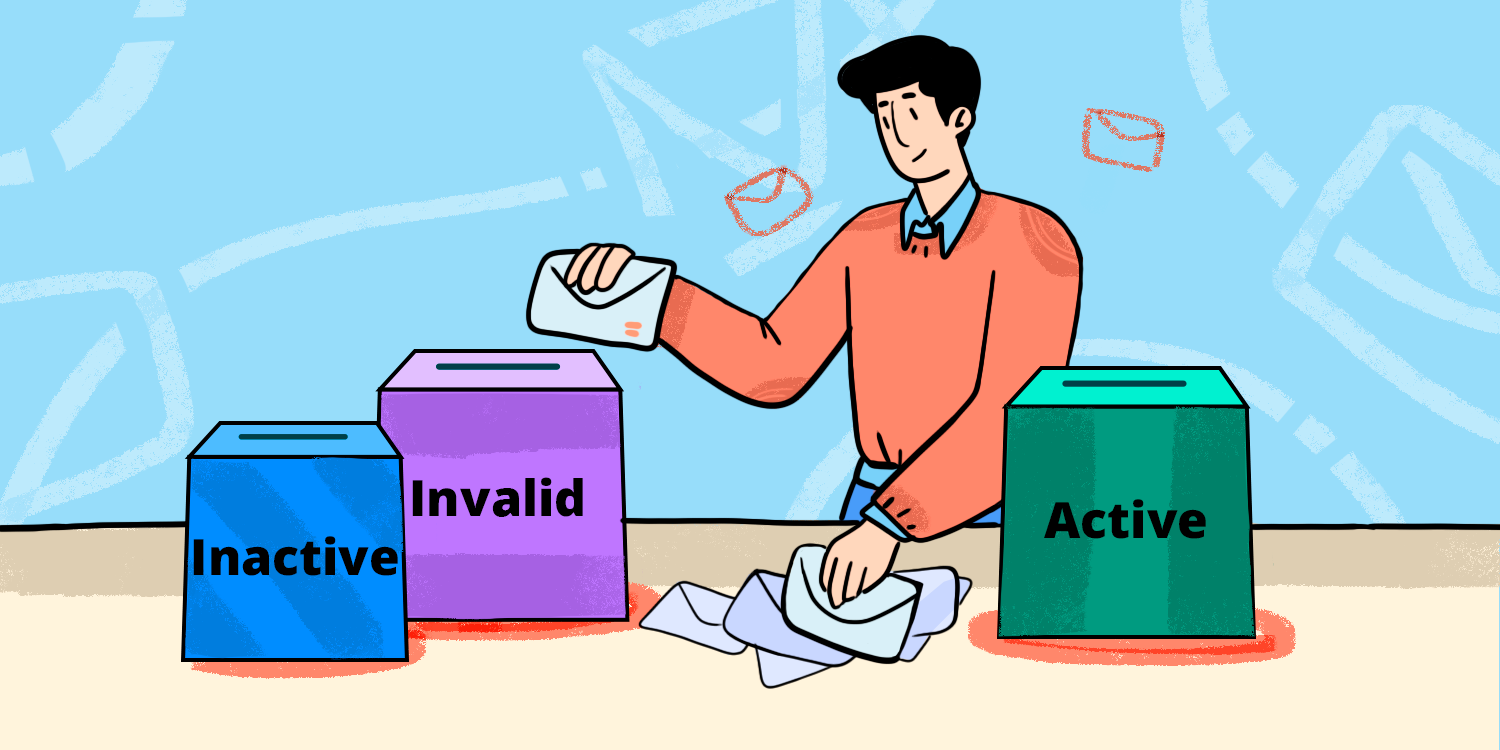
The process of email validation involves verifying that the addresses on your list are genuine, active, and safe before you send out any messages. Instead of waiting for bounces to damage your sender reputation, you validate your list beforehand and prevent the issue.
What a validated email address actually means
A validated email address is one that has gone through at least three separate stages of checking:
- Correct format: the address follows email syntax rules.
- Active domain: the domain exists and is configured to receive mail.
- Confirmed mailbox: the specific inbox exists on that server.
Each stage is more thorough than the previous, working as filters emails go through. That’s why a correctly formatted address on your list does not mean it is deliverable.
Say, an address such as john.smith@formercompany.com may be syntactically valid, but if its owner left that company two years ago, the mailbox is no longer active.
Email validation vs. email verification
The two terms are often treated similarly, though there’s a slight difference between them:
- Email validation involves a broader process of checking whether an email address has the correct format, the domain is active, and that the mail server is properly configured.
- Email verification involves a technical analysis of whether the specific mailbox exists, typically via an SMTP-level check.
Modern email verification tools usually carry out both actions in one go.
How does email validation work?
If you feed a list into a validation tool, each address is subjected to a series of checks. The more layers there are in a verification process, the fewer risky addresses will end up in your campaigns.
Below is a 7-step email validation process the Snov.io email validation service performs:
- Syntax check
- Gibberish check
- Domain check
- MX record check
- Email server check (SMTP)
- Mailbox existence check
- Catch-all check
Only if the email passes all these checks is it marked as valid.
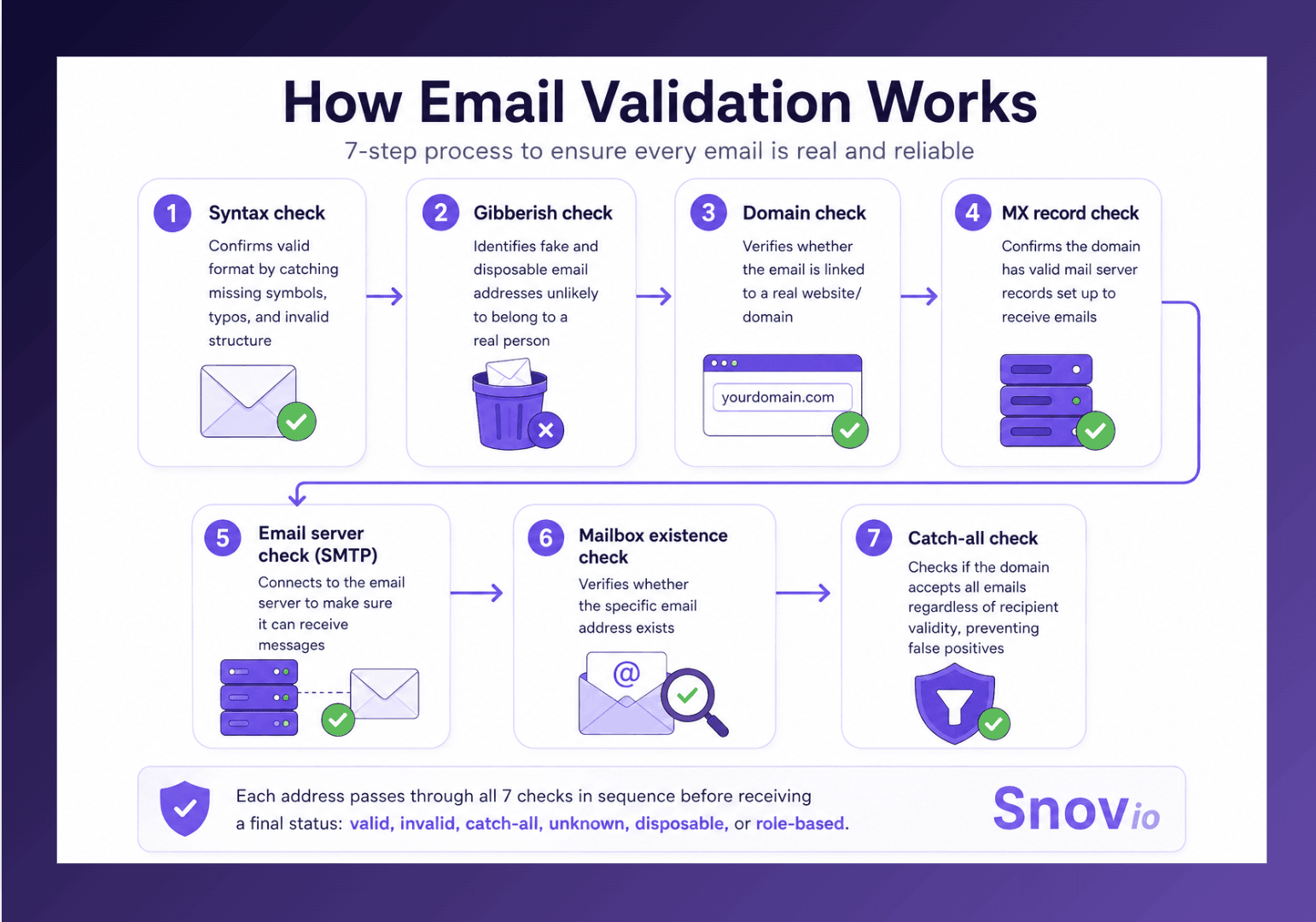
Let’s look at each step in detail.
Step 1: Syntax check
At this step, the system checks whether the address complies with the structural rules of an email address. That is, the email address format should have a local part, an @ symbol, a domain, and a valid top-level domain, and must not contain any illegal characters or spaces.
✅ Valid: sarah.jones@acme.com
❌ Invalid: sarah.jones@@acme.com
Syntax errors are generally caused by typos made during manual entry or by dirty CSV imports. So, this filter removes the obvious junk before the more extensive checks start.
Step 2: Gibberish check
At this point, the system identifies fake or disposable addresses.
Disposable addresses are temporary inboxes that are used to receive a download or to get past a signup barrier before being discarded. They end up in lists as a result of gated content or scraped data.
The individual who uses a temporary email address never intended to respond to you; the inbox is probably no longer there; and email providers regard messages sent to known disposable domains as spam.


Step 3. Domain check
Next, the validator checks if the email belongs to a real domain. In other words, it analyzes whether the address is linked to a particular website.
The domain and email infrastructure you choose are just as important as the quality of your email list. According to Smartlead’s analysis of 16.6 million emails, SMTP mailboxes suffered from a bounce rate six times lower than that of Gmail and Outlook mailboxes. 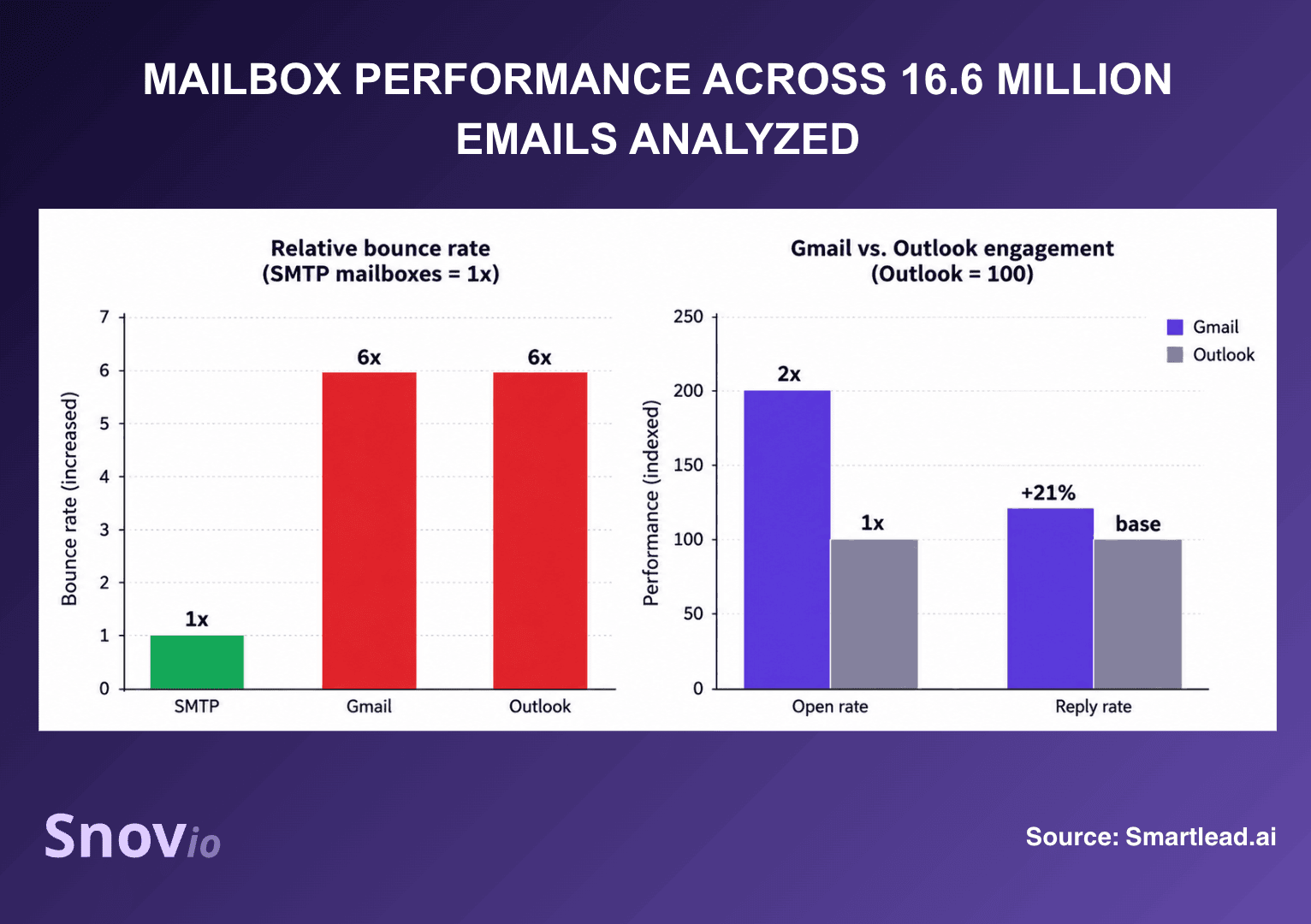
Need proper authentication for your domain? Run a free DNS lookup to detect technical issues that may hurt your email deliverability.
Step 4. MX record check
At this step, the system looks up the domain’s MX (Mail Exchange) records to confirm that the domain this address belongs to has valid mail server records configured to receive email.
If a domain has no MX records, it cannot receive email, so no mailbox at that domain can be valid. This check can also spot expired or parked domains, which is a common issue in B2B lists when companies shut down, rebrand, or get acquired.
Step 5: Email server check (SMTP)
The validator establishes a connection to the recipient’s mail server and initiates the process that would occur in a genuine email delivery, then disconnects without sending any message.
The gist is to check whether it can receive messages.
Step 6: Mailbox existence check
While the syntax and domain checks indicate the address might be valid, the SMTP check finally confirms it is valid.
The server’s response indicates this: if the response is 250 OK, the mailbox exists; if it is 550, the mailbox does not exist, and the address will hard bounce.
Step 7. Catch-all check
Certain domains are configured to accept mail addressed to any address, whether real or fictitious. This makes catch-all domains the most problematic area for validation.
Since the server agrees to all requests, the SMTP check cannot determine whether a particular mailbox exists behind it. A catch-all address will pass all the standard checks but still carries a risk of bouncing: many catch-all servers accept the message as it arrives and then either silently discard it or send it back later.
A good validator identifies these cases individually so that you can make a deliberate decision about the risk.
The outcomes from all seven checks are gathered together to form a single deliverability status. Based on Snov.io’s testing, this multi-layered method achieves 98% accuracy and handles cases marked as valid bounces at 1%.
What validation results mean and what to do with them
Once validation is complete, each address is returned with a status. A table below explains what each status means and what actions are recommended to take:
| Email status | What it means | Recommended action |
|---|---|---|
| Valid | Mailbox confirmed to exist and accept mail | Safe to send |
| Invalid | Failed the syntax, domain, or mailbox check | Remove immediately |
| Catch-all | Domain accepts all mail; the mailbox cannot be confirmed | Send cautiously or suppress, based on risk tolerance |
| Unknown | Server did not respond conclusively | Re-validate later; treat like catch-all if it persists |
| Disposable | Temporary, throwaway address | Remove always |
| Role-based | Function inbox such as info@ or admin@ | Suppress for cold outreach |
When it comes to invalid addresses, next steps are clear — you should immediately remove them from your list.
But how to handle catch-all and unknown addresses?
Well, there isn’t a general rule; it involves a balance between reach and risk, and the appropriate decision will depend on the present state of your sending domain.
If your sender reputation is strong, your bounce rate is well below 2%, and the segment is valuable enough to warrant a certain level of risk, you may include catch-all addresses and send them off in small, separate batches.
If your domain is new, however, or you have experienced bounce or spam issues in the previous 90 days, then suppress them. A weak reputation cannot take the impact.
Why email validation directly impacts deliverability
Email list quality is one of the key factors that influence how your emails will be delivered. Below are some of the key problems email validation solves:
Hard bounces and sender penalties
The fact that you get hard bounces means that you are sending mail to addresses whose authenticity you don’t know, which is typical of a spammer.
When you exceed the approximately 2% bounce rate, the mailbox providers start to treat you more severely. The higher the rate, the more likely you are to be throttled, have your mail placed in the spam folder, or be put on a blocklist. Since reputation builds up over time, each message sent to an unverified address reduces the standing of the next message.
The hidden risk of catch-all addresses
Hard bounces at least make themselves known. Catch-all damage, on the other hand, is quieter and more difficult to detect.
Emails sent to catch-all domains are often accepted but then diverted to nowhere: there is no bounce, no opening, and no reply. Your campaign data becomes unreliable because you can’t run A/B tests on a list where a portion of the delivered emails have never been seen by anyone.
Engagement levels remain low for reasons that are not visible to you. Mail providers interpret this lack of engagement as an indication that your emails are unwanted. A result is known: your sender reputation, hence deliverability rate, falls.
Role-based addresses and distorted campaign data
If a big portion of your list consists of role-based entries, your reply rate will naturally be lower. More so, when too many emails go to addresses like info@, sales@, or support@, you can’t clearly see whether the poor performance is caused by your messaging or the quality of your list.
Therefore, the optimization decisions you take based on that data will be based on distorted inputs.
The long-term impact on domain reputation
You can think of sender reputation as a cumulative score that each campaign either increases or decreases.
The more bounces there are, the lower the score becomes. A lower sender score results in lower inbox placement. This, in turn, leads to lower engagement, which causes the score to fall even further. Validation is the means by which you break the loop before it begins.
Email validation is less visible work than growing a list, but when it comes to the impact on deliverability, it’s even more valuable than adding new contacts.
Email Deliverability Specialist at Snov.io

How frequently should you check your email list?
Validation shouldn’t be a single exercise. It is recommended to check your email list every 3 to 6 months to keep it clean. The reason for this is the constant email decay.
According to ZeroBounce’s Email List Decay Report, 23% of emails deteriorate within one year. The decay is even more rapid in the B2B sector — people change jobs, companies go out of business or are acquired, and inboxes become outdated. Lists grow stale quicker than most teams anticipate.
Apart from this, the frequency of email validation depends on your team’s type.
- Agencies running campaigns for multiple clients should validate each contact list before every campaign. One client’s poor-quality list can damage the shared sending infrastructure and affect other clients’ campaigns.
- Enterprise SDR teams working with large, static lists should revalidate their databases quarterly. Plus, it’s recommended to run an additional validation check before launching each new sequence.
- Growing teams that continuously add new leads should validate email addresses right as they enter the database. This prevents invalid data from accumulating over time.
Finally, your current state of affairs matters. If you’ve just noticed bounces to spike or deliverability to drop, it’s high time you revalidated your email list.
Ensure you regularly check your email deliverability rate to catch the problem before it damages your reputation and overall performance. Moreover, the process is effortless: with tools such as SmartDelivery from Smartlead.ai or Email Deliverability Test from Snov.io, you can do it in less than a minute.
Where email validation fits in your deliverability stack
Validation isn’t a single solution; it is just one layer within a stack, and all the layers depend on the rest functioning correctly.
Authentication: SPF, DKIM, and DMARC
SPF, DKIM, and DMARC provide mailbox providers with evidence that you are the entity you say you are. A perfectly clean list originating from an unauthenticated domain will still end up in the spam folder, since providers have no way to trust the sender.
You should set up authentication before carrying out validation, as validation safeguards what authentication enables.
Inbox warmup
Gradual email warm-up helps establish a positive sending record in new inboxes. If you send an email to a list that has not been validated during the warm-up phase, you quickly undo the progress made, since a bounce spike during warm-up is one of the most harmful signals a new domain can send.
Teams using a tiered warmup infrastructure should regard validation as a necessary step, not something to be ignored.
Sending infrastructure and inbox rotation
A strong email infrastructure helps distribute bulk outreach across multiple domains and inboxes. Inbox rotation ensures that the volume per inbox remains natural. Meanwhile, email validation ensures each inbox is free from invalid contacts. These layers work together to protect deliverability at scale.
Key takeaways
Email validation shouldn’t be treated as a single checkbox; it should be seen as an ongoing practice, just like email warm-up and authentication. Each check performed during the process, whether it’s checking syntax or the SMTP handshake, serves to protect the same three objectives: your deliverability, your sender reputation, and your campaign ROI.
Validate your list regularly to ensure your email campaigns reach prospects’ inboxes and deliver the desired conversions!