
TL;DR
The correct email address format follows the pattern local-part@domain.tld, where the local part identifies the specific mailbox and the domain points to the mail server that handles it. Even small email syntax errors can make campaigns undeliverable, leading to bounces, poor deliverability, and lost outreach opportunities.
At the same time, a valid format of email address doesn’t always mean the inbox actually exists or can receive messages. So to confirm that an address is real and deliverable, it’s best to check it with tools like Snov.io’s Email Verifier. Format Type Server status Auto-generated Catch-all

Did you know that in 2025 alone, more than 2.6 billion invalid email addresses were found across global business databases? And a large portion of them could have been avoided by simply using the correct format of email addresses from the start.
In this guide, you’ll learn what email address format is, how it works, why it impacts deliverability, and how to maintain it properly.
What is email address format?
Email address format refers to the structure of an email address, governed by particular rules (email address syntax). These rules are not arbitrary; they come from SMTP standards, mainly RFC 5321, which define how mail servers read, validate, and route email addresses.
Email address syntax is about whether the address itself is correctly constructed — not whether the inbox exists or whether anyone checks it.
Take john.doe@company.com, for example. It’s correctly formatted, even if the mailbox no longer exists. Now compare that with john.doe@company — it’s invalid from the start because it’s missing a top-level domain, such as .com or .org.
These issues may look small, but they matter. A typo, missing @, or invalid domain will block delivery immediately. That will lead to higher bounce rates and can affect your sender reputation and email deliverability, making future emails more likely to land in spam.
What is the email address structure?
The proper structure of an email address follows the same pattern every time: local-part@domain.tld.
Let’s take a look at the key email address components. The local part, everything before the @, identifies the specific mailbox. The domain, everything after it, points to the mail server where that mailbox lives.
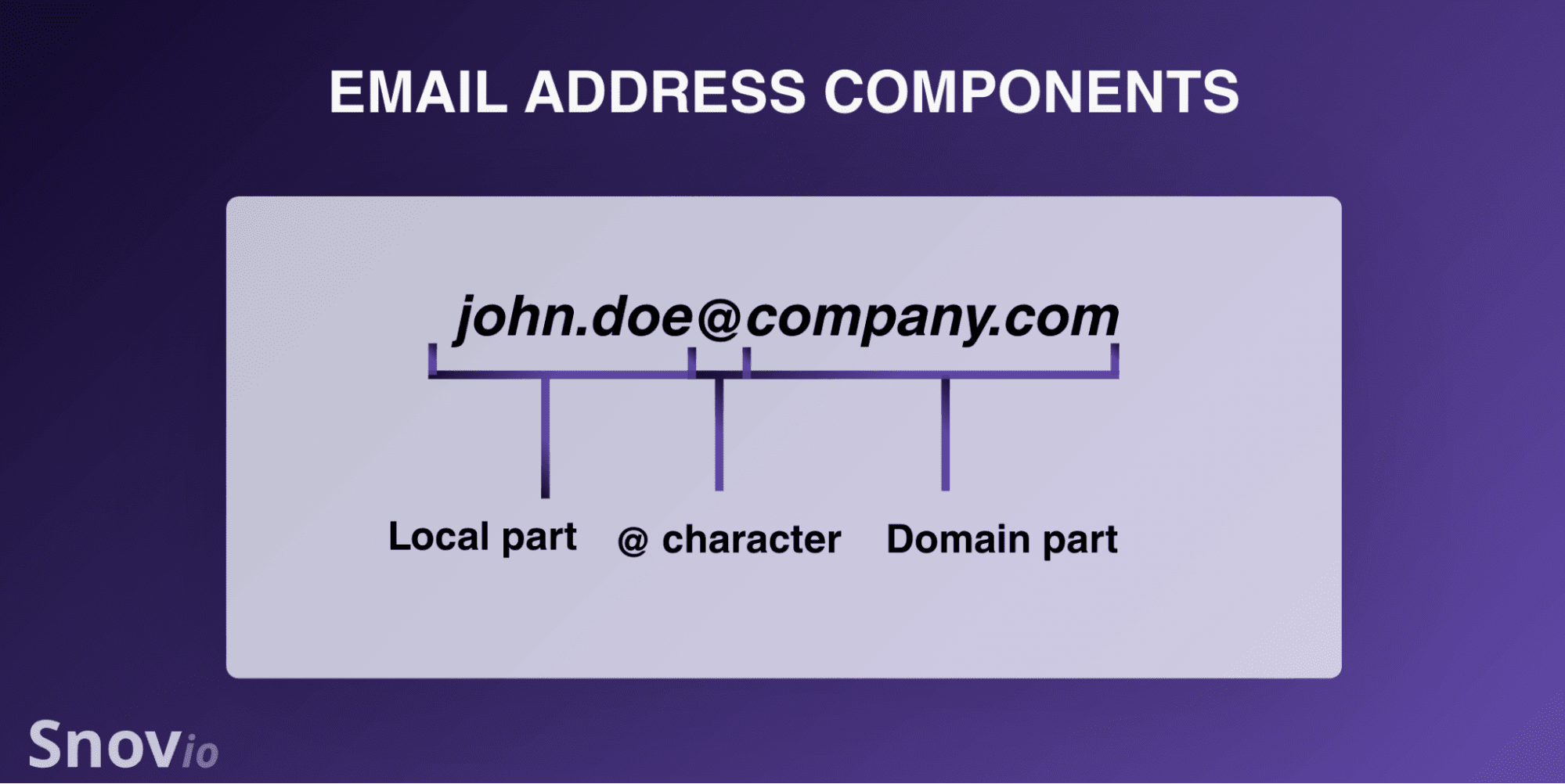
Every time an email is sent, the sender’s server checks DNS to determine where the recipient’s domain receives mail. Once the message reaches that server, the local part of the email address is used to direct it to the right mailbox.
In simple terms, the domain tells the email where to go, and the local part identifies who should receive it. A format error in either part breaks the process before anything gets delivered.
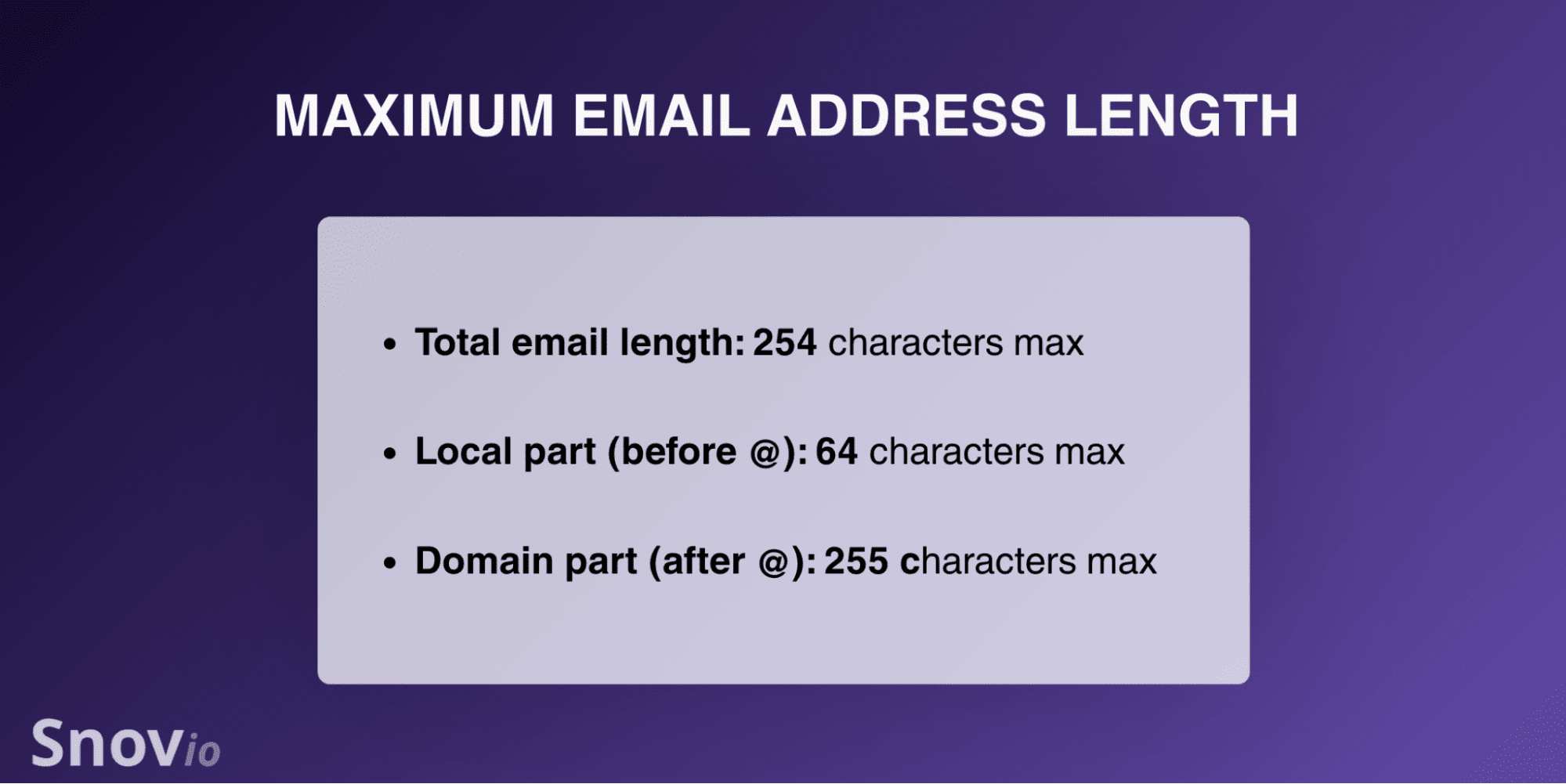
All email address components have a character limit:
- Local part: up to 64 characters
- Domain part: up to 255 characters
- Full address: generally up to 254–320 characters, depending on system implementation, with most providers enforcing practical limits closer to 254
Obviously, most email addresses never come close to these limits, but exceeding them renders an address invalid, regardless of how well it looks.
Email address format rules
Unlike humans, mail servers parse addresses in a strict way with no room for interpretation. That’s why email address syntax matters: one small violation is enough to make an otherwise normal-looking address completely unreadable to a server.
The core rules for email address format
These rules account for the vast majority of format errors in real systems. They appear often, especially with user-submitted data.
These rules cover most common email format issues, but the local part of an email address also has a few additional requirements worth understanding.
Rules specific to the local part
Most formatting mistakes happen in the local part, so it’s worth looking at it more closely.
The permitted characters here are letters, numbers, and the special characters listed in the table above. Dots are allowed as well, but come with 3 specific restrictions:
- They can’t appear at the very start of the local part
- They can’t appear at the very end
- They can’t appear twice in a row
So john.doe is fine, but .john, john., and jo..hn are all invalid.
Technically, spaces and certain special characters are allowed if the local part is quoted, as in “john doe”@example.com. But in practice, most mail systems reject this format, so treat it as a technical edge case rather than a usable email format.
Domain requirements for email address format
The domain part of an email address structure follows DNS hostname rules. They are more restrictive than the local part and are worth understanding separately.
Each segment between the dots is called a label. So in mail.company.com, the labels are mail, company, and com, each validated independently.
Labels can only contain letters, numbers, and hyphens. Underscores, spaces, and other characters aren’t allowed. For example, my_company.com isn’t a valid domain even though my-company.com is, because domain labels follow DNS rules that predate most of the naming conventions common in usernames and filenames today.
A few additional rules apply:
- A label can’t start or end with a hyphen, so -example.com and example-.com both fail while ex-ample.com is fine
- Each label can be at most 63 characters long
- The total domain can’t exceed 255 characters
- For a public internet email, the address should end with a recognized top-level domain
Keep in mind, format validation can only confirm that the domain is correctly constructed. It can’t confirm the domain is actually set up to receive mail. A domain can pass every format check and still bounce on delivery if it lacks proper infrastructure.
Examples of valid and invalid addresses
Here is an example of a correct email address format:
john.doe@company.com
In john.doe, letters and a properly placed dot between 2 character sequences make the local part valid. The @ acts as the required separator, while company.com, the domain, has 2 dot-separated labels ending with a valid TLD. Everything checks out.
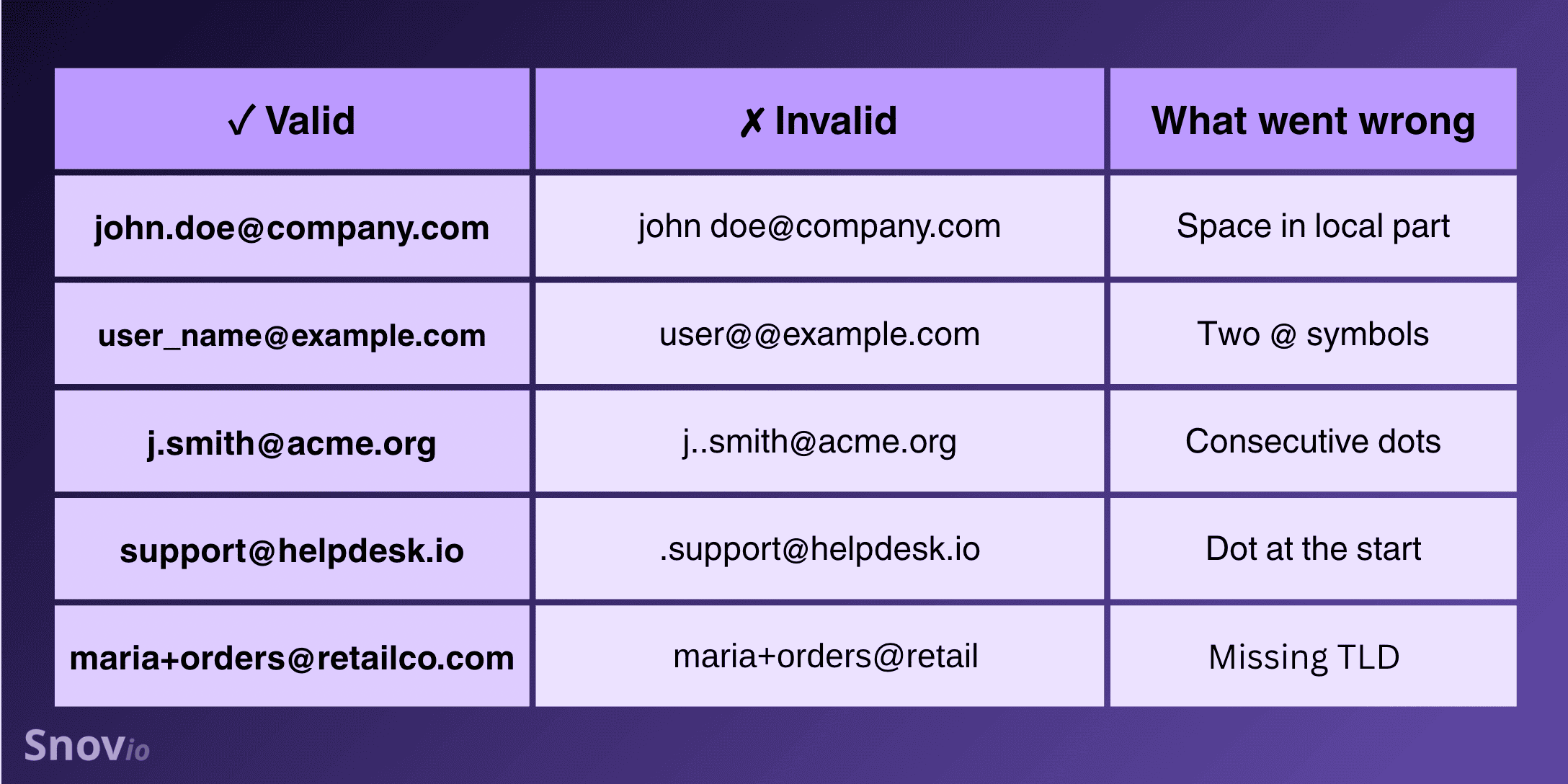
Here are a few more valid email address format examples worth recognizing:
- j.smith@acme.org — first-initial-last-name, common in corporate environments
- support@helpdesk.io — a role-based address, perfectly valid and preferable for team inboxes
- maria.garcia+orders@retailco.com — the plus tag routes to the same inbox as
- maria.garcia@retailco.com, useful for filtering and tracking
And the most common invalid email format examples:
- john doe@company.com — the space is an immediate disqualifier
- john..doe@company.com — consecutive dots in the local part
- @company.com — no local part
- john.doe@ — no domain
- john.doe@company — not a fully qualified, resolvable domain for public email delivery
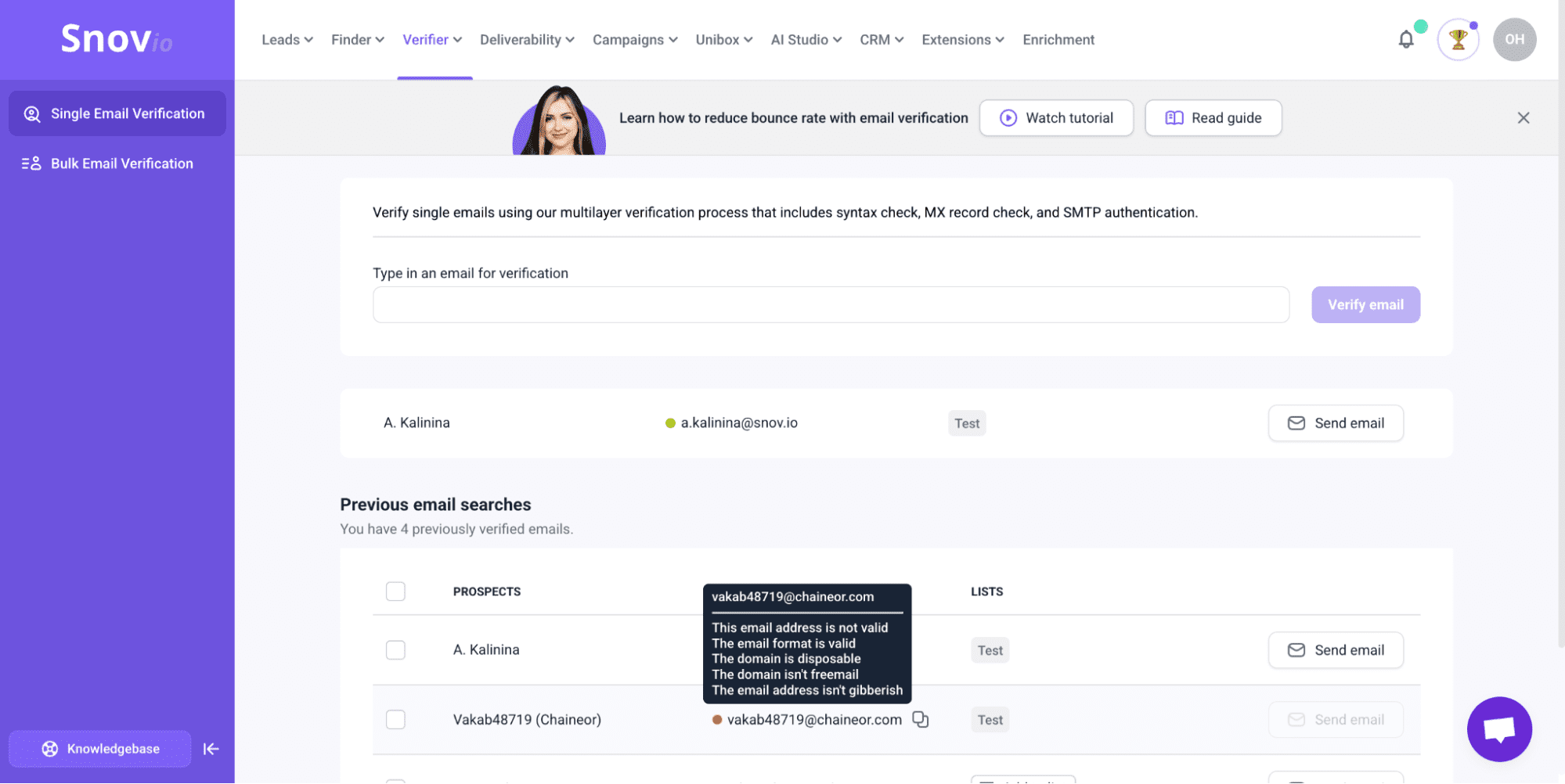
If you’re unsure whether a specific address passes validation, you can always verify an email address using Snov.io. It’s quick and easy. Just head to the Snov.io app, paste in the email you want to check, and your results will be ready in seconds.
→ For a deeper look at how invalid email adresses affect overall performance and what to do with this problem, read our expert email deliverability guide.
What is the best email address format for business?
Choosing the right email address standard format for your business is partly a technical decision and partly a brand one. Why? Because the address someone receives your email from shapes their first impression before they read a single word.
The most fundamental choice is opting for a custom domain. Using @gmail.com or @yahoo.com for business outreach can make your emails feel less trustworthy. A custom domain, on the other hand, like @yourcompany.com, is a small investment that makes your business look way more professional.
For individual addresses, firstname.lastname@yourdomain.com is the best format in practice. It’s readable, predictable, and memorable.
Role-based addresses are worth setting up for any function that touches external communication. Here are a few common ones to consider:
- support@ for customer-facing help
- billing@ for finance and invoicing queries
- hello@ or info@ as a general contact
- press@ for media and PR inquiries
Finally, a long company name is worth abbreviating in your domain if it causes any friction. We recommend testing it by asking whether someone could hear it once, hold it in memory, and type it correctly on the first try. If not, the shorter option is the smarter one.
Are email addresses case sensitive?
Technically, yes, but practically no. But the full answer is slightly more nuanced than that and worth understanding if you’re storing or validating addresses at scale.
The email standard technically allows the local part to be case-sensitive. Meaning, John.Doe@example.com and john.doe@example.com could, in theory, point to 2 completely different mailboxes. The logic is that the receiving server should have full control over how it interprets the local part, including whether capitalization matters.
In reality, no major provider takes advantage of this. Gmail, Outlook, and Yahoo treat email addresses as case-insensitive. The domain part is also case-insensitive by default, so the full address works the same way regardless of capitalization.
What matters, however, is how you store addresses in your system. If you save John.Doe@company.com and john.doe@company.com as 2 separate entries, you’ll end up with duplicate records for the same person.
Normalizing email addresses to lowercase before saving keeps your data consistent and aligns with how every real provider handles things anyway.
Email addresses in other languages and scripts
Many systems and apps still assume email addresses only use English letters, numbers, and a handful of special characters. That works for a lot of people, but it leaves out anyone whose language uses a different script entirely, such as Arabic, Chinese, Hindi, and many others.
A standard called Email Address Internationalization (EAI) fixes this by allowing both the local part and the domain to use characters from any language. So someone in Japan or Saudi Arabia can have an email address written in their own script.
The gap is in how applications handle these addresses. Many signup forms still use validation patterns built for English-only input, and they’ll quietly reject a perfectly valid address in another script without explaining why. It’s a small oversight that creates a real problem for a large portion of the world.
If your product has users who might need this, 3 things are worth checking:
- Whether your signup forms accept non-English characters in the email field
- Whether your validation logic would silently reject a non-English address
- Whether your database is set up to store those characters correctly
The ICANN Universal Acceptance guidelines walk through all of this. And the fix is usually simple; it just tends not to happen until someone actually hits the problem.
How email format affects deliverability and what to do about it
A formatting error can contribute to a pattern that affects your ability to reach everyone on your list.
When the email address doesn’t meet format requirements, the send fails, and the email bounces. And the real problem comes from accumulation, because once providers start treating your domain as low-quality, emails get routed to the spam folder across the board.


The format-level fix is to validate at the point of collection. But format validation is just the start; keeping email deliverability healthy over time takes a few ongoing habits:
Document your naming convention
Without a written standard, email address formats inside an organization drift over time, especially after hiring or rebranding. A short internal document that specifies the format, how to handle name conflicts, and what role-based addresses exist saves a lot of cleanup work later.
Automate validation before addresses are saved
Running addresses through an email verifier before they enter your list catches format errors, dead domains, and non-existent mailboxes before they become bounces.
Re-verify email lists regularly
You can’t just verify your email list once you collect it. This practice should be performed regularly to ensure that no invalid addresses are hidden among valid contacts.
At Snov.io, we recommend verifying your list 24–48 hours before each campaign, every 3-6 months, and after any bulk import or a bounce rate increase. It’s less visible work than growing a list, but in terms of actual impact on deliverability, it’s often more valuable than adding new contacts.
Email Deliverability Specialist at Snov.io

Monitor deliverability and sender reputation on an ongoing basis
Regularly track bounce rates, spam complaints, and blacklist status — all of them affect deliverability.
Snov.io’s Email Deliverability Test covers your domain health and shows where your emails actually land across major providers.
And if any issues are detected, the tool explains what’s causing them and what you should fix to improve deliverability.

Key takeaways
Email address format is simply about structure — the local part, the @ symbol, and the domain. If one of these is wrong, the email won’t be delivered. That’s why even small issues like typos, missing symbols, or broken domains can quickly cause failed sends. Over time, this adds up — higher bounce rates, a weaker sender reputation, and more emails landing in spam.
With tools like Snov.io, you can address this problem early: validate emails as you collect them, check your deliverability, or even have email infrastructure set up for you automatically.