
TL;DR:
LinkedIn Premium plans can significantly boost your job search, hiring, and social selling efforts. There are four major subscription plans with different feature sets and pricing: LinkedIn Careers, LinkedIn Small Business, Sales Navigator, and Recruiter.
Here’s a quick overview of how they differ from each other:
Still, these plans are fairly costly, so we recommend exploring their capabilities in more detail before buying. Read this article to discover the prices, features, and use cases for each plan, and learn how to combine your LinkedIn Premium subscription with other tools for increased efficiency.
Whether you’re looking to expand your customer base and grow your business, searching for your dream job, or hunting for talent, LinkedIn is a go-to spot: with a whopping 1 billion users worldwide, it’s where the action is!
But when it comes to moving from the free version of LinkedIn to the Premium one, things get a bit tricky. Is it really worth the extra cost? The answer to this question is a bit more complicated than it seems. Let’s explore all of the details.
Outline:
What is LinkedIn Premium?
LinkedIn Premium is a paid subscription plan that offers tools for career growth or business needs. LinkedIn claims that Premium Business members have an average of 16x more connections.
It is divided into two tiers:
- For individual users:
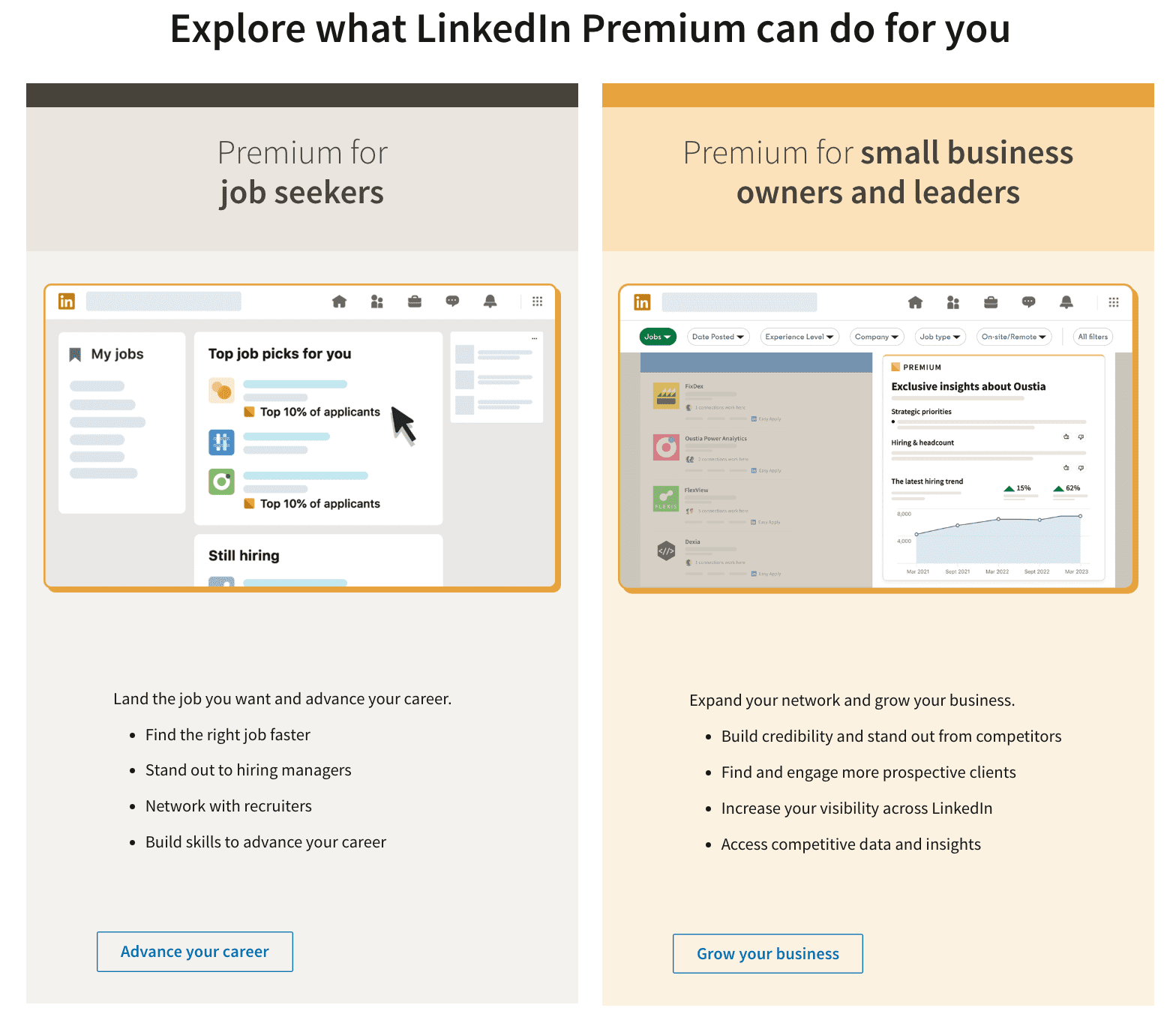
Premium Career for advanced job search.
Premium Small Businesses for enhanced social selling.
For companies (business solutions):
Recruiter or Recruiter Lite for more efficient hiring.

Sales Navigator for lead generation
Sales Assistant for AI-guided prospecting
Premium Company page for enhanced engagement
Premium learning tools for centralized employee education
Each tier provides specific tools and insights, such as seeing who viewed your profile, advanced search filters, lead recommendations, direct messaging capabilities (InMail), etc. They are designed to amp up your networking game or career journey.
Below, we’ll talk in detail about how all these features may help you meet your goals so you can decide for yourself if LinkedIn Premium is splurge-worthy. But first, I suggest we discuss when it’s time you switch to a paid plan and how much it costs.

When should you use LinkedIn Premium?
The choice of the subscription plan depends on your current needs, of course. If you’re using LinkedIn mainly for casual networking or building your personal brand, the free account might be enough to connect with people, join discussions, and share your professional opinion.
If you are planning to start a serious social selling campaign on LinkedIn, you’ll probably need to reach out to LinkedIn users in bulk and automate your activities. In this scenario, you’ll hardly do without advanced features. That’s when a Premium plan may become handy.
But which tier would fit you best? Use a simple decision guide prepared by our experts to get the idea.
💡 Still not sure which subscription is for you? We recommend signing up for a 30-day free trial, so you can test the effectiveness of different premium features like InMails or profile insights. See if they get you valuable connections and qualified leads.
What does LinkedIn Premium offer (compared to Basic)?
LinkedIn Premium offers advanced features that help subscribers achieve their objectives faster and more efficiently than they could on a freemium plan. Let’s explore what you’ll get access to after switching to the Premium from the Basic free plan:
Who viewed your profile
This feature is crucial for understanding who’s interested in you, whether these people are potential employers, business partners with link-building potential, or clients. It offers strategic insights for following up with these individuals, potentially leading to new job opportunities or business collaborations.
The free version of LinkedIn only shows you a limited number of people who have viewed your profile without much detail.
With LinkedIn Premium, you gain full access to the list of people who have viewed your profile over the past 90 days, along with how they found you, for example, through LinkedIn search, Feed, or a specific search engine.
In addition, you can see the information about your viewers through a weekly viewer trend graph, filter viewer data by time range and/or demographics, get personalized skill suggestions (skills you should add to your profile), browse viewers, plus get highlights of top locations, industries, and companies of people who viewed your profile.
Top jobs and applicant insights
Accessing applicant insights will help you see how you compare to other candidates for a particular job. You’ll also be able to filter out positions with fewer applicants, those where you seem like the best candidate, and other specifics.

The top Choice jobs feature is handy for discovering the position best suited to your skill set. Using it increases your chances of being contacted by a recruiter.
💡Mark a job you’re applying for as your top choice to stand out to potential employers. Users who apply to job openings using Top Choice jobs are 43% more likely to hear back from a hiring team.
InMail and Open Profile
On a basic LinkedIn plan, you can only exchange messages for free with direct connections. Besides, your profile visibility to non-connections is limited. This limits your ability to reach out to people outside your immediate network.
Of course, you can send connection requests and communicate with prospects directly on the platform. But remember, there are rules for sending invites within the professional network. If you break them, your account may be restricted:
- Only send invites to people relevant to your field.
- Don’t rapidly increase the number of requests you’re sending – start with under 100 a week and spread them out evenly between different days.
- Don’t keep more than 500 pending requests – delete old connection messages before sending new ones.
🔎 Need to add more users to your network right now? Learn how to outsmart your LinkedIn connection limits with our free guide!
Besides these rules, you’re also not allowed to have more than 30,000 1st-degree connections in your network. Plus, others don’t see your profile in full.
The Open Profile feature of the Premium version makes your profile visible and accessible to all LinkedIn members, allowing them to message you for free.
This added visibility is crucial for networking, establishing thought leadership, and enhancing your professional online presence. It creates a direct channel for new connections to reach out, potentially leading to valuable opportunities you might not have expected.
Premium is worth every penny! It has helped amplify my voice, leading to unexpected opportunities.
Social Work Development Coach

Additionally, InMails provided by LinkedIn Premium allow you to directly contact anyone on this platform, even if you are not connected. This is why many sales reps invest in Sales Navigator. With open rates as high as 85%, InMails seems to be the best alternative to email.
Keep in mind, though, that this superpower comes with a cap. The number of InMails you’ve got per month depends on your subscription plan, and very often, the cost of InMails compared to cold emails is a bit pricey.
Unlimited searches and advanced filters
With a free LinkedIn plan, you’ll quickly hit the commercial use limit, which caps the number of profiles you can search for or view outside your immediate network. This restriction is meant to stop people from using the free version of the platform for sourcing or lead generation. It limits you to roughly 1,000 profiles (100 pages of 10 results).
For businesses, this can be a major growth hindrance. The inability to see beyond a small portion of LinkedIn’s member base means fewer opportunities to identify high-value prospects, decision-makers, or top talent.
LinkedIn Premium removes this cap, giving you unlimited searches and views. In addition, it equips you with advanced filters so you can pick leads or candidates with a chosen seniority level, number of years of experience, belonging to a particular industry, company, and more.
These tools improve the quality of your outreach, ultimately shortening sales cycles and improving recruiting efficiency.
❗️Even though the Premium subscription enables unlimited searches and views, it doesn’t mean you can let automation software run wild. Ensure you stick to the recommended safety limits provided below.
Configuring your software to operate within these limits will help you avoid appearing spammy to minimize the risk of account restrictions.
Access to LinkedIn Learning
A free account does not provide access to LinkedIn Learning’s extensive course library.
Premium users can access over 5,000 expert-led courses on the LinkedIn Learning educational platform. These courses cover a wide array of topics and are valuable for enhancing your skill set, staying updated with industry trends, and advancing your career.
You can post the completed courses to your LinkedIn profile and get recommendations based on the skills you’re interested in. Many classes come with exercise files, assessments, and transcripts for the video. You can also use LinkedIn Learning to provide feedback about courses, as well as download videos to view them offline.
Access to these courses is a significant advantage to your ongoing professional development, making the Premium subscription an investment in your future.
Pricing overview and tier comparison
Now, all the extra features listed above sound very neat, but how much are you going to pay for them? It usually depends on the plan and your region.
Below, we list current prices and key features of the most popular Premium plans. Remember that prices are subject to change, so always check the official sources before buying.
Also, note that LinkedIn often offers promotional discounts, so keep an eye out for those.
Premium Career
Pricing: starting from $19.99/month (if billed annually) or $29.99/month (if billed monthly).
Trial: 1 month.
Using LinkedIn’s free basic membership is already a great starting point for making connections and showcasing your skills to job hunters. But if you want to really stand out from the crowd, LinkedIn Premium Career can boost your job search with:
- 5 InMails per month
- The ability to see who’s viewed your profile in the last 365 days
- Open profile
- Job and applicant insights
- Top applicant job recommendations
- Company insights
- Resume insights
- 21,000+ LinkedIn Learning courses
Plus, you’ll get full access to Interview Preparation tools.
Last but not least, Premium members are 2.6x more likely to find new job opportunities.
Premium Small Business
Pricing: starting from $47.99/month (if billed annually) or $59.99/month (if billed monthly).
Trial: 1 month.
LinkedIn Premium Business is the right choice for you if your business thrives on high-quality leads and you’re seeking direct connections with the key personas in your target market.
This plan opens lots of opportunities owing to the following features:
- 15 InMails monthly (you can accumulate unused credits and recover a credit if you sent an InMail message that was ignored)
- Full insight into who’s been checking out your profile in the last 90 days
- Unlimited people browsing
- Open profile
- Job and applicant insights
- Top applicant job recommendations
- Company insights
- Resume insights
- 21,000+ LinkedIn Learning courses
Just like Premium Career, this plan also provides full access to Interview Preparation tools.
Sales Navigator Core
Pricing: starting from $79.99/month (if billed annually) or $99.99/month (if billed monthly).
Trial: 1 month.
Sales Navigator boosted my prospecting efficiency by 50%+, allowing me to focus my time on customers.
Enterprise Account Executive

According to LinkedIn, 62% of B2B marketers say this platform helps them generate leads. With Sales Navigator, you have a professional sales toolkit right in your LinkedIn profile. Sales Navigator is like a high-precision GPS for finding and connecting with prospects. It offers you the following features:
- Sales Navigator platform
- 50 InMails per month
- See Who’s Viewed Your Profile over the last 365 days
- Unlimited people browsing
- Custom lead and account lists
- Advanced lead search and account search
- 10,000 saved leads
- Lead recommendations and saved leads
- Open profile
- Real-time alerts on your leads and accounts
- Company insights
Additionally, you’ll get access to resume insights and 21,000+ LinkedIn Learning courses, as with the Career subscription.
Recruiter Lite
Pricing: starting from $139.99/month (if billed annually) or $169.99/month (if billed monthly).
Trial: 1 month.
[Hiring Assistant] cut our sourcing time by at least half, allowing us to focus on other critical tasks.
Sr. Talent Acquisition Partner at Siemens

If you’re looking for skilled employees on LinkedIn, but don’t need to hire more than 5 people a year, consider upgrading to Recruiter Lite. It’s like having a personal assistant (not an expensive one!) for your recruiting efforts. This plan offers the following features:
- Recruiter Lite platform
- 30 InMails per month
- Access to your 2nd and 3rd degree networks
- 20+ advanced search filters
- Candidate search alerts
- Candidate recommendations daily
- Search with smart suggestions
- Personalized outreach with saved templates
- Opportunity to post a free job
- Projects for organization and tracking
- InMail performance insights
- Jobs analytics
- Company insights
- 21,000+ LinkedIn Learning courses
- Full access to Interview Preparation tools
If you need to hire more than 5 people annually, or have a recruiting team where each member needs their own LinkedIn Premium plan, opt for LinkedIn Recruiter. It offers more enterprise-grade features, such as 150 InMails per month and the ability to send messages in bulk.
Unfortunately, LinkedIn doesn’t list the official pricing for the Recruiter tier, and doesn’t allow you to test it in a free trial. You’ll need to speak to LinkedIn’s sales representative to see if this plan is right for you.
How to boost your performance with a Premium and Snov.io combination
Combining Sales Navigator with tools like Snov.io’s LinkedIn Automation enhances your lead generation and outreach possibilities. Our clients report tripled ROI when using LinkedIn automation tools.
Don’t worry, the tool’s dedicated proxy will completely control the safety of your automation. This means your automation activities will be hard to detect, plus your data will be completely protected from any malicious activity.
You can combine Sales Navigator with Snov.io tools in two ways:
- Use Snov.io LinkedIn Email Finder to collect your prospects’ contact information right from the Sales Navigator Search page into your CRM.
- Launch multichannel campaigns (email + LinkedIn) to streamline engagement with your leads and grow your LinkedIn Social Selling Index (SSI) score.
Here’s how you can launch such campaigns with the Snov.io app:
This multichannel outreach tool will handle routine LinkedIn actions while you focus on more strategic tasks.
With Snov.io, we increased our response rate by 20% and tripled the number of meetings booked per week.
Chief Growth Officer at Anderson Digital Growth

Is LinkedIn Premium worth it?
Yes, LinkedIn Premium is worth it – if its features align with your professional objectives, such as expanding your business network, finding new prospective customers, or accessing a much wider pool of opportunities. That is, if you’ve got a budget for that, of course.
Realistically, the value of the Premium plan comes down to your goals. Using a free version is totally fine for basic networking or growing your profile as a content creator. Premium benefits are more suitable for business owners, job seekers, sales reps, and recruiters.
Even if you’re a business owner, don’t rush to buy the highest tier of LinkedIn Premium. Our experts recommend considering your daily use cases to decide which subscription covers them best. What’s more, you can employ Snov.io tools to get the same results on a cheaper tier!
If you have larger business needs, talk to the platform’s sales representatives – they will help you select the best-fitting plan.
Key takeaways
So, what’s the final verdict? Is Premium LinkedIn worth it? It all comes down to your goals and resources.
For the casual LinkedIn user or a content creator, the free version is enough. It’s also okay to stay on a free tier if you’re a small business owner with a limited budget. All the tools you need to make this type of LinkedIn plan work for you are in a Snov.io account.
But investing in LinkedIn Premium will be the smart decision if you’re willing to invest in expanding your business presence, generating high-quality leads, as well as hunting for talented employees on social media. A Premium account will give you a significant boost with its exclusive features like InMails, advanced searches, LinkedIn Learning, and much more.
Still hesitating? Give it a try for a month. Monitor performance metrics, such as connection acceptance and reply rates, conversion rate, and the length of the sales cycle. Then – make a decision. Besides, you can always cancel the subscription.