TL;DR: ZeroBounce vs NeverBounce comparison
Here’s an at-a-glance overview of both email validation services set side by side.
| Criteria | NeverBounce | ZeroBounce |
|---|---|---|
| Free credits | 10 one-time | 100 monthly |
| Pay-as-you-go price per email range* | $0.008–$0.002 | $0.0195–$0.003199 |
| Accuracy rate** | Over 98% | 99.6% |
| Bulk email validation speed | ~0.018 sec/email | ~0.027 sec/email |
| Types of emails detected | 5 statuses | 30+ statuses and sub-statuses |
| Charging for “unknown” | ✅ | ❌ |
| Credits expiration | ✅ (within a year) | ❌ |
| Real-time verification API | ✅ | ✅ |
| Deliverability tools | ❌ | ✅ |
| G2 rating⭐ | 4.1/5 | 4.7/5 |
| Support options | Chatbot, phone, contact form, email | Email, phone, live chat with a human agent |
| Did it pass my test and recognize 7 risky and invalid email addresses out of 10? | Yes (but marked one disposable as “accept-all”) | Yes (but marked one disposable as “role-based catch-all”) |
*Prices may be updated periodically — always consult the providers’ websites for the latest pricing details.
**I used the accuracy rates as stated on their official sites.
“Message not delivered” errors, hard bounces, spam traps lurking around the digital corner… What else? Ah, yes, practically every fourth address decays within just a year!
Over 40% of businesses verify emails every month. And you’d definitely want to join their ranks to obtain valid, active addresses for your campaigns. For that reason, I compared two popular email verification tools: NeverBounce vs ZeroBounce against several criteria and my hands-on testing results.
Or, you can always pick one of the alternatives. Which? Keep reading my NeverBounce vs ZeroBounce comparison guide to find out which solution performs better and which alternative email validation services may cater to your email marketing goals.
Key points of this guide:
- How I compared NeverBounce vs ZeroBounce
- What is NeverBounce?
- What Is ZeroBounce?
- ZeroBounce vs NeverBounce: Deep-dive comparison
- NeverBounce vs ZeroBounce: My test of email validation features and final verdict
- Top 5 NeverBounce and ZeroBounce alternatives
- Key takeaways: Is NeverBounce better than ZeroBounce or vice versa?
How I compared NeverBounce vs ZeroBounce
Here’s what I focused on for a thorough and practical ZeroBounce vs NeverBounce comparison:
- Verification accuracy: What are their claimed email verification accuracy rates? Do they actually perform accurate email validation?
- Pricing model and quality-price ratio: Can you pay as you go (PAYG format)? Which brings higher value for money: NeverBounce or ZeroBounce?
- Bulk processing speed: How fast do they verify email addresses in bulk?
- Feature sets: What do these email verification tools offer besides the essential email validation feature? Do they have other features contributing to email deliverability?
- Integrations: What is the range of tools and apps that they integrate with for cold outreach and email marketing strategies? Do they both support API integration?
- G2 user feedback: What do email marketers, sales reps, or other users say about each on G2?
- My firsthand experience with an email validation test: Are they easy to use? Do they detect all risky email addresses (catch-all, role-based, or disposable), invalid or inactive addresses, and help avoid spam traps?
As for the latter, I decided to test both ZeroBounce and NeverBounce, verifying the same 10 emails (the maximum I could access with NeverBounce’s free trial). But! I deliberately picked 7 risky or invalid email addresses and only 3 valid ones for testing.
Curious about my ZeroBounce vs NeverBounce testing results? Scroll down the article to see the whole test, or follow me step by step, starting with the basics.
What is NeverBounce?
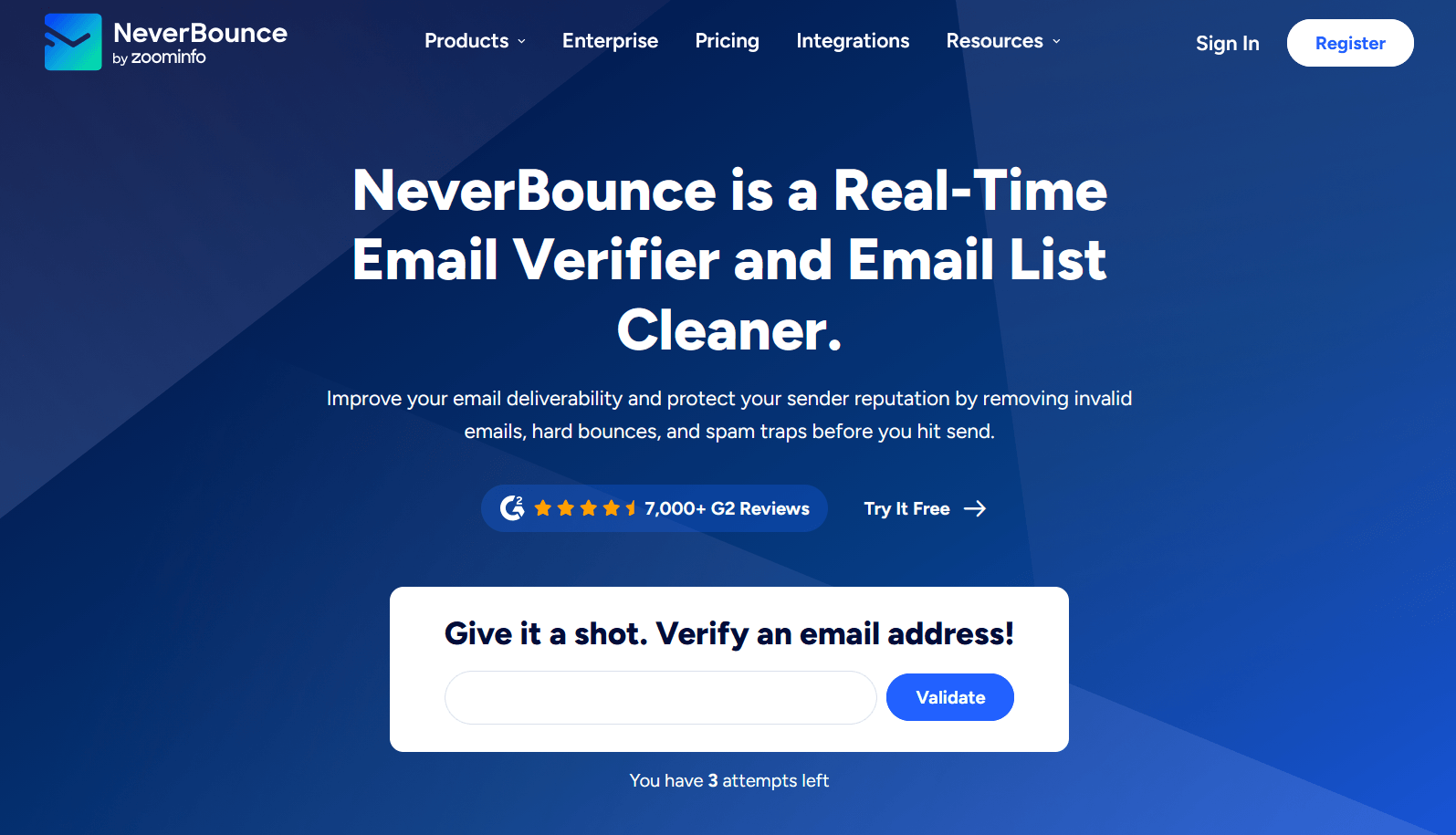
NeverBounce is a ZoomInfo-owned company that positions itself as a “real-time email verifier and email list cleaner.” And it does what it says, being one of the best email verification tools on the market. NeverBounce provides an email verification service and bulk list cleaning to remove “invalid emails, hard bounces, and spam traps” in real time.
Basic facts to know about NeverBounce:
- Number of users: 150,000+ clients
- Emails cleaned: More than 1 billion
- G2 rating: 4.1/5 ⭐ (based on 144 reviews)
- Speed of bulk email validation: ~3 minutes to analyze up to 10,000 emails, making it one of the fastest email verification tools
- Accuracy rate: Over 98%
Now, let’s drill down into a full NeverBounce review: price, key features, integrations, use cases, and limitations.
NeverBounce pricing: How much does NeverBounce email verification cost?
Under the pay-as-you-go system, NeverBounce’s price per email may range from $0.008 to $0.002.
Let’s look closer at the NeverBounce pricing model.
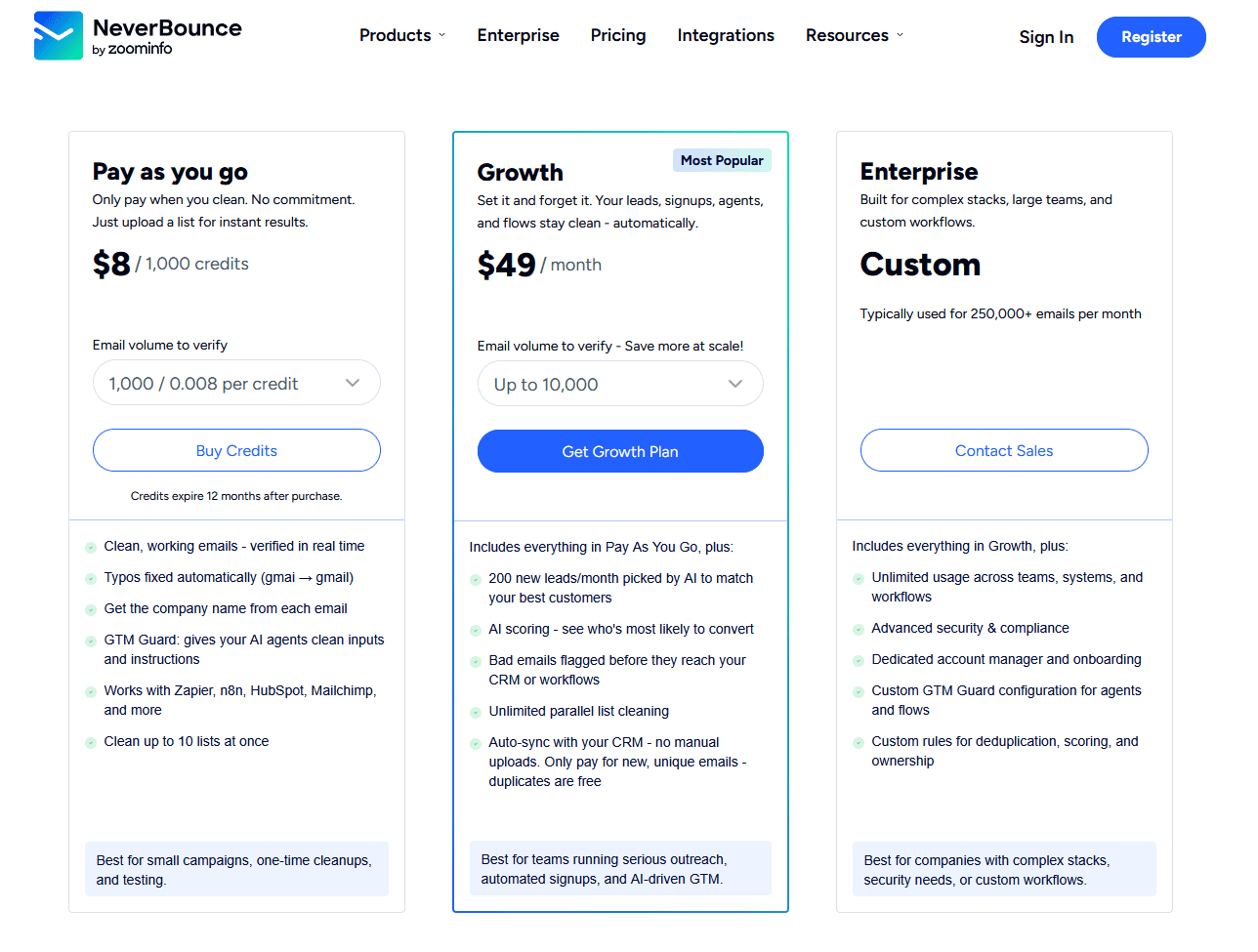
It goes like this:
- Free test with no registration required: 3 free email checks
- Free trial with account registration: 10 free credits (one time only)
- Pay as you go: From $8 per 1,000 credits to $4,000 per 2,000,000 credits (or a custom amount with a minimum of 1,000) — clean up to 10 lists at once
- Growth: Starts at $49/month with unlimited parallel bulk list cleaning
- Enterprise: Custom price for 250,000+ emails/month
It’s a flexible, PAYG model with advanced features (e.g., AI scoring to identify who’s most likely to engage) in the Growth and Enterprise plans.
⚠️ Note: NeverBounce’s “credits expire 12 months after purchase.”
What are NeverBounce’s key features and integrations?
NeverBounce offers the following features:
🔷 Email Verifier
It’s a basic email validation feature that costs 1 credit/email. According to NeverBounce, their “20+ step verification process checks each email up to 75 times.”
Here’s a full breakdown of email statuses after checking:
So, does NeverBounce detect catch-all email addresses?
Yes, it does, but they are marked as “Accept All” instead of “catch-all,” whereas ZeroBounce has both statuses with stricter division of such risky emails.
⚠️ Note: NeverBounce doesn’t have a dedicated spam trap detection status (unlike ZeroBounce).
🔷 Email List Cleaner
To use email list cleaning in NeverBounce, you need to upload Excel or CSV files under 500KB with emails placed in one column.
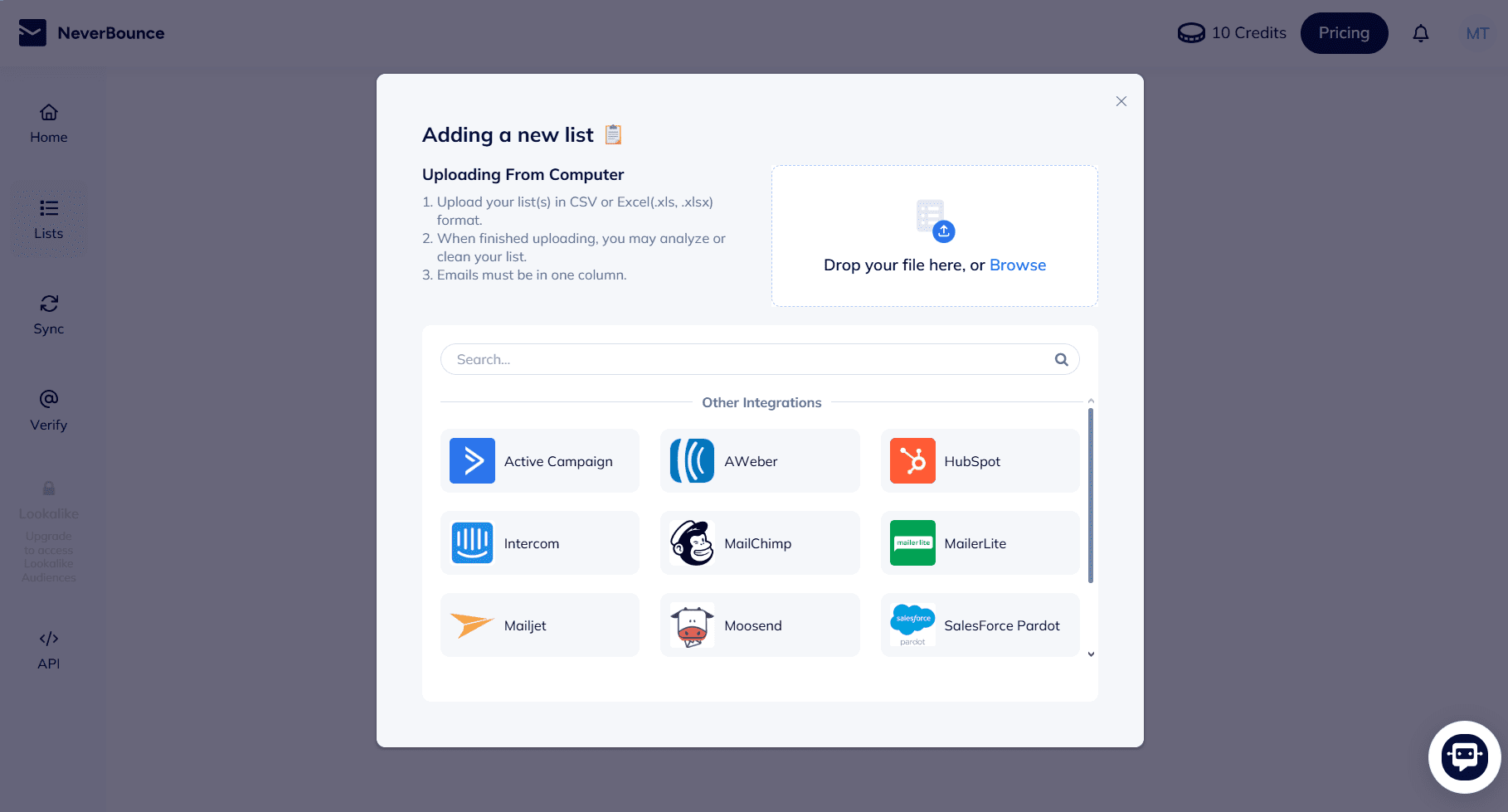
When there are many unknowns, the NeverBounce team reviews lists manually. They also offer a bounce analysis to remove up to 99.9% of bounced emails, protecting sender reputation and improving email deliverability.
🔷 Sync
Designed for automated list cleaning, this feature lets users connect to marketing platforms and CRM tools to remove invalid or inactive addresses automatically on your preferred schedule: daily, weekly, or monthly.
After nine years in email marketing, the one thing I’ve seen damage email campaigns more than poor copy or bad timing is a dirty list. A regular cleanup — ideally every quarter — removes invalid, role-based, and risky addresses before they hurt your sender reputation score. Think of it as routine maintenance: you wouldn’t drive a car without oil changes, and you shouldn’t run email marketing campaigns without list scrubbing
Marketing Specialist at Snov.io

For example:
For email marketers, it’s possible to connect NeverBounce with Mailchimp or Moosend to maintain a healthy email marketing list. If they run monthly email marketing campaigns, they can set up month-to-month bulk list cleaning on autopilot.


🔷 Integrations
NeverBounce’s integration pool contains 80+ tools and apps, including sales CRMs and marketing platforms. For example, to verify emails for cold outreach, sales teams can integrate NeverBounce with CRM systems such as HubSpot, Freshsales, or Salesforce.
NeverBounce also enables API integration for real-time verification at the point of entry with Make, n8n, or any custom apps.
🔷 Phone Verification and Lookalike Audiences (in beta testing)
The phone number verification feature is now in beta testing. It promises to “clean phone numbers and identify active mobiles and landlines.”
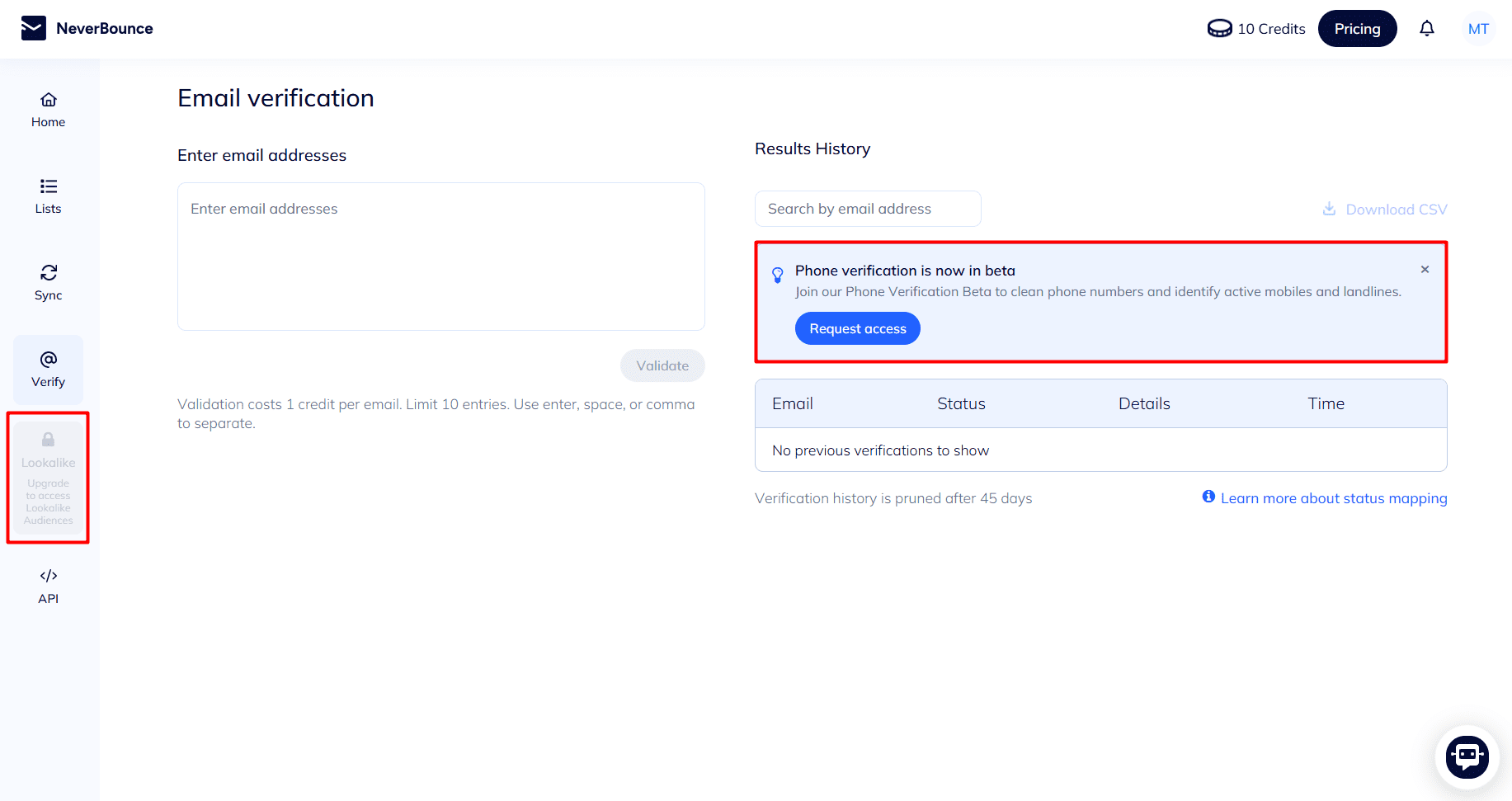
Aside from that, “Lookalike Audiences” is a new feature on the horizon, accessible from the Growth plan: “200 new leads/month picked by AI” to match your ideal customer profile (ICP).
Who should use NeverBounce (and when it’s not the best option)
In the table below, review NeverBounce’s use cases as an email validation tool and see when it fails to meet specific needs.
| NeverBounce is best for: | NeverBounce is not the perfect choice when you need: |
|---|---|
|
|
Overall, NeverBounce is good at providing fast, straightforward email validation services. At the same time, its credit expiration policy (introduced in 2024) makes the tool less attractive to users. Expiring credits decrease the value of the pay-as-you-go pricing model.

What Is ZeroBounce?
ZeroBounce is an email validator claiming to provide an “accurate, fast, and secure email verification service.” However, its functionality goes beyond increasing your sender reputation and inbox placement. Its features embrace four major categories: email discovery, validation, deliverability, and enrichment.
Basic facts to know about ZeroBounce:
- Number of users: 600,000+ clients
- Already validated emails: 24+ billion
- G2 rating: 4.7/5 ⭐(based on 1,366 reviews)
- Speed of bulk email verification: 100,000 emails in approximately 45 minutes
- Accuracy rate: 99.6%
Now, let’s explore it in more detail with a comprehensive ZeroBounce review: price, key features, integrations, use cases, and limitations.
ZeroBounce pricing: How much does ZeroBounce email verification cost?
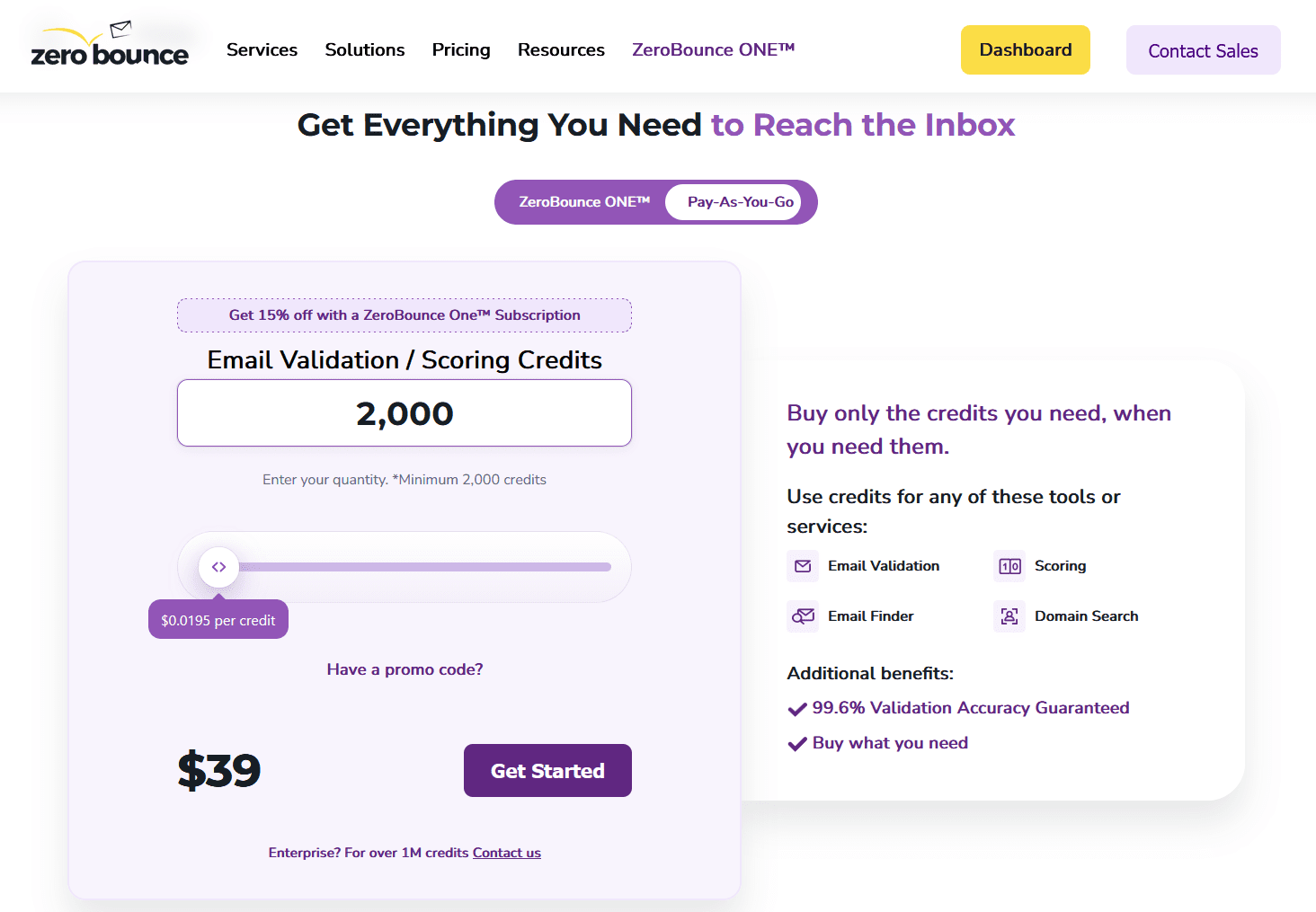
When users verify emails with ZeroBounce, the price ranges from $0.0195 to $0.003199 per email under the PAYG system. But you can give it a free try, too, just like with NeverBounce.
Let’s take a sharper look at the ZeroBounce pricing model.
Here’s how it breaks down:
- Free test without sign-up required: “Test a few emails for free” — I was able to verify 3 emails without creating an account (just like with NeverBounce)
- Freemium plan: 100 free credits for scoring or validation, 10 email finding credits, 1 inbox placement test, 1 email server testing, and 1 blacklist monitoring
- Pay as you go: Starts at $39 per 2,000 credits to $3,199 per 1M credits and scales with custom prices for enterprises ordering more
- ZeroBounce One: Starts at $99 per 10,000 credits with additional credits for email discovery, warming up, inbox placement testing, blacklist monitoring, and other features
Similar to NeverBounce, 1 credit = 1 email check in ZeroBounce. However, in contrast, ZeroBounce’s credits never expire and accumulate on the platform.
What are ZeroBounce’s key features and integrations?
This email validation tool offers comparatively more features than NeverBounce.
🔷 Email validation toolkit
➤ Validate
This basic email validation feature identifies different email types. From spam traps to toxic, catch-all, and disposable, ZeroBounce distinguishes between 30+ email types (compared to only 5 in NeverBounce), assigning each a status and sub-status.
Check out the 7 major statuses in the following table.
| Email verification status in ZeroBounce | Explanation |
|---|---|
| Valid (with 6 sub-statuses) | For valid and active addresses |
| Invalid (with 7 sub-statuses) | For invalid email addresses |
| Spamtrap | For spam trap detection specifically (these emails are considered to be spam traps) |
| Catch-all | For catch-all email addresses |
| Abuse | For emails of abusers or complainers who often report spam |
| Do-not-mail (with 7 sub-statuses) | For role-based, toxic, disposable email addresses, or those you should avoid |
| Unknown (with 8 sub-statuses) | For greylisted or undetectable emails |
ZeroBounce strictly differentiates between “accept-all” and “catch-all” statuses. It marks accept-alls as valid email addresses and offers to score catch-alls more thoroughly. 👇
➤ Email scoring
The Email Score tool analyzes catch-all email addresses more precisely. Why would you need that? To know who you can contact, because it’s actually a hit-or-miss game. Not all catch-alls cause email bounces. Some may be high-quality, valid contacts, resulting in closed deals when being reached out to.
The tool assigns a grade of 0 to 10 to score email domains:
- 0 — Unknown
- 1 — Likely abandoned or invalid catch-all address with low engagement
- 10 — Active catch-all address with high engagement
⚠️ Note: ZeroBounce recommends sending email campaigns only to those addresses that scored 9 and 10.
➤ Verify+
It’s a built-in checker for deactivated or disabled Yahoo, AOL, and Verizon emails to help prevent high bounce rates.
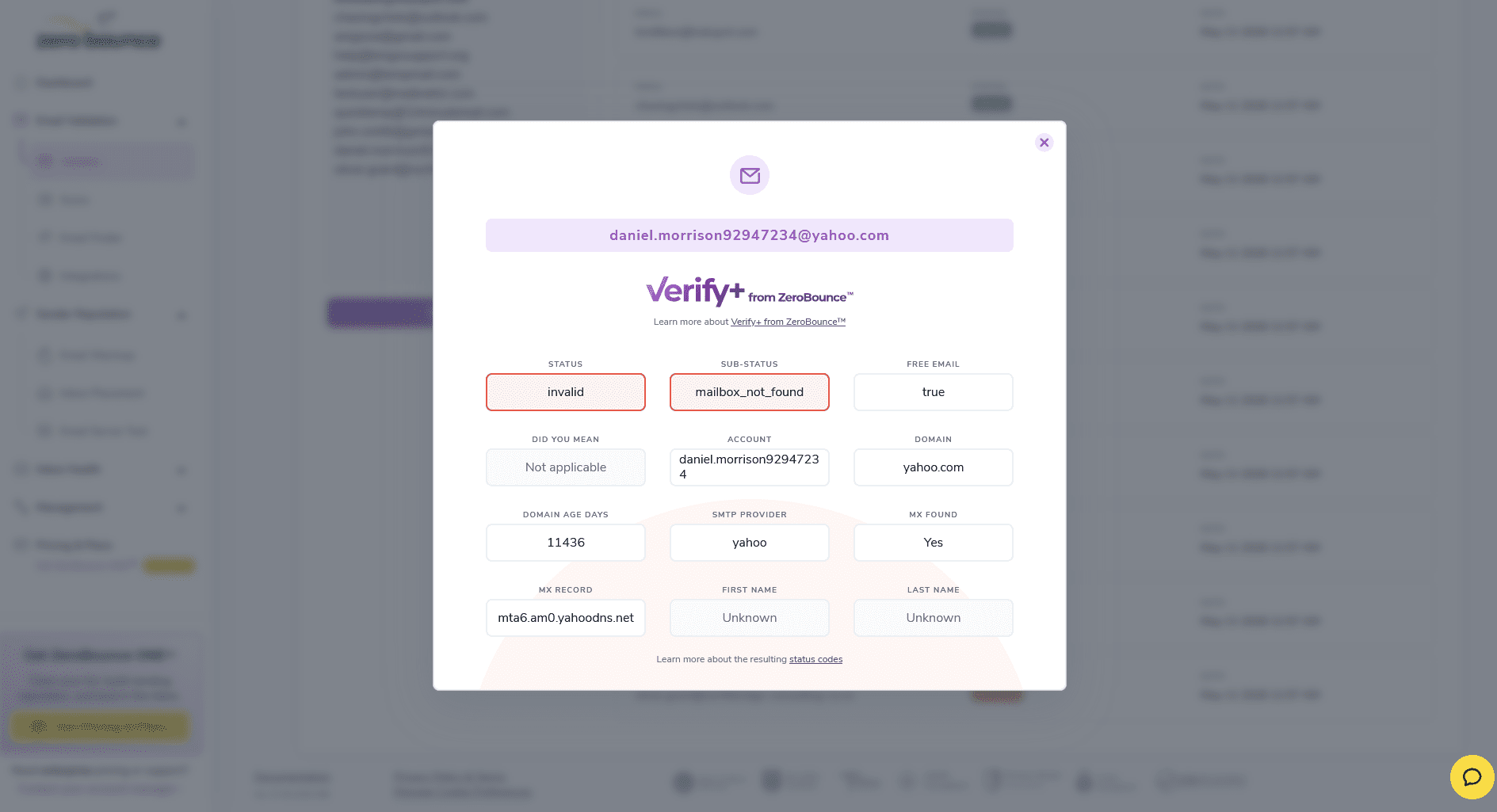
This way, ZeroBounce pays closer attention to Yahoo emails (including AOL and Verizon) to help reduce Yahoo-related email bounces and improve deliverability.
Email service providers closely monitor your activity, track the percentage of your bounces, and give them even the slightest hint — and the reputation of a spammer gets stuck to you.
To avoid this, there is email verification. Run your contact list through 2 different email validation services to clean it up. How often, you ask? Every time before launching a campaign.
Outbound Outreach Expert at Snov.io

🔷 Deliverability toolkit
It encompasses email deliverability tools as follows:
- DMARC Monitor (only in paid plans): It checks the major email authentication records: SPF, DKIM, and DMARC
- Warmup (only in paid plans): It warms up your mailbox by automatically sending and receiving emails, building trust with email service providers
- Blacklist Monitor: This blacklist monitoring tool tracks whether IPs or email domains get on blacklists to be on guard against sender reputation damage
- Email Server Test: It diagnoses email server problems by analyzing headers, SMTP server setup, authentication protocols, and more
- Inbox Placement Test: This email deliverability test shows what percentage of your messages will reach your recipients’ inboxes and which will land in a junk or spam folder.
As you can see, ZeroBounce offers an extensive inbox testing toolkit.


🔷 Other useful features
- Email Finder: Find people’s email addresses by entering their names and domains (or company names)
- Domain Search: Discover address patterns a company uses (e.g., firstlast@company.name or f.last@company.name)
- Data enrichment: First and last name, gender, location
- Activity Data: The last known activity date, engagement timeframe, and number of activities (opens, clicks, sends) for valid contacts upon verification
- Consulting (at an extra fee):Deliverability audits and consultations
🔷 Integrations
ZeroBounce integrates with 90+ apps and tools for various needs, from sales CRMs (HubSpot, Pipedrive, Zoho CRM, etc.) to email marketing platforms (e.g., Klaviyo, GetResponse, Mailgun, etc.).
Also, just like NeverBounce, it has an API hub for connecting with n8n, RapidAPI, and other tools. It also supports a real-time verification API that automatically blocks invalid or risky emails as soon as they sneak into sign-up forms on websites or landing pages. And if you want to schedule automated list cleaning for your marketing or cold email strategy, you can easily do that via API integrations with ActiveCampaign or Constant Contact, for instance.
Who should use ZeroBounce (and when it’s not the best option)
Take the straightforward answer from the table below.
| ZeroBounce is best for: | ZeroBounce is not the perfect choice when you need: |
|---|---|
|
|
Overall, ZeroBounce is designed for enterprise-grade companies aiming at better email marketing performance. It offers team accounts for large agencies and enterprises, but I wouldn’t recommend it to smaller teams or startups on tight budgets.
ZeroBounce vs NeverBounce: Deep-dive comparison
On the surface, these email verification tools look quite similar, even though ZeroBounce boasts greater feature richness. They both verify and scrub email lists, integrate with various CRMs, and contribute to the success of email campaigns. But once you dig a bit deeper, you’ll notice clearer distinctions between them.
Let’s benchmark NeverBounce and ZeroBounce against each other based on the key feature contrast, pricing, user feedback, and pros and cons to see how they differ.
NeverBounce vs ZeroBounce: Bulk email validation feature
Both platforms are recognized for bulk email verification, but there are a few discrepancies in allowed file types, speeds, and other aspects. I’ve put them side by side in the following table.
| NeverBounce | ZeroBounce | |
|---|---|---|
| File formats | CSV, XLS, XLSX | TXT, XLS, XLSX, CSV |
| Entry limits | Up to 1,000,000 rows with no limit on columns | No limit on contacts, but up to 500 columns of data for each |
| Maximum file size | Up to 1GB | Up to 1GB |
| Processing speed | ~0.018 sec/email | ~0.027 sec/email |
| Accuracy rate | Over 98% | 99.6% |
NeverBounce’s speed obviously stands out. Plus, it allows unlimited columns in files, which is an advantage for those handling massive datasets. ZeroBounce, on the other hand, is a more accuracy-first platform that supports additional TXT uploads for email validation.
NeverBounce vs ZeroBounce: Price comparison
Both ZeroBounce and NeverBounce take a similar approach to pricing, but with a slight difference.
Let’s look at the details.
| NeverBounce | ZeroBounce | |
|---|---|---|
| Pricing structure | Pay as you go | Hybrid with pay-as-you-go and ZeroBounce One subscription plans |
| Free credits | 10 (in the free trial) | 100/month (in the freemium plan) |
| Minimum PAYG purchase | $8 per 1,000 credits | $39 per 2,000 credits |
| Cost per email | From $0.008 to $0.002 | From $0.0195 to $0.003199 |
| Credits longevity | Expire in 12 months | Never expire |
| Tailored pricing for enterprises | Yes | Yes |
| Special discounts | 20% discount for nonprofits (not available for Growth and Enterprise plans) | Startup discount up to 30% off
20% off if billed annually (only for ZeroBounce One subscription) |
So, which is cheaper: NeverBounce or ZeroBounce?
Set against ZeroBounce, NeverBounce is a more affordable option, especially for smaller teams. Yet, while ZeroBounce’s email verification service costs more, it also includes substantial deliverability features and non-expiring credits, offering better long-term value. For larger volumes, though, the price difference becomes practically unnoticeable.
NeverBounce vs ZeroBounce: G2 user reviews
On G2, ZeroBounce currently outruns NeverBounce with a significantly higher rating: 4.7 vs 4.1 out of 5 stars. Not without a reason. NeverBounce’s G2 score has been gradually dropping due to users’ concerns about expiring credits.
Let’s look at the positive and negative sentiment about both.
What users like and dislike about NeverBounce:
Generally, people praise NeverBounce for its intuitive UI and find it “simple to integrate” and “straightforward to use.”
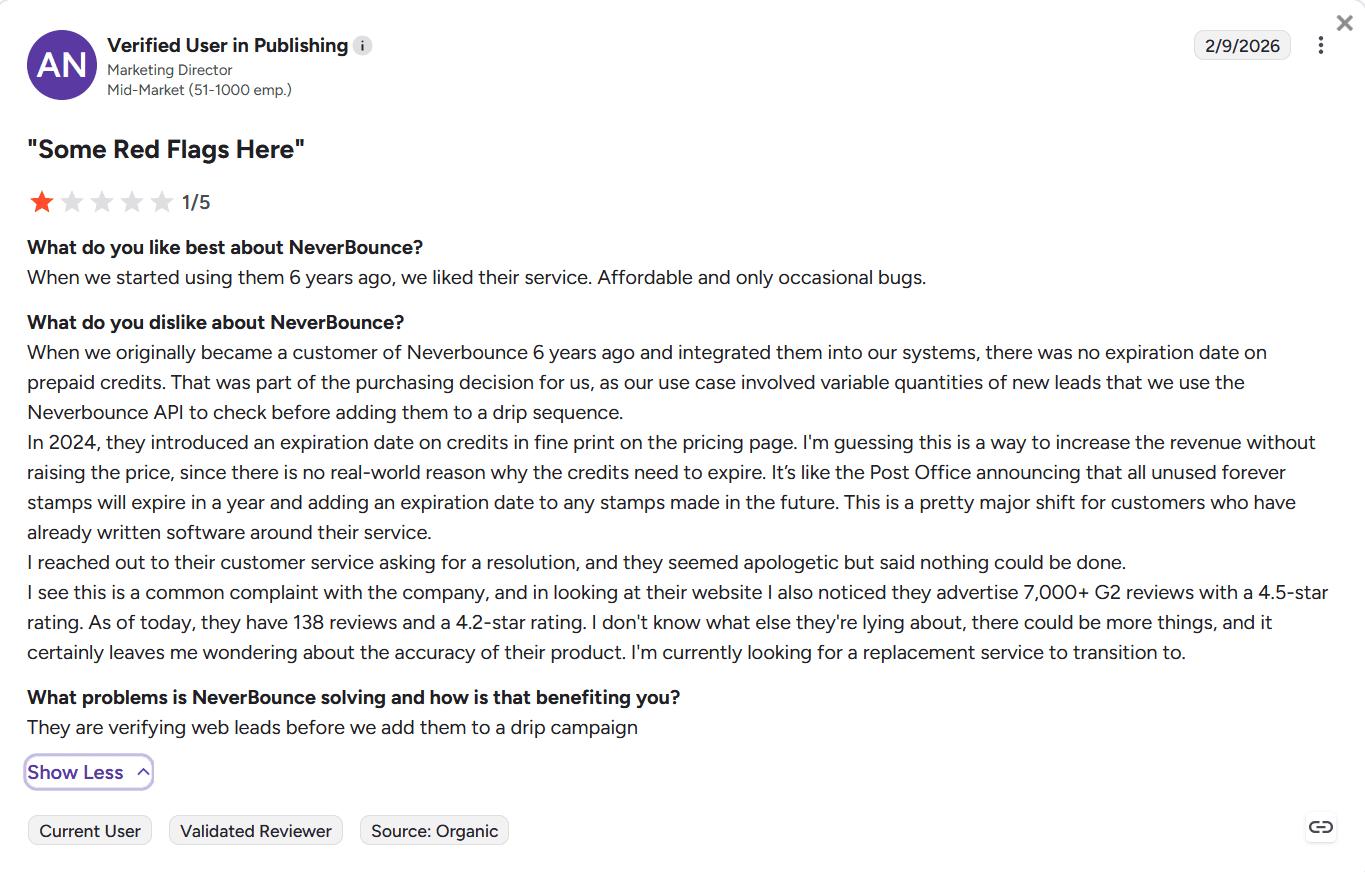
At the same time, reviewers criticize the platform for becoming more expensive after ZoomInfo acquired it. The price rose “by 300% in one month,” according to one customer. Poor accuracy is another major downside of NeverBounce: higher-than-expected bounce rates after bulk list cleaning. But the majority of users are indeed very disappointed with the added expiration dates to their credits.
What users like and dislike about ZeroBounce:
Email verification accuracy is the most appreciated advantage, with more than 430 users highlighting it in their ZeroBounce reviews. Also, some people applaud the tool for helping them “improve deliverability and reduce bounce rates.”
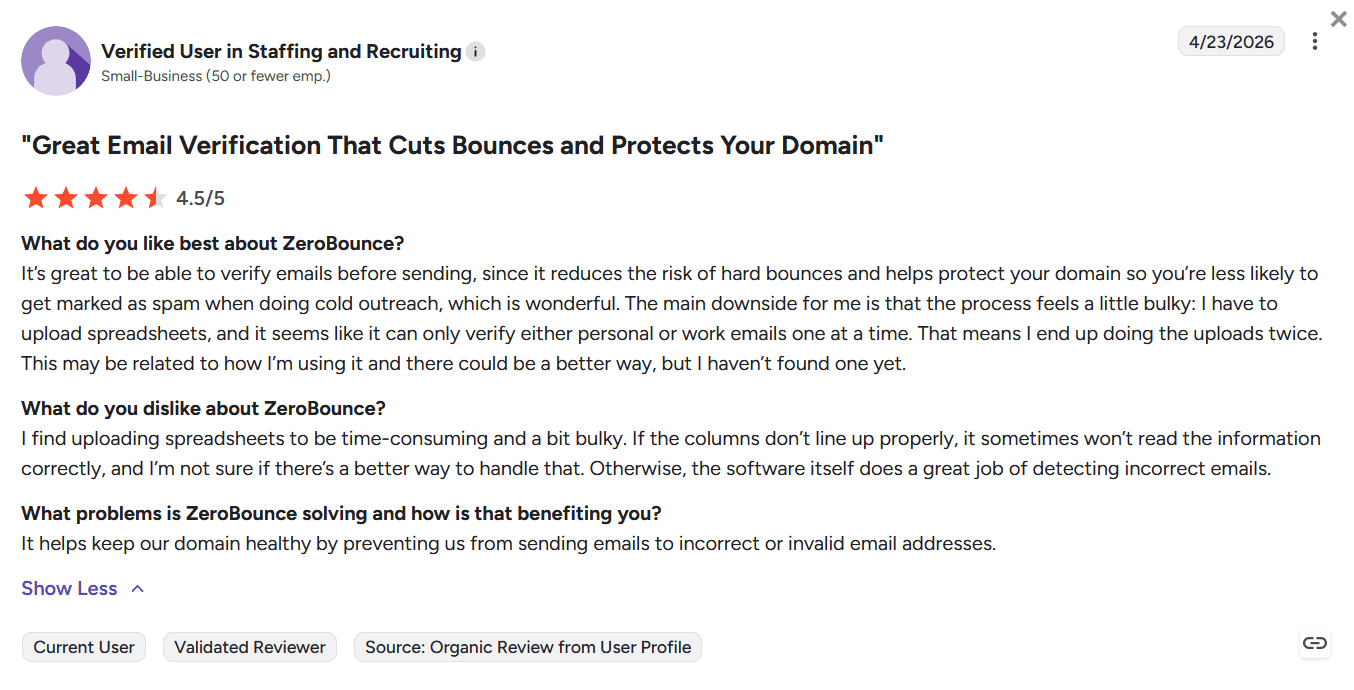
On the downside, although it is claimed to provide more accurate email validation, several reviewers report that valid business addresses are sometimes incorrectly flagged as risky or invalid, particularly on newer email domains. Others point out drawbacks such as high price, especially for large contact lists and additional features. Some also say that “the UI is functional but not very modern or fast” and find “uploading spreadsheets to be time-consuming and a bit bulky.”
NeverBounce vs ZeroBounce: Pros and cons
Let’s begin with the pros and cons of NeverBounce.
Now, move over to the pros and cons of ZeroBounce for comparison.
Key takeaways:
If you care about affordability and focus solely on fast, one-time list scrubbing to get rid of bounced emails, NeverBounce would be a better fit. But if you want a more advanced checker to detect spam traps or other risky pitfalls (especially with catch-alls), a broader deliverability toolkit, and personalized support, these features may justify the higher price point in ZeroBounce.
Yet, keep in mind that both may occasionally fail at accurate email verification.
NeverBounce vs ZeroBounce: My test of email validation features and final verdict
For this NeverBounce vs ZeroBounce comparison test, I prepared a list of 10 emails***:
- 3 valid and active addresses from different email service providers: HubSpot, Outlook, and Gmail
- 2 risky addresses: 1 role-based (from a disposable, temporary email provider) + 1 catch-all
- 2 disposable addresses
- 3 invalid addresses: 1 with a typo (often used in typo spam traps), 1 non-existent inbox (but from one of the existing email service providers — Yahoo Mail), and one made-up domain
***All real email addresses used for testing are publicly accessible and disclosed via social media or other channels.
Now, I’ll share my hands-on testing experience: how easy it was to get started with each tool and verify emails, and how they both coped with the same task.
My NeverBounce review
Creating an account at NeverBounce was a breeze and didn’t take me long. Just a minute or so to sign up with Google. When I did, I was greeted by a clean, simple, and uncluttered interface that invited me to verify emails manually or in bulk.
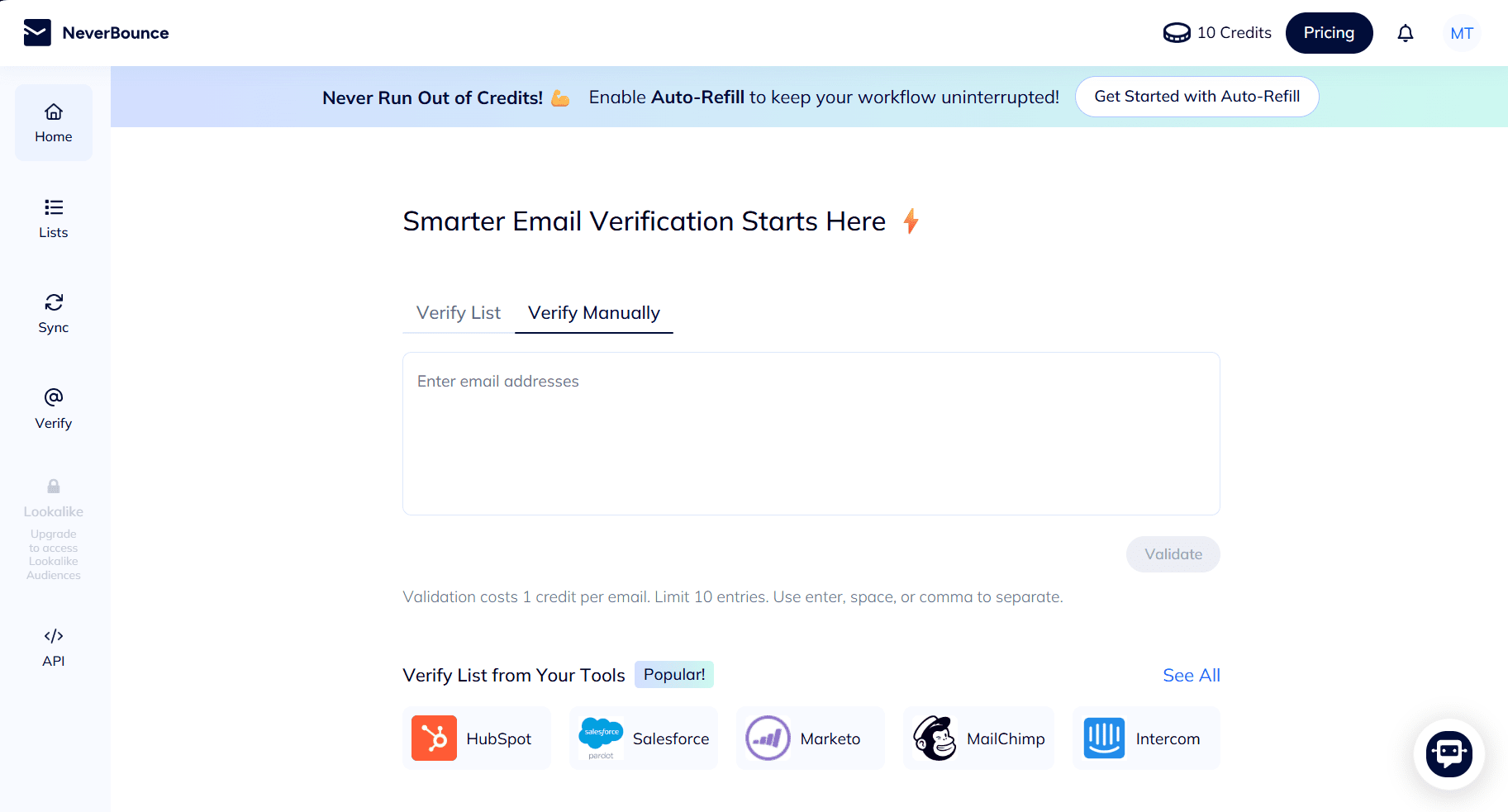
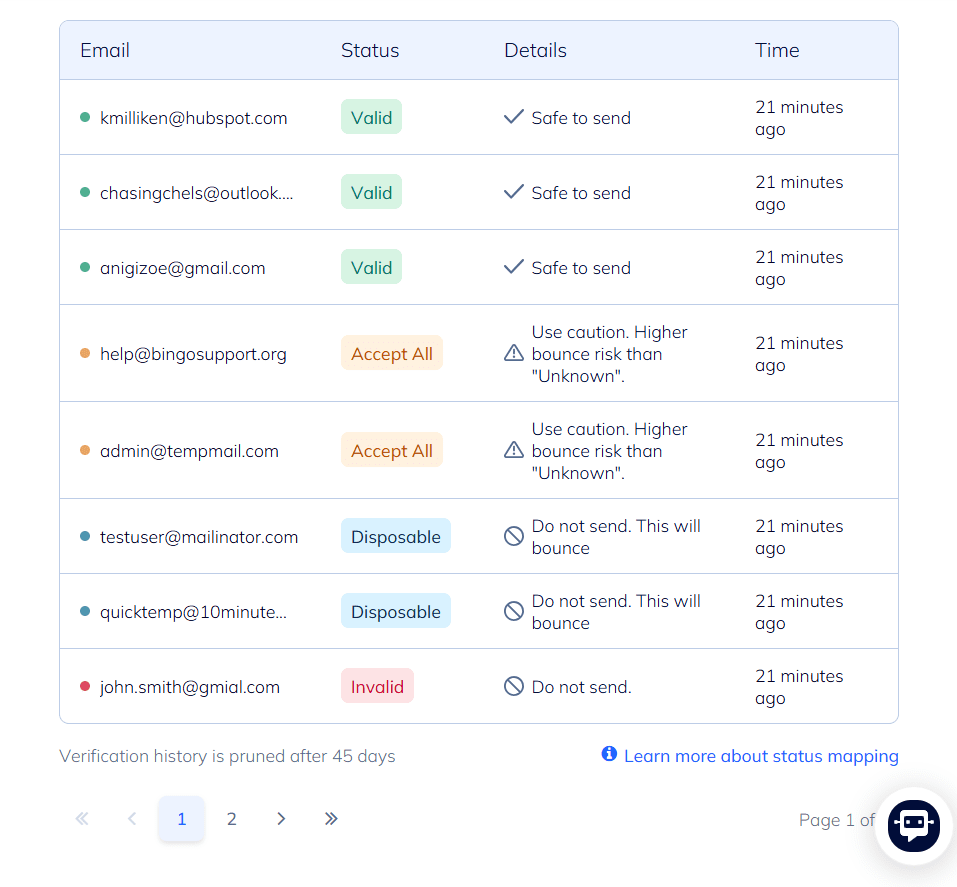
I started using the email verification service right away and checked the 10 email addresses.
I got results on two separate pages. For me, it wasn’t very convenient as I had to click forward and backward to get a comprehensive picture.
Page 1
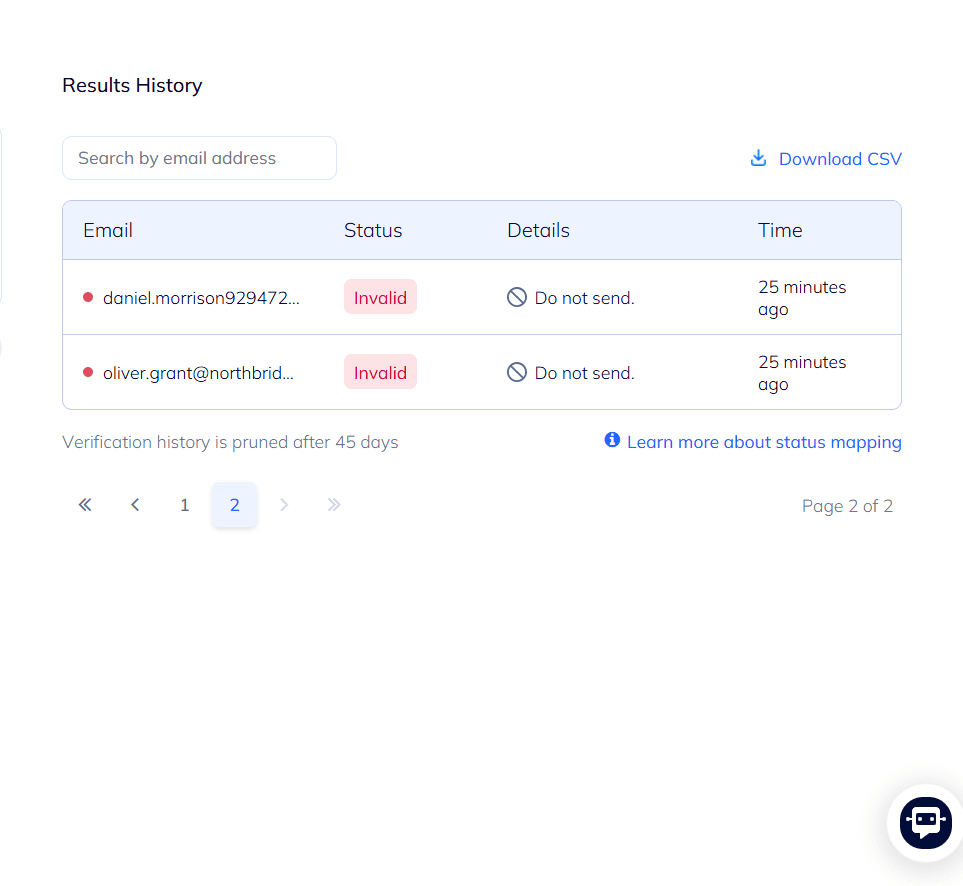
Page 2
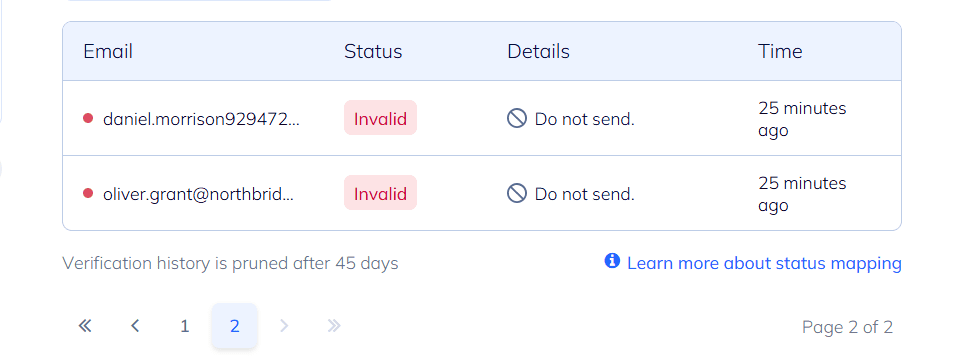
NeverBounce email validation test results:
- 3 valid contacts → “Valid” statuses
- 2 risky email addresses → “Accept All” statuses
- 2 disposable email addresses → “Disposable” statuses
- 3 invalid addresses → “Invalid” statuses
I found the “Details” section quite informative, with “Safe to send,” “Do not send. This will bounce,” or other cautionary messages. After verifying my email list, I also used a one-click “Download CSV” export to save my results.
But when I wanted to talk to a human agent and asked their AI Assistant about it, it suggested connecting me with support via email only.
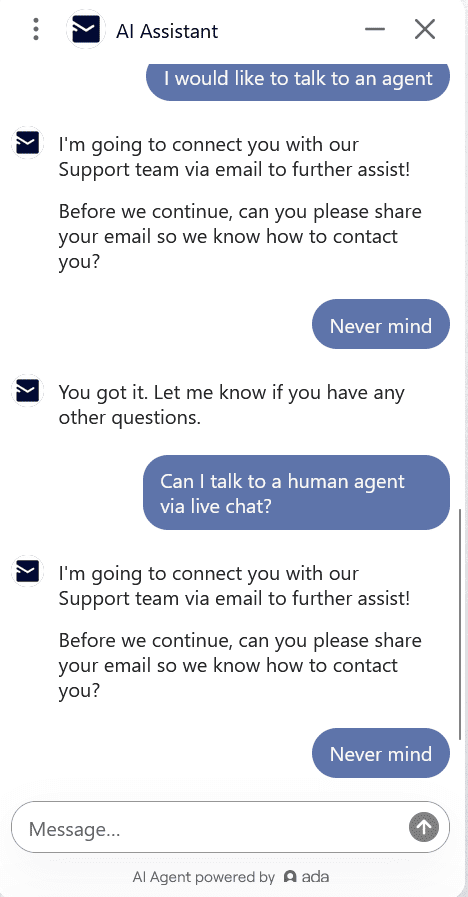
Compared to ZeroBounce, which offers human support via both live chat and email, this is a considerable drawback as chatbots do not always provide the necessary assistance.
My ZeroBounce review
As opposed to NeverBounce, it took me much longer (at least 15–20 minutes) to start using the email validation tool. Here’s why. When I tried to create an account with my work email, ZeroBounce denied the registration with the following error message.
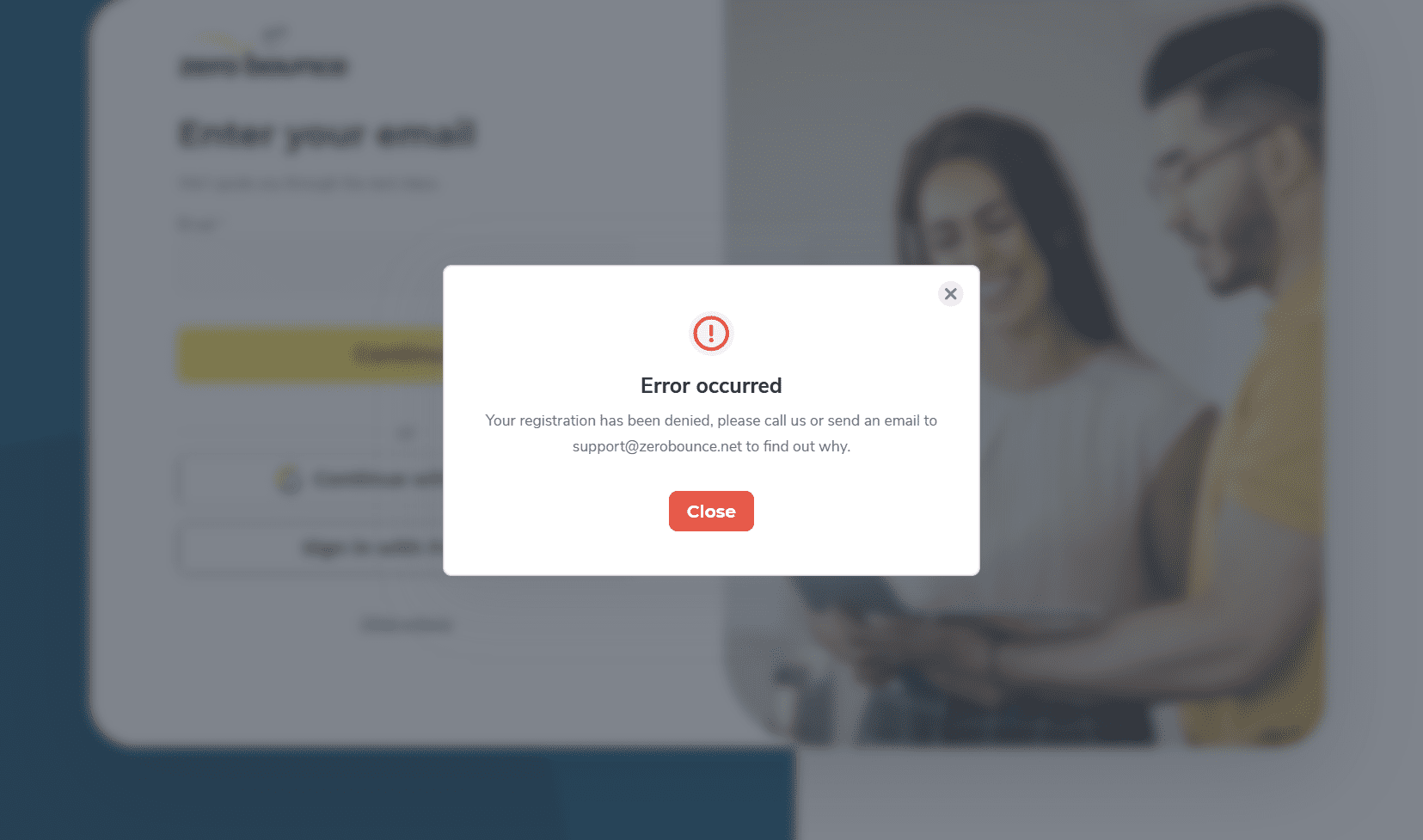
After contacting support, I received the answer in 3 minutes:
“There are multiple accounts created for your organization. Since we only allow one account per user or organization, we recommend you get in contact with your team and ask them to invite you to the main team account.”
So, I decided to sign up with my personal email. When done, I had to “contact support to update to Freemium.”
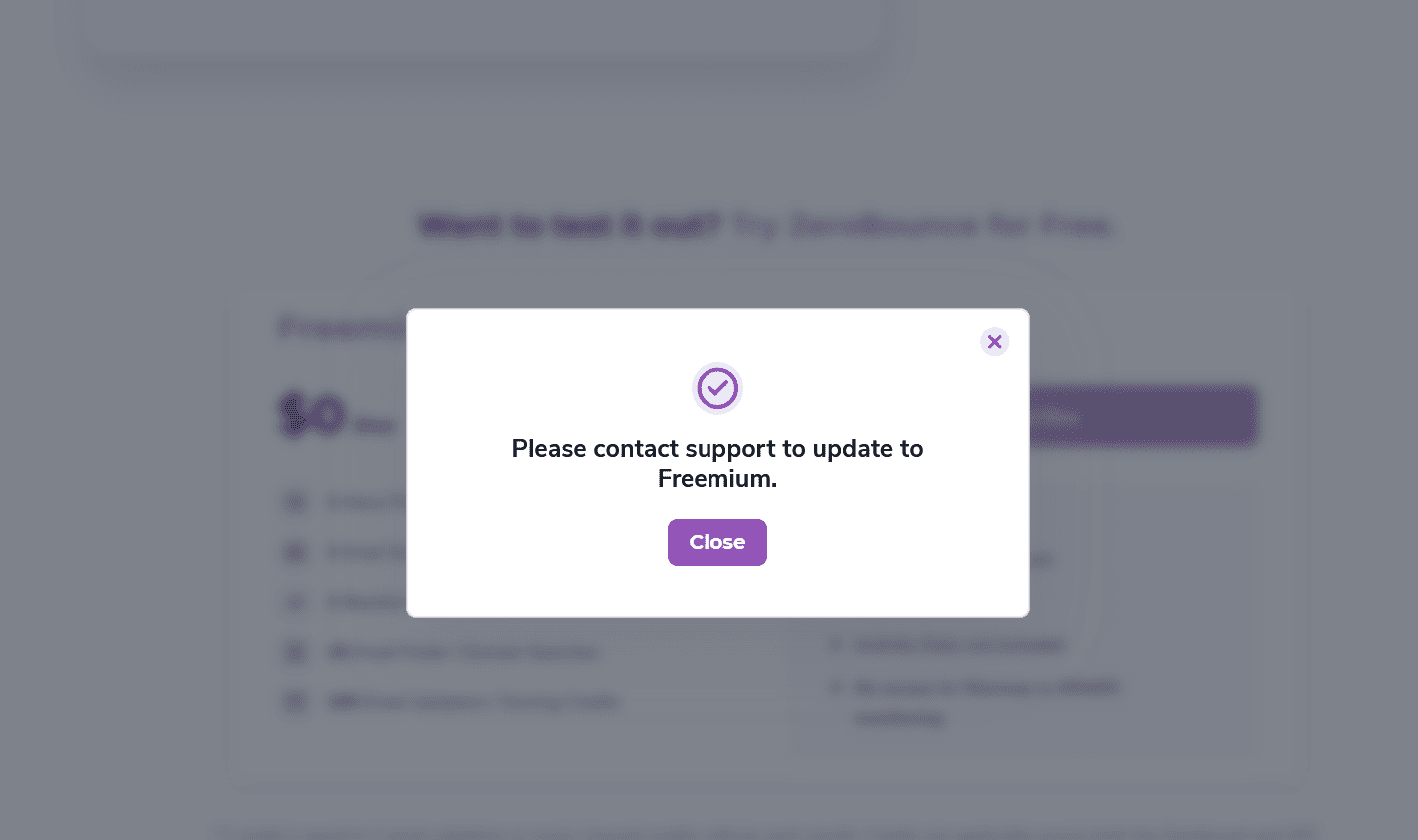
It confused and irritated me a bit, but I followed the instructions. The customer support agent activated my freemium plan, unlocking 100 free credits.
Needless to say, the support was fast and helpful — I can’t deny it. I also reached out to the same support agent via live chat to clarify some information and got a quick response in a few seconds. But the registration overall? It wasn’t a very pleasant experience, I must say.
Anyway, once I registered, I went straight to the Validate feature to run my email verification test. Let’s look at the outcomes.
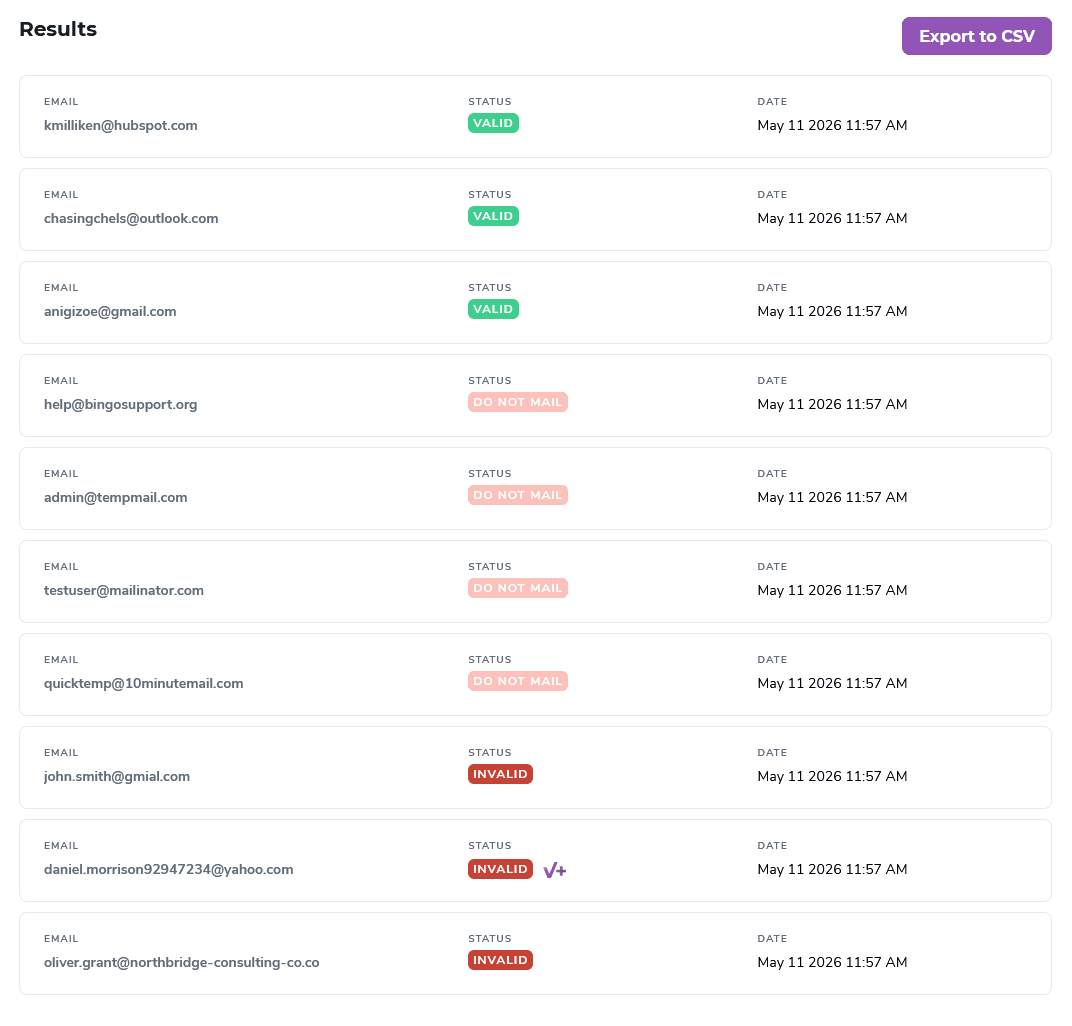
ZeroBounce email validation test results:
- 3 valid email addresses → “Valid” statuses
- 2 risky and 2 disposable email addresses → “Do not mail” statuses
- 3 invalid email addresses → “Invalid” statuses
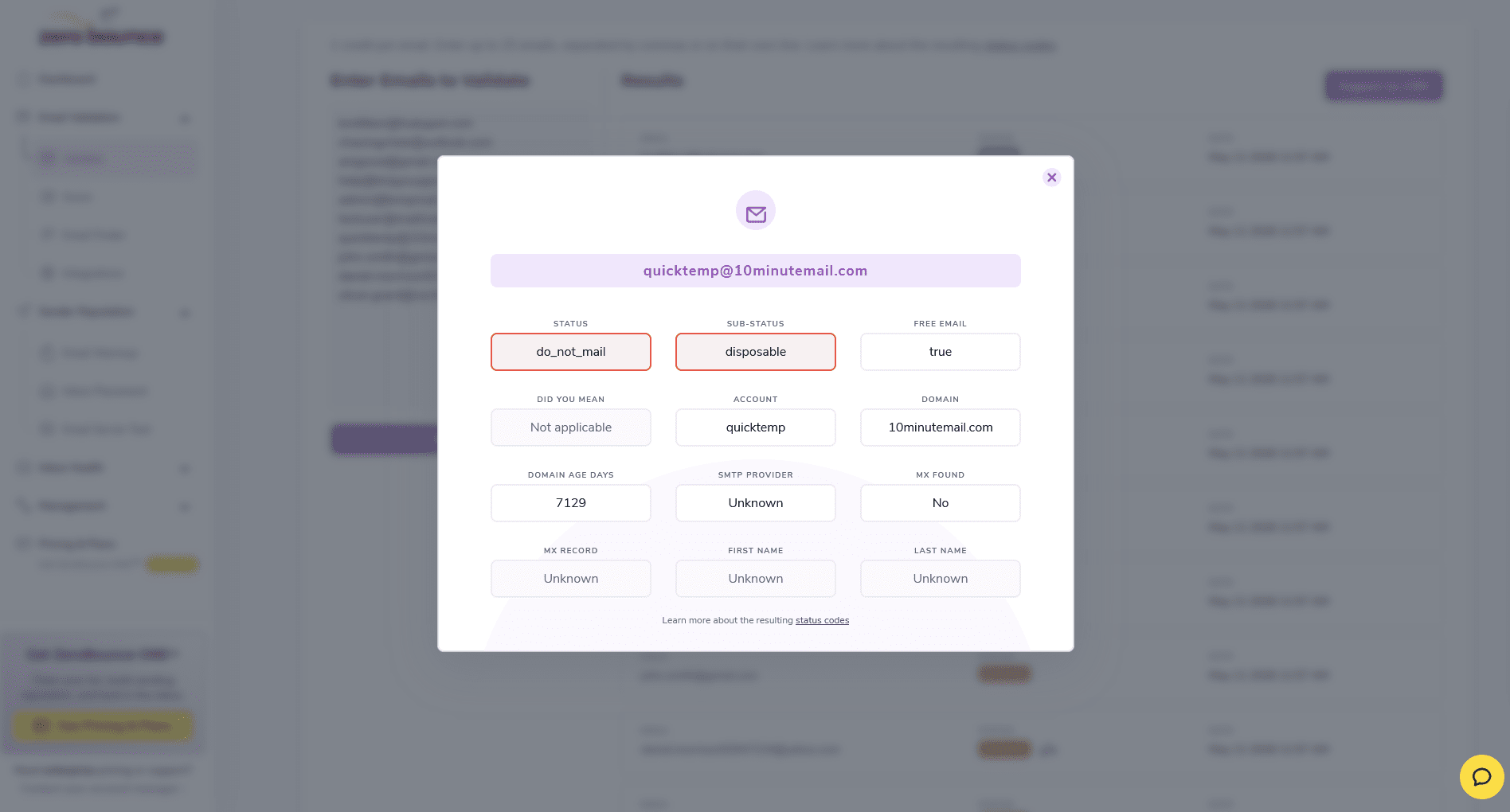
When I clicked on each, I could see a sub-status, domain age days, SMTP provider, MX record, and more details.
For example, look at this result with a “do not mail” status and “disposable” sub-status.
Finally, I performed a one-click export of all the results to a CSV file, which was very quick and convenient.
ZeroBounce vs NeverBounce: My verdict after testing and reviewing both tools
What I particularly like is that both email verification tools automate list cleaning, which you can schedule when integrating with your CRM or marketing platforms. Also, during my hands-on testing, both tools validated all emails without “unknowns.”
However, admin@tempmail.com email address was identified as an “accept all” by NeverBounce and a “role-based catch-all” by ZeroBounce. Both relied on the first part “admin@” and avoided the temporary email domain “tempmail.com,” which calls into question the accuracy of disposable email detection when multiple signals overlap.
Compared to NeverBounce, ZeroBounce provides a more thorough analysis of each address. But if you just want to verify emails (and that’s it), its dashboard looks cluttered with too many features you won’t actually need. NeverBounce would be enough to validate and/or clean email lists.
If you need more features to find emails, protect your sender reputation, and fix email deliverability issues, however, ZeroBounce is a much better option.
But if you need more features on top of those, say, to automate your cold outreach or email marketing campaigns after verifying and cleaning, I’d recommend you consider an alternative email verification tool with richer functionality. 👇
Top 5 NeverBounce and ZeroBounce alternatives
I’ve done some research, sifting through a dozen reviews of email validation services, and chose the top 5 alternatives to ZeroBounce and NeverBounce.
After thoroughly analyzing them, I’ve summarized my findings in a table format for easier comparison.
****For the latest pricing updates, check the providers’ websites.
After testing 90% of similar tools, I’ve concluded that Snov.io’s email verifier is the best on the market. You can be sure that if it’s verified (green), then it will hit the inbox. And most importantly, the software has helped me reclaim valuable time for high-priority tasks.
Full-Cycle Sales Specialist at JetOctopus

Key takeaways: Is NeverBounce better than ZeroBounce or vice versa?
There’s no clear winner — the choice would be largely driven by what you actually expect from an email verification service.
If your priority is speedy bulk email validation, an easy-to-browse UI, and flexible pay-as-you-go pricing, NeverBounce might be a dependable option. It’s particularly useful for teams that mainly want to remove inactive addresses or risky emails and get valid contacts on the go.
On the other hand, ZeroBounce is more expensive but holds a stronger focus on monitoring sender reputation and increasing deliverability, beyond revealing detailed statuses of verified emails. It is more appealing to data-driven email marketers and sales teams interested in long-term value.
But in case they don’t align with your specific use case and/or spending limit, opt for one of the NeverBounce and ZeroBounce alternatives like free Snov.io Email Verifier. Snov.io is a lead-generation software that brings all outreach features into one package without the hefty price tag.