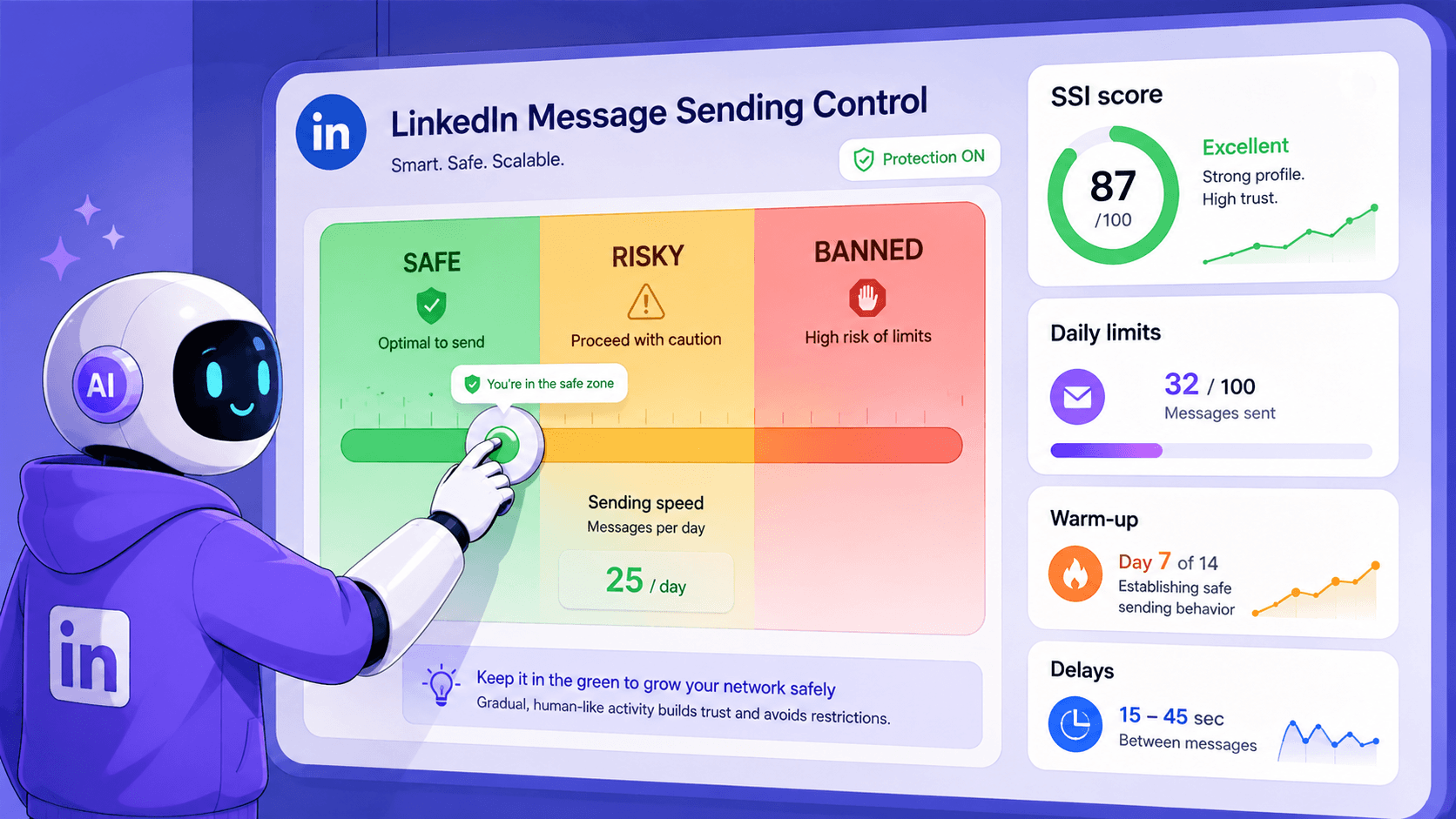
About 85% of companies adopt LinkedIn automation. The choice of the right solution, however, remains one of the key challenges.
In this post, I combined my review of the safest LinkedIn automation tools I tested with other top solutions based on use case, so you can pick a service that meets your needs.
TL;DR: Top LinkedIn automation tools by use case
The choice of the best tool for LinkedIn automation depends on your key needs. Use the table below to quickly compare my top recommendations based on your goals, pricing, and ideal users.
| Best for | Tool | Entry price |
|---|---|---|
| Safe LinkedIn automation for startups and SMBs | Snov.io | $69/slot* |
| Enterprise sales engagement | Reply | $99/month |
| High-volume agency outreach | HeyReach | $79/account/month |
| Intuitive interface for solo founders and freelancers | Dripify | $59/user/month |
| Lead scraping and Sales Navigator export | Evabot | $9/month |
| Contact enrichment for sales and recruiting teams | Surfe | €39/user month |
| AI-powered messaging | SalesRobot | $59/account/month |
| LinkedIn content creation | Taplio | $39/account/month |
| Multichannel outreach (3+ channels) | SmartReach.io | $29/account/month |
* Pricing is subject to change. Always visit the tool’s website for actual information.
How I evaluated the LinkedIn automation software
I didn’t want to simply turn this blog post into another ordinary “X best tools” listicle. Here’s what I did instead:
First, I picked the top 10 LinkedIn automation tools claimed to be the safest for B2B lead generation and outreach.
My purpose was to actually put every platform to the test and thoroughly analyze each around 6 key criteria:
- Anti-restriction and anti-ban safety approach: What actual safety measures does it support to prevent temporary restrictions or permanent bans on LinkedIn?
- Pricing model: What value for money can one get in the starting paid plan? Does the cost shoot up when scaling outreach or adding team members?
- Key features: What core functionality does it provide for LinkedIn outreach automation in particular?
- User ratings and reviews: What’s the score and the word on G2 about it?
- Pros and cons: What are its strongest and weakest points?
- My free trial experience: Is it straightforward to start using the tool and launch a LinkedIn campaign? How user-friendly is it overall for beginners?
Then, I categorized the other 20 tools by the narrower use case they primarily focus on in LinkedIn automation:
- Lead scraping and data extraction
- Messaging (connection request notes, messages/InMails, and follow-ups)
- Content automation (from creation to scheduling posts)
- Multichannel outreach across 3 or more channels, including LinkedIn
I analyzed their official websites, other users’ tests, and G2 reviews to pinpoint their standout strengths for B2B sales and marketing teams, as well as the weaknesses worth considering.
So, let’s start with my personal top-10 list of safe LinkedIn automation platforms based on my deep-dive research and firsthand trials.
10 safest LinkedIn automation tools for lead gen and outreach in B2B
Here are the 10 LinkedIn automation platforms I found the safest for B2B lead generation and outreach based on my in-depth analysis and testing experience.
Compare their key safety-first measures in the table below.
| Tool | Dedicated IP address | Warm-up mode | Safe limit control | Daily limits randomizer | Account rotation | Connection request auto-withdrawal |
|---|---|---|---|---|---|---|
| Snov.io | ✅ | ✅ | ✅ | ✅ | ✅ | ✅ |
| Reply | ❌ | ❌ | ✅ | ✅ | ✅ | ❌ |
| Expandi | ✅ | ✅ | ✅ | ✅ | ❌ | ✅ |
| Dripify | ✅ | ❌ | ✅ | ✅ | ❌ | ✅ |
| Linked Helper | ❌ | ❌ | ✅ | ✅ | ❌ | ✅ |
| HeyReach | ✅ | ❌ | ✅ | ❌ | ✅ | ❌ |
| We-Connect | ✅ | ✅ | ✅ | ✅ | ❌ | ✅ |
| Meet Alfred | ❌ | ❌ | ✅ | ❌ | ❌ | ✅ |
| Lemlist | ❌ | ✅ | ✅ | ❌ | ❌ | ✅ |
| Dux-Soup | ❌ | ❌ | ✅ | ❌ | ❌ | ✅ |
Right at the beginning, I must say that none of them provoked any restrictions or bans on my LinkedIn account.
Here’s my honest take on each.
Snov.io – best for startups and SMBs that need safe LinkedIn and email automation
Pricing: Free 7-day trial; $69/slot on the free plan or $59/slot with an active Sales Suite plan.
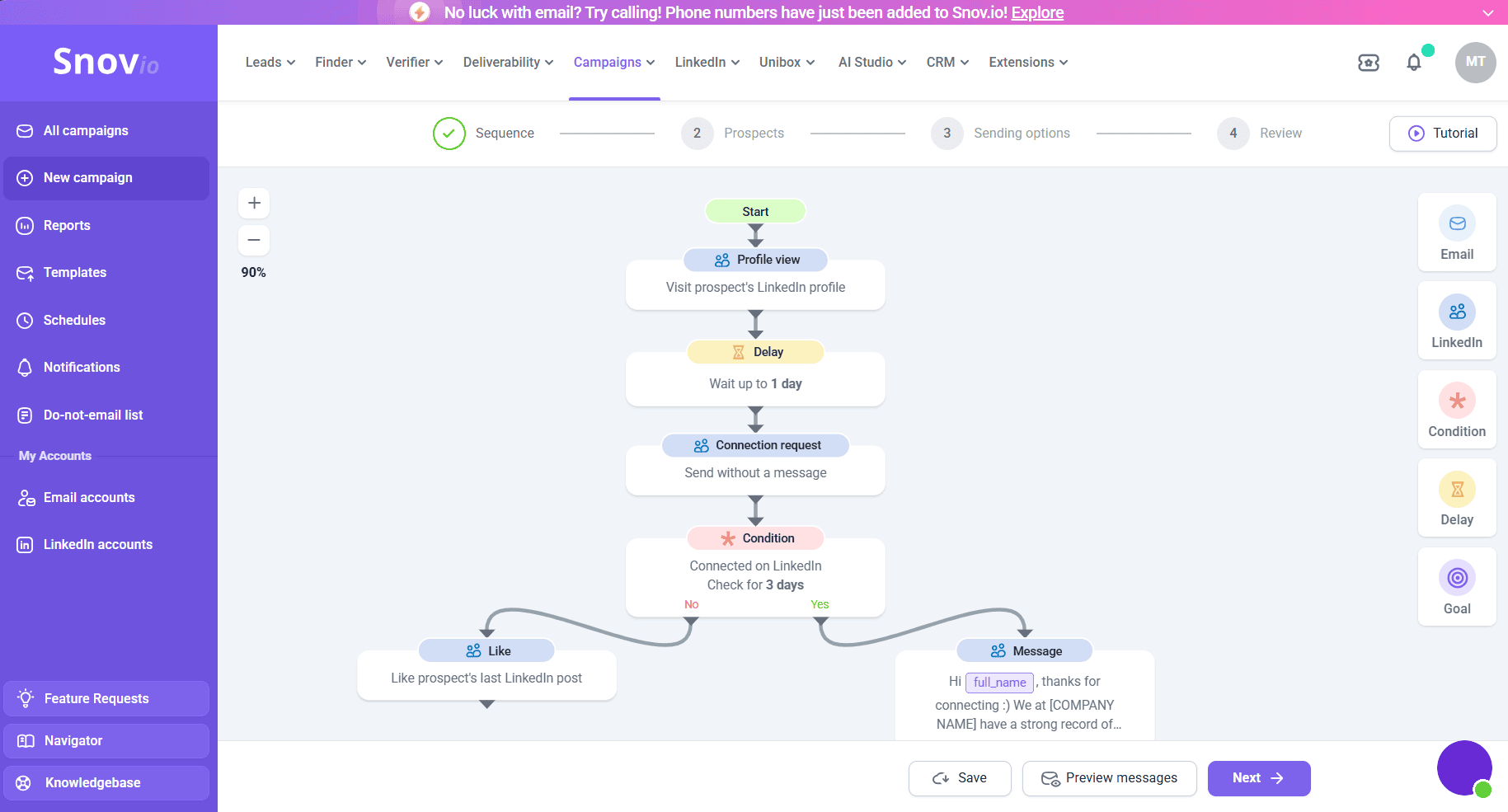
Snov.io is a multichannel outreach platform that combines LinkedIn prospecting, outreach campaigns, and cold emails in a single cloud-based workspace. This tool is best suited for solopreneurs, small-to-mid agencies, and B2B teams looking for safe lead generation and outreach automation.
LinkedIn safety measures:
- Built-in or custom proxy of your choice
- Dedicated location-based IP address
- Warm-up mode
- Adjustable daily action limits
- Rotation of several profiles for compliance with limits and safer LinkedIn outreach
- Automatic removal of old pending connection requests
- Personalization with Spintax and Dynamic content in the message editor
Key features for LinkedIn outreach automation:
- In-app lead-finding tools: Use an AI-driven Database Search or LinkedIn Search to find prospects by applying filters, adding search result pages from LinkedIn, or importing profile links in bulk
- LI Prospect Finder extension: Capture LinkedIn leads on the fly from your Chrome browser
- Automated LinkedIn touches: Automate condition-based LinkedIn actions with delays — profile views, follows, connection requests, post likes, skill endorsements, messages, and InMails
- Unibox: Sync conversations with leads across all accounts in one unified inbox
- Reports: Get hourly/daily/weekly/monthly statistics and monitor your team’s performance to convert leads faster with advanced analytics together
- Native CRM: Build sales pipelines and close more LinkedIn deals without leaving the app
G2 rating: 4.5/5⭐
User feedback:
Snov.io is most frequently praised for ease of use (150+ mentions), customer support (90 mentions), and its multifunctionality: “simplicity combined with powerful features.” One user particularly said, “The LinkedIn extension is especially useful as it saves a lot of manual work.”
At the same time, some users find it hard to grasp all the features at once when going multichannel, beyond LinkedIn lead generation and outreach automation.
Pros and cons of Snov.io:
📍My feedback after testing Snov.io:
Although users mention a mild learning curve, I found the UI and the entire account-connection process in the “LinkedIn” tab pretty intuitive. But I did consult Snov.io’s Navigator to get acquainted with the app’s overall functionality faster through interactive tutorials.
Thanks to a drag-and-drop campaign builder, I created my first multi-step LinkedIn sequence with a personalized InMail in just under 5 minutes. I could also choose the 1st, 2nd, or 3rd connection degree in the condition settings — a feature many LinkedIn automation software typically lack.
What I’d like to highlight at the bottom line is that Snov.io’s pricing model is highly user-oriented and cost-effective. It gives you the freedom to decide whether to use it as an add-on to the free-forever plan or to any of the paid subscriptions.
Compared to Lemlist or other similar platforms that have LinkedIn outreach automation rooted in higher-cost tiers, you don’t overpay for unnecessary features.
Reply – best for enterprise-level SDR/BDR teams focusing on multichannel outreach
Pricing: Available only with paid subscriptions starting at $99/mo or as a separate add-on for $69/slot.
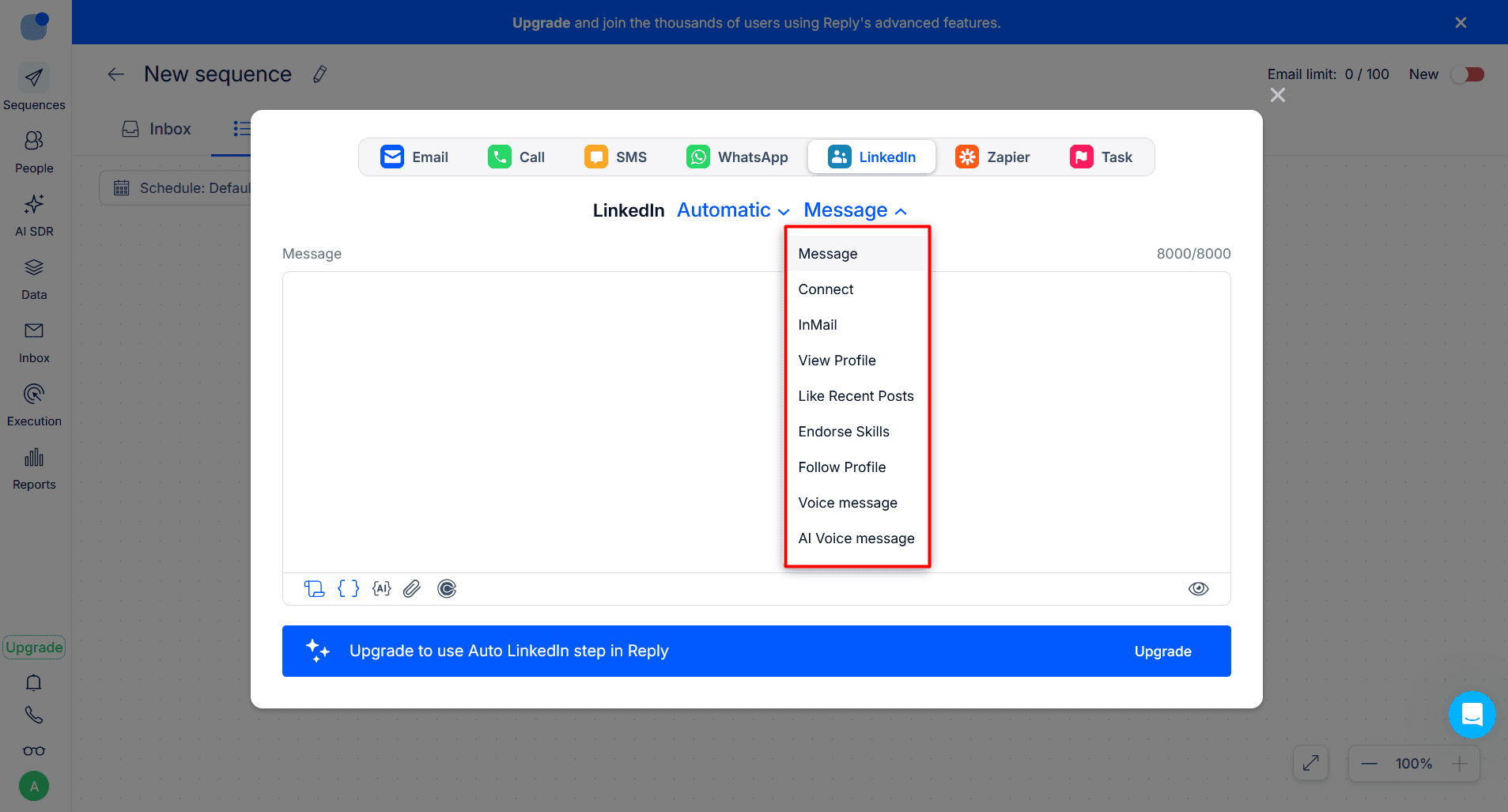
Reply is an AI-driven sales engagement platform with a sequencer that enables multichannel outreach via LinkedIn, email, phone, SMS, and WhatsApp.
LinkedIn safety measures:
- Customizable safety limit for each action
- Randomizer of daily limits
- Multiple accounts for campaign distribution
- Message personalization with dynamic variables
Key features for LinkedIn outreach automation:
- Findy LinkedIn Chrome extension: Capture prospects directly from the platform
- Automated activities: Send automatic connection requests, messages, InMails, and voice messages, like posts, follow profiles, and endorse skills
- Unified inbox: Access all messages in one place
- LinkedIn statistics: See how many connections you made or messages you sent
- A/B testing for LinkedIn steps: Test connection request notes or messages by adding variants for each
G2 rating 4.6/5⭐
User feedback:
People rate Reply the highest for multichannel capabilities and mention that “voicemail drops on LinkedIn are particularly valuable.”
That said, the learning curve raises a collective concern, as “the interface can feel a little overwhelming for new users” when getting acquainted with Reply.io’s features.
Pros and cons of Reply:
📍My feedback after testing Reply:
What I particularly liked about Reply is that it gives you more control over action limits with a randomizer, similar to other best LinkedIn automation software on this list. Yet it lacks several critical safety arrangements, such as built-in or custom proxies and the ability to change IP locations for LinkedIn accounts.
And if you want to “join the AI side,” as Reply suggests, and hire Jason AI SDR, the tool becomes way too expensive (starting at $500). Such a high price may be a barrier for small businesses or startups on a tight budget.
Overall, it may be a go-to solution for enterprises with large budgets interested in cross-channel communication, not just LinkedIn lead generation and outreach.


Expandi – best for growth marketers and agencies managing larger outreach volumes
Pricing: Free 7-day trial; paid from $99/mo.
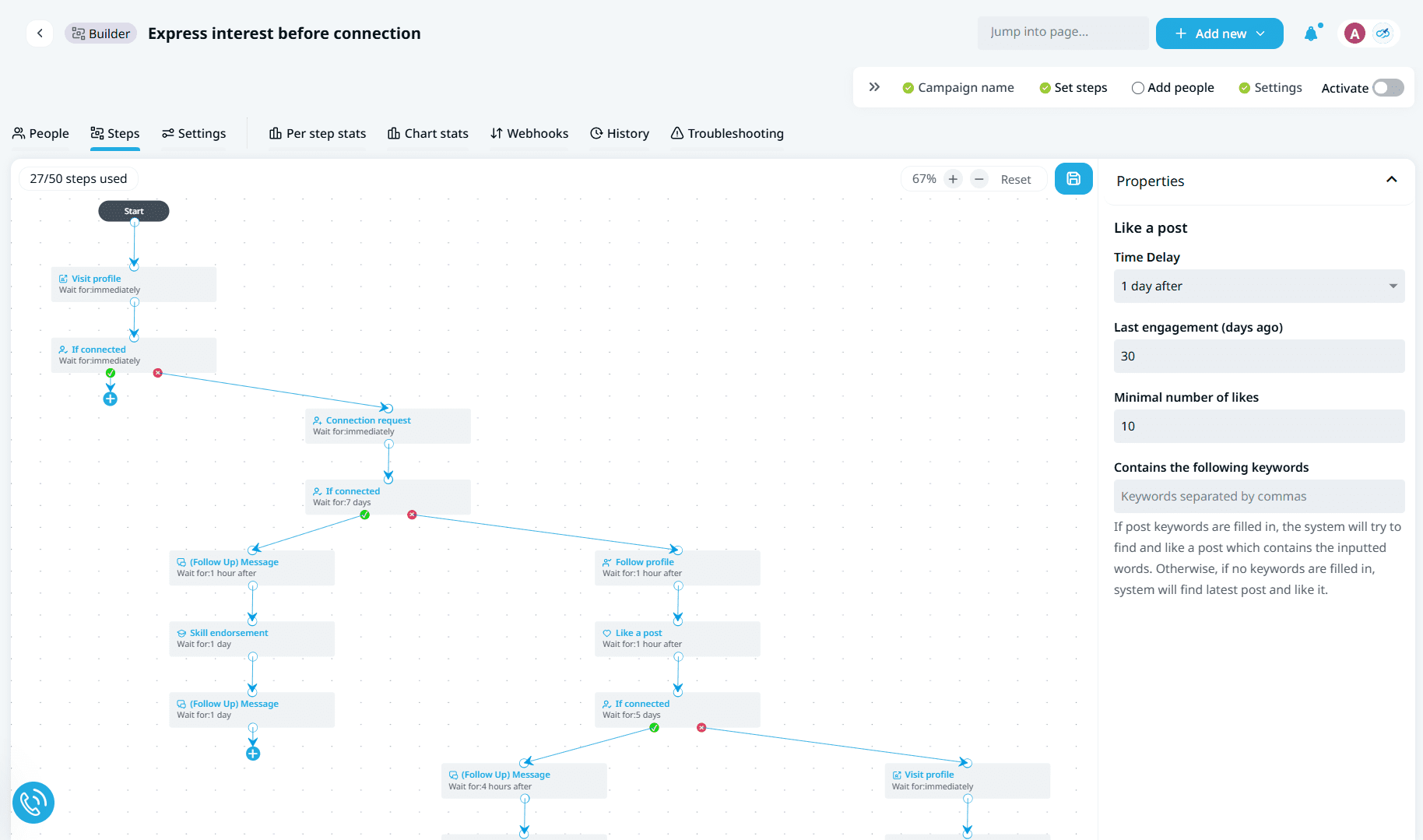
Expandi is a cloud-based solution, which makes it safe to use for automated LinkedIn outreach.
LinkedIn safety measures:
- LinkedIn profile auto-warm-up
- Dedicated country-based IP address
- Smart algorithms that control LinkedIn activity limits
- Separate safety limit for each action type
Key features for LinkedIn outreach automation:
- Advanced search filters: Find LinkedIn leads that match your ICP
- Multichannel outreach with “if-then” sequences: Combine LinkedIn messages and InMails with email follow-ups in a sequence
- Campaign prioritization: Prioritize the campaign driving the best results
- Image, GIF, and video personalization (at extra cost)
G2 rating: 4.2/5⭐ (a noticeable drop from its previous peak of 4.7)
User feedback:
On the upside, users typically praise Expandi for a no-code campaign builder and responsive, helpful customer support (21 mentions).
On the downside, just like with Reply, people are mostly dissatisfied with Expandi’s UI, calling it “incredibly opaque.”
Pros and cons of Expandi:
📍My feedback after testing Expandi:
I was truly impressed by the solid number of possible conditions and actions, which give much room for flexible, versatile LinkedIn campaigns. Also, you can monitor per-step statistics, which narrow down your focus to how many leads received a particular action, replied, and so on.
But you can do that only after getting past a rather time-consuming setup and onboarding stage. From my perspective, the user interface also feels rather cumbersome. Our detailed, hands-on Expandi review also highlights this and other drawbacks.
Dripify – best for solo founders looking for an intuitive tool
Pricing: Free trial available (7 days); the paid Basic plan starts at $59/user/mo with only 1 drip campaign.
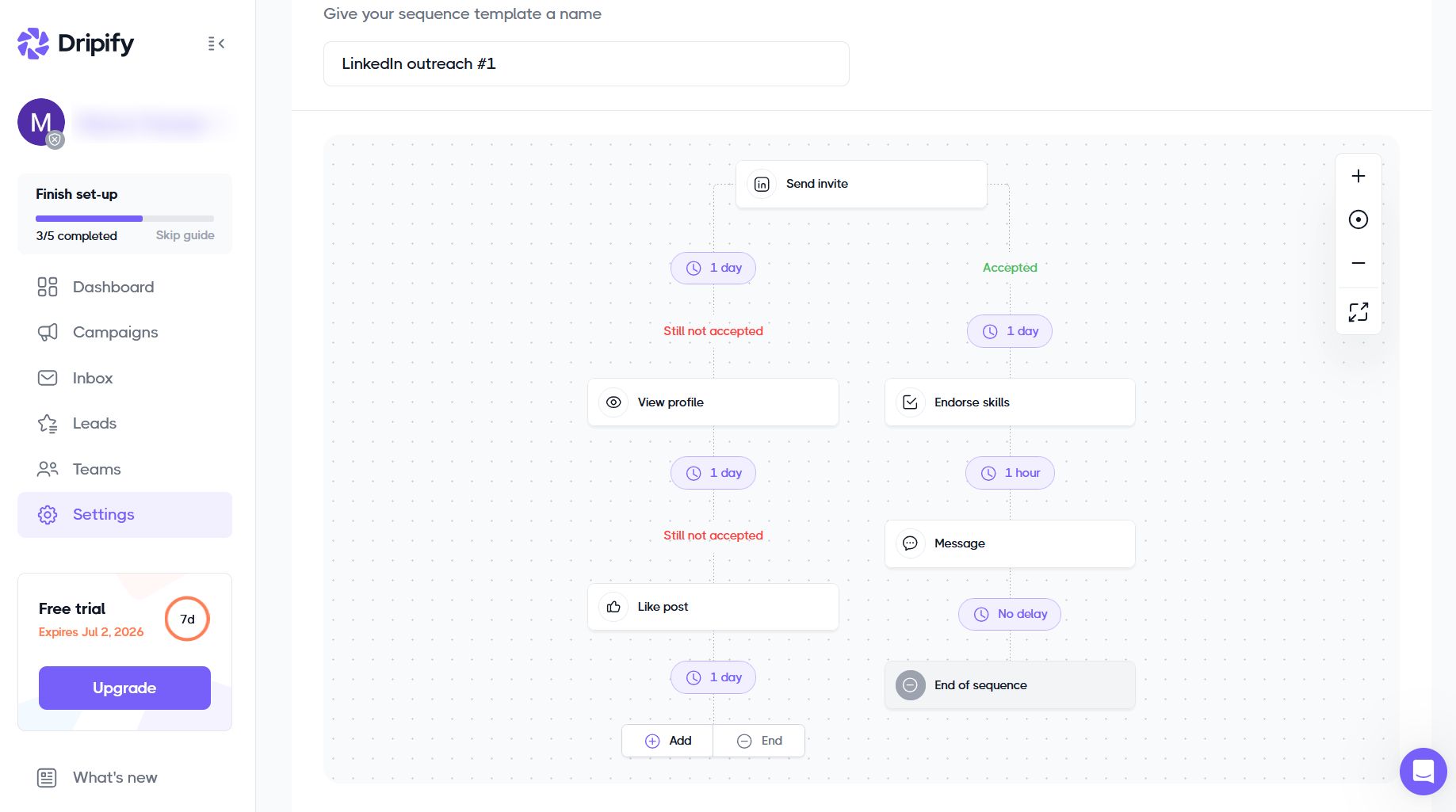
Dripify is another LinkedIn automation software solution that runs in the cloud while your device is off.
LinkedIn safety measures:
- Unique, local IP address
- Human-resembling behavior simulation with a random range of actions
- Automatic activity control that automatically adjusts limits
- Limited daily quotas for sending messages, connection requests, and other actions
- Bulk withdrawal of connection requests
Key features for LinkedIn outreach automation:
- LinkedIn prospecting: Run a LinkedIn or Sales Navigator Search or scrape prospects based on their engagement with posts, events, or groups (coming soon)
- Automated LinkedIn touches: Automate profile views, post likes, follows, skill endorsements, and messages
- Multichannel sequences: Set up automatic LinkedIn + email sequences
- LinkedIn Analytics: Track and evaluate LinkedIn campaigns’ performance
- Team Management: Invite your colleagues, assign roles, and share templates
G2 rating: 4.5/5⭐
User feedback:
While some G2 reviewers applaud Dripify’s simplicity and smooth interface, others say that “campaign logic isn’t very flexible for complex branching” and that it lacks editing options mid-campaign.
Also, to some users, pricing feels a bit steep, especially when managing several accounts.
Pros and cons of Dripify:
📍My feedback after testing Dripify:
Just like many other users, I found Dripify easy to navigate and launch a LinkedIn sequence from the start. Compared to Expandi or Reply, its simplistic, intuitive UI makes the onboarding process much easier and faster.
It can be a good choice for LinkedIn-only outreach to go solo, because once you want to invite team members or start adding email credits for multichannel campaigns, the price skyrockets.
⚠️ Friendly caveat: When updating your LinkedIn profile, particularly changing your name and/or custom URL slug, wait until Dripify fully reconnects after the update. In my experience, it constantly showed an error and took almost half a day to sync back to my renamed account.
Linked Helper – best for solo entrepreneurs and SMBs looking for an affordable LinkedIn-only solution
Pricing: 14-day free trial; paid from $15/mo per 1 license (1 LinkedIn account).
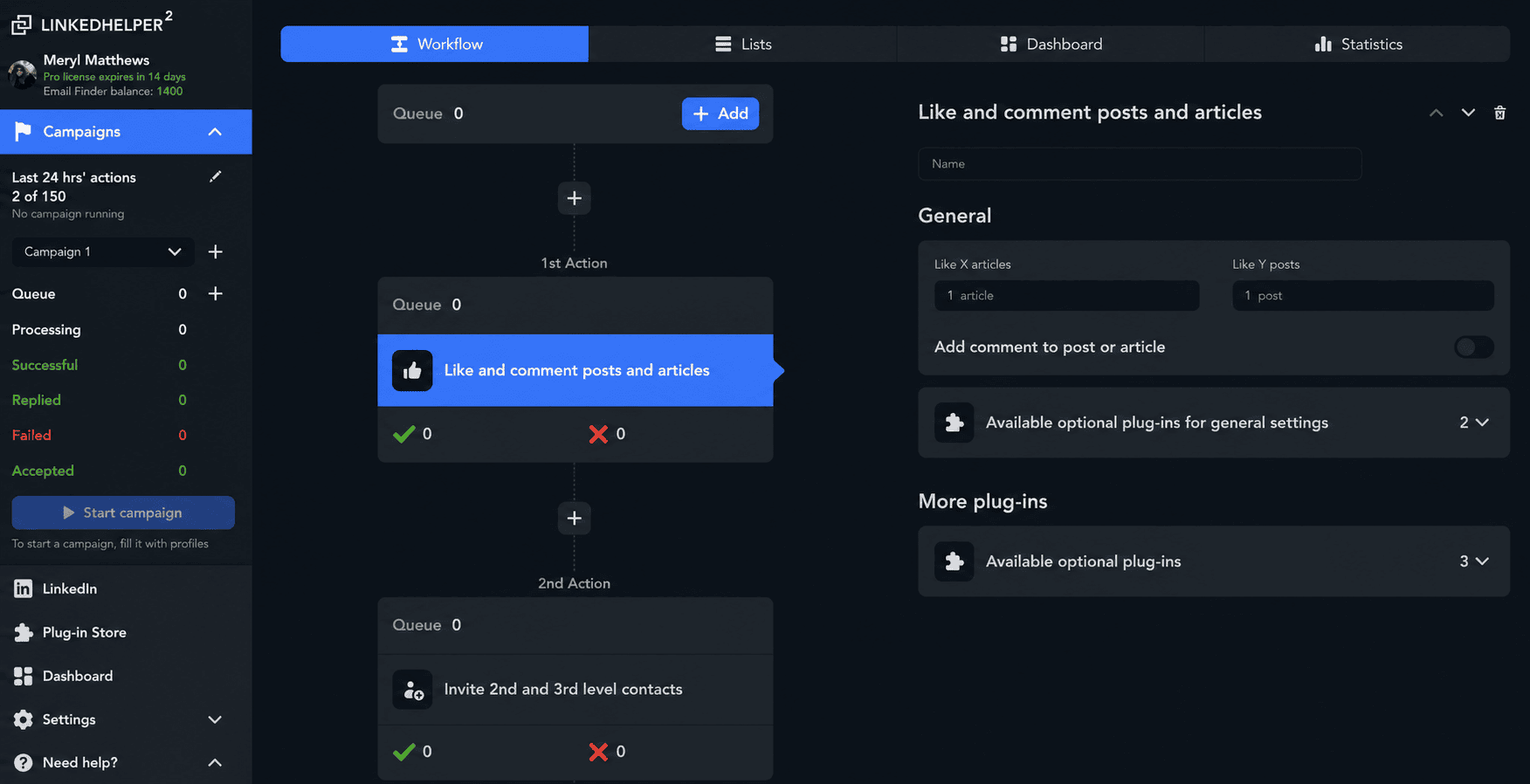
Linked Helper is an installable desktop app that mimics human-like browsing and interaction behaviors for LinkedIn prospecting and outreach automation.
LinkedIn safety measures:
- Possibility to add custom proxies
- Proxy health checker
- Variables and spintax for human-like messages
- Strict limit control
Key features for LinkedIn outreach automation:
- Automated invitations to connect and withdrawals: Send and withdraw connection requests on autopilot
- Auto-profile visits: Automatically view a range of LinkedIn profiles once or multiple times to earn reciprocal profile visits
- Bulk engagement actions: Message and follow-up, endorse skills, invite to join events groups, tag prospects under posts — all automatically
- Hyper-personalization: Use a template editor or import custom variables to personalize LinkedIn messages
- Native CRM: Effectively manage LinkedIn leads at every stage of the pipeline building
G2 rating: 4.5/5⭐
User feedback:
Mostly, users appreciate Linked Helper for automating repetitive LinkedIn outreach tasks and saving time and manual effort. They particularly emphasize that it is a powerful tool for bulk actions, especially at this price tag.
When expressing their concerns, people mention that the “software is really heavy,” causing the computer to stop or crash at times. They also dislike the app’s layout, describing it as “outdated,” “clunky,” and “confusing.”
Pros and cons of Linked Helper:
📍My feedback after testing Linked Helper:
To be honest, it took me a while to install the LinkedHelper app on the desktop, log in, connect my account, and finally create my first LinkedIn sequence. To me, it looks and feels more like a programming platform, far from intuitive for non-techies.
At the same time, I should admit that it’s one of the cheapest tools for LinkedIn automation I’ve ever come across on the market. So, if you’re looking for something inexpensive and don’t mind a “heavily technical” layout, it’s definitely worth considering.
HeyReach – best for large agencies managing 25+ LinkedIn accounts
Pricing: Free trial (14 days); paid subscriptions start at $79/mo per 1 sender account.
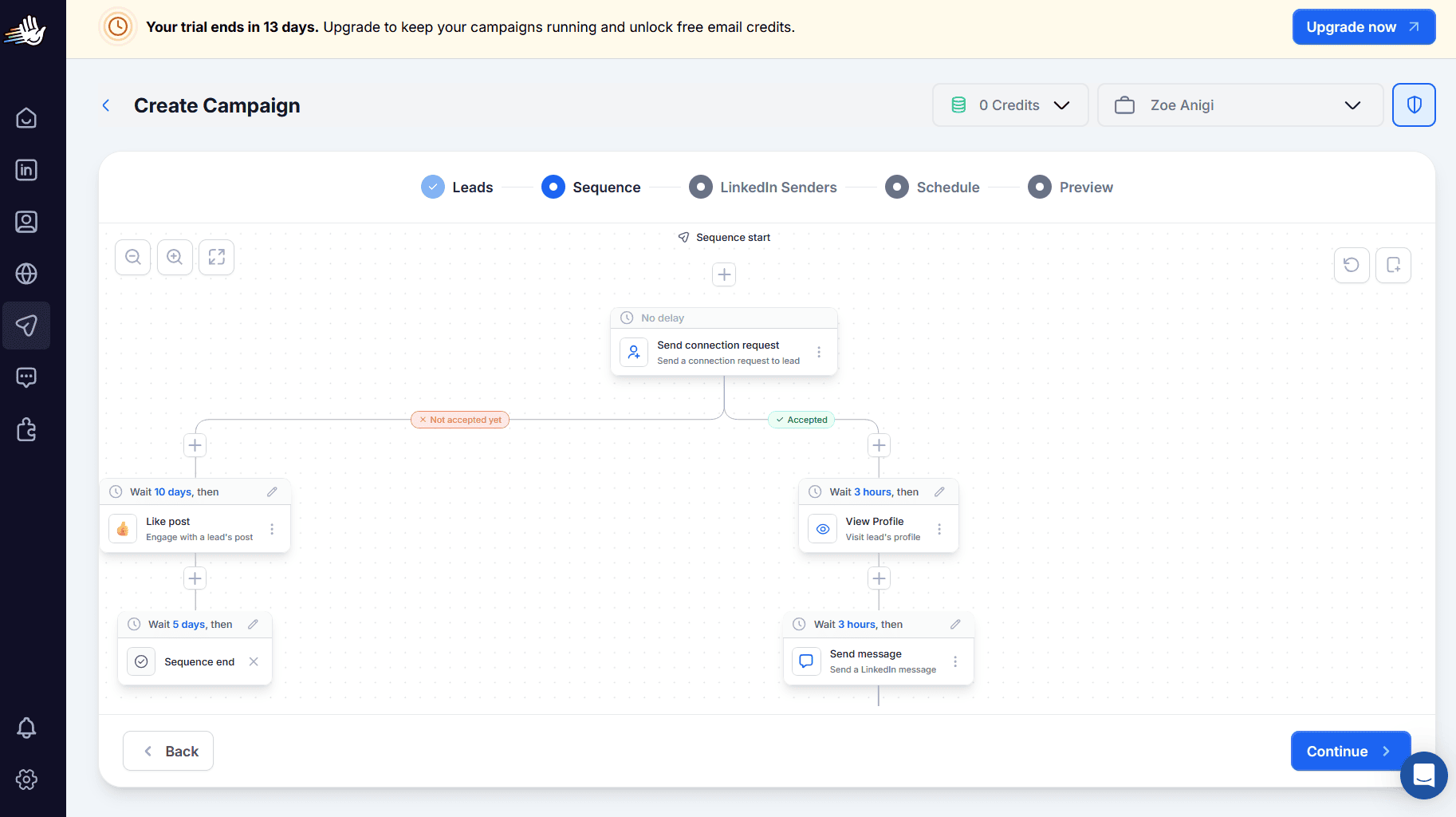
HeyReach is a cloud-based LinkedIn automation platform designed specifically for multi-account outreach and teamwork.
LinkedIn safety measures:
- Built-in or custom proxies
- Dedicated IP addresses
- Automatic sender rotations
- Standard daily limits enforced per account
Key features for LinkedIn outreach automation:
- Automatic LinkedIn prospecting: Import leads from the LinkedIn search bar or search by keyword
- Campaign sequence builder with branching: Create multi-step sequences and sub-sequences
- HeyReach MCP: Perform LinkedIn outreach tasks from platforms like Claude or ChatGPT
- Unified inbox: Manage all LinkedIn messages in one centralized hub
G2 rating: 4.6/5⭐
User feedback:
HeyReach receives positive reviews for being simple and safe, giving a plug-and-play feel, especially for multi-account management. Plus, it’s backed by highly praised customer service.
On the other hand, users wish the platform “could be more AI-futuristic” and had richer functionality, with a sharper focus on personalization.
Pros and cons of HeyReach:
📍My feedback after testing HeyReach:
Overall, I got a positive impression while using this tool for a couple of days. During my free trial, I could create a workspace and invite my team members to test the platform together. And based on my observations, HeyReach makes a good choice for high-volume outreach teams targeting LinkedIn leads from 25–50 accounts or more, with a Master View of all workspaces.
Among other things, I really appreciated the ready-made templates with LinkedIn steps. Yet one drawback that stood out to me was the tiny font; the text was hardly comprehensible. I had to zoom in and out repeatedly to review and edit the steps, which was quite inconvenient.
We-Connect – best for individual sales reps focusing on LinkedIn outreach and content automation
Pricing: 14-day free trial; monthly price per seat starts at $69 in the Growth plan.
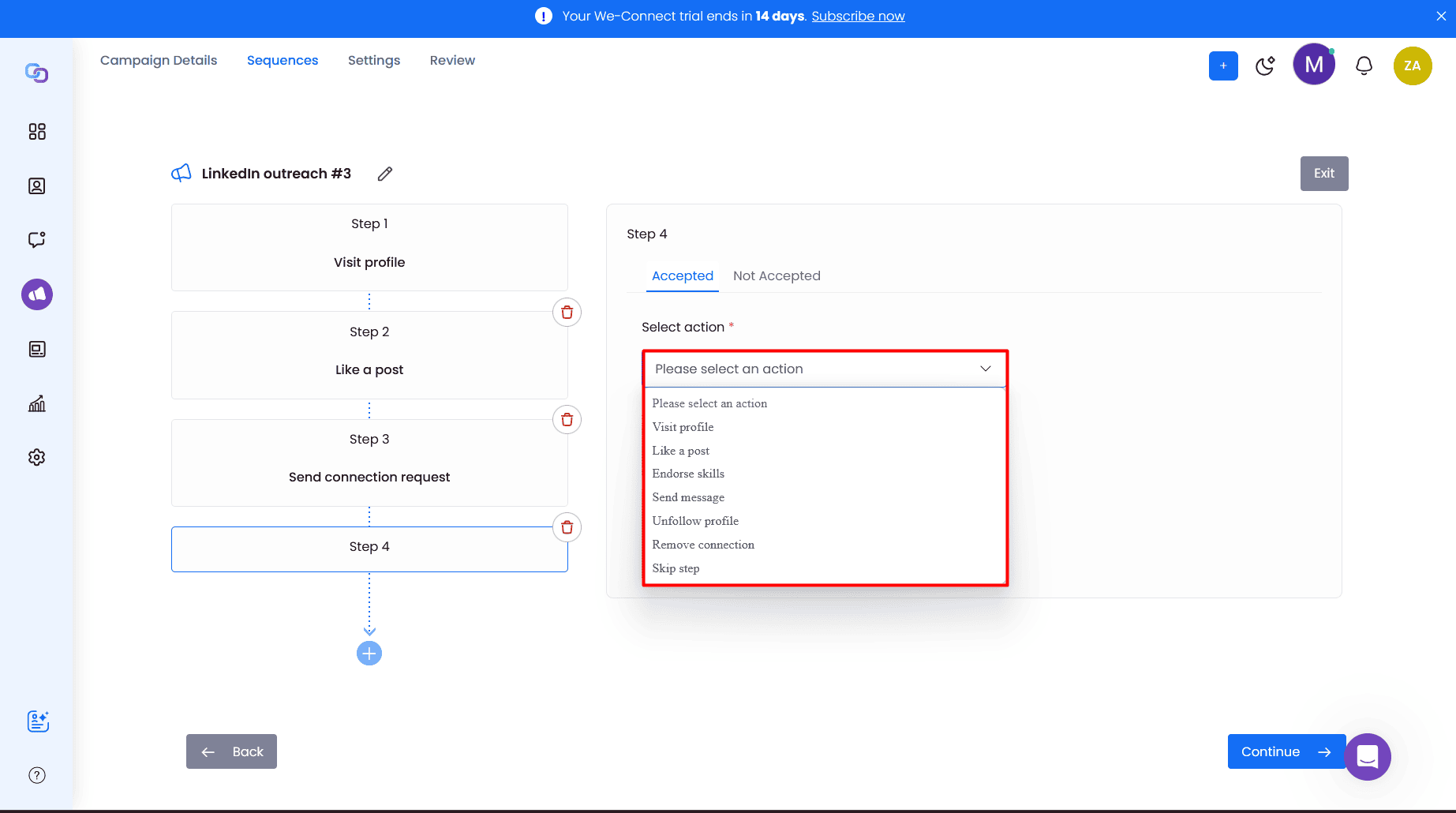
We-Connect is an AI-powered LinkedIn automation software that works in the cloud and automates connection requests, personalized messages, and other actions in sequences while tracking results in real time.
LinkedIn safety measures:
- Bring-your-own-IP (BYOIP) support
- Account warm-up
- Auto-withdrawal of pending invitations
- Daily action limits with a randomizer
- Reuse and resume activity
Key features for LinkedIn outreach automation:
- LinkedIn Lead Engine (in beta testing): Branch, score, and route LinkedIn prospects automatically based on their intent and behavior
- Smart Sequences: Automate connection requests, profile visits and follows, messages/InMails, birthday/job anniversary greetings, and more
- AI Assist: Craft personalized messages with the AI spintax writer and content assistance
- Post Remix (paid add-on): Generate, schedule, and remix LinkedIn posts
G2 rating: 4.6/5⭐
User feedback:
Ease of use and logical interface are among the most frequently mentioned benefits of We-Connect. Another great advantage is that it sends email notifications about campaign-related steps, keeping users informed.
In negative reviews, people are mainly dissatisfied with slow syncing, connection hiccups, surface-level analytics, and support that’s only available Monday–Friday.
Pros and cons of We-Connect:
📍My feedback after testing We-Connect:
What impressed me most about this software was Contact Cleanup, which automatically removes unwanted elements (e.g., “Mr./Mrs.”, “Dr., “CEO,” or custom words you indicate) near people’s names before your LinkedIn messages go out.
I also found the sending schedule particularly useful in Smart Sequence settings. For example, you can choose particular days and hours, as well as your preferred time zone, or even exclude federal US holidays from the schedule.
As for limitations, We-Connect’s sequence builder feels too basic (very few actions) and rigid (you can’t move steps, only delete them). It also glitched when I tried to set A/B variants for InMails.
On the flip side, with the new content feature (Post Remix) on the horizon, We-Connect can be beneficial for B2B marketing teams looking to automate both LinkedIn outreach and post creation.

Meet Alfred – best for team oversight and multichannel automation
Pricing: 7-day free trial; the Basic tier for solo users costs $59/user/mo; the Team plan’s price is $79/user/mo.
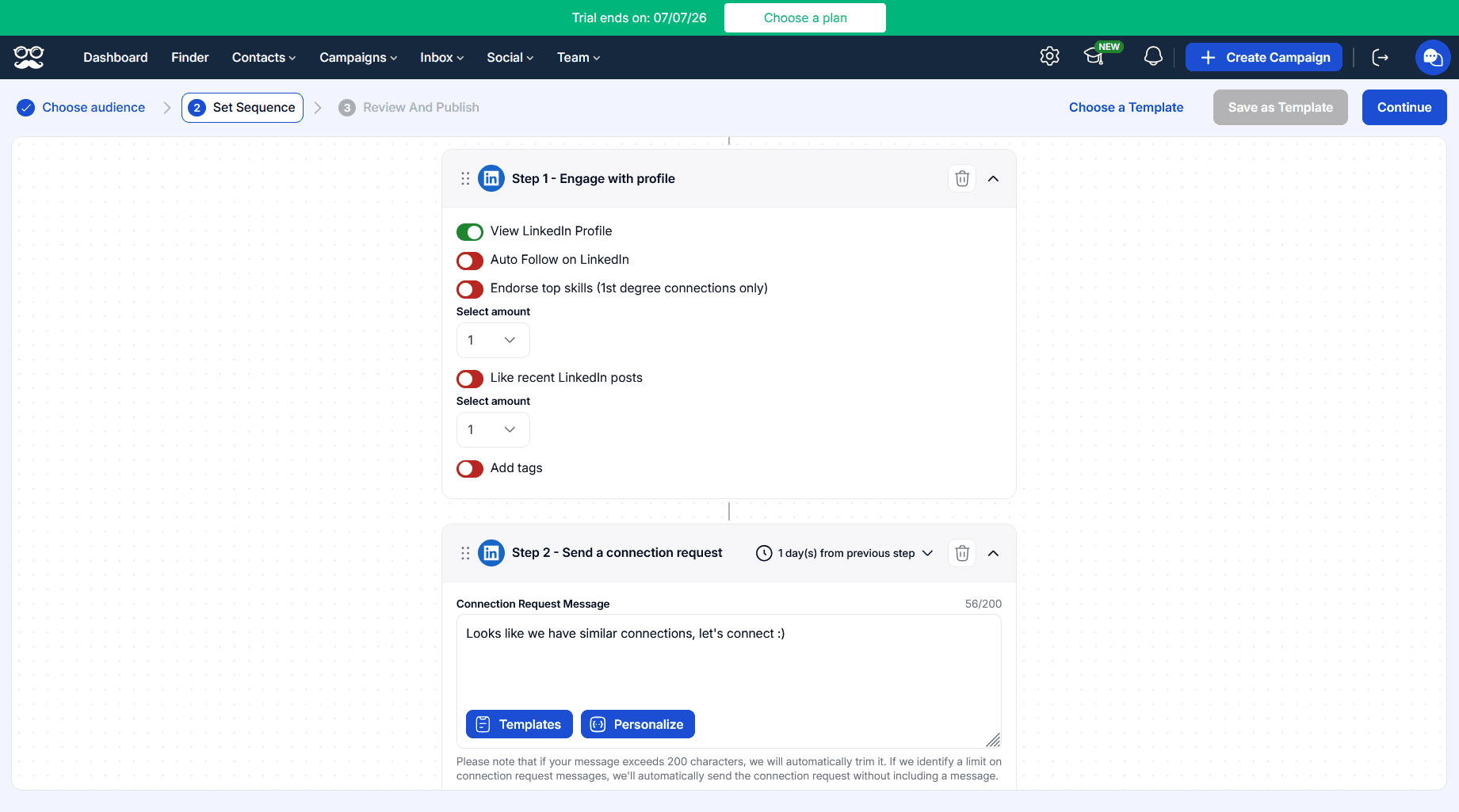
Meet Alfred is a cloud-based LinkedIn automation software with additional multichannel capabilities for Twitter/X and email outreach.
LinkedIn safety measures:
- Cloud infrastructure
- Dedicated IPs
- Preferred time zone and work hours
- Strict daily limits (25/action is the maximum allowed)
- Auto-withdrawals possible within a range of 7–90 days
Key features for LinkedIn outreach automation:
- Prospecting tools: Search for prospects in Lead Finder, pull your leads directly from Sales Navigator, use LinkedIn search URLs, or capture leads from posts or ads
- Automated actions: Auto-follow, view profiles, endorse skills (only 1st-degree connections), like recent posts, invite to attend events, and send connection requests, messages, or greetings
- AI-personalization: Personalize your messages with AI and dynamic variables
- Team collaboration: Collaborate with your team members and track performance
- LinkedIn CRM: Organize and manage your lead lists and connections separately, and export contact details if needed
G2 rating: 3.4/5⭐
User feedback:
Referred to as a “time saver,” Meet Alfred is recognized for effortless LinkedIn outreach. One reviewer specifically considers the “AI assistant and the automation features very helpful, along with the analytics dashboard.”
One of the biggest frustrations, however, is a poor support experience, especially when handling refunds. Some users also criticize Meet Alfred for frequent profile disconnections and glitches.
Pros and cons of Meet Alfred:
📍My feedback after testing Meet Alfred:
Once I signed up for a free trial, I was greeted by a user-friendly interface with a calm, non-distracting color palette, which I liked. The sequence builder with toggles for actions and block dragging was also intuitive and easy to use.
It was a pleasant surprise to see a pre-written connection request message and a follow-up message with a thank-you note (sent if the prospect connects), so you don’t have to spend time writing those. Yet, they lack personalization.
What I didn’t find very convenient was the inbox divided into 3 categories (LinkedIn, InMail, and Sales Navigator), which makes you hop between all conversations with leads.
But what disappointed me even more was the inability to save a campaign as a template without upgrading to a higher-tier plan. And what’s worse, when I finished building my first sequence but didn’t click “Publish Campaign,” the changes weren’t saved, and I had to re-create it.
Lemlist – best for large B2B teams and enterprises that need multichannel automation
Pricing: 14-day free trial; paid starts at $109/user/mo.

Lemlist is a multichannel B2B sales engagement platform, not solely a LinkedIn automation service. It helps large B2B teams and enterprises coordinate LinkedIn outreach with email, phone, SMS, and WhatsApp, which makes it not the cheapest solution on the market.
LinkedIn safety measures:
- Daily limits on each action
- Smart delays
- Spintax for safer bulk outreach
- Automatic “Withdraw invitation” step to remove pending connection requests
Key features for LinkedIn outreach automation:
- Chrome extension: Scrape leads from LinkedIn automatically with a browser extension
- Automated actions: Automate profile visits, connection requests, follows, skill endorsements, comments, post likes, and text/voice messages
- Voice messaging: Humanize interactions and increase response rates by sending voice notes automatically to the leads who accepted your connection requests
- lemAgent: Use an AI agent to help you plan your LinkedIn outreach campaigns or draft personalized messages
- Conditional multichannel sequences: Combine LinkedIn with emails, calls, and SMS/WhatsApp messages
G2 rating: 4.6/5⭐
User feedback:
On the positive side, people highlight ease of use (585 mentions), a workflow-boosting AI toolkit, a balance between automation and personalization, and smooth CRM integrations with HubSpot, Pipedrive, and others.
The two major downsides of Lemlist are a daunting learning curve (125 mentions) and a heavy price tag (140 mentions). As one user remarked, “For solo founders or small businesses, the pricing can feel high compared to simpler outreach tools.”
Pros and cons of Lemlist:
📍My feedback after testing Lemlist:
From what I’ve seen and tried on the platform, Lemlist has indeed accumulated an extensive range of features under one digital roof. But that’s simultaneously the beauty and the major headache of it, making the UI too cluttered and the learning curve too steep. In contrast with other tools, it took me considerably more time (at least half an hour) to understand how every feature works on the platform.
It’s also worth mentioning that Lemlist’s safety approach is built primarily around email warm-up and deliverability. LinkedIn-specific safety measures are less developed and adopted on the platform.
So, I’d say Lemlist is an email-centric platform that automates LinkedIn outreach as well, rather than a LinkedIn-first tool. It could be a good choice for teams prioritizing other communication channels in their multichannel campaigns with only a few LinkedIn action droplets in between.

Dux-Soup – best for budget-conscious solo salespeople who need basic LinkedIn automation
Pricing: 14-day free trial; for individuals, paid tiers start at $14.99/user/mo, while for teams — $55/mo per seat.
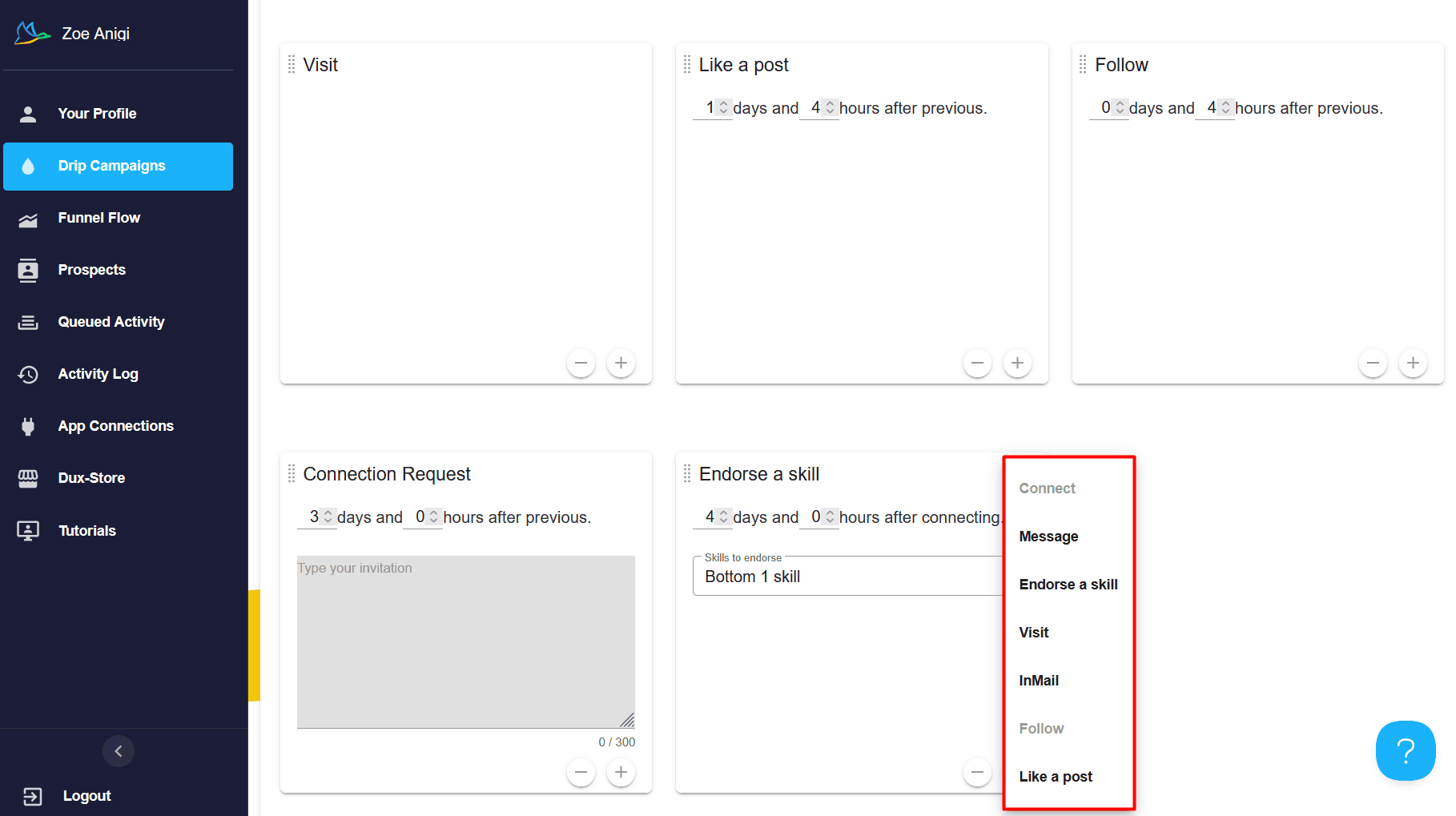
Dux-Soup operates as a browser extension and helps recruiters and sales reps streamline their prospecting and outreach efforts on the platform.
LinkedIn safety measures:
- Throttling tab with daily action limits and snoozing
- Configuration of randomized, custom-set time delays between steps (hours to months)
- A “Planner” with working hours
- Auto-pausing after a response
- Cancellation of pending connection requests after “X” days
Key features for LinkedIn outreach automation:
- Visiting and scanning: Automatically visit or scan LinkedIn profiles to scrape data, such as first/last name, company, email address, and more
- Automated 6 key actions: Follow, Endorse, Visit, Connect, Like a Post, Message, and InMail
- Merge-tag personalization: Apply the first name, company, job title, or other merge tags to personalize every message
- Dux-Dash analytics: Track acceptance and response rates by campaign
G2 rating: 4.4/5⭐
User feedback:
In the latest reviews, users speak positively of Dux-Soup’s ”consistent, structured LinkedIn outreach with outstanding support.” One of them highlighted specifically that “The tagging system is second to none.”
On the negative side, poor UI is the #1 drawback mentioned by users who wish the platform were slightly more user-friendly and had a more modern design. Slow performance is next among major dislikes.
Pros and cons of Dux-Soup:
📍My feedback after testing Dux-Soup:
Registration was a breeze, and once I installed the Chrome extension, I created my test campaign by dragging and dropping the blocks to rearrange the LinkedIn sequence as needed. I particularly liked that I could endorse up to 3 skills either from the top or from the bottom of the prospect’s profile.
I do have a few negative observations about the cost. Dux-Soup has quite fairly earned its reputation as one of the most affordable tools on the market. But once you look closer at what you get for $14.99 per month, it will be far from enough.
For example, you won’t be able to follow LinkedIn profiles automatically or integrate any third-party software (not even via Zapier) in this lowest-price plan. I’d recommend it if you just want to dip your toes into LinkedIn outreach automation; otherwise, it’s not the best choice. And definitely not for scaling.
Top LinkedIn prospecting tools for lead scraping and data extraction
If you simply want to extract prospect data from LinkedIn or Sales Navigator but don’t need automated LinkedIn actions, these 5 tools are among the strongest choices, each bringing exclusive value to the table.
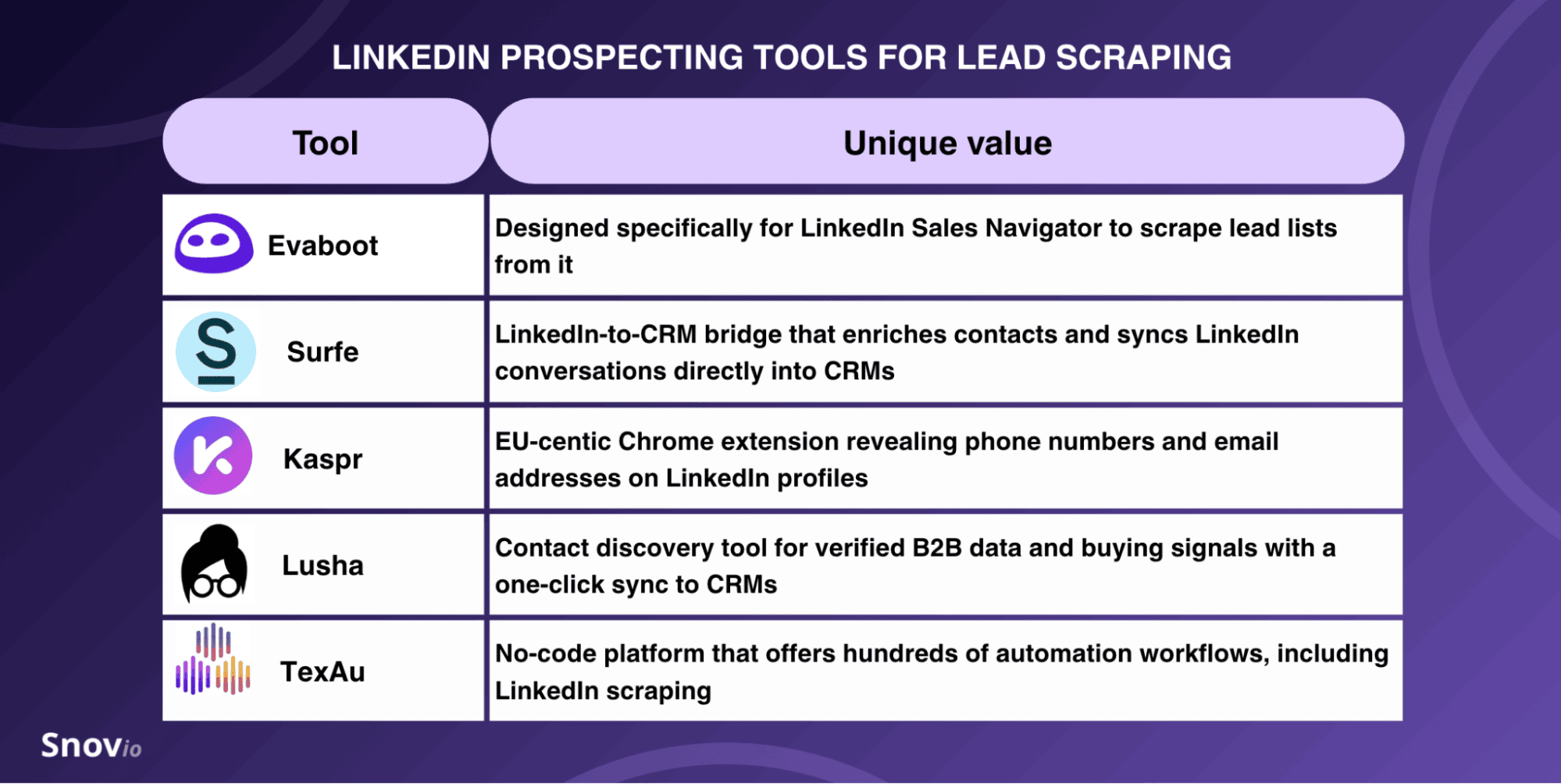
While some focus solely on contact discovery via LinkedIn Sales Navigator (e.g., Evaboot), others offer more advanced data enrichment and go far beyond LinkedIn scraping (e.g., TexAu).
Evaboot
Unique value: Evaboot scrapes lead lists specifically from LinkedIn Sales Navigator via the Chrome extension.
Pricing: From $9/month with 100 credits (credit-based model).
Key features of Evaboot:
- Sales Navigator Export
- Data Cleaning
- Lead Filtering
- Email Finder
- Email Verifier
- LinkedIn URL Enrichment
G2 rating: 4.6/5⭐
Pros and cons of Evaboot:
Surfe
Unique value: Surfe acts as a LinkedIn-to-CRM bridge, enriches contacts, and syncs LinkedIn conversations directly into CRMs without leaving the platform.
Pricing: Free plan with limited credits; paid from €39/user/month.
Key features of Surfe:
- Company & People Search
- B2B Contact Details Finder
- Data Enrichment (API + waterfall technology)
- The Surfe Chrome extension
- Bulk Export
- LinkedIn Message Templates
G2 rating: 4.6/5⭐
Pros and cons of Surfe:
Kaspr
Unique value: Backed by Cognism, Kaspr is an EU-centric tool that quickly finds verified phone numbers and business emails directly from LinkedIn profiles.
Pricing: Free plan with only 20 credits in total; paid plans from $65/user/month.
Key features of Kaspr:
- Chrome extension
- Lead management
- CSV enrichment
- Workspace for teams
- API access for advanced/bulk use
G2 rating: 4.4/5⭐
Pros and cons of Kaspr:
Lusha
Unique value: Lusha’s Chrome extension reveals verified emails and phone numbers directly on any LinkedIn profile, with a one-click sync to CRMs.
Pricing: Free plan with only 40 credits and one seat; paid plans from $49.90/seat/month.
Key features of Lusha:
- Chrome extension for LinkedIn prospecting
- Buying Signals
- AI Assistant
- AI Recommendations
- AI Prospect Playlists
- Workspace for sales, marketing, and RevOps teams
G2 rating: 4.3/5⭐
Pros and cons of Lusha:

TexAu
Unique value: TexAu is a no-code platform that offers hundreds of automation workflows, goes beyond LinkedIn scraping, and covers 12+ platforms, including Twitter/X, Reddit, Product Hunt, Google Maps, and more.
Pricing: Free trial for 14 days; paid from $99/month for solo.
Key features of TexAu:
- Waterfall enrichment
- AI lead scoring
- Email verification
- CRM sync
- GTM Co-Pilot
G2 rating: 4.3/5⭐
Pros and cons of TexAu:
Top LinkedIn messaging automation tools
For those B2B sales reps or marketers who want to hyper-personalize InMails/messages and create multi-step follow-ups on LinkedIn, I’ve rounded up the following list of tools:
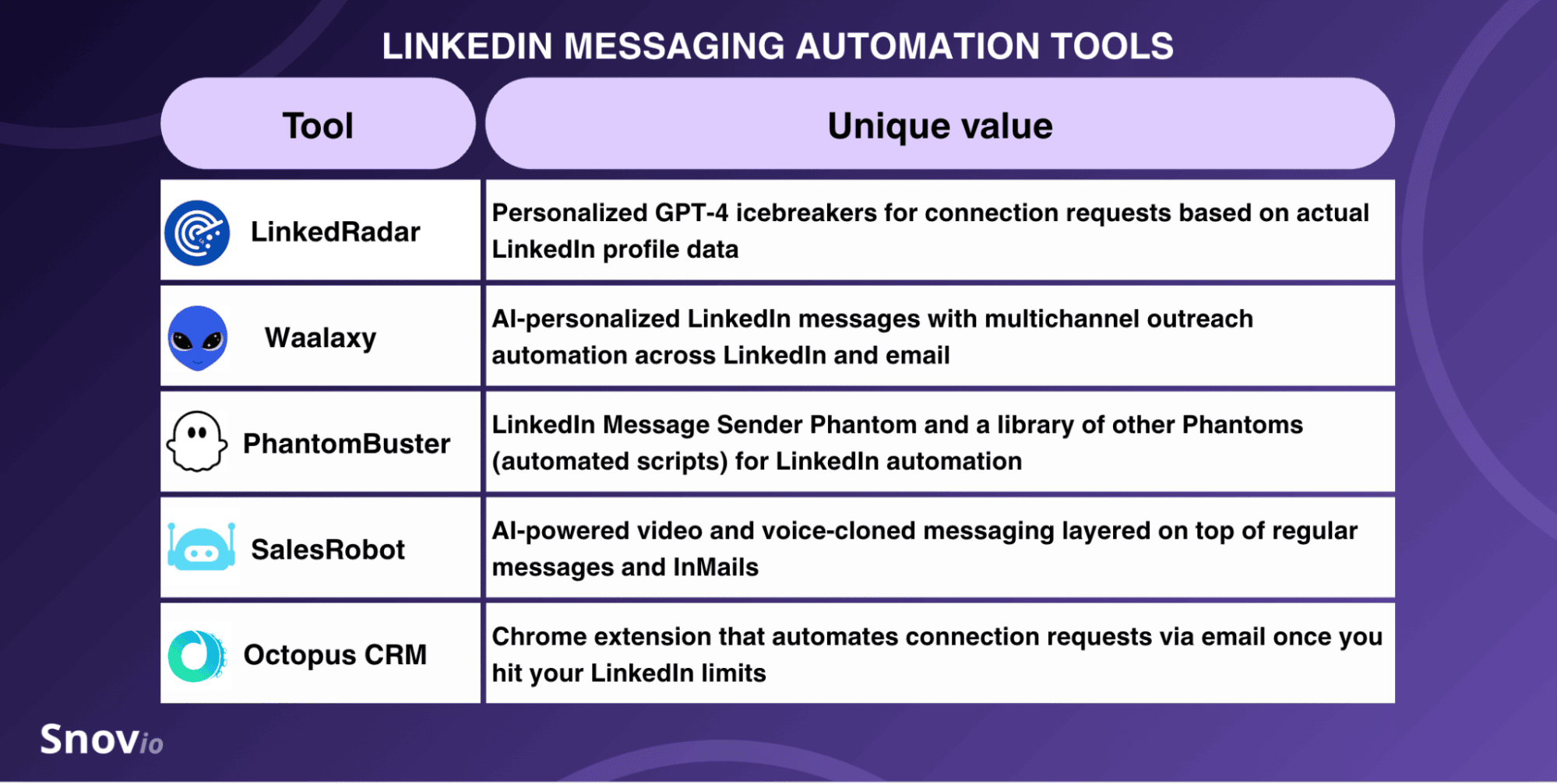
While nearly all heavily lean on AI for personalization, each has its sweet spot, from LinkedRadar with GPT-4 icebreakers in connection requests to SalesRobot that clones voices and crafts personalized voice messages for LinkedIn outreach.
LinkedRadar
Unique value: LinkedRadar crafts unique, personalized AI icebreakers for invitations based on actual LinkedIn profile data.
Pricing: Free limited plan available; paid plans start from $19.90/month.
Key features of LinkedRadar:
- LinkedIn Auto Connect via a Chrome extension or Microsoft Edge add-on
- LinkedIn Email Finder
- Prospecting Templates
- LinkedIn Message Sender
- Contacts Export
G2 rating: 4.6/5⭐
Pros and cons of LinkedRadar:
Waalaxy
Unique value: Waalaxy stands out from others with AI-personalized LinkedIn messages and dual-channel outreach automation (LinkedIn + email).
Pricing: 14-day free trial; paid from $19/user/month.
Key features of Waalaxy:
- Linkedin Auto-Prospecting
- Email Finder
- Cold Emailing
- Unified LinkedIn Inbox
- CRM synchronization
G2 rating: 4.5/5⭐
Pros and cons of Waalaxy:
PhantomBuster
Unique value: PhantomBuster is a no-code platform that runs specific Phantoms (automated scripts) for data extraction and outreach automation. For messages specifically, you need a LinkedIn Message Sender Phantom.
Pricing: Free trial (14 days); paid from 69€/month.
Key features of PhantomBuster:
- PhantomBuster extension for the Chrome browser
- Real-time lead sourcing from 15+ platforms
- Lead prioritization
- Drip campaigns via automated Flows
G2 rating: 4.4/5⭐
Pros and cons of PhantomBuster:
SalesRobot
Unique value: SalesRobot’s key strength is AI-powered video and voice-cloned messaging in addition to InMail and regular message automation on LinkedIn.
Pricing: 14-day free trial; paid plans start from $59/month per 1 LinkedIn account.
Key features of SalesRobot:
- AI Inbox Manager
- AI Comments
- AI Voice and Video Messaging
- Smart Reply Detection
- AI Appointment Setter Agent
- Drip Campaigns (email + LinkedIn)
G2 rating: 4.8/5⭐
Pros and cons of SalesRobot:
Octopus CRM
Unique value: Octopus CRM operates entirely as a Google Chrome extension and automates connection requests via email once you run out of your LinkedIn limits.
Pricing: 7-day free trial; paid from $9.99 per month.
Key features of Octopus CRM:
- LinkedIn Prospecting Tool
- Auto Invite
- Auto Endorse
- Auto View
- LinkedIn Mailer
G2 rating: 4.3/5⭐
Pros and cons of Octopus CRM:
Top LinkedIn content automation tools
If your primary use case is content, whether you need to generate, schedule, or repurpose it on LinkedIn, you can try one of these solutions:
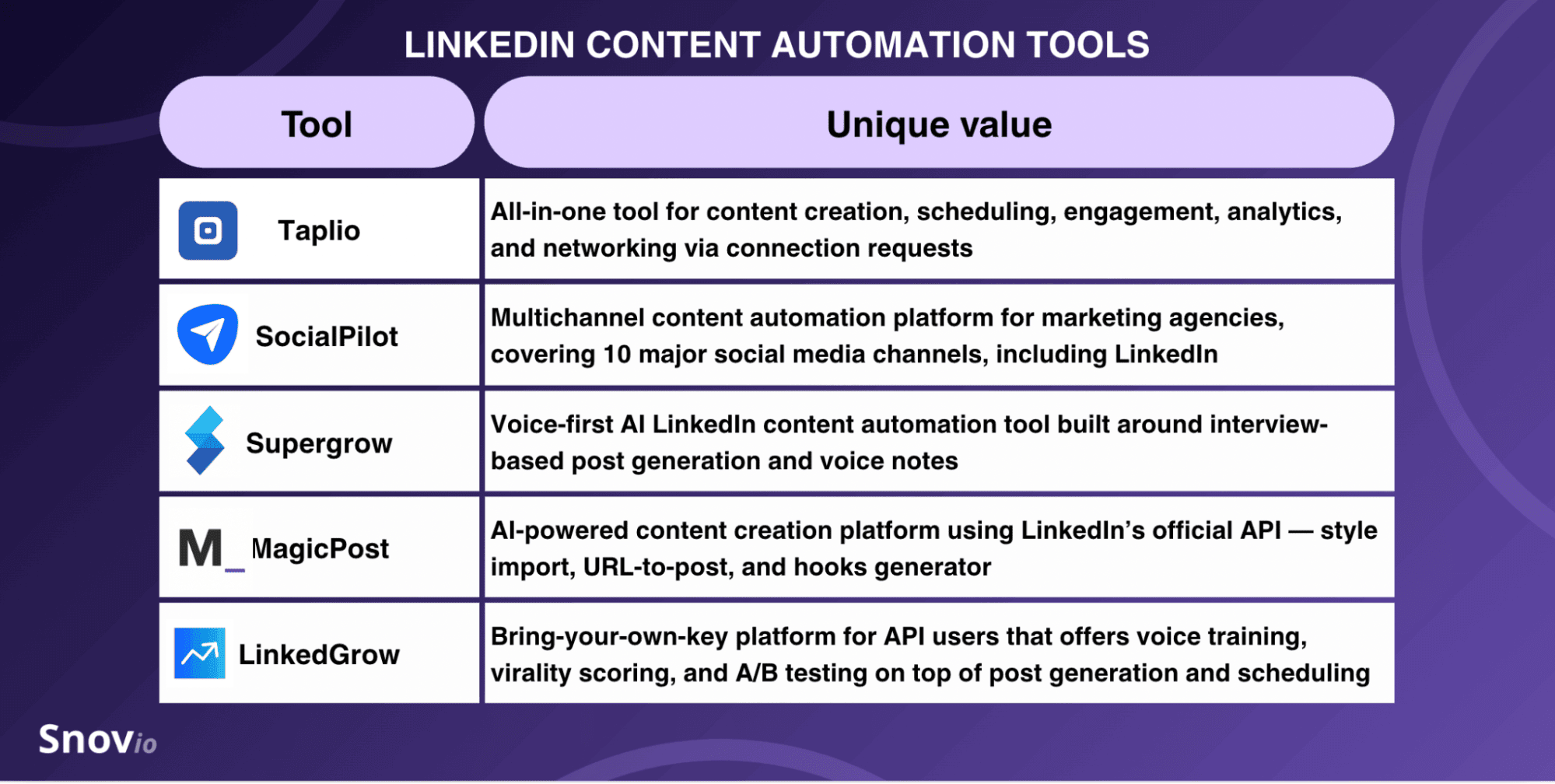
Let’s look more closely at where each sparkles brightest and how it can help you with LinkedIn content marketing.
Taplio
Unique value: Taplio’s superpower lies in its “omnipotence” — the only tool in this category that combines content creation with a lead-generation database, post scheduling, engagement (auto-DMs, likes, and comments), analytics, and even networking via connection requests.
Pricing: Free trial (7 days); paid from $39/month per 1 LinkedIn account.
Key features of Taplio:
- AI-Powered Content Creation (AI-generated carousels, post replies, and more)
- LinkedIn Post Scheduler
- Taplio Connection Requests
- LinkedIn Analytics Tool
- Taplio LinkedIn MCP
- Taplio Connect extension for Chrome
G2 rating: 3.9/5⭐
Pros and cons of Taplio:
SocialPilot
Unique value: SocialPilot is a multi-platform post scheduler for marketing and social selling, which covers 10 social media channels, including LinkedIn, in a single dashboard.
Pricing: Free 14-day trial; paid subscription starts at $30/user/month.
Key features of SocialPilot:
- Browser extensions for Chrome and Firefox
- Social Media Calendar
- AI Scheduler
- AI Pilot for post generation
- Social Inbox with conversations
- Team Collaboration
- Analytics and Reporting
G2 rating: 4.5/5⭐
Pros and cons of SocialPilot:
Supergrow
Unique value: PostCast is Supergrow’s defining feature — a conversational AI interview host asks questions and drafts LinkedIn posts from what you actually said, not from generic prompts.
Pricing: 7-day free trial; paid for solo creators — $19/month; for teams, it starts at $139/month with 4 accounts.
Key features of Supergrow:
- LinkedIn Post Generator (based on Postcast AI interviews)
- Content DNA voice profile
- Calendar & Kanban scheduler
- Repurposing (from YouTube videos, articles, or PDFs)
- Insights & Analytics
- MCP integration (Claude, ChatGPT)
G2 rating: 4.8/5⭐
Pros and cons of Supergrow:
MagicPost
Unique value: The “LinkedIn Verified Partner” status makes MagicPost one of the safest LinkedIn content automation tools in the category for account compliance.
Pricing: 3-day free trial; paid from $35/seat/month.
Key features of MagicPost:
- LinkedIn Post Inspiration (database of 2M+ LinkedIn posts)
- Ideas and Hooks Generator
- Engagement Feed
- LinkedIn Calendar & Scheduler
- MCP & API support
G2 rating: 5/5⭐
Pros and cons of MagicPost:
LinkedGrow
Unique value: LinkedGrow is a bring-your-own-key (BYOK) LinkedIn content platform that offers voice training, virality scoring, and A/B testing in addition to post generation and scheduling.
Pricing: 7-day Pro trial; paid starts at $19/month + ~$2–4/month API costs.
Key features of LinkedGrow:
- Hook and Carousel Generators
- Content Calendar with Post Scheduling
- AI Image Generation
- Repurposing (YouTube to LinkedIn, Reddit to LinkedIn, and more)
- Voice Training
- A/B testing
G2 rating: 5/5⭐
Pros and cons of LinkedGrow:


Top LinkedIn automation tools for multichannel outreach across 3+ channels
The final group of tools is for those who want to automate LinkedIn plus at least 2 other outreach channels: email, SMS, phone, or even Twitter/X.
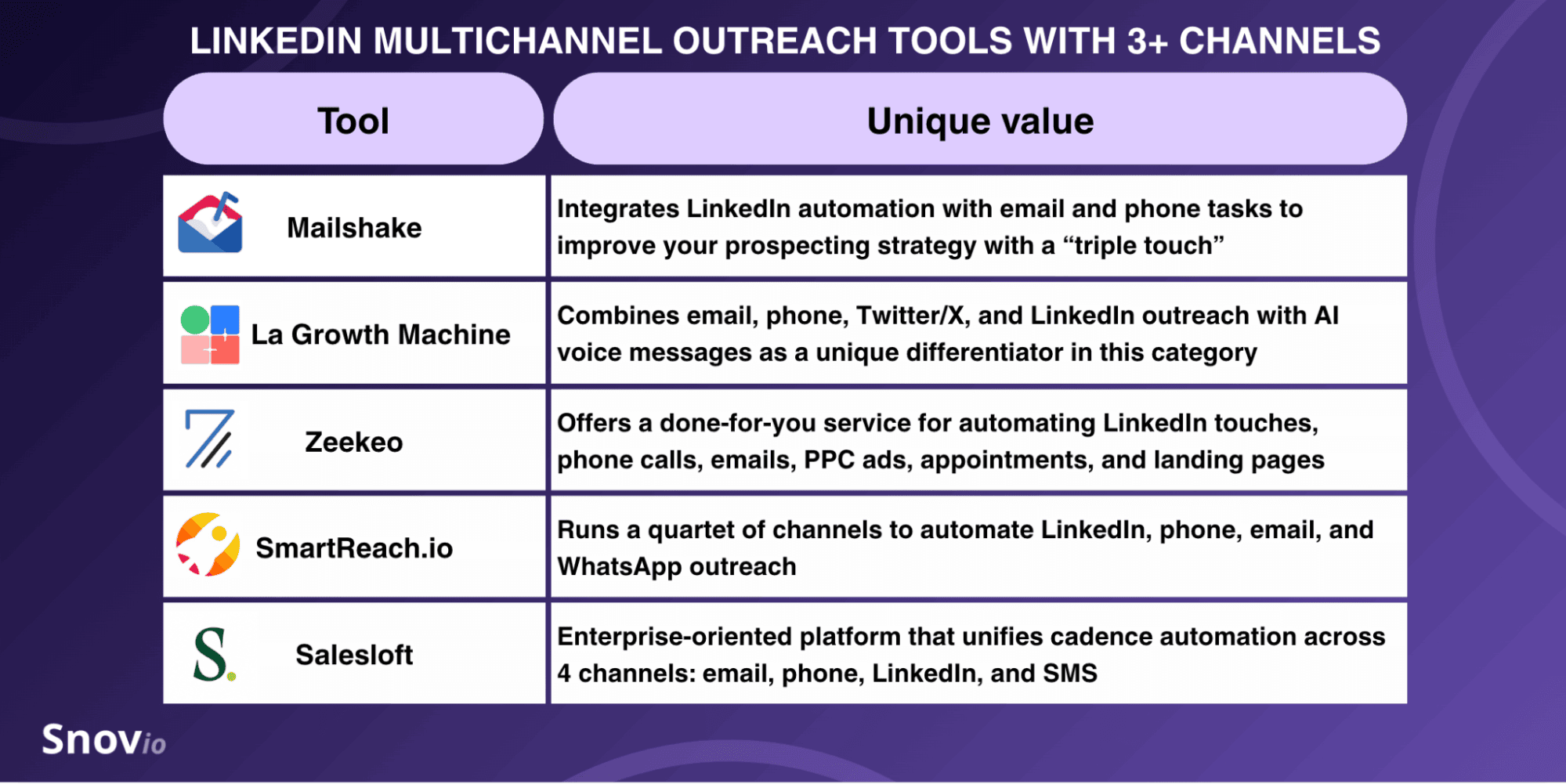
Let’s see how “multichannel-far” you can go with each.
Mailshake
Unique value: Mailshake integrates LinkedIn automation with email and phone tasks to improve your prospecting strategy with a “triple touch.”
Pricing: No free trial; paid from $29/month.
Key features of Mailshake:
- Lead Catcher
- Data Finder
- Mail Merge
- AI Email Writer
- VoIP Dialer
- AI Sales Coach
G2 rating: 4.7/5⭐
Pros and cons of Mailshake:
La Growth Machine
Unique value: As a 4-channel outreach automation tool, La Growth Machine combines email, phone, Twitter/X, and LinkedIn, with AI voice messages as a unique differentiator in this category.
Pricing: Free trial (14 days); paid from 70/month per identity with only email and LinkedIn outreach.
Key features of La Growth Machine:
- Multichannel Sequences
- AI Voice Messages
- Lookalike Search
- Real Chat Mode
- Multichannel Inbox
G2 rating: 4.6/5⭐
Pros and cons of La Growth Machine:
Zeekeo (formerly Zopto)
Unique value: Zeekeo offers a fully managed (done-for-you) service for automating LinkedIn touches, phone calls, emails, PPC ads, appointment setting, and landing page management.
Pricing: No free trial; paid from $149/seat/month with email and LinkedIn automation only.
Key features of Zeekeo:
- Targeted Calls
- Appointment Booking
- Email Outreach
- LinkedIn Outreach
- PPC Campaigns
G2 rating: 4.5/5⭐
Pros and cons of Zeekeo:
SmartReach.io
Unique value: SmartReach.io runs a quartet of channels to automate LinkedIn, phone, email, and WhatsApp outreach.
Pricing: Free trial for 14 days; paid from $39/month. LinkedIn automation is a paid add-on that costs $29/month per account.
Key features of SmartReach.io:
- B2B Lead Finder
- Multichannel sequences (emails, calls, LinkedIn touches, and WhatsApp messages)
- Unified shared inbox
- AI automations with AI agents
- Prospect CRM
G2 rating: 4.6/5⭐
Pros and cons of SmartReach.io:
Salesloft
Unique value: Salesloft is an enterprise-oriented platform that unifies cadence automation across 4 channels: email, phone, LinkedIn, and SMS messaging.
Pricing: Advanced and Elite plans are available upon request
Key features of Salesloft:
- Multi-Step Cadences
- AI Agents
- AI Forecast
- Seller Coaching
- Salesloft Deals (native CRM)
G2 rating: 4.5/5⭐
Pros and cons of Salesloft:

How to use a LinkedIn automation tool for B2B outreach safely
First, you should keep your finger on the pulse and know what’s happening with LinkedIn limits on invitations and messages/InMails. LinkedIn states quite clearly about automated activity:
“We don’t allow the use of third-party software or browser extensions that scrape, modify the appearance of, or automate activity on LinkedIn’s website.”
If you break LinkedIn rules, your account might be temporarily restricted. In severe cases, you may even face a ban, which could result in losing your hard work and valuable time.
- In 2025, LinkedIn made a major algorithmic shift to stricter limits on mass outreach. Experts claim LinkedIn restricted millions of accounts at that time.
- LinkedIn frequently updates its algorithms and policies. Watch out for such changes and adjust your tool’s settings whenever they occur to avoid temporary restrictions or permanent bans.
To help you stay on the safe side, I’ve also rounded up several tried-and-true tips from outreach experts. Follow their professional advice.
Set healthy limits based on your SSI score
When using LinkedIn automation software, your Social Selling Index should actually be a guidepost for risk-free daily limits. Why? Because it tracks and reflects how active you are on the platform. Naturally, accounts with higher scores can safely perform more actions.
🔷 Best practice: Use our expert-recommended healthy LinkedIn limits for different SSI scores in the infographic below and mix actions randomly. Check your SSI score monthly and watch for any sudden drops — treat them as warning signs to pull limits back. Don’t push through.
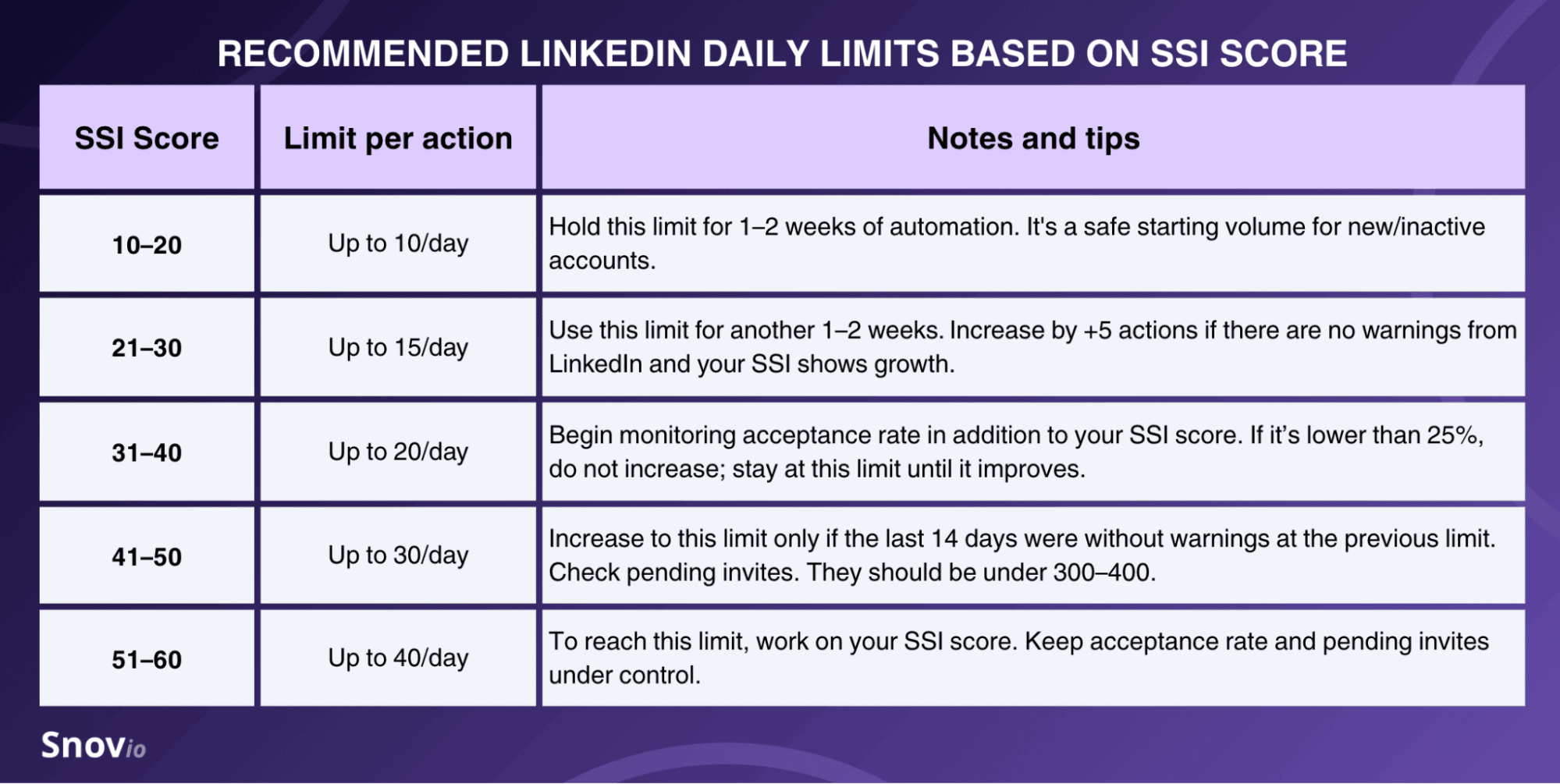
For example:
Suppose your SSI score is lower than 20. In this case, you may set the following safe mix of LinkedIn touches per day:
- Profile views: 9–10
- Connection requests: 6–9
- Follows: 6–8
- Post likes: 8–10
- Skill endorsements: 4–6
- Messages: 2–5
Learn how to set safe LinkedIn automation limits and randomize those numbers to avoid bot-like activity.
Start with “social warming” and personalize
Since LinkedIn is particularly harsh on bulk messaging, don’t spam your prospects with messages or InMails straight away.
🔷 Best practice: Experts from PhantomBuster recommend you begin with “lighter” LinkedIn steps to “social-warm” your leads: visit their profile, endorse one skill (only when appropriate), like their post, or send a connection request. This is the first step toward both personalization and safe LinkedIn automation.
Also, when choosing LinkedIn automation software, make sure it offers built-in personalization options, such as Dynamic variables or Spintax.
For example:
To boost outreach efforts on the platform, INTERLUNAR used the Snov.io LinkedIn automation software, offering both Spintax and Dynamic variables for effective personalization of connection requests, InMails, and follow-ups.
Here’s one of my go-to workflows: I strategically structure outreach by starting with a personalized LinkedIn connection request, followed by an introductory message. Then, I send a targeted follow-up with an e-coffee invitation. All via Snov.io.
Founder of INTERLUNAR



Benefit from reciprocal actions
If you don’t have a decent number of connections yet, don’t rush to invite everyone.
🔷 Best practice: Set your automation tool to first view profiles or like posts without sending connection requests. Remember that some of these contacts will visit your profile in return (principle of reciprocity) or like your post as a reciprocal gesture. Or even send you a connection request.
Provided you have an authoritative-looking and visually appealing page, you may get some effective inbound connections from profiles you’ve visited.
This way, it may have a cumulative effect over time. What’s even better, you can rely less on outbound connection requests and minimize their number to avoid LinkedIn restrictions. Rather than chasing every new connection, you’re building visibility.
→ Discover how to make your LinkedIn profile more attractive to prospects with AI in our ChatGPT for LinkedIn guide.
Remove pending connection requests
Let’s be realistic — not every LinkedIn prospect will accept your connection requests, and that’s okay and absolutely normal. But it’s not okay if you don’t delete these old connections for which you received no responses, as it might indicate that your connection to people isn’t actually welcomed.
So, don’t forget to do regular LinkedIn cleaning and withdraw the connection invites that haven’t been accepted. LinkedIn doesn’t notify users when you withdraw, so there’s no social cost.
Do you withdraw connection requests when they go unanswered? I do – and you should too. If they build up, LinkedIn sees them as spammy. I generally give people a week to accept me, or I withdraw the invite.
Founder of The Lime One

🔷 Best practice: Remove old connection requests after 7–14 days of no response. This will keep your pending queue healthy without giving up too early.
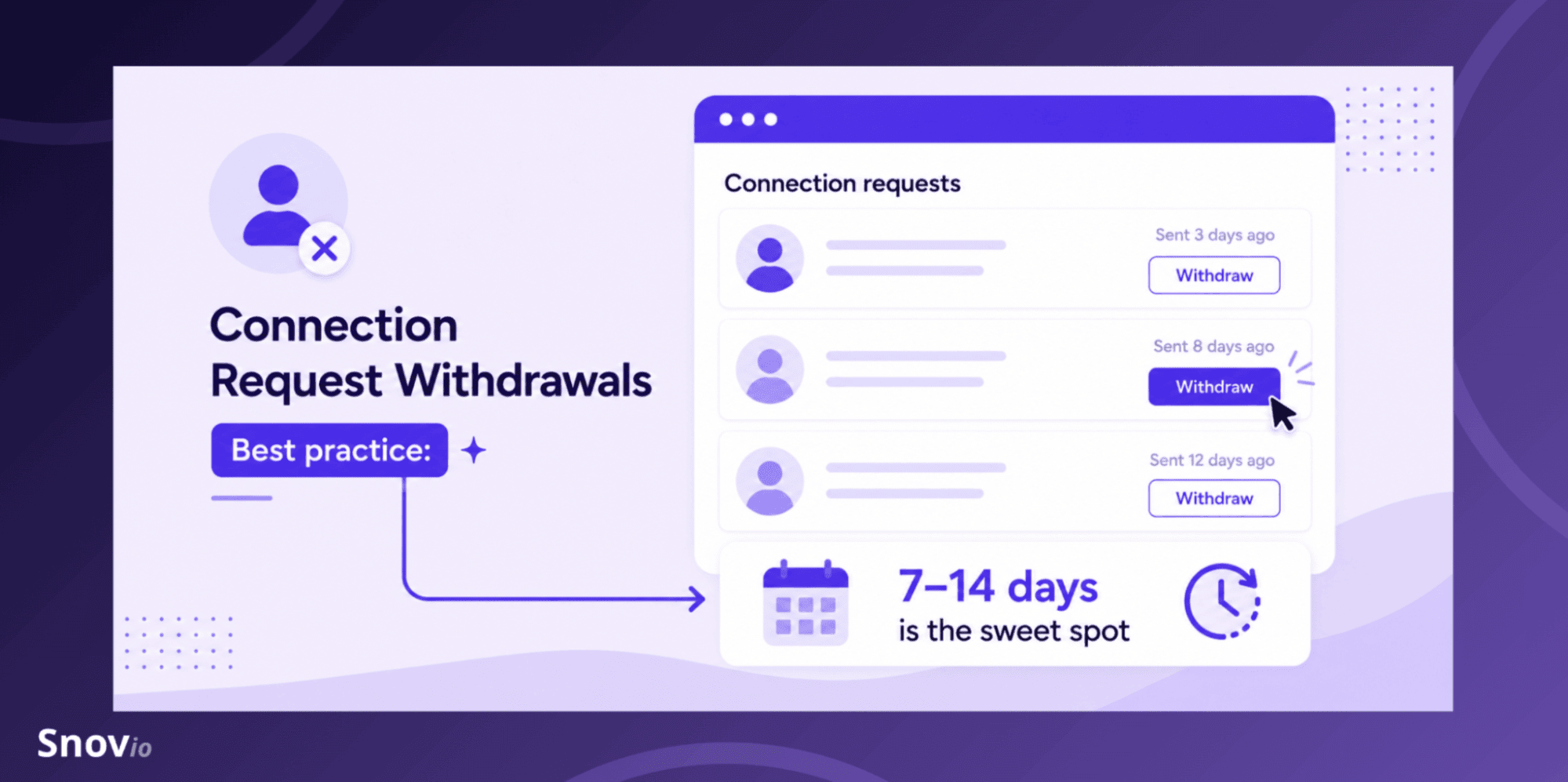
You can withdraw pending invites either manually or automatically. With some LinkedIn automation software, such as Reply or HeyReach, you will have to do it manually. While others, like Snov.io or Expandi, let you set automatic withdrawals to safeguard your LinkedIn account reputation.
Key takeaways: Which is the best LinkedIn automation tool?
The choice of the best solution for LinkedIn automation depends on your team’s needs and goals. Here’s a full breakdown of all 30 tools by use case:
- Best for safe LinkedIn lead generation and outreach automation: If you’re a founder, solo SDR, or a small-to-mid B2B team, consider Snov.io, Dripify, Linked Helper, We-Connect, or Dux-Soup. For larger teams and enterprises — Reply, Expandi, HeyReach, Meet Alfred, or Lemlist.
- Best for lead scraping and data extraction: Evaboot, Surfe, Kaspr, Lusha, or TexAu.
- Best for messaging: LinkedRadar, Waalaxy, PhantomBuster, SalesRobot, or Octopus CRM.
- Best for content automation: Taplio, SocialPilot, Supergrow, MagicPost, or LinkedGrow.
- Best for multichannel outreach across 3+ channels, including LinkedIn: Mailshake, La Growth Machine, Zeekeo, SmartReach.io, or Salesloft.
If you’re still sitting on the fence and deciding what you truly need, choose the lowest-risk route and automate your LinkedIn outreach (along with your emails) with Snov.io. Let it help you cautiously switch on your outbound autopilot mode.