
Finding an email is easy. Finding the right email for cold outreach – that’s where the real challenge begins.
In 2025, ZeroBounce verified more than 11 billion addresses, but only 62% of them were classified as valid. Just think: 4 of 10 emails were invalid or risky, meaning they could lead to wasted sends, bounces, or deliverability problems instead of replies and closed deals.
So if you want cold emails to open the door to new opportunities, you first need to make sure you’re knocking on the right one. In this guide, we’ll explore how to find emails for cold emailing and use them legally in your outreach.
TL;DR:
The fastest way to find emails for cold emailing depends on what information you already have:
- Choose the Email Finder when you know the prospect’s full name and company.
- Use Domain Search if you know your target company and need to find employee email addresses and other details to identify the right person to contact.
- Use email finder extensions to collect contact information while browsing LinkedIn or company websites.
- If your target audience is active on LinkedIn, LinkedIn Search in Snov.io is one of the fastest options to find email addresses from profiles in bulk.
Whatever method you choose, always verify email addresses before sending to keep your bounce rate low and avoid deliverability risks.
8 ways to find emails for cold emailing
Now that you know how much data quality can affect your campaign results, it’s clear that a cold email outreach strategy should start with building an accurate contact list.
Below are proven methods to help you find the right contacts and follow cold email best practices from the start.
1. Use an email finder tool for a single lookup
If you already know who you want to contact, dedicated email finder tools are usually the fastest place to start. Enter your prospect’s first and last name along with their company domain, and the tool will search for their professional email address.
Many services also include a verification step, which helps reduce bounces and protect sender reputation. For example, Snov.io finds a prospect’s email based on their name and company website and automatically verifies each result.
When to use: Choose this method when you have a list of target prospects with their names and company names but are missing their contact details. Email lookup tools work well for both individual searches and larger lead lists.
Practical tip: Before running a search, make sure you use the company’s current domain. If your prospect has recently changed jobs, the email found with their old company website is likely outdated.
Limitation: No email finder has 100% coverage. If the tool can’t find the address, you may need to combine this method with manual search or other email-finding options on our list.

2. Search by company domain to find employee emails
If you want to target a company that perfectly matches your ICP but haven’t identified the right person yet, this method is for you. Domain email search helps you discover employees associated with a specific company and shows their names, positions, and available email addresses.
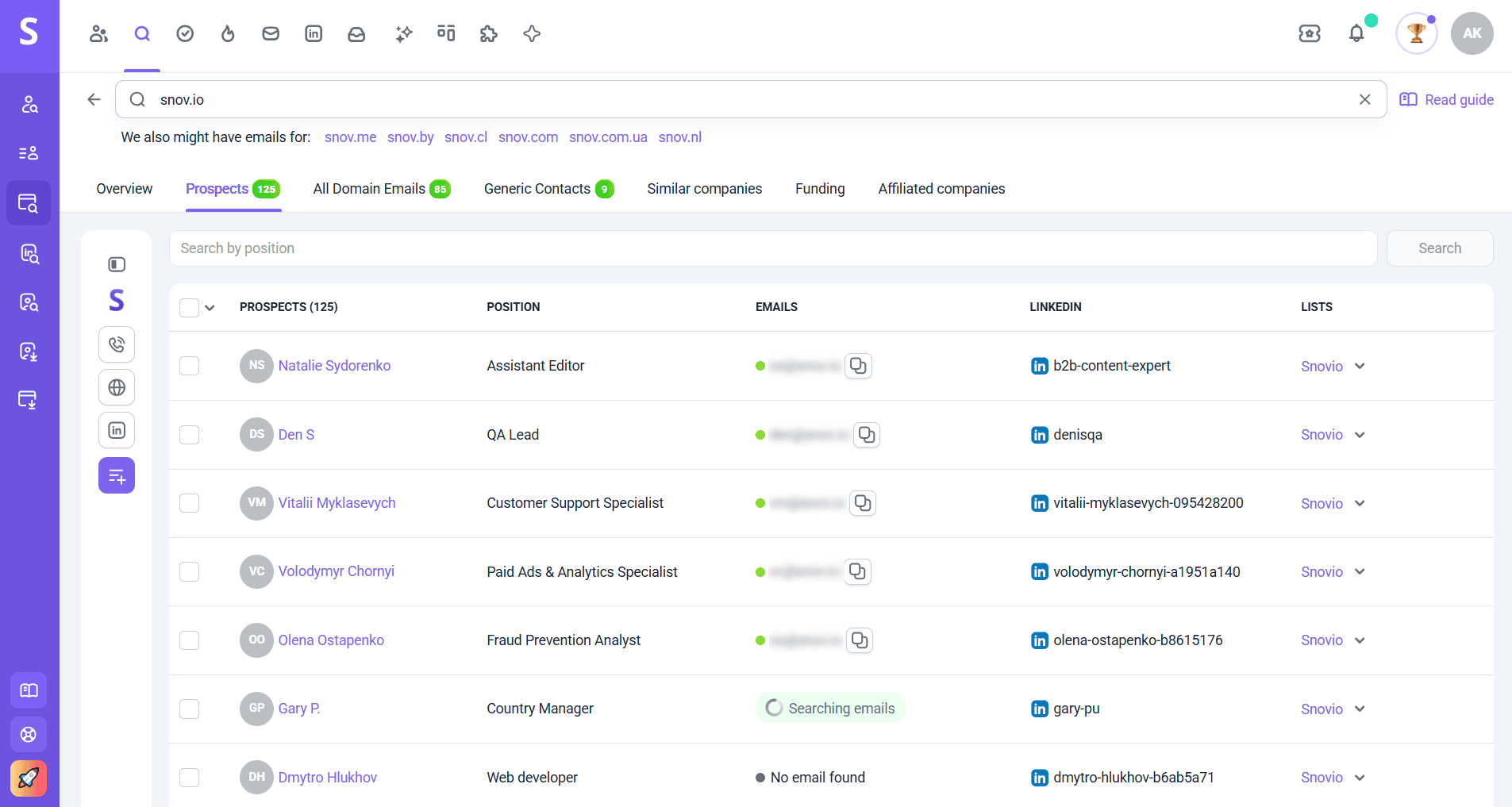
With this information, you can more easily identify decision-makers to contact. Platforms like Snov.io also uncover LinkedIn profiles of employees, where you can learn more about your prospects and use these details to personalize your sales pitch.
When to use: Domain search works best for account-based prospecting. This method is also helpful when you already know the company you want to target but need to identify the right person to reach out to.
Practical tip: Filter domain search results by department, seniority, or other criteria from the available details. Then collect prospects who best match your buyer persona instead of saving every email address in your outreach list.
Limitation: Coverage may vary from company to company, so you may not find an email address for every employee. Domain search results also depend on the data available to the provider. Besides, large companies may use several domains or email formats.
→ Learn more about how to find business email addresses from our recent post.
3. Find emails directly from LinkedIn profiles
LinkedIn can be especially useful when you’re looking for how to get email addresses for email marketing or cold outreach. With more than 1.7M decision-makers and 388K companies, this platform offers a large pool of B2B prospects.
The best part is that LinkedIn provides advanced search capabilities. This lets you identify people by role, industry, company location, and other valuable professional details before looking for their contact information.
To find emails for cold emailing on LinkedIn, start by checking the prospect’s profile. If they’ve chosen to share their email address publicly, you can find it in the Contact Info section under their name and headline.
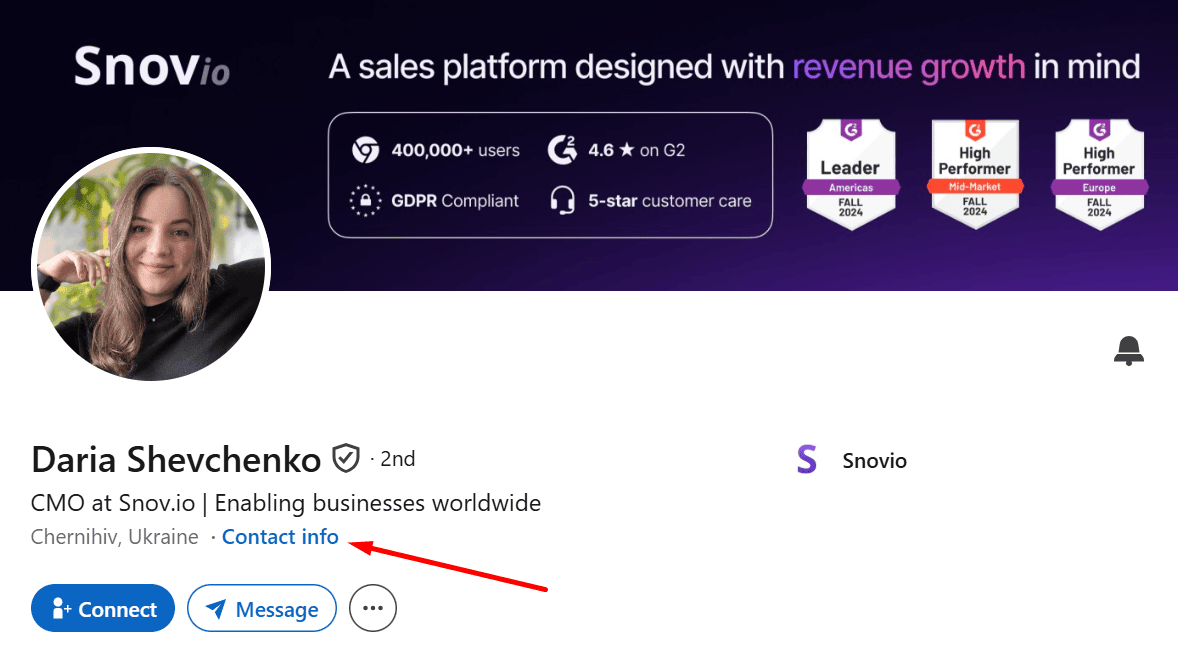
Keep in mind that visibility can depend on your connection degree or the prospect’s privacy settings. So even if the email address exists, it may not be visible to you.
When to use: If LinkedIn prospecting is part of your workflow, this method is a strong choice. It’s also useful when you want to qualify a prospect first.
Practical tip: If you can’t find an email address on the prospect’s profile, try Snov.io LinkedIn Email Finder. Simply install the extension and run it on the profile page of the person you’re interested in. You can also use the Email Finder on LinkedIn search results and company pages.
Limitation: Not every profile has a publicly available email address. Profile information may also be outdated if a prospect hasn’t updated it recently.
4. Check the company website
Company websites can reveal accurate email addresses without specialized tools, so manual search is still worth trying. Look through About, Team, and Contact pages, where businesses often publish employee contact information.
When to use: This method is good for one-off searches or when you’re researching a small number of high-value prospects. You can also check company websites when your email finding tools don’t return any results.
Practical tip: Don’t stop at contact-related pages. Explore the Blog, especially author pages, where you can find an author’s email address. Employee bios, downloadable reports, and event pages may also include contact details.
Limitation: Although this method is free, it’s difficult to scale. Furthermore, it’s often impossible to find a specific employee’s email because many companies publish generic addresses like info@company.com or sales@company.com.
5. Use Google search operators to surface public emails
Another manual method to find emails for cold emailing is advanced Google search. It can help uncover email addresses published across company websites, PDFs, conference pages, and other public sources.
Use search operators to narrow down the results. For example, you can try the following searches:
- “[First name] [Last name]” “@company.com”
Example: “Oleksii Kratko” “@snov.io”
- site:company.com “[First name] [Last name]”
Example: site:snov.io “Oleksii Kratko
- site:company.com “@company.com”
Example: site:snov.io “@snov.io”
- site:company.com filetype:pdf “@company.com”
Example: site:snov.io filetype:pdf “@snov.io”
- “[First name] [Last name]” email
Example: “Oleksii Kratko” email
When to use: Google search can help when you need to find a specific, hard-to-locate email address or want to double-check information you received through another method.
Practical tip: If searching for one person didn’t return useful results, try looking for the company’s domain combined with words like “email,” “contact,” “press,” and so on. You may find another employee email address and use it to identify the company email pattern.
Limitation: Google shows only the information that has been publicly indexed. Search results may also contain old addresses, so even if an email appears online, there’s no guarantee that it’s still active.
6. Identify and replicate common email patterns
Let’s first define what an email pattern is. An email pattern is the standard format a company uses to create addresses for its employees, such as firstnamelastname@company.com or firstinitiallastname@company.com.
Many companies follow a consistent format for all employees. So if you find a few employee emails, you can potentially guess the address you need. Review and compare the confirmed contact details you already have, identify the company email pattern, and apply it to your prospect.
When to use: This method can be helpful when you know your prospect’s full name and company but can’t find their exact email through other channels.
Practical tip: Use more than one existing employee email as a reference. Companies may assign different patterns for different locations or departments. So one email doesn’t mean you can apply that format to all employees.
Limitation: Although this method may be effective, it’s still an educated guess. Always use an email verification tool to check that the address is valid.
Format
Type
Server status
Auto-generated
Catch-all
7. Ask for referrals and warm introductions
Need an email address? Ask for it! Surprisingly, sometimes the easiest way to find the right contact information is to ask someone you already know who also knows your prospect.
For example, you’re targeting a company and notice that one of your ex-colleagues or LinkedIn connections knows the decision-maker. Instead of juggling different methods to find the right email address, ask your mutual contact for an introduction or help reaching the person you need.
Or consider another case: you already know someone from the company you’re targeting, but this person isn’t responsible for the problem your product solves. You can ask whether they can point you to the right colleague.
This method also helps build rapport and establish trust before you even send your first email.
When to use: This method is especially useful for high-value accounts, partnership opportunities, or industries where trust matters a lot.
Practical tip: Make your request easy to act on. Mention the specific person or role you want to contact and briefly explain why the introduction would be relevant.
Limitation: This approach depends heavily on the strength of your professional network and doesn’t scale easily. Your mutual contact may also refuse to share contact details without permission (and you definitely shouldn’t pressure them to do so 😀).
8. Source leads from niche communities, forums, and events
Industry communities, professional groups, and events can help you discover highly relevant prospects for cold email campaigns. After all, the likelihood of converting a prospect who has already shown interest in a topic related to your offer is high enough.
Visit webinar pages, participate in niche forums, or join industry groups to identify interested prospects first. Then, look for their business emails through their company website, LinkedIn email finder, or other legitimate channels.
When to use: This method is useful when you’re targeting a narrow niche and searching for specific prospects or accounts. It’s also good for identifying higher-intent prospects for your cold outreach.
Practical tip: Look for intent signals. Someone asking a specific question or discussing a challenge your product helps with may be a stronger prospect than even a contact who matches every ICP criterion at first glance.
Limitation: This method requires more effort and time, as you need to participate in communities or review discussions to find potential leads. Some communities also prohibit scraping and commercial solicitation. Always respect platform rules and applicable privacy laws.
How to find emails at scale with Snov.io
Besides tools for individual email discovery, Snov.io also provides several ways to find email addresses in bulk. Let’s explore how these capabilities can help you look up contacts at scale in practice:
Bulk email search
This method is useful when you already have a list of prospects for outreach and want to find their email addresses without manual searching. To use Bulk Email Search, you need your leads’ full names and company domains.
Simply upload your CSV file with this information into Snov.io, and the tool will look up emails for the whole list at once. Once the results are ready, you can use the built-in verification to check which addresses are valid and suitable for cold outreach before adding them to your campaign.
Since we started using Snov.io, our bounce rate dropped from 15% to 5%. At the same time, business emails found with its Email Finder helped us reach the right people with our campaigns and increase our average open rate from 50% to 65%.
Head of Sales Development at PVcase

Bulk domain search
If you have a list of target companies, Bulk Domain Search is one of the fastest ways to find emails for further outreach. Using this method, you don’t have to search for employee contact details for each account separately. Upload the list with company names or domains and discover prospects across multiple businesses at once.
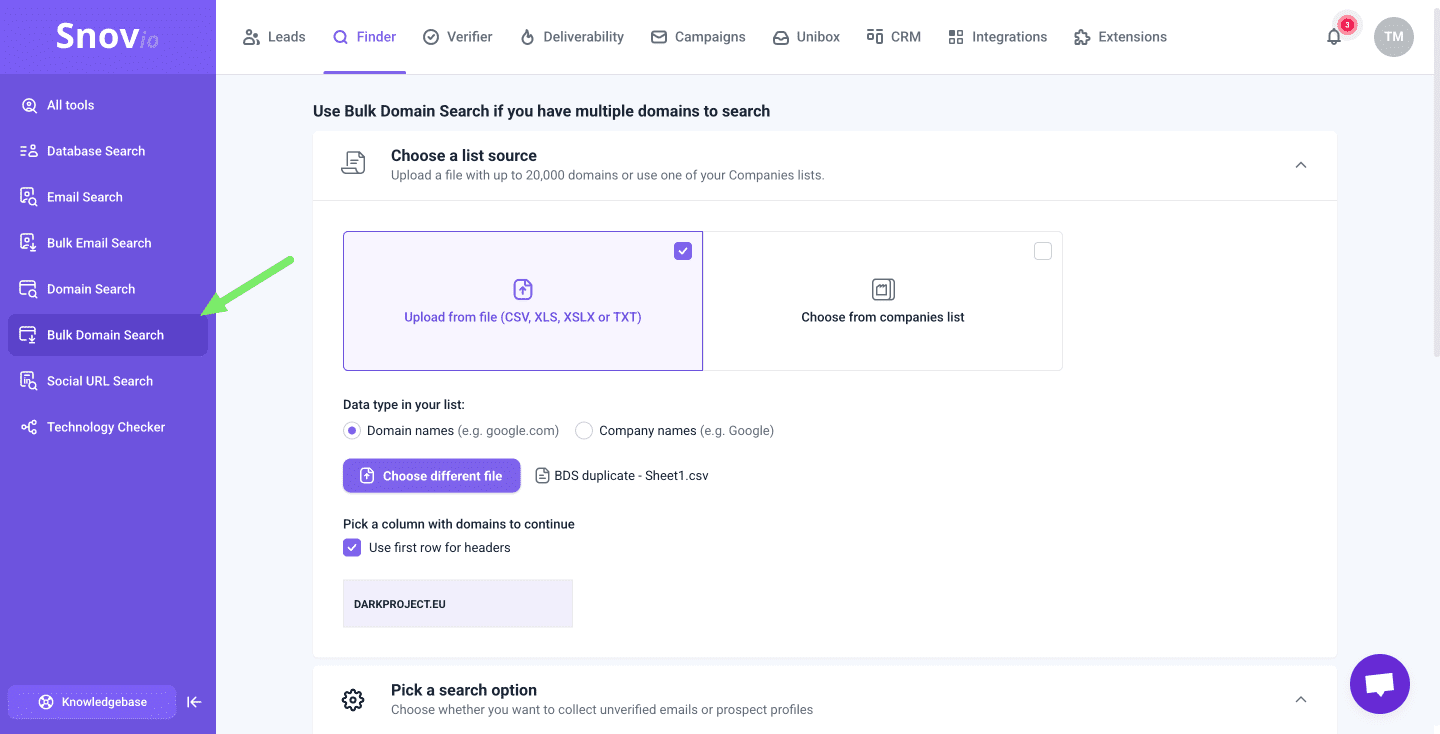
Narrow down your search by position or other available filters to identify the right person to contact for each target company. You can also save the full list of employees if you need broader coverage.
Chrome extension
If you want to collect prospects while browsing, use the Email Finder Extension. Install it in Chrome and run it on company websites to quickly find available email addresses and save the most relevant contacts to your list.
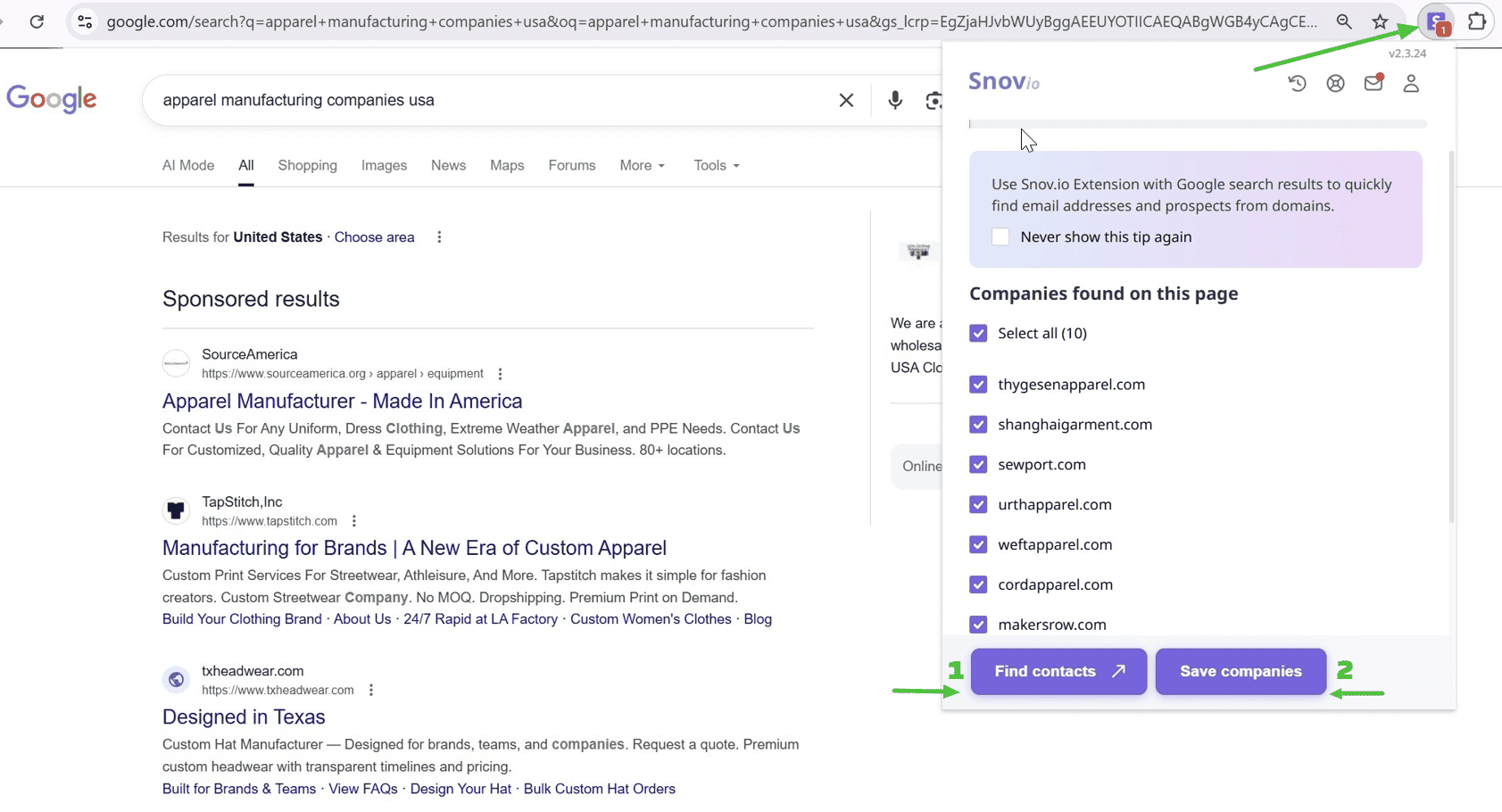
You can also use the extension when looking for prospects in Google. Instead of saving each target account manually, run the Email Finder directly on search results pages. The tool will identify companies found there, so you can save them and then find employee emails in bulk in Snov.io.
LinkedIn search
Besides the email-finding extension for on-platform email discovery, Snov.io also provides built-in LinkedIn Search within the app. With this option, you can find prospects using a specific profile URL, LinkedIn filters, or a URL with search results.
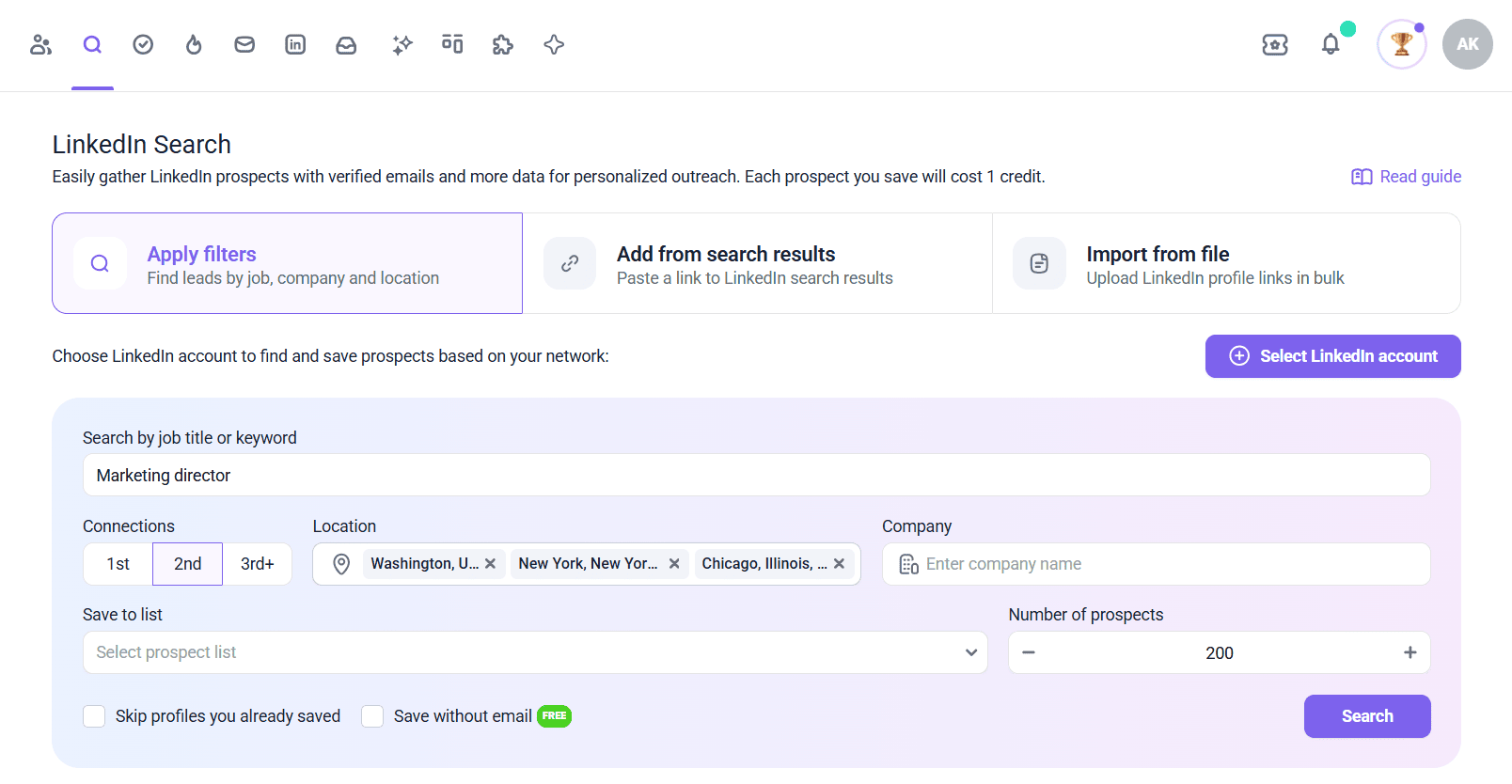
For example, you can upload a CSV with LinkedIn profile URLs and discover their email addresses in bulk. Or if you’ve connected your LinkedIn account to Snov.io, you can search for prospects by keyword and narrow down results with filters, like connection degree, industry, and more.
Database search
If you don’t know who exactly you want to contact and want to build a list of relevant leads from scratch, use the Database Search. Apply filters, such as job title, department, industry, location, and others, to find prospects or companies that match your ICP in Snov.io’s built-in database.
You can also use AI-powered search to look for relevant prospects with a single prompt instead of setting filters manually. Once you’ve found the right contacts, save them to your list to automatically find their emails in bulk.
Is it legal to find and use emails for cold outreach?
Yes, finding and using emails for cold outreach can be legal, but the requirements vary depending on where you and your prospect are located. Generally, you need a legitimate reason for contacting and must comply with applicable privacy and marketing laws.
For example, in Europe, GDPR applies to how you collect and process personal data. Direct marketing may sometimes rely on legitimate interest, meaning you have a valid business reason to contact someone and that your outreach is relevant to their professional role. Keep in mind that email outreach may also be subject to ePrivacy and national regulations across Europe.
If you’re running outreach in the US, you need to comply with the CAN-SPAM Act. It doesn’t require prior consent for commercial emails. However, you must follow its requirements, which include:
- Accurate sender information and subject lines
- A valid physical address
- A clear opt-out method
Whatever market you’re targeting, legal requirements should shape how you build your list and contact potential customers. Here are a few compliance-focused email outreach best practices to reduce privacy risks and respect recipients’ rights:
- Contact people only if your offer is truly relevant to them
- Be transparent about who you are and why you’re reaching out
- Use compliant email finder tools
- Always provide an easy opt-out option
- Stop contacting people who ask you to
📌 To sum up, make it a rule always to check the regulations that apply to your prospect’s location before launching an outreach campaign.
Why buying or scraping emails is a bad idea
Though it may seem like the quickest way to get emails for cold emailing, I strongly recommend avoiding purchased lists whenever possible.
Third-party lists can contain outdated, invalid, irrelevant, and duplicate email addresses — a perfect recipe for higher bounce rates and weaker deliverability.
Besides, even a technically valid email from such a list doesn’t mean the person behind it is relevant to your offer.
Poor data quality can also increase the risk of triggering spam filters, which may not only affect campaign performance but also hurt your overall deliverability. Deliverability issues, in turn, can hurt revenue: 64.6% of businesses reported poor inbox placement directly impacted their ROI.
So, when figuring out how to get emails for cold emailing, your goal shouldn’t be to collect as many addresses as possible. Focus on finding accurate contact details for prospects who actually match your ICP. A smaller, relevant list can bring much more value than sending to thousands of contacts, hoping some are the right fit.
If you still decide to use email scraping tools or external contact data, check how the information was obtained and whether you’re allowed to use it for cold outreach.

Always verify emails before sending
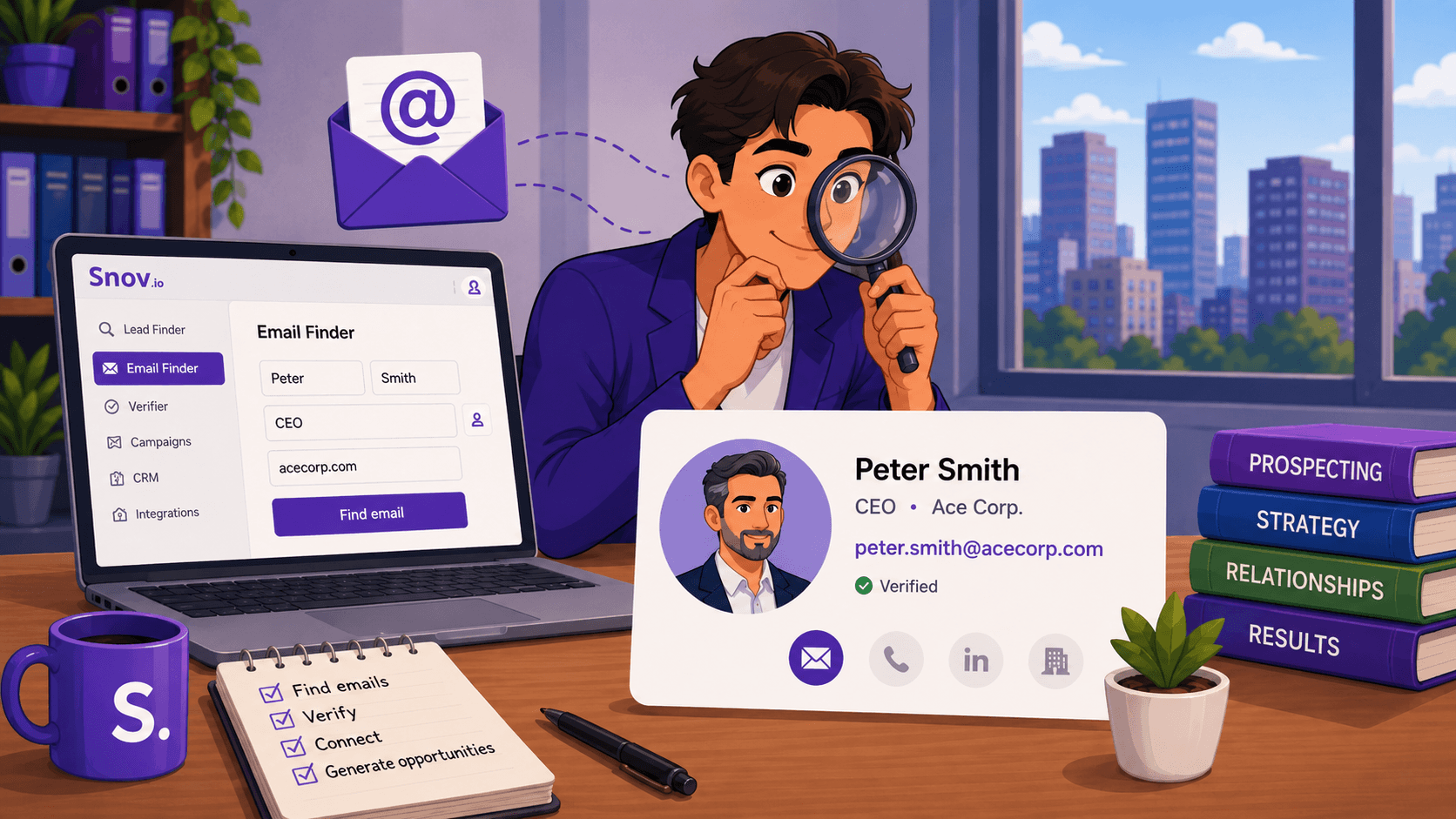
It’d be great if any method to find contact details returned only high-quality email addresses. In reality, ZeroBounce identified more than 2.6 billion invalid emails in 2025, and they made up 23% of all addresses checked. That’s why it’s crucial to verify emails before you hit “Send”.
Unverified lists may contain invalid, catch-all, or risky addresses, which can increase bounces, trigger spam-related issues, and decrease overall performance. These signals may damage sender reputation over time and even make it harder for your next cold email campaigns to reach the inbox.
To protect deliverability, check your list with a reliable email verification tool. For example, you can use Snov.io Email Verifier. It uses a 7-tier verification process to provide 98% accuracy and keep bounce rates below 1% on verified lists.
With this Email Verifier, you can regularly check addresses both individually and in bulk, quickly filter out risky contacts even from larger lists.
Make email verification a must-have step between finding addresses and sending. This way, you’ll reduce bounce risk and ensure your outreach efforts aren’t wasted.
Although there’s no universal bounce-rate threshold that guarantees good deliverability, aim to keep your bounce rate as low as possible. If you notice a sudden increase, pause the campaign and check your list quality before sending more emails.
Email service providers closely monitor your activity, track the percentage of your bounces, and give them even the slightest hint — and the reputation of a spammer gets stuck to you. To avoid this, there is email verification. Run your contact list through 2 different email validation services to clean it up. How often, you ask? Every time before launching a campaign.
Outbound Outreach Expert at Snov.io

From finding emails to getting replies: Cold email best practices
You’ve got the right emails — now let’s put them to work. Before we wrap up, here are a few practical cold email outreach tips to help you turn those contacts into replies and opportunities.
✅ Define your Ideal Customer Profile
Your cold outreach strategy should start with defining your target audience. Think about who exactly you want to reach and build an ICP based on industry, job title, company size, pain points, and other relevant characteristics. A clear customer profile helps you focus on prospects who are most likely to be interested in your offer.
Struggling to define your buyer persona? Let Snov.io AI do this work for you. Add the link to your website and briefly describe your company and product, and the AI ICP Builder will create your ICPs in seconds.
Each persona includes details like industry, role, company size, pain points, and other criteria you can use for more targeted email discovery and outreach.
✅ Prepare your sending setup
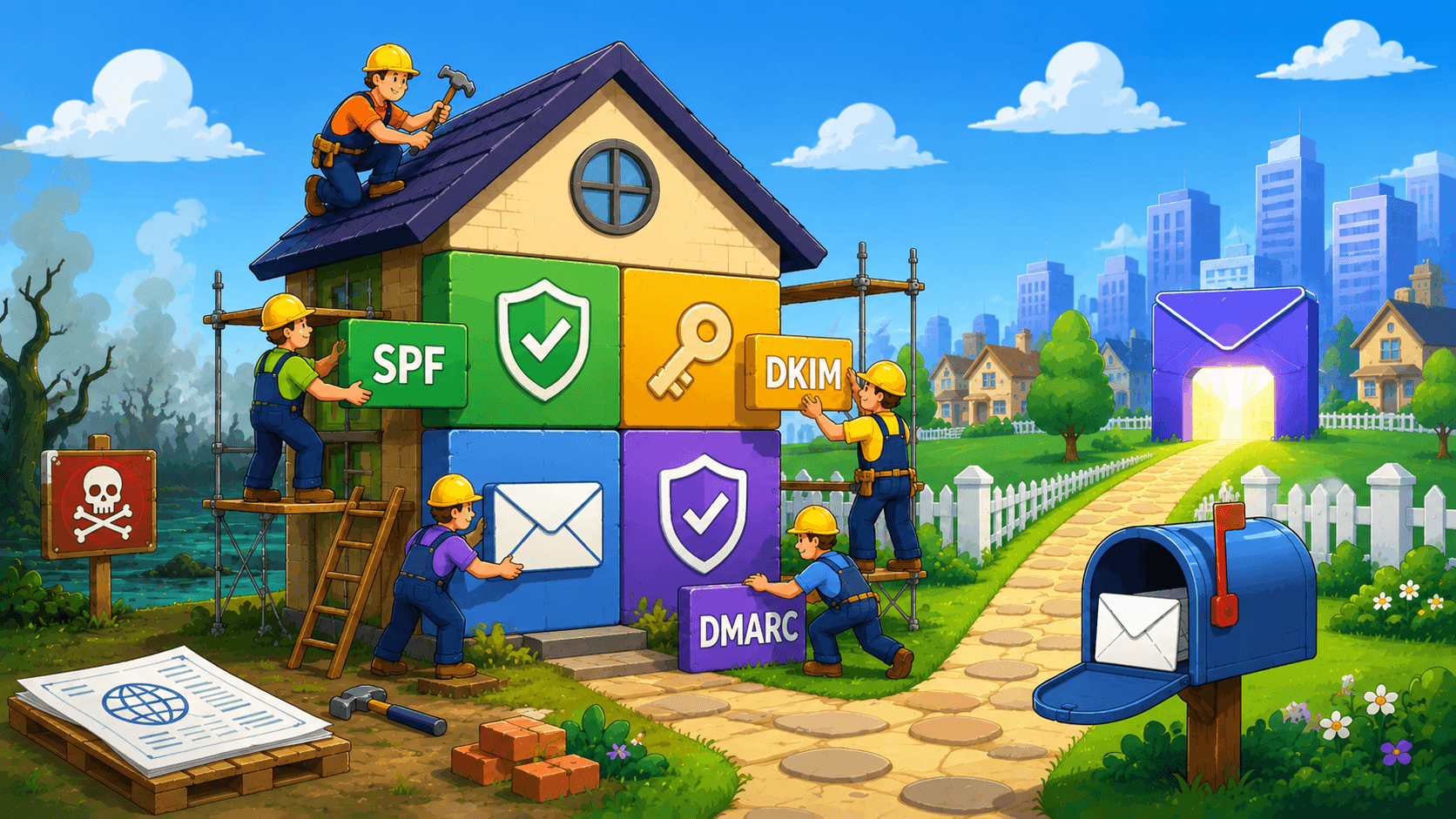
To increase the chances that your cold emails actually reach prospects’ inboxes, set up a proper sending infrastructure. Configure SPF, DKIM, and DMARC records and warm your email accounts. Once your campaign starts, monitor deliverability to reduce the risk of landing in spam and catch potential issues early.

✅ Keep subject lines clear and relevant
A subject line is the first thing your prospect sees and can influence whether they open your email. So write a subject line that makes recipients curious about what’s inside. Keep it short, clear, and relevant to the prospect.
Another important B2B cold email best practice is to avoid overly promotional or misleading subject lines that may increase the risk of landing in spam. Make sure your subject line connects to your message so prospects know what to expect when they open your email.
✅ Personalize your emails
One of the essential cold email tips in 2026 is personalization. Go beyond simply adding a first name. Consider how your offer connects to the prospect’s role, mention their recent project or achievement, or reference a specific challenge their company may be facing. This shows genuine interest and makes your outreach feel more personal and relevant.
✅ Follow up consistently
If a prospect misses your first email, it doesn’t always mean they’re not interested at all. Professionals usually have crowded inboxes, so your message can easily get lost. That’s why many cold email strategies include several follow-ups. Space your messages out and add new value each time instead of repeating the same pitch.
✅ Maintain a balanced sending volume
When you’re only learning how to do cold email marketing, it may seem that sending thousands of messages can bring higher response rates. However, increasing volume too quickly may hurt your deliverability. So it’s better to start with fewer emails and scale your sending gradually. Watch your bounce and complaint rates and pause scaling if you notice any issues.
→ Need more tips? Learn how to write messages that convert with our cold email guide, complete with ready-to-use templates.
Key takeaways: What is the best way to find emails for cold emailing?
There’s no single best way to find emails for cold emailing. The right approach depends on how many contacts you need, what you already know about your prospect, and other factors.
The success of your cold outreach starts with accurate contact data. Let’s sum up key things to keep in mind to ensure accuracy and efficiency:
- Choose email-finding methods based on the information you already have about your prospect.
- Prioritize relevance over quantity and focus on building a list of prospects who match your ICP.
- Always verify the emails you find to ensure they are safe to send to.
- Follow privacy and marketing laws that apply to your prospect’s location to keep your outreach compliant.
To get more from your cold campaigns, support high-quality email data with proper email infrastructure, strong subject lines, personalized messages, consistent follow-ups, and reasonable sending volumes. Use Snov.io if you need email finding, verification, and outreach tools in one place.