
TL;DR: How to get business email addresses — Quick roundup
Here’s my revelation from the very beginning: there isn’t one “best-suited” way to find corporate email addresses. The right technique depends on whether you need one contact or a hundred/thousand, how much time you’re ready to dedicate to searching, and other factors.
That’s why I compiled them all into the following comparison table to help you pick the right method.
| Method | Best for | Accuracy | Speed of bulk email search |
|---|---|---|---|
| Email finder tool | Single or bulk search for verified emails | High (pre-verified) | Very fast ⭐⭐⭐⭐⭐ |
| Company website | General, support, or department company emails | Very high (primary source of truth) | Slow ⭐⭐ |
| LinkedIn search | Decision-maker emails and targeted B2B lists | Medium-to-high | Fast ⭐⭐⭐⭐ |
| Advanced Google search (operators) | One-off lookups and social media emails | Low-to-medium | Very slow ⭐ |
| Directories and databases | Local or small-business emails with no site/LinkedIn presence | Medium | Medium ⭐⭐⭐ |
| Email pattern identification | Free method when you already know one employee’s email | Low (requires obligatory verification) | Fast ⭐⭐⭐⭐ |
| AI assistants (Claude, ChatGPT) | Single lookups or spotting an email pattern | Low-to-medium (can make mistakes) | Slow ⭐⭐ |
I drew these ratings from the pros/cons of each method discussed below. Keep reading to see the peculiarities and examples, or pick the most effective method right away.
Finding a company or employee email address is far from a walk in the park. It often feels more like a long and rocky uphill climb. In the mountain woods. In the dark.
No wonder every fourth sales rep considers getting direct contact information for decision-makers a major struggle they face in the daily prospecting process. Moreover, 16% of SDRs lack high-quality data on their prospects and businesses they represent.
In this article, we’ll discuss the easiest ways to find corporate email addresses, whether employee or general company emails, which will free up precious hours for your more strategic tasks.
What type of corporate email addresses are you looking for?
Depending on your purpose, you may find email addresses of business executives for sending cold email campaigns to C-suite leaders and other decision-makers. Alternatively, you may want to find company email addresses for informational or press inquiries.
So, before you start digging those up, consult the following list of business email addresses by type with examples.
| What are you trying to find? | Examples |
|---|---|
| Employee email addresses | j.smith@company.com, jane.d@company.com |
| Founder, co-founder, or executive email addresses | Founder@company.com, CEO@company.com |
| Other decision-maker email addresses | marketingdirector@company.com, salesopsmanager@company.com |
| General company email addresses | info@company.com, office@company.com |
| Department email addresses | hr@company.com, sales@company.com, marketing@company.com |
| Press/media email addresses | communications@company.com, pr@company.com |
| Support email addresses | help@company.com, customerservice@company.com |
Knowing what you’re after, let’s zoom in on the best methods to get them so that you can choose the right one for your specific use case and needs.

How to look up business email addresses: I tested the top 7 methods
While testing and comparing, I placed a sharper focus on how to find someone’s work email, from a founder/owner to an employee email address, with the hope of making this guide particularly useful for cold email outreach.
Each tactic has its key strengths and limitations worth considering. The point is to choose the one that suits you best. So, dive in and make your choice.
Pick an email finder tool — best for single or bulk search
If you need more than a handful of contact emails (and preferably verified ones), an email finder is by far the fastest way to obtain them.
You can choose one of the best email finder tools like these:
- Snov.io → Best for all-in-one prospecting, building cold email sequences, and managing customer relationships (offers a native CRM)
- Hunter → Best for full name and domain-based lookups
- Skrapp.io → Best for email extraction from LinkedIn with a Chrome extension
- Norbert (VoilaNorbert) → Best for one-off contact searches
- UpLead → Best for bulk lookups of contact details with direct dials and social links
Now, let’s see how you can use one of the email finders in action.
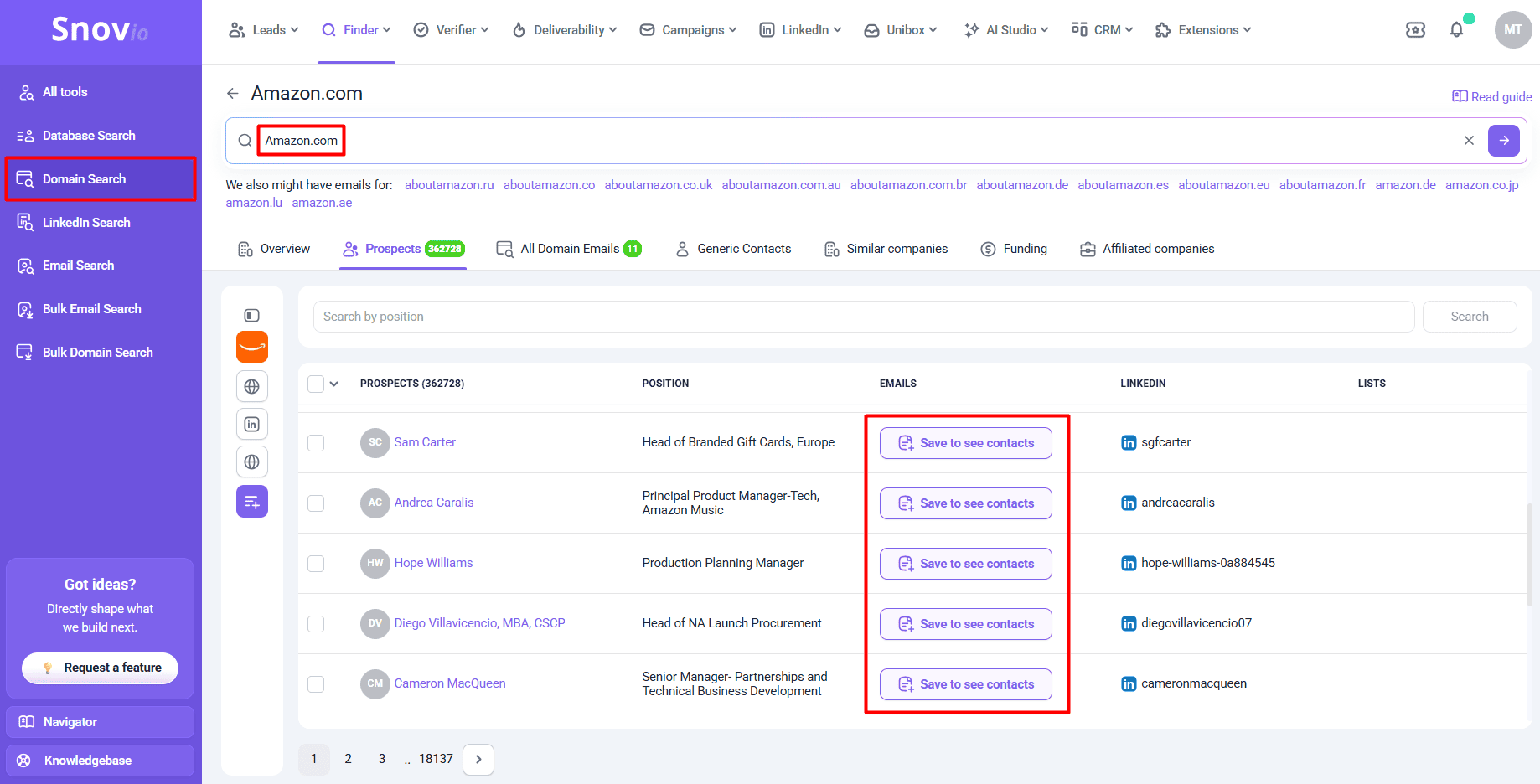
Suppose you want to find Amazon employee email addresses. Here’s how you can do it using Snov.io’s Email Finder tool.
Once you create an account at Snov.io, go to the Finder tab and click Domain Search. Enter the company domain (amazon.com) into the search bar, click the small arrow on the right to find contacts, and receive over 360K results.
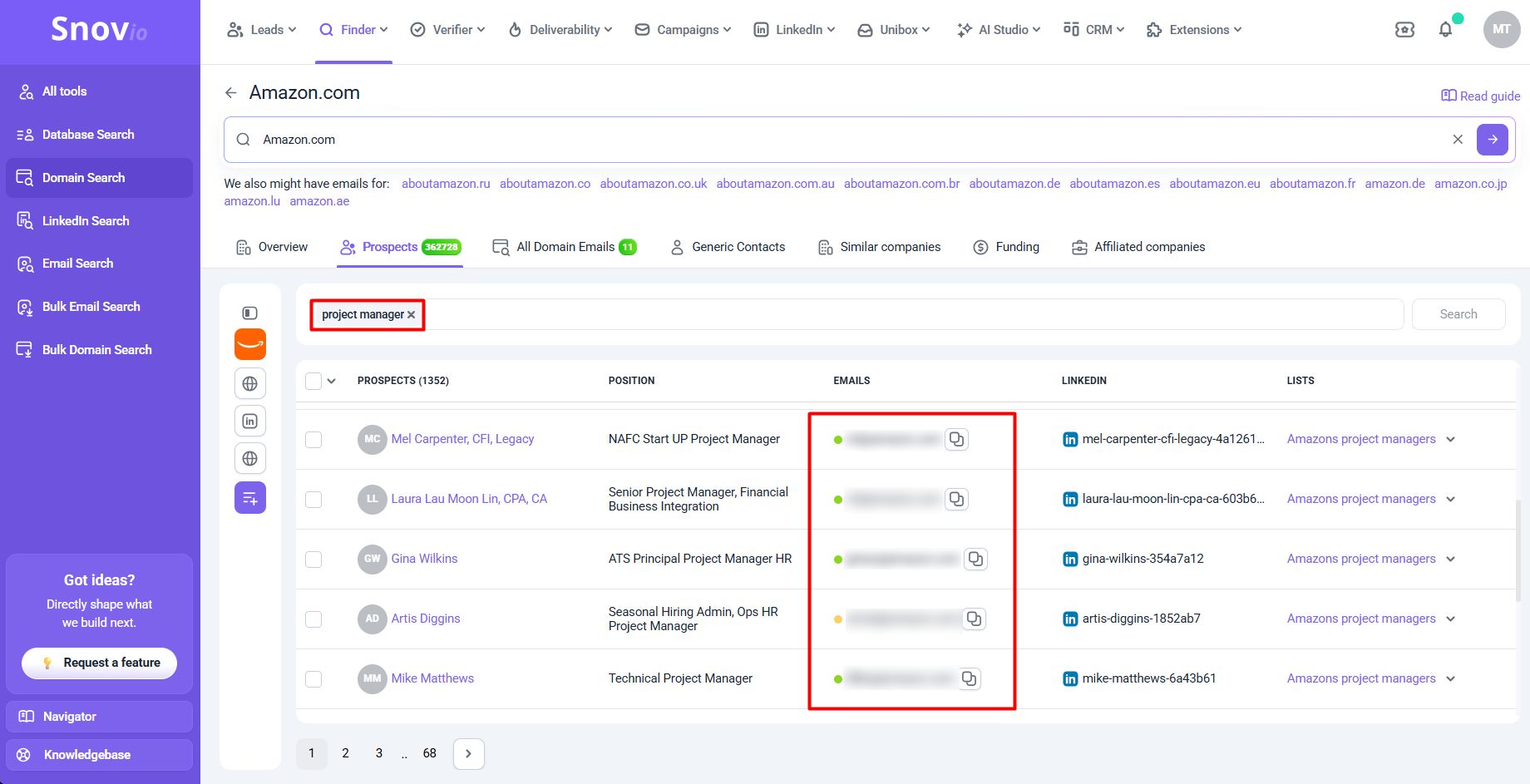
Narrow your search by position (e.g., project manager) and get pre-verified business email addresses with statuses (green for valid; yellow for unverifiable; red for invalid).
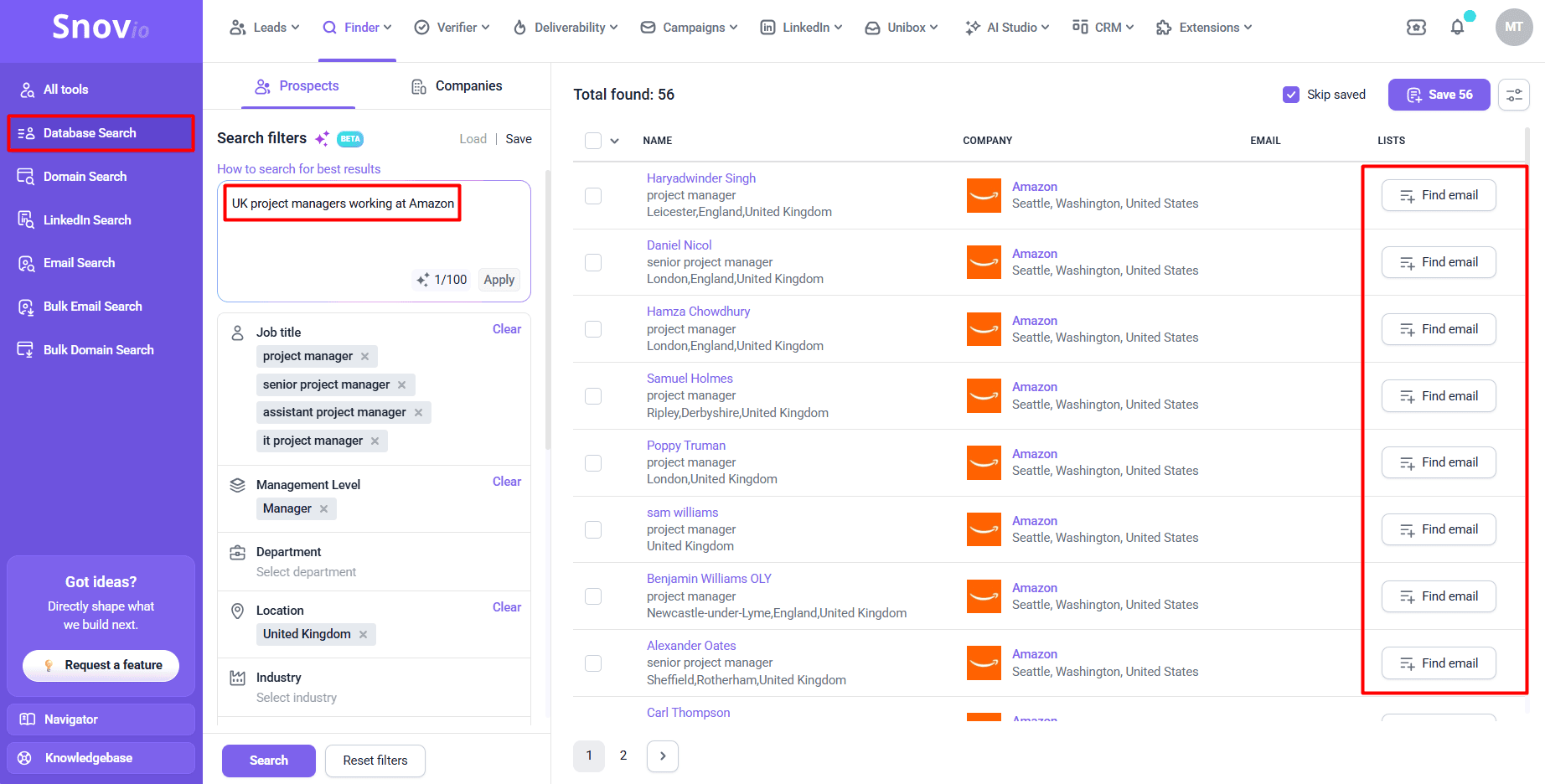
Alternatively, you can apply more advanced filters manually or with AI. Go to Database Search and type: “UK project managers working at Amazon,” for instance. AI fetches the results instantly.
Explore other search options if you know the contact name and their company name or domain (Email Search) or other data like LinkedIn profile URLs (LinkedIn Search).
| Pros of email finder tools | Cons of email finder tools |
|---|---|
| ➕ Fast email discovery: single or bulk | ➖ Paid subscription for bulk search (a free plan or trial is very limited) |
| ➕ Typically offer additional email verification services with a built-in email verifier | ➖ Some require credit cards for registration (e.g., credit card required by UpLead) |
| ➕ No manual copy-pasting, as most email finders have browser extensions and CRM integrations | ➖ Low database coverage for niche businesses or newly founded companies |
| ➕ Typically have large B2B databases | |
| ➕ Many email finders also function as outreach platforms, so you can go from found → verified → contacted without hopping between tools |
Scroll through the company website — best for general company emails
It sounds too basic, yet official websites remain free and reliable sources of contact information, especially when searching for common business email addresses, such as contact@company.com or press@company.com. These are often published in the most visible places on corporate sites to make it easier for customers and partners to reach them.
Where to find general company email addresses:
- “Contact us” page
- “Support” page
- “Help” center
- Press/media page
- Footer
- “Privacy” page
- “Terms and Conditions” page
For example:
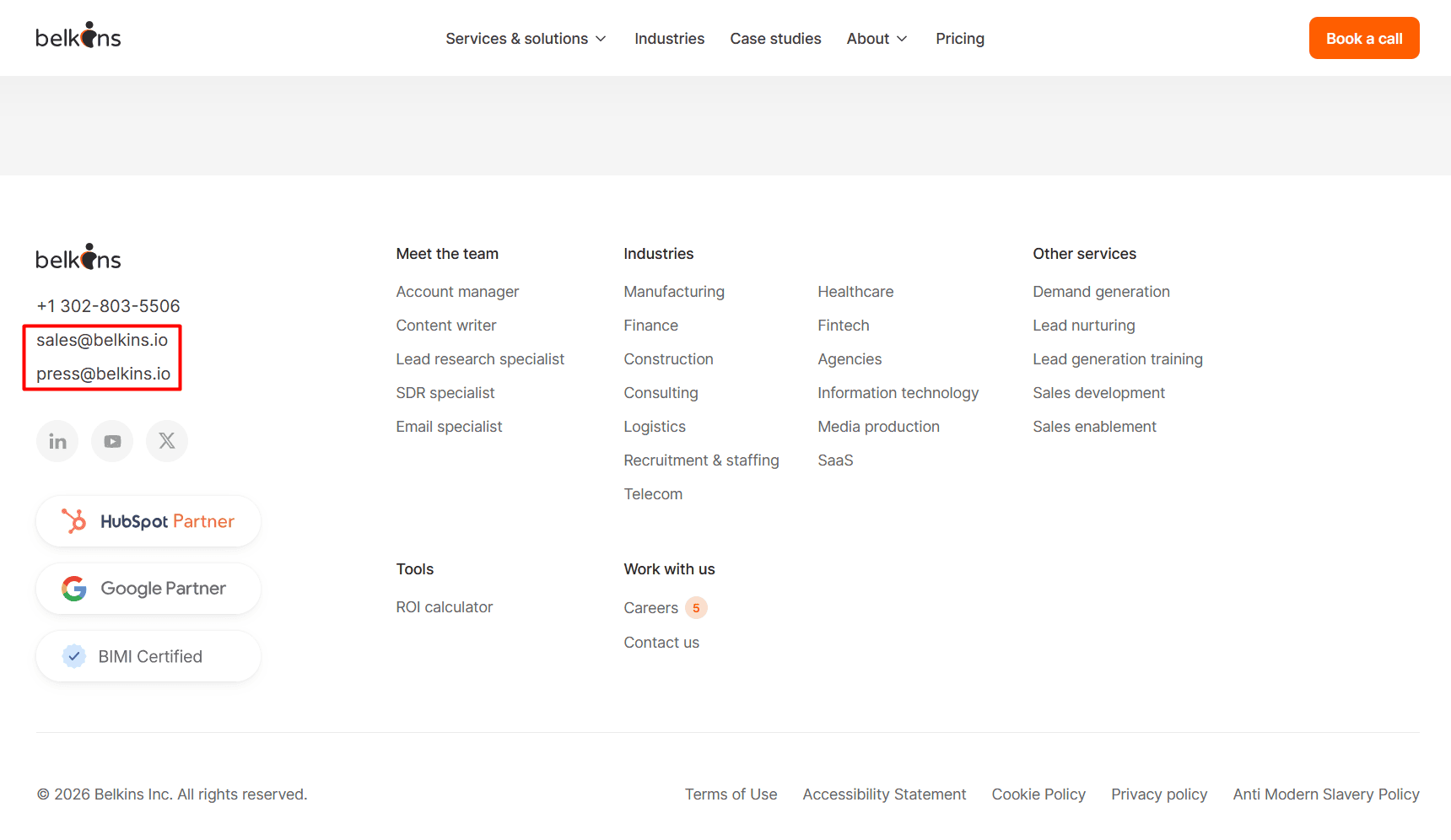
When I visited the official site of Belkins, I found 2 company emails (sales and press) immediately in the footer on the homepage.
Where to find company employee email addresses:
- “About us” page
- “Our Team” page
- Author/expert bio on the blog
- Press release
- Downloadable PDF (e.g., an annual report or whitepaper)
For example:
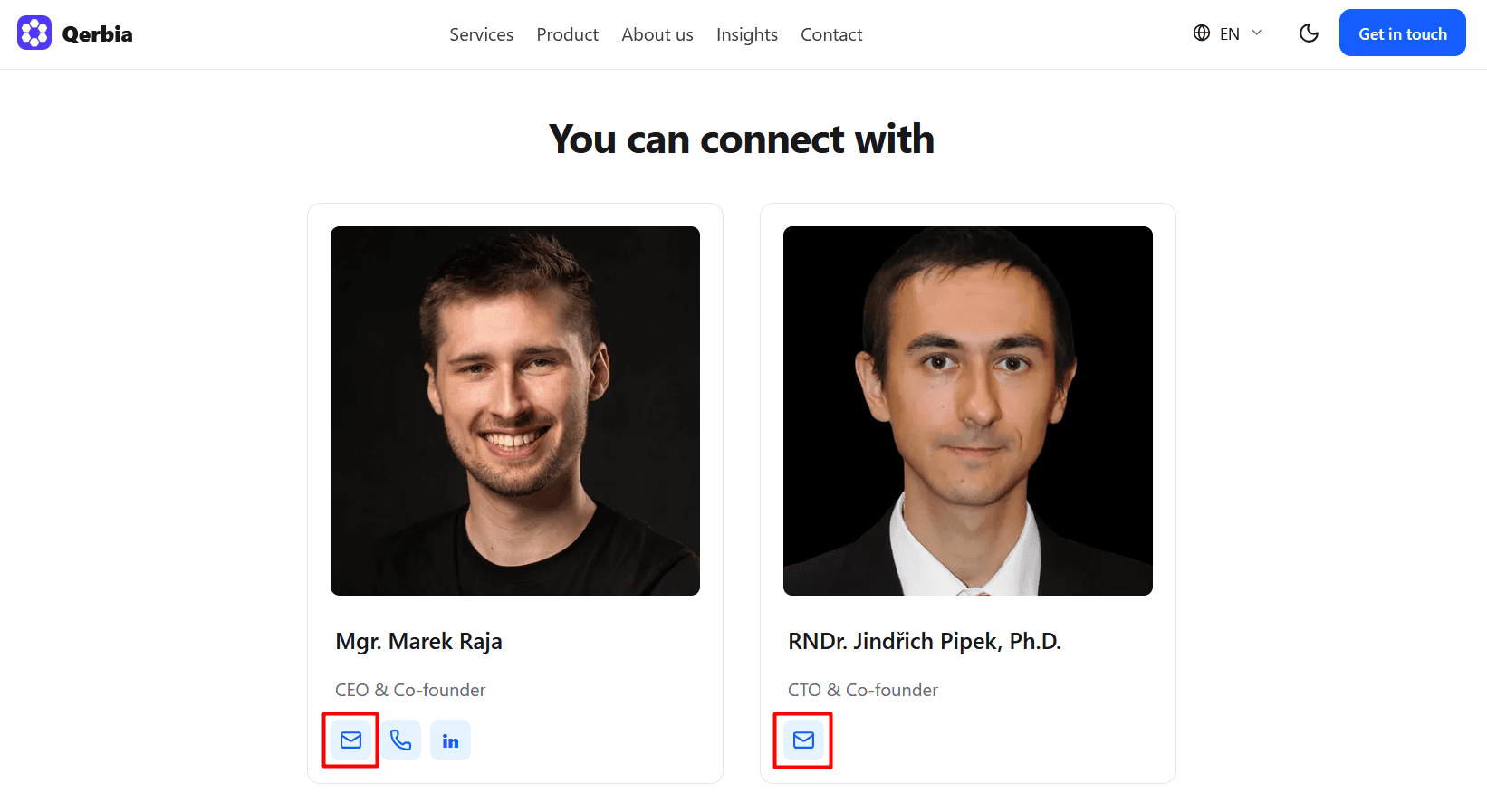
I tried my luck looking for small-business email addresses on company websites. I scrolled through a dozen websites in the IT consulting and web development niche, although it took me a while and yielded only 2 email addresses of business executives: the CEO and the CTO.
| Pros of company website search | Cons of company website search |
|---|---|
| ➕ Ideal for department or support emails | ➖ Too time-consuming if you’re browsing several sites |
| ➕ Free and accurate results straight from the primary source | ➖ Many companies don’t reveal their employee emails |
| ➕ Lower risk of finding out-of-date contacts | ➖ SMBs typically embed contact forms or list phone numbers |
Search on LinkedIn — best for generating B2B leads
It’s no secret that LinkedIn is the #1 network for B2B lead generation, generating 80% of all B2B leads across social media channels.
But do all of them publicly disclose their work emails on their profile pages?
Not all, of course, but some actually do. And here are several methods I tested to find business email addresses on LinkedIn.
Visit LinkedIn profiles
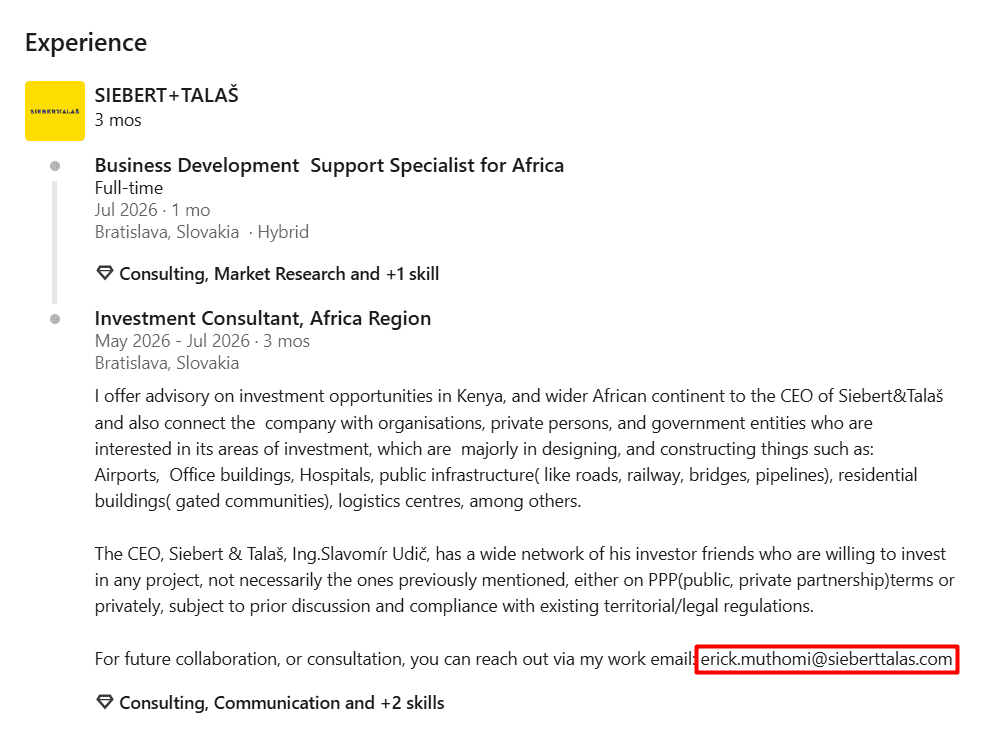
If you know a person’s LinkedIn profile, open it and check “Contact info.” It’s the most typical place to look up business email addresses on LinkedIn. But don’t hurry to close the tab just yet, even if you didn’t find anything there. There’s one more place, often overlooked — and it’s not even the “About” section (which is also a great place to look). It’s the “Experience” part.
For example:
I found the prospect’s email address in “Experience,” even though it isn’t mentioned in the “Contact info” section.
To avoid tiresome copy-pasting every contact, opt for a browser extension like the Snov.io LinkedIn Email Finder for Chrome. It automatically captures emails from LinkedIn profiles, company profiles, and search pages. You don’t even need to dig through the profile.
Need step-by-step guidelines on how to get business emails from LinkedIn profiles? Just watch this quick video:
Scrape LinkedIn Sales Navigator
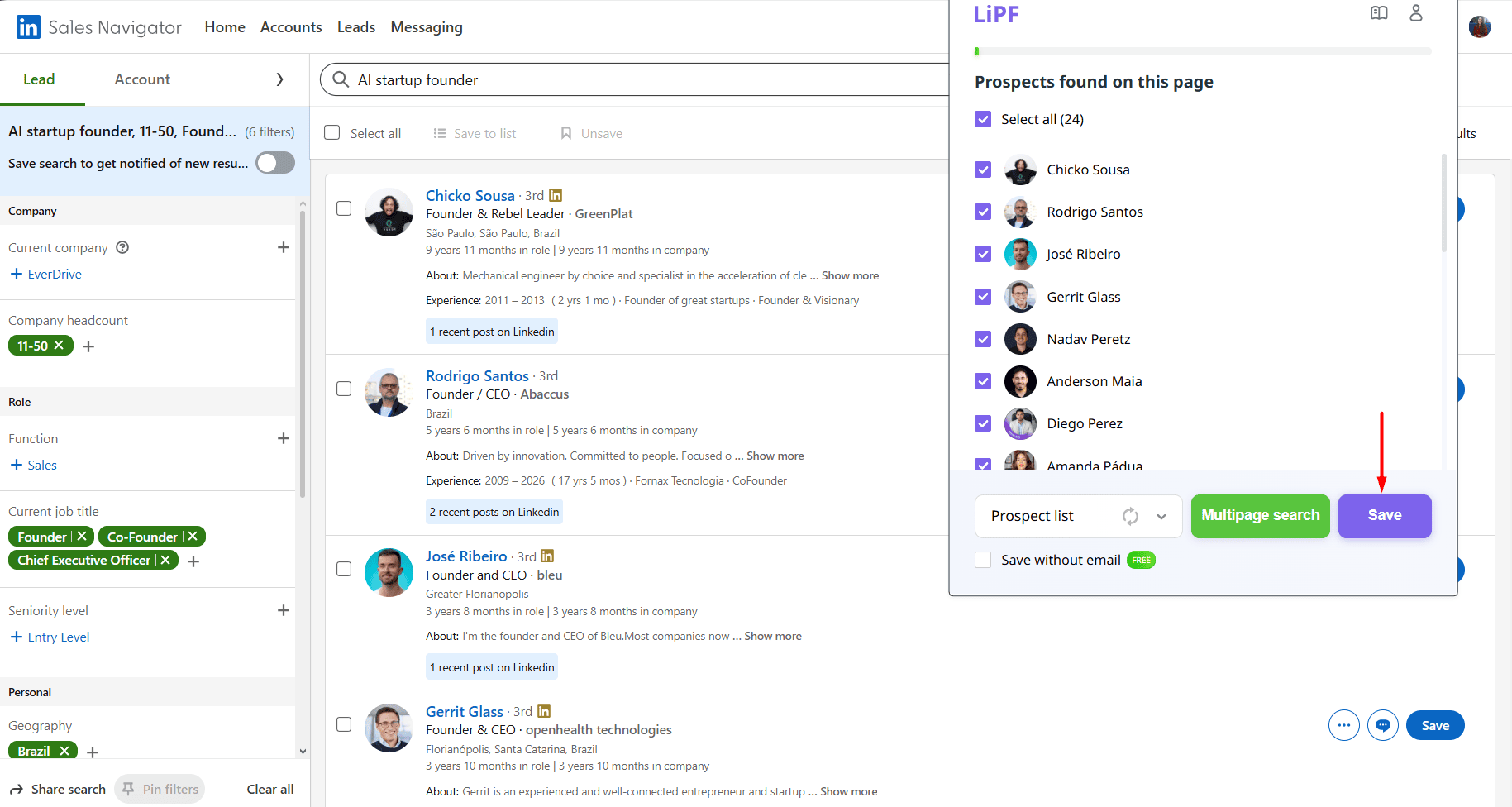
If you’re working with LinkedIn Sales Navigator, first use its advanced 50+ filters to build a contact list of leads based on your ideal customer profile (ICP):
- Job title: e.g., Founder, Co-Founder, Chief Executive Officer
- Industry: e.g., Artificial Intelligence, Software Development
- Company headcount: e.g., 11–50
- Geography: e.g., Brazil
- Recent updates: e.g., Posted on LinkedIn
- And so on
Then apply a dedicated LinkedIn scraper that integrates with Sales Navigator or a Chrome extension like Snov.io’s LinkedIn Email Finder to add the leads to your prospect list.


Perform a LinkedIn search (if any) via an email finder
Some email finder tools let you collect pre-verified business emails from LinkedIn right from the app, so you don’t even need to switch to your LinkedIn tab.
With the Snov.io LinkedIn Search feature, for instance, you can do it in the following ways:
- Apply filters: Find LinkedIn leads and their emails by name, connection level, job title, location, or any keyword
- Add from search results: Paste a LinkedIn search URL
- Import from file: Upload LinkedIn profiles in bulk
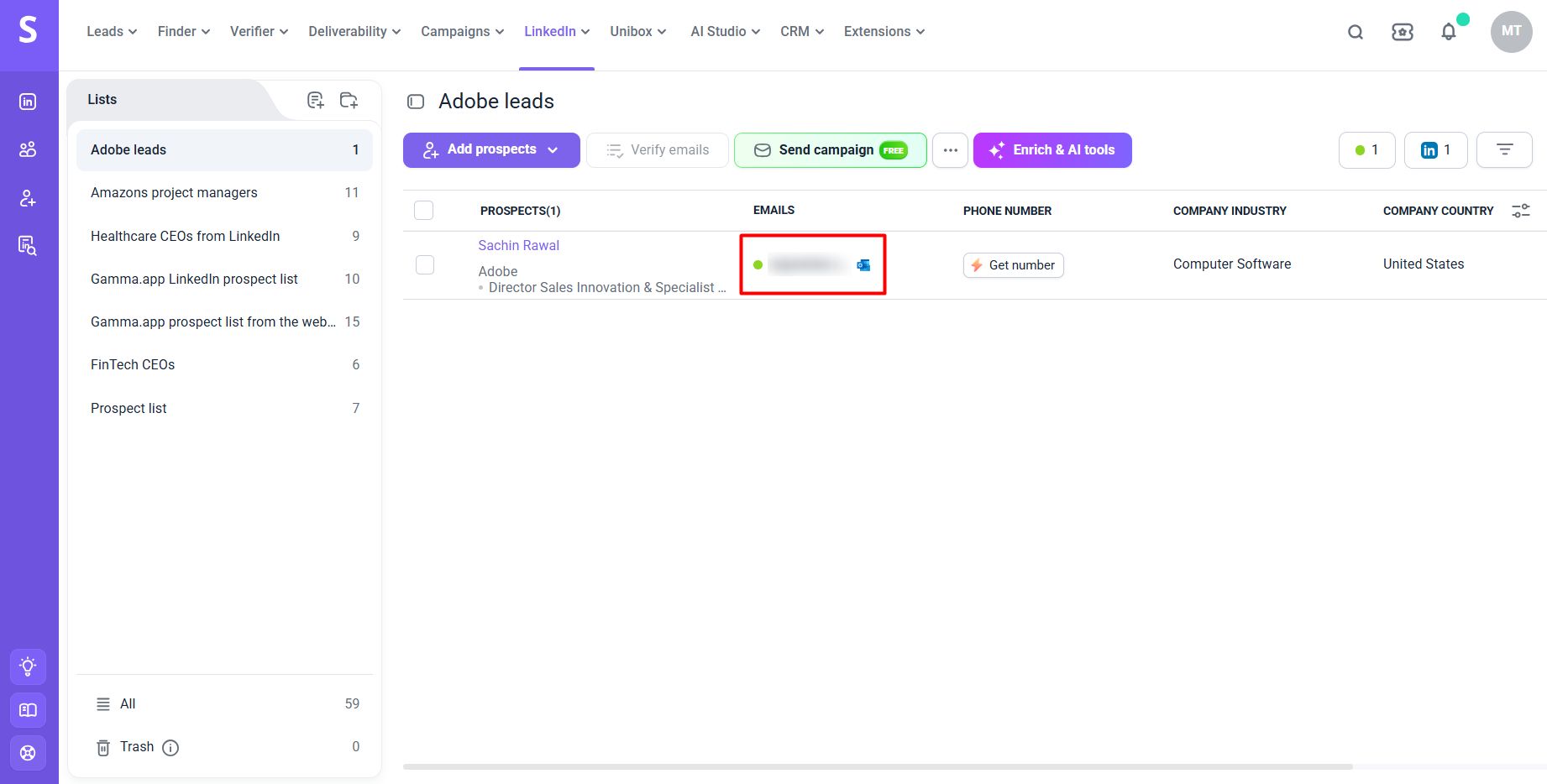
Let’s say you want to find an Adobe employee’s email address by name. Enter the prospect’s full name and company (Adobe), choose the list to save it to, and perform your search.
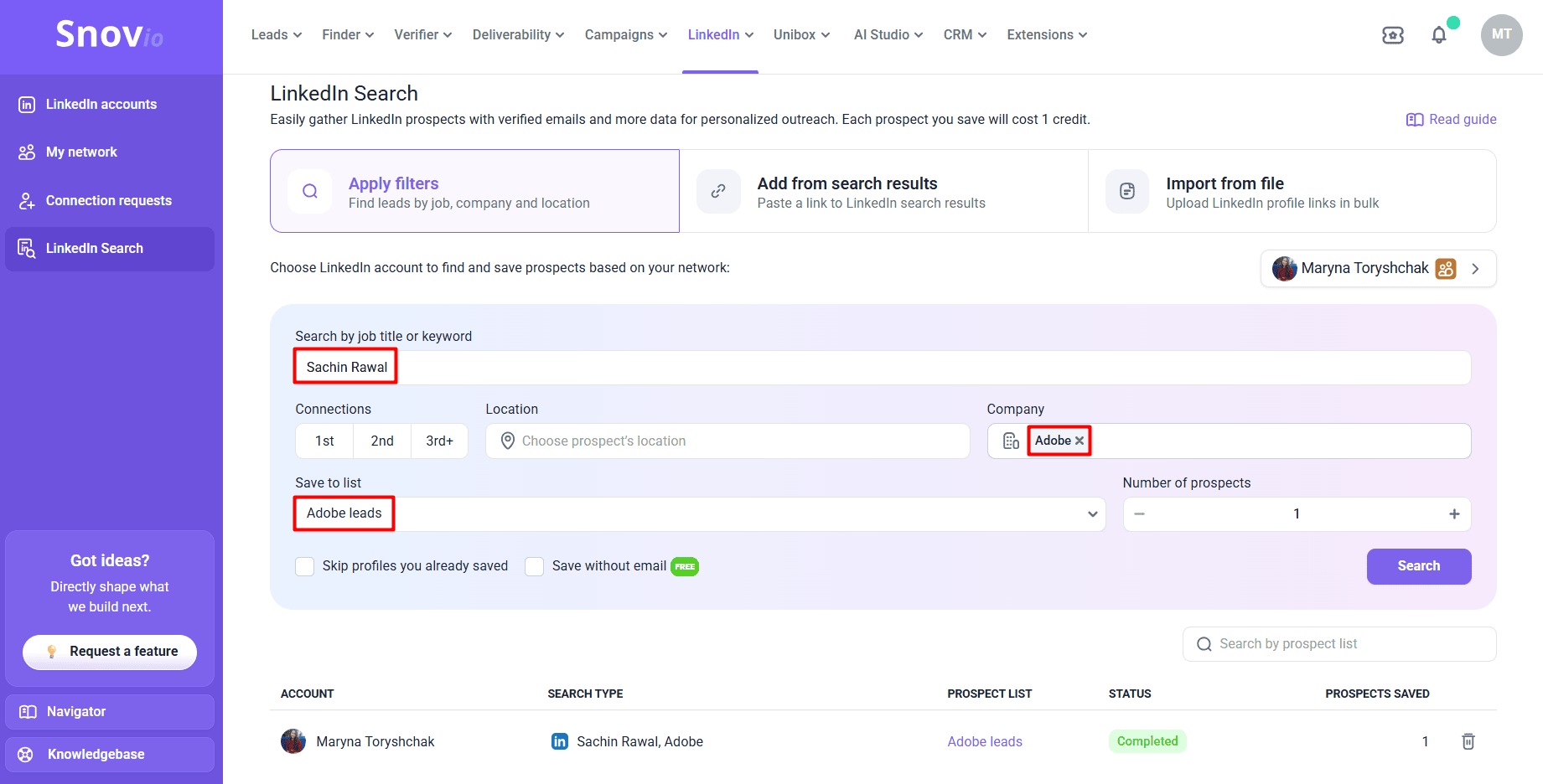
Then go to the list to see the prospect’s verified email address.
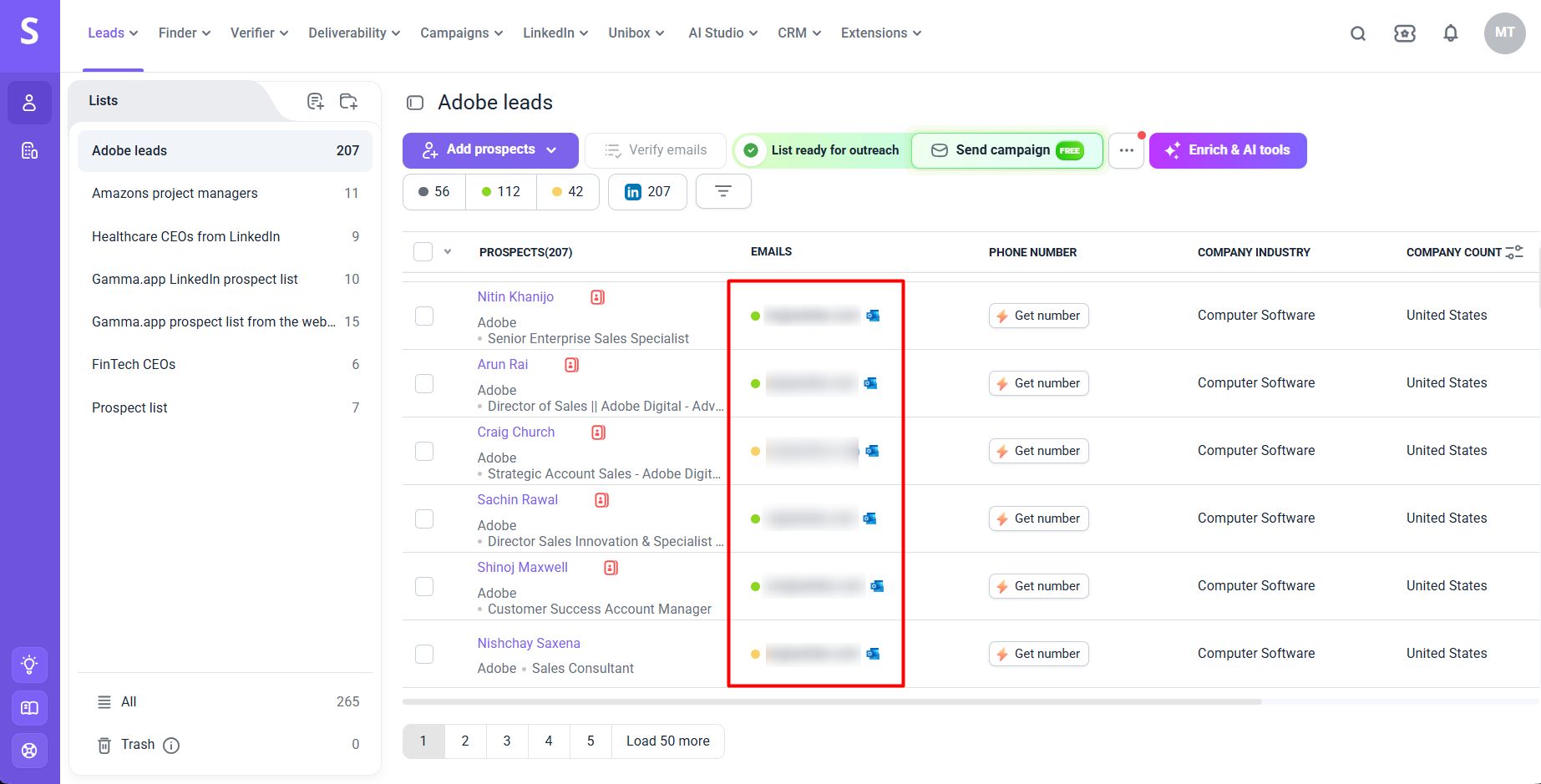
Likewise, you can find Adobe employee email addresses in bulk by job title (e.g., sales manager) and save up to 500 leads to your prospect list per lookup.
| Pros of LinkedIn search | Cons of LinkedIn search |
|---|---|
| ➕ Good for finding decision-maker emails | ➖ Not all profiles contain emails |
| ➕ Confirms current job titles, companies, and other high-quality data points | ➖ Sales Navigator is a paid product |
| ➕ Helps build targeted prospect lists | ➖ Risk of LinkedIn account restrictions with bulk automated extractions |
Turn to Google’s advanced search operators — best for one-off and social media searches
If you’ve ever typed something like “find an email address of this person [First and Last Name]” into Google’s search bar but found nothing, I feel your pain…
What I’m offering here, instead of a simple Google search, is a more advanced one that actually works, all thanks to the following operators:
- ” “ → Find an exact phrase match
- – → Exclude a specific search item
- OR → Search for the first or second item
- site: → Limit results to one website or domain
- intitle: → Search in the web page title
- inurl: → Search in the URL path
- filetype: → Restrict results to a specific file format
Grab several possible combinations you can try for different search scenarios from the table below.
| What you’re searching for | Combination example | What it does |
|---|---|---|
| How to find someone’s company email address by name and domain | site:company.com “Sam Doe” “@company.com” | Finds a person’s name appearing on the same web page as a corporate email address |
| How to find company email addresses for general inquiries | site:company.com “contact us” “@company.com” | Finds common business email addresses on contact pages |
| How to find employee email addresses on corporate sites | site:company.com “@company.com” intitle:”team” OR intitle:”staff” | Discovers staff/team pages that list individual employee emails |
| How to find emails from email links on web pages | site:company.com “mailto:” | Finds pages with clickable email links |
| How to find business owner email addresses | site:linkedin.com “Founder” “email me at” OR “contact me at” | Searches for emails of business founders specifically on LinkedIn |
| How to find email addresses of business executives | “CEO” OR “Chief Marketing Officer” “@company.com” | Narrows results to pages mentioning a leadership title next to an email address |
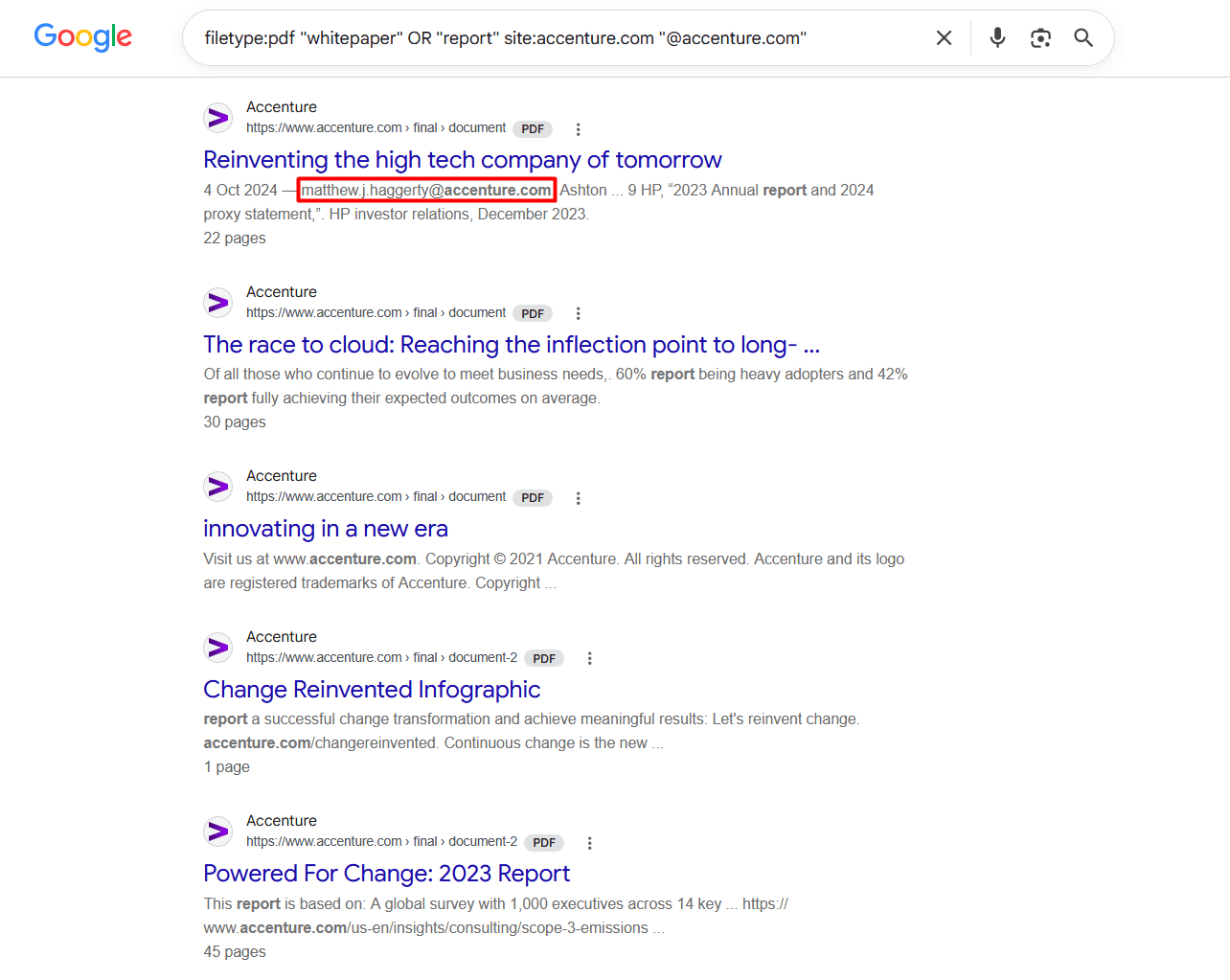
| How to find emails from reports or whitepapers by a company | filetype:pdf “whitepaper” OR “report” site:company.com “@company.com” | Finds whitepapers or reports in PDF published by the company that include a contact email |
Don’t put a space between the operator, the colon, and your targeted word or phrase. Both letters in the OR operator must be typed in uppercase to work. Also, keep in mind that it’s a trial-and-error method.
For example:
When I used one of the combinations to find Accenture employee email addresses in PDFs, the first page of my Google search results showed only 1 address. But at least it helped me determine the Accenture email format.
| Pros of Google search operators | Cons of Google search operators |
|---|---|
| ➕ Completely free | ➖ It’s a method of trial and error, working differently for different companies and niches |
| ➕ Can surface emails from different document types | ➖ Doesn’t always cover all the search terms from your combination |
| ➕ Performs a social media search | ➖ May give inaccurate results, as Google indexes cached, outdated web-page versions |
| ➖ Not practical for finding hundreds of contacts at once |
Browse directories and databases — best for local or small business email addresses
When a company’s official site doesn’t have a “Contact” page (this is typical for very small, early-stage, or local brands) and you can’t find anything on LinkedIn or elsewhere, this can be the next best place to look.
Such platforms don’t necessarily provide employee email addresses, mostly only generic ones like info@ or contact@. However, depending on the directory or database, you may collect other valuable information, such as:
- Company names
- Websites
- Phone numbers
- Locations
- Industries
- Employees’ full names
- Job titles
- Social profiles
- And more
Now, let’s look at several examples of databases and directories for finding business email addresses.
Databases:
- Crunchbase — Focuses heavily on startups and private tech firms and tracks their funding activities
- Owler — Offers company data and a competitor graph with 45M+ relationships (Note: Contact details, such as corporate email addresses, phone numbers, and LinkedIn profiles, are only available in Owler Max, the enterprise tier)
- ZoomInfo — An EU-centric B2B data provider designed particularly for sales teams interested in high-volume prospecting
Directories:
- Yelp — Lists local businesses all over the world
- Manta — US-focused business directory
- Local Chamber of Commerce directory — A powerful source for brick-and-mortar businesses that rank poorly on Google; well-searchable by city/region
For example:
When I couldn’t find the company’s official website or LinkedIn profile with contact details, I collected their contact email from the Manta directory listing.
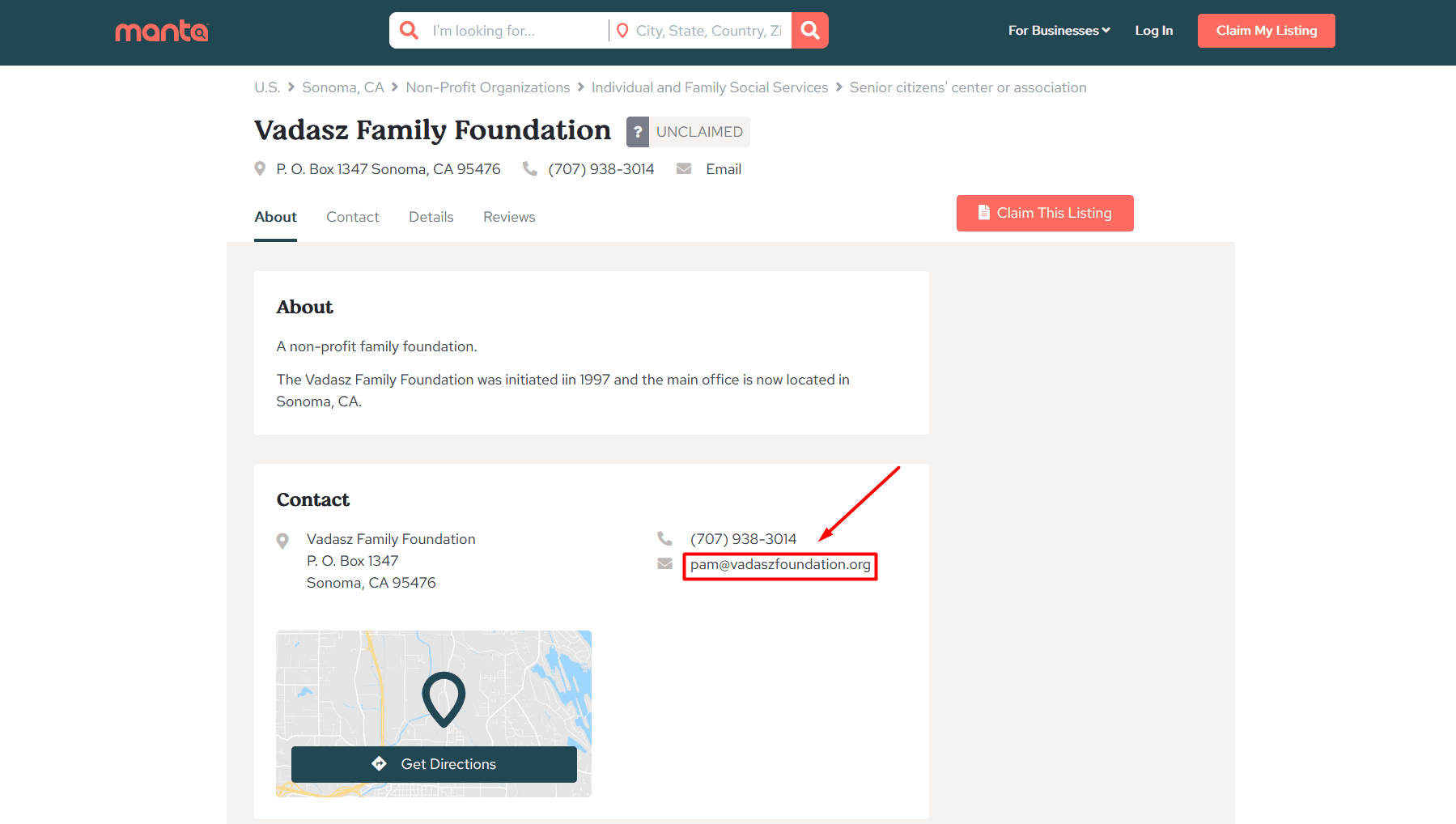
Use directory-listing or database-search scrapers to simplify the process and save time. For instance, Apify offers the Manta Business Directory Scraper to scrape business listings by location or keyword (up to 1M per run), or the Crunchbase Search Scraper to extract over 130 fields from any company profile on Crunchbase.
But honestly, I’d rather treat this approach as the primary lead-generation step for B2B sales teams and recommend additionally using other methods (e.g., an email finder + LinkedIn search) to confirm (or refute) any information you get from these sources.
| Pros of directories and databases | Cons of directories and databases |
|---|---|
| ➕ Great for finding company email addresses when there are no “Contact” pages or LinkedIn profiles | ➖ Directory/database listings can be outdated |
| ➕ Often include phone numbers as a backup contact method | ➖ Coverage varies by location and industry |
| ➕ Simple way to get local business email addresses | ➖ Some require a paid account to access companies’ contact details, especially in bulk |
| ➖ Low accuracy |


Identify and verify email patterns — best free method if you already know one employee address
Normally, companies use a single email address format across the whole team. So, once you identify at least one employee’s address, you can apply it to other employees’ names.
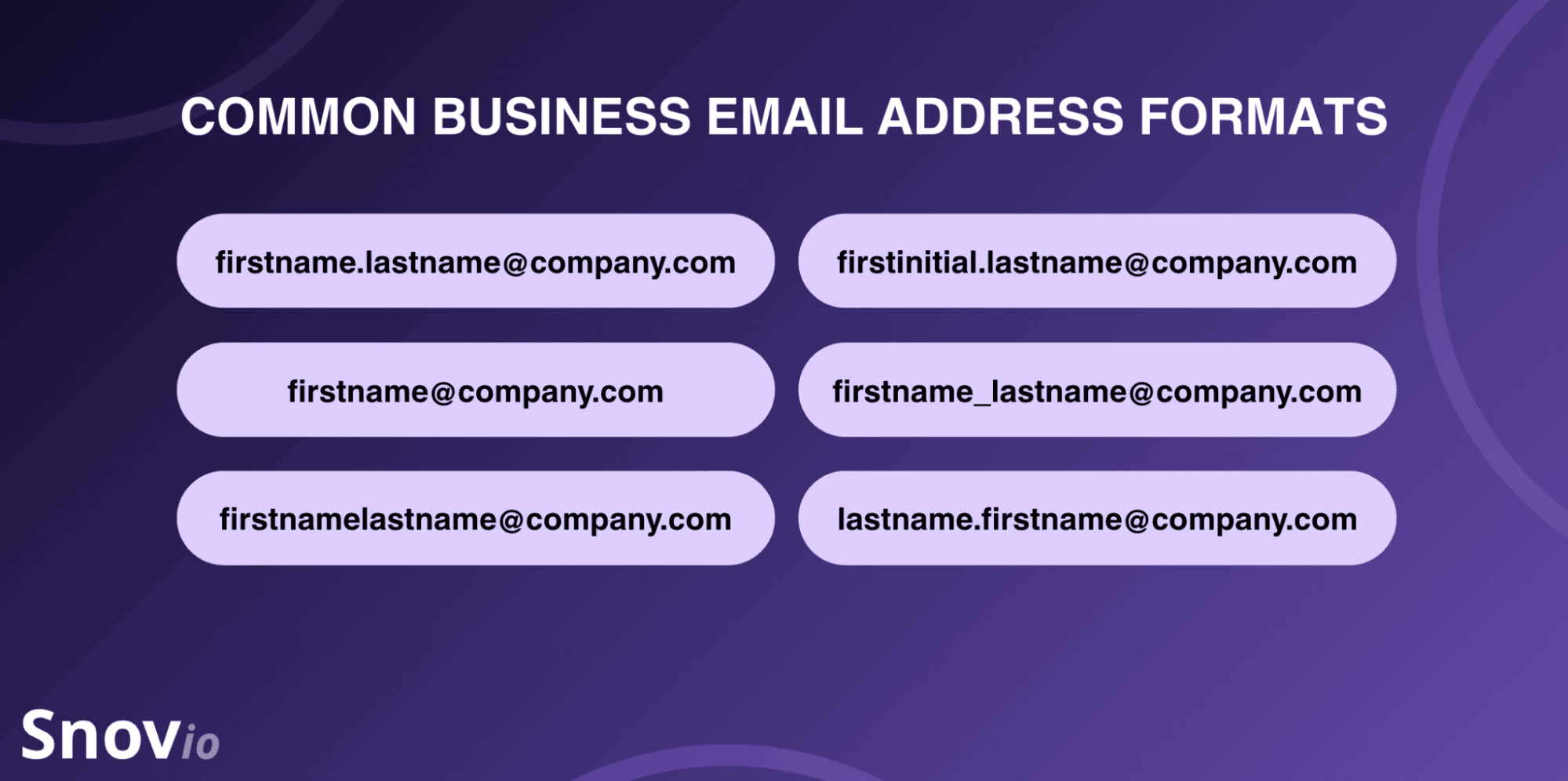
If not, check the most widespread formats as follows:
- firstname.lastname@company.com: The most widely used overall, preferred by the majority of leading companies and large corporations
- firstname@company.com: Popular among startups, SMBs, and smaller agencies
- firstnamelastname@company.com: Less common than the dotted variant but still widespread among mid-to-large brands
- firstinitial.lastname@company.com: Mostly used by small-to-mid-sized teams
- firstname_lastname@company.com: Less typical but seen in some tech or manufacturing firms
- lastname.firstname@company.com: Common in some European countries (especially Hungary and France)
You may turn to the so-called “email guessers,” or permutators, to speed up the process.
More effective hack:
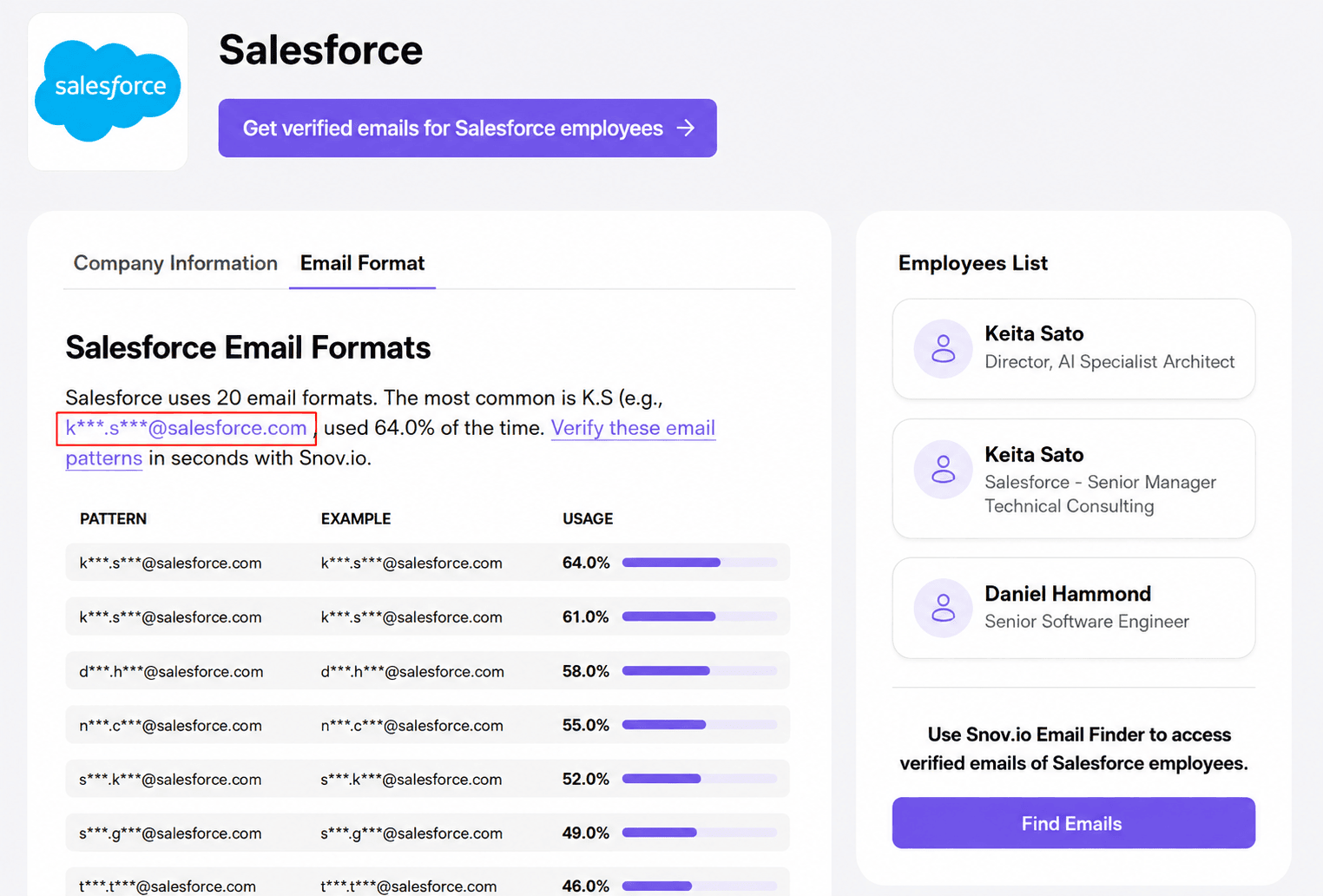
Use company search tools that also show businesses’ email formats along with other info. Suppose you want to know the Salesforce email format. Go to Snov.io’s company search tool, open the Salesforce company profile, and click “Email Format” right next to “Company Information” to see the most common one used.
Remember to validate email addresses, even if you already know the exact email pattern chosen by the prospect’s company. Keep in mind that companies may change corporate email address formats over time.
| Pros of identifying email patterns | Cons of identifying email patterns |
|---|---|
| ➕ Free and scalable if you already know at least one employee’s email address | ➖ Works only if you already know at least one address for sure to confirm the pattern |
| ➕ Fast way to build a list of employee email addresses | ➖ Formats may vary by region or department (e.g., marketing and sales teams) |
| ➕ Highly useful as a cross-check against results from other methods | ➖ Requires email verification services for a conclusive accuracy check |
Ask AI assistants — best for single lookups or email patterns
According to a recent report, sellers expect AI to cut prospecting time by 34% and email drafting time by 36%. Still, accuracy remains one of the biggest concerns. So, take this method with caution. Plus, if you’re planning to boldly ask something like “Find all Apple employee email addresses that are publicly accessible,” and hope AI will give you the list, sorry, it won’t. Trust me, I tried.
However, here’s what works instead.
The following prompts proved the most advantageous for both ChatGPT and Claude searches.
Prompt 1.
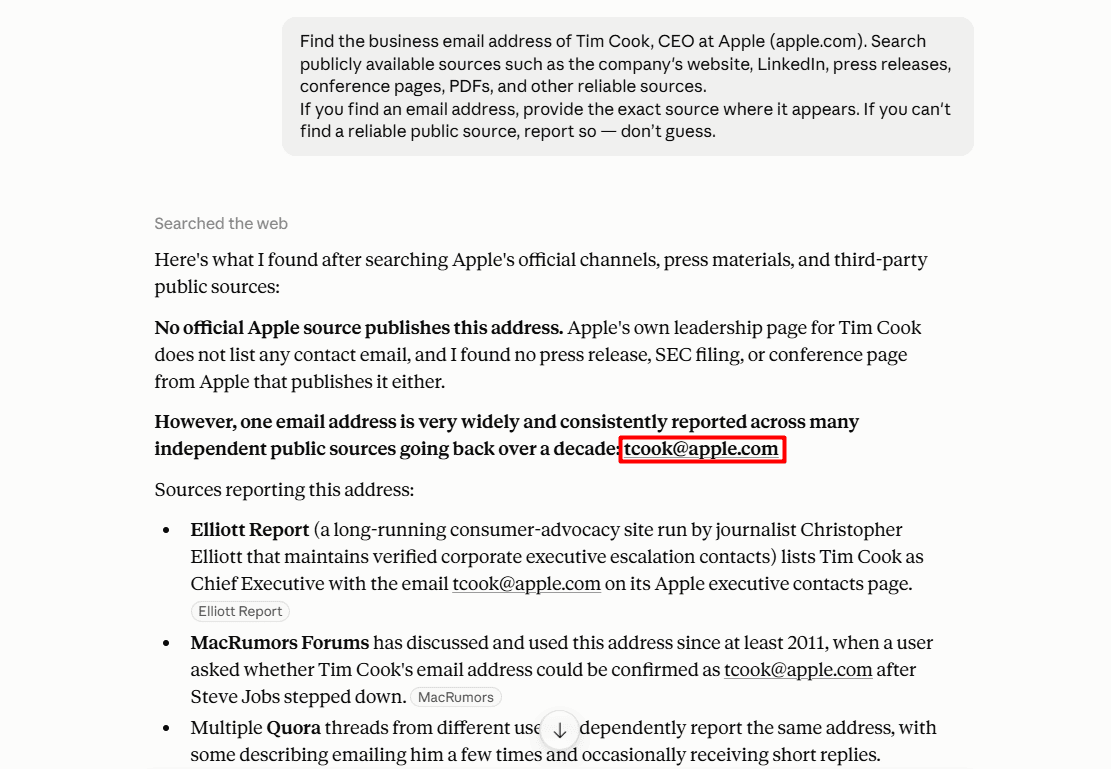
Find the business email address of [Full Name], [Job Title] at [Company Name] ([company domain]). Search publicly available sources such as the company’s website, LinkedIn, press releases, conference pages, PDFs, and other reliable sources.
If you find an email address, provide the exact source where it appears. If you can’t find a reliable public source, report so — don’t guess.
For example:
I asked Claude to find Apple’s CEO email address and obtained the business email address, which is “consistently reported across many independent public sources.”
Prompt 2.
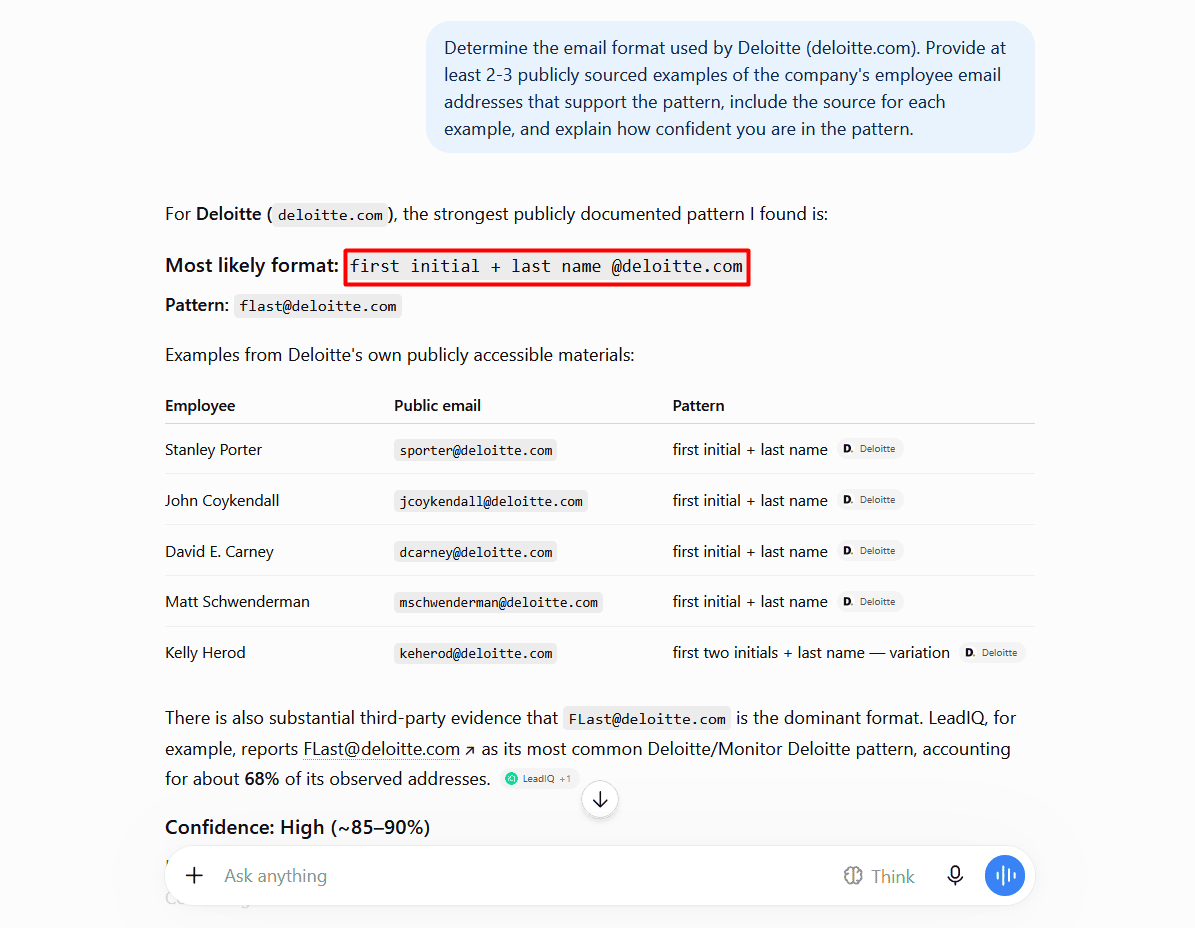
Determine the email format used by [Company Name] ([company domain]). Provide at least 2-3 publicly sourced examples of the company’s employee email addresses that support the pattern, include the source for each example, and explain how confident you are in the pattern.
For example:
I asked ChatGPT to identify the Deloitte email format. It returned the most likely format: firstinitiallastname@deloitte.com, including the sources (which confirmed it) with the 85–90% confidence score.
| Pros of AI assistants | Cons of AI assistants |
|---|---|
| ➕ Starting point for newer companies or niche-specific searches | ➖ Make mistakes |
| ➕ Free and quick way to get the brand’s email pattern | ➖ Bring results only from indexed pages |
| ➕ Cross-checks several sources at once | ➖ Accuracy depends on how specific your prompts are |
| ➕ Can also help draft a cold email message in the same conversation | ➖ Not suitable for bulk lookups |


Combine methods to get business email addresses by scenario
Here’s a quick reference table to pick the best combo for your unique situation.
| Scenario | Best combination of methods |
|---|---|
| You know only the company domain | Official website + email finder + database/directory |
| You know the person’s name and company domain | Email finder + AI assistant + company site |
| You have the person’s LinkedIn profile but don’t know their email | “Contact info” or “About” section on LinkedIn + Email Finder |
| You need hundreds or thousands of emails (ideally — verified email addresses) | Bulk email finder + database search |
| You’re looking for a general contact email address | “Contact us” page + AI assistant + Google |
| You need a support email address | Help center or support page + Google |
| You want to find a specific department email | Department page (marketing, HR, sales, etc.) + Google |
| You need email addresses of founders or other decision-makers | Email finder + “Leadership,” “About,” or “Our Team” page + LinkedIn search |
| You want to find corporate email addresses completely free but unverified | Email pattern identification + AI assistant + Google |
| You’re targeting a niche business with low-to-zero online presence | Company site + directories/databases |
If your case still doesn’t fit any row above, it’s usually because you’re dealing with one of the hardest-to-find scenarios described in the next paragraphs. Read on.
What to do when you still can’t find a business email address: Alternatives to try
The methods shared above may still fail because of the following challenges:
- Solopreneurs using a personal email (e.g., @gmail.com or @outlook.com), not a business one
- Privacy-first individuals who deliberately hide their corporate email addresses
- Businesses in niche industries with practically zero online presence
- Recently founded brands that haven’t been picked up by databases yet
- Recently acquired or rebranded companies, where the old company domain and email pattern no longer work, and the new one isn’t yet indexed
- Enterprises with strict cybersecurity policies that keep employee email addresses off public pages
So, even if you’ve tried all the approaches from this guide and ended up with an empty contact list, a few alternatives can still help you out:
- Call the company or employee directly (politely ask for the person’s email, explaining the reason you’re reaching out, or ask to be transferred)
- Fill out the contact form, requesting the person’s email
- Send a LinkedIn message (it’s less intrusive than calling)
- Ask someone who may know them (e.g., a colleague, a business partner, an affiliate, etc.)
- Use other contact details (e.g., perform a reverse phone lookup to find someone’s email by phone number)
- Visit their personal website or online portfolio if they have one
- Subscribe to their newsletters or even app/software trials (effective method for finding SaaS business email addresses)
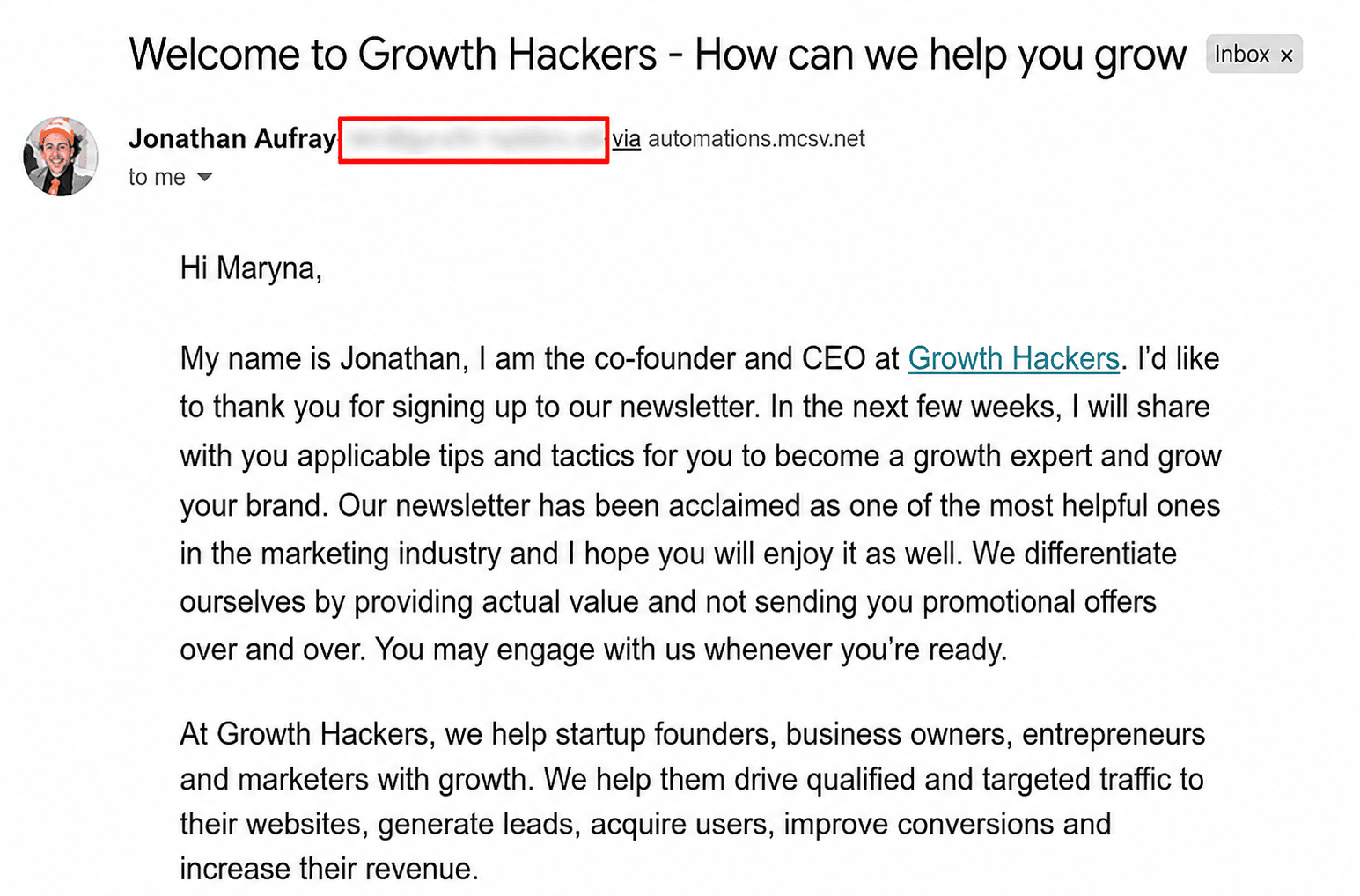
Aside from generic info@ or hey@ contacts, newsletter subscriptions may also help you find business owner email addresses. Sometimes, business executives, such as CEOs or CMOs, may also send you a “welcome” note once you subscribe.
For example:
After I subscribed to Growth Hackers, I received a welcome message from the brand’s co-founder and CEO. This way, I captured his work email.
Bonus tip: Verify email addresses before every cold outreach campaign
Did you know that roughly 23% of emails become invalid each year?
So, even if you already generated leads with verified email addresses, but they are weeks or months old, don’t hurry to launch your cold email sequences straight away. Sending to guessed, outdated, or invalid addresses causes high bounce rates and hurts the sender reputation, with future emails going to spam.
Email service providers closely monitor your activity, track the percentage of your bounces, and give them even the slightest hint — and the reputation of a spammer gets stuck to you. To avoid this, there is email validation. Run your contact list through 2 different email verification services to clean it up. How often, you ask? Every time before launching a cold email campaign.
Outbound Outreach Expert at Snov.io

Regular list cleaning with a reliable email verifier will help you exclude:
- Invalid addresses
- Abandoned mailboxes
- Disposable addresses
- Catch-all addresses
- Spam traps
- Or other risky addresses
On most email finder platforms I’ve tested, address validation is ingrained into the lead-generation workflow, so you can look up and verify contacts before launching cold email sequences. Plus, some offer extra features like bounce-risk detection to save your sender reputation before or even mid-campaign if bounces start climbing.
We use Snov.io’s Email Finder tools with LinkedIn Sales Navigator. Its built-in Verifier tool also helped us cut costs on an email validator, as all emails we collected with Snov.io from LinkedIn were already pre-verified, and the verification results were as accurate as the tool we used before. With Snov.io, we generated 25,000 new emails every month, which helped us target the records matching our client’s ICP with even higher efficiency.
VP of Operations at Leadlytics

Key takeaways: Which approach to find business email addresses is the best?
Ultimately, the right method to find business email addresses is the one that suits your specific needs best:
- Need verified email addresses fast in bulk? Use email finders like Snov.io, UpLead, Hunter, Skrapp.io, and Norbert, and scrape LinkedIn profiles with their extensions or features.
- Looking for one address and don’t mind some manual work? Use free methods like company websites, LinkedIn profiles, and advanced Google search operators.
- Want to find niche or local business emails? Use local listings or database search.
- Prefer to spot a corporate email pattern and determine other employee addresses based on it? Use email pattern identification and ask AI assistants like ChatGPT or Claude.
Overall, combining several approaches (e.g., email finder + company site + LinkedIn) is the optimal solution, rather than relying on a single information source. Also, use an email verifier to confirm you have gathered valid emails, especially if you’re planning cold outreach campaigns.