Email remains highly effective for B2B outreach: 78% of businesses consider it a top lead generation channel in 2026. What’s more, customized messages can bring you 10% higher open rates and 2× more replies.
But even the best-crafted email won’t perform if prospects never see it. That’s why maintaining strong deliverability is crucial for driving results.
In this article, we’ll explore how to improve email deliverability to ensure safer outreach, reach more inboxes, and get more value from your B2B campaigns.
TL;DR:
To maintain healthy email deliverability and a solid sender reputation, you need the right technical setup, clean contact data, relevant messaging, and consistent sending activity. In the table below, you can see the most common reasons for poor inbox placement and practical ways to fix them:
| Reasons for low deliverability | How to fix email deliverability issues |
|---|---|
| Improper email authentication setup | Set up SPF, DKIM, and DMARC records and confirm they pass for every sending service |
| Poor email list quality | Verify lists before launch and remove invalid or fake email addresses, unsubscribes, and hard bounces |
| New or long-inactive mailboxes | Warm these accounts gradually before outreach |
| Generic or irrelevant messages | Segment your audience and tailor the copy to each group |
| Emails marked as spam | Lower your daily sending limits and review your emails for spam-triggering wording, formatting, or links |
| Weak domain or sender reputation | Run a deliverability audit to check domain health, review blacklist status, and identify other issues |
Continue with this email deliverability guide for a closer look at each solution and discover a practical workflow you can apply before and during campaigns.

What is email deliverability?
Email deliverability is the ability of an email to reach a recipient’s primary inbox instead of landing in spam or being blocked. In simple terms, this metric shows whether your messages have a real chance to get seen, opened, and replied to.
Email deliverability vs. email delivery
It is easy to confuse email deliverability with email delivery, but they aren’t the same.
Delivery rate shows how many of your emails were accepted by the recipient’s mail server.
Deliverability rate, on the other hand, is more related to inbox placement and focuses on where those delivered messages actually go.
To make the difference clearer, let’s look at an example.
You sent 100 emails, and 80 of them were accepted by recipients’ mail servers. So, your delivery rate is 80%.
Out of those 80 messages that didn’t bounce, 65 reached recipients’ inboxes, 10 landed in the Promotions tab, and 5 appeared in the spam folder. In this case, your deliverability rate is 93.75% because 75 out of 80 delivered messages actually reached the inbox.
So, the delivery rate indicates whether your emails were technically delivered, while the deliverability rate shows whether they reached the places where your prospects are likely to see them.
Why is email deliverability important?
Email deliverability has a direct impact on campaign performance, and 67% of B2B professionals cite it as a major barrier to success.
Well, it’s easy to see why. When your emails go to spam, your campaign performance drops even if your offer, targeting, and message copy are brilliant. Strong email deliverability increases your chances of getting opens, replies, clicks, and booked meetings.
You need to improve email deliverability to protect your sender reputation, because frequent spam complaints and low engagement send negative signals to mailbox providers. Over time, these signals make your sending domain less trustworthy, leading to poor inbox placement for future campaigns.
Find out whether your domain is on any blacklist to improve sender reputation and deliverability.
What is good email deliverability?
A good email deliverability rate in 2026 is between 95% and 99%. A rate of 94% or lower may indicate issues with domain health, sender reputation, list quality, or other aspects of your sending process.
So, before exploring specific strategies to improve email deliverability, let’s look at the main factors that have an impact on it.
Common causes of poor email deliverability
Here are the main reasons why your email deliverability may be low:
- Weak sender or domain reputation
- Missing or misconfigured email authentication protocols
- Poor contact quality
- Sudden sending volume increase or inconsistent activity
- Spam-triggering email copy or formatting
- Low engagement across previous campaigns
- Domain or IP blacklist listings
- High unsubscribe or complaint rates
In some cases, poor inbox placement can be a result of a single weak point, but my experience shows it is usually caused by several issues reinforcing one another.
→ See which factors affect deliverability most based on our analysis of 10M+ emails
Practical ways to improve email deliverability
There is no single answer to the question ‘How to ensure email deliverability?’ For more consistent performance, you need a combination of reliable technical configuration, clean contact data, relevant content, and smart campaign management.
Below are the main steps to improve email deliverability and practical ways to apply them.
Improve list hygiene
People change jobs, companies may switch domains, and mailboxes can be abandoned. So before launching a campaign, always ensure your contact data is valid and up to date. This is especially important when email addresses come from older lists, external databases, or manual research.
A clean contact list helps you reduce bounces, protect sender reputation, and avoid wasting your sending capacity on inactive or invalid addresses. Use reliable verification tools to identify invalid and potentially risky addresses.
I also recommend paying attention to catch-all emails. These addresses are not always invalid, but they require extra caution because the receiving server doesn’t confirm whether a specific mailbox exists. So use them selectively and avoid sending to large numbers of catch-all contacts at once.


Remember that list cleaning isn’t a one-time task. Continue monitoring contact data after launch. Remove hard bounces immediately and review addresses that have returned multiple soft bounces.
Do not forget to suppress unsubscribed contacts to prevent further messages and reduce the spam complaint rate. If you haven’t used a list for several months, reverify it before sending.
A clean contact list helps you reduce bounces, protect sender reputation, and avoid wasting your sending capacity on inactive addresses, supporting better email deliverability over time.
Set up SPF, DKIM, and DMARC authentication
If you’re looking for how to improve email deliverability rates, start with the essentials — the technical setup.
Email authentication gives receiving servers the information they need to confirm that messages sent from your domain are legitimate. In simple terms, it shows mailbox providers that your emails really come from your domain. Without reliable authentication, even relevant emails sent to verified contacts may be marked as spam or rejected.
This technical setup relies on three protocols that work together but serve different purposes:
- SPF (Sender Policy Framework) identifies which IP addresses and mail servers are authorized to send emails on behalf of your domain. This setting helps mailbox providers determine whether the message came from an approved service.
- DKIM (DomainKeys Identified Mail) adds a digital signature to every outgoing email so that receiving servers can confirm that it is associated with your domain and that its content wasn’t changed during delivery. Run a DKIM record check to verify that the record is published correctly and the signature is valid.
- DMARC (Domain-based Message Authentication, Reporting, and Conformance) checks whether SPF or DKIM aligns with the domain shown in the From address. It also specifies what receiving servers should do with emails that fail authentication. A DMARC record check can identify missing records, invalid syntax, and other configuration issues.
To improve your email deliverability, make sure these records are properly configured for every service that sends messages on your behalf. Whenever you connect a new outreach, marketing, or transactional platform, update the relevant records and run an authentication check to confirm that SPF, DKIM, and DMARC are passing.
I saw this firsthand with a SaaS CEO who ran a cold outreach campaign for a month with zero replies. Where was the problem? A missing DKIM record, which sent nearly every message straight to spam. All his effort went down the drain. That’s why it’s crucial to verify that your DNS records are synchronized with your hosting provider and ESP, and double-check them with appropriate tools before launch.
Outbound Outreach Expert at Snov.io

Proper email authentication reduces the risk of messages being rejected or filtered as suspicious. It also protects your domain from spoofing, strengthens its credibility, and supports more consistent deliverability.
Use a dedicated IP address
There are two options when sending emails: using a shared or a dedicated IP. When you use a shared IP address, your emails are sent through the same infrastructure as messages from other customers. So, if other senders can spam large contact lists, generate complaints, or get the IP blocklisted, the shared reputation may affect your deliverability too.
A dedicated IP can help avoid such issues and protect your campaigns from other users’ activity. It is assigned only to your account, giving you more control over its reputation. Although dedicated IP addresses cost extra, consider using them if you have a stable, high sending volume.
Yet, for lower-volume senders, a well-managed shared IP may still be a better option because dedicated addresses require consistent activity to build and maintain a healthy reputation.
Segment your audience
Yes, segmentation can indeed help you improve email deliverability. By grouping contacts based on meaningful characteristics, you can target them more precisely and send more relevant messages.
The thing is that when you’re sending to the wrong recipients, they might ignore, delete, or report your emails as spam. Such behavior signals to email service providers that the value of your communication is low. This weakens your sender reputation and increases the risk of your future emails going to spam.
So, to improve email deliverability, segment contacts using specific criteria that can help shape the offer and messaging, such as:
- Prospect’s role
- Industry
- Location
- Company size and growth stage
- Technology stack
- Pipeline stage
Tailor your subject line, value proposition, call to action, and other email content to each segment. Thus, your messages will resonate more with each recipient, encouraging higher engagement throughout the campaign.
🔎 Missing details for accurate segmentation?
Try Snov.io’s AI-powered enrichment tools and quickly uncover prospect and company details without spending hours on manual research. Get deeper context on each recipient, including their bio, education, experience, company findings, follower count, and more, to create emails worth replying to.
Smaller groups are also safer to send to. If something goes wrong, you can limit its impact and identify the problem before it affects the entire campaign. Start with a limited segment, evaluate bounces, replies, and placement, and fix issues before sending to the rest of your list.
Personalize your messages
Personalized outreach performs better than one-size-fits-all copy, driving higher engagement rates.
Our recent study on cold email deliverability shows that tailored messages generate nearly 6% higher open rates and 2× more clicks compared to generic emails. Meanwhile, non-personalized campaigns can see double the bounce rate and fewer replies.
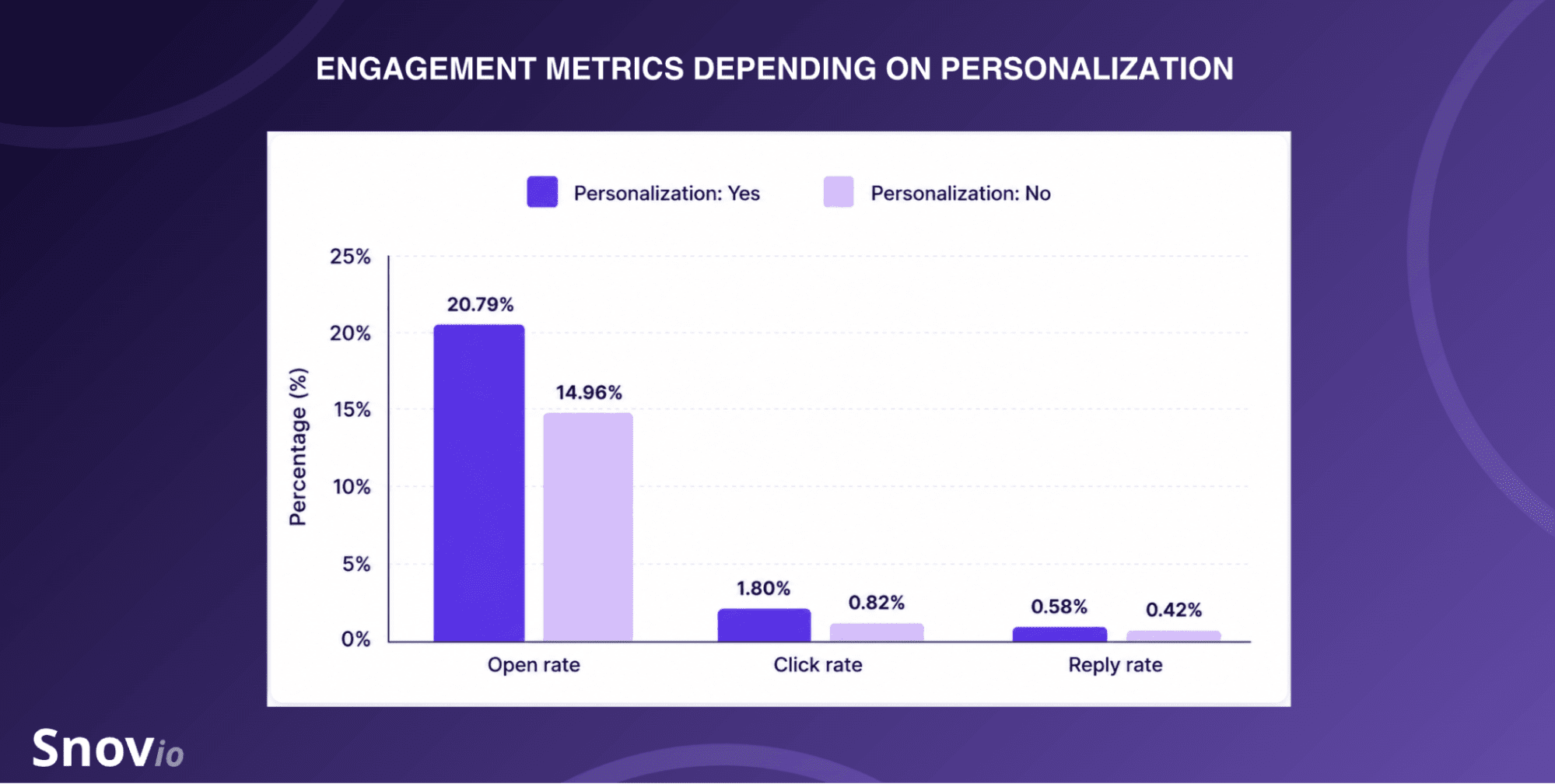
As I’ve mentioned above, inbox providers assess how recipients interact with your emails. Higher open rates, clicks, and replies indicate interest, while low engagement may be interpreted as a sign that your content is unwanted. This can reduce your sender score and negatively impact inbox placement over time.
By personalizing your campaigns, you make them more valuable to recipients and encourage positive engagement that builds trust with mailbox providers.
💡 Expert tip:
To personalize emails, you should tailor the elements that influence email engagement – the subject line, the opening sentence, and CTAs.
If you use outreach automation platforms to personalize emails at scale, preview every template before launch. Check whether all variables display correctly and pull accurate prospect data.
Incorrect names, irrelevant facts, or broken placeholders can not only damage your professional image but also increase the risk of emails being ignored or marked as spam.
Avoid spammy email content
Spam-triggering words and elements can cause mailbox providers to treat legitimate emails as suspicious, increasing the risk of filtering or rejection. Misleading or overly promotional messages may also look untrustworthy to recipients, making them more likely to ignore, delete, or report your message.
So try to keep your email copy direct and credible. Write an engaging subject line that reflects what your message is about. Avoid misleading claims, excessive capitalization, and forced urgency. Try to keep it brief and easy to understand at a glance.
After analyzing 4.3 million emails sent through Gmail SMTP, I noticed that long subject lines underperformed in both bounces and replies. Subjects with fewer than five words delivered the lowest bounce rate, while those containing five to ten words generated the most responses. My practical recommendation is to keep the length below ten words and communicate the main idea as clearly as possible.
CEO & Founder at Snov.io

Also, ensure your email content is useful, relevant, and easy to scan. Use simple formatting, limit the number of links and images, and remove unnecessary attachments. For cold outreach, especially in the first email of a sequence, I recommend using attachments cautiously or skipping them altogether. As a rule of thumb, include one clear CTA and no more than one direct link.
I also recommend testing the exact copy you plan to send before launch. Use a spam checker to identify risky elements. You can also look for more comprehensive inbox placement tools to check where your message lands across different providers, preview it on different devices, and spot other factors that may affect email deliverability.
Maintain a consistent sending volume
Large or irregular changes in sending activity can look suspicious, especially for new or previously inactive mailboxes. Set a conservative daily limit for each sender account and increase it gradually. Also, it’s better to space emails throughout the day instead of sending them all at once.
Snov.io outreach experts recommend staying within a daily limit of 15-30 emails per mailbox. However, the appropriate volume also depends on mailbox age, domain history, provider limits, engagement, and other factors.
If you need more capacity, distribute your sending activity across multiple mailboxes. Platforms like Snov.io support mailbox rotation that lets you scale outreach efforts more safely. Monitor bounces, spam rates, and pavement as you scale to operatively reduce activity if these metrics begin to decline.
Make it easy to opt out
To avoid numerous spam complaints that may affect deliverability, ensure recipients have a simple way to unsubscribe. A clear opt-out mechanism helps you respect preferences, maintain a suppression list, and reduce spam rates.
Do not hide the unsubscribe link or require multiple steps, as this adds friction and increases the likelihood of a spam report. Once someone opts out, stop the sequence and make sure this contact won’t be added to future campaigns.
How to improve email deliverability with Snov.io
Now that you know email deliverability best practices, it’s time to put them into action. For more consistent results, you can use Snov.io, which provides a robust deliverability suite to help you protect sender reputation and improve inbox placement.
The platform combines contact verification, infrastructure setup, mailbox warm-up, content checks, and sending controls, so you can manage the key tasks in one place. Below is a practical workflow for improving email deliverability with Snov.io.
1. Connect sender accounts and check your setup
Add the mailboxes you plan to use for outreach to Snov.io. Once connected, review the domain health of each account. Here is a small checklist of what to pay attention to:
- Confirm that SPF, DKIM, and DMARC are configured correctly
- Verify whether other required DNS records are active
- Investigate the blacklist or reputation warnings
Based on the email deliverability audit results, fix any missing or invalid records. I also recommend setting up a custom tracking domain if you plan to track opens or clicks. Thus, you’ll keep tracking connected to your own domain, reducing risks associated with shared infrastructure.
👀 Did you know?
Our recent analysis of 10 million emails revealed that the sending domain type strongly influences cold email deliverability. For example, free domains have more than twice the bounce rate of paid ones — 3.67% compared to 1.68%. Custom domains perform best, achieving the lowest bounce rate at 1.15% compared to free or non-custom paid domains.
If you don’t have sender accounts yet (or simply don’t want to deal with technical setup yourself), you can use Snovio’s done-for-you email infrastructure. The service provides custom domains and mailboxes already configured with essential deliverability settings, including custom tracking domains.
Once your custom tracking domain is configured, verify its CNAME record to confirm that the tracking subdomain resolves to the intended service.
2. Warm up your mailboxes
Once you set up your sender accounts, run an automated email warm-up to prepare your mailboxes for outreach. For new accounts or long-inactive mailboxes, choose a progressive strategy that starts with low sending volume and gradually increases activity.
If you’re looking to stabilize deliverability or recover after spam issues for an existing account, use a steady email warm-up with a fixed daily limit. If you’ve noticed poor inbox placement with specific providers, target your warm-up activity toward these ESPs.
Snov.io provides ready-to-use warm-up strategies for these use cases, but you can adjust the starting volume, daily increase, and sending goal if needed. Don’t forget to warm up your custom tracking domain as well.
⚠️ Important:
Do not treat the email warm-up end date as permission to start sending at full capacity right away. Even when your mailbox is warmed up, you still need to increase your sending volume gradually.
You can continue the warm-up at a lower activity after launching your campaign. But you should remember that both campaign and warm-up emails count toward your total daily limit.
3. Verify and segment your contact list
Before adding email addresses to your campaign, upload your list and run it through bulk email verification in Snov.io. Review the results by status:
🟢 Valid: Safe to add to your email campaigns.
🟡 Unverifiable: May still be valid but requires extra caution. Add them gradually and monitor bounce-backs to protect your sender reputation.
🔴 Invalid: Has a high deliverability risk. Snov.io automatically excludes invalid email addresses from your campaigns. If you believe that some of the invalid results belong to real people, check the spelling and the format for possible typos.
Once the list is clean, use Snov.io filters to group your contacts by shared criteria. This will help you tailor your emails further.
Snov.io reduced the time it took us to find verified email addresses by almost 50% and improved our lead generation efforts by 20%. What’s even better, the high accuracy of the results allowed us to significantly improve the deliverability.
Global Digital Marketing Manager at SurveySensum

If you need more people for a particular segment, you can find them in Snov.io’s built-in database. Set the necessary search filters or describe who you’re looking for in a prompt so that AI can quickly surface relevant leads. Explore the results and save contacts with verified email addresses to the appropriate list.
4. Create personalized emails
Now that you’ve grouped your audience, create a separate message for each segment. In Snov.io’s AI Studio, add your company and product details to build several Ideal Customer Profiles (ICP). Then, choose the ICP you want to target, select the strongest selling points, and generate an email tailored to that audience.
If you already know what you want to say but need some assistance to turn your idea into a strong message, AI Email Writer will help you with that. Describe the offer, purpose, audience, and other details in your prompt to generate an email from scratch or tweak your existing copy by setting tone, text size, style, or language.
Add variables to automatically personalize the copy with prospect data, such as name, company name, industry, and other information, via custom fields. Also, to avoid sending generic emails that may trigger spam filters, especially at higher volumes, diversify your messages using Spintax or dynamic content.
5. Set a controlled campaign schedule
As you already know, increasing sending volume too quickly can increase the risk of filtering. So, to maintain a positive sender reputation, build a sequence with reasonable delays and follow-ups. Set a daily limit for each account and schedule outreach according to the recipient’s time zone.
Snov.io supports mailbox rotation. So you can spread campaign activity between connected mailboxes if a single account can’t handle the required volume due to limits. Before rotating, make sure each sender is warmed up and has its own daily sending limits.
6. Test your emails before launch
Use Snov.io’s deliverability tools to test the exact email you plan to send, including the real subject line, body, links, and sender account. Once the test is complete, review inbox placement rate across providers, content warnings, IP and domain reputation, and blacklist results.
Don’t worry if the results are not as good as you’ve expected. That is exactly what pre-launch testing is for — to catch and correct problems before they affect your campaign. Snov.io highlights all issues that need to be fixed and provides personalized recommendations on how to improve email deliverability.
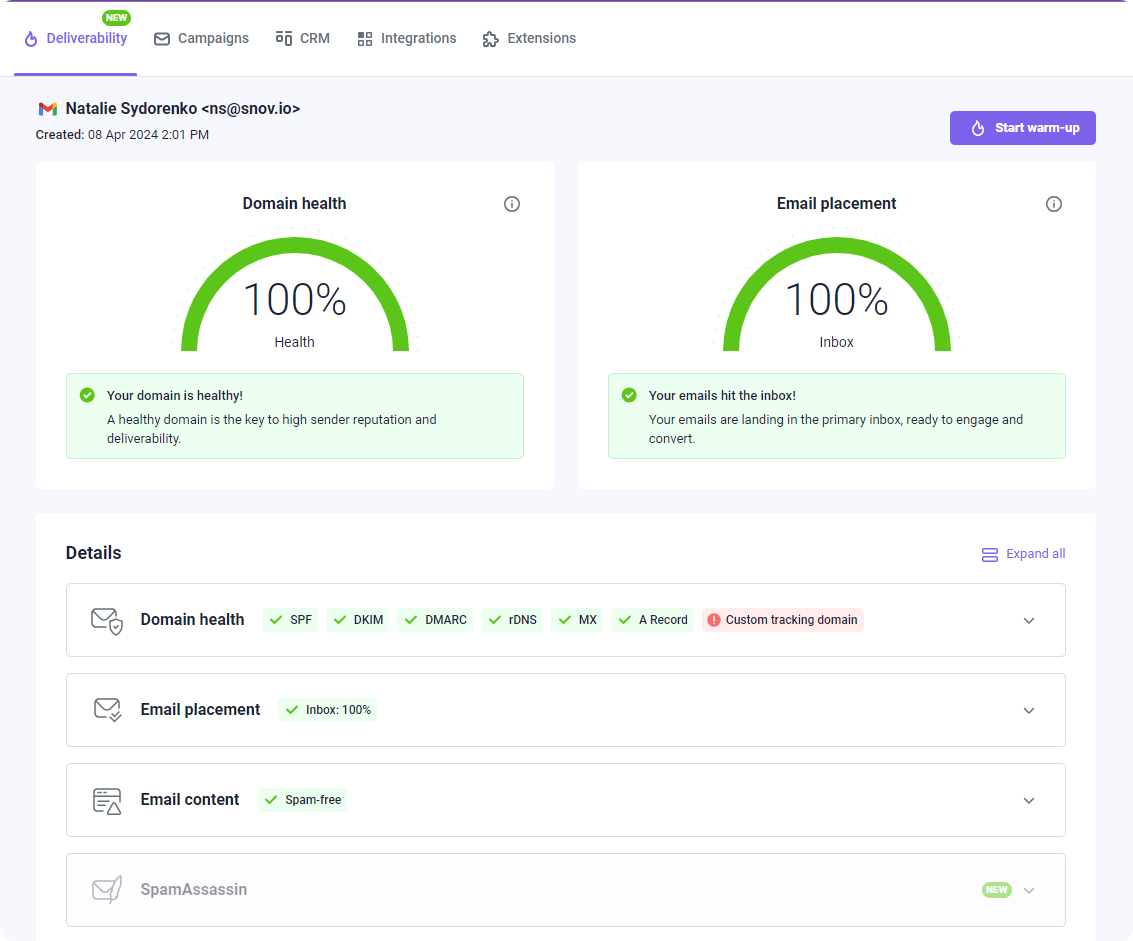
So, apply the suggested changes, test your email again, and repeat the process until you’re satisfied with the results.
7. Monitor engagement and deliverability
Launch your campaign with a smaller group and monitor bounces, unsubscribes, and email placement. If performance stays stable and no deliverability issues arise, you can gradually grow your sending activity.
If you spot an unusual increase in bounces or spam placement, pause your sending to investigate the reason. Recheck your list, authentication, recent copy changes, and domain status. If everything is ok, resume your campaign with reduced activity and keep on monitoring email performance metrics.
Key takeaways
If email is your primary channel for sales and marketing, strong deliverability is essential to achieving real outcomes from your campaigns. The more messages reach the inbox, the more prospects will see your offer and the more revenue opportunities you can create.
Low results often come from poor contact quality, incomplete authentication, spam-triggering content, irrelevant outreach, and suspicious sending behavior. To maintain stable email deliverability, follow these core practices:
- Configure SPF, DKIM, DMARC, and other essential DNS records for every sending account.
- Verify your contact list and remove invalid or risky addresses.
- Warm up your mailboxes before starting outreach.
- Segment your audience to create more relevant offers.
- Personalize emails to encourage stronger engagement.
- Run a spam test to identify content that may trigger filtering.
- Set reasonable sending limits and increase activity gradually.
- Check inbox placement, domain health, and blacklist status, and fix issues before launch.
- Monitor bounces, complaints, and engagement to adjust your sending strategy when needed.
These practices help protect your sender reputation and improve inbox placement, while Snov.io, with a strong built-in deliverability suite, can help you apply them throughout the outreach process and get more value from every campaign.