TL;DR: Waterfall enrichment in a nutshell
Short on time? Here’s what you need to know about waterfall enrichment in one concise Q&A table.
| Question | Short answer |
|---|---|
| What is waterfall enrichment? | An enrichment method that queries several providers sequentially until one finds and returns a result |
| How does it work? | Input → Provider A → 0 result❌ → Provider B → 0 result❌ → Provider C → Result found✅ |
| What data can it enrich? | Work or personal emails, phone numbers (direct dials or mobile numbers), revenues, recent company news, etc. |
| What’s the main benefit? | Higher coverage |
| What’s the main drawback? | Static rules that may impact data accuracy |
| How to build an enrichment waterfall sequence? | Step 1. Prepare normalized inputs. Step 2. Choose a tool for a build-your-own or managed sequence. Step 3. Verify results (even if they passed native validation). Step 4. Write them back with the sources, dates, and statuses logged. Step 5. Experiment, measure, and implement what works best. |
| What are the best tools for it? | Clay, BetterContact, FullEnrich, Databar, pipe0 |
| What are the alternatives? | Single-provider, multi-provider, custom API enrichment |
Interested in a deeper dive with more extensive answers? Scroll on.
An empty email field, a wrong phone number… Challenges all too familiar to many sales reps. In fact, 76% say less than half of their CRM data is complete and accurate, and 37% report losing revenue as a direct consequence of poor data quality.
But does waterfall enrichment solve all these problems?
Find out in this guide. I’ve packed it with everything you need to know about waterfall enrichment, so let’s go.
What is waterfall enrichment in lead generation?
Waterfall enrichment, sometimes called cascade enrichment, is a method of finding missing lead data (e.g., an email address or a phone number) using multiple data providers (2 to 50+) in sequence. Each provider attempts to fill the gaps left by the previous one until one finally fetches the required info.
This specific approach to enriching data has 3 key defining aspects:
- Sequential order: Multiple data providers are queried one at a time in a pre-defined or manually configured priority order.
- Conditional logic: If the first provider returns no result or fails pre-set validation rules, the next provider gets the task to enrich data.
- Stopping point: The sequence stops at the first verified result.
In simple words:
Imagine an investigation agency searching for data on a particular case. One detective checks the first source. If they find nothing, they hand it over to another detective who consults their own source, and so on until someone finds the needed data. They rely on multiple sources, but none of them repeats the work already done by their colleagues.
Let’s explore how waterfall data enrichment works in practice in a B2B lead generation context.
How waterfall enrichment works and what it looks like
Waterfall enrichment works as a fallback chain across several B2B data providers. If one provider returned an empty result, the record would move down the chain to the next one.
Here’s what waterfall data enrichment may look like:
Input → Provider A → 0 results❌ → Provider B → 0 results❌ → Provider C → Output: Data found✅
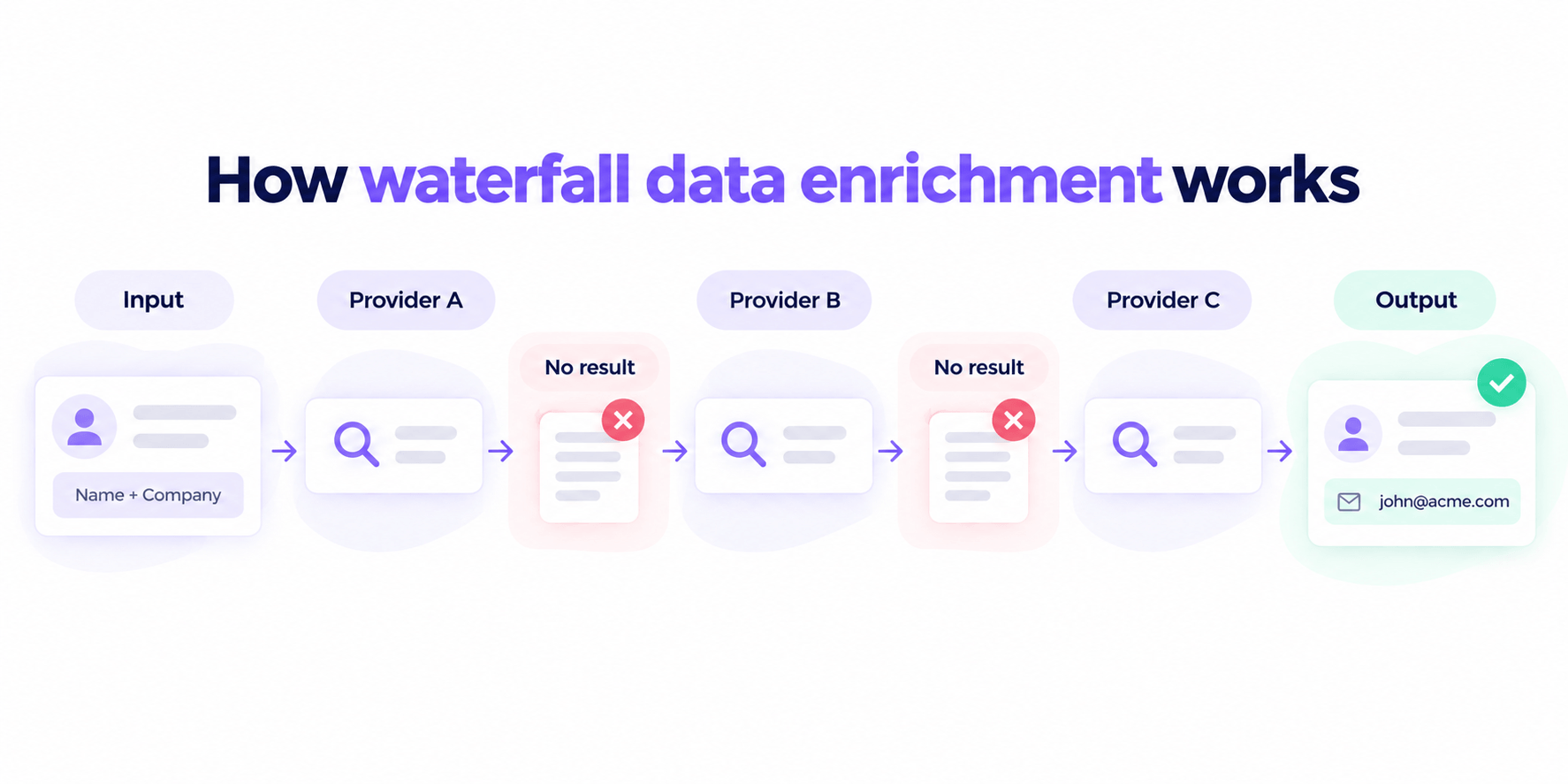
The input typically consists of a set of fields, such as a full name, company domain, LinkedIn URL, or others. The output is whatever data you’re lacking.
The whole point is that this cascading method, an enrichment waterfall, works for different data types. So you can use this approach to enrich leads’ profiles with various details, including:
- Emails
- Mobile numbers or direct dials
- Work experiences
- Company info (e.g., company size, creation date, industry, lookalikes, tech stack, and so on)
- Social media profiles (both personal and corporate)
- Or other details
Today, social profiles, especially LinkedIn URLs, have become valuable enrichment data for B2B. However, email addresses and phone numbers are the most searched-for data points for sales outreach.


Waterfall enrichment example: From 55% to 90% coverage
Suppose you have a list of 1,000 prospects with their first and last names, company domains, and, say, job titles. But you want to find their direct dials using the waterfall method.
Here are the mechanics (the numbers are illustrative):
- Provider A tries to get all corporate phone numbers but finds only 550 (55%).
- Provider B searches the missing 450 records and returns merely 173 results.
- Provider C tries the remaining 277 and brings 91 more phone numbers.
- Provider D searches the remaining 186 and returns 86.
Here’s a quick breakdown with hit/match rates for each provider in this case.
| Provider | Contacts queried | Phone numbers found | Hit rate |
|---|---|---|---|
| Provider A | 1,000 | 550 | 55% |
| Provider B | 450 | 173 | 38.4% |
| Provider C | 277 | 91 | 32.9% |
| Provider D | 186 | 86 | 46.2% |
In total: 900 phone numbers (90%) from multiple data providers queried in a sequence vs 550 (55%) from the first provider alone.
Impressive, isn’t it? Yet, I wouldn’t celebrate this hypothetical result too soon. Those numbers still need validation to determine how many are actually usable. Higher coverage doesn’t always mean better data quality.
So let’s look at the key benefits of waterfall contact enrichment along with its main drawbacks.
Pros and cons of waterfall data enrichment: What experts are saying
I did some searching across LinkedIn and found insights from decision-makers based on their hands-on experience with waterfall B2B data enrichment. Here are the most commonly cited benefits and drawbacks of this method:
| Waterfall enrichment pros | Waterfall enrichment cons |
|---|---|
| ➕ Higher coverage overall | ➖ Overlapping databases: More vendors ≠ more unique data |
| ➕ Deeper specialization across locations (regions), industries, etc. | ➖ Hard-to-forecast total spend |
| ➕ Less manual research and time spent on prospecting | ➖ Inconsistencies between providers |
| ➕ Lower cost-per-contact found when you put cheaper sources first and pay for results only) | ➖ More latency per record, as running a sequence is slower than a single-provider query |
| ➕ No vendor juggling with one subscription but multiple data providers | ➖ Zero control over priority order in automatically managed tools |
| ➕ Fuel for AI tools or other parts of your tech stack (e.g., for personalization of messages or cold-calling scripts) | ➖ More complicated troubleshooting and traceability; hard to benchmark providers by hit rate |
| ➕ Improved outreach results | ➖ Non-compliance risk with regional laws (e.g., GDPR for EU, PIPL for China, or DPDPA for India) |
For a closer look, let’s review the most significant of them.
What are the key benefits of waterfall enrichment?
👍Better coverage
Most experts agree that the primary advantage of waterfall enrichment is closing the so-called “coverage gap” that can arise when you rely on a single provider.
Most sales and marketing teams prospect like this. Pick one provider. Hope it finds as many emails as possible for their list. Then they ship the list anyway, with emails missing for more than half of the contacts. […] That is the coverage gap nobody talks about. And it kills outbound before copy even matters. […] A waterfall enrichment fixes that.
Head of Service Delivery at ColdIQ

Let’s look at the real ColdIQ example that illustrates this coverage improvement with actual prospect data:
One provider found 5 out of 13 emails. That’s 38% coverage. The waterfall found 13 out of 13. That’s 100% coverage.
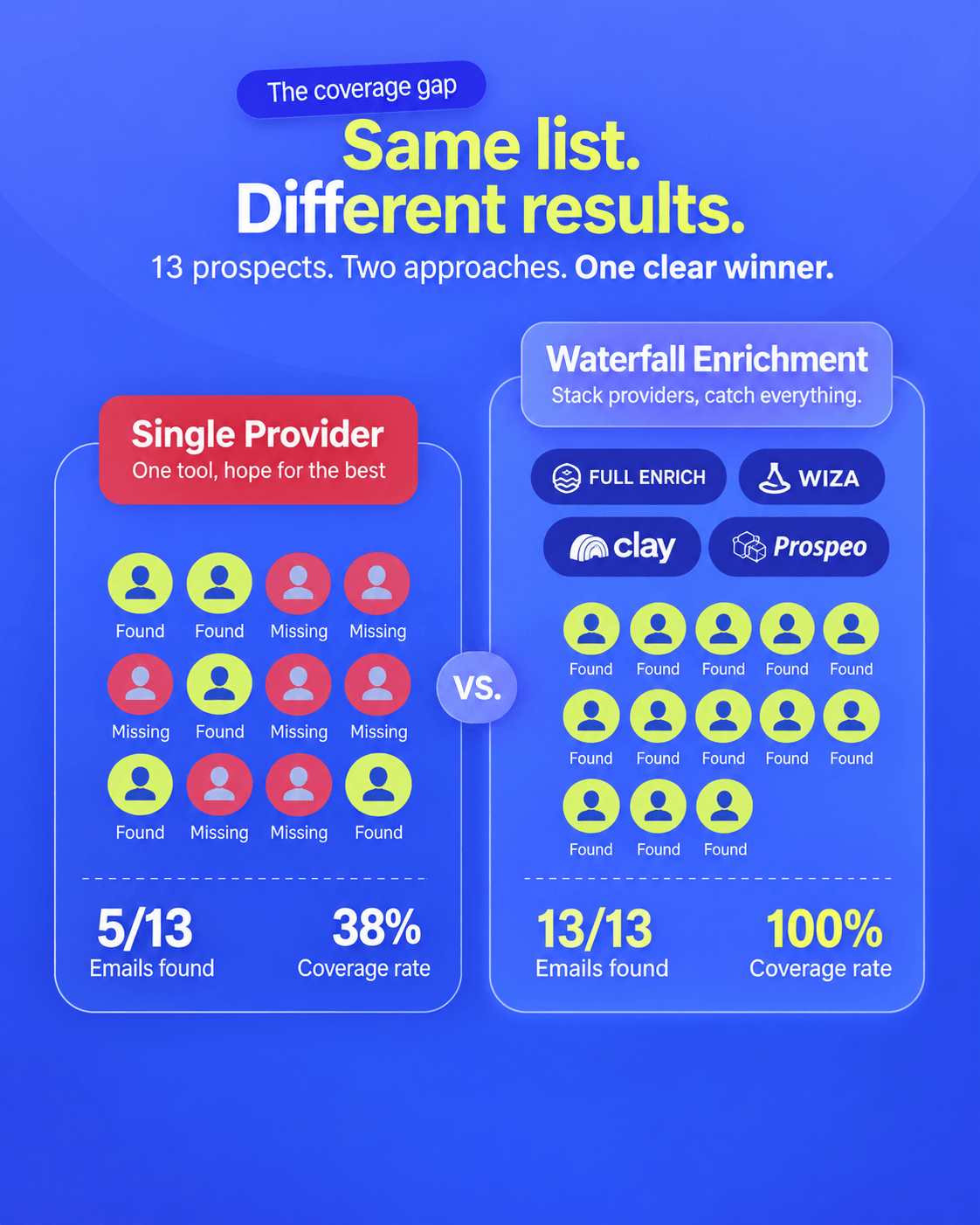
Although the sample is too small to demonstrate typical waterfall performance, it illustrates how combining providers can close coverage gaps.
👍Provider’s specialization (location, business niche, company size, etc.)
Another key benefit that decision-makers notice about cascade enrichment is the ability to combine providers with different geographic and industry strengths.
Indeed, vendors differ in their database coverage. Some vendors specialize in technographics or firmographics, while others focus on a particular region (e.g., the UK), company size (e.g., small businesses only), industry (e.g., manufacturing), etc. Knowing that, you can route the waterfall to leverage those strengths.
For phone waterfall enrichment, FullEnrich has a high match rate in the APAC region — 81%. But it’s weaker when enriching EMEA mobile numbers — 71%.
👍Time-saving potential
Waterfalls automate sequential, conditional lookups across multiple data providers. No manual copy-pasting and multi-tab switching.
Let’s do some math. A manual lookup usually takes at least 4–5 minutes per single profile across social media like LinkedIn or databases. A waterfall system queries a sequence of vendors and delivers hundreds of enriched profiles in seconds.
As mentioned in the case study, C17 Lab saved >5 hours/week of ops time on phone number enrichment with BetterContact.
What are the key pitfalls of waterfall enrichment?
👎Static rules that impact data quality
While higher coverage tops the pros list, the risk of inaccurate data remains a key drawback.
Waterfall enrichment is great for coverage, but not good for accuracy. Say that you enrich a number, but it’s the wrong number. If you re-enrich, you get back the exact same number because of static waterfall rules (enrichment stops at the exact same provider again). As a result, even though you have 6+ providers, you can’t fully leverage them.
CEO of Salesfinity

Here’s how it may play out with direct dials. The first match wins, even if it’s wrong. Provider A returns a company’s switchboard number. The waterfall marks it as “found” and stops. Provider B, C, D, or others never get a turn, even if one of them has the right direct dial.
👎Unpredictable total costs
Some platforms use a pay-per-find model and charge per verified data point. Others may charge credits for unverified results or even lookups that return nothing. In some cases, the price of a found data point varies dramatically depending on the provider choice. So, it’s always worth clarifying the pricing model.
Phone lookups are the usual culprits of skyrocketing costs, since most waterfall data enrichment tools typically charge 3–10x more credits for a phone than for an email.
In Clay waterfall enrichment, a mobile number may cost 2 credits with one provider and 25 credits with another. In comparison, FullEnrich charges only 1 credit for a work email but 10 credits for a mobile phone number.


👎Inconsistencies between providers
Data providers may use different criteria to define a “valid” result. That’s what most experts call “the problem of vocabulary.” For example, one provider may label a catch-all email as “valid,” while another considers it “risky” or returns a low confidence score without explaining what it means.
There is the problem of vocabulary. One provider says an accept-all address is a risky thing. Another says valid w/footnote. A third will say nothing. All three are in the same CRM column called ‘verified.’ That word now means nothing.
Founder of RichAPI

Similar inconsistencies arise with phone data when defining mobile numbers, direct dials, or switchboard numbers.
How to build a waterfall data enrichment workflow step by step
If you’ve weighed all the pros, cons, and trade-offs and are ready to start building an enrichment waterfall sequence, here’s a full breakdown of steps you should take.
Step 1. Prepare and normalize your inputs
Most waterfall enrichment tools support CRM imports and CSV or Excel uploads. But before importing your contacts, make sure you’ve properly formatted the rows and columns in your inputs.
For prospects, you may typically need the following input:
- First and last name (Split full names as some tools require them as separate columns)
- Company Domain (A root domain, not a subdomain: e.g., company.com, not blog.company.com)
- LinkedIn URL (Useful for finding more data points)
- Email Address (If you’re running a reverse email lookup or a phone-only waterfall)
For companies, the minimum required input is typically this:
- Company Name (The official business name)
- Company Domain (Again, it should be a root domain: e.g., company.com, not news.company.com)
If you mess it up, match rates will naturally drop. Poor data in the input = poor data on the output. Brand name variations, mistyped domains, duplicate rows, or other inconsistencies may send providers down the wrong path. So, polish your file and remove duplicates to avoid overspending on the wrong input.
⚠️Important note:
Tools like FullEnrich accept LinkedIn-profile-only lists. Others recommend adding supplementary data to boost each provider’s hit rate and speed up the cascade. But when uploading personal data of EU residents in particular, remember GDPR’s data minimization principle for compliance. Add only what’s necessary.
Step 2. Choose the right tool for a managed or build-your-own sequence
Generally, tools for waterfall data enrichment offer 2 approaches: automatically managed sequences and build-your-own workflows.
Compare them in the table below.
| Tools with an automatically managed sequence | Tools with a build-your-own sequence | |
|---|---|---|
| How they work | The tool decides which vendors to query and in what order, either via a fixed default cascade or a dynamic one (e.g., based on each provider’s performance, hit rate, or other factors). | You pick multiple data providers yourself, define the primary source, the next provider, and so on. You also decide whether to verify results between steps. |
| Examples | BetterContact, Persana AI, FullEnrich | Clay, Databar, pipe0 |
| Pros | • Quick and easy setup • No maintenance headaches • Dynamic routing matches providers to a lead’s region automatically • The tool updates vendors and changes their order automatically |
• Full control over order • You can add verification between steps and stop rules • More visibility into which provider supplied which result to remove the weakest from the sequence • Higher cost control (e.g., trying the cheapest first) |
| Cons | • No ability to choose providers • Zero control over their priority order • Often a “black box”: It’s hard to see which provider supplied a result • More difficult troubleshooting and compliance monitoring due to limited provider transparency |
• Takes time and basic technical knowledge to set up • Requires ongoing maintenance (waterfall enrichment API changes, rate limits, etc.) • Easy to misconfigure and waste credits on a poorly defined order of vendors • Responsibility for benchmarking providers is on you |
| Best for | Teams without ops resources or those who need results quickly | Teams with ops resources or strict cost and compliance requirements |
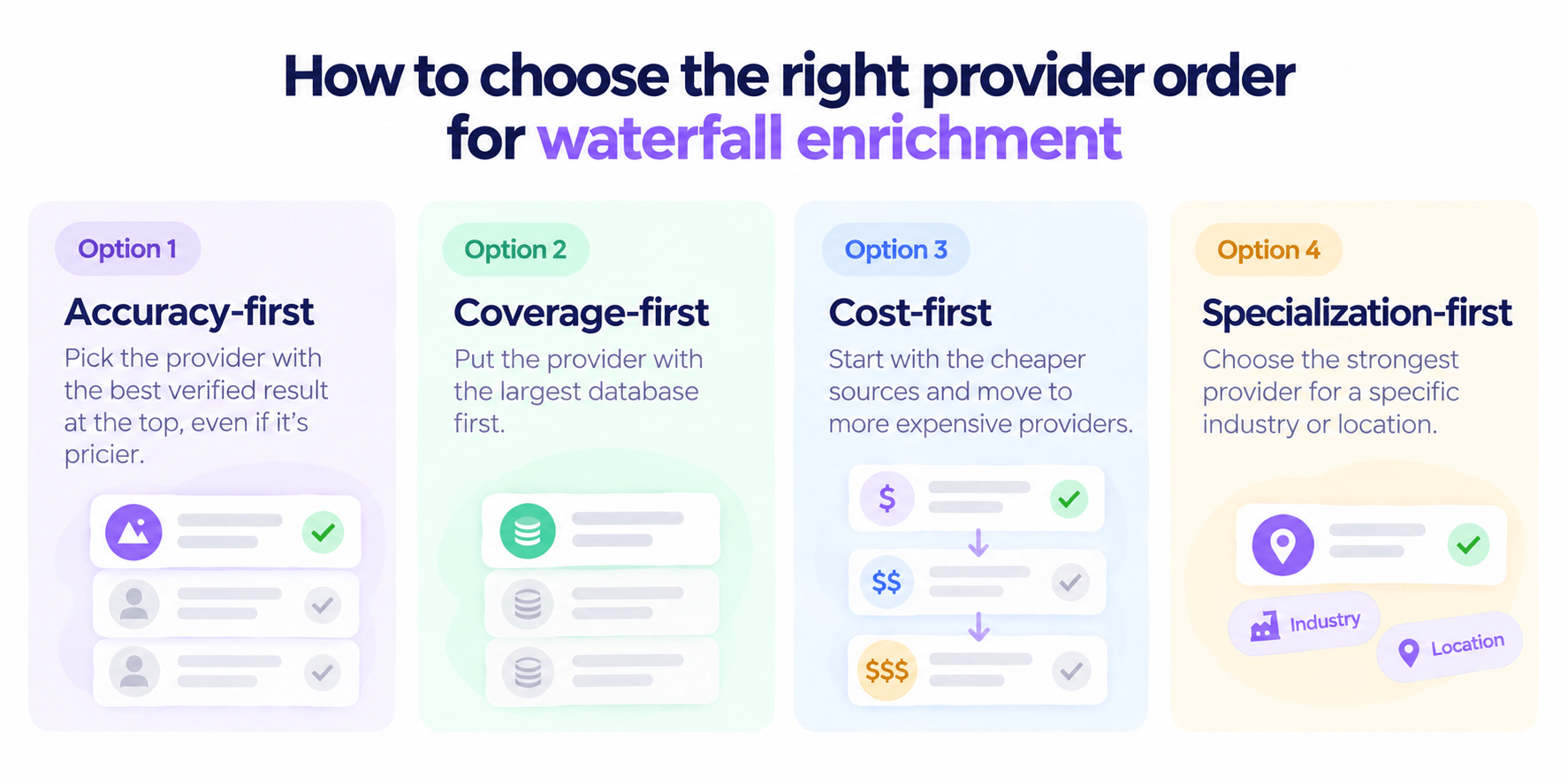
If you prefer to control it yourself, consider these four strategies to prioritize vendors for waterfall enrichment.
- Accuracy-first (Best when data quality is your main concern): Pick the vendor with the best verified result at the top, even if it’s pricier.
- Coverage-first (Best for large total addressable markets (TAMs)): Put the provider with the largest database and high match rate first.
- Cost-first (Best for high-volume work on a tight budget): Start with the cheaper sources and move to more expensive vendors.
- Specialization-first (Best for niche- or geography-specific lists): Choose the strongest database provider specializing in a particular niche or location.
🤓Quick fact:
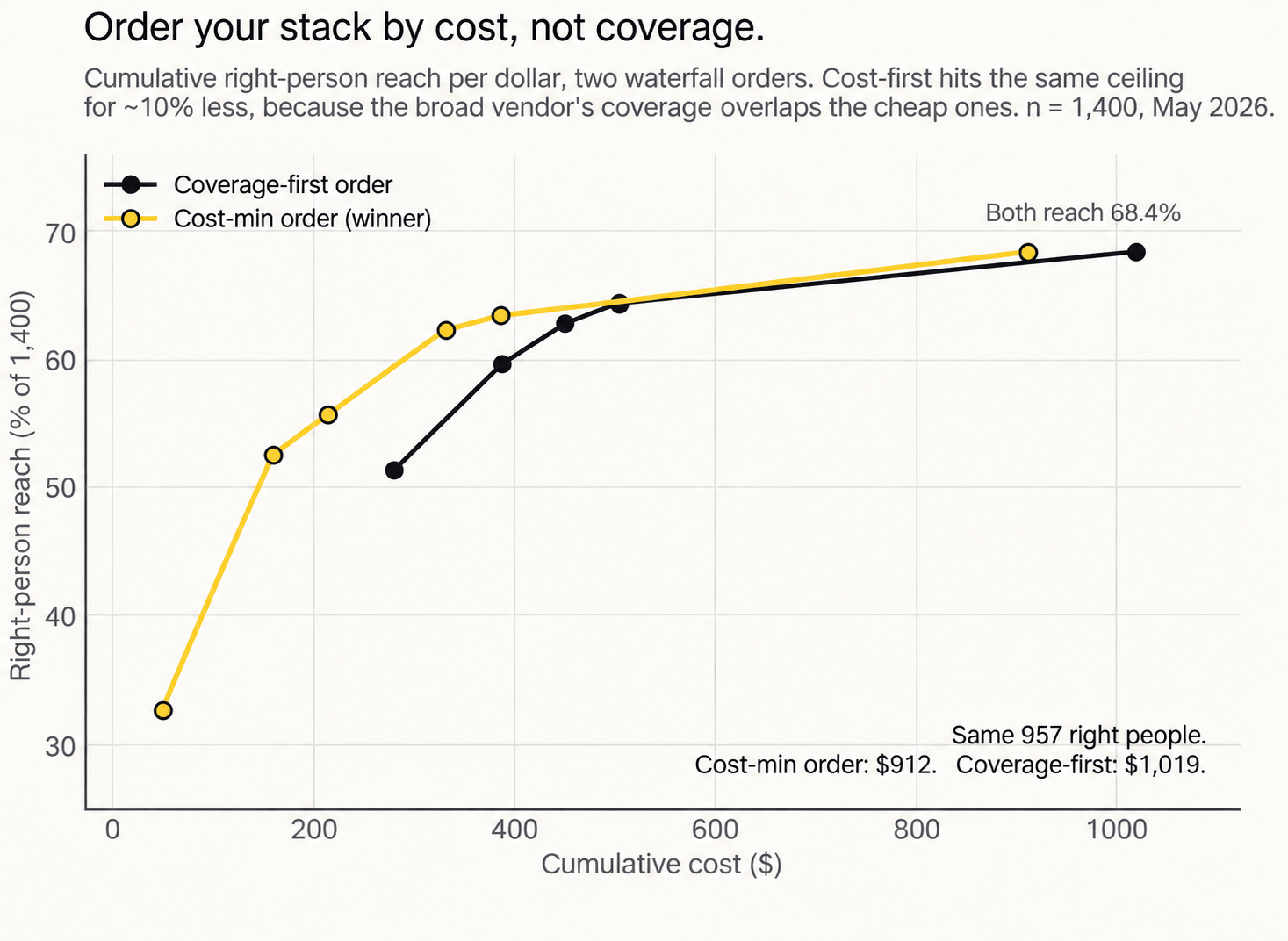
In a recent study by Outbound Kitchen comparing cost- and coverage-first orders for phone enrichment waterfall, both reached 68% match rates. However, the cost-first approach turned out to be about 10% cheaper: $912 vs $1,019.
Step 3. Verify results before any data point lands in your CRM
Is this step mandatory? No. Is it highly recommended? Absolutely! Some of the best waterfall enrichment tools do offer built-in verification. But it’s still worth clarifying what they actually validate and whether additional checks are needed.
Any data point can go stale or wrong — company revenues, mobile numbers, email addresses, and so on.
In email waterfall enrichment, misverified or unverified addresses from a deep fallback source can quietly raise your bounce rates. Without you even noticing, bounces drag down your sender reputation and inbox placement rate for every campaign that follows. An extra verification layer saves you from all of this.
Email Deliverability Specialist

So, if you want to avoid high bounce rates after waterfall enrichment, run your output through a reliable email verification service. For instance, turn to Snov.io’s Email Verifier as a final verification pass before any address touches your outbound sequences. With its Bulk Email Verification, you can check up to 100,000 lines in a single run.

Format
Type
Server status
Auto-generated
Catch-all
“Snov.io reduced the time it took us to find verified email addresses by almost 50% and improved our lead generation efforts by 20%. What’s even better, the high accuracy of the results allowed us to significantly improve the deliverability.”
Global Digital Marketing Manager at SurveySensum

Step 4. Log the source, date, and status before writing back the enriched records
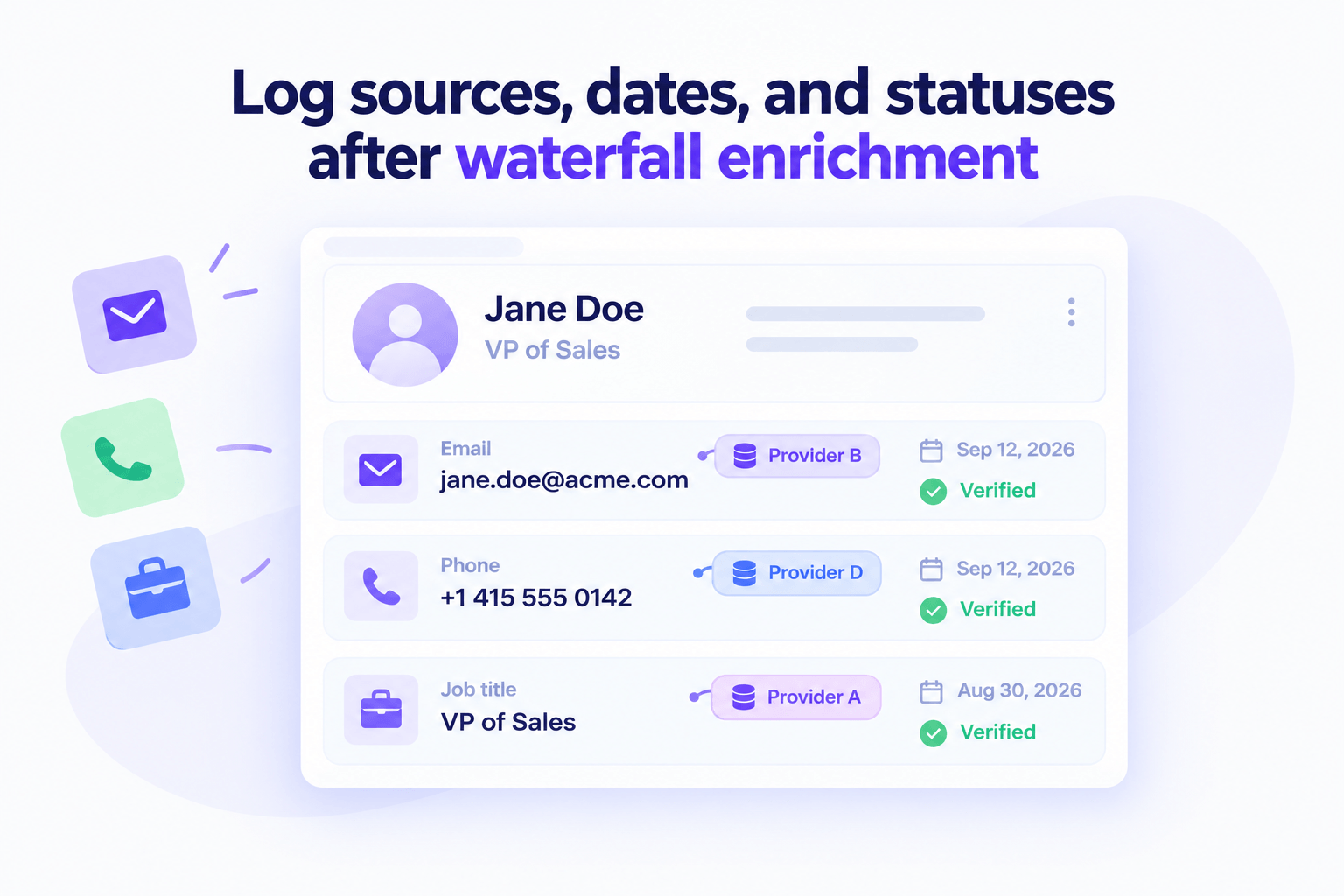
Once you receive the enriched records, don’t hurry to write them back to your system just yet. First, save which vendor returned each field and when exactly. Why do you need this? This step will help you:
- Maintain high data quality and freshness → Replace unverified or outdated data points with verified and up-to-date information.
- Avoid re-enriching and paying twice for the same contacts → Check each record: Has this field already been filled, and is it still fresh data? If yes, skip it. If no, re-enrich.
- Evaluate performance → Tag each enrichment waterfall sequence with its batch ID, then track bounce rates (for emails) or wrong-number rates (for phone numbers) per batch. If a September batch bounces at 9% while earlier ones remain under 2%, you know where the problem hides.
- Handle compliance requests → Answer when asked where data came from
For example: j.smith@company.com | Provider B | Sep 27, 2026 | Verified
💡Smart hack:
When you have no idea which providers are used in automatically managed sequences:
- Option 1. Ideally, before you sign up to one of the waterfall data enrichment tools, inquire about a Data Processing Agreement (DPA) and clarify whether they can trace a specific record back to its original provider and share this info on demand.
- Option 2. Check the raw waterfall enrichment API response (some tools include a source field there even if the interface hides it).
If you still can’t identify the exact provider, treat the tool itself as your single source of truth. Log the tool’s name, timestamp, and the request ID for every enriched field.
Step 5. Test, measure, and improve
Test different waterfall enrichment tools and sequence orders using the same sample of 100–200 records (to keep costs low) and compare results.
When measuring performance, focus on these metrics:
- Coverage rate
- Provider match rate (or hit rate)
- Verification rate
- Incremental coverage rate
- Cost per successful enrichment
For convenience, consult the following table for explanations and formulas metric by metric.
| Metric | What it shows | Formula |
|---|---|---|
| Coverage rate | Share of input records the waterfall returned a value for | Records with a result ÷ total records submitted × 100 |
| Provider hit rate | Which provider has a low and high match rate | Results returned by the vendor ÷ records sent to that vendor × 100 |
| Verification rate | Share of verified results | Verified results ÷ total results returned × 100 |
| Incremental coverage rate | How much extra coverage each vendor adds on top of the ones before it | New (enriched) results from the provider ÷ total records submitted × 100 |
| Cost per successful enrichment | How much you really pay for each usable data point | Total spend ÷ number of verified results |
Best waterfall enrichment tools — Quick overview
Here’s how popular tools for waterfall enrichment compare on price, number of providers, unique features, and downsides.
| Tool | Best suited for | Pricing | Number of vendors | Unique features and benefits | Major drawbacks |
|---|---|---|---|---|---|
| Clay | GTM engineers who want to design the sequence themselves | 14-day free trial with 2K credits; paid starts at $185/mo with 15K actions and 2.5K data credits* | 150+ | Full control over provider choice; built-in AI agents (Claygents); preferred by LinkedIn audience with the most positive mentions; the largest template library | Steeper learning curve; expensive at scale with credits running out fast; email verification through third-party tools |
| BetterContact | Small teams or agencies testing waterfalls on low budgets | 50-credit free trial; paid from $15/mo per 200 credits | 20+ | Pay only for the highest-likelihood-to-connect numbers (P1s); no charge for catch-alls | Only 1-tier email verification with Bouncer; no firmographic data; no option to cancel a sequence mid-run |
| FullEnrich | Large teams and those interested in mobile number coverage | 50 free credits on the trial; paid starts at $29/mo per 500 credits | 25+ | 80%+ hit rate; triple email validation process; probability of bounce rates; strong phone verification (owner’s name + landline verification, out-of-service removal) | No control over providers; credit rollover is limited; low EMEA/European coverage |
| Databar | GTM teams that want ready-made waterfalls in no-code tables | 14-day free trial with 100 credits; paid from $99/mo per 5K credits | 160+ | AI Web Researcher Agent; pre-built templates; bring-your-own, custom APIs; 450+ enrichments | Complex setup; overkill (and overpriced) for basic enrichment |
| pipe0 | API-first and agent-driven teams and developers interested in a waterfall enrichment API | First 20 credits are free; paid from $49/mo per 1.6K credits; pay-as-you-go pricing with $0.035 per credit | 50+ | Full provider control; credits never expire; 100+ enrichments; pipe0 Sheets for no-code users | No visual sequence builder; zero G2 reviews |
*Features and prices change often, so confirm current details on official websites.
For example:
Look at a Clay waterfall enrichment sequence with 7 providers in the order I chose by dragging and dropping.
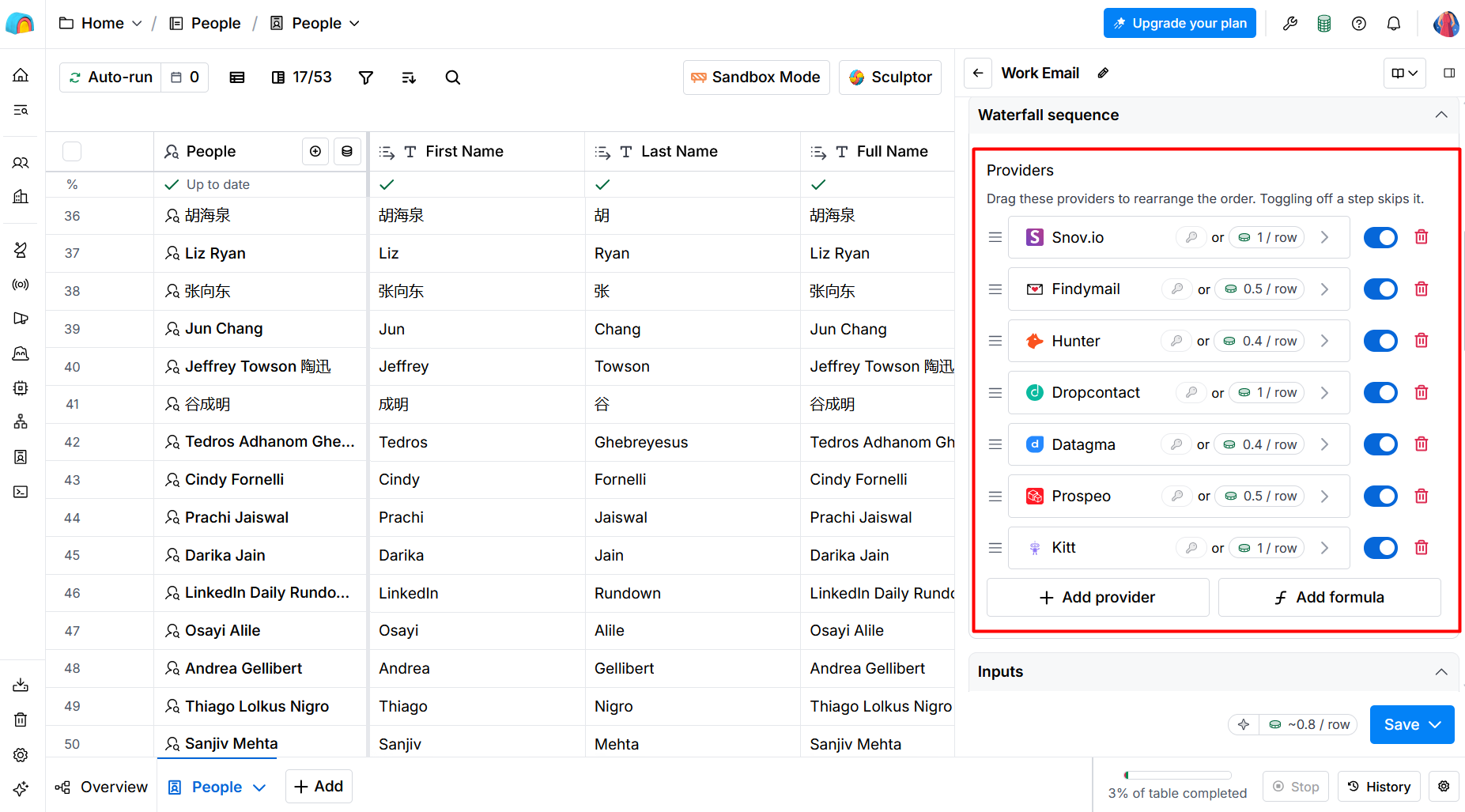
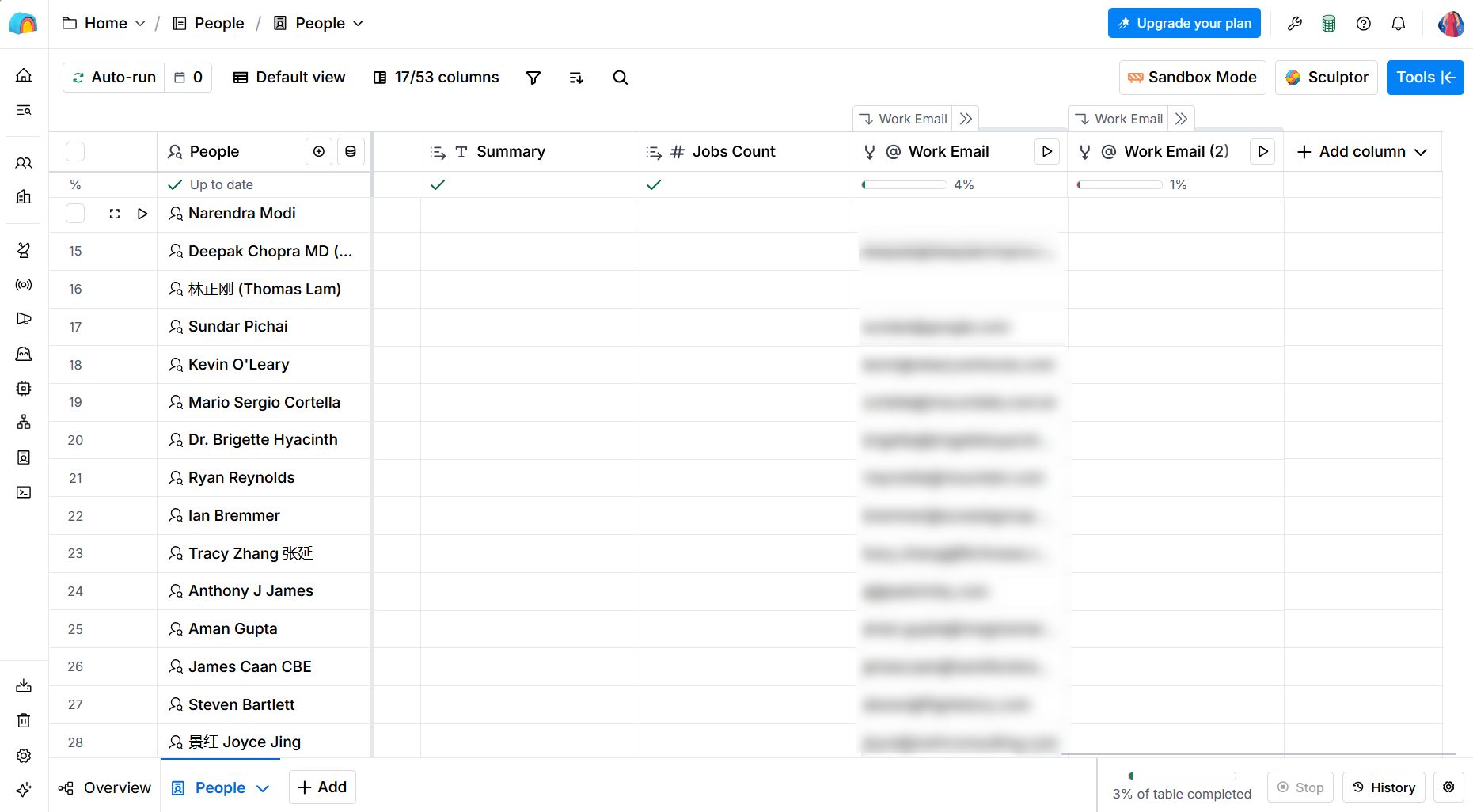
It did leave a couple of work email gaps during my trial, but overall it was intuitive and user-friendly, even though it took some time to learn as a beginner.
💰Money-saving tip for Snov.io users:
Clay uses Snov.io’s database as one of its multiple sources. But the tools also sync smoothly via a native integration. So, you can run waterfall contact enrichment in Clay from your Snov.io account and save costs, as you don’t have to pay twice. Enrich lead data in Clay and push contacts straight into the Snov.io app to launch email and LinkedIn outreach campaigns.
Waterfall vs alternatives: Single-provider, multi-provider, custom API enrichment
A cascade is only one method to enrich contact data. There are many more. I suggest reviewing and comparing the top 3 alternative ways:
- Single-source enrichment
- Multi-provider enrichment
- Custom API enrichment
See how they compare across coverage, cost control, and setup effort, and explore their benefits and limitations.
| Waterfall | Single-provider | Multi-provider | Custom API | |
|---|---|---|---|---|
| How it works | You build a strict sequential and conditional order of providers | You rely on one vendor only | You use multiple data providers in parallel or by data segment | You call provider APIs based on any logic you prefer |
| Best when | You have a large list or search for hard-to-find data | You focus on only one narrow niche or need only one data point and know the right provider for it | You want a fast parallel run across industries or regions, or you want to cross-check data from several vendors | You have custom data rules and enough GTM engineering resources |
| Coverage | High | Low; limited to one provider | Medium-to-high | Variable, depends on workflow logic |
| Setup effort | Medium | Low | Low-to-medium | High |
| Key benefits | Potentially high match rates; fewer unnecessary paid lookups; cost control by prioritizing cheaper providers | Faster to set up; higher cost predictability; easy to audit data quality | Broader coverage than one vendor; higher accuracy when cross-checking results; parallel calls are faster than sequential ones | High flexibility and customization; more controllable workflows; internal system fit with custom development |
| Key limitations | Slower; results depend on the provider order; data from different sources can be inconsistent | Lower coverage; you depend on one vendor’s pricing and accuracy | You may need to pay several vendors for the same record; requires rules to resolve conflicting data | Requires technical skills; takes the longest time to launch; breaks when providers change APIs |
Now, let’s take a sharper look at waterfall enrichment alternatives through examples.
Alternative 1. Single-source enrichment (EasyLeads example)
The best practice here is to choose a vendor that specializes in one particular data point, region, niche, etc.
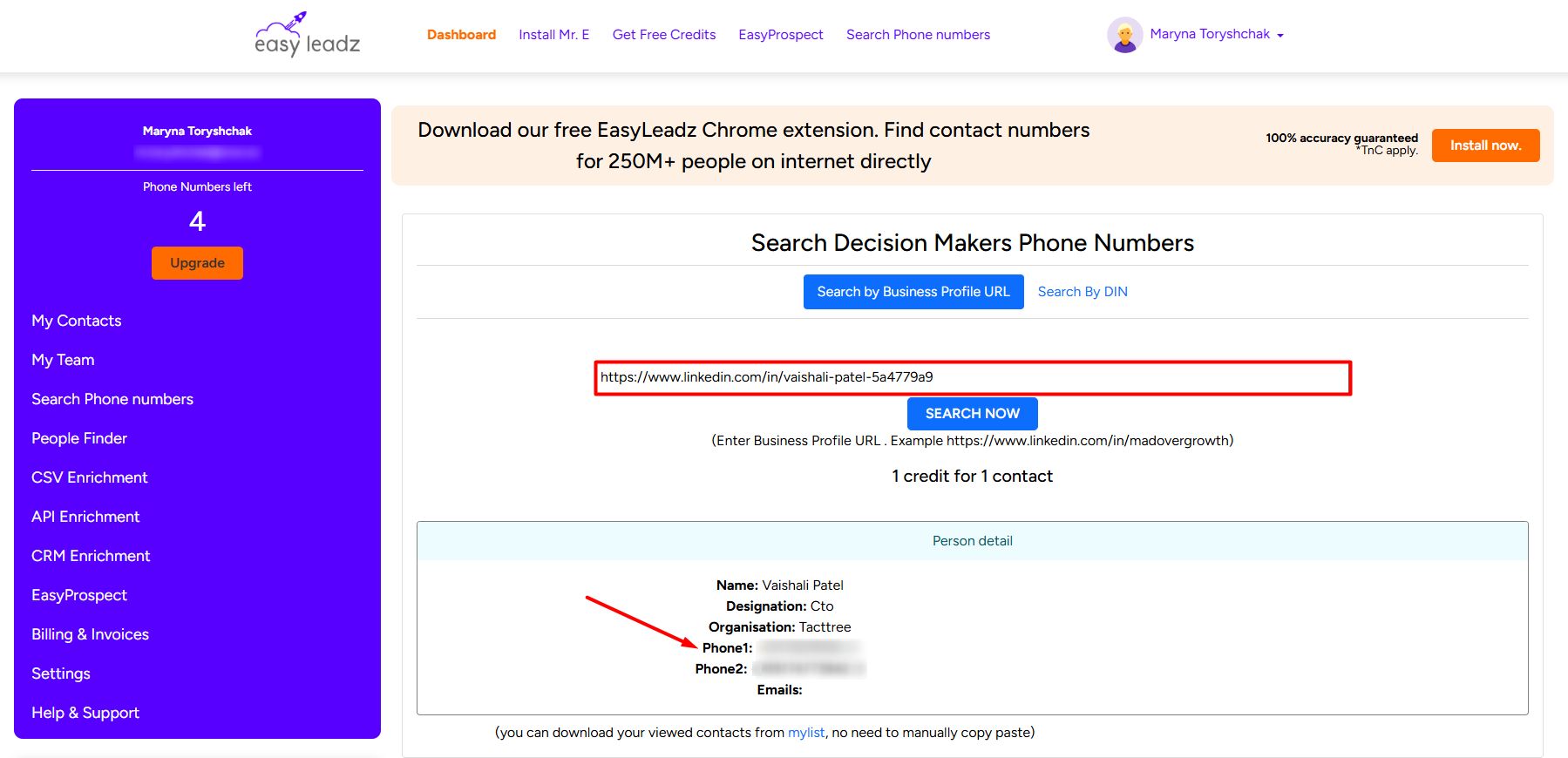
Let’s say your target prospects are located in India, and you only need their mobile numbers. In that case, use a phone number finder that specializes in covering that very country.
For example:
When I tried EasyLeadz, an India-centric B2B data finder, I got phone numbers for India-based prospects by entering their LinkedIn profile URLs.
Alternative 2. Multi-provider enrichment (Snov.io example)
Here, you use multiple sources in parallel or by segment. No strict sequential waterfall is needed. One provider handles emails, another covers mobile numbers, and a third enriches company data. Some tools let you switch between those easily.
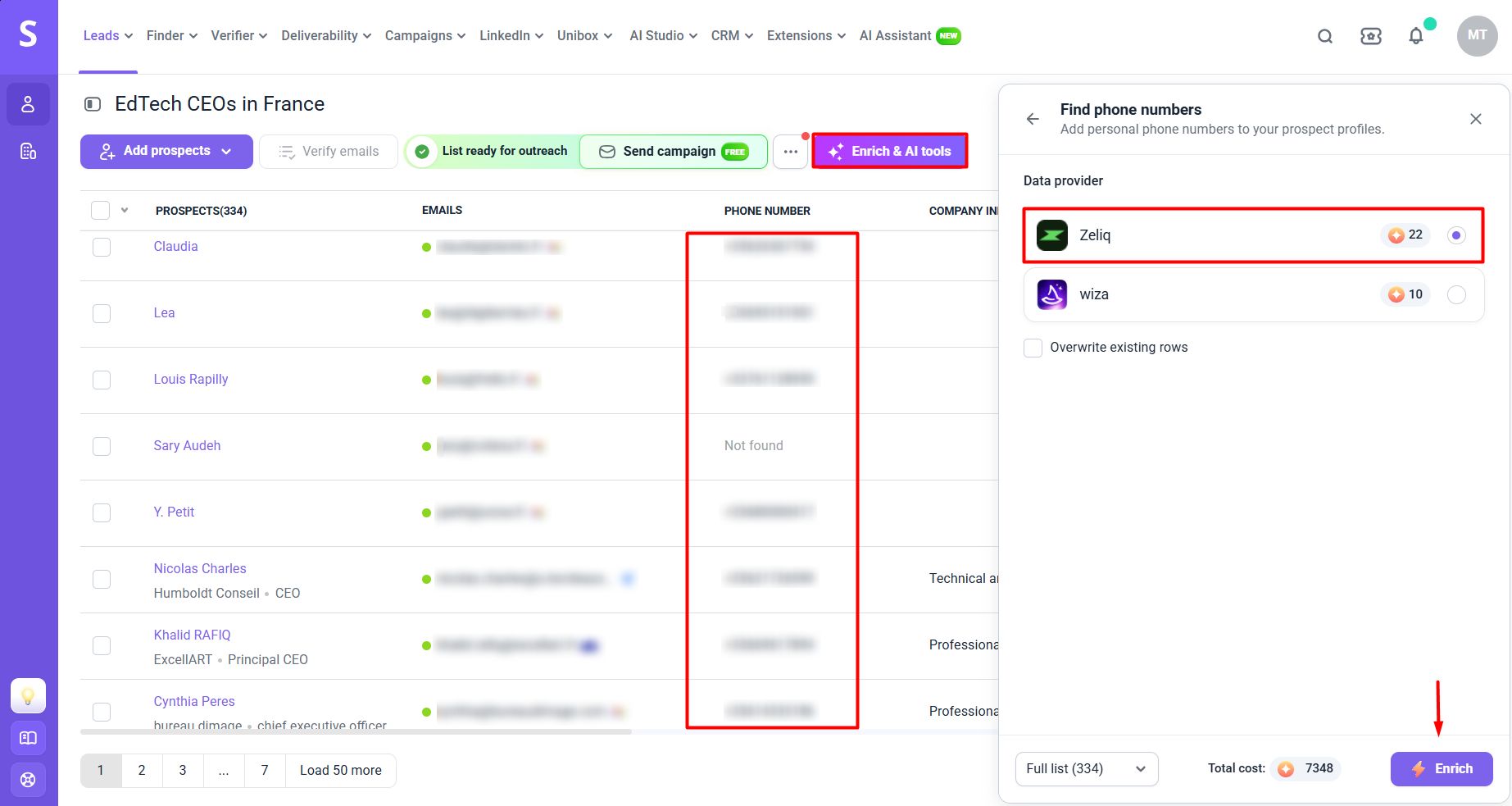
Take Snov.io’s B2B Data Enrichment Tool, which offers multiple providers to find missing emails or other data points. In the Snov.io app, go to your prospect list and click “Enrich & AI tools,” then pick the data type you need and its provider. To mention a few:
- “Get email addresses” → Wiza or Zeliq as a data provider
- “Find phone numbers” → Zeliq (better phone coverage for the UK and Western Europe) or Wiza (stronger phone coverage for the US and North America) as a data provider
- “Pull LinkedIn profile” → Generect or Snov.io
- “Fill out from web” → AI agents: Google, Anthropic, or OpenAI
You’re free to choose the source and decide how to spend tokens, since token costs vary by provider.
For example:
To get phone numbers of French prospects, I picked Zeliq. Even though it’s pricier, it helped me enrich 9 out of 10 contacts.
If you want to use AI web search to find specific information about prospects and companies for personalized outreach, select “Fill out from web,” give AI a prompt, and get the result as in the screenshot below.
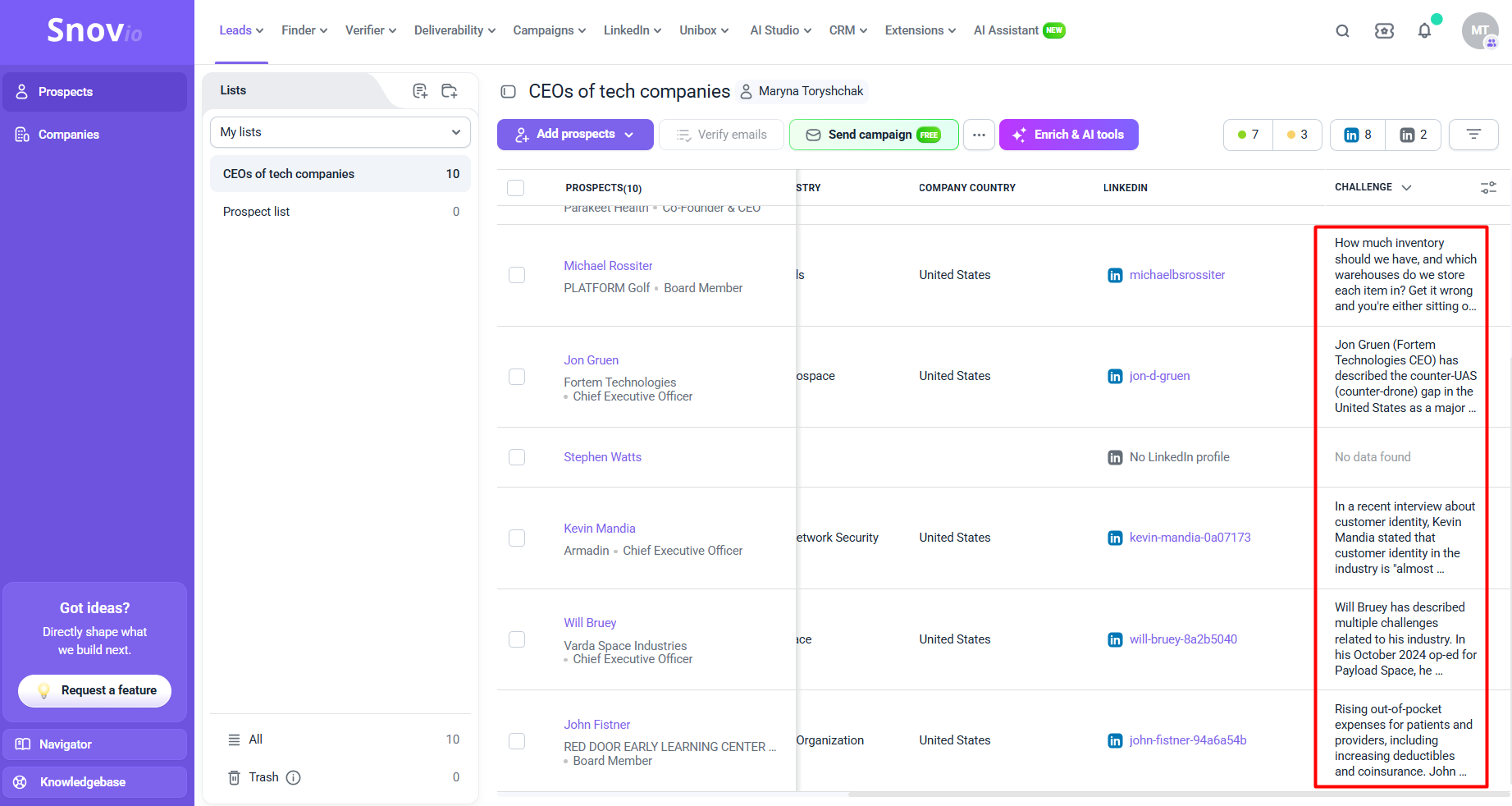
I chose Anthropic and used the following prompt:
“Search for any public posts, interviews, or articles by {{Prospect Name}} where they mention a challenge or frustration related to their industry. Provide the specific problem they described.”
Watch this helpful video to learn more B2B enrichment hacks:
Alternative 3. Custom API workflow (n8n example)
This waterfall enrichment alternative lets you customize your workflows to the fullest, applying whatever logic you prefer. For convenience and speed, most teams opt for a low- or no-code automation platform like n8n or Make.
For example:
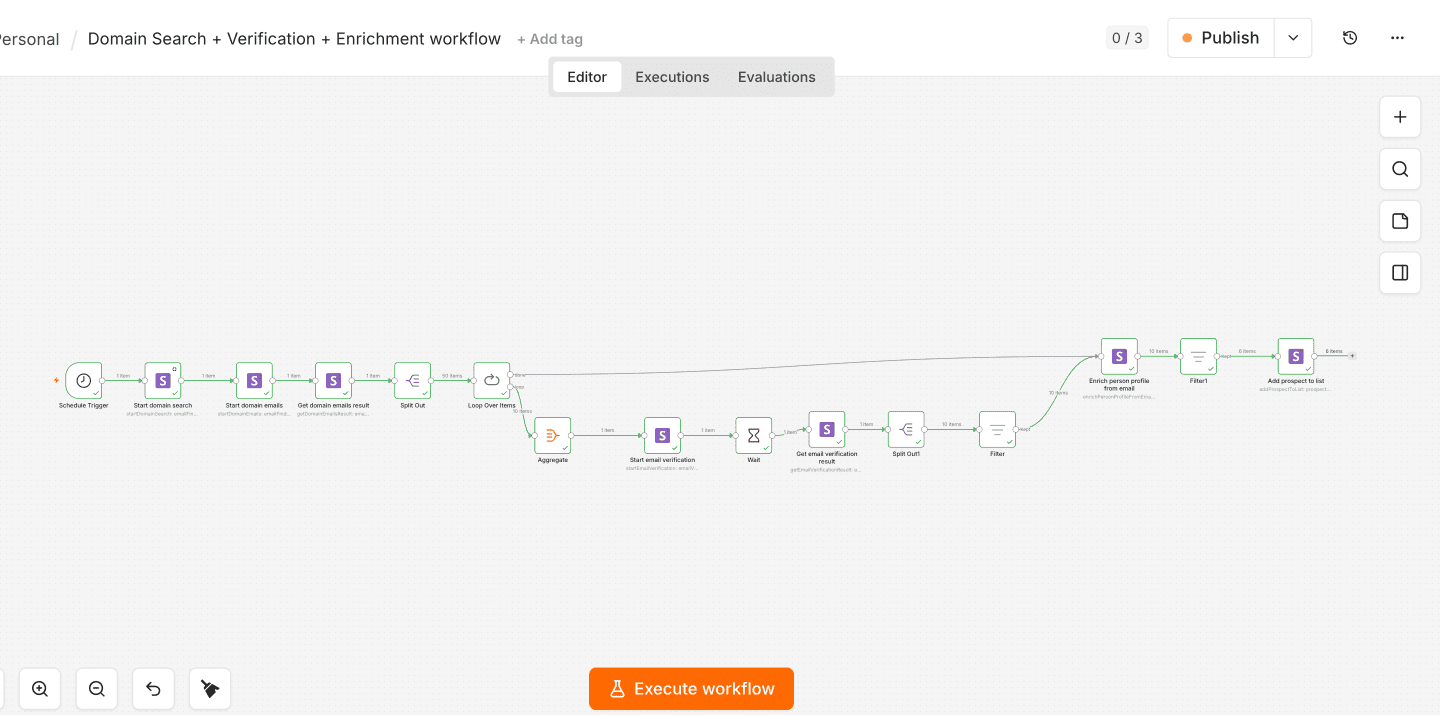
Here’s a self-hosted n8n workflow example using Snov.io nodes to perform a domain search first, then verify emails, and then enrich profiles (company, job title, and location) from those verified email addresses.
⚠️Important note:
Snov.io action nodes are currently available only for self-hosted n8n accounts. So, if you’re on n8n Cloud, use the Snov.io data enrichment API to get verified email addresses, job titles, phone numbers, and more data points from prospects’ names and/or company domains or their LinkedIn or X profiles.
When you should and shouldn’t use waterfall data enrichment
Not sure whether waterfall enrichment is right for your lead-generation strategy? Here’s a side-by-side look at the best-fit and the worst-fit scenarios.
| Use an enrichment waterfall when… | Don’t use an enrichment waterfall when… |
|---|---|
| ✅ A single source leaves most records empty | ❌ Your list is small, so the cost for setting up a waterfall outweighs the potential benefit |
| ✅ You enrich high-volume lists in batches | ❌ Your provider already delivers sufficient coverage for your goals |
| ✅ You target hard-to-reach prospects, and every reachable contact detail matters greatly | ❌ Additional coverage doesn’t outweigh the downsides |
| ✅ You want to balance data quality, coverage, and cost | ❌ Your real problem is ICP targeting, not coverage |
| ✅ You’re entering a new market and don’t know which provider covers it best | ❌ You need results quickly or in real time |
| ✅ You can afford an extra verification layer | ❌ You can’t confirm whether each vendor complies with GDPR, CCPA, or other regulations |
Need a simpler rule to decide? Frame it around one simple question. What costs you more: a missing row or a bad row?
- If missing contacts cost you more than the risk of occasional bad data, a waterfall is worth it, as long as you verify each result before accepting it.
- If a bad row costs you more, keep the sequence short, choose the first provider by the accuracy-first principle, or stick with a single trusted source.
Either way, the waterfall should pass a final test: the incremental value of the extra valid contacts has to outweigh the cost and complexity of running multiple data providers.
Key takeaways: Is waterfall enrichment worth it?
For most teams whose outreach requires contact data a single source can’t provide, waterfall enrichment can definitely deliver value. But only when it’s fully controlled and measured.
Let’s recap the key trade-offs and risks you may face when using a waterfall approach to enrich your B2B data.
| Trade-off | What you gain | What you compromise on |
|---|---|---|
| Coverage vs accuracy | More contact data found | Low-confidence data blocks better sources; inconsistent “valid” definitions |
| Convenience vs traceability | One subscription, no manual work | Performance is hardly traceable and measurable |
| Depth vs speed | Multiple sources checked, including region-oriented | The process is slower |
| More providers vs compliance | Broader source pool | More data processors = more non-compliance risks |
To make waterfall enrichment work, you need to:
- Start with cleaned-up, normalized inputs
- Decide on the right tool and setup (a managed or build-your-own sequence)
- Verify outputs before writing them back to your CRM
- Log the source, date, and status of every enriched field
- Test small, see what works, and improve
Alternatively, explore other ways to enrich data: single-source, multi-source, or custom API workflows.
With Snov.io’s Data Enrichment Tool, you can use multiple sources and run an automatic AI web search to find unique information about your prospects. Use it to personalize your outreach for real: mention something truly specific about them, win them over, and close the deal.