What could you do with an extra 4 hours a day? According to HubSpot, that’s how much time marketers spend on manual, repetitive tasks. Automating your lead generation workflow can help you reclaim some of that time for work that actually drives pipeline and revenue.
In this guide, you’ll learn what an n8n lead generation workflow can automate and how to set yours up.
TL;DR:
n8n lets you automate lead generation by connecting your data sources, prospecting tools, CRMs, outreach platforms, and other apps into a single workflow. Each node performs a specific task and passes data to the next, reducing repetitive manual work across your lead generation process.
n8n lead generation workflow examples:
- Turn Google Maps business data into a structured prospect database.
- Find prospects by industry and location and generate personalized outreach with AI.
- Build qualified prospect lists with Snov.io and sync them with your sales stack.
n8n lead generation best practices:
- Prioritize high-quality data sources
- Map your workflow before building it
- Test individual nodes as you go
- Start with a small dataset before scaling
Keep reading to build your very first n8n lead generation workflow step by step.
What a lead generation workflow in n8n actually looks like
n8n lead generation workflows vary depending on your goals, lead source, and sales process. Some catch inbound leads as they arrive; others find prospects, qualify them with AI, or personalize outreach at scale.
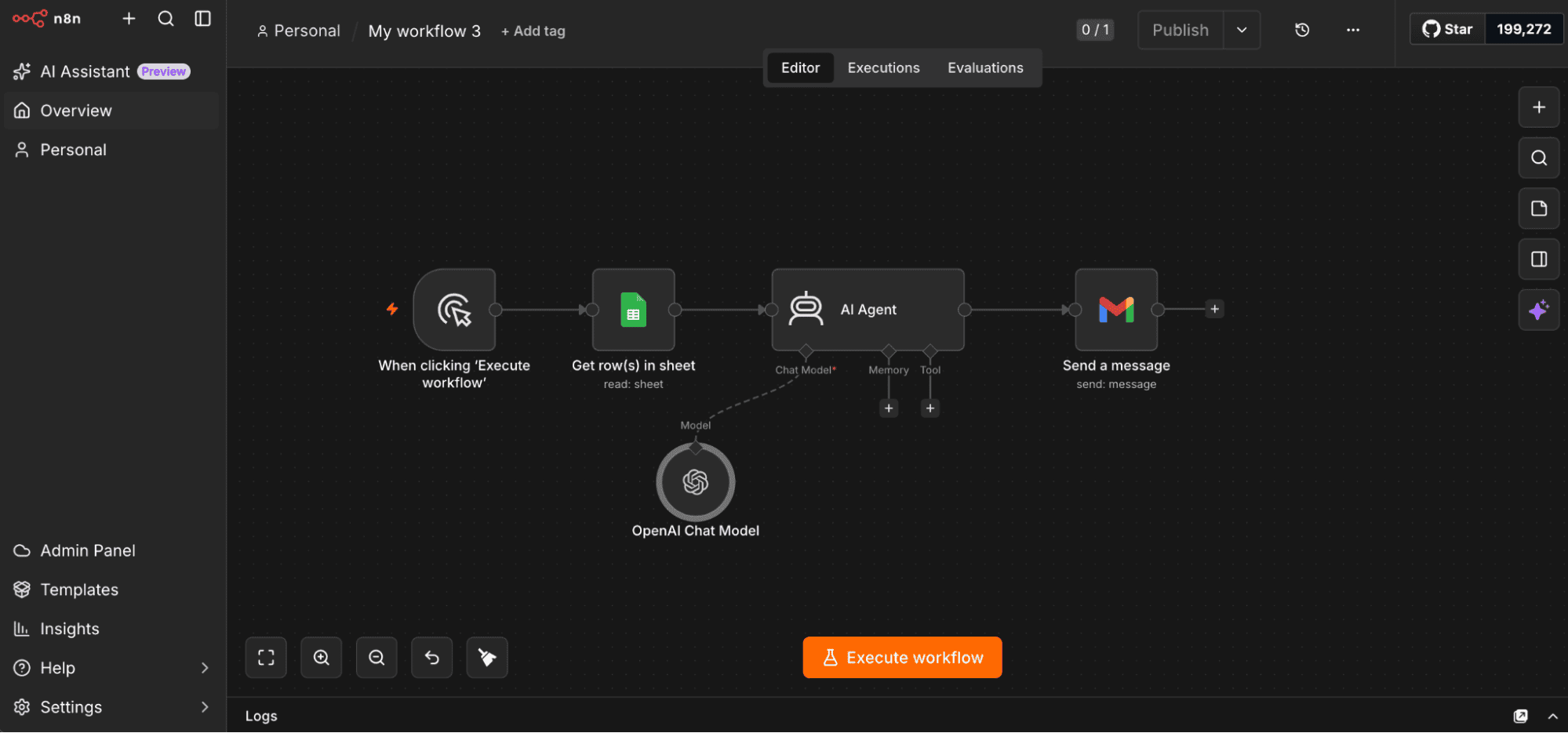
You’re free to combine automation steps however your use case demands. But if you’re wondering what one might look like in practice, an n8n lead generation workflow can include stages such as:
- Trigger: Starts the workflow manually, on a schedule, after a form submission, or via webhook.
- Lead collection: Retrieves prospects from forms, company databases, websites, CRMs, APIs, or other sources.
- Data enrichment: Adds additional context, such as company details, job titles, or contact information.
- Email verification: Validates email addresses before they’re used in outreach campaigns.
- Storage and routing: Saves leads to a CRM, spreadsheet, database, or prospect list, or passes them to the next system.
- Outreach: Sends personalized email or multichannel campaigns.
At its core, n8n turns lead generation into a chain of purpose-built nodes, each responsible for a specific task. Data flows from one node to the next, allowing different tools and services to work together as a single automated process.
Define your lead source before building the workflow
Your n8n lead generation automation workflow is only as good as the data feeding it. And no, that’s not just another automation cliché. According to the IBM Institute for Business Value, over 1 in 4 organizations lose more than $5 million annually because of poor data quality.
So, do yourself a favor before connecting a single node: decide where your prospects will actually come from and how reliable that data is.
Some of the most common lead sources are listed in the table below:
| Lead source | Best for |
|---|---|
| Website forms | Capturing inbound leads |
| Existing CRM | Re-engagement campaigns |
| Outbound prospecting | |
| Company domains | Finding contacts at target companies |
| B2B prospect databases | Building outbound prospect lists at scale |
My recommendation for you is to enrich data and qualify prospects before storing it in your CRM or launching outreach.
To save yourself hours of workflow building, start with a dedicated B2B database that already provides structured company and contact information, then let n8n handle what comes next.
Snov.io, for example, can search company domains, find business email addresses, enrich prospect profiles, and pass qualified contacts to your CRM or outreach campaigns.
Choosing a reliable data source from the beginning helps reduce manual cleanup later and improves the overall quality of your outreach campaigns.
How to set up n8n for lead generation
Once you’ve chosen your lead source, it’s time to prepare your workflow.
And here’s the nice part if you’re only getting started: n8n offers a 14-day free trial, so you can explore the platform and start building before making any deployment decisions.
Choose how you’ll run n8n
First, decide between n8n Cloud and self-hosting.
With n8n Cloud, hosting and setup are handled for you. Self-hosting requires more technical setup but gives you greater control and access to community nodes.
Connect your lead generation stack
Keep in mind you’ll eventually need to connect the services your workflow relies on. Most integrations, from CRMs and spreadsheets to communication tools and lead generation platforms, use API credentials you can set up once and reuse.
If you’re using Snov.io, for example, its community node is available for self-hosted n8n installations. Just connect your API credentials and add the Snov.io node after your workflow trigger.
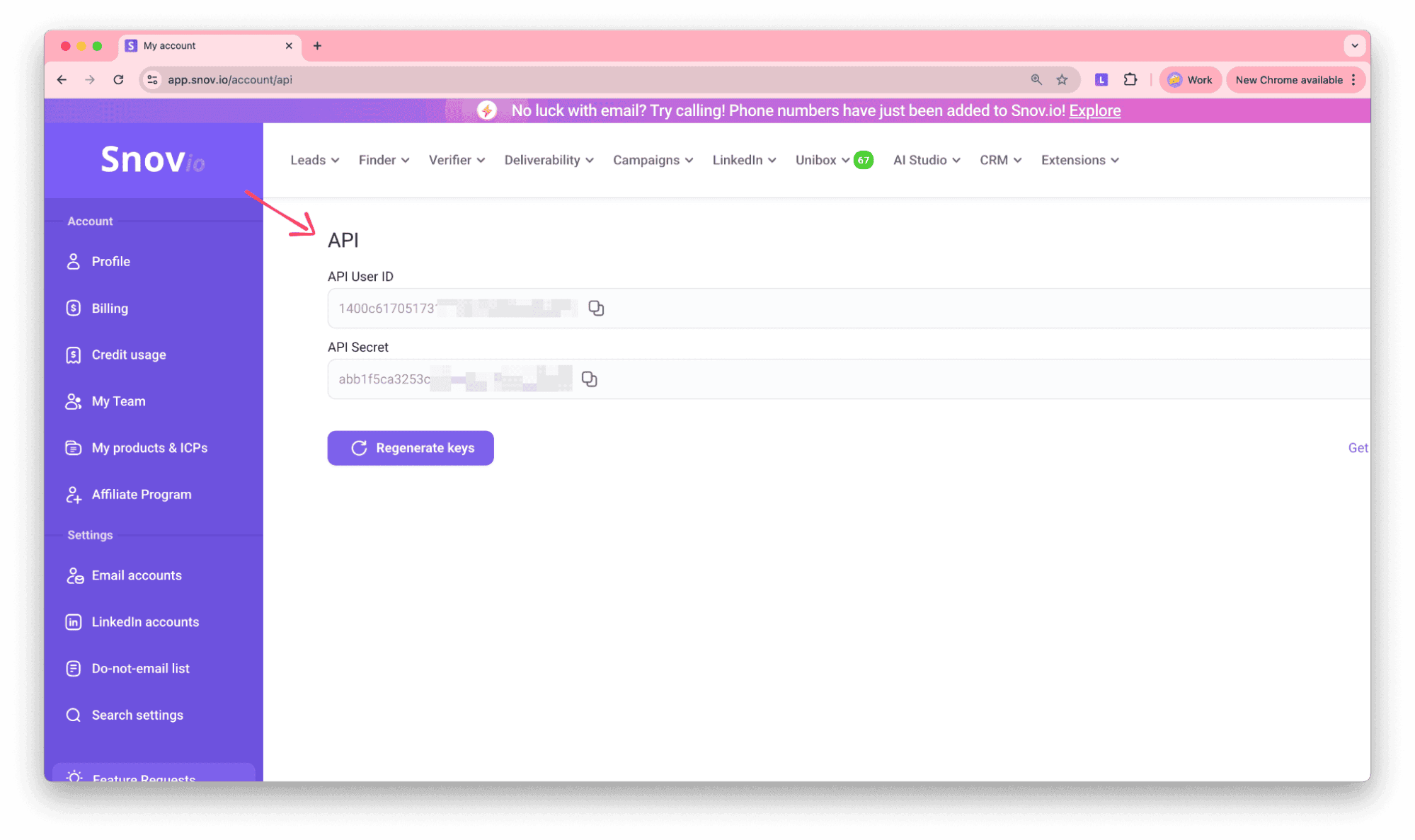
On n8n Cloud, you can connect through the HTTP Request node and the Snov.io API instead.
Map out your workflow
A quick word of advice before you open the workflow editor: visualize the whole process first. Knowing your trigger, main stages, decision points, and integrations in advance makes it much easier to connect the right nodes and spot problems later.
How to build a n8n lead generation workflow step by step
It’s time to move from planning to building.
Begin by creating a new workflow, give it a descriptive name, and you’ll be taken to the workflow canvas.
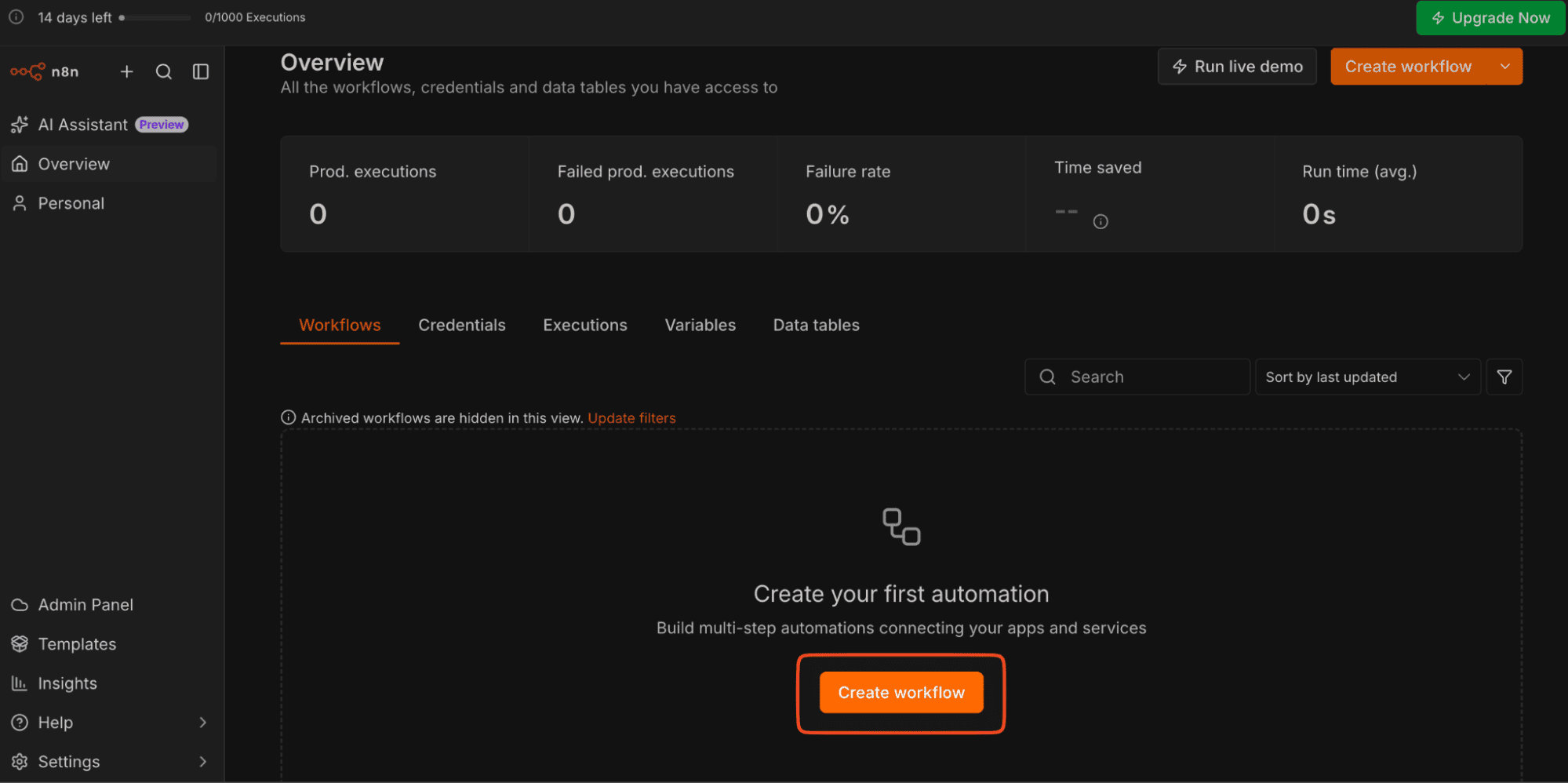
By design, the workflow will be structured as a series of nodes, each scoped to a single task and passing its result downstream.
Step 1: Choose a trigger
Every workflow starts with a trigger node, which determines when the automation runs.
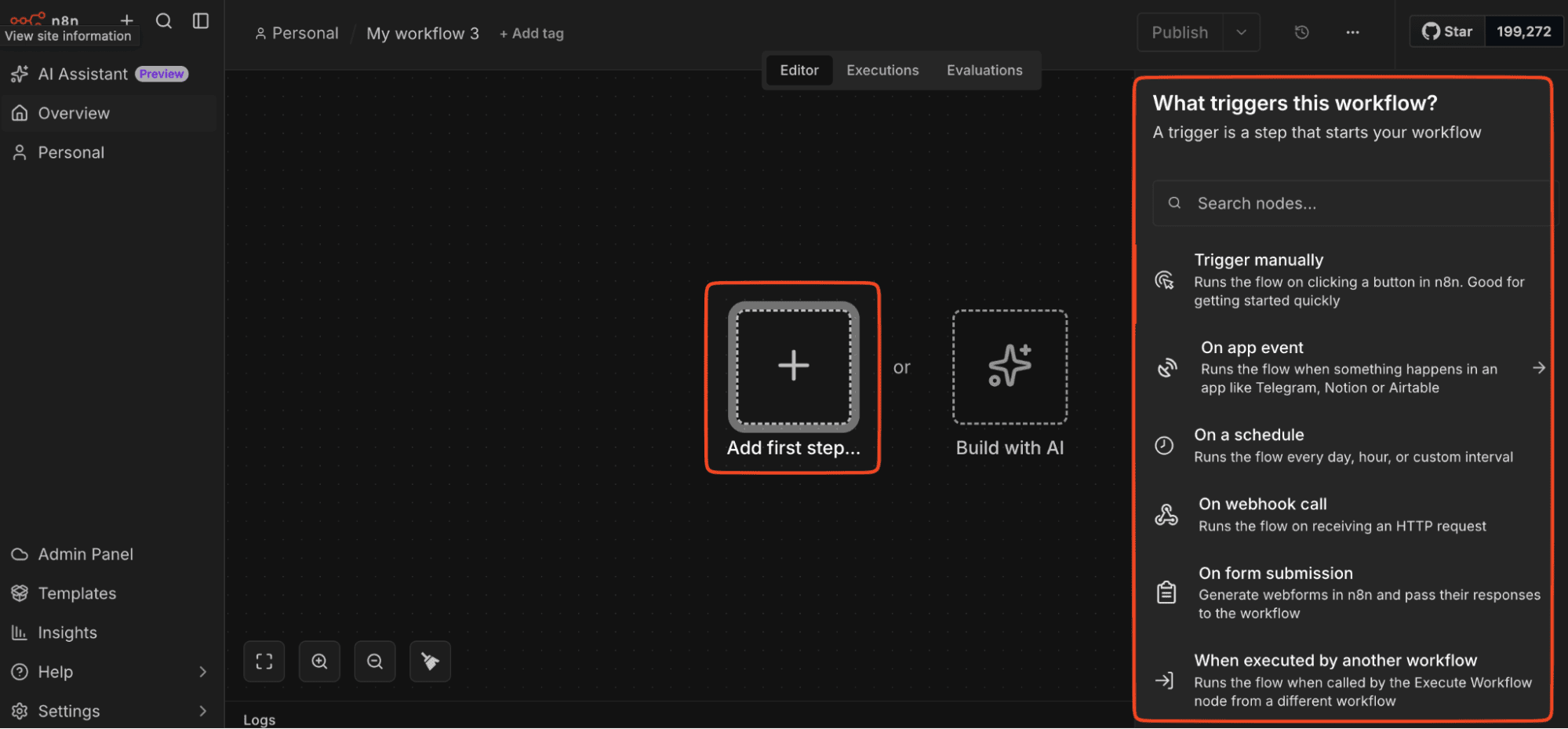
During development, a manual trigger is your best friend, letting you kick off the workflow with a single click to test each step. But once everything works as expected, you can easily replace it with a trigger that fits your use case.
Common options include:
- Schedule: Run the workflow automatically at defined intervals.
- Webhook: Start the workflow when another application sends data.
- Form submission: Process new inbound leads instantly.
- App events: React to changes in connected tools like CRMs.
Pick the trigger that best matches how leads enter your process and when they need to be processed.
Step 2: Retrieve prospect data
Next, add a node that connects to your lead source. This might be a spreadsheet, CRM, website form, API, or a B2B prospecting platform.
After adding the node, connect the required account or API credentials and configure the data source. Then execute the node to verify that it returns the expected data.
Once the output is available, you can map fields such as company names, email addresses, or job titles into the next node in your workflow.
Step 3: Process and enrich your data
With the data collected, you can process it before routing it further. Common actions at this stage include:
- enriching company or contact information,
- verifying email addresses,
- removing duplicates,
- filtering prospects,
- generating AI-powered summaries
Obviously, you don’t need all of these; choose the actions that make sense for your workflow.
Step 4: Define what happens next
Once your data has been processed, decide what should happen to each lead. You might save it to a CRM, spreadsheet, or prospect list, or start outreach directly from the workflow.
This is also where you can make the workflow a bit more selective. Use IF or Switch nodes to create different paths based on specific conditions, for example, routing enterprise accounts to one pipeline and smaller businesses to another.
And since we’re automating anyway, you might as well take things a step further. An AI Agent node can generate personalized email copy or prospect summaries before the workflow continues.
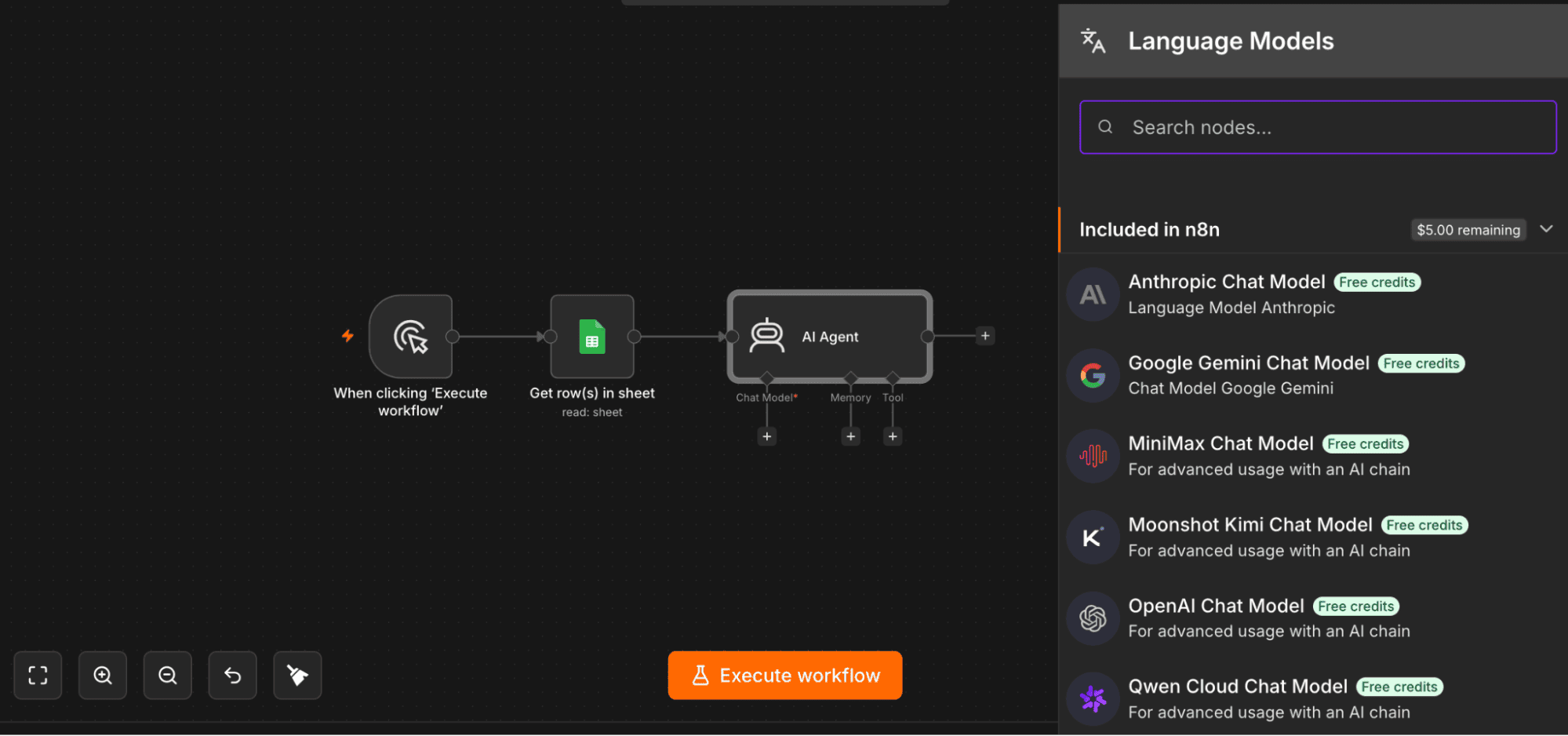
Also, if you’re monitoring campaigns, Snov.io can return engagement data such as opens, clicks, and replies — nice to have when you want to see what happens on the other side of your automation.
And remember, before activating your workflow, give it a test drive first. Run it with a small dataset and make sure each node receives the right data and behaves as expected.
n8n workflow examples for lead generation
The beauty of n8n lies in its flexibility. The same workflow architecture can be adapted to different prospecting strategies. But enough theory; let’s see what that actually looks like.
Below are 3 practical n8n lead generation workflow examples to give you some idea of what you can actually build.
Example 1: Build a local business prospecting database
One possible setup is a workflow that discovers businesses matching your criteria and automatically organizes the results into a prospect database.
Here’s how it works:
- Send a Telegram message specifying the type of business you want to find, the number of results, and a Google Maps search URL.
- Use a web scraping service, such as Apify, to collect publicly available businesses matching the search.
- Retrieve details such as business name, category, address, city, phone number, and website.
- Remove duplicate businesses before processing the results further.
- Use AI to generate concise business summaries and extract professional email addresses from company websites.
- Save the resulting business and contact data in a structured Google Sheet.
- Send a Telegram notification once all requested businesses have been processed.
The outcome? A process that would normally involve hours of searching and copying data turns into an automated, structured prospect database complete with contact details and AI-generated business insights.
Example 2: Generate and send AI-personalized cold emails
Here’s another idea to try: combine lead discovery, AI personalization, and email outreach in a single automated workflow.
Take a look at the following n8n lead generation workflow template:
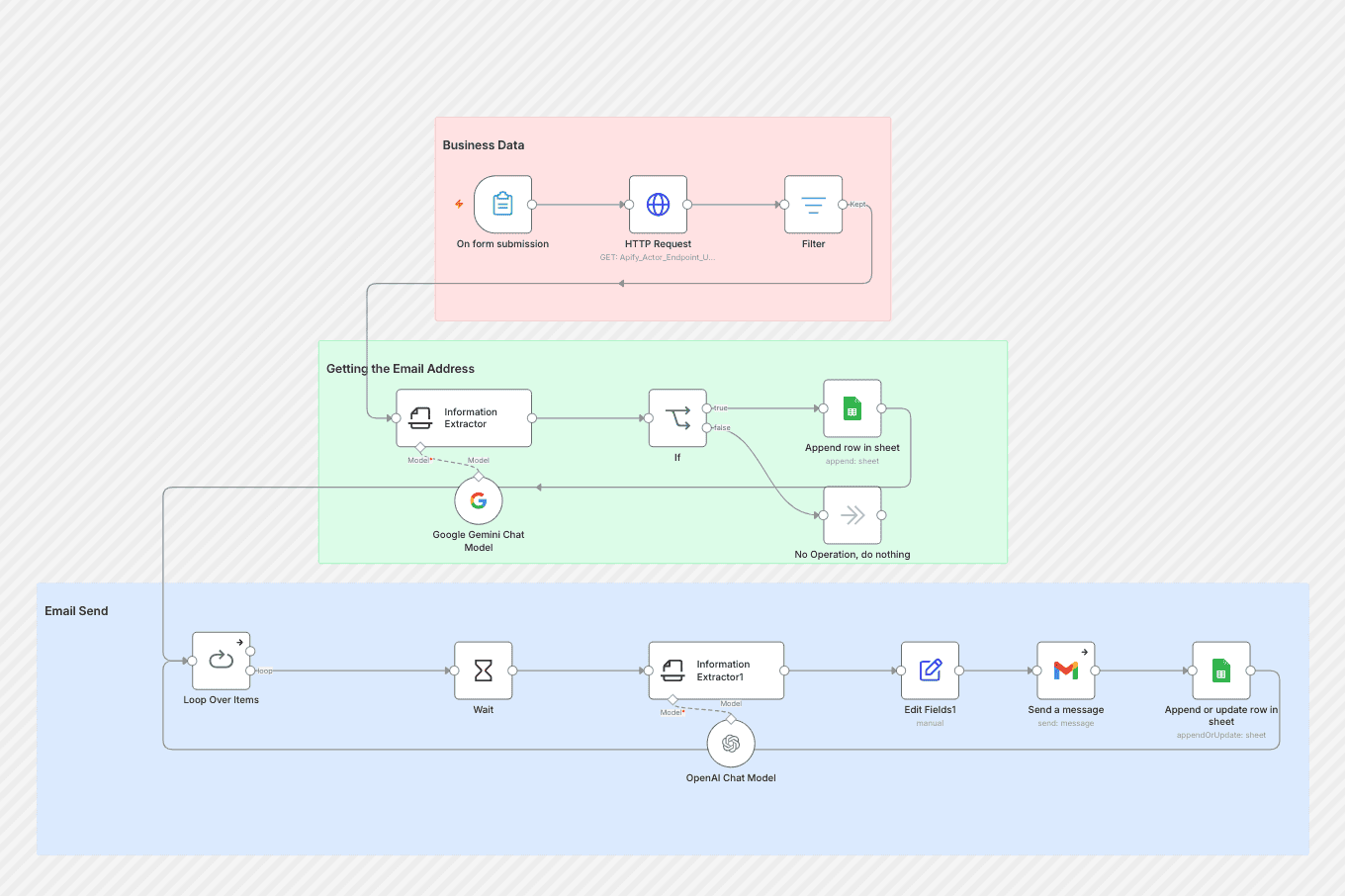
The process looks like this:
- Start the workflow when someone submits a form specifying the target business type, location, number of leads, and preferred email style.
- Use a web scraping service to find businesses matching those criteria and collect details such as company name, website, phone number, address, and category.
- Use AI to analyze each business website and extract an available contact email address.
- Store the resulting leads in Google Sheets.
- Use AI to generate a personalized subject line and email body in the selected tone.
- Send each cold email through Gmail.
- Update Google Sheets with the send status and timestamp for each message.
What do you get?
A single workflow builds prospect lists, generates personalized outreach with AI, sends emails automatically, and tracks campaign activity without manual copywriting or spreadsheet updates.
Example 3: Build qualified prospect lists with Snov.io
And if you already know which companies you want to target, here’s an idea: use Snov.io and n8n to turn those domains into ready-to-use lists.
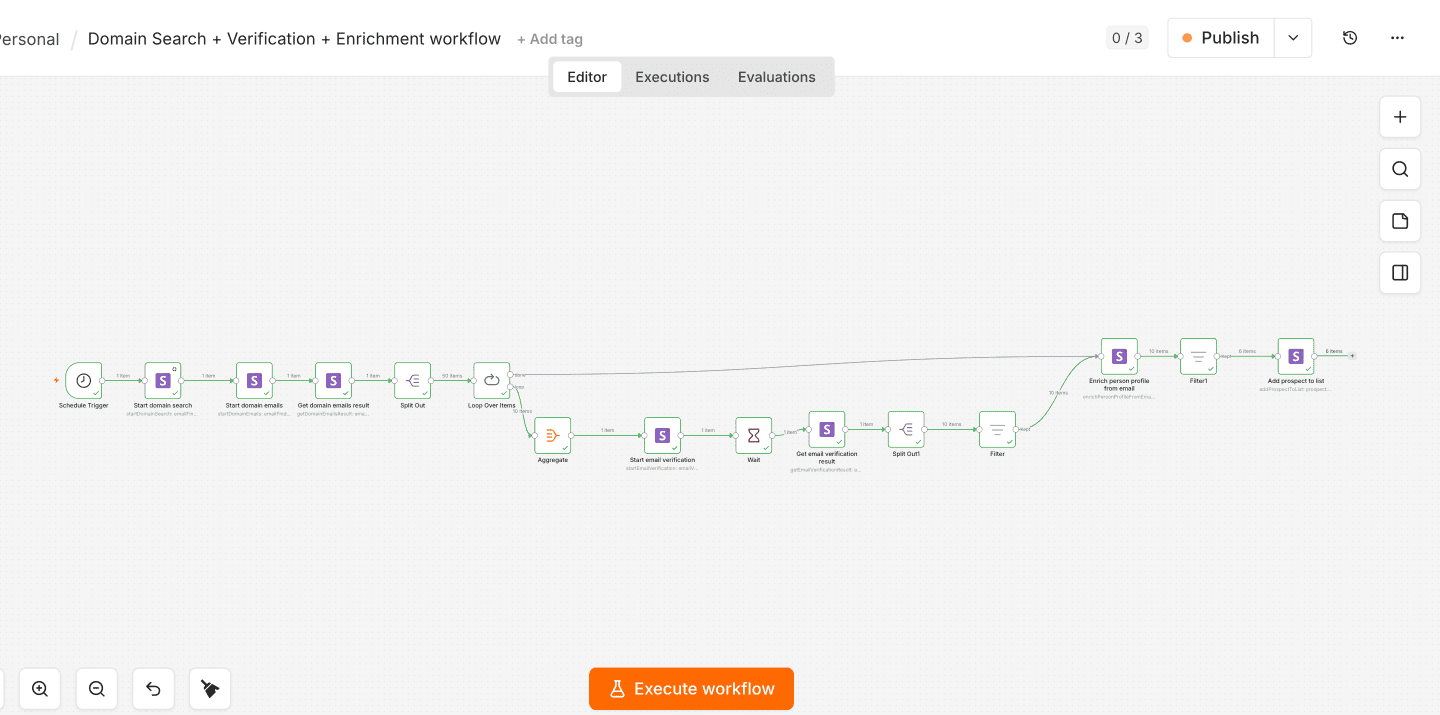
Here’s how it comes together:
- Trigger the workflow manually or on a schedule.
- Start a Domain Search for a target company using the Snov.io node.
- Retrieve business email addresses for contacts found at that domain.
- Verify deliverability and enrich valid contacts with additional company and job information.
- Filter qualified prospects based on your targeting criteria.
- Automatically add contacts to a Snov.io prospect list.
And just like that, a process that would normally involve plenty of switching between tools runs as one connected workflow. Your prospect lists are built automatically, contacts stay synced across your stack, and campaign data is ready for whatever you want n8n to do next.
💡 Like the sound of it? Build it yourself by checking out our n8n email automation guide.
Why verification and enrichment matter in every lead generation workflow
According to recent research by Mailgun, about 39% of email senders seldom or never clean their email lists. Meanwhile, now and then, contact details go stale, forms get filled out incorrectly, and prospect information changes over time. So even trusted lead sources don’t guarantee clean data.
This is where real-time enrichment and email verification matter. It helps to check whether an email address is valid and safe to contact. Dismiss it, and you might face growing bounce rates, deliverability issues, and long-term damage to your sender reputation.

Format
Type
Server status
Auto-generated
Catch-all
As for data enrichment, it adds missing context like company info, job titles, and locations, so you can qualify and personalize with more to go on.
In n8n, enrichment and verification can be added after prospect data is collected and before it reaches your CRM or outreach platform.


How to scale lead generation workflows in n8n
A workflow processing 10 leads per day behaves very differently from one processing thousands. As volume grows, you need to account for API limits, processing delays, failures, and increasing workflow complexity.
Process leads in batches
APIs typically have limits on how much data they’ll accept per request or per time period. And sending it all in one go tends to backfire. Use n8n’s Loop Over Items or Split Out nodes to split large datasets into batches you can actually process.
Account for asynchronous actions
Some API actions don’t return results immediately. Instead, the first request starts a task and returns an identifier, while another request retrieves the result later.
In these cases, add a Wait node between requests to give the external service enough time to process the data before n8n asks for the result.
Control how leads move through your workflow
As workflows become more complex, not every lead needs to follow the same path. And why make them?
Avoid treating every lead the same. Use lead data to create branching logic that routes prospects based on factors like fit, intent, or engagement. This way, high-potential leads can move straight to sales, while others enter nurturing or enrichment flows that better match where they are in the buying journey.
Outbound Outreach Expert at Snov.io

Use IF or Switch nodes to branch the workflow based on criteria such as company size, industry, data availability, or qualification status. This helps avoid unnecessary processing and sends each lead through the actions relevant to it.
Build reusable workflows
If you repeatedly use the same automation logic, there’s no need to reinvent the wheel every time.
Design common processes to be modular, so they work across different triggers, data sources, or destinations. This makes larger automation setups easier to update, troubleshoot, and maintain.
Monitor workflow health
Scaling also means keeping an eye on what happens after your workflow gets launched. After all, automation doesn’t mean “set it and forget it.” Monitor failed executions, API limits, processing delays, and duplicate records so problems don’t quietly affect your pipeline.
You can also bring operational data directly into your automations. For example, Snov.io lets you check your API credit balance and retrieve campaign analytics, allowing n8n to react automatically when conditions change.
Common limitations of n8n for lead generation
n8n is an excellent platform, but it isn’t a complete lead generation solution on its own. Its job is to connect specialized tools and automate how data moves between them, so some parts of the process still depend on the services you integrate.
n8n doesn’t provide lead data
n8n can collect and move prospect data, but it doesn’t come with a built-in B2B database. You’ll need to connect a reliable lead source to supply the company and contact information your workflow needs.
Data quality depends on your sources
Incomplete or outdated records don’t get better as they move through the pipeline; they just spread further. And I’m sure that’s not the kind of automation you’re after.
Consider adding an email verification step before using collected leads for outreach, especially when working with data from multiple or less reliable sources.
Email deliverability isn’t managed automatically
n8n handles the sending, not the outcome. Getting into the inbox comes down to factors outside the workflow itself: sender reputation, domain health, message content, and quality of your list.
So before scaling a campaign, check your sending setup and address any issues that could hurt inbox placement. For example, Snov.io Deliverability check analyzes key deliverability factors and provides recommendations for improving your setup.
Integrations may require maintenance
External APIs and integrations can change over time. Authentication methods, endpoints, rate limits, or response formats may require you to update your workflows, while community nodes can receive updates independently of n8n itself.
In other words, even a workflow that runs perfectly today may need a little attention later.
Large workflows need monitoring
The more data and integrations your workflow handles, the more important monitoring becomes. Keep track of failed executions, API limits, retries, processing delays, and duplicate records.
Trust me, this matters much more once you start scaling. Without regular monitoring and error handling, a small issue in one node can affect thousands of records downstream.
Key takeaways
The best n8n lead generation workflow isn’t the fanciest one. It’s the one that saves you time without becoming another thing you constantly have to fix.
Keep things simple, start with reliable data, test on a small batch before scaling, and watch failed executions and API limits. A little maintenance now saves a lot of troubleshooting later.
n8n can handle the orchestration, while tools like Snov.io provide prospect data, enrichment, verification, and campaign insights where needed. Get those pieces right, and you’re left with what automation should actually give you: less manual work and a workflow that keeps doing its job.