

TL;DR: How to Get Phone Numbers from LinkedIn
If you’re using phone calls as one of the lead generation channels, LinkedIn might seem like a perfect place to hunt for business phone numbers. After all, it’s where all the professionals are.
There are two ways one can extract phone numbers from LinkedIn. You can either search for contact data manually or use lead generation and enrichment tools like Snov.io to find publicly available phone numbers.
In this article, we’ll explore each method in detail and discuss how to enhance your outreach success by pairing phone calls with other channels.
Finding direct phone numbers for prospects can speed up outreach and improve conversion rates. But LinkedIn hides most numbers unless you’re connected — but even then, many profiles have no phone listed.
Let’s learn how to get phone numbers from LinkedIn ethically and efficiently, using tricks like Boolean search and LinkedIn phone number finder software.
Outline:
Can you get phone numbers directly from LinkedIn?
Yes, you can get phone numbers from LinkedIn, but only from users who decided to share them. Sounds confusing? Let me explain. Knowing precisely what LinkedIn shows — and to whom — will help you decide on how to get phone numbers from LinkedIn most efficiently.
What LinkedIn shows (and hides) about contact details
LinkedIn’s profile structure includes a “Contact info” section where people can add email addresses, phone numbers, links to their websites, and other social media profiles. But that contact panel is usually only visible to people who already know each other (1st-degree connections).
Also, many profiles don’t list a phone number. Thus, manual checks are useful for single contacts but unreliable when you want to extract phone numbers from LinkedIn in bulk.
Limitations of free and premium LinkedIn access
On LinkedIn, phone number visibility depends only on the user’s privacy settings, not your subscription type. Even Sales Navigator doesn’t expose private phone numbers that users haven’t chosen to share. No LinkedIn phone number finder has power over this.
While upgrading won’t guarantee you’ll easily extract phone numbers from LinkedIn, it will help you find people who are more relevant to your business. You can then use other means to contact and convert them.
Legal and ethical considerations of contact extraction
Before digging into techniques, let’s do a short ethics check, because compliance matters. It’s only allowed to collect phone numbers for legitimate business purposes, in accordance with local privacy regulations (GDPR, CCPA, etc.).
I strongly advise you against scraping methods that violate LinkedIn’s Terms of Use or put your account at risk. Instead, favor LinkedIn phone extractor tools that perform compliant data extraction and real-time verification.
For instance, Snov.io LinkedIn lead generation software is based on email verification and enrichment. It doesn’t resort to dangerous scraping practices, such as bot scraping. On the contrary, we protect our users’ accounts and data with multiple layers of security. We also strictly adhere to the GDPR and CCPA regulations.
On the one hand, this means you won’t be able to extract phone numbers from LinkedIn fast without providing a reason. On the other hand, your account is much safer this way. The last one is more important, in my opinion, because keeping your account active is vital for successful outreach.

The best ways to extract phone numbers from LinkedIn
There are two ways to gather LinkedIn contact details: with and without specialized software.
Extracting phone numbers manually works well for a quick one-off outreach, follow-ups with warm contacts, or a special client you want to take extra care of. But if you need hundreds or thousands of numbers, manual checks don’t scale. This is the time to put software to work.
Let’s review each method in more detail.
Extracting phone numbers from LinkedIn manually
For small lead lists, manual lookup is the best answer to how to get phone numbers from LinkedIn.
For 1st-degree connections:
Open the person’s profile and click Contact Info. If they added a phone number, it will be shown there. Copy it into your sales CRM and annotate where you found it and the date. If the number is not listed, either ask the person directly or move on to enrichment tools (we’ll talk about them in the following sections).
For other LinkedIn users:
You’ll need to connect with the prospect first. I recommend performing other LinkedIn actions first, such as viewing the person’s profile, following, liking their posts, etc. This way, you won’t be a stranger who just wants to connect out of the blue.
|
💡Pro-tip: Cut corners by automating routine actions with the Snov.io LinkedIn Automation Tool. Let our software handle profile views, post likes, and connection request sending. Automating routine steps lets you skip to the essential part – conversations with your leads. |
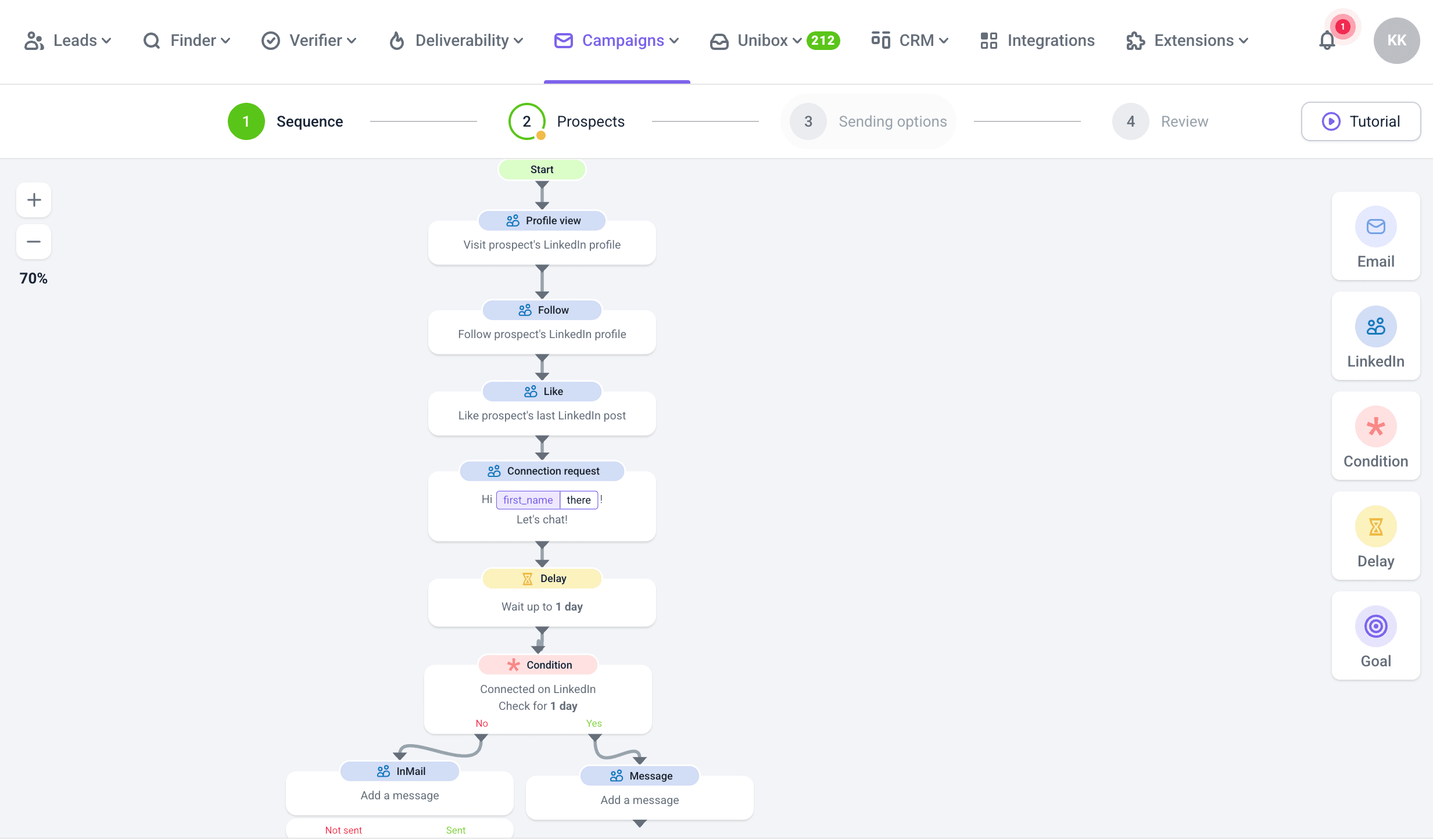
After you’ve connected, simply perform all of the steps relevant to 1st-degree connections (listed above).
Extracting phone numbers from LinkedIn with specialized tools
If you’re wondering how to get phone numbers from LinkedIn in bulk, specialized software is the practical choice. Many solutions capture prospect data from LinkedIn, enrich it, and validate contact details before outreach.
To further streamline your workflows, pick LinkedIn phone number finder software that integrates seamlessly with your sales CRM and outreach tools. This way, you can easily combine calling with email and LinkedIn touchpoints for better conversion.
How to get contact information from LinkedIn using Snov.io
Getting phone numbers from LinkedIn with Snov.io is pretty straightforward. All you need is the Snov.io LinkedIn Email Finder extension installed and a couple of minutes.
Let me help you with a step-by-step guide on extracting a prospect’s contact details from LinkedIn with LinkedIn Email Finder:
- Install the Snov.io LinkedIn Email Finder Chrome extension.
- Get on LinkedIn and search for prospects that fit your ICP (Ideal Customer Profile).
- While on the search result page or a particular lead’s LinkedIn profile, click the extension icon.
- Then, save the lead to your prospect list.
Now you can view your prospects’ contact details on the Snov.io platform. And here comes the most interesting part — Phone Number Enrichment, which is easily accessible right from your newly saved prospect list.
Another way to extract leads from LinkedIn is to use the Snov.io LinkedIn Search tool within the platform:
- Get on LinkedIn and search for prospects that fit your ICP. Apply advanced filters to narrow results, or use Sales Navigator to make your search even more precise.
- Copy a link to search and paste it into the LinkedIn Search Tool.
Then select the list to save your prospects to and specify the number of leads to extract.
Tips for more efficient contact data extraction on LinkedIn
To obtain quality data from LinkedIn, you need to find relevant people. Meaning, users who align with your ICP and have contact info listed in their profile. You can go about it in two ways: search for prospects or attract them to your profile. I strongly recommend doing both.
Optimize your LinkedIn searches
The more precise your search is, the fewer irrelevant profiles you inspect, wasting less time. Use advanced LinkedIn search techniques, such as Boolean search, combined with LinkedIn filters for better targeting.
Boolean search means using operators like AND, OR, NOT, parentheses, and quotes to look for exact keywords in users’ profiles while excluding unwanted ones. For your convenience, I provide ready-to-use Boolean queries below. Simply adapt them to fit your situation.
- Target SaaS sales leaders in two cities:
(“head of sales” OR “sales director” OR “VP Sales”) AND “SaaS” AND (“London” OR “Manchester”)
- Exclude agency recruiters:
(“recruiter” OR “talent acquisition”) AND “software” NOT “agency”
- Find local business owners in a particular city:
(“owner” OR “founder” OR “co-founder” OR “CEO” OR “managing director”) AND (“small business” OR “local business” OR “SMB”) AND “Los Angeles”
You can use the sequences above with a free account, but combining them with LinkedIn Sales Navigator can sharpen your targeting even further. With this tool, you’ll get more filters (e.g., company size, seniority, years in role) and see more results without hitting the search limit.
Optimize your social media presence
Now, another way to get leads from LinkedIn is to attract relevant people to your profile and build trusting relationships with them. Here’s what you can do to help prospects find you:
Write a headline that clearly states who you help and how. Use a banner image with your brand statement or a subtle call-to-action. Craft an About section that addresses your ICP’s pain points and positions you as a solution provider.
- Publish content your prospects likely care about.
Post short, actionable insights that help solve their common challenges. Share industry trends, relevant case studies, or tips from your own experience. Use hashtags relevant to your industry (e.g., #B2Bsales, #SaaSgrowth).
The algorithm doesn’t care about you! Your audience does. Write for them.
Principal Product Manager at Microsoft, LinkedIn Top Voice

- Engage with your leads’ content.
Comment on posts from your target audience with thoughtful, value-adding remarks – not just “Great post!”. React to updates from your prospect list so you stay on their radar.
- Join and participate in relevant LinkedIn groups.
Look for groups where people who match your target audience are active. Answer questions, share useful resources, and start relevant discussions.
- Add a soft call-to-action in your profile.
In your Contact Info, make it easy to reach you (email, scheduling link). Mention in your About section that you’re open to connections or discussions about specific topics.
How to increase the effectiveness of your outreach
Now, you might be a pro at extracting phone numbers from LinkedIn, but relying on a single communication channel limits your reach and response rates. When you combine phone calls, emails, and LinkedIn, you engage with your leads across multiple touchpoints. This increases your chances of getting noticed and remembered.
Think it’s too complicated? Not at all. Here’s a simple sequence I use when I want to establish a trusting relationship:
- Connect with a prospect on LinkedIn.
- Get their phone number.
- Extract their email address with the Snov.io LinkedIn email finder software.
- Call the prospect during business hours in their time zone.
If they don’t pick up, I leave a short, personalized voicemail mentioning their name, the reason I’m calling, and one value point I can offer.
- Send a follow-up email referencing the call.
- Wait a few days.
- If I get no response, I follow up via LinkedIn message.
Besides being effective, this sequence is also easy to automate. All I have to do manually is extract the phone number and make the call. Everything else I leave to the Snov.io Multichannel Outreach Tool.
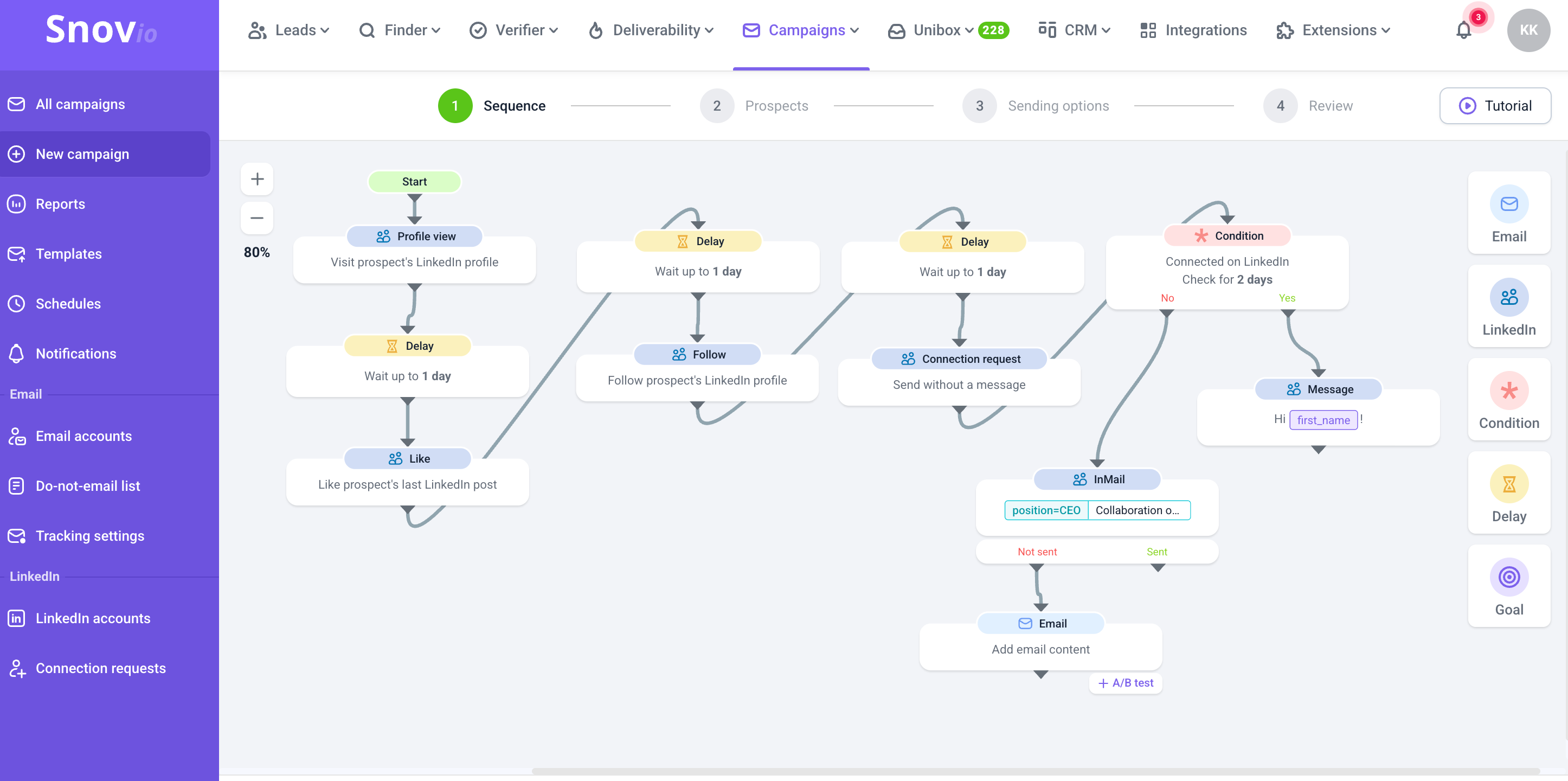
This simple sequence usually works wonders. A phone call creates urgency and establishes a personal connection. LinkedIn adds a layer of social proof because prospects can see my profile, expertise, and mutual connections. And an email is the cherry on top – it provides a written record of interactions with a prospect, and makes it easy for me to share resources.

Next steps
Now that you know how to get phone numbers from LinkedIn, it’s time to put your knowledge into practice. Start by signing up for Snov.io and downloading the LinkedIn Email Finder extension.
Test both manual and automated methods to see which delivers the best balance of speed, accuracy, and personalization for your needs. Experiment with multi-channel outreach by combining phone, email, and LinkedIn messages. Supplement your process with a third-party LinkedIn phone number finder if needed, but choose it very carefully to not break LinkedIn’s rules.
Track your results in a CRM to refine your strategy over time.
The sooner you start, the faster you’ll have a reliable workflow for turning LinkedIn profiles into qualified leads.