
TL;DR:
Looking for a quick Apollo.io overview? Here’s a one-minute scoop on what I’ve researched and tried myself over a week.
| Question | Answer |
|---|---|
| What is Apollo.io? | An AI-powered GTM platform for B2B prospecting, sales engagement, and deal management |
| What does Apollo.io do? | Helps find the right prospects, get their contact info, and engage them through email, phone calls, and manual LinkedIn tasks |
| What is Apollo.io used for? | Prospecting, data enrichment, lead scoring, sales engagement, and meeting and deal management |
| How does Apollo.io work? | Connects data, AI-powered intelligence, and execution tools to support go-to-market workflows |
| What are its key features? | Apollo AI, Email Finder, Deliverability, Sequences, Dialer, Waterfall Enrichment, Chrome extension, integrations |
| Does Apollo offer a free plan? | Yes, with 75 credits per month |
| What are its major advantages? | AI-powered go-to-market features, data enrichment options, and integration suite |
| What are its major disadvantages? | Reported data accuracy issues, a steep learning curve, and per-seat costs that can add up |
Prefer the longer version? Read my full Apollo.io review from top to bottom and see whether it’s worth it in 2026.
If you work in outbound, you’ve probably seen Apollo’s name popping up in ads, LinkedIn posts, or other digital places.
So, what is Apollo.io, and does it deserve a spot in your tech stack? I spent a week with it to find out. I analyzed its core features, AI tools, and user feedback from 3 platforms (G2, Reddit, and LinkedIn). Wait for my no-filter take at the end; meanwhile, let’s define what it is.
What is Apollo.io?
Branded as Apollo, it is an AI-driven GTM (go-to-market) system that brings B2B prospecting and lead generation, sales intelligence, and execution under one digital roof.
In practice, it provides tools to find the right prospects, understand leads (lead intelligence), engage them (prospect engagement), and speed up outreach and data management with artificial intelligence.
Explore the basic facts about Apollo.io in the following table (all data points are taken from the official website).
| Fact | Details |
|---|---|
| Year of foundation | 2015 (founded as ZenProspect) |
| Headquarters | San Francisco, CA, United States |
| Number of users | 5M+ users across 600K brands |
| B2B database size | 30M+ companies and 240M+ individual contacts |
| Advertised email accuracy* | 98% |
| Compliance | GDPR, SOC 2 Type II, ISO/IEC 27001, CCPA, CPRA, CASA Tier 2, PCI DSS, EU-US DPF |
*Apollo’s product page claims 98% accuracy, while its knowledge base mentions a 91% rate of email accuracy.
Founded in 2015 as ZenProspect, the company initially focused on prospecting and sales engagement. After rebranding, it expanded into AI-powered research, automation, and deal management.
Over time, the company repositioned itself from offering Apollo as a sales tool to providing an all-in-one GTM hub for RevOps, sales, and marketing teams.
Apollo’s transition to a broader GTM platform may reflect growing demand for better alignment across GTM teams. Mural’s GTM Alignment Gap research found that 85% of surveyed teams experienced ongoing cross-functional misalignment. That helps explain the appeal of tools connecting sales and marketing workflows.
How does Apollo.io work?
Apollo works as a multi-layered system, consisting of 3 interconnected layers:
- Data Layer (what it knows): Apollo Data + Internal Data + External Data
- Sales Intelligence Layer (how it thinks): Apollo Profile + GTM Harness
- Execution Layer (how it gets work done): Workspace + Apollo Anywhere + Builder Studio (coming soon)
Now, let’s explore them one by one.
Data Layer
The foundation is Apollo’s database, including internal and external data. Its “Living Data Network” pulls and cross-checks data points from 4 independent inputs:
- A contributor network of 2M+ people
- Activity (replies and bounces) from its own sales engagement suite
- Web crawling public sources
- Third-party data providers
When data is available, Apollo validates it in real time (both email addresses and direct dials) and enables bounce guard and protection against catch-all emails specifically.


Intelligence Layer
This is a merge-and-decide layer.
Apollo Profile merges data and puts signals into one profile for the whole sales team (and AI agents) in a single file. When everything is merged, AI and sales reps get the whole picture.
GTM Harness is the AI-powered “shared brain” that decides. First, it learns and remembers from go-to-market contexts it works with: data points, ICP(s), actual selling patterns, etc. Afterward, it plans across every step and runs automated workflows on a schedule or as soon as signals appear.
Execution Layer
The final layer is where the actual “to-be-done” happens, all thanks to the key elements:
- Workspace is where you plunge into sales processes: generate leads, send cold emails and follow-ups, make calls, book meetings, execute manual tasks, and track performance
- Apollo Anywhere brings the same data and actions into tools your team already uses (e.g., your CRM system, email service providers, etc.)
- Builder Studio (coming soon) is designed to build custom workflow automation tools by describing them in plain language
In short, here is how all three layers work in practice:
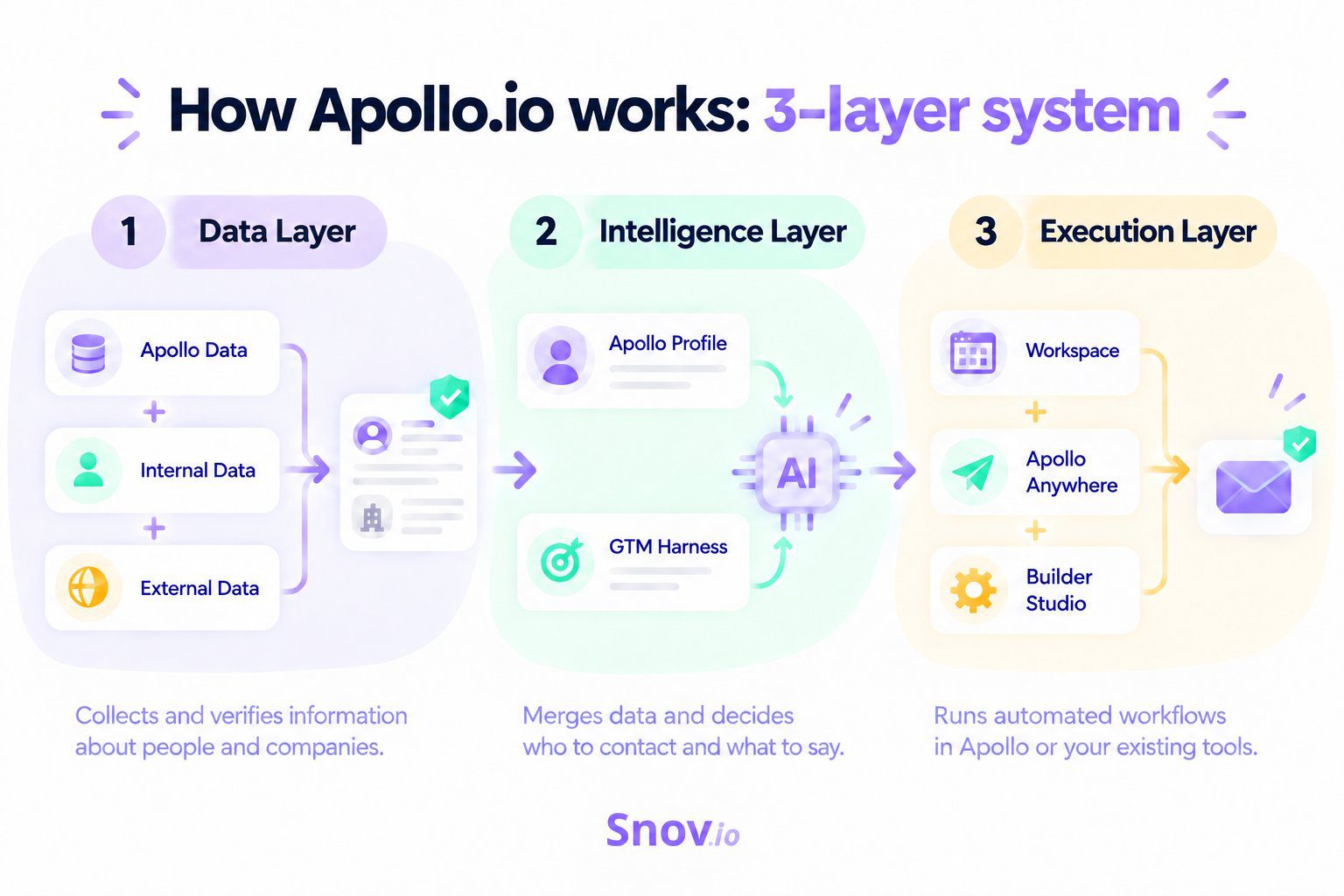
The first (Data) layer collects and verifies information about people and companies. The second (Intelligence) layer relies on AI to merge data and drive decisions about who to contact and exactly what to say. The third (Execution) layer carries out the plan either inside Apollo or in the toolset you’re already using through custom-built, automated workflows.
What is Apollo.io used for? Top 5 use cases
Here are the 5 jobs it handles most often.
Lead generation
Lead generation is deep-rooted in Apollo from its “birth.” Just like years ago, it helps sales teams find ideal customers based on the ideal customer profile (ICP).
Sales professionals search for prospects and companies by applying 65+ filters that fall into several categories:
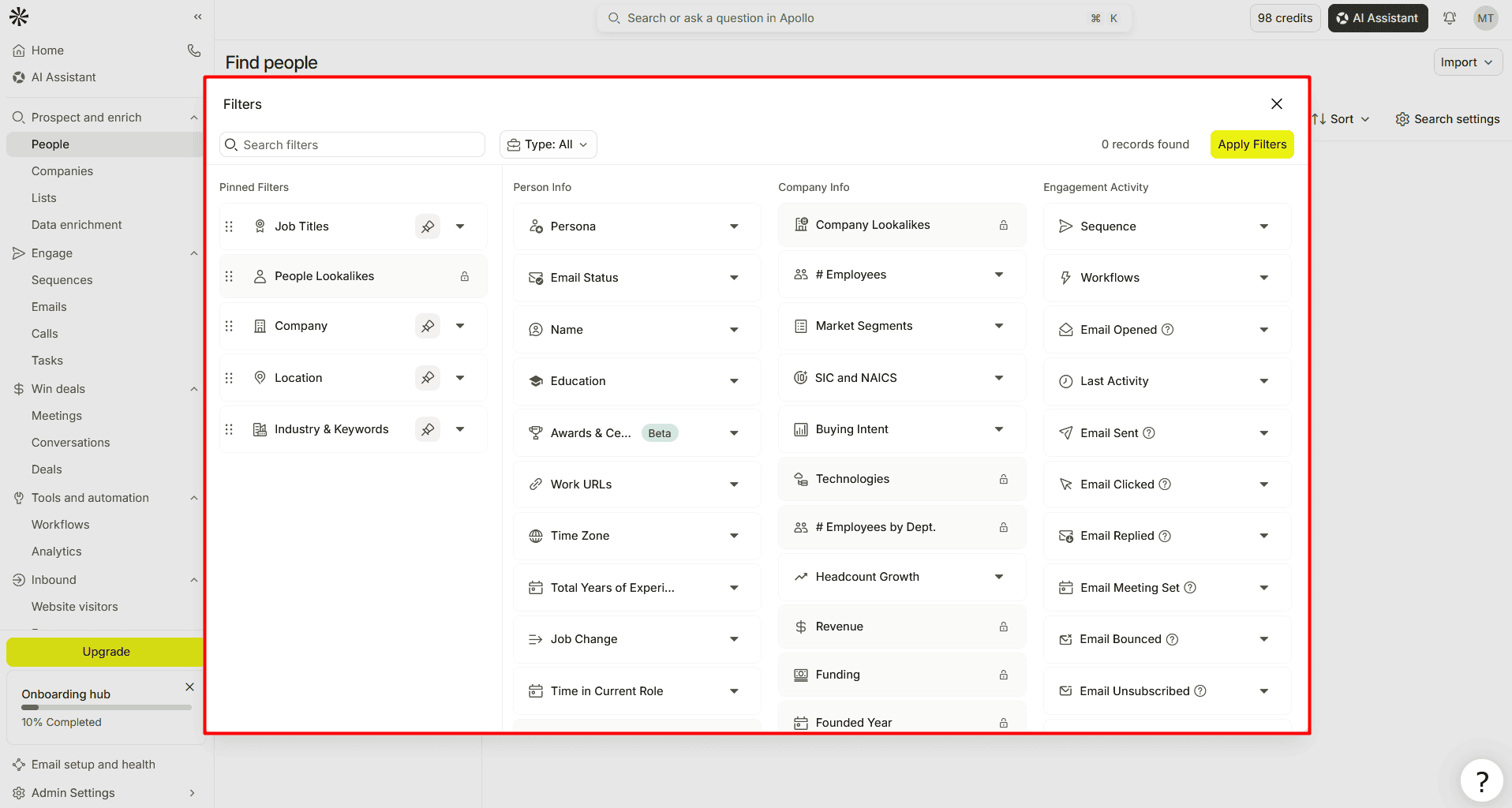
Source: Apollo.io
The goal is to generate high-quality leads that match the ICP(s) by applying those filters.
AI lead scoring
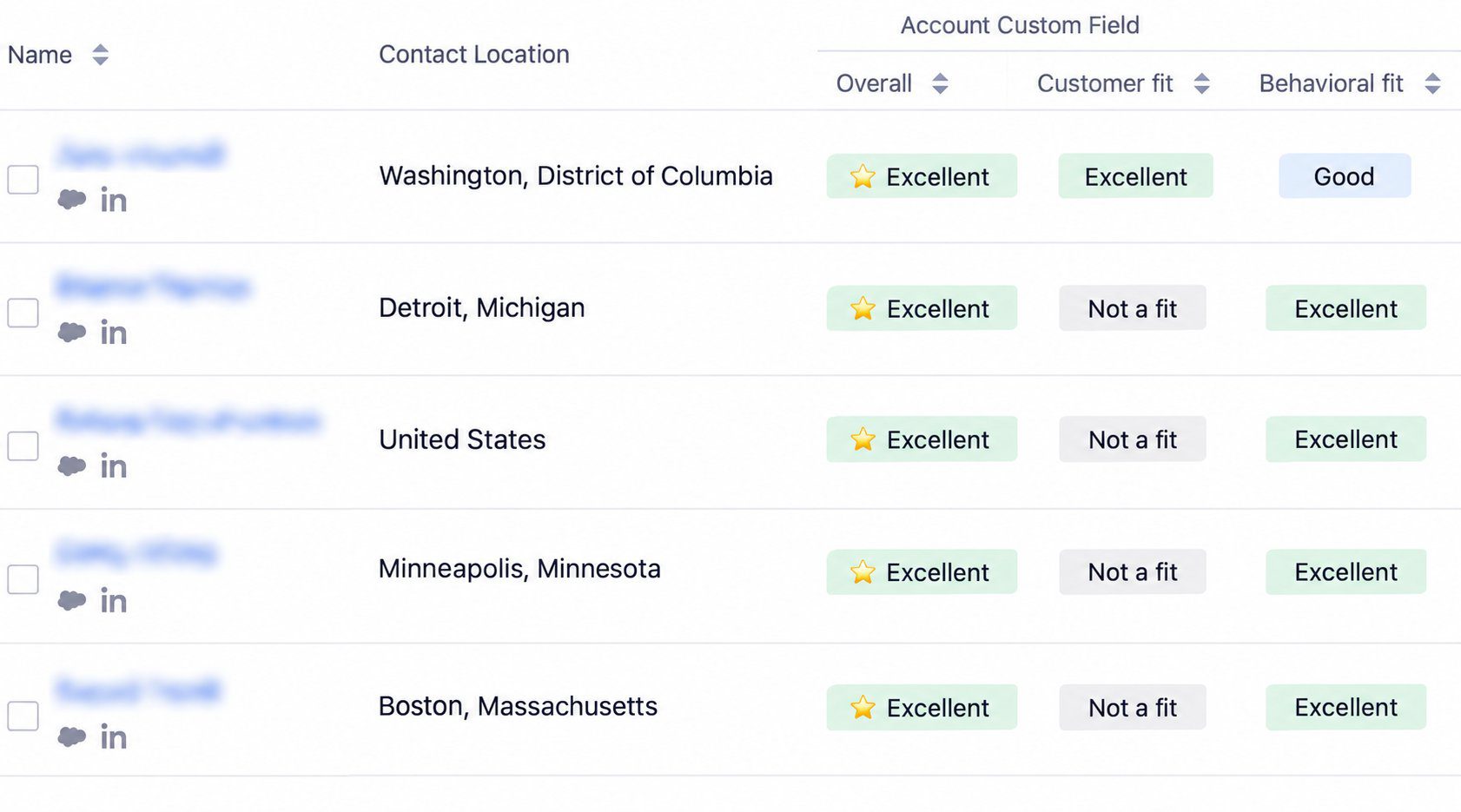
Apollo’s AI lead-scoring system helps rank the best opportunities so a sales team can focus on the prospects most likely to convert.
It offers AI-generated auto-scores as follows:
- Not a fit
- Fair
- Good
- Excellent
Source: Apollo.io
It’s also possible to develop custom lead-scoring frameworks by setting unique score criteria based on specific signals and filters.
Data enrichment
With Apollo for data enrichment, sales teams can fill in the blanks in prospect or company records manually, automatically (in real time), on a set schedule, or via the API, depending on the workflow.
For example:
Automatic form enrichment auto-fills the web form’s fields, shortens, and enriches each submission in real time.
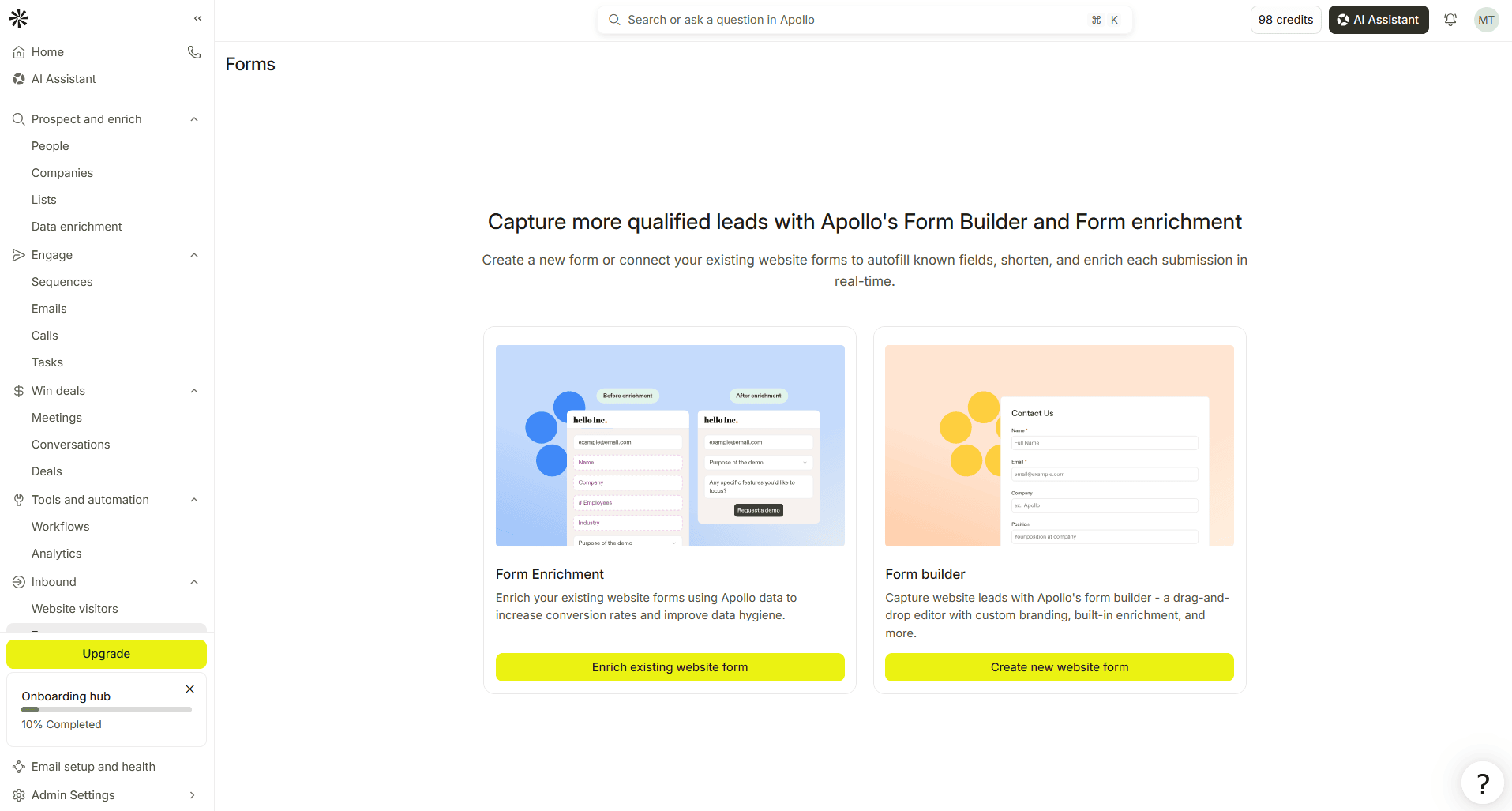
Source: Apollo.io
Alternatively, there’s a manual way to enrich data from CSV when users upload a lead list (a CSV file with up to 100K rows). For instance, each prospect has a full name and a company domain but lacks contact info, such as a phone number and/or a business email address, which you can enrich from Apollo’s database or other sources in a waterfall.

Multichannel sales engagement
Apollo supports sales outreach sequences across 3 basic channels for multichannel outreach: email, phone, and LinkedIn. Others can be added only as custom action items via Tasks.
Basically, sales teams can engage leads by scheduling:
- Emails: Automate outreach via email
- Calls: Reach out to prospects via phone
- Tasks: Set manual tasks for contacting leads via email (Manual email), phone (Call), LinkedIn (Send connection request, Interact with post, View profile, or Send message), or other channels (Action Item with a custom task)
For example:
A 4-step multichannel outreach sequence may look like this:
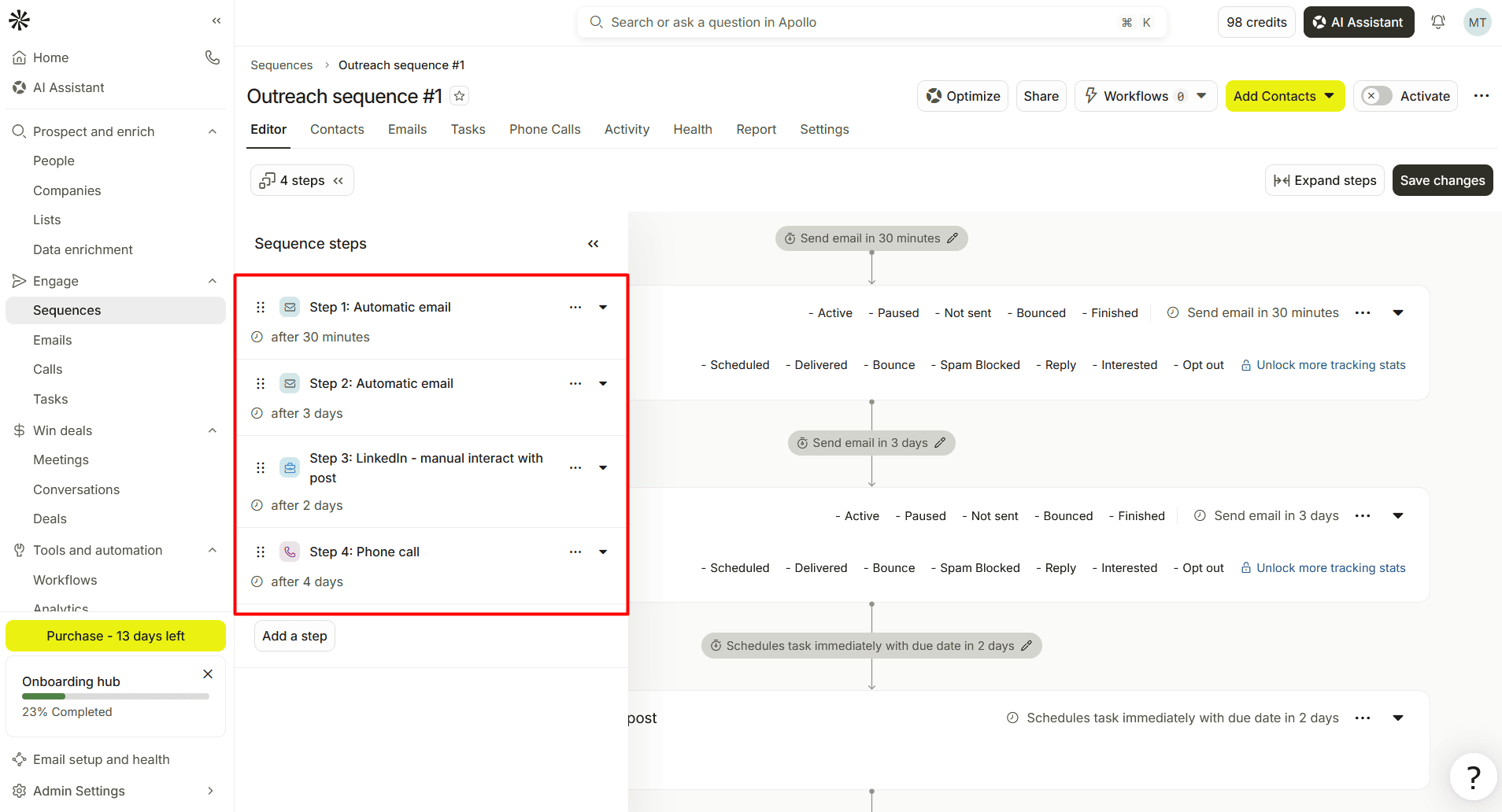
Source: Apollo.io
Step 1: Automatic cold email (after 30 minutes) → Step 2: Automatic follow-up (after 3 days) → Step 3: LinkedIn — interact with post (after 2 days) → Phone call (after 4 days).
Meetings, conversations, and deals management
This Apollo’s use case applies to the late stage of the sales cycle, after lead generation and outreach, and covers the following:
- Meetings: Sales reps book meetings from their associated email address (e.g., via a synced Google Calendar in Google Workspace)
- Conversations: Apollo AI automatically records, transcribes, and analyzes video calls, producing call summaries and performance dashboards for sales coaching
- Deals: It functions as a simplistic sales CRM, giving one view of the pipeline across sales stages
For example, sales reps can create deals manually or import them in bulk, up to 10K records at a time.
Core features of Apollo.io: From Apollo AI to CRM integrations
Let’s explore what lies at the core of Apollo’s functionality. Below, you’ll see what each feature means and what it does.
| Apollo’s feature | What it is | What it does |
|---|---|---|
| Apollo AI | Suite of AI Assistants and research tools | Discovers prospects, builds lead lists, drafts emails, analyzes calls, and automates repetitive tasks |
| Email Finder | B2B contact lookup tool | Finds business emails and available phone numbers |
| Deliverability | Email setup, testing, and monitoring tools | Checks mailbox health, supports warm-up, and helps protect deliverability |
| Sequences | Outreach campaign builder | Combines automated emails with manual steps (phone calls, LinkedIn tasks, and custom actions) |
| Dialer | Built-in calling tool | Lets sales reps make, receive, and record phone calls and leave voicemail messages on unanswered ones |
| Advanced Dialer | Paid calling add-on | Adds first-to-answer routing, international calling, and parallel dialing |
| Waterfall enrichment | Multi-provider data enrichment with conditional logic | Checks Apollo’s database first, then other connected sources until it finds a suitable result |
| Chrome extension | Prospecting and outreach browser extension for Chrome | Displays available contact info across supported web pages and lets you add found contacts to lists and sequences |
| Integrations | Apollo.io integrations with 60+ tools and API for custom integrations | Syncs Apollo with other go-to-market tools like CRMs, productivity apps, or automation systems |
For this section of my Apollo.io review, I selected the top 3 non-AI features I found worth a deeper dive (I’ll cover its key AI features in the next one).
Let’s delve into each together.
Waterfall data enrichment
As of today, Apollo lets you enrich contacts with emails and phone numbers by choosing from 20+ third-party data providers and applying conditional logic. If the first provider doesn’t return a suitable result, the next takes over. The sequence goes on until it finds one or exhausts the available sources.
Keep in mind that, with validation enabled, it can continue past results that fail validation.
For example:
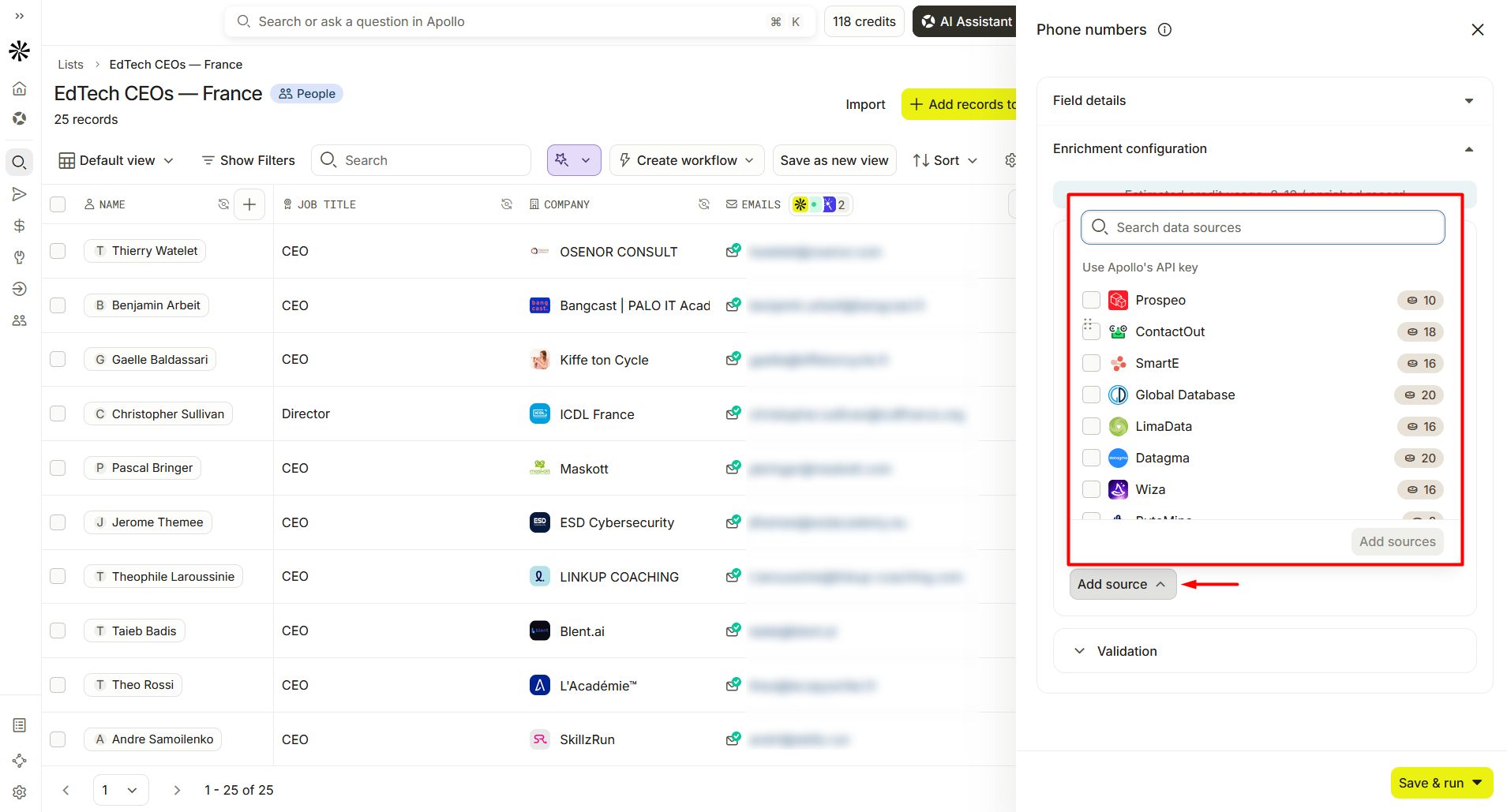
Source: Apollo.io
When testing this feature, I could choose Prospeo, Wiza, ContactOut, or other data sources for waterfall phone number enrichment.
Advanced Dialer
Apollo’s Advanced Dialer includes 3 core features for sales teams living on the phone: parallel, power, and international calling.
Here’s a quick comparison table to distinguish between them.
| Power Dialer | Parallel Dialer | International dialing | |
|---|---|---|---|
| What you can do | Automatically dial through the contact list one by one | Call several people at once and connect to the first person who picks up | Reach customers outside of the US and Canada |
| Key advantage | No need to dial manually between calls | Less time waiting for calls to connect | Tapping into global markets |
| Best for | Prioritized to-call lists | High-volume cold calling | Sales teams running outbound campaigns internationally |
For example:
You can set up to 5 active calls at once with the parallel-dialing feature.
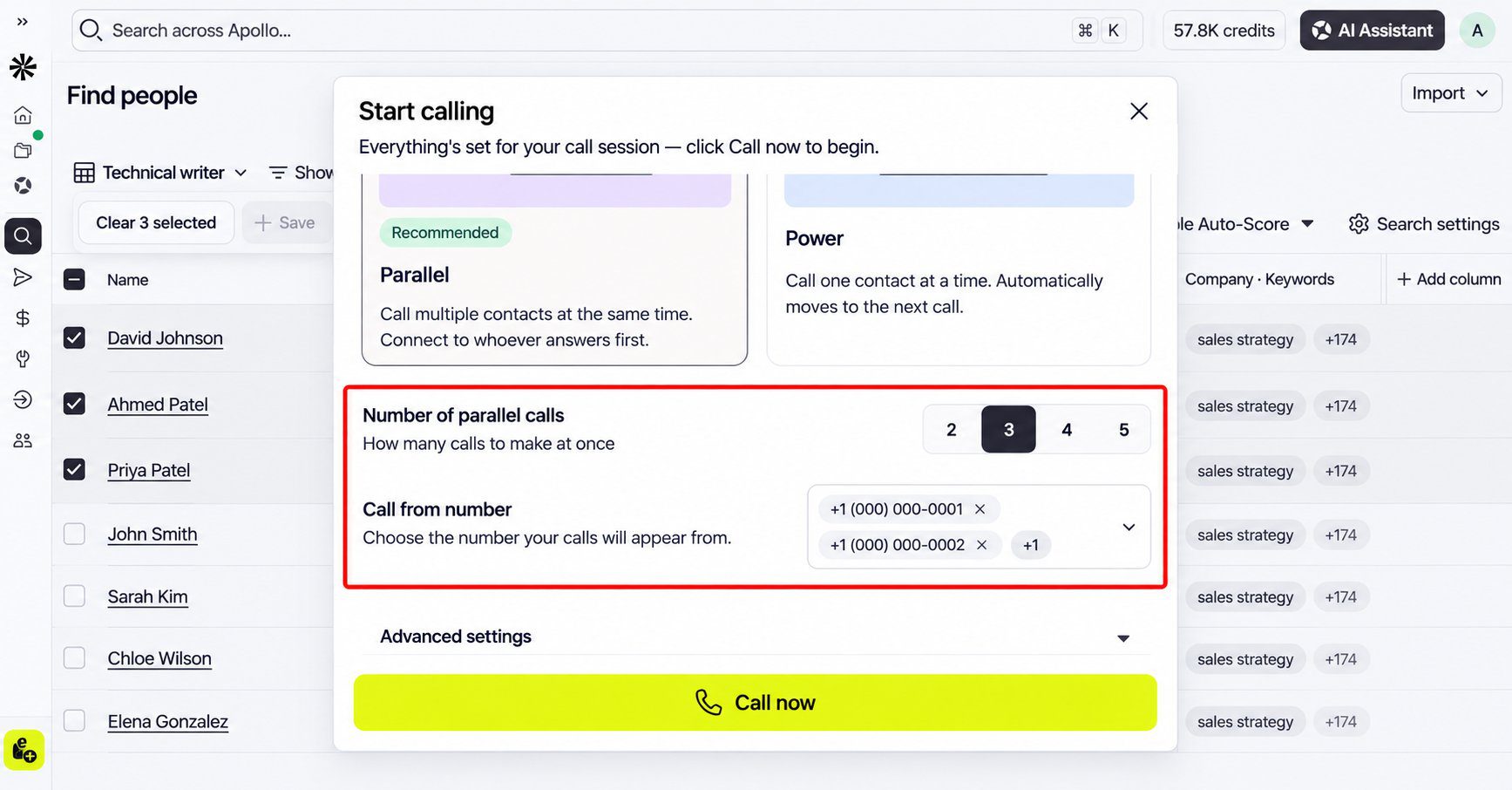
Source: Apollo.io
Apollo’s basic Dialer feature is included in all paid plans and consumes credits to make calls. However, Advanced Dialer is a paid add-on that isn’t available on the free tier and requires separate billing.
👉 Check out the full Apollo.io pricing breakdown for add-on costs, plan limits, and credit usage.
Chrome extension
Like similar LinkedIn Chrome extensions, Apollo brings lead generation and outreach to the web page you’re working from:
- LinkedIn (e.g., find and save info about prospects or companies by browsing their LinkedIn profiles)
- Gmail (e.g., track opens and clicks or apply email templates)
- Google Calendar (e.g., use Apollo data for your meetings)
- HubSpot or Salesforce (e.g., push your CRM contacts directly to Apollo’s sequence)
At present, it’s rated 4.6 stars (based on 2.2K ratings) with 1M+ installs.
For example:
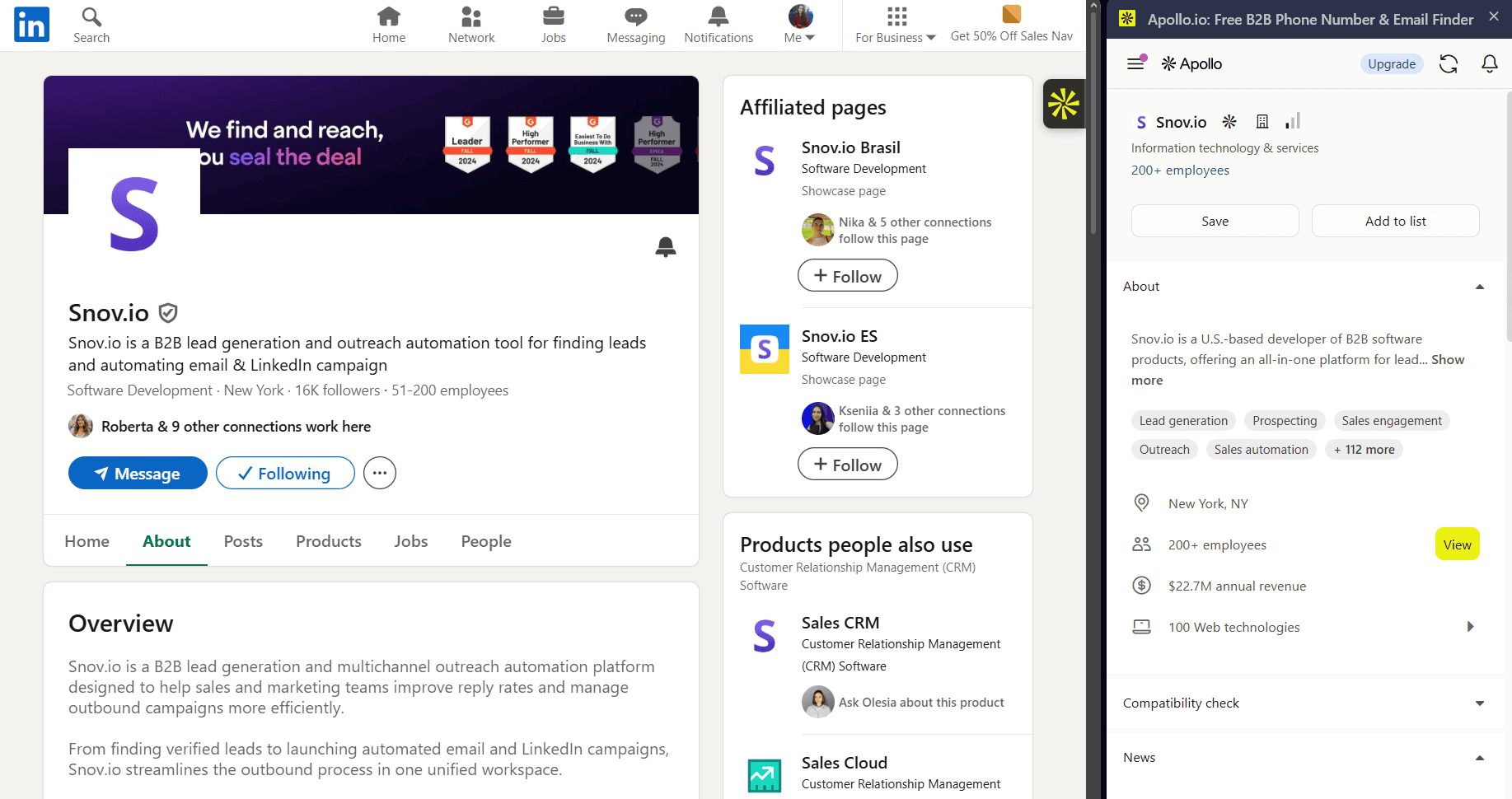
After adding it to Chrome, I opened the company’s LinkedIn profile, clicked the extension icon to run it, and saw the company info (headquarters, number of employees, annual revenue, news, etc.).
Source: LinkedIn.com
Although the extension is free to download, it requires an active subscription to either a paid or a free plan. Also, LinkedIn prospecting isn’t active across the entire platform: you can find emails from LinkedIn profiles (personal or company) and search result pages only.
Apollo AI key features
I decided to look more closely at Apollo AI features. As in the previous section, I narrowed my focus to the top 3 I found most useful during my testing: AI Assistant, AI Writing Assistant, and Apollo MCP.
Let’s see what each brings to the GTM table.
AI Assistant
Apollo’s built-in AI Assistant runs your outbound from a chat. You describe exactly what you need in a natural-language prompt, and it executes your GTM workflow automation task directly inside the app: finds leads, enriches data, builds sequences, analyzes performance, and so on.
For example:
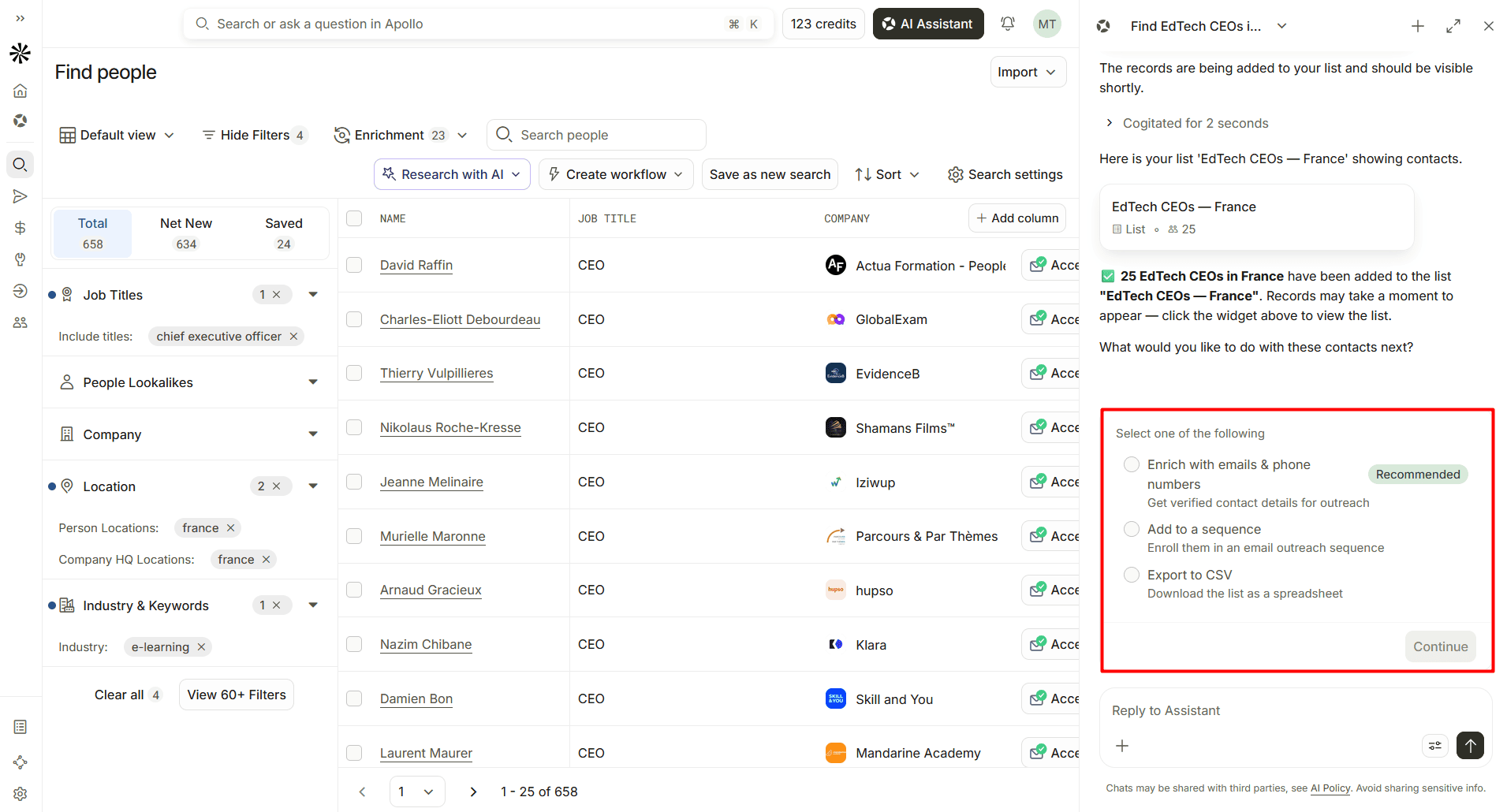
I prompted the AI Assistant in plain English to find and add prospects to my list. Once done, it asked me, “What would you like to do with these contacts next?”
Source: Apollo.io
I could type my own response or choose from several options: “Enrich with emails & phone numbers,” “Add to a sequence,” or “Export to CSV.”
It’s currently a free “introductory” offer on paid plans, which means the feature’s price and availability may change over time. Usage on the free tier is limited to only 5 chats (up to 10 messages each) monthly.


AI Writing Assistant
This assistant is particularly designed to help you generate messages and send them at scale.
Here are the 3 basic things (with corresponding buttons) you can do with it to get AI-written outreach emails:
- Write with AI → Draft a personalized email for each prospect
- Rephrase → Highlight words (at least 5), sentences, or paragraphs and give AI instructions: make it shorter/longer; break into bullet points, simplify, etc.
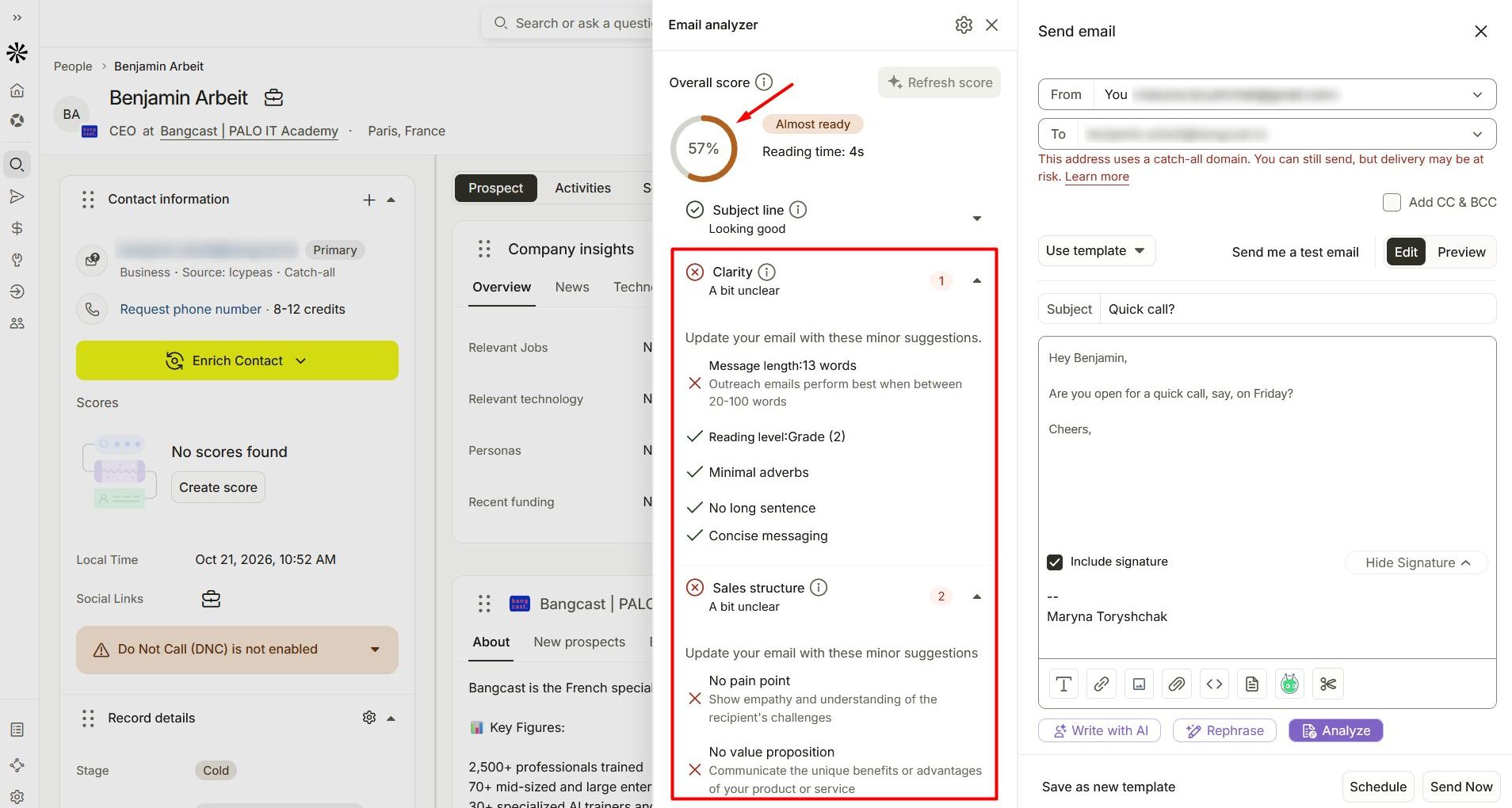
- Analyze → Get the overall email score, the tone of writing, and suggestions on what to improve: the subject line, clarity, sales structure, or engagement
For example:
When I typed a one-question message for my prospect and analyzed it, the tool assessed it with a 57% score. It recommended improving the message length, adding a pain point and value proposition, and fixing several engagement factors.
Source: Apollo.io
Keep in mind that Apollo’s AI Writing Assistant relies heavily on the AI Context Center, which stores information about your company, ICP(s), pain points, value proposition, and other info you fill in before outreach.
Try Snov.io AI Email Writer for free
Email result:

Suggestion:
Write a follow-up email after a job interview
Write a thank-you email to a client after closing a deal
Write an email requesting partnership opportunities
Write an email requesting a meeting with your manager
Write an email apologizing for a delayed response
Write an email asking for a deadline extension
Write a cold email pitching your services
Write an email introducing yourself to a new team
Write an email requesting feedback on your work
Write an email confirming an appointment
Write an email declining a job offer politely
Write an email requesting a letter of recommendation
Write an email to a customer addressing a complaint
Write an email announcing a company update
Write an email inviting colleagues to an event
Write an email asking for a salary increase
Write an email requesting time off
Write an email welcoming a new employee
Write an email reminding a client about an overdue invoice
Write an email following up on a sales lead
Apollo MCP
For this AI feature, Apollo uses the Model Context Protocol (MCP) to let AI tools search prospects, enrich them, build sequences, analyze a sales team’s performance, or perform other actions.
You can access Apollo from external AI tools and development environments in several ways:
- AI tools like Claude, ChatGPT, and Perplexity via a native integration (Best if you’re already familiar with them)
- MCP-compatible tools like Codex or Cursor (Best for custom GTM workflows)
- Command line via Apollo CLI (Best for terminal-based GTM workflow automation)
Once they get access to your Apollo.io account, they can execute a limited number of pre-defined actions.
For example:
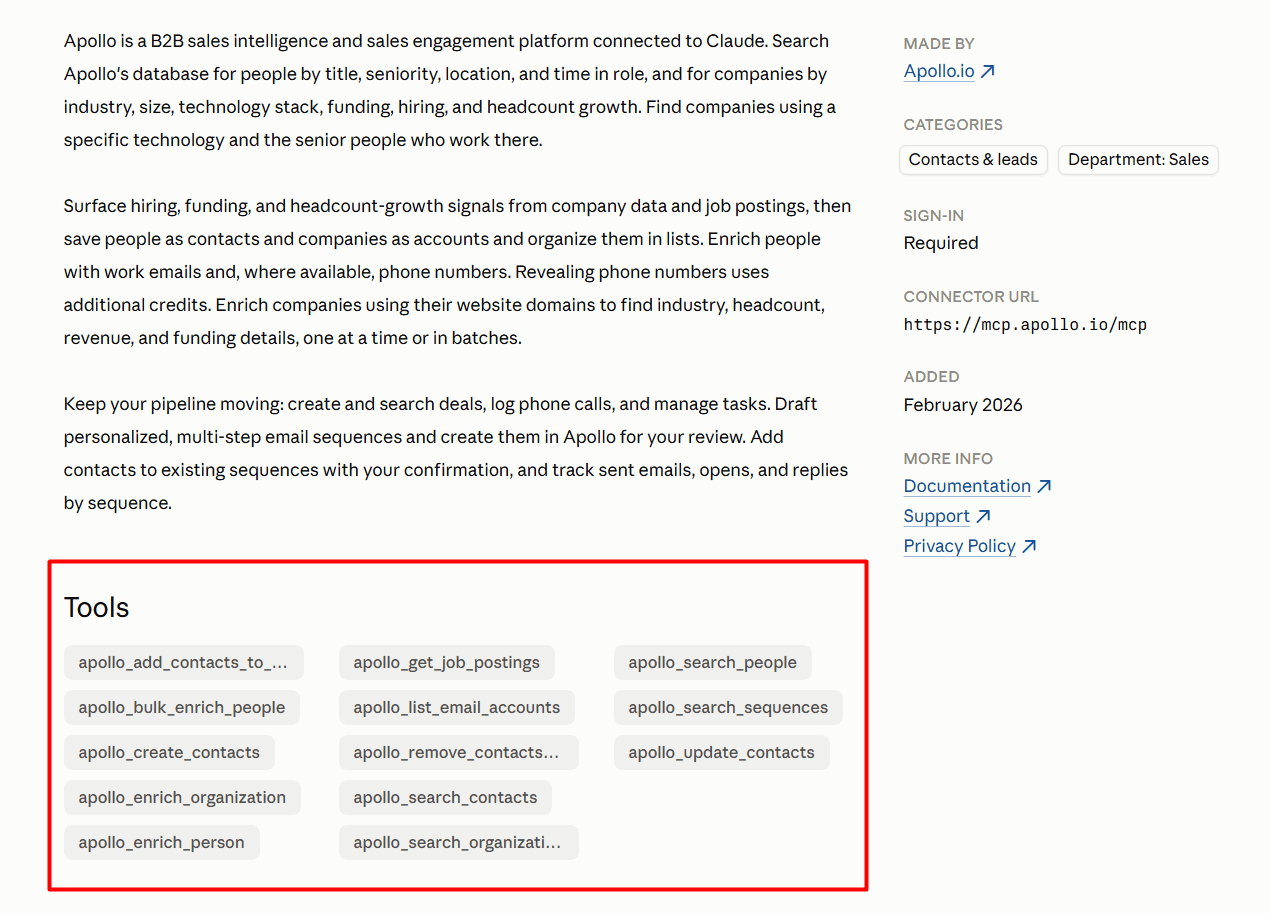
When you connect Apollo.io to Claude via the MCP, you can see 13 actions available at the moment, including people search (apollo_search_people) and bulk enrichment (apollo_bulk_enrich_people).
Source: Claude.ai
By connecting your AI agents to sales platforms, you can run prospecting and outreach from one conversation. See how you can manage your sales workflows directly from your AI chat with Snov.io MCP:
How to use Apollo.io — Quick tutorial and my honest take after trying it
Want to learn how to use Apollo.io for lead generation and outreach?
Here’s a short, step-by-step Apollo.io tutorial:
- Step 1. Register a free or paid account
- Step 2. Build your prospect list by applying filters or asking an AI Assistant
- Step 3. Enrich missing phone numbers and email addresses
- Step 4. Connect your mailbox
- Step 5. Create a sequence of emails, calls, and tasks
- Step 6. Warm up your mailbox before mass sending
- Step 7. Run your sequence and track the results
If you need an in-depth guide with more details, you can turn to Apollo Academy or Apollo Help Center (knowledge base).
Now, did Apollo win me over? Here’s what I liked and disliked after a week on the free plan and on the Basic trial.
What I liked about Apollo.io during my trial
👍 Smooth onboarding with free extra credits (pleasant bonus)
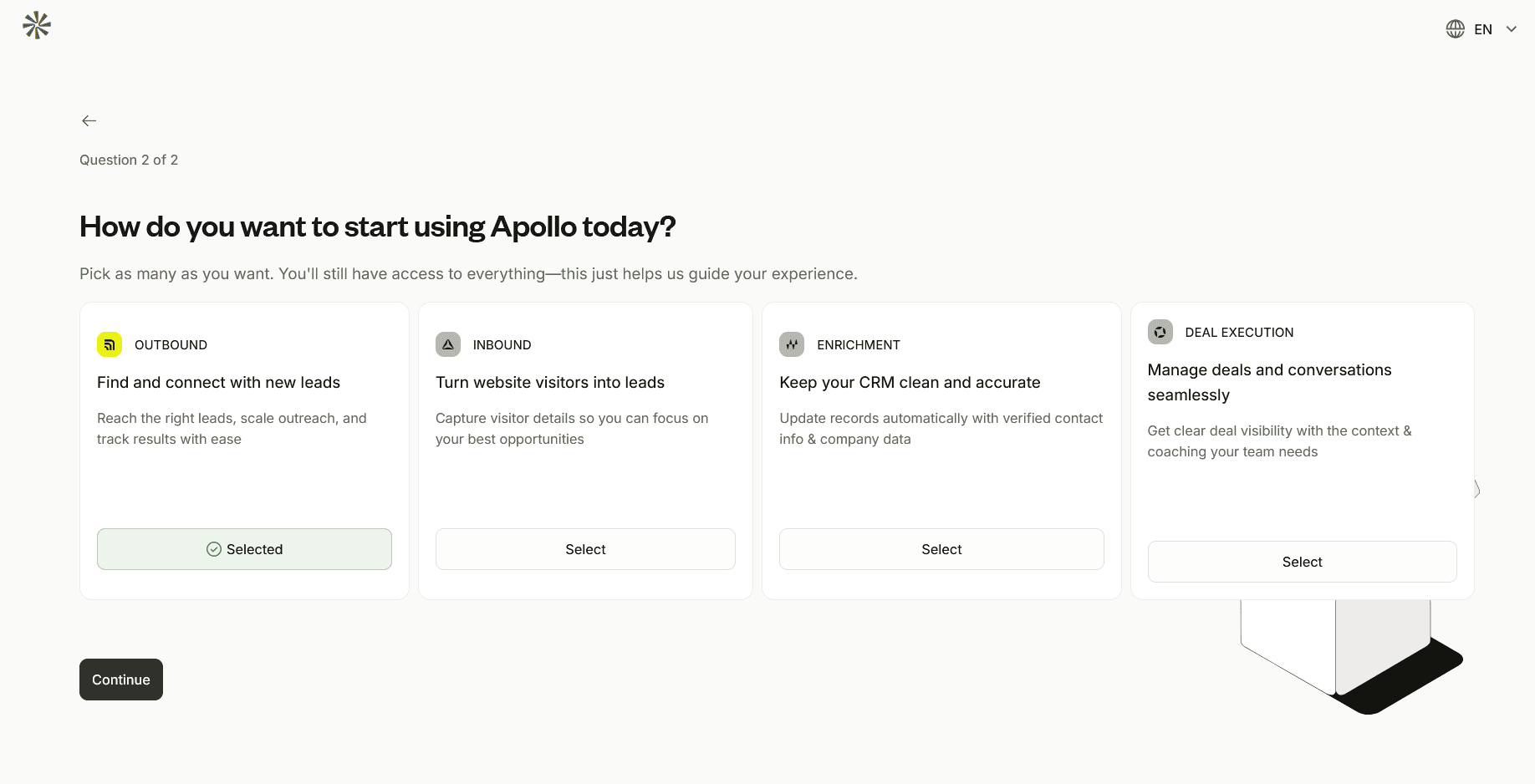
Account creation took me less than a minute (I signed up via Google) and was a breeze. Apollo asked me a couple of questions, but there weren’t too many of them — just the necessary ones to guide my experience and direct me to the features I’m particularly interested in.
Source: Apollo.io
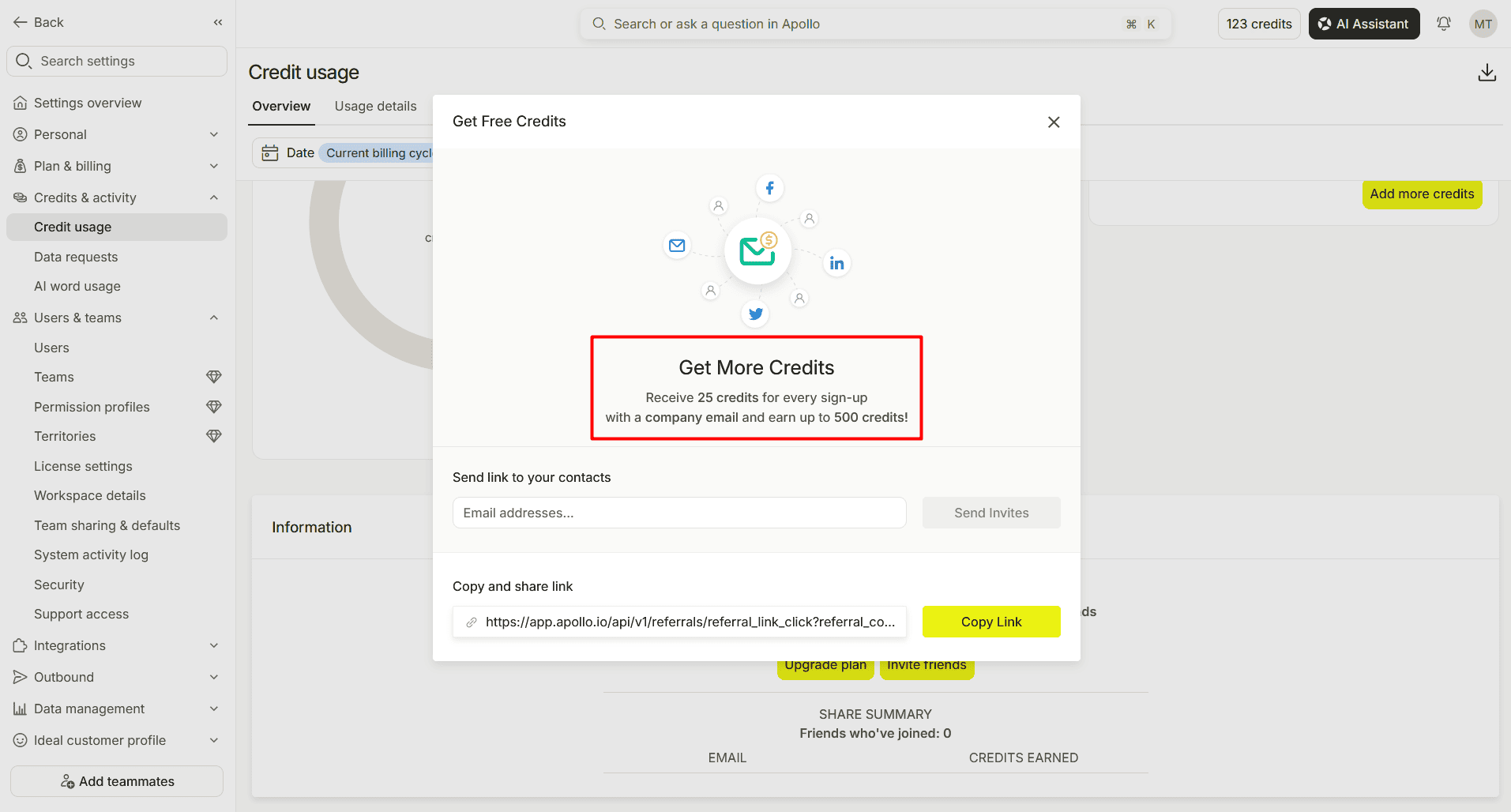
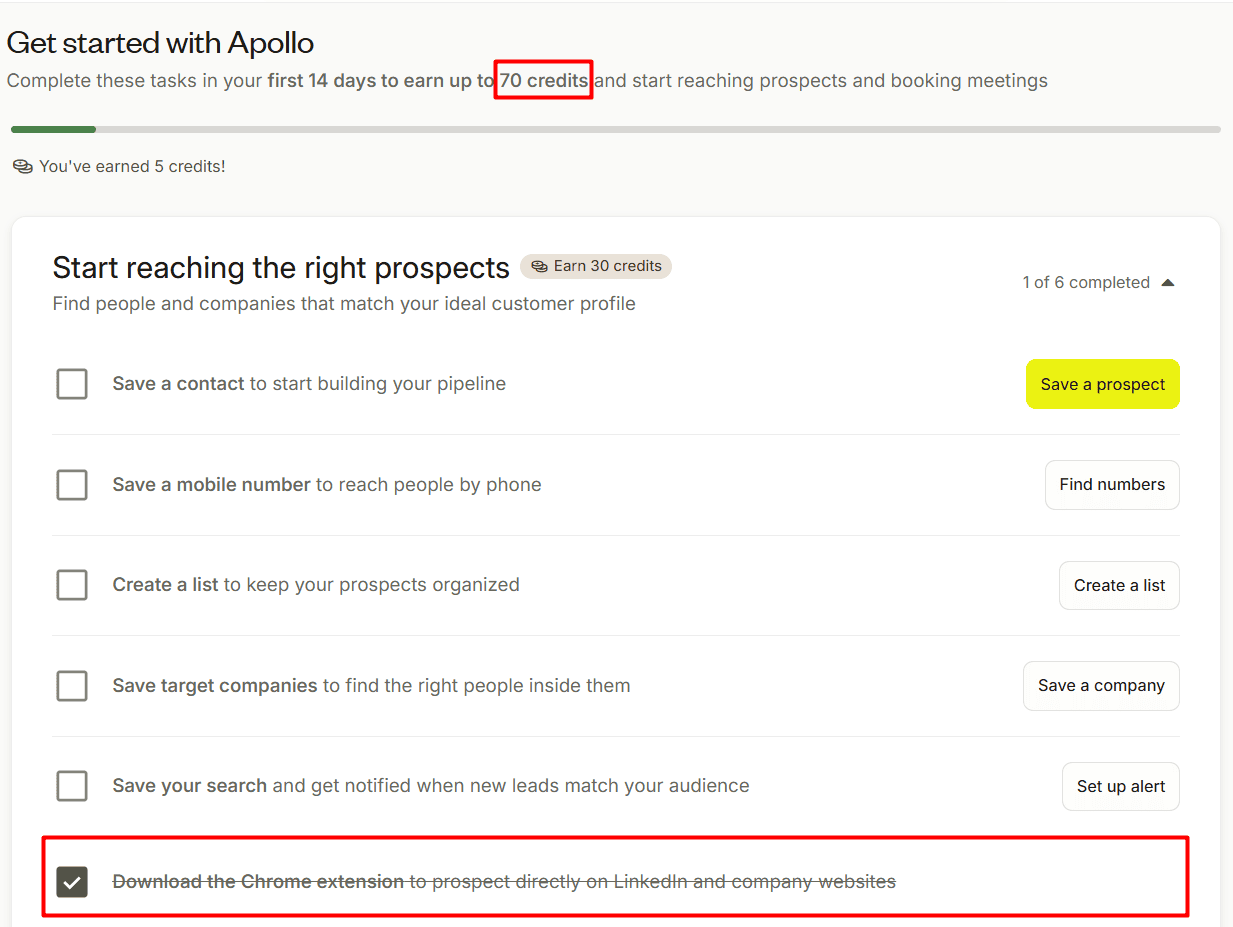
I was also delighted to get 65 extra credits for completing onboarding tasks. But even more than that, I could invite friends and “Receive 25 credits for every sign-up with a company email and earn up to 500 credits.”
Source: Apollo.io
The number of onboarding credits differs slightly between Chrome and Firefox. The difference is only 5 credits, but here’s the reason. You can earn 5 extra credits on Chrome after installing the Chrome extension.
Source: Apollo.io
👍 Plethora of features with an AI-first approach
Apollo seems to pack an entire go-to-market toolkit into one platform: prospecting, data enrichment, inbound and outbound sales engagement, cold calling, deal management, analytics, and more. What makes that versatility a strength is its AI-centricity.
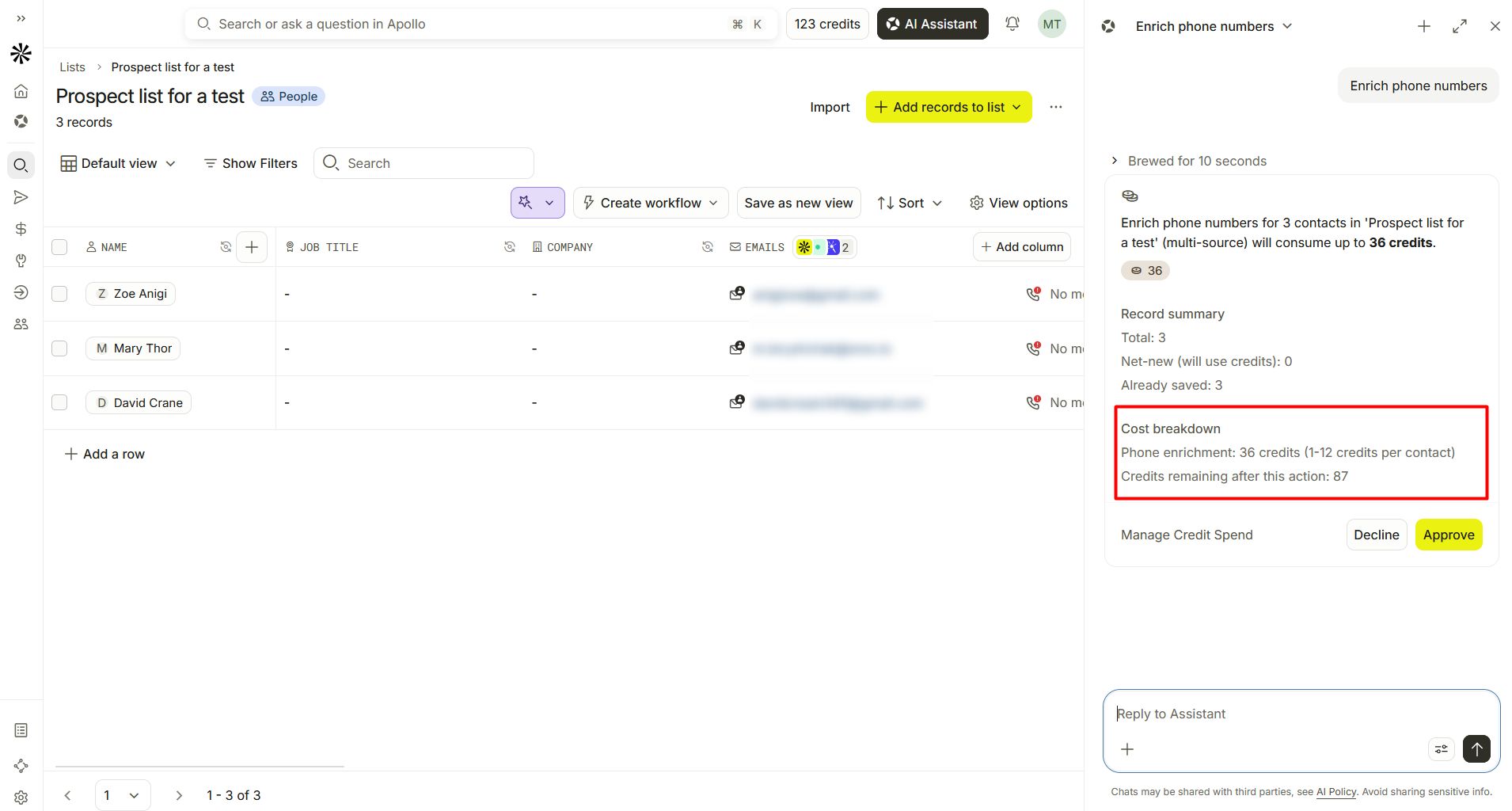
I found the AI Assistant particularly helpful in lead generation. One thing worth mentioning here is that the assistant itself doesn’t use credits, but specific actions it executes (e.g., Apollo data enrichment or AI research) may. In this case, I appreciate that it shows the approximate cost breakdown and asks you to confirm first so that you can “Approve” or “Decline” the action before your credits get burned out.
Source: Apollo.io
👍 Verification option during waterfall data enrichment
When enriching data with Apollo, you can add an optional validation step to make sure you get verified contact information in the output:
- Trestle or Clearout Phone for phone number validation
- ZeroBounce, Bouncer, or any other email verifier from the list for email validation
This step costs extra credits, and the consumption differs for a verified email (1 credit) and a verified phone number (8 credits).
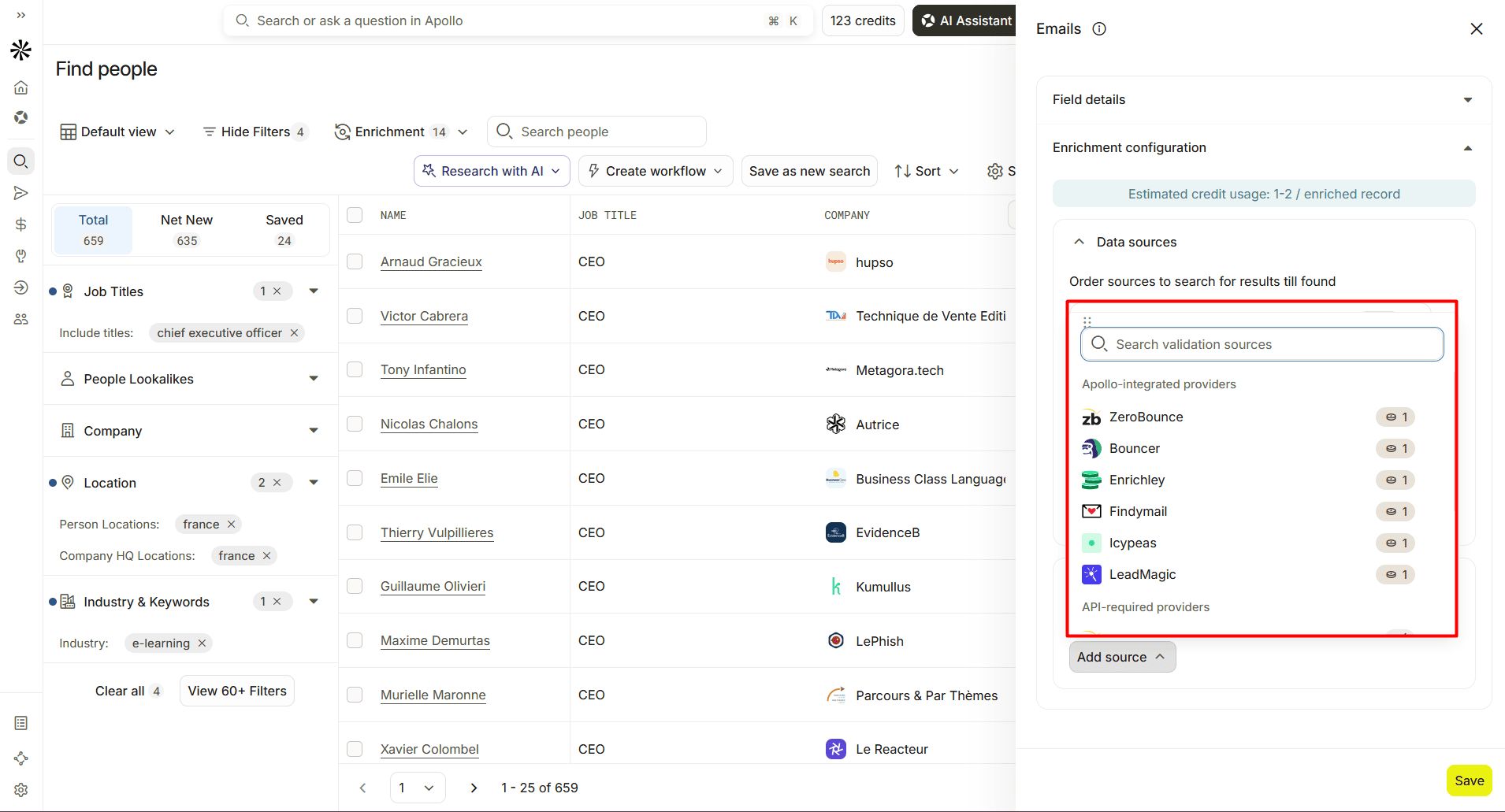
Source: Apollo.io
Whichever tool you use, without thorough email verification, your outreach is most certainly destined to fail. You’ll likely see your bounce rates jump to 15% or even 20% and sender reputation drop to the bottom, where it’s hard, if not impossible, to recover.
Email Deliverability Expert at Snov.io

👍 Multi-lingual UI
One thing I really find useful about Apollo is how international it has become. Over 2026, Apollo has steadily expanded its language support. Besides English, the entire interface is now available in:
- Spanish
- Portuguese
- Italian
- French
You can also interact with the AI Assistant in these languages.
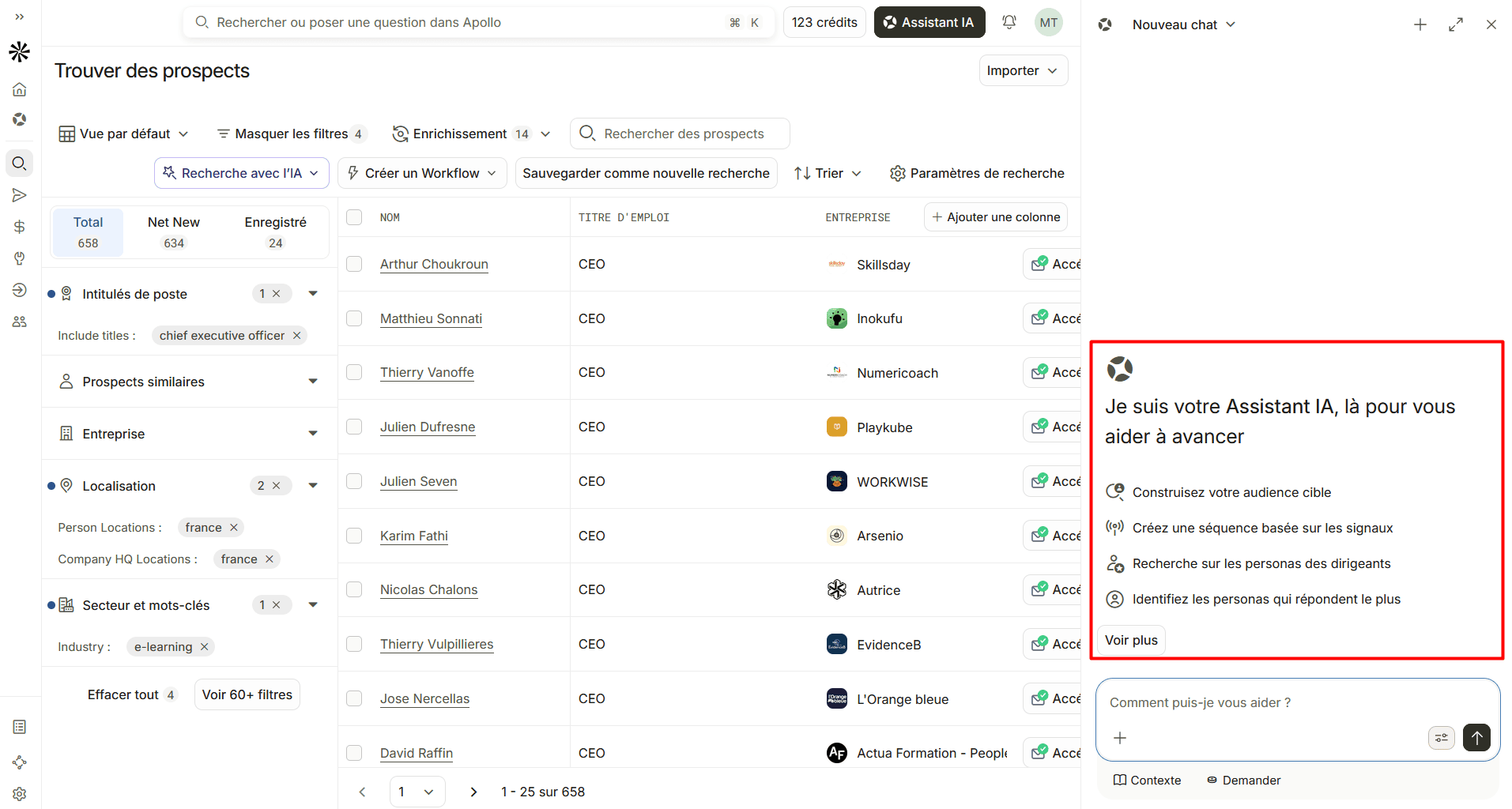
Source: Apollo.io
This matters more than it might seem on the surface. Sales and marketing teams are rarely monolingual these days. And working in your native language means fewer misunderstandings and more confidence when setting up outbound campaigns.
What I disliked when testing Apollo.io
👎 Significant learning curve
It’s not a tool you master overnight. The learning curve was a bit of a mountain to me. After testing Apollo.io for a week, I can say that it’s far from enough to figure things out and takes a couple of “What is this button for?” and “How does this work?” moments.
So, be prepared to do some homework before you start using the platform.
👎 Complicated credits system
At first glance, everything looks pretty simple and understandable:
- 1 credit to access 1 verified email
- 8 credits to access a verified phone number
- 1 credit to run 1 AI Research round
- And so on
But once you start estimating the amount for waterfall data enrichment where each third-party provider eats up a different amount (e.g., 10 Apollo credits per email found by Wiza or 20 Apollo credits per phone number found by Datagma), or other features, it becomes a real math challenge.
For example, US Dialer consumes only 2 credits per minute. But for international dialing, it varies drastically by region: from 10 credits/min for Europe to 36 credits/min for Africa.
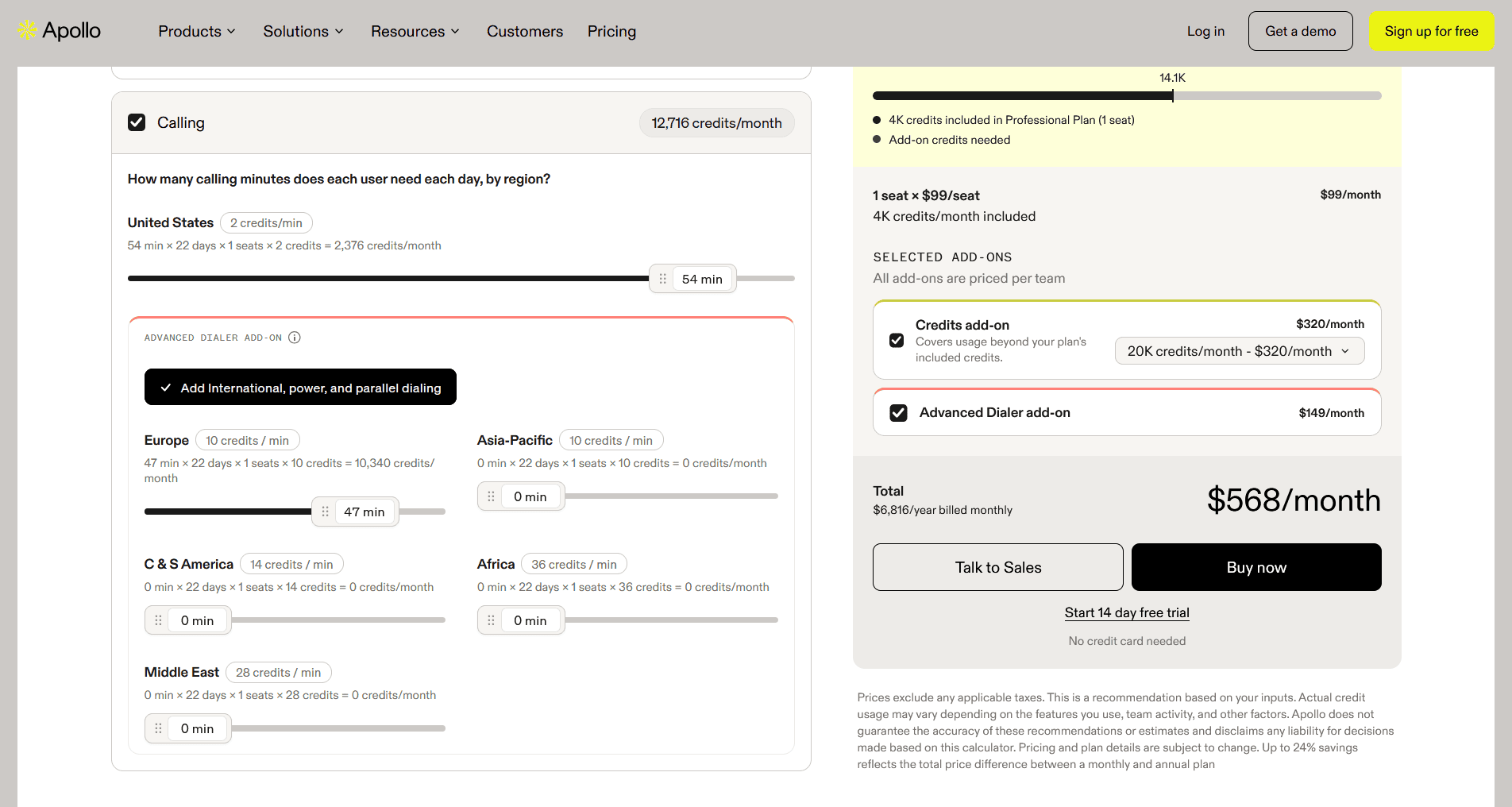
Source: Apollo.io
👎 Poor flexibility
I particularly experienced a couple of inconveniences building my first sequence and testing waterfall enrichment. Here’s what I mean.
Compared to visual drag-and-drop builders, Apollo’s builder felt less flexible. From the three-dot menu, you can only clone, delete, or change the step type. So, at first, the steps seemed immovable because dragging them in the main view didn’t work as I expected.
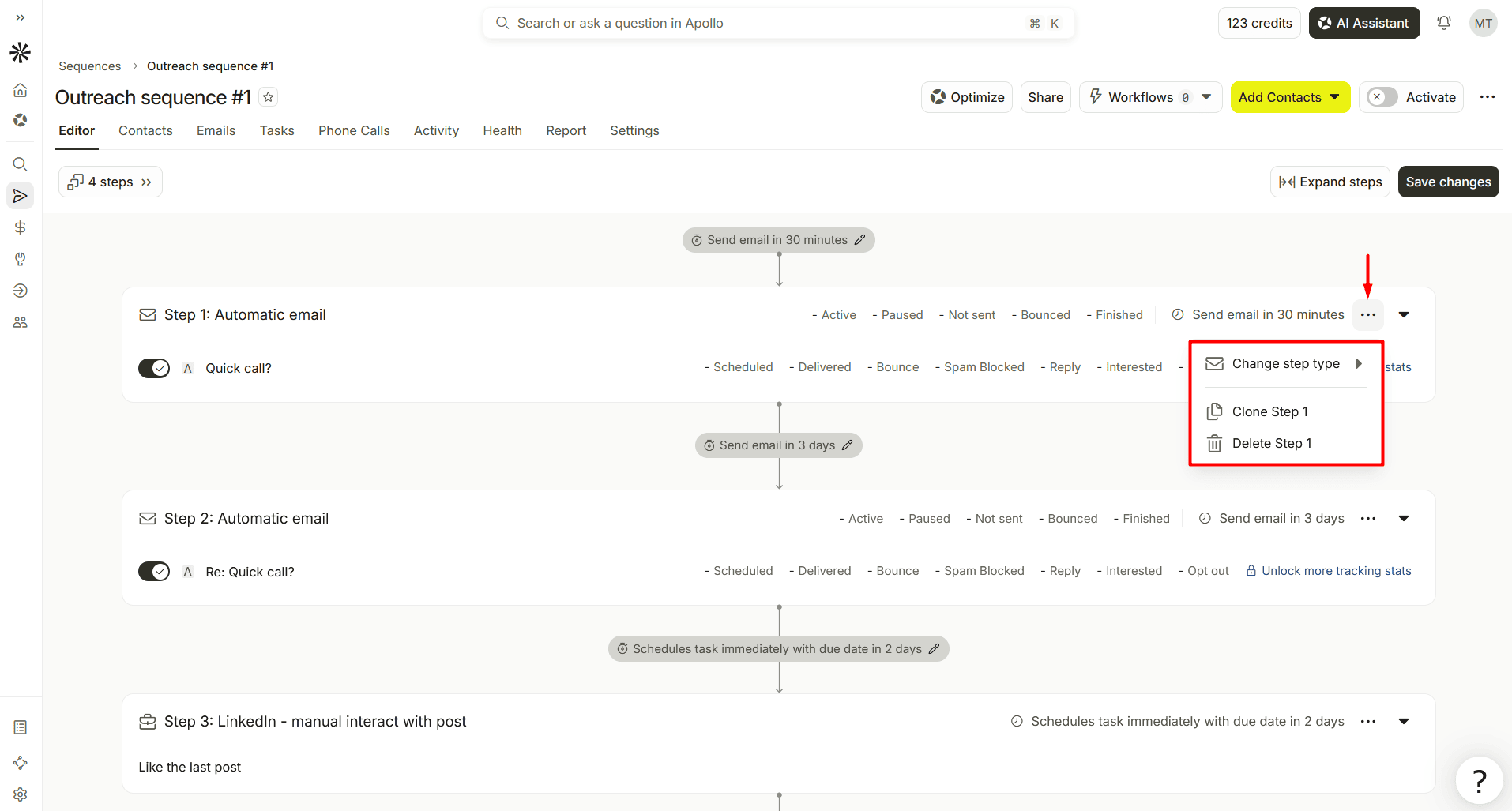
Source: Apollo.io
I eventually found that I had to open the Steps panel above the sequence to reorder them there. However, this option wasn’t that obvious to me. Also, I think the vertical layout may make it harder to see the overall sequence, especially when you add many steps.
Here’s what frustrated me even more. There’s no way to disable Apollo’s database or change its place in the waterfall sequence during data enrichment. You can move or remove third-party tools, but not Apollo — it always stays first. So, whether you want it or not, Apollo gets the first lookup and consumes credits (luckily, only when it returns data).
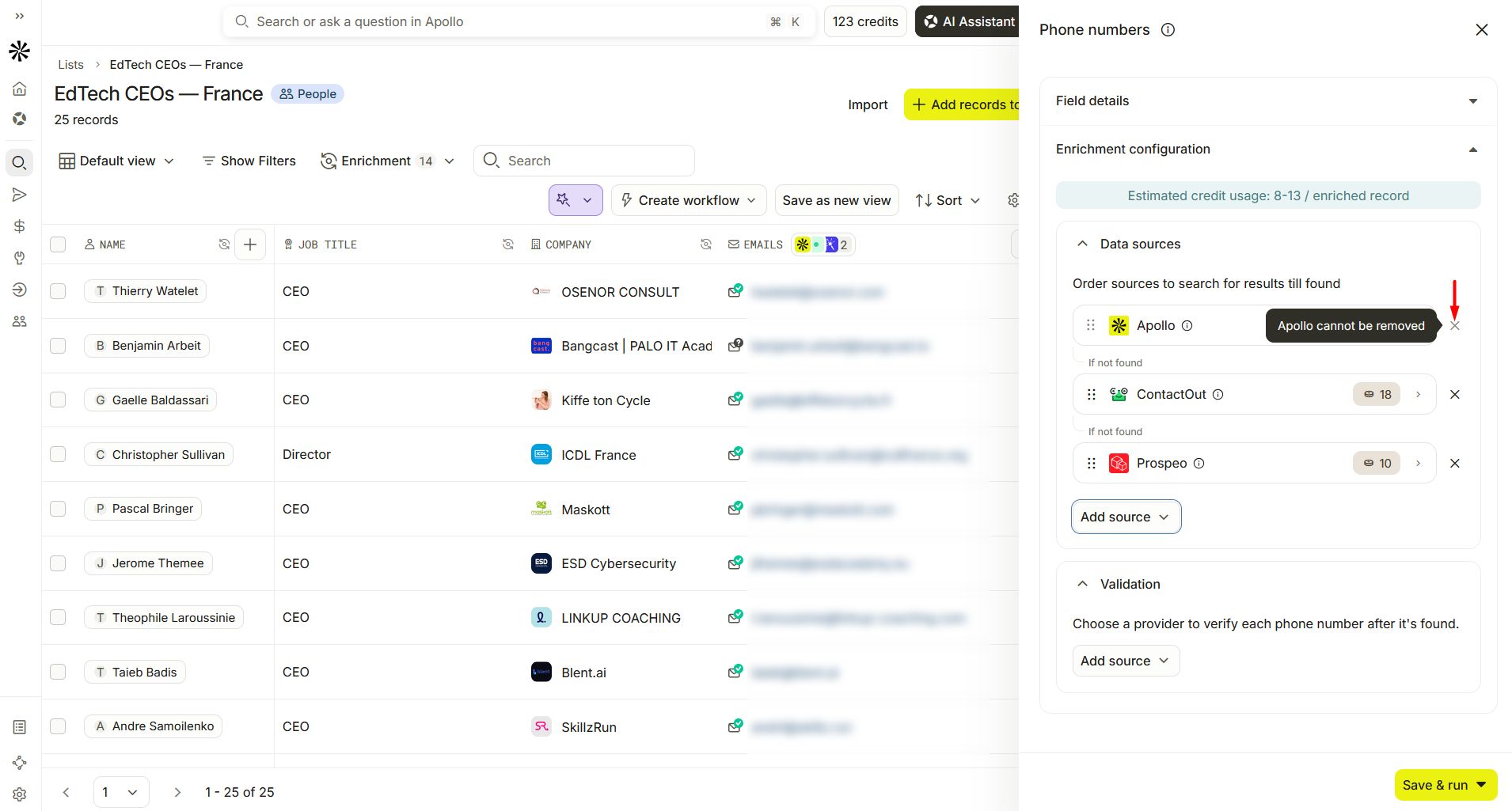
Source: Apollo.io
👎 Limited email personalization
AI Writing Assistant promises to write personalized emails, but does it in reality?
Find the answer in my experiment. Here’s how the test unfolded. First, I generated a personalized message with the writing assistant.
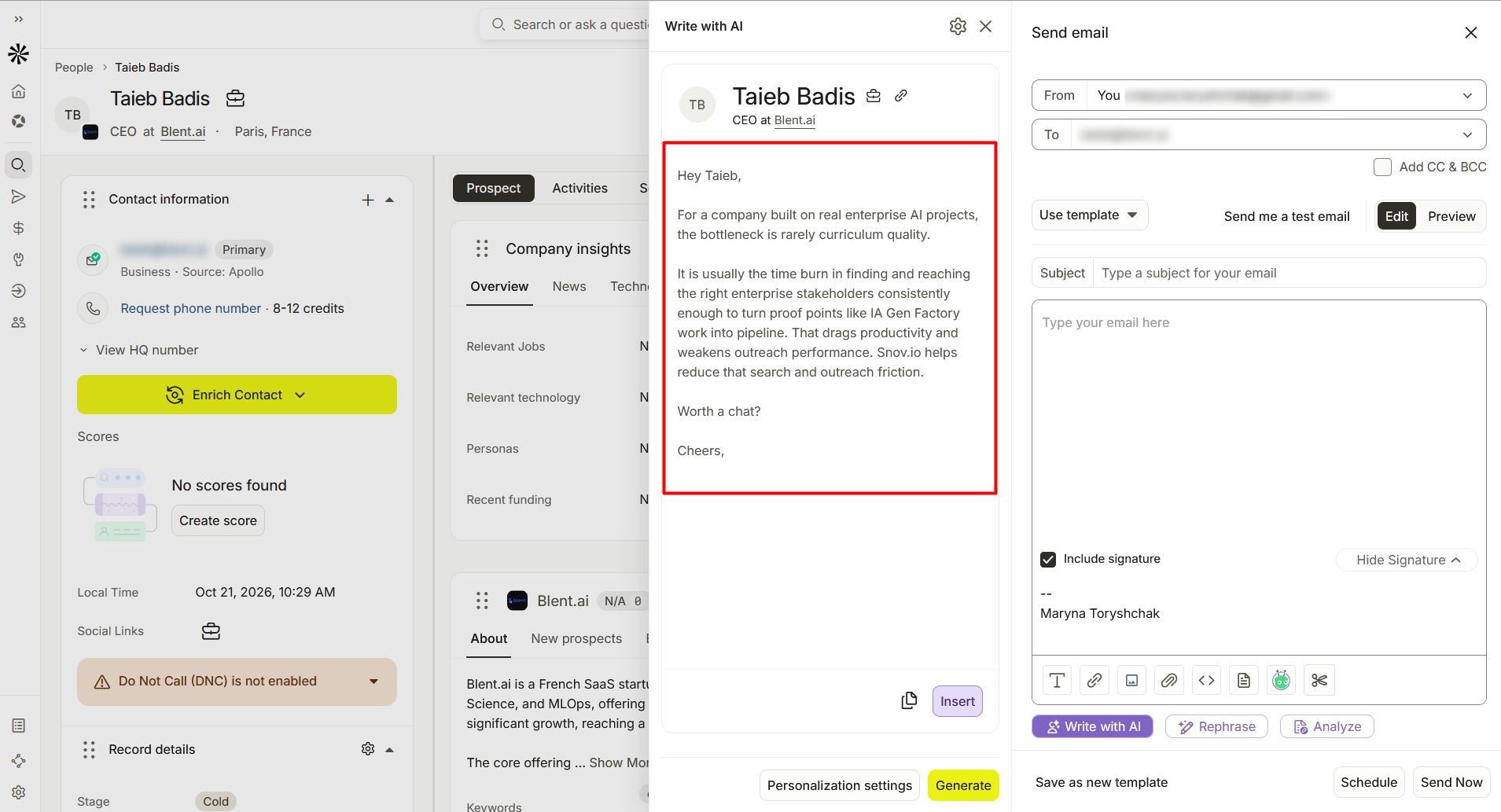
Source: Apollo.io
Then, I inserted this very AI-written email and clicked “Analyze.” As a result, it showed the 71% score and “Not personalized” verdict.
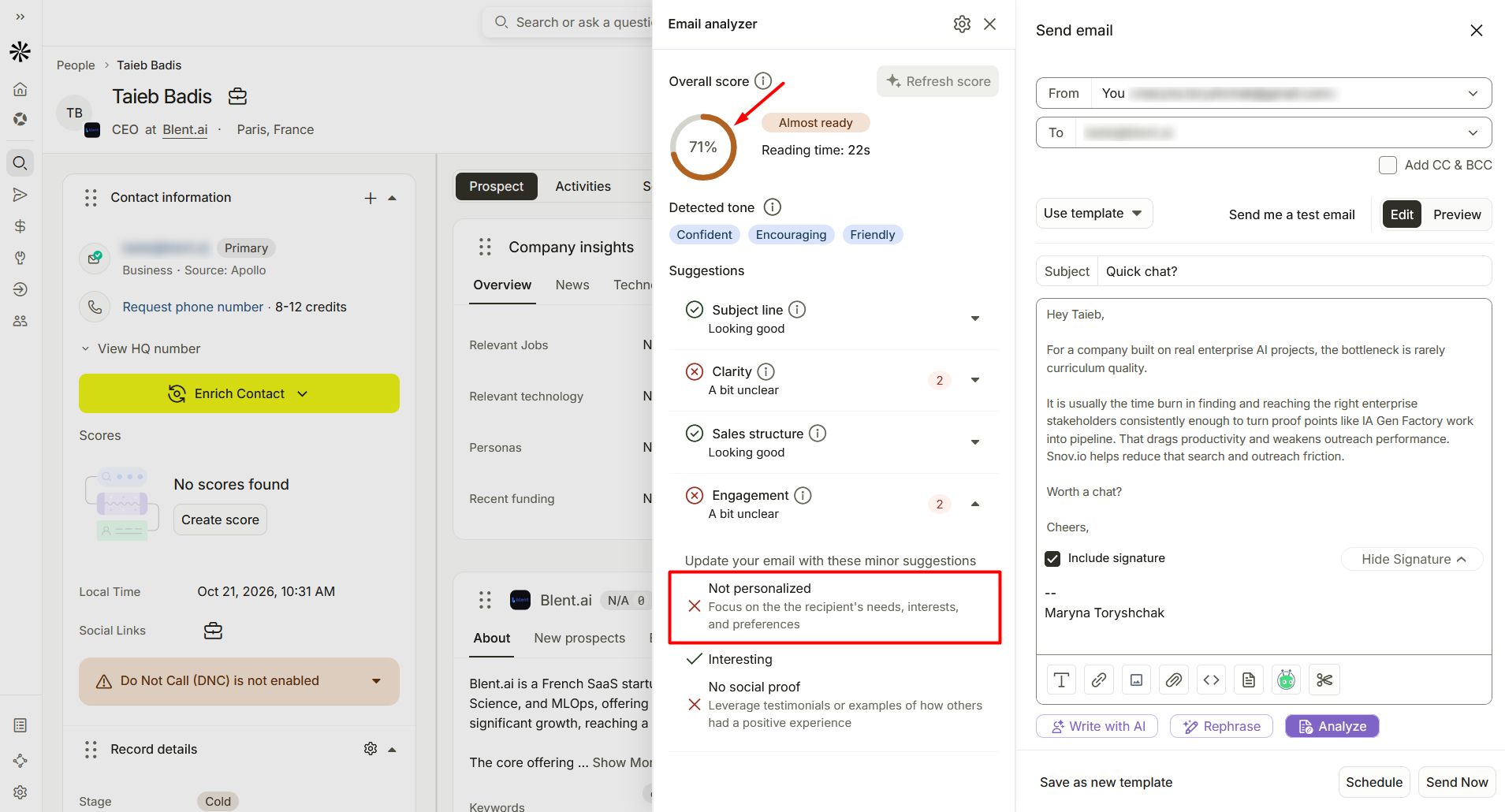
Source: Apollo.io
Indeed, AI personalization didn’t go beyond the first name. To be quite fair, I should say that it added prospects’ company names several times to other emails but still lacked a human touch and enough personalization, in my opinion, with generic sentences using the common AI-ish pattern: X is not; it is Y.
Here’s one example from Apollo AI-generated emails: “The friction is not demand. It is the time lost between capture, qualification, and follow-up.”

👎 LinkedIn prospecting and manual LinkedIn tasks
When I used Apollo’s Chrome extension on several LinkedIn profiles, it failed to capture the email addresses visible to the naked eye. Some were in the “About” section or even headlines, as you can see in the screenshot below.
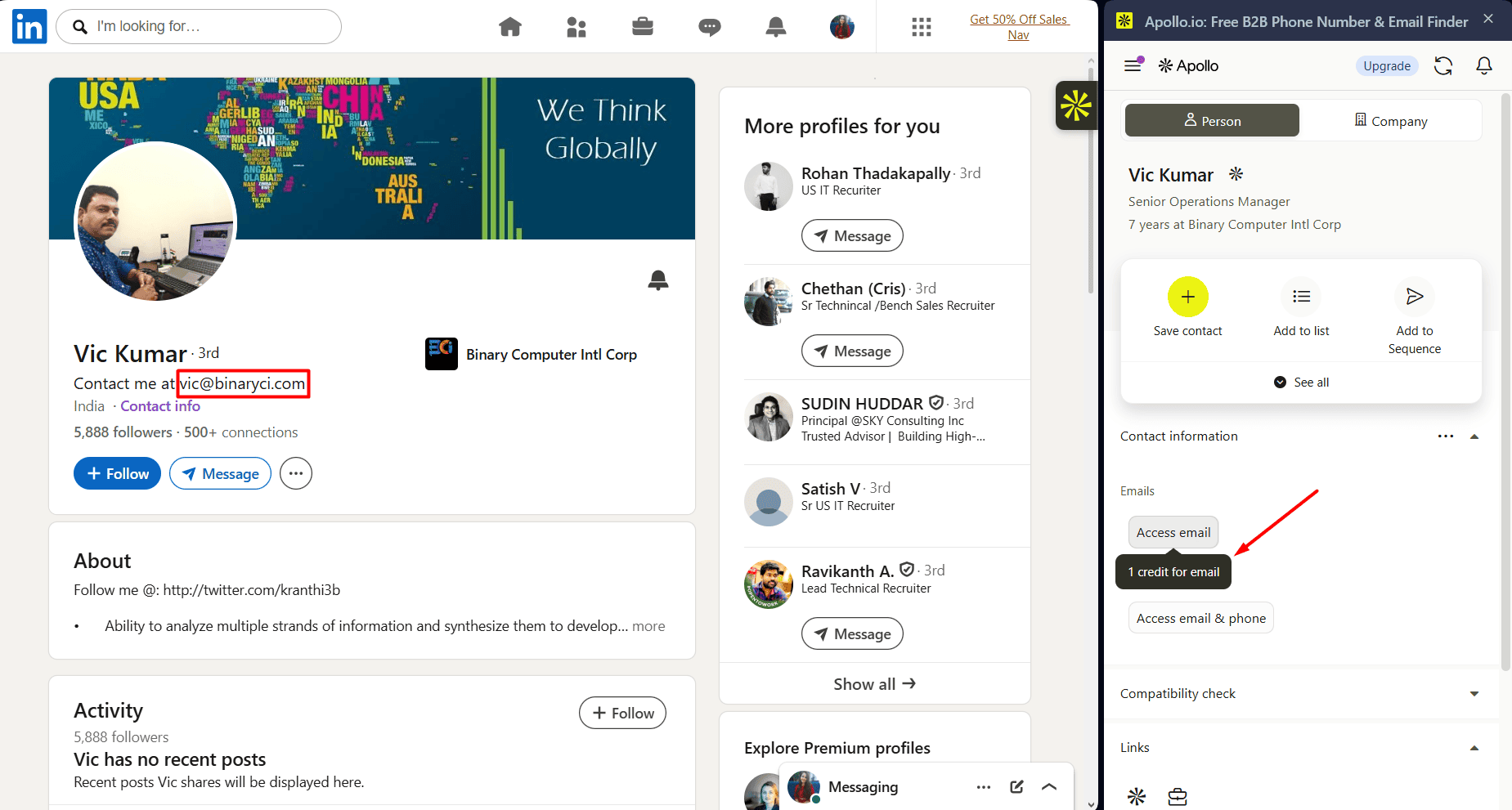
Source: LinkedIn.com
I was disappointed to find out that it doesn’t work like most LinkedIn scraping tools and doesn’t scrape profiles. The Chrome extension matches them to Apollo’s database and displays the found, not scraped, data. So, even if you see the info you need, you’ll still have to pay for it with Apollo credits or save it manually.
And then, even after adding the right prospects from LinkedIn to your list and finding their contact details, you still have to complete LinkedIn tasks manually. That adds repetitive work and makes Apollo less convenient if LinkedIn is central to your outreach.
Many Apollo alternatives offer automation. For example, in Snov.io, you can automate profile visits, connection requests, messages, skill endorsements, and other LinkedIn actions.
So you can spend less time on routine tasks and more time on conversations with prospects.
What other users say: Apollo.io reviews on G2, LinkedIn, and Reddit
After testing it for a week, I wanted to see how other people’s experiences differ from mine (or coincide with it) to make my Apollo.io review more objective and provide a fuller picture.
So, what do other users think of Apollo? Here’s what I found on platforms such as G2, LinkedIn, and Reddit.
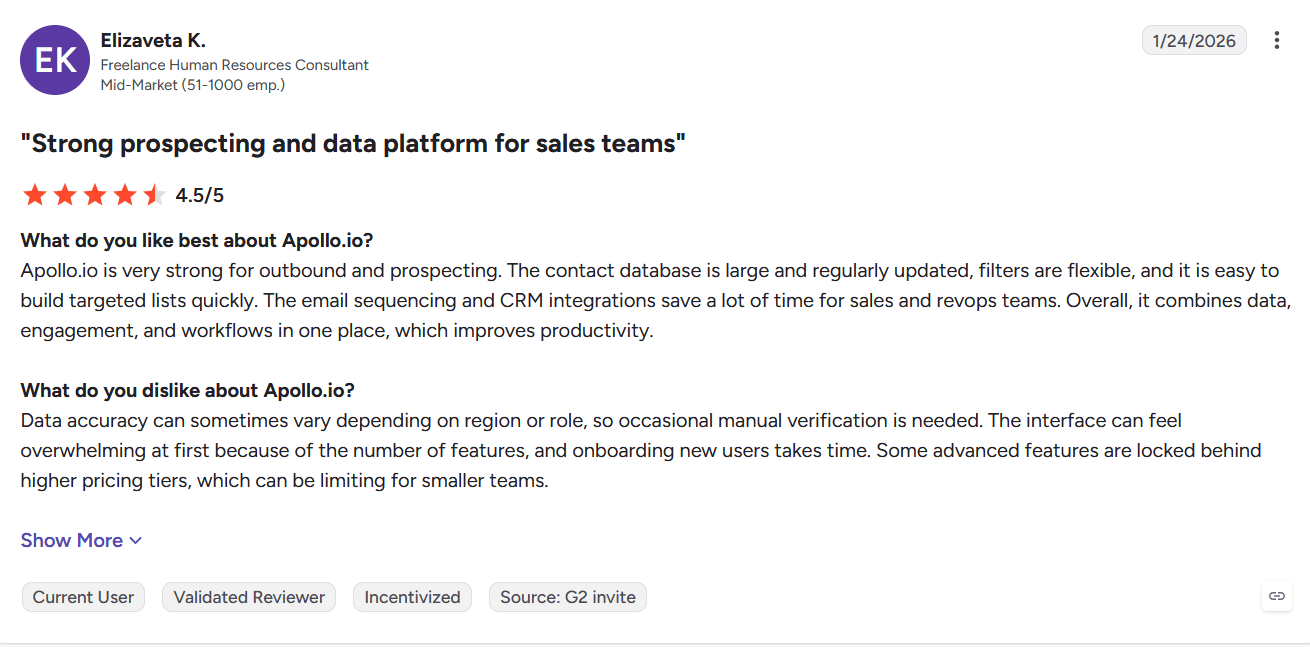
G2 Apollo reviews
At the time of writing (October 2026), Apollo.io holds a rating of 4.7 out of 5 based on 9,848 reviews on G2.
Where it stands out:
People highlight ease of use (1,500+ mentions) once you get the hang of the tool. They also find its features, particularly filters, most useful for lead generation (1,300+ mentions).
Other positive user mentions:
- Chrome extension
- Customer service
- CRM integrations
Where it falls short:
All that functionality overwhelms users and creates an intense learning curve. It’s one of the most frequently cited drawbacks.
Source: G2.com
Other complaints include poor data accuracy, a non-intuitive UI, and high cost.
Apollo.io reviews on LinkedIn
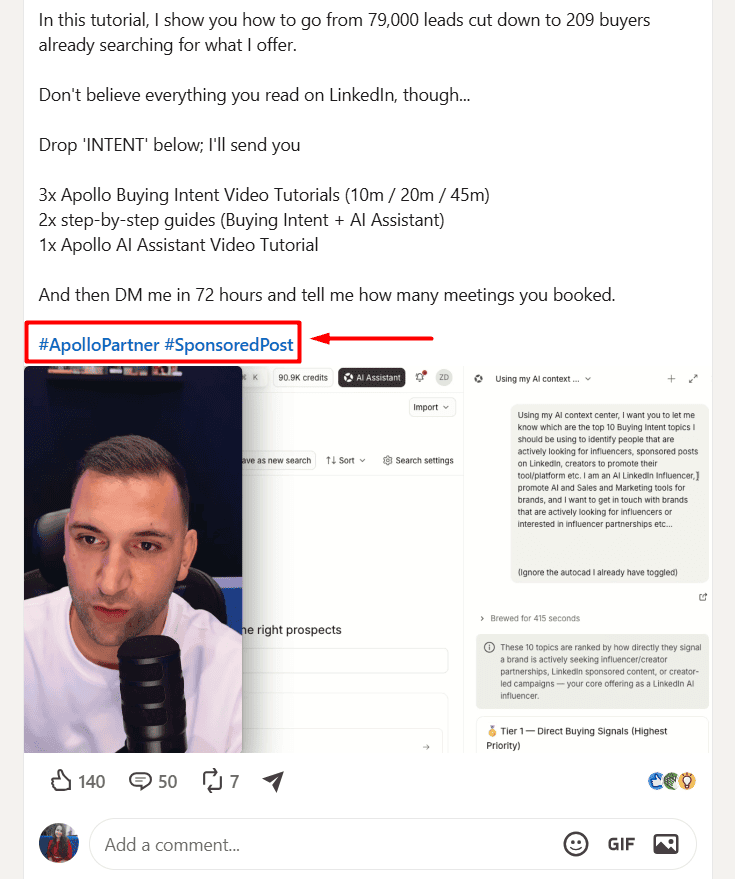
There aren’t too many users reviewing Apollo on the platform. Many of those I found are either from company employees promoting the brand and product, their partners, or sponsored content.
Many Apollo video reviews I found disclosed sponsorships or partnerships. So, if you’re looking for Apollo reviews from non-sponsored users on LinkedIn, watch out for hashtags like #SponsoredPost or #ApolloPartner.
Source: LinkedIn.com
Here, user opinions are also divided. According to positive feedback, one of its biggest strengths is AI functionality. People also applaud Apollo for firmographic, technographic, and buying-intent filtering.
Others raise concerns about data accuracy and want better data quality. Some also find it too expensive and switch to cheaper alternatives.
Switched from Apollo to a cheaper stack six months ago. Same data quality, lower cost, and the workflow is cleaner because we built it ourselves rather than working around Apollo’s interface.
Business Development Manager at Coenzio
Apollo reviews on Reddit
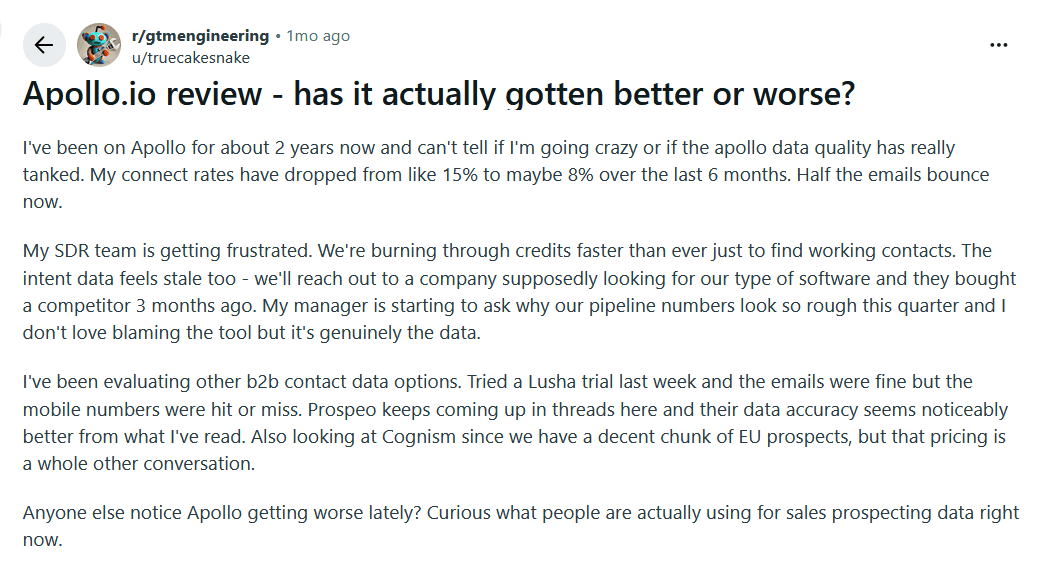
While scrolling through user feedback on Reddit, I was surprised to see that many of the posts and comments were negative. But let’s look at both sides.
On the positive side:
- Good for getting started
- Massive database with a lot of filters
On the negative side:
- Inaccurate data
- Hard to learn
Overall, Apollo receives the harshest criticism from Redditors for data quality, with some users reporting that it has worsened over time.
Source: Reddit.com
Taken together, Apollo reviews suggest the platform’s broad functionality and AI-powered features are strengths, while data accuracy, usability, and cost remain recurring concerns.
Apollo.io pros and cons based on what I’ve read and tried
I drew the following strengths and weaknesses from Apollo’s own published details, my testing notes, and Apollo.io reviews across platforms like LinkedIn, G2, and Reddit.
| Apollo.io pros | Apollo.io cons |
|---|---|
| ➕ Free plan with the Chrome extension and CRM integrations ➕ 65+ data points, including buyer intent and technographics ➕ Data enrichment across 20+ partners with an optional email validation step ➕ Agentic go-to-market system with AI tools and AI insights ➕ Responsive customer support via email and live chat (a chatbot can transfer to a human agent) ➕ 60+ native integrations, including bi-directional with Salesforce, HubSpot, and Pipedrive ➕ Multi-language support: Spanish, Italian, French, and Portuguese ➕ Transparent security and compliance documentation |
➖ Questionable data accuracy (reviewers report high bounce rates and low connect rates) ➖ Hard-to-navigate UI with a daunting learning curve ➖ Too expensive for small sales teams and SMBs ➖ Complicated system of credits (plus, they don’t roll over) ➖ Advanced filters (e.g., Technologies, Revenue, or Lookalikes) are locked behind the paywall ➖ Strict feature usage limitations that vary by plan ➖ LinkedIn steps in sequences are manual, not automatic, tasks ➖ The Chrome extension doesn’t scrape profiles but matches them to Apollo data |
What I really think: Apollo has rich filtering options and many useful integrations, and it moves with the AI times, offering strong AI features. But its restrictive credit-based system and limits on feature usage make it a better solution for enterprise-level teams than solo B2B players or SMBs that need low-volume prospecting. However, what bothers me most is recurring feedback that data quality has dropped over the years, and that looms as a major red flag for me.
My final say on the tool: Would I recommend Apollo.io?
Yes, but under specific conditions. Here’s when you should and shouldn’t use Apollo.
Apollo is a stronger fit if you:
- Manage a larger sales team and need prospecting, dialer, deal tracking, and AI tools in one place
- Run outbound predominantly on the phone
- Have enough time to learn the platform and keep an eye on credit usage and data quality
Apollo is a weaker fit if you:
- Are a solo user or a small team, agency, or business doing low-volume outbound, since per-seat pricing and credits add up fast
- Want LinkedIn outreach that runs automatically without babysitting
- Don’t have time to learn and test data accuracy, and can’t risk your bounce rate
So, if you belong to the second group, Snov.io is the Apollo alternative I’d try first: flat pricing with unlimited users, a dedicated email verifier, and automated outreach.