TL;DR: In this guide, we’ll share connection request templates that work for both free and Premium LinkedIn account users. We’ll also show you how to automate the process without losing a personal touch. Let’s make your LinkedIn outreach smoother, smarter, and way more effective!
We all know that LinkedIn is brimming with sales opportunities. But to take advantage of them, you first need to connect with your prospects. Otherwise, you can’t start a conversation, let alone guide them through your sales funnel.
Unfortunately, LinkedIn users don’t accept invitations from anyone who sends them. They’re tired of scammers, sales pitches, and AI-generated connection messages. So, how do you get through to your leads?
Outline:
What is an invitation on LinkedIn?
A LinkedIn invitation is a request to become someone’s 1st-degree connection on LinkedIn. That’s why it’s also commonly known as a connection request. Users can accept or ignore the invitation based on whether they are interested in interacting with you.
A high rate of invitation acceptance is crucial for growing your LinkedIn. 1st-degree connections can exchange messages, see each other’s posts on their feeds, and get notified about each other’s important milestones like promotions or certifications.
Thus, you need to send connection requests that spark interest in your recipients. Adding a personalized note to your invite is the best way to achieve this.
|
❗️Note: A connection request message is limited to 200 characters for free LinkedIn accounts and to 300 characters for Premium LinkedIn accounts. |
LinkedIn connection request templates for lead generation
There’s no one-size-fits-all solution when it comes to connection request messages on LinkedIn. You need to consider the tone of voice acceptable in the particular community, your recipient’s seniority, industry, and interests, along with other factors.
Connecting on LinkedIn is like meeting someone at an event — be real, be clear, and offer value. Explain why you’re reaching out, keep it simple, and show you’re a real person, not just another request.
Marketing Specialist at Snov.io

That said, we know how much time creating a personalized LinkedIn connection note from scratch takes. If you’re a busy sales representative or a business owner, you’ve got other urgent tasks on your plate.
That’s why we gathered a variety of tried-and-true connection request templates that you can adjust to your circumstances. Use them to save time without compromising the success of your LinkedIn outreach.
|
💡 Expert tip: Regardless of whether you’re using templates or not, we recommend sending invites only to relevant recipients. Mass sending the invitations to random accounts won’t help you acquire quality leads. Instead, it can trigger LinkedIn’s spam filter and get your account restricted. |
1. Mentioning a mutual LinkedIn connection
LinkedIn users are more likely to trust you if someone they know has already connected with you. Thus, it’s generally a good idea to look for potential leads among your 2nd and 3rd-degree connections.
Template 1 (under 200 symbols)
Hi [Prospect’s First Name],
We follow the same experts from [Industry]. I’d love to have you in my network and exchange thoughts on their recent posts. Let’s connect!
Template 2 (under 300 symbols)
Hi [Prospect’s First Name],
[Mutual Connection] praised your expertise in [Industry]. Let’s connect and discuss [Common Pain Points/Trends].
2. Discussing an industry hot topic
People often get on LinkedIn to participate in industry-related discussions and learn about recent trends. If you have valuable insights to contribute, others will be eager to hear from you. You’ll be able to grow your LinkedIn audience and establish your expertise in one go.
With this type of connection request message, you can approach two groups of users. The first is those actively engaging with a particular topic in LinkedIn Groups or under experts’ posts. The second is simply professionals from the relevant industry. The chances for success with the latter might be a little lower, but it’s still worth a try.
Template 1 (under 200 symbols)
Hi [Prospect’s First Name],
[Particular Topic] is all [Industry] specialists are talking about. I’m curious to hear your take. Let’s connect and discuss!
Template 2 (under 300 symbols)
Hi [Prospect’s First Name],
I came across your comment regarding [Particular Topic] in [Industry]. Being in [Industry] for [Number] of years, I [completely agree/respectfully disagree] with your point. I’d love to connect and discuss this further.
3. Connecting to a member of the LinkedIn Group
Many sales and marketing professionals use LinkedIn Groups to find potential leads, show their expertise, and enhance their brand visibility. Being in the same Group is also an excellent pretext for asking someone to connect.
Template 1 (under 200 symbols)
Hi [Prospect’s First Name],
I’ve recently joined [LinkedIn Group’s Name] to expand my network with like-minded people. Would you be interested in connecting?
Template 2 (under 300 symbols)
Hi [Prospect’s First Name],
I’m connecting with members of [LinkedIn Group’s Name] like yourself to build a network of professionals passionate about [Industry]. Would you be interested in joining?
4. Reaching out to an event participant
Event attendees often connect with each other on LinkedIn prior to or after the event. So, don’t hesitate to sign up for events related to your business and send invitations to other participants. This works well both with offline and online events.
Template 1 (under 200 symbols)
Hi [Prospect’s First Name],
Looks like we both attended [Event]. What’s your biggest takeaway? Let’s connect and chat!
Template 2 (under 300 symbols)
Hi [Prospect’s First Name],
We crossed paths at the [Event] but unfortunately didn’t have the opportunity to talk. Let’s connect and catch up!
5. Acknowledging expertise
Everyone wants to be seen and heard, especially on social media, where the competition for attention is so high. There’s no better way to start a conversation with someone active on LinkedIn than by complimenting their content.
Template 1 (under 200 symbols)
Hi [Prospect’s First Name],
Your recent posts caught my eye, and I would love to connect and discuss this important topic with you in more depth.
Template 2 (under 300 symbols)
Hi [Prospect’s First Name],
I’ve been following your page for a while now because I admire your expertise in [Industry]. Your recent post really resonates with me. I would love to connect and discuss it in more detail.
|
💡Expert tip: You can send 5 personalized connection requests with a free LinkedIn account. With a Premium subscription, you can send an unlimited number of personalized connection requests. And yes, personalization is key if you want to stand out from the crowd and actually capture the attention of your recipients. Don’t have time to manually write them? We understand. Automate this process with the help of Dynamic content and variables using the Snov.io LinkedIn automation tool. 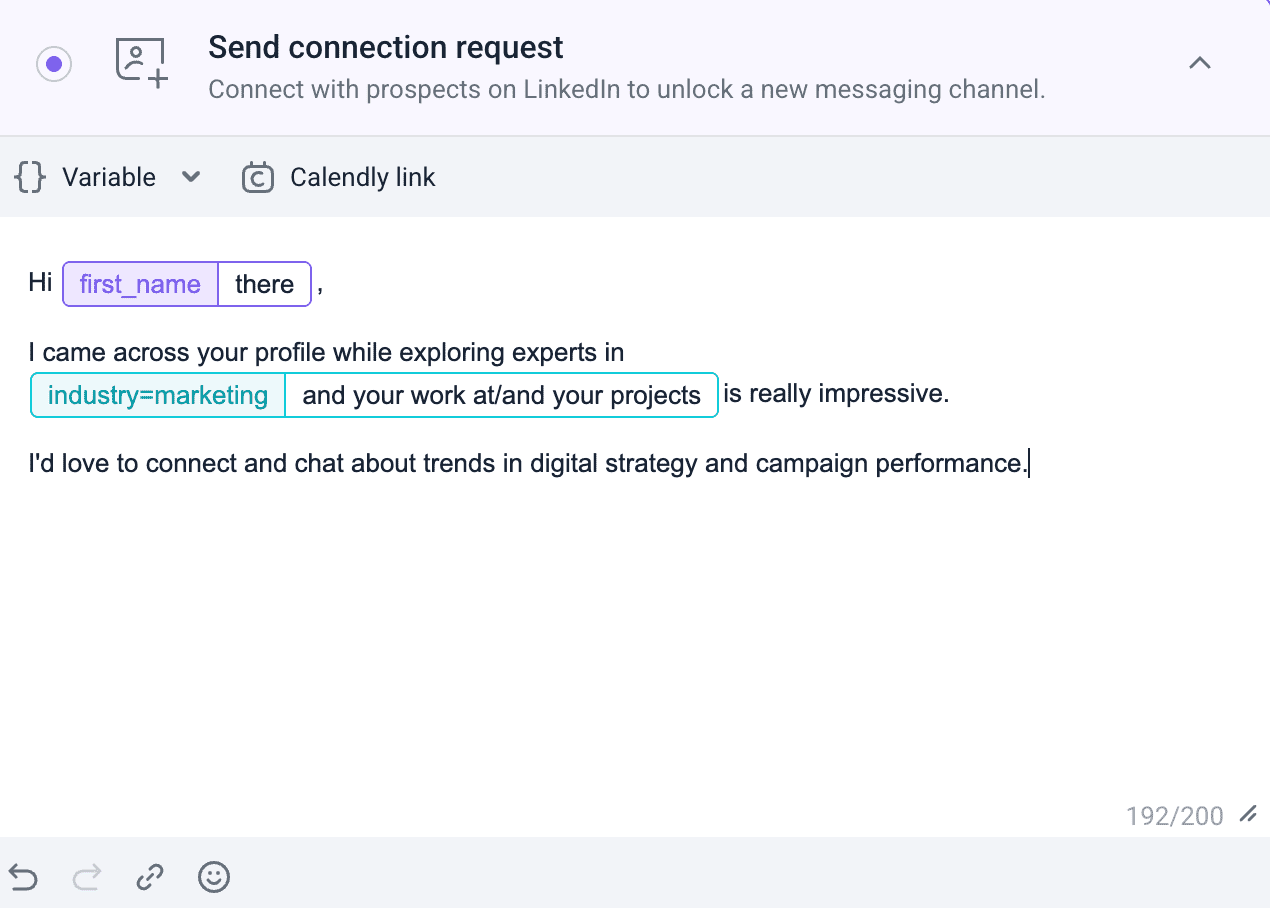 You can also add another LinkedIn action to your campaign for a comprehensive cold outreach strategy, allowing you to view users’ profiles and like their posts before sending an invitation. |
6. Retargeting users who interacted with your LinkedIn posts
People who have already shown interest in you by engaging with your LinkedIn content are likely to accept your invitation. Still, you have to be clear in your request message about why you’re approaching them. Sending empty invites to everybody who liked your LinkedIn post might look like spammer activity.
Template 1 (under 200 symbols)
Hi [Prospect’s First Name],
Thank you for liking my post about [Topic]! Would you be interested in connecting so I can provide more detailed information?
Template 2 (under 300 symbols)
Hi [Prospect’s First Name],
Thank you for sharing your experience under my post about [Topic]. Your expert comment added another valuable angle to the discussion. I’d love to connect and continue our conversation.
7. Discussing a piece of content you both engaged with
If your LinkedIn posts haven’t had a lot of engagement yet, no worries. You can reach out to people who interacted with the same content as you did. Be active on LinkedIn, reacting and commenting on other users’ posts, and then look for users who did the same.
Template 1 (under 200 symbols)
Hi [Prospect’s First Name],
Looks like we both noticed [Particular Post]. I’d love to connect and hear your thoughts about it!
Template 2 (under 300 symbols)
Hi [Prospect’s First Name],
Have you seen [Particular Post]? I’m very curious to hear what other experts in [Industry] think about it. Let’s connect and exchange our insights!
8. Offering a solution to their problem
Nobody likes a sales pitch inside a connection request. But a solution to a particular problem is an entirely different matter. Does your potential customer struggle with some aspect of their business? Show them that you are ready to help.
|
🎁 Writing a LinkedIn connection message that introduces your product but doesn’t sound too salesy is tricky. Download a free guide with tips from our experts that will help you create compelling connection requests. |
Template 1 (under 200 symbols)
Hi [Prospect’s First Name],
I’ve helped businesses like yours to overcome [Pain Point/Problem]. Would you be interested in connecting and learning more?
Template 2 (under 300 symbols)
Hi [Prospect’s First Name],
Having trouble with [Pain Point/Problem]? I have a solution that’s proven to work. Let’s connect so I can explain in more detail. Maybe it’s just what your business needs!
9. Offering valuable freebies
Offering value upfront is a wonderful way to build trust and appeal to LinkedIn users so they accept your invitation. It can be expert guides, discounts on your products, or free passes to your event, among other things.
Template 1 (under 200 symbols)
Hi [Prospect’s First Name],
Would you like to receive a free guide on how to overcome [Pain Point/Problem]? It’s based on years of experience and hundreds of use cases.
Template 2 (under 300 symbols)
Hi [Prospect’s First Name],
I helped businesses in [Industry] to achieve [measurable results relevant to the recipient]. Let’s connect so I can send you a step-by-step guide on how to get the same results – no strings attached!
10. Breaking the ice with a joke
What should you do if none of the above LinkedIn invitation message samples fit your situation? Your prospects haven’t posted insightful content in a while, haven’t joined any LinkedIn Groups, and haven’t attended any events. You can still win them over – with a bit of humor!
It might be a risky step, so make sure you understand your audience well. The joke must be personalized to your recipient’s area of expertise or interests.
Template 1 (under 200 symbols)
Hi [Prospect’s First Name],
What do you have to know to be a real estate salesperson? Lots.
Jokes aside, I know you’re a pro at real estate. Let’s connect and exchange some ideas!
Template 2 (under 300 symbols)
Hi [Prospect’s First Name],
I saw your profile on LinkedIn and thought we had a lot in common! You breathe air, I breathe air – it seems like we should connect.
Jokes aside, I’d be happy to add a seasoned [Industry] professional like yourself to my network.
|
💡Need more LinkedIn connection message examples and ideas? Find them in the video below: |
How to automate LinkedIn connection request messaging
Even with the pre-made templates, sending connection request messages manually takes a lot of time. A time you could be using to close deals. You’re probably wondering if connection requests can be automated. They can, but there’s a catch.
Based on our experience, it’s better to send an invitation without a message than with a generic one. You need to select software with advanced personalization features.
For example, let’s explore how to send personalized connection messages using the Snov.io LinkedIn Automation Tool.
Step 1. Warm up your LinkedIn account. We strongly recommend preparing your account for any bulk sending. Here’s an example:
- Day 1: 5 requests
- Day 2: 5 requests
- Day 3: 7 requests
- Day 4: 7 requests
- Day 5: 9 requests
50 requests should be the maximum amount to stay within LinkedIn’s limits.
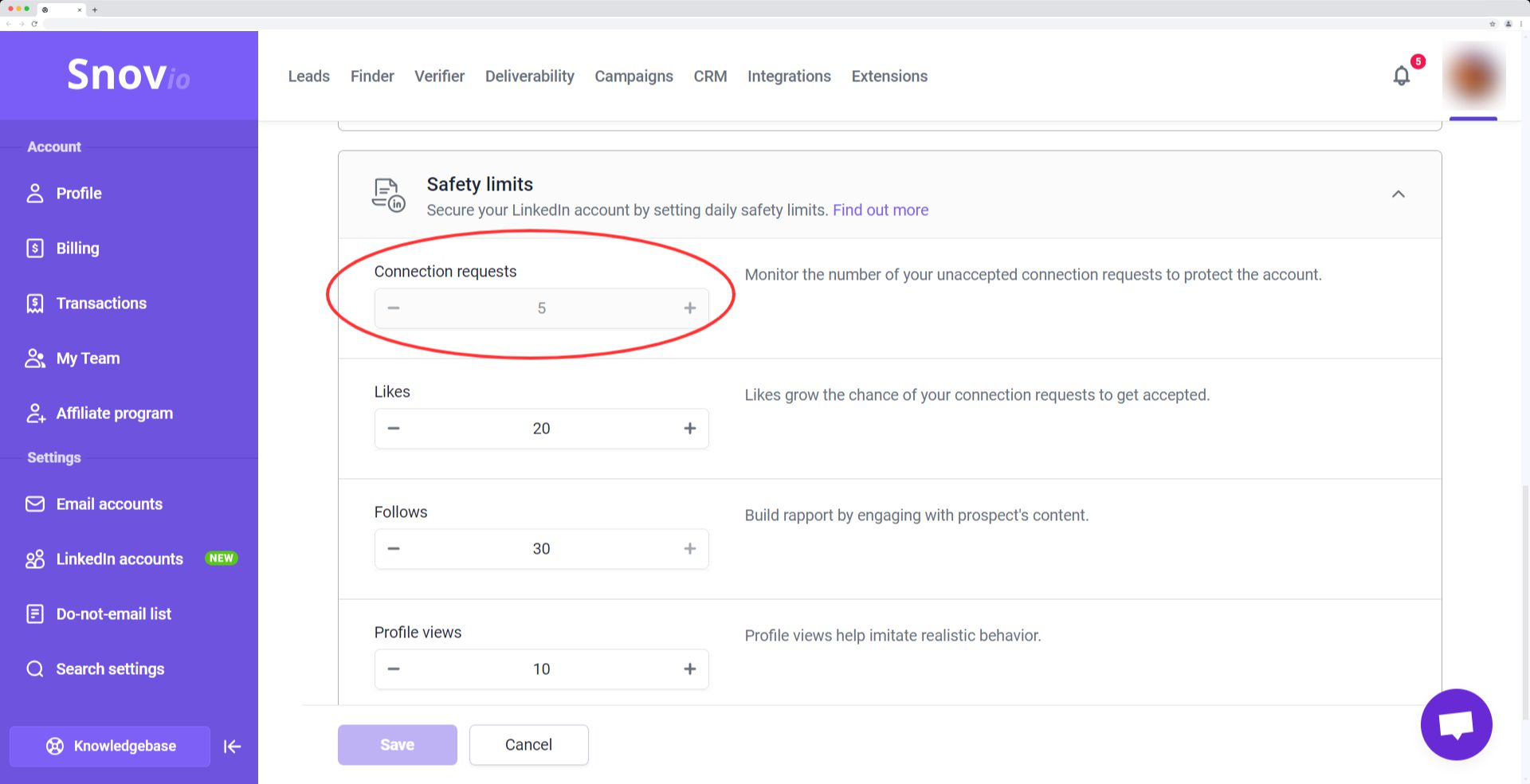
Step 2. Set up safety limits for LinkedIn actions to protect your LinkedIn account from suspension or restriction. Our intelligent tool will suggest appropriate limits based on your Social Selling Index.
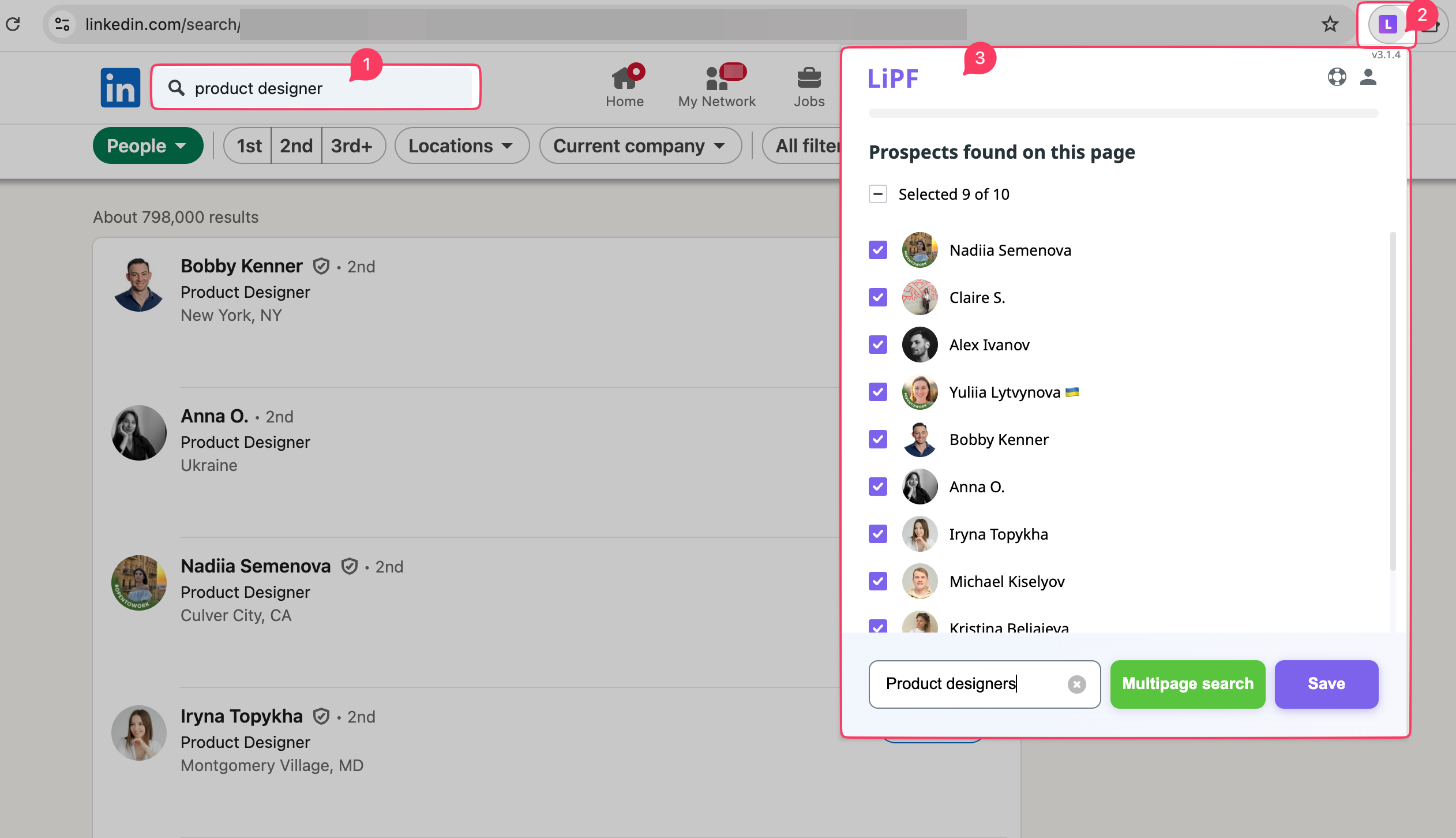
Step 3. Collect leads from LinkedIn using the free Chrome extension LI Email Finder. It allows you to gather leads from the LinkedIn search page, from personal profiles, and from company pages. You can also combine it with the LinkedIn Sales Navigator for better search precision.
Step 4. Segment your prospect list. One way to do it is to separate your prospects according to the types of connection message templates you’re going to use. Group all event participants into one list, all users who have interacted with your LinkedIn content into another, and so on.
Step 5. Create a LinkedIn action sequence for each group.
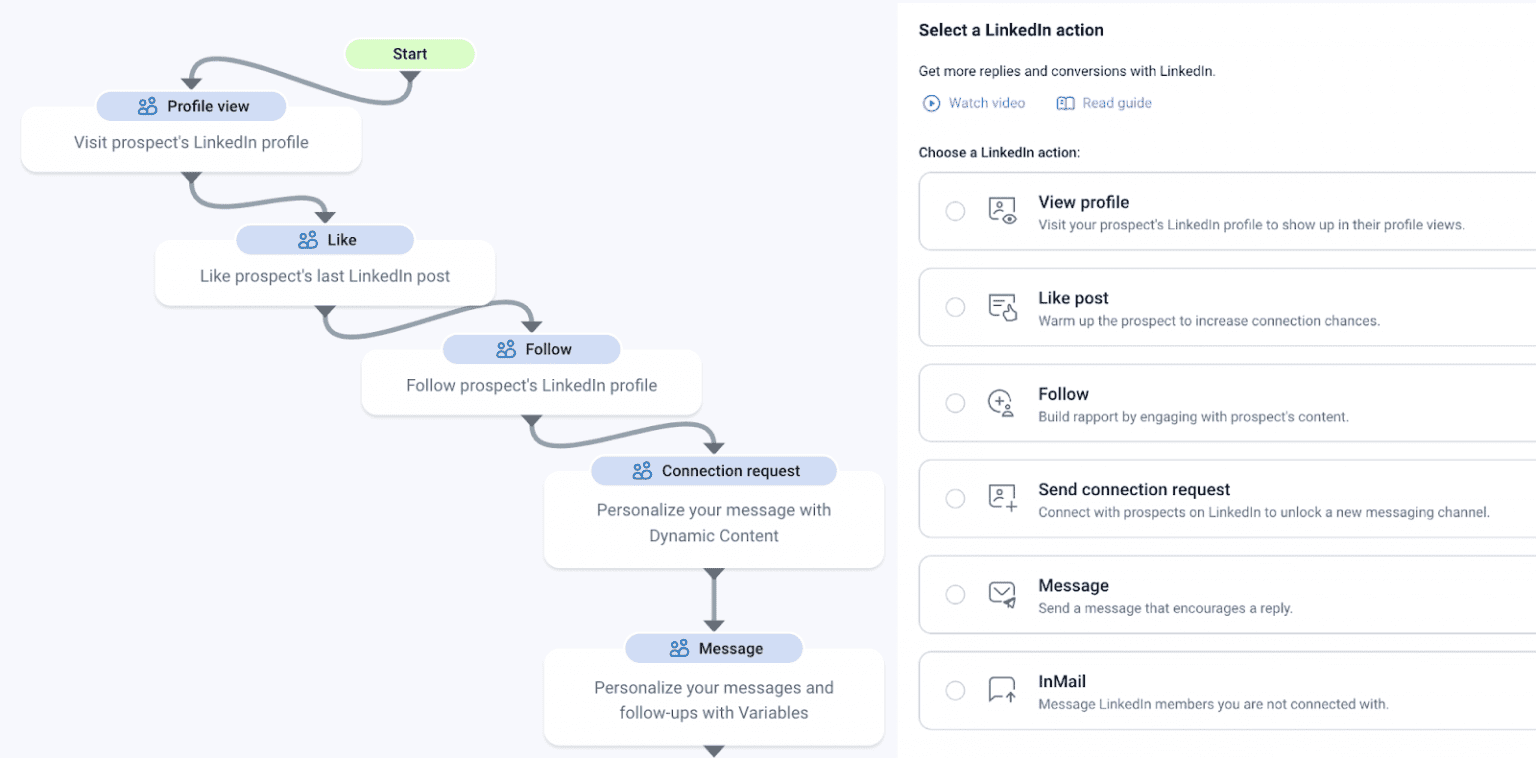
Step 6. Paste the preferred template into the connection request message box and adjust it as needed. Remember to utilize personalization features like Spintax and dynamic content to vary your connection request messages slightly. This will ensure that your messages don’t appear as spam to the LinkedIn algorithm.
Step 7. Add a LinkedIn action that follows your connection request, such as an introduction message. It’s also important to choose a fallback action for cases when recipients don’t accept your connection requests. For example, it can be an InMail or an email.
Step 8. Select the appropriate prospect list and the sending schedule, and launch your LinkedIn campaign.
Step 9. Monitor your LinkedIn campaign’s success with our detailed and comprehensible reports. Analyze the results and use the insights to achieve better outcomes in the future.
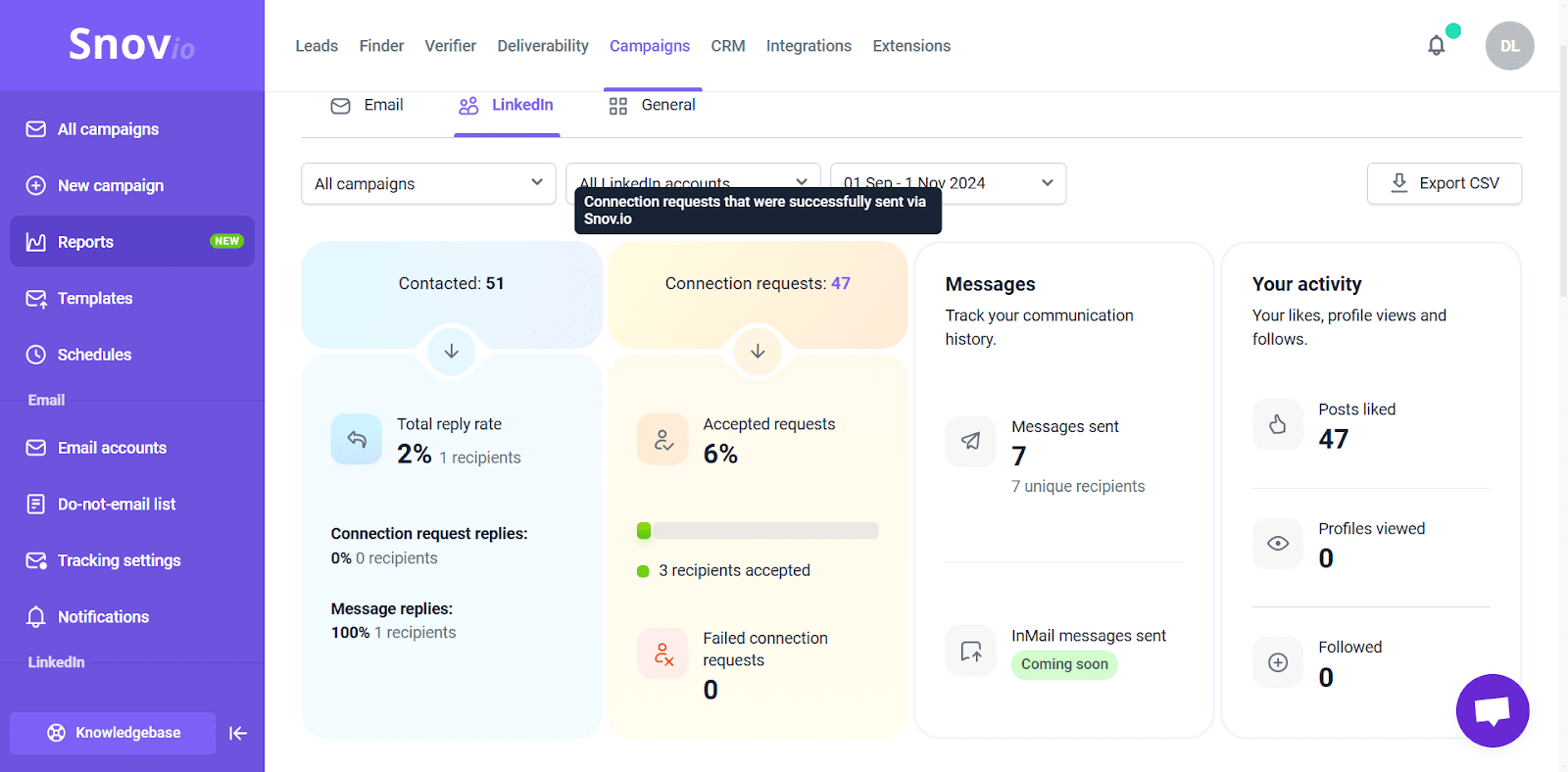
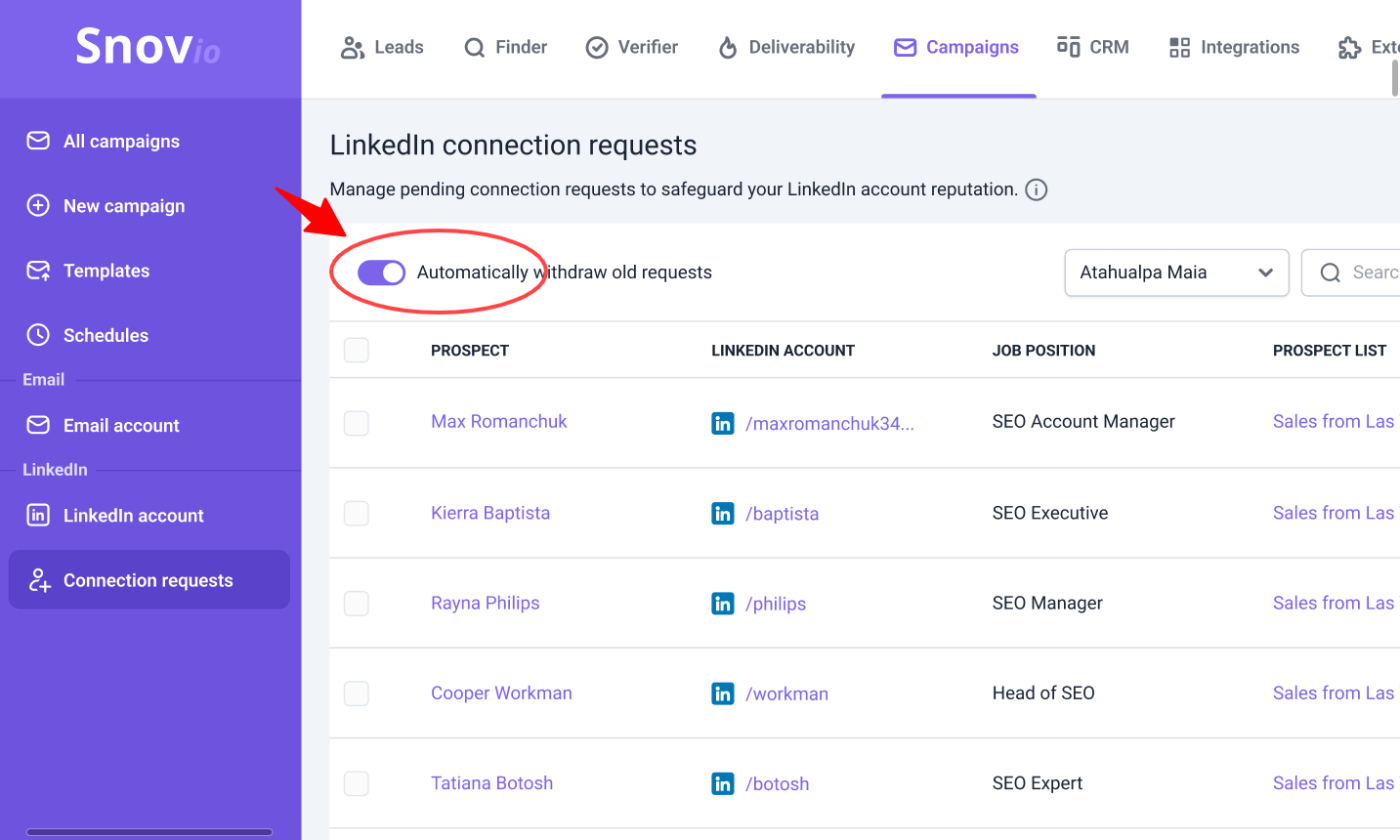
Step 10. Regularly review your sent connection requests and withdraw those that have not been accepted in the last two weeks.
You can also automate the old request withdrawal process to make your life easier. This step is crucial to keep the LinkedIn algorithm from flagging your account as unreliable.
Key takeaways
While LinkedIn is a highly competitive space, building the right connections doesn’t have to be complicated. Keep your message real, make it personal, and focus on value. Now that you’ve got some solid message templates and automation tips, it’s time to put them to work. Test different approaches, see which messages get the best response, and tweak as you go. The more experience you have, the better results you will get.
If you need more help crafting a successful LinkedIn strategy, join Snov.io Academy. Our free short course turns beginners into social selling pros.