
TL;DR
Learning how to find a hiring manager’s email can give you an edge in making a direct connection. Here’s a quick action checklist:
- Know the name and domain? Use Snov.io Email Finder.
- Unknown domain? Apply Google search operators to uncover company email formats.
- Don’t have the hiring manager’s name? Use LinkedIn filters by department, seniority, or team, and activate LinkedIn Email Finder.
- Found an email? Always verify email address before sending with Snov.io Email Verifier.
Once you’ve found the email and are ready to send your message, make sure it’s personalized and clear. I also recommend using Snov.io for automated outreach and scheduled follow-ups.
Reality check: your perfectly crafted resume might never get seen. As more companies adopt Applicant Tracking Systems, the likelihood of your job application being filtered out before real people even review it is increasing exponentially.
But when things get tricky, it’s time for some outside-the-box thinking, right? One bold alternative: skip this system altogether and just reach out directly via email.
In this article, I will help you figure out how to find hiring manager email and deliver your message straight to them.
Key points of the article:
How to find a hiring manager’s email?
Wondering how to find a hiring manager’s email? Here’s a quick guide:
Do you know that hiring manager’s name?
Yes → Move on to email-finding methods (Snov.io Email Finder).
No ↓
- Check job postings for listed managers or department leads
- Look at “About,” “Team,” or “Leadership” company pages
- Search on LinkedIn (e.g., Head of Talent, Marketing Manager, etc.)
- Review social media company posts announcing team members
- Ask your network
Do you have their LinkedIn profile?
Yes → Use Snov.io LinkedIn Email Finder.
LinkedIn’s recruiter verification badges and company affiliation checks can help confirm the profile is legitimate.
No → Use LinkedIn search filters (title, department, location, company size) → then extract contact data.
Still can’t find the hiring manager’s email?
Use common pattern guessing and verify with Email Verifier.
Use tools for a verified HR email address
Find a hiring manager’s email address quickly with an Email Lookup Tool. Just make sure you have that person’s name and know the company’s domain (e.g., companyname.com).
Below are 3 quick options using Snov.io:
- Snov.io Email Finder (web app)
You can perform a search in Snov.io. Just put in first name + last name + company domain/website and find the list of contacts.
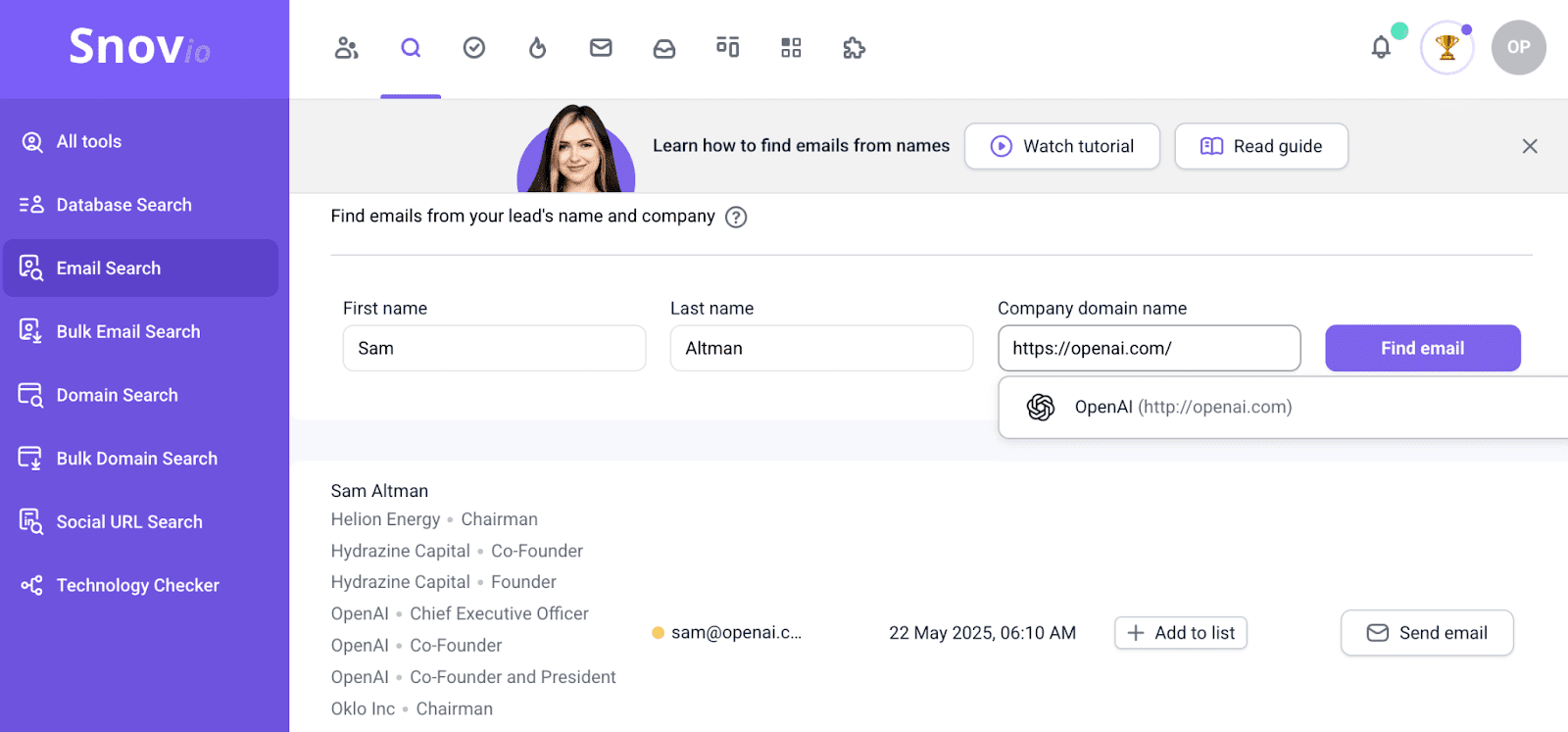
Contact data you’ll find is already verified as well, so you can jump right into crafting that personalized message.
- Chrome extension on company websites
Alternatively, download the Email Finder Chrome extension. Then, activate it on any company website.
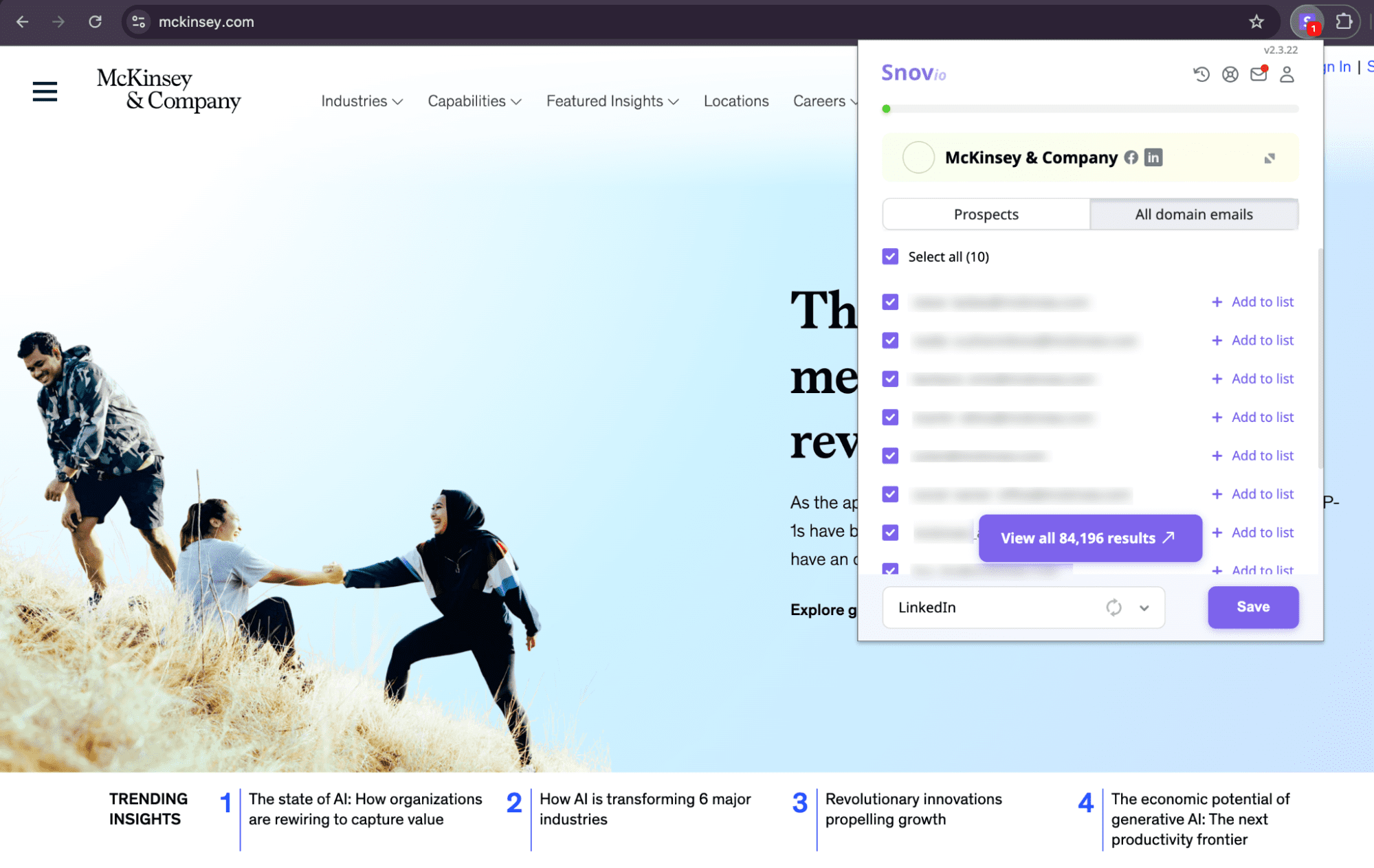
This handy tool will help you find preverified contact data on any website!
- Database Search by title + location + industry
Last but not least, you can take advantage of Snov.io’s Database Search to find emails of hiring managers. Look them up by company location, hiring manager’s name, industry, and other criteria.
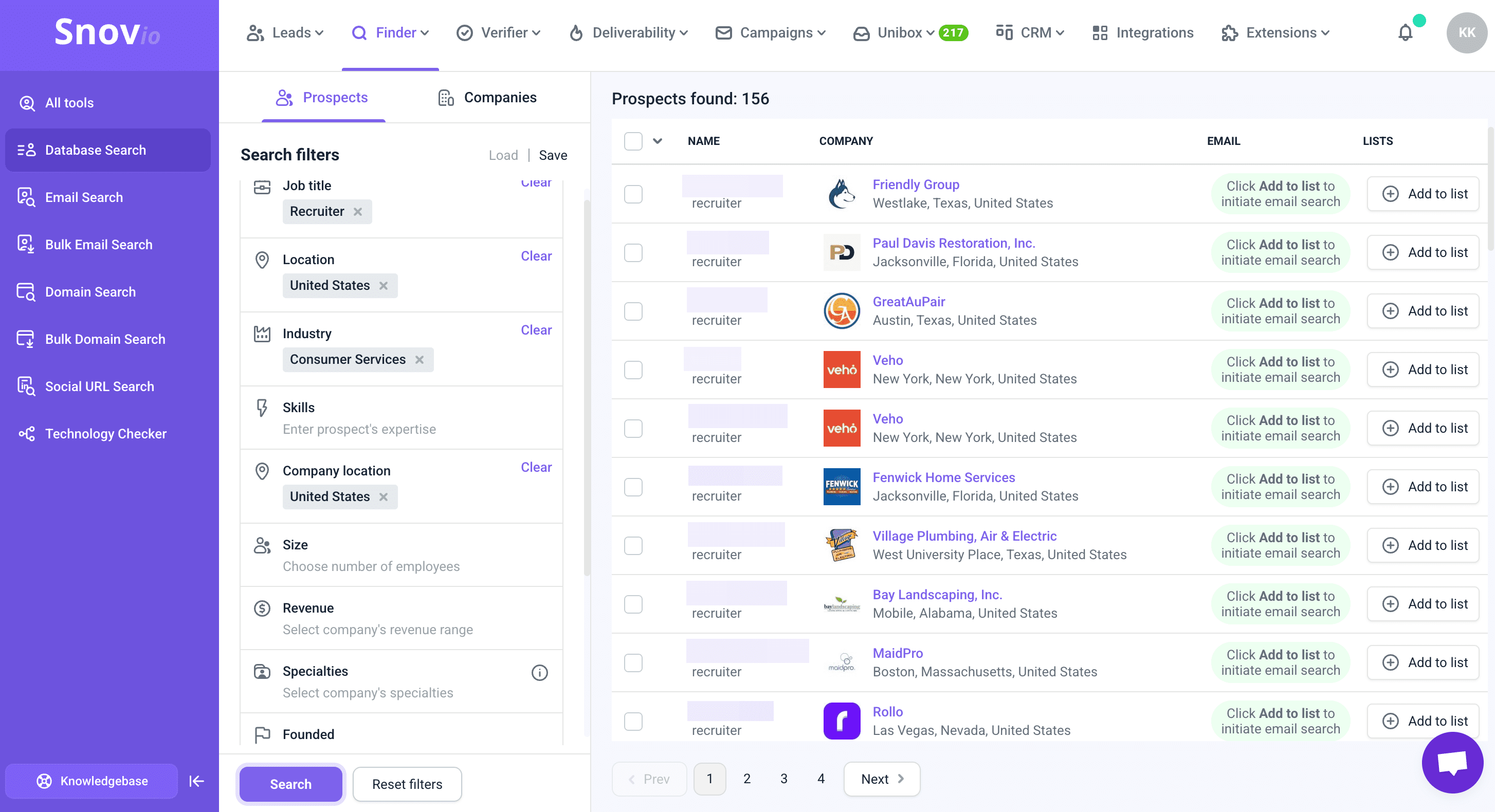
This method is useful when you want a list of potential hiring managers from a company.
📍Note
Email verification statuses show whether an address is deliverable and safe to contact. This helps you protect your sender reputation and avoid bounces.
Main status types include:
💚Valid: safe to use
💛Unverifiable (catch-all, greylisted, auto-generated, unverifiable): use with caution
❤️Invalid: do not send
Typically, contacts found through Snov.io come pre-verified, but some may still require additional verification.
Whichever method you choose, having verified HR emails gives you a direct line to decision-makers and increases your chances of getting noticed.
Find HR email addresses using a LinkedIn Email Finder extension
Here’s how to find hiring managers on LinkedIn and get their contact data in just a few simple steps:
Step 1: First, install the LinkedIn Email Finder extension.
Step 2: Next, go to the main LinkedIn search bar and enter that HR or hiring manager’s name. Alternatively, use LinkedIn’s search filters to find multiple contacts and collect email addresses from the search results in bulk.
For example, you might want to find hiring managers’ contact data in the United States:
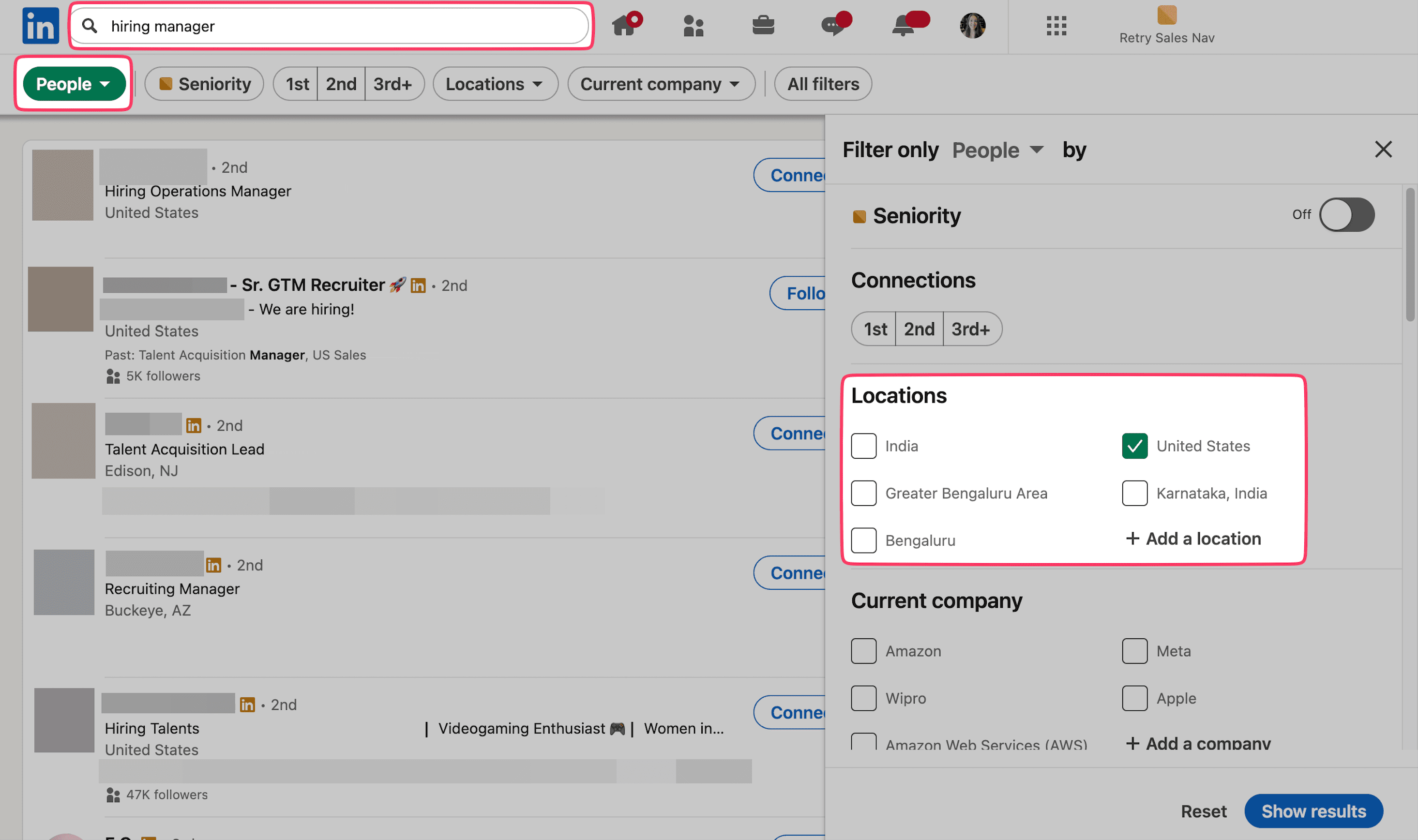
Step 3: Click the LinkedIn Email Finder icon to gather contacts in bulk from search results.
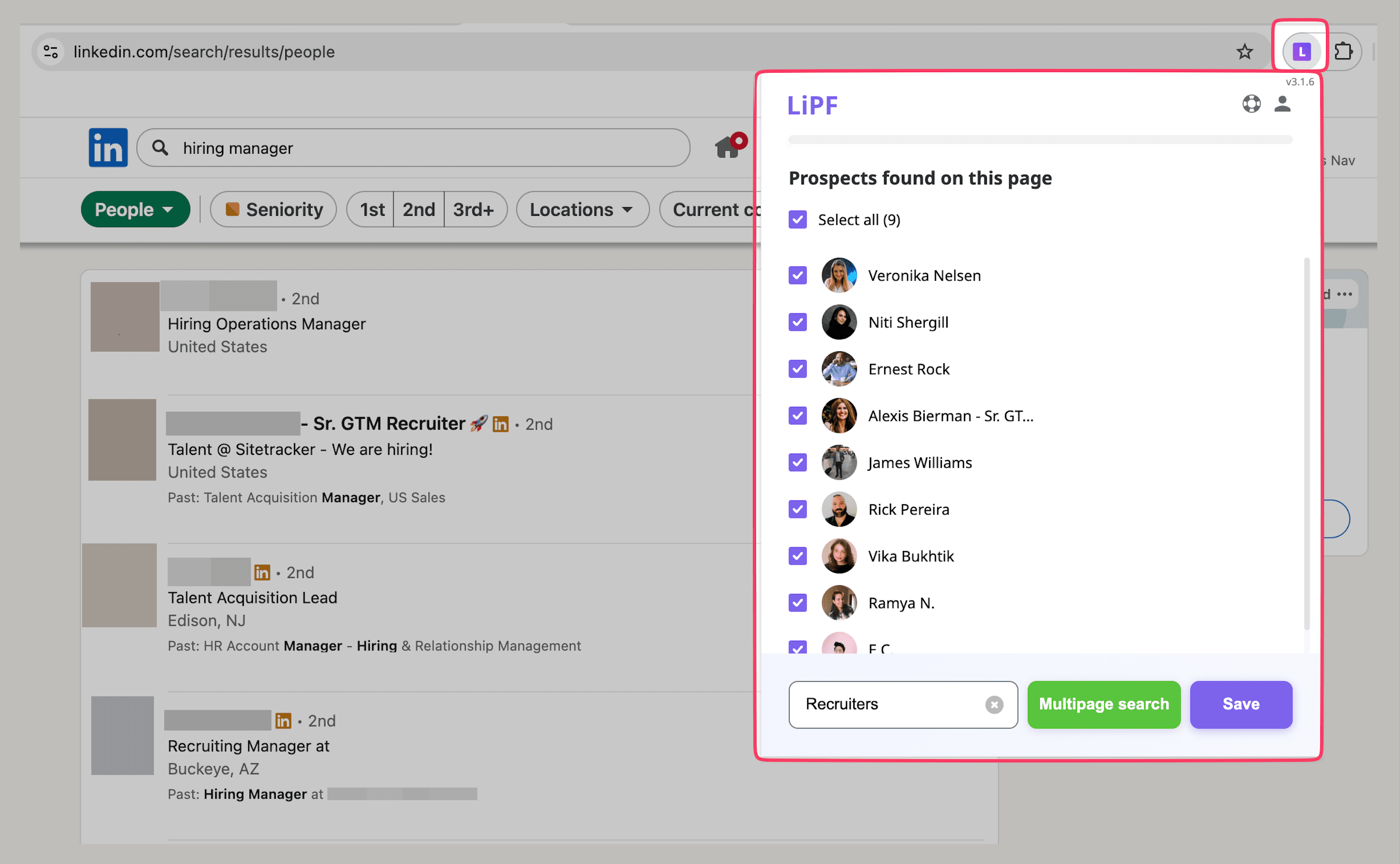
Or, if you’ve found a specific profile, open it and activate the Snov.io extension. Once activated, a pop-up window will display what you’re looking for.
You can also find HR contacts using Snov.io’s LinkedIn Search feature. Just paste your LinkedIn search results URL into Snov.io, or upload profile links. The app will automatically add them to your list.
📍Note
LinkedIn now asks anyone with recruitment-related job titles to verify that they actually work at the company they work for (at least, they claim so). Executives have to do this as well, and company page verification is being rolled out more widely.
So look for Verified recruiter or Verified company badges. These are a quick way to know the person is real and avoid scams.
That’s it. No need to move mountains.
Search Google for hiring manager emails
Basic Google searches can be a great way to find recruiter email. You might discover it on their personal site, company website, or another professional page they’re associated with.
Being highly specific with search terms yields way better results. Here are some hiring manager email example search templates that work well:
- “Full name” email
- “Full name” “Company Name” email
- firstname.lastname@companyname.com
- “firstname lastname” email site:company.com
- “hiring manager” “company name” email
- “@company.com” “firstname” “lastname”
- filetype: pdf AND “firstname lastname” AND email
You can also use a domain’s WHOIS record to find contact information. WHOIS is a public database that records details whenever a domain is registered or its DNS settings are updated. By entering the company’s domain in a WHOIS lookup tool, such as GoDaddy WHOIS Lookup, you can access registration details, which may include contact data.
Check LinkedIn for contact info
Another way to find recruiter emails is by closely examining their LinkedIn profiles. Make sure you’ve tried this:
Once you’ve opened their account, check out the Contact info section; this is often where you’ll find what you’re searching for.
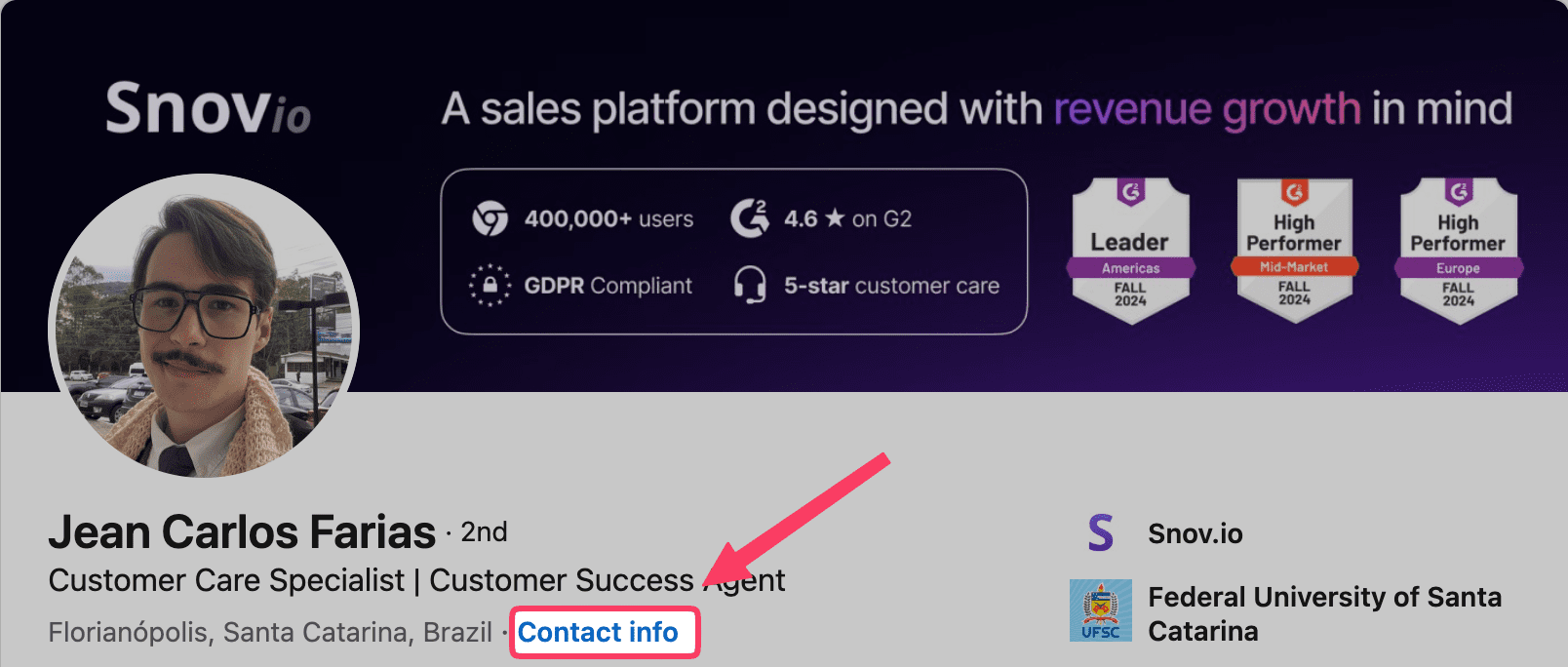
If there’s no email, I recommend using Snov.io’s finder tools mentioned above.
💡Expert tip
On LinkedIn, you can’t message someone directly unless you two are connected or you have a Premium account. However, you might try sending a connection request message.
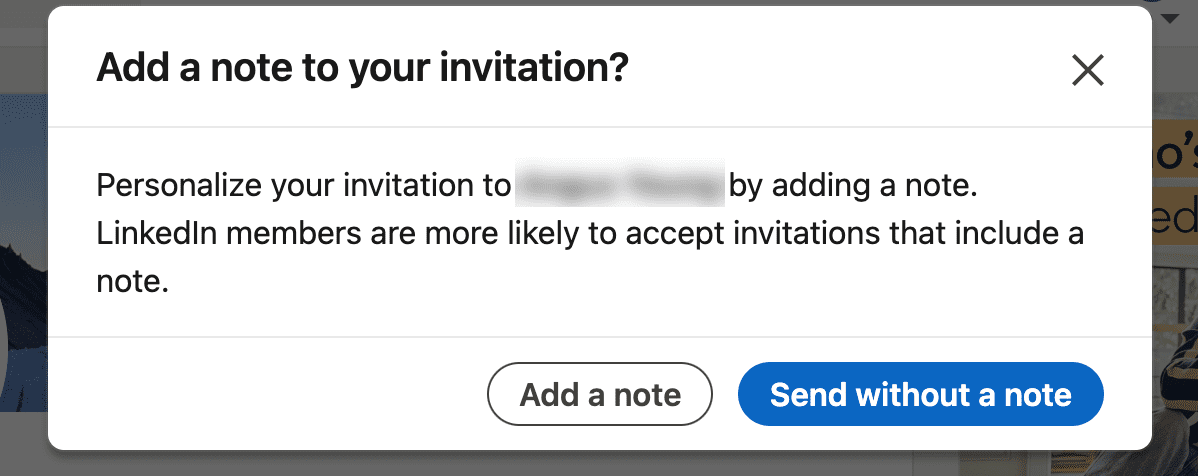
I recommend keeping it professional yet personal. Mention the specific position that caught your attention and your genuine interest in connecting. Try something like this:
“Hello [Hiring Manager’s Name],
I saw the [Job Title] opening at [Company Name] and would love the opportunity to connect. I’d be happy to briefly share how my background aligns with your team’s goals and how I could contribute to your team’s goals.”
What’s the smartest move? Check LinkedIn first, use email finder tools if needed, or send a connection request; one of these will get you through.
Look for emails in job postings
Maybe you do not need to look any further than the job posting itself to find recruiter emails. In many cases, employers include contact information in job descriptions.
Take a closer look. Sometimes, contact data is mentioned in a line like “For more information, contact name@example.com.” You might be asked to send your application directly.
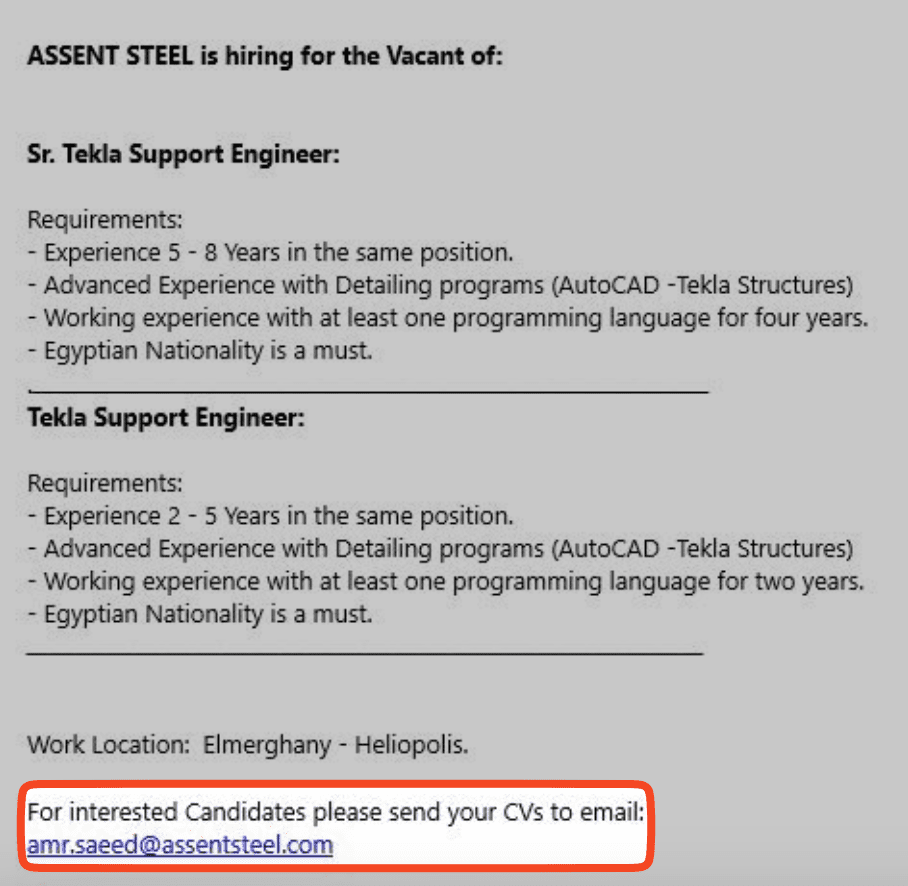
Additionally, take a look at the company’s careers microsite or dedicated job boards, where email addresses are sometimes listed. For positions that have been posted for a while, it’s worth checking cached or archived versions, as they may reveal contact information that has since been removed.
So, before searching elsewhere, make sure you have thoroughly read that job posting. It might already have what you need.
Generate hiring manager emails with common formats
This method is far from ideal, and I don’t recommend it, especially since there are more advanced ways to find hiring manager email. However, because many companies use standard formats (like firstname.lastname@company.com), you could try guessing the address.
Here are some common email patterns:
If you choose this approach, always be sure to verify email address before sending any messages. Use Snov.io by entering your contact data into Email Verifier, then review the status. Remember that only valid ones are completely safe for outreach.
How to verify the hiring manager’s email before sending
That hiring manager’s email you found? It might not even be valid, especially if you used methods other than Snov.io.
There’s no point in investing time in a personalized message that never reaches its destination. Plus, sending to an invalid address does more harm than just wasting your time; it can hurt your sender reputation.
Bounced emails alert mailbox providers that you might be a spammer. This increases the likelihood that your future messages will be flagged as spam.
To keep yourself safe, always verify email address before sending any messages. This whole process will only take a few seconds while ensuring no effort is wasted.
Snov.io helps maintain an average deliverability of 98% by checking contacts using a unique 7-tier email verification process, which includes:
- Syntax check: Ensures addresses are correctly formatted (e.g., name@company.com).
- MX record check: Confirms the domain can receive messages.
- SMTP verification: Pings the mail server to check if the mailbox exists.
Here is how to perform quick checks:
Navigate to the Single Email Verification page, enter your address, and click the Verify email button.
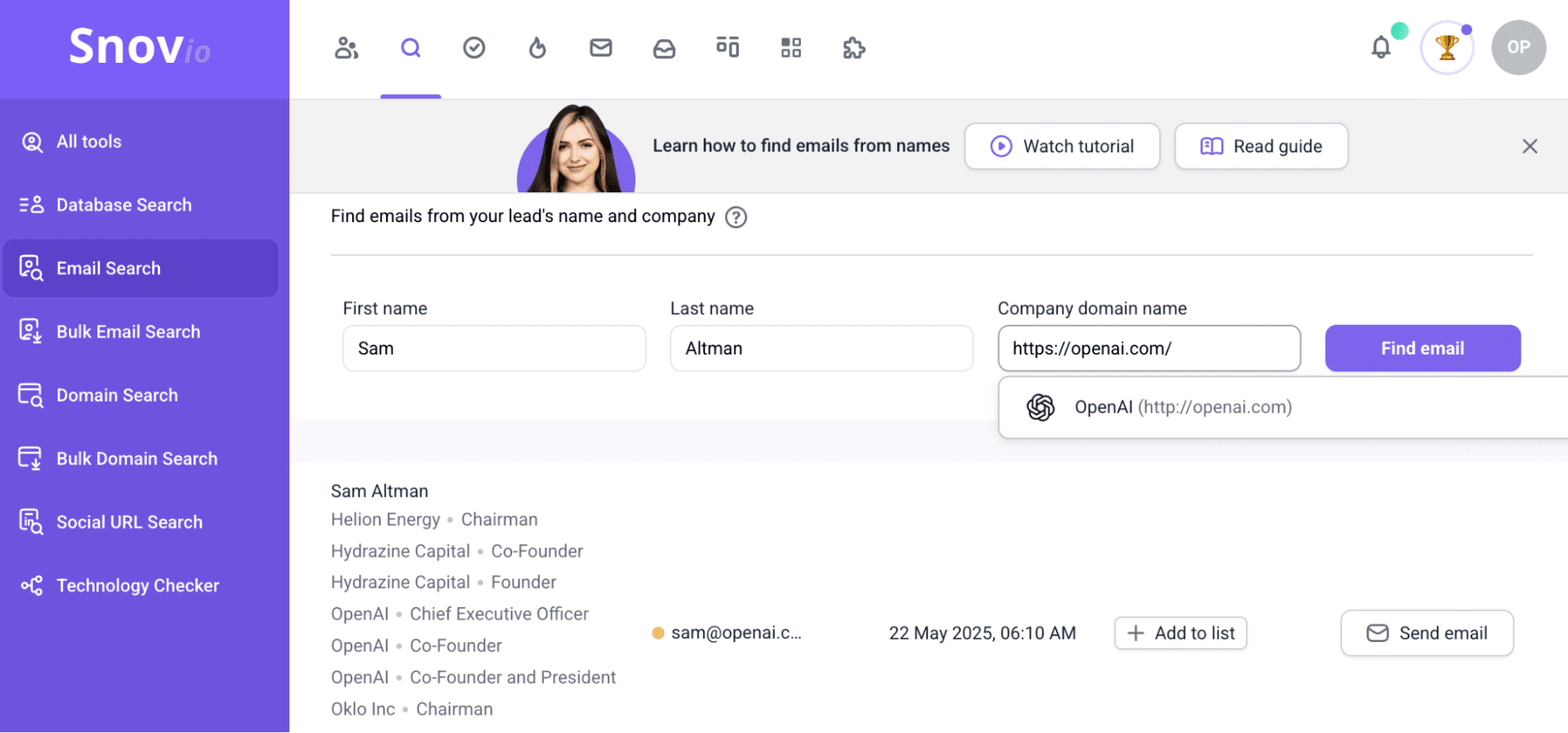
Alternatively, you can verify addresses in bulk by uploading the list to the app.
Once an email has been verified, it will fall into one of several categories. Based on the category, here are the recommended next steps:
With that, you can be certain the email address is valid. It really is that simple!
How to email a hiring manager?
As long as you keep it professional, emailing the hiring manager can be seen in a positive light. In many cases, it signals your proactivity and genuine interest in the role.
Here’s a quick professionalism checklist:
- Email includes your real name
- Clean formatting, no emojis
- Clear subject line
- Signature block with full name
- LinkedIn/portfolio links included
Let’s take a closer look at each tip below.
Use a professional email
Even a small detail like your email address can play a part in how your message is perceived. Personal and informal ones might create a poor first impression and diminish your credibility.
Stick to a clean, professional format; your email address should ideally include your name or initials. Using a polished, consistent email setup shows you pay attention to detail and helps establish credibility from the very first contact.
Keep the subject line clear
Your email subject line is equally important; avoid any guesswork, just keep it to the point. Make sure it catches attention and communicates your intentions. Include your name and job title so the hiring manager understands the purpose of your outreach. Opt for something along the lines of:
“Application – UX Designer – Taylor Chen”
Here are a few additional subject line options:
- “Application – [Role] – ]Your Name]”
- “Regarding the [Role] Position – Your Name]”
- “Follow-Up on [Role] Application – [Your Name]”
- “Referred by [Employee Name] – [Your Name]”
- “Interest in [Role] at [Company]”
- “[Role] Candidate – [Key Skill] – [Your Name]”
- “Quick Question About the [Role] Opening”
- “[Role] Opportunity | [Your Name]”
Using a clear subject line sets expectations and increases the chances that your message will be opened quickly.
Personalize your email
Don’t even get me started on the importance of personalized email greetings. This approach tells the hiring manager that you’ve taken the time to research who you’re speaking to. This tiny gesture also shows respect and professionalism.
Easy personalization framework:
- Reference something recent (post, launch, announcement)
- Connect it to the team or role
- Add one sentence showing why it matters to you
This makes your message immediately more human and increases your chances of receiving a response.
Open with a purpose
Focus the first sentence of your message on introducing yourself and explaining why you’re contacting them. Being clear upfront helps quickly understand the context of your message.
Here are several copy-ready hiring manager outreach templates:
Before applying
Hi [first_name],
I’m interested in [role] at [company] and wanted to reach out before submitting my application to see whether my background is a strong fit for what you’re looking for.
[2–3 sentence value highlight]
I’d appreciate any guidance you can provide.
Thank you, [name] | [LinkedIn] | [portfolio]
With this hiring manager email example, you can gauge interest and build a connection before formally applying.
After applying
Hi [first_name],
I recently submitted my application for [role] at [company] and wanted to introduce myself directly.
[2–3 sentence value highlight]
I’d welcome the opportunity to discuss how I could contribute to your team.
Thank you, [name]
This template shows how to email hiring manager after applying while maintaining a professional, respectful tone.
Referred by an employee
Hi [first_name],
[referrer_name] suggested I reach out to you about [role], and I wanted to introduce myself.
[2–3 sentence value highlight]
I’d be glad to discuss this further if you have time.
Best, [name]
By starting with a clear purpose, you set the tone for a respectful and concise message.
Highlight your value in 2-3 sentences
Those next few lines are a great opportunity to explain why you believe you are a strong candidate. But here, of course, you shouldn’t retell your entire career story. Instead, focus on highlighting 3 relevant points that align closely with that job description.
Try this “evidence sandwich”:
- Metric (what you achieved)
- Skill (how you achieved it)
- Relevance (why it matters for their team)
Using this structure lets you quickly show your value.
Close with clear contact info
Contacting you should be easy. Leave your name, number, and add LinkedIn or portfolio links. Also, if possible, include a short availability window or a calendar link for simple scheduling.
How to automate email outreach to hiring managers with Snov.io
Once you’ve found and verified your emails, Snov.io can handle your whole outreach process for you.
Here’s how to set it up:
- Create your contact list
Collect and save hiring managers’ contact details with Email Finder.
- Verify
Run your list through Email Verifier, ensuring you’re only contacting valid addresses.
- Build your campaign
Open Campaigns, create a new sequence, and write your first message (or generate one with AI Email Writer).
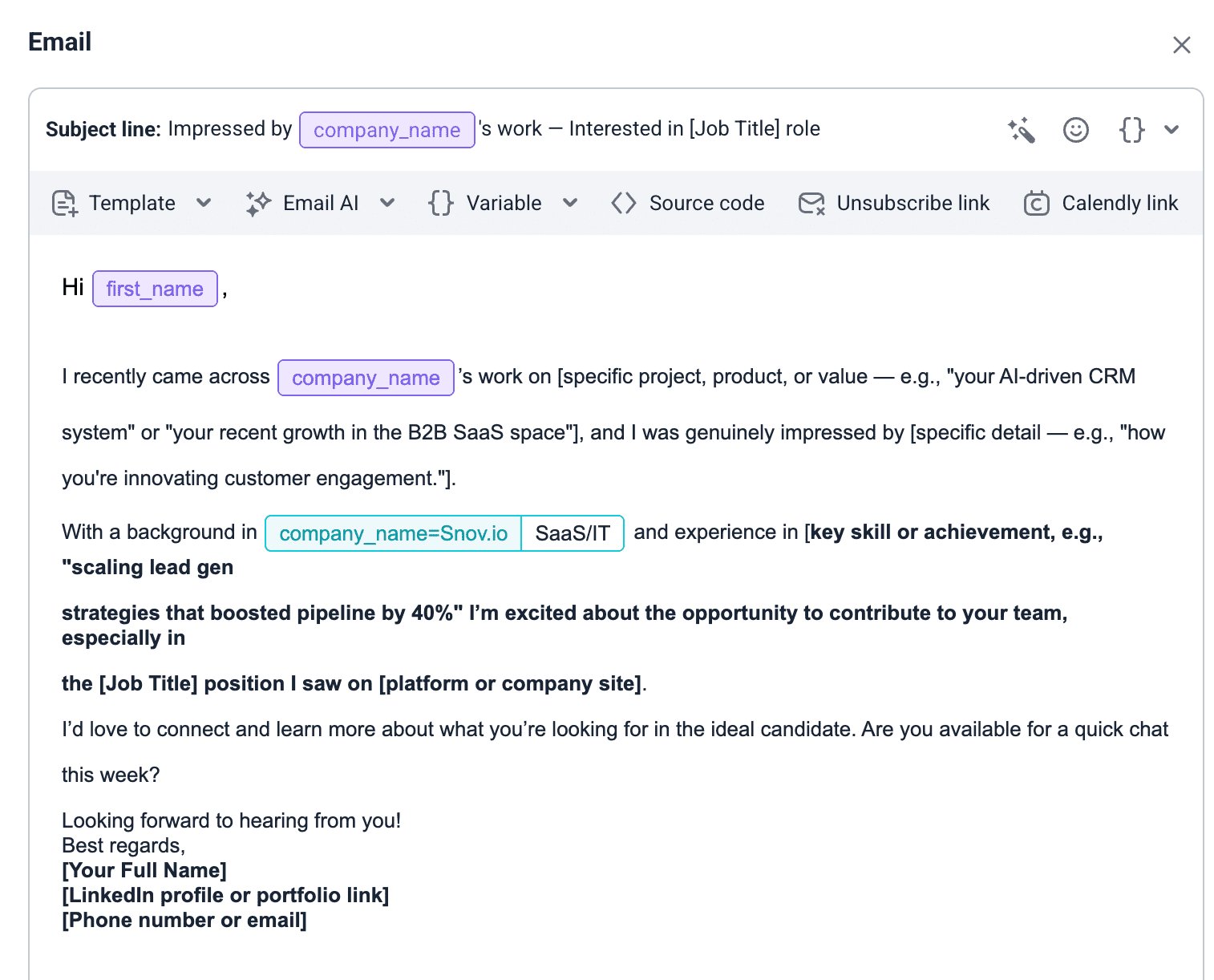
You can also tailor each message with variables, such as the hiring manager’s name or the position you’re applying for. This keeps it personal and relevant.
- Add LinkedIn steps
While email remains your primary channel, don’t stop there. Build stronger connections with recruiters and increase your chances of getting a response by diversifying your outreach:
- Create warm familiarity by auto-viewing LinkedIn profiles
- Subtly boost visibility by auto-liking recent posts
- Auto-send personalized LinkedIn connection requests or messages based on shared interests or job relevance
Even simple actions, such as interacting with their content, can improve response rates. Remember, personalization and consistency across channels help you stand out.
- Set delays and conditions
Add natural delays and use conditions like “send only if no reply” to make the sequence feel considerate.
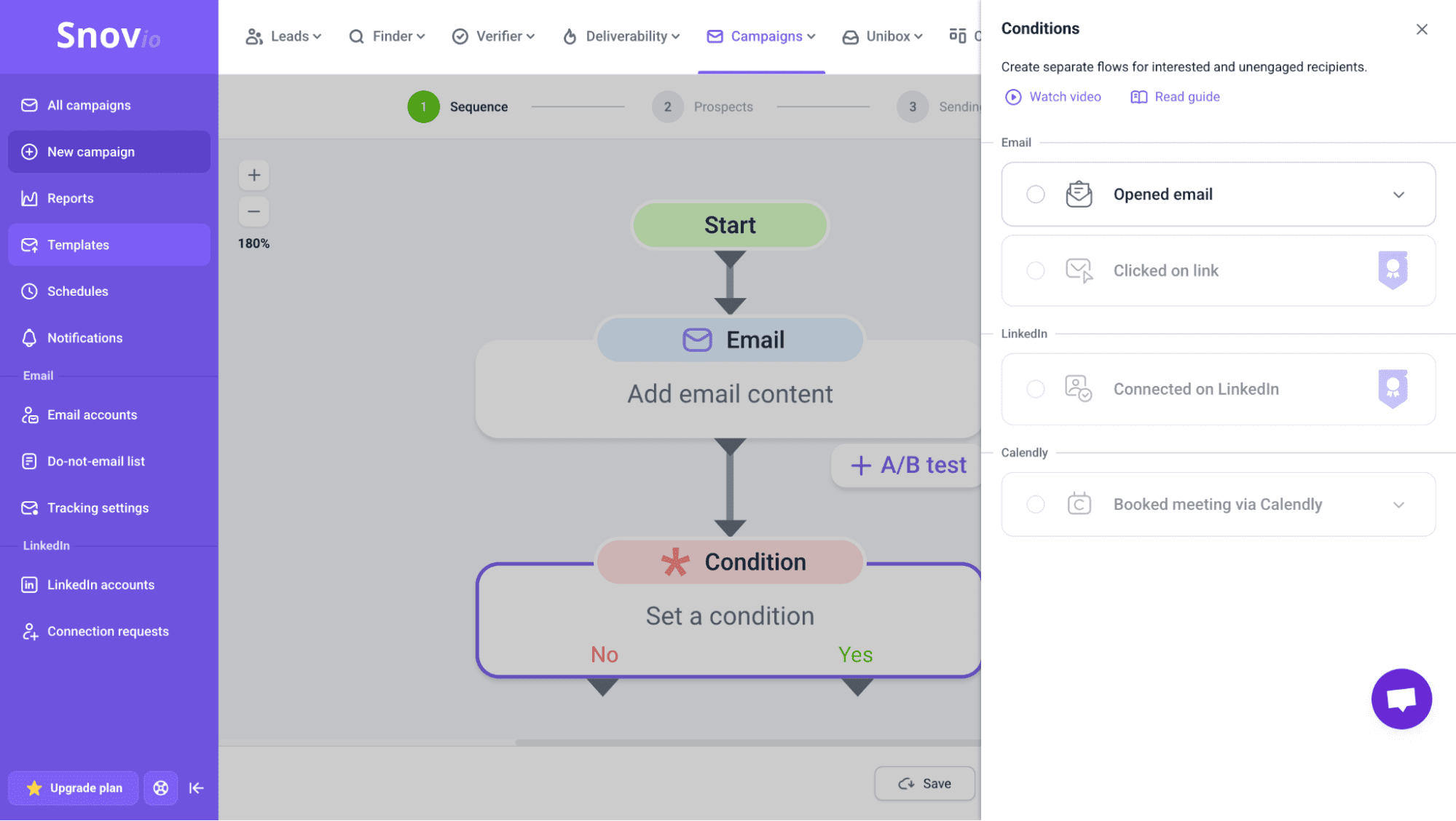
These small adjustments help your emails come across as thoughtful follow-ups instead of spam.
- Launch
Once everything looks right, launch your sequence and let Snov.io handle the follow-ups.
Below is a hiring manager outreach template sequence:
LinkedIn touch 1: Profile view (Day 1). This builds initial familiarity before your first email arrives.
Initial outreach (Day 1) Subject: Application – [role] – [your_name]
Hi [first_name],
I’m reaching out regarding the [role] position at [company]. My background in [skill/area] aligns closely with what your team is looking for, and I’d be happy to share relevant work if that would be helpful.
LinkedIn touch 2: Post like (Day 2-3). This keeps your name visible without adding pressure.
Soft follow-up (Day 4-5)
Hi [first_name],
I wanted to follow up in case my previous message got buried. I’m still very interested in the [role] opening and would be happy to share examples of related work.
This is a good example of how to email hiring manager after applying.
Final check-in (Day 7-9)
Hi [first_name],
I’m checking in once more about [role]. If there’s anyone else I should speak with, I’d really appreciate any guidance you could provide.
This sequence blends email and LinkedIn touchpoints in a natural way, keeping you visible without overwhelming recipients.
Key takeaways
Once you’ve learned these key methods to find hiring manager email, it’s high time for some practice. Here’s a quick recap:
- Use the decision tree above to quickly determine the best method for your situation.
- Once you’ve found the right contact, craft a clear, professional, and personalized message using those templates above.
- Remember to follow up—it helps you stay on the hiring manager’s radar and increases your chances of a response.
- Use Snov.io to automate timely, personalized follow-ups so you stay proactive and keep your application top of mind.
By following these steps, you’ll ensure your outreach is structured, professional, and effective, increasing your chances of connecting with the right person and landing an interview.