
TL;DR:
In this guide, I shared how to send 10000 cold emails safely by:
- Using multiple domains and mailboxes
- Complying with Gmail or Yahoo’s daily email sending limits and rules
- Using Snov.io’s Done-For-You mailbox setup option to automate DNS setup and other technical stuff
- Ensuring the efficiency of your outreach with Snov.io’s domain warm-up tool
So if you’re planning to scale a cold email campaign to 10,000 messages and worried about deliverability, you’re in the right place.
Sending 10,000 cold emails is not a trick. A trick is to land them all in inboxes. Misconfigured email infrastructure, skipped email warm-up, or ignored sending limits are key reasons why your campaigns may never get delivered.
Gmail and Yahoo now limit bulk cold email outreach to 5,000 external messages per day per domain, also requiring proper SPF, DKIM, DMARC, ARC alignment, and a one-click unsubscribe.
So, without properly setting up your cold email infrastructure in 2026, your business risks losing thousands of dollars. You don’t want it to happen. I don’t want it to happen. That’s why I’m here with this guide to show you how you can prepare for bulk outreach and send your 10,000 cold emails (and even more) safely and effectively.
Key points of this guide for easy navigation:
- What you need to do before sending 10,000 cold emails
- How to send 10,000 cold emails “at once” without burning your domain: 7 best practices
- Legal regulations for sending bulk cold emails
- How to set up a 10,000-email infrastructure in a few clicks
- Why you need to warm up your account before scaling a cold email campaign
So, without properly setting up your cold email infrastructure in 2026, your business risks losing thousands of dollars. You don’t want it to happen. I don’t want it to happen. That’s why I’m here with this guide to show you how you can prepare for bulk outreach and send your 10,000 cold emails.
What you need to do before sending 10,000 cold emails
Before you draft a single subject line, you need a stable email infrastructure. Without it, attempts to send as many as 10,000 cold emails will look like spam activity in the eyes of email providers.
Start from the basics: set up domains, mailboxes, DNS records, and warm-up. Once these are in place, scaling becomes safer and much more predictable. Here’s how you proceed.
Buy several domains to scale a cold email campaign
First, you need domains dedicated to your business outreach. You never want to send large-scale cold campaigns from your main brand domain. Even if you follow every best practice, cold outreach still comes with:
- Bounces,
- Occasional spam complaints,
- Recipients marking your emails as “not relevant.”
If this happens to your primary domain, all communication from that domain can suffer. This includes invoicing, support, and existing customer emails. That would disrupt your operations, significantly bringing down your revenue.
I recommend sticking to a safer approach:
- Keep your main domain for core business (e.g., company.com)
- Use similar “lookalike” domains for cold outreach (getcompany.com, trycompany.com, company-mail.com, etc.)
Remember that your TLD (Top-Level Domain) and your domain names matter in cold outreach, too. Take caution when choosing them.
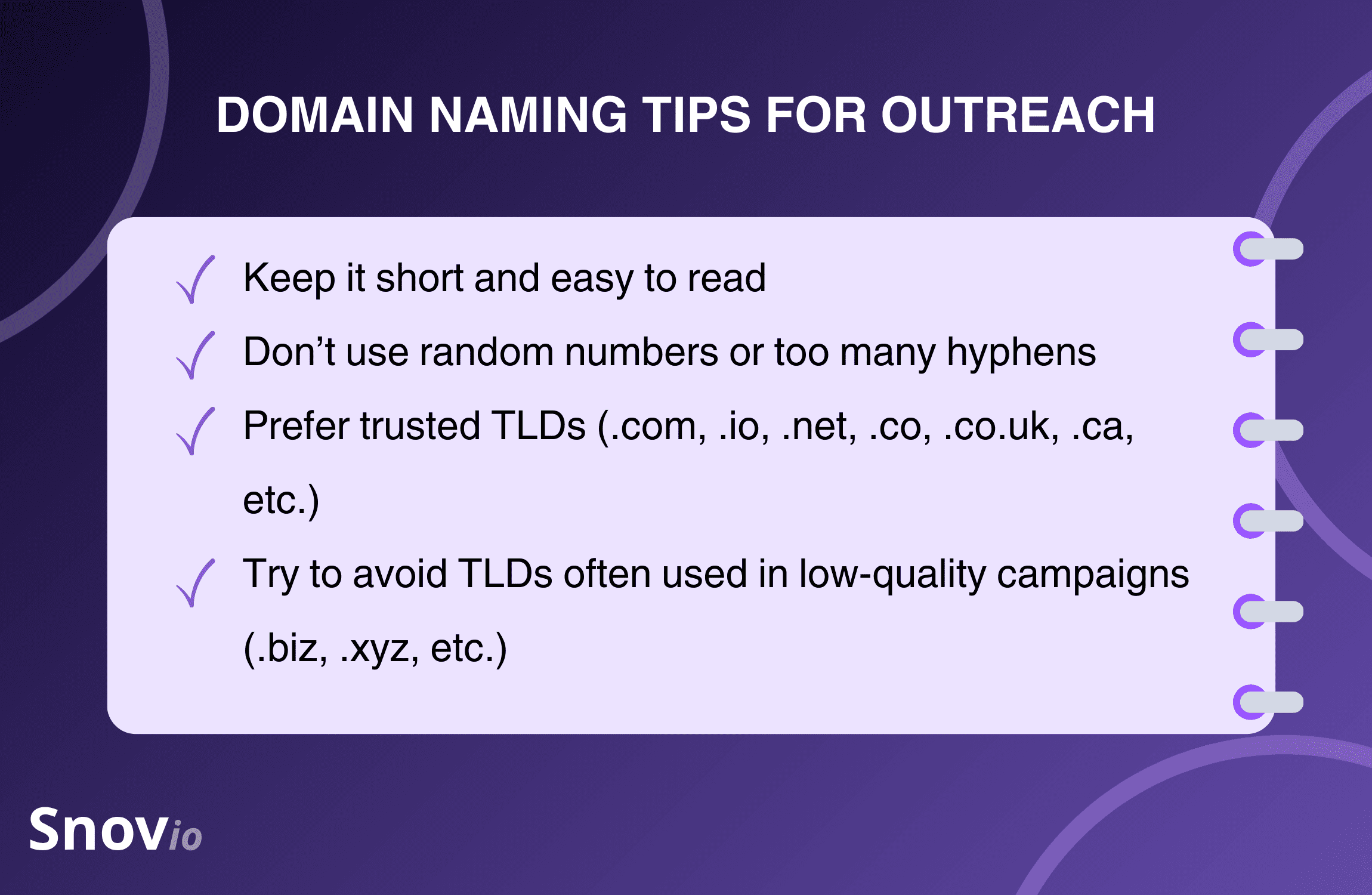
For a 10,000-recipient campaign, you do not need many domains to start. In practice, successful teams begin with 2-3 outreach domains. Then, they move towards 6-8, while increasing volume and adding new campaigns.
You can purchase domains from any reputable registrar. Just make sure it has clear DNS management and transparent pricing.
Authenticate domains with SPF, DKIM, DMARC, and MX records
Once your outreach domains are live, you must prove to inbox providers that your emails are legitimate. This is where DNS records come in.
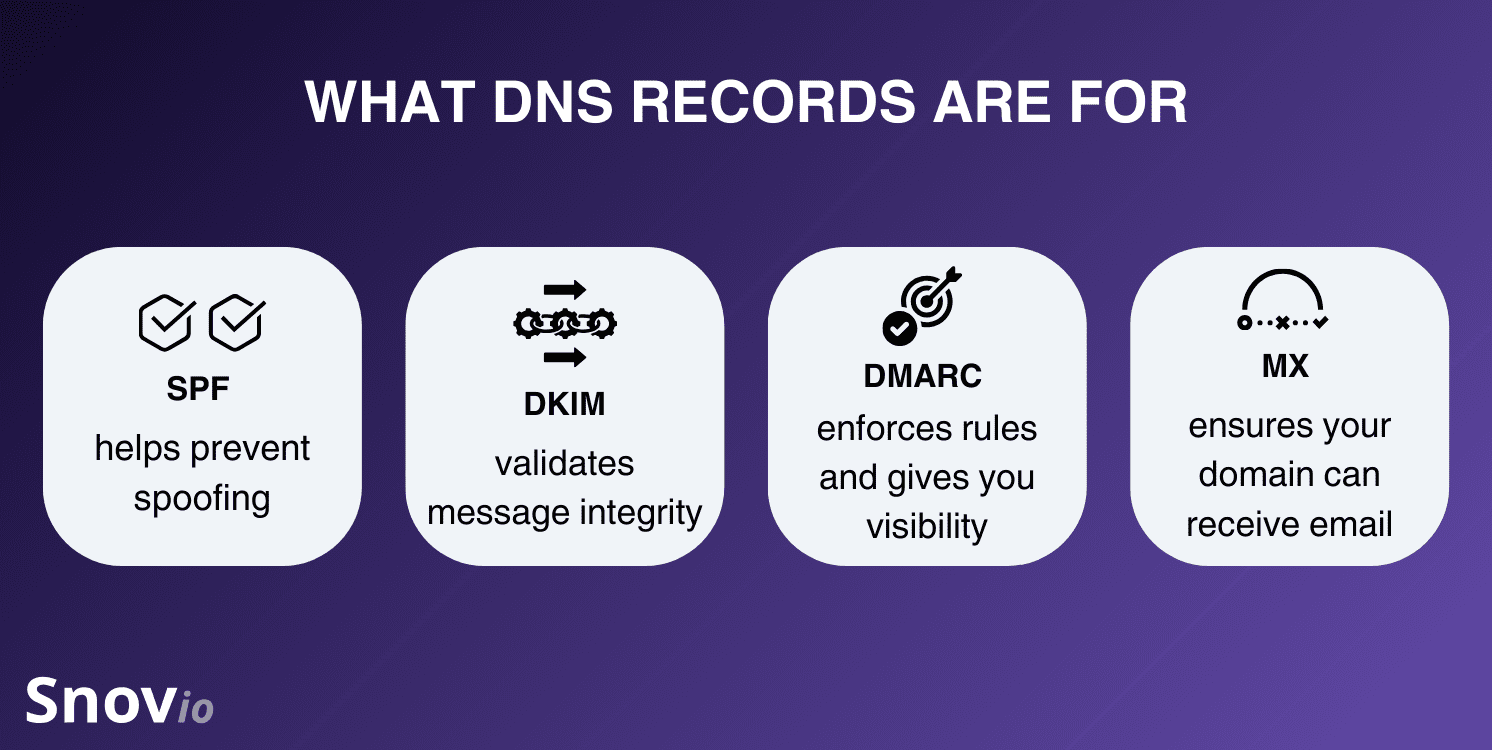
There are four main types of records you need to know before starting outreach:
- SPF: establishes which servers can send campaigns on behalf of your domain.
- DKIM: signs your emails digitally so receiving servers can verify they were not altered during transit.
- DMARC: explains what to do if SPF or DKIM checks fail and delivers security reports to you.
- MX: specifies which servers receive emails on behalf of your domain.
Not only are these records required by major providers like Yahoo and Gmail, but they also help you build more credibility with your recipients and improve deliverability.
Configuring these records correctly is vital but tricky. A missing semicolon or mis-typed hostname can break your outreach.
In short, manually configuring DNS records looks like this:
- Go to your domain registrar’s DNS panel.
- Add or update a SPF record as a single TXT entry, including all services you use.
- Add DKIM records provided by your mailbox or infrastructure provider.
- Configure a DMARC record (start with p=none).
- Make sure MX records point to your actual mailbox provider.
- Use tools like MXToolbox, Google Admin Toolbox, or Snov.io Deliverability Check to confirm everything is detected correctly.
❗️Remember: DNS changes take from a couple of minutes up to 48 hours to take effect across global servers.

Create enough email accounts to distribute your sending load
So, you’ve got your domains authenticated. That’s not all. To send 10,000 cold emails safely, you need enough mailboxes to spread the volume. Inbox providers track behavior per mailbox and per domain. Sending too many messages from one address per day is a quick way to attract negative attention.
I recommend starting slow and sending emails not all at once, but throughout a set period. Plus, you should create several mailboxes per domain to follow safe daily limits.
Let’s run through a simple example:
- Your goal: to send 10,000 cold emails.
- Time frame: 20 days.
- Daily volume needed: 10,000 ÷ 20 = 500 emails per day.
Now, look at a safe daily sending limit per mailbox. For warmed-up accounts, a conservative range is 30-50 cold emails per mailbox per day.
If you stick to the middle ground here (40 emails per mailbox per day), it means you need approximately 13 mailboxes (500÷40). If you want to go faster and hit, say, 1,000 emails per day, you will need roughly twice as many mailboxes (25-30), spread across multiple domains.
Here’s how I recommend approaching this:
- Start with 2-3 domains, 3-5 mailboxes each.
- Add extra mailboxes as you approach higher daily volumes or add campaigns.
Remember: in cold outreach, “slow’n’steady” is more effective than quickly running into the spam folder.
Warm up your email accounts
Once your domains and mailboxes are configured, don’t rush to launch campaigns immediately. A brand-new mailbox has no sender reputation. If you start by sending dozens of cold emails right away, inbox providers will treat your domain as risky. Many messages will be filtered into spam or blocked outright.
Using email warm-up tools solves this problem by gradually increasing your sending volumes over time. This prompts a steady inflow of opens, replies, and positive interactions, which trains inbox providers to recognize your domain as trustworthy.
So, before you start sending your 10,000 cold emails, consider warming up your accounts for 3-4 weeks first. This helps you grow your sender reputation progressively.
🧘♀️ Still not convinced about the benefits of a domain warm-up? Think of it as stretching before a workout. It is not optional if you want to avoid “injury” to your sender reputation.
Discover why warming up your domain is critical for a bulk cold email outreach:
How to send 10000 cold emails “at once” without burning your domain: 7 best practices
Even a perfectly configured infrastructure can get into trouble if your behavior or content looks risky. These seven best practices will help you avoid blocks while still hitting your numbers.
1. Adhere to cold email sending limits
For new or newly warmed mailboxes, start with very small volumes (20/day) and only increase the volume when performance remains positive. Remember: 50 emails per day is your max – don’t exceed it.
2. Send to only verified, relevant leads
Poor email list quality is one of the fastest ways to hurt deliverability. If you see high bounce rates, it usually means your contact data is faulty. Either it became outdated over time, or it wasn’t relevant at all.
So before you upload 10,000 contacts into your campaign, make sure to do the email list hygiene:
- Verify all addresses
- Remove invalid or risky addresses
- Exclude contacts outside your ICP (ideal customer profile)
A smaller, clean list beats a large, messy one every time.
💡 Use Snov.io 7-tier Email Verifier to clean up your prospect lists. It’s fast, easy, and shows 98% accuracy in distinguishing between valid and invalid (or risky) addresses.

3. Personalize every email
Inbox providers employ algorithms that recognise similar patterns. If thousands of nearly identical messages fly from your domain, they will treat it as spam.
To avoid damaging your reputation while also improving chances for reply, try:
- Tailoring subject lines to each of the recipients
- Referencing your prospects’ role, company type, or recent social media activity
- Keeping your message short, specific, and written as a conversational letter, not a promo.
But how to send 10,000 cold emails that would sound unique? After all, personalization means more than just inserting your recipient’s name into the opening paragraph.
Enrich your prospect list beforehand with data like company name, position, and social media handle. Then, employ variables to utilize these details for cold email personalization. In Snov.io, for example, you can go beyond basic variables, extending your possibilities to dynamic content as well as Spintax personalization:
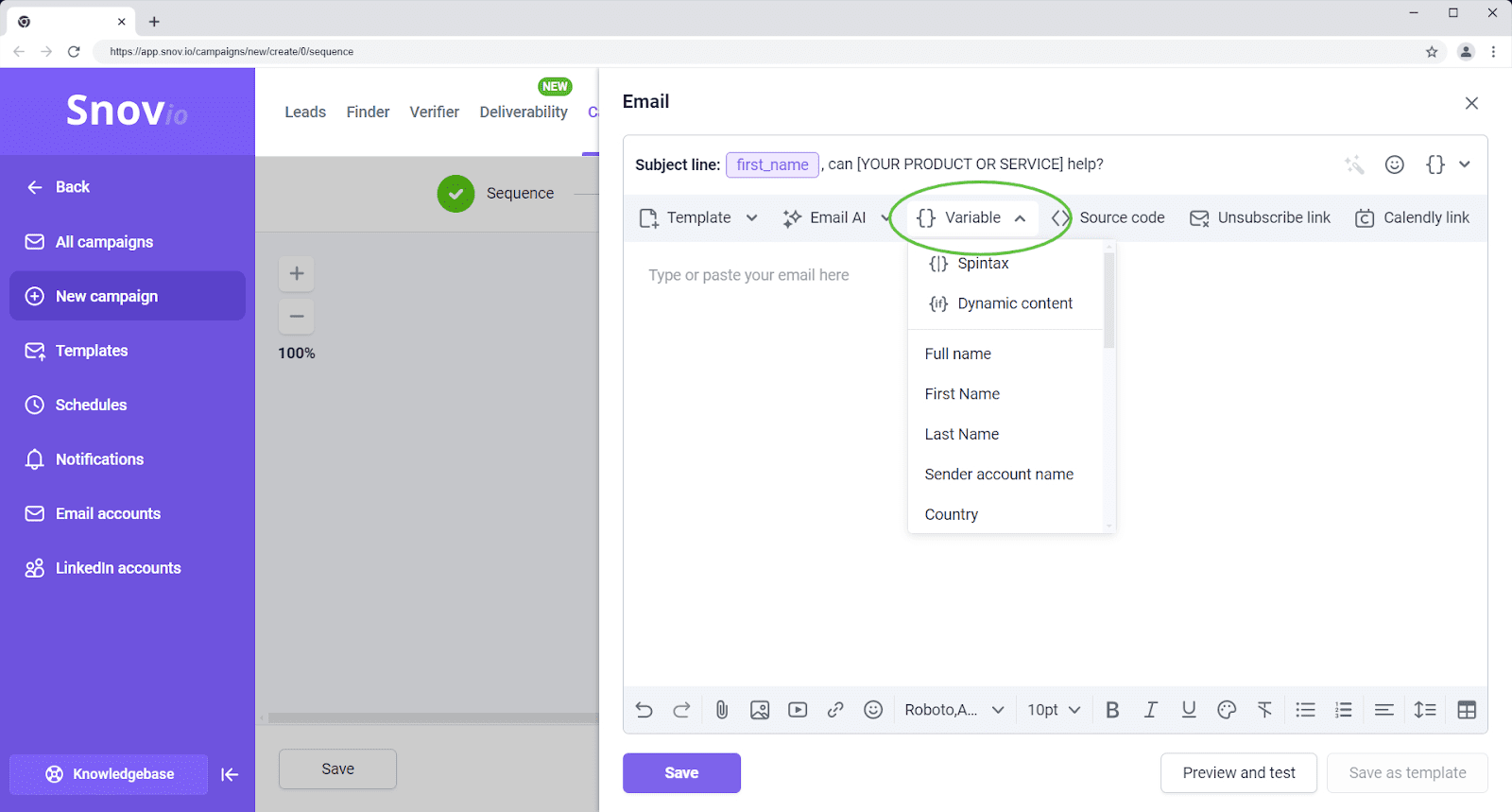
❗️Don’t forget to set a neutral default phrase that will be shown in the email in case there’s no data on a particular recipient.
4. Avoid spammy elements and heavy templates
Over-designed templates are more likely to be flagged as promo in bulk cold email outreach. Plain-text copy tends to perform best. Our analysis of 44+ million emails revealed that such messages get, on average, a 1.30% reply rate, compared to 1.08% for messages with images or links.
To stay safe, use plain text or at least simple layouts for your messages. Avoid all caps, excessive punctuation, or clickbait subject lines. Don’t use excessive links or attach large files either. For the first emails in a sequence, experts advise against using attachments altogether.
5. Monitor bounces, replies, and spam complaints daily
When you are regularly sending 10,000 cold emails, you need to supervise how each of your campaigns behaves.
The bounce rate should stay low. If the bounce rate for the last 100 sent emails reaches 15%, Snov.io, for instance, will automatically pause your campaign. Spam complaints should also be minimal – even a few per thousand messages can hurt reputation. Reply rate should stay over 2%, as low engagement usually signals poor targeting or irrelevant content.
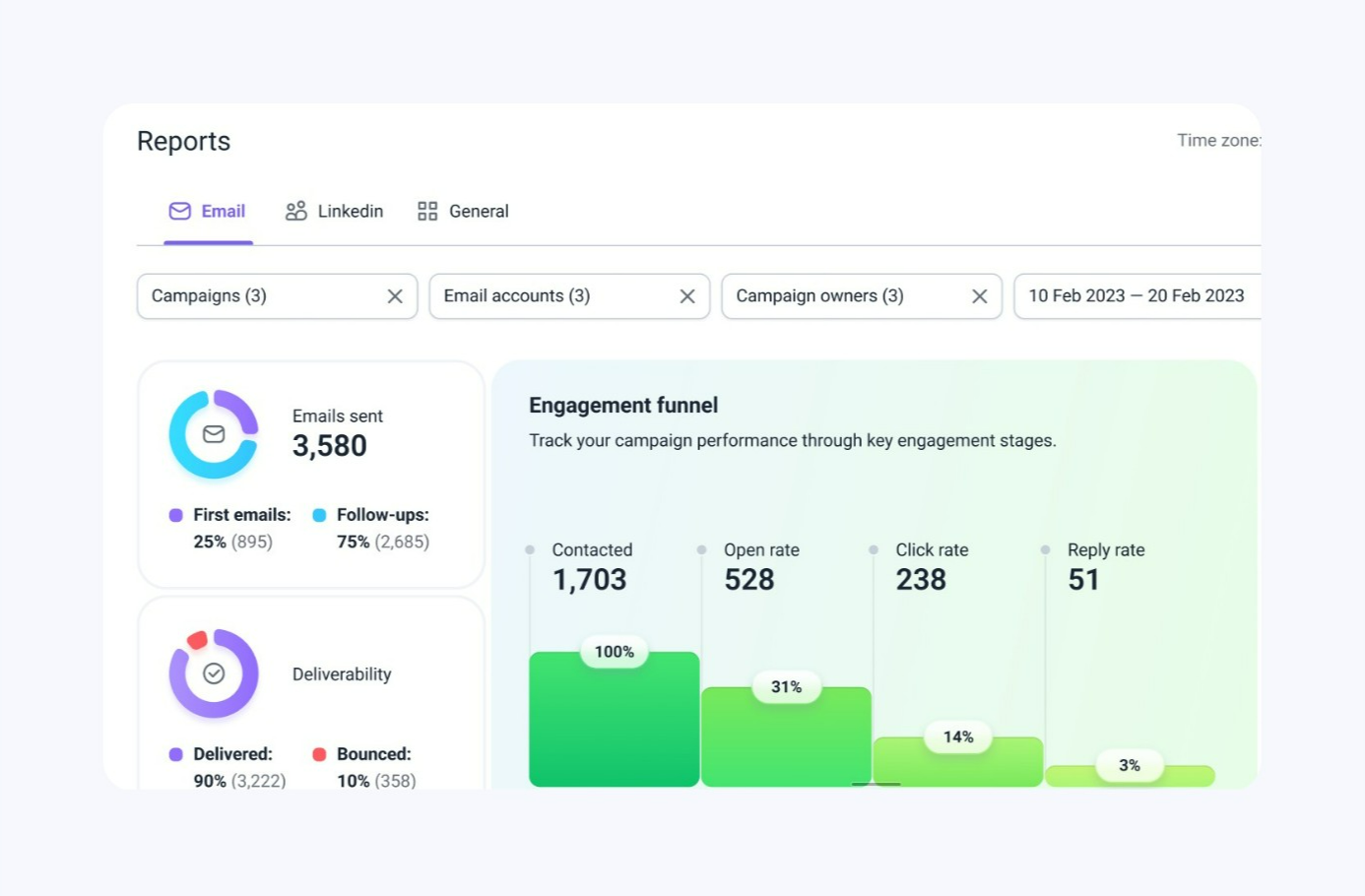
When something goes awry, pause your campaign. Adjust, and continue it only when the data looks good.
6. Make it easy for people to unsubscribe
If someone does not want to receive your emails, ensure they can easily opt out. Otherwise, you potentially risk getting your campaigns marked as Spam. Add an opt-out line in your signature, respect opt-out requests immediately, and avoid re-adding unsubscribed contacts accidentally.
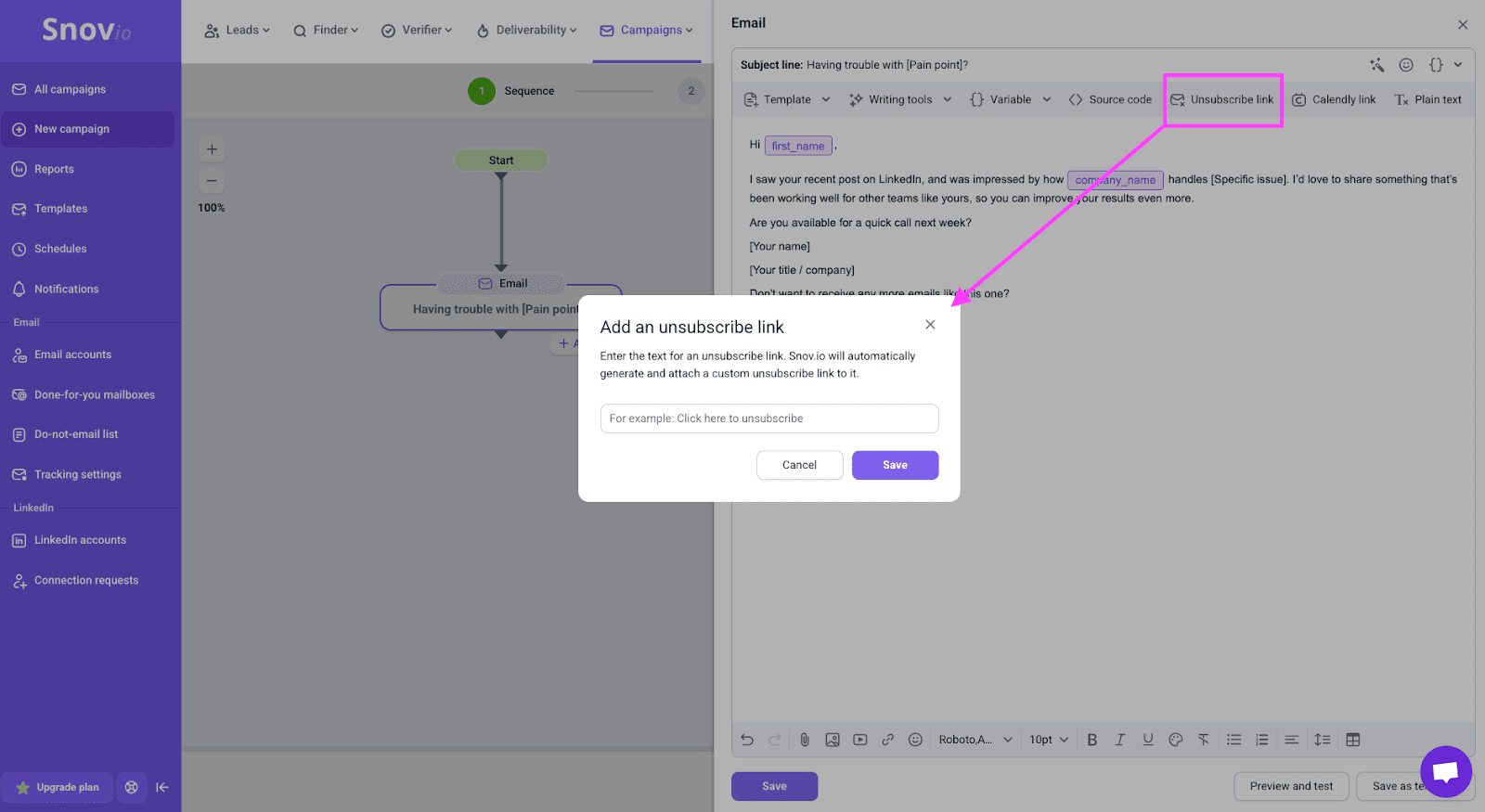
By providing the unsubscribe option, you show inbox providers that you respect user preferences.
7. Keep backup domains and mailboxes warming in the background
Even with careful planning, a domain or mailbox can be throttled, temporarily blocked, or blacklisted.
Here’s what I recommend instead in such a scenario:
- Keep additional domains warming at low volume
- Maintain a pool of backup mailboxes you can switch to if needed
- Rotate senders instead of pushing all messages through one mailbox
This way, if one asset gets into trouble, you can quickly re-route your efforts to another one, without stopping outreach entirely.
Legal regulations for sending bulk cold emails
Hitting 10,000 recipients also means thinking about legal frameworks. These rules depend on where your recipients are based, not just where you operate.
This section is not legal advice, but it will give you a starting point to understand compliance better.
Understand the main legal concepts
Two key regulations affecting bulk cold email outreach are:
- CAN-SPAM (US): allows unsolicited commercial emails, but requires accurate identification, no deceptive content, and a clear opt-out mechanism.
- GDPR (EU): requires B2B cold email senders to rely on “legitimate interest” and keep targeting relevant and proportionate.
There are other country- or state-specific laws for bulk cold email outreach, but they often echo the above principles, adding their own nuances.
Build compliant templates and internal processes
To stay safer across markets, make sure that each email shows your company name and contact details, clearly explains why you are reaching out, and includes an easy opt-out line or link.
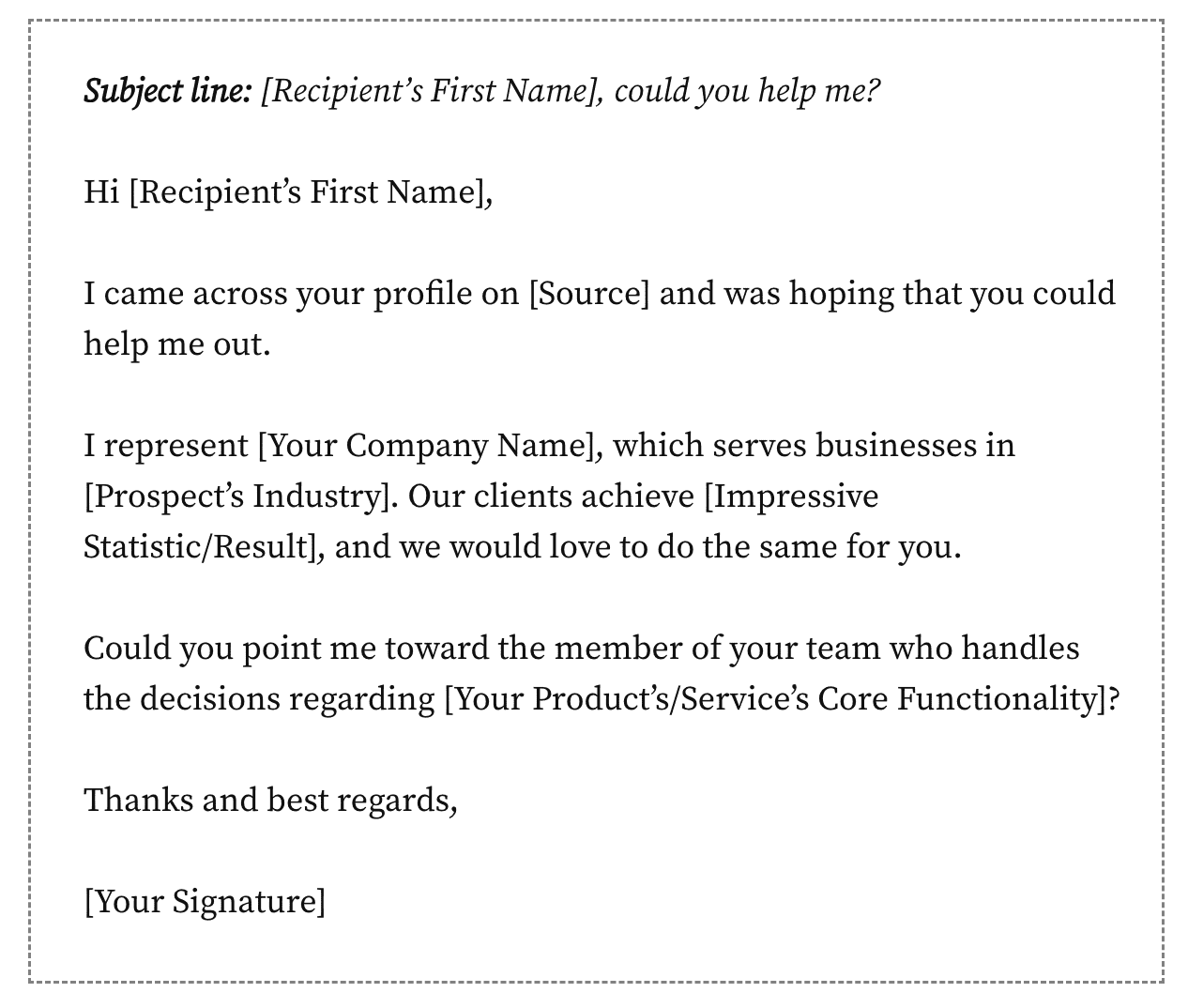
Keep a clear list of unsubscribed contacts, and remove unsubscribed or objecting contacts from all future campaigns. Ideally, create guidelines on who your team can and shouldn’t contact.
The combination of relevance, transparency, and respect for choice is what will keep your outreach sustainable over time.
How to set up a 10,000-email infrastructure in a few clicks
Doing everything manually is possible, but it takes time, precision, and technical confidence. If you prefer a faster, easier, and more reliable path, give Snov.io’s DFY mailbox setup a try.
It’s ideal for sales teams, marketers, and agencies that need to send tens of thousands of cold emails every day without risking domain reputation. You get verified domains, ready-for-warmup mailboxes, plus correct DNS settings without investing hours of work.
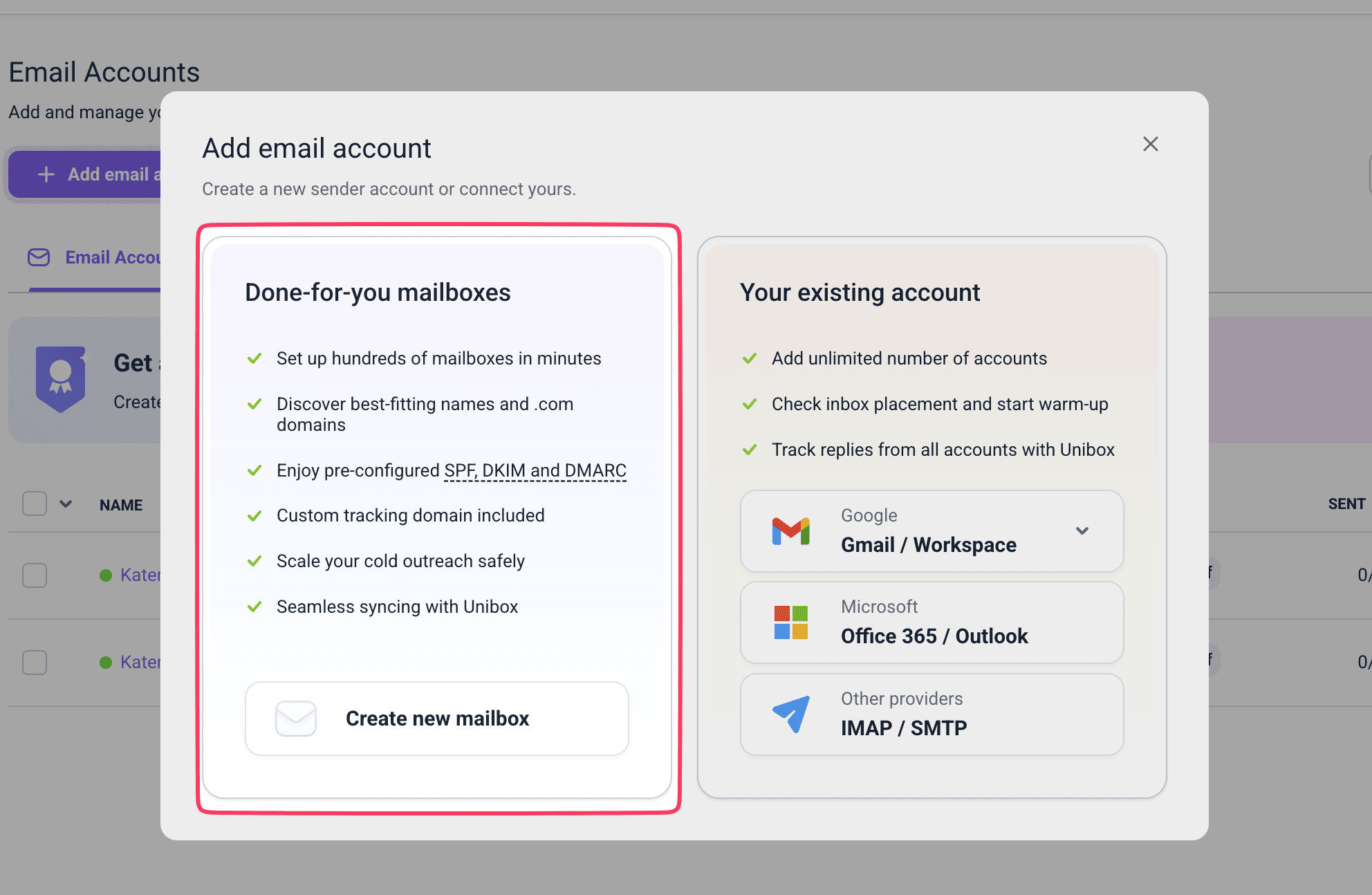
Instead of juggling registrars, DNS zone files, and mailbox providers, you can simply:
- Purchase outreach domains with preferred names from inside Snov.io
- Create multiple ready-to-use mailboxes with custom sender names for high-volume outreach
- Connect them to the Snov.io Warm-up Tool and Campaign Builder automatically
You do not need to figure out which DNS records to add or in what format. The system applies the right defaults on your behalf. What’s more, because DFY mailboxes are designed for secure cold outreach, they come with pre-configured:
- Recommended daily email sending limits
- Safe tracking and forwarding configuration
- Easy integration with other essential sales tools, including LinkedIn campaigns for multichannel outreach.
You still control the contents of your campaign, but the underlying infrastructure is built to minimize risks. This is ideal for company founders, sales leaders, or marketers without technical knowledge or a specialized team on board.
Why you need a warm-up before scaling a cold email campaign
Even with the perfect email infrastructure setup, your new mailboxes are still newcomers in the eyes of Gmail, Yahoo, and corporate servers. That’s why you need to warm them up properly so you get a decent reputation as a sender.
Your existing mailboxes might need warming up as well if they have been inactive for a while, or you introduced some changes to sending tools or IPs.
Run a proper domain warm-up before you do anything else. Without a warmup, you’re asking for trouble!
Keep in mind that not only your cold outreach mailbox needs warming, but the tracking domain as well. It will signal to inbox providers that the tracking domain is used for legitimate, low-risk activity, improving the chances your emails land in inboxes.
Outbound Outreach Expert at Snov.io

With Snov.io’s Email Warm-up, you can:
- Ramp up both new and existing mailboxes.
- Set up a tracking domain warm-up (essential if you need campaign analytics).
- Choose a relevant warm-up plan for your particular use case.
For example, the safest way to scale a cold email campaign at the beginning is to use a progressive warm-up plan.
To succeed from it even more:
- Choose a plain-text style or elaborate template for your email warm-up.
- Exchange emails only with accounts on business domains to build a more positive sender reputation faster.
- Build a positive reputation with specific providers through a targeted warm-up.
Additionally, while your inboxes are warming up, you can track:
- How many warm-up emails are sent and received
- Where your emails land (inbox vs spam)
- Overall health of each mailbox over time.
If you face trouble with any mailbox, Snov.io will pause warm-up campaigns, so you can adjust your settings and avoid damaging that sender’s reputation further. This helps you stay in control of how aggressive or conservative to be.
I recommend keeping light warm-up running even while campaigns are active and increasing domain warm-up intensity for new backup domains. This way, you’ll keep your infrastructure healthy, not just for one 10,000-email push, but for ongoing bulk cold email outreach.
Key takeaways
In 2026, sending 10,000 cold emails safely is possible, but it takes a lot of planning. Inbox providers monitor authentication, daily limits, behavior, and feedback closely.
A safe plan to scale a cold email campaign includes:
- Separate outreach domains instead of your main brand domain
- Enough mailboxes (10-15) to distribute volume safely
- Correct SPF, DKIM, DMARC, and MX records
- Proper mailbox and tracking domain warm-up
- Clean, segmented prospect lists and realistic daily email sending limits
- Continuous monitoring of bounces, spam complaints, and replies.
You can build this manually if you want full control. Or you can offload most of the technical work to the DFY setup inside Snov.io. With this platform, sending 10,000 cold emails will no longer be a risky one-time adventure but an effective growth strategy.