


Only around 62% of email addresses are fully valid. That means your prospect pool is already smaller than you’d like. Delete catch-all addresses on top of that, and you’re cutting yourself off from even more potential leads.
Luckily, there’s a more balanced approach.
In this guide, you’ll learn what catch-all email addresses are and how to handle them without risking your sender reputation.
TL;DR
A catch-all email address is configured to accept mail sent to almost any recipient, even for mailboxes that don’t actually exist. This creates a verification challenge, as no catch-all email verifier can definitively confirm whether a specific catch-all mailbox is real.
Many legitimate businesses use catch-all domains, so deleting every catch-all email from your list is a mistake. Remove them, and you lose valuable opportunities.
A better approach is to:
- Clean your list first by running it through an email verification tool to flag catch-all and unverifiable addresses
- Segment them away from verified contacts
- Send to them in smaller batches while warming up your sending domain
- Monitor bounce rates, replies, and overall campaign performance
This way, you reduce unnecessary delivery risks while keeping legitimate prospects that might otherwise be discarded. Format Type Server status Auto-generated Catch-all

What is a catch-all email address?
A catch-all email address (also known as an accept-all email) is a mailbox set up to receive mail sent to any address at a domain, including addresses that don’t actually exist. any address under it, even if that mailbox doesn’t actually exist.
To better understand what a catch-all email address means, imagine a building (domain) with 100 apartments, each having its own mailbox. Normally, if a letter is sent to Apartment 101, which doesn’t exist, the letter is returned to the sender.
In the case of a catch-all domain building, there is a concierge who collects all mail sent to non-existent apartments and puts it into one special mailbox instead of returning it.
In terms of email marketing, the situation looks like this: a company enables a catch-all configuration for the company.com domain. Its mail server might accept messages sent to:
- sales@company.com,
- john@company.com
- random123@company.com
- typo@company.com
Even though some of these addresses don’t exist, the mail server accepts them. Below is a catch-all email example.
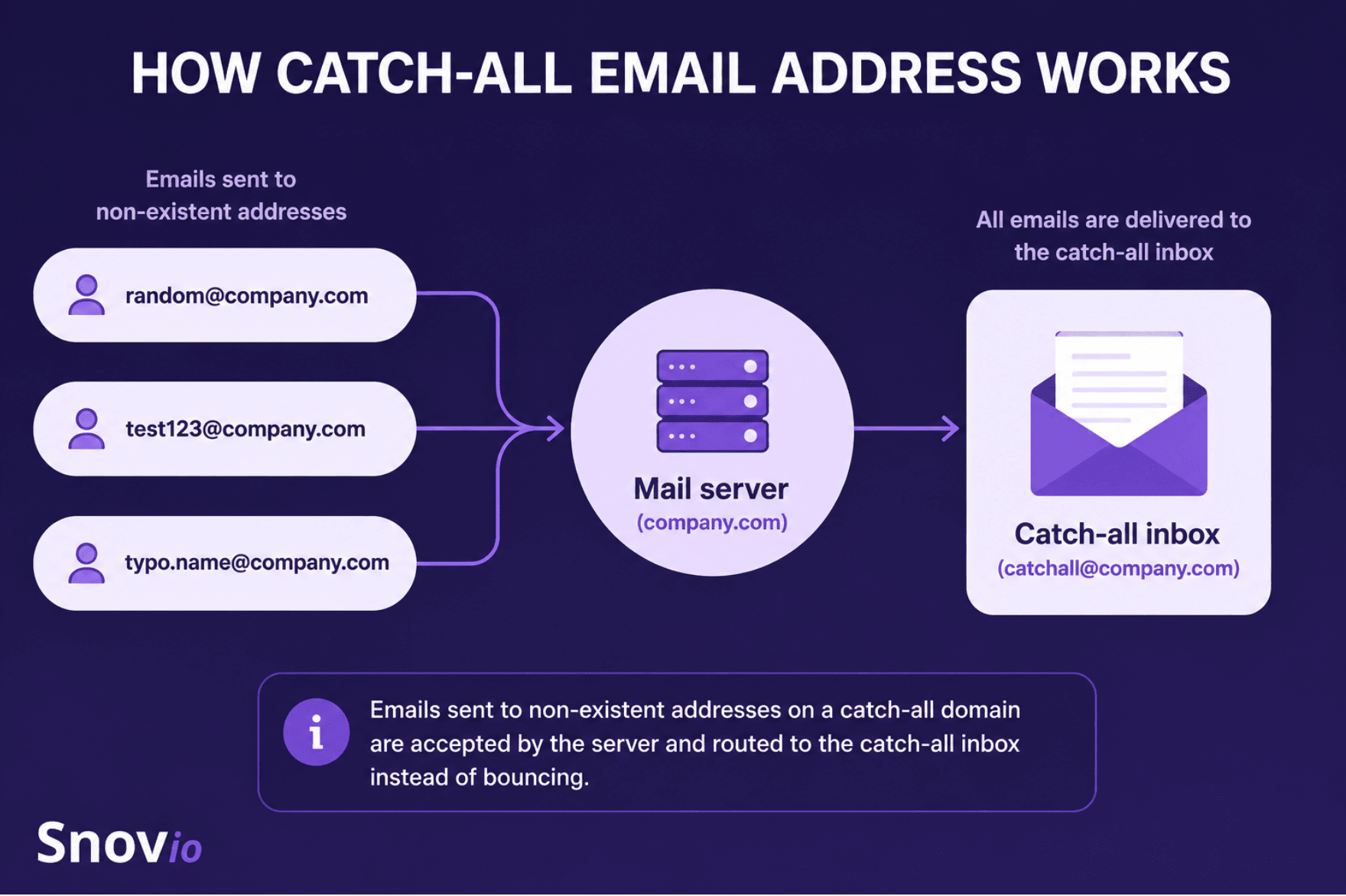
Today, catch-all domains are not uncommon. Recent data suggests they account for roughly 9% of verified email addresses.
Businesses originally adopted the catch-all domain setup to avoid missing legitimate emails because of typos or outdated addresses. So instead of rejecting those messages, the mail server accepts them and routes them according to the company’s configuration.

How catch-all email addresses work from a technical perspective
Every email domain has DNS records, which tell other mail servers where incoming emails should be delivered. When someone sends an email, the receiving mail server checks those records before deciding whether to accept or reject the recipient.
On a standard domain, the server verifies that the mailbox exists before accepting the message. If it doesn’t, the server returns an error indicating that the address is invalid.
A catch-all domain works differently. Instead of rejecting unknown recipients during the SMTP exchange, it accepts almost any email address sent to the domain.
What happens next depends on how the company has configured its mail server. The email may land in a shared inbox, get forwarded to another mailbox, be filtered automatically, or simply be discarded.
Since the server accepts emails sent to almost any address on the domain, there’s no reliable way to tell whether a specific mailbox actually exists. That’s what makes catch-all email verification much more difficult than verifying a standard email address.


Why verify catch-all email addresses?
You can’t change how catch-all domains work, but you can change how you handle them. Here’s why taking the time to identify catch-all addresses is worth it.
Reduce uncertainty in your email list
Unlike fully verified email addresses, catch-all emails occupy a gray area. The mail server accepts them, but that doesn’t necessarily mean they belong to a real or actively monitored mailbox.
Identifying catch-all addresses gives you the flexibility to treat these uncertain contacts differently from fully verified ones.
Protect cold email campaign performance
For cold outreach teams, catch-all domains add another layer of uncertainty.
You don’t always know whether there’s a real person behind the email address. Some messages may never be read, while others may bounce after the server initially accepts them.
Those extra bounces can affect your sender reputation and reduce overall deliverability. Plus, they make campaign performance harder to evaluate.
Recover valuable leads instead of deleting them
As many companies, including larger organizations, use catch-all domains, automatically removing every catch-all address can cost you legitimate business opportunities. It’s much better to verify and group them separately.
My advice is to segment catch-all emails as a separate test group. Then you can start small, sending to 50–100 catch-all contacts, monitor the results closely, and only scale if the engagement looks healthy.
Email Deliverability Specialist

How catch-all detection works
As I’ve already mentioned, no email verifier can confirm every mailbox on a catch-all domain. But these tools run several checks to understand how the domain behaves and estimate the likelihood that an email address can receive messages.
Here’s what happens behind the scenes.
DNS and MX record checks
First, the verifier checks the domain itself. It makes sure the domain exists and has valid MX (Mail Exchange) records. These records tell other mail servers where to deliver incoming emails.
If the domain doesn’t exist or has no valid MX records, the email address usually gets marked as invalid.
SMTP recipient verification (RCPT TO)
Next, the verifier connects to the recipient’s mail server.
Using the SMTP RCPT TO command, it asks whether a specific email address can receive messages. For regular domains, the server usually gives a clear answer: it either accepts the address or rejects it.
For catch-all domains, the verifier can’t confirm the exact inbox with full certainty.
Random address testing
To spot catch-all behavior, the verifier may also test 1 or more random email addresses at the same domain. These addresses are usually made up and are very unlikely to exist.
If the server accepts both the real address and the random ones, it’s a strong sign that the domain uses a catch-all setup. This helps distinguish catch-all domains from standard mail servers without actually delivering emails.
Risk assessment
After these checks, the verifier combines all available signals to evaluate the address. This doesn’t guarantee that the mailbox exists, but it estimates the delivery risk and assigns an appropriate verification status.
How to verify catch-all emails and start the outreach
No email verifier can guarantee that every catch-all mailbox actually exists. But you can still use email verification tools to find catch-all domains. This helps you lower delivery risks and sort your contacts before you start an outreach campaign.
Below, I’ll provide step-by-step guidance on how to verify catch-all emails with the help of the email verification tool from Snov.io.
Step 1: Prepare your email list
Before you run verification, remove duplicate contacts from your list. Clean up any obvious formatting errors. A clean list speeds up verification and stops you from wasting credits on duplicate addresses.
Step 2: Upload your contacts to Snov.io Email Verifier
Whether you want to verify a single email address or an entire contact list, Snov.io makes the process straightforward. You can check addresses one by one or upload up to 100,000 contacts at once using a CSV, XLS, XLSX, or TXT file.
All you need to do is just open the Snov.io Email Verifier and upload your email list in bulk.
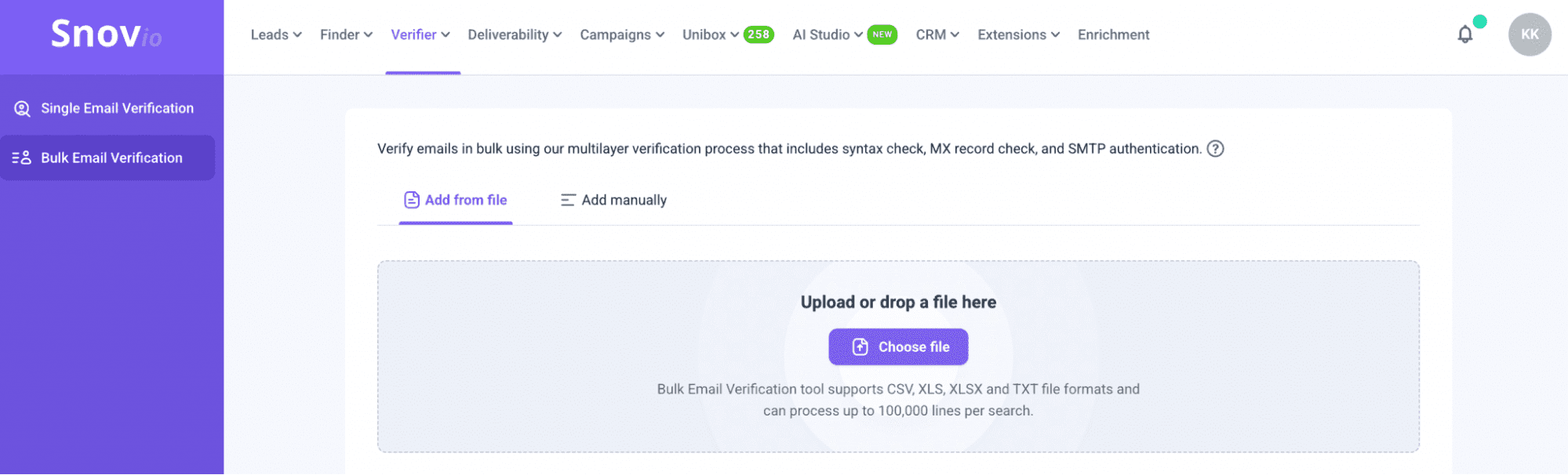
Every email then goes through Snov.io’s reliable 7-step verification process, which combines syntax validation, domain and MX record checks, SMTP verification, etc.
Step 3: Review the verification results
When the verification is complete, Snov.io assigns 1 of 3 statuses to every email address:
- Valid (green) — the email address is active, has passed all verification checks, and is safe to contact.
- Unverifiable (yellow) — Snov.io couldn’t confirm the address with complete certainty because of the recipient’s mail server configuration or other technical limitations. This category includes catch-all, auto-generated, greylisted, and unverifiable email addresses.
- Invalid (red) — the email address doesn’t exist or can’t receive emails.
So, catch-all email addresses will most likely be marked as unverifiable:
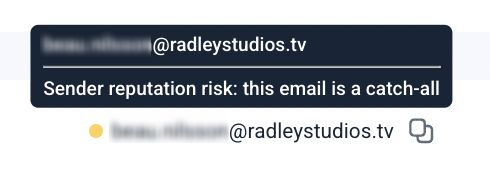
Obviously, invalid emails should be deleted from your list upon verification.
Step 4: Segment your email list
Once you’ve reviewed the verification results, organize your contacts into separate lists by status. For example, you can create segments for:
- Valid email addresses
- Catch-all email addresses
- Other unverifiable email addresses
This makes it easier to decide how you’ll use each group. And you can then confidently start outreach with valid contacts while treating catch-all and other unverifiable emails more cautiously.
Step 5: Export verified contacts to your CRM or outreach platform
Now that your list is clean, it’s ready for outreach.
If you’re using Snov.io Email Verifier, you can move your verified contacts straight to Snov.io CRM to keep everything organized in one place.
Once your contacts are in the CRM, you can also move them straight into Snov.io email campaign. Just open the Campaigns section and click New campaign.
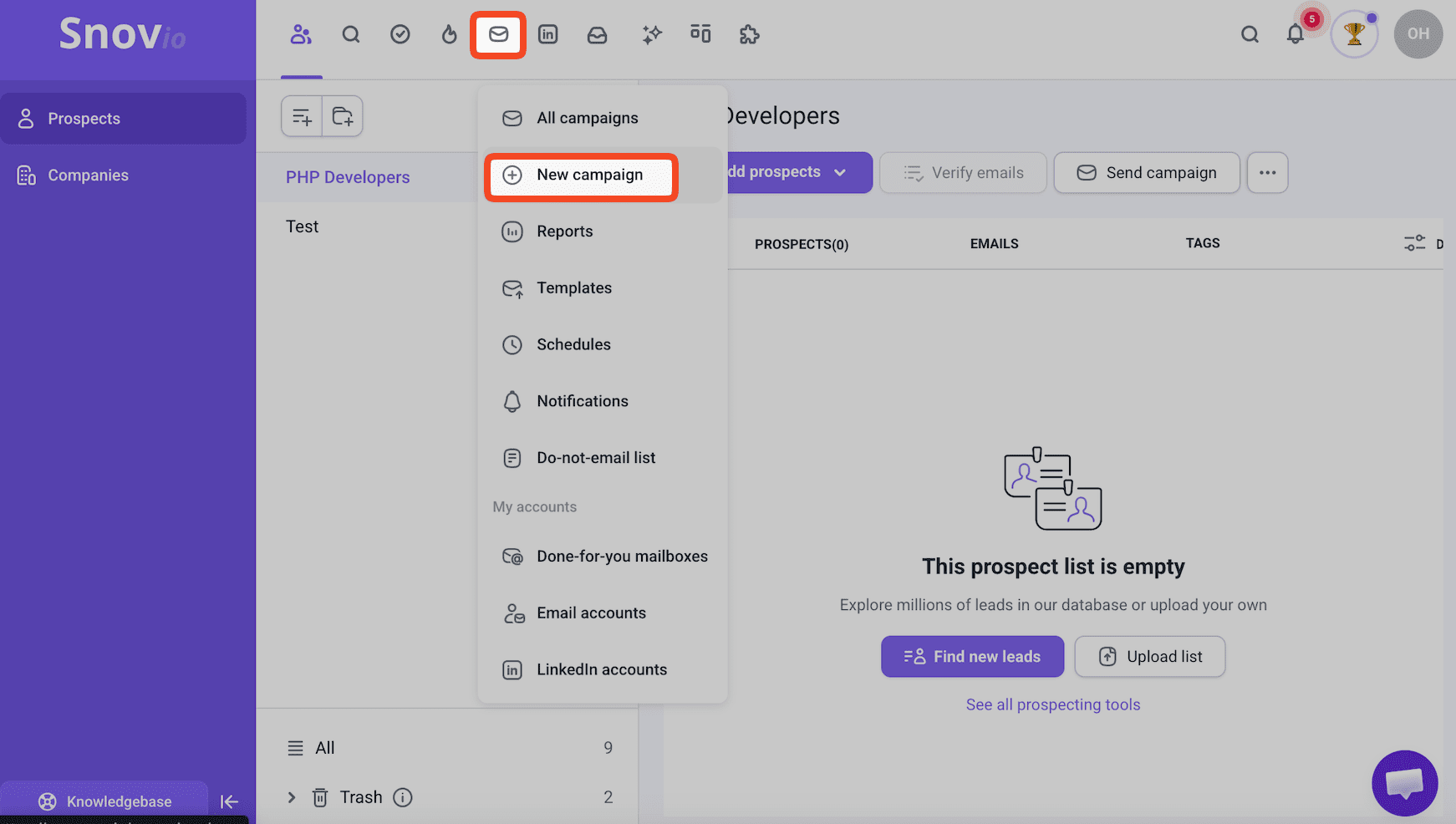
Then build your email sequence, choose the prospect list you’ve just verified, connect your sending account, and launch your outreach campaign.
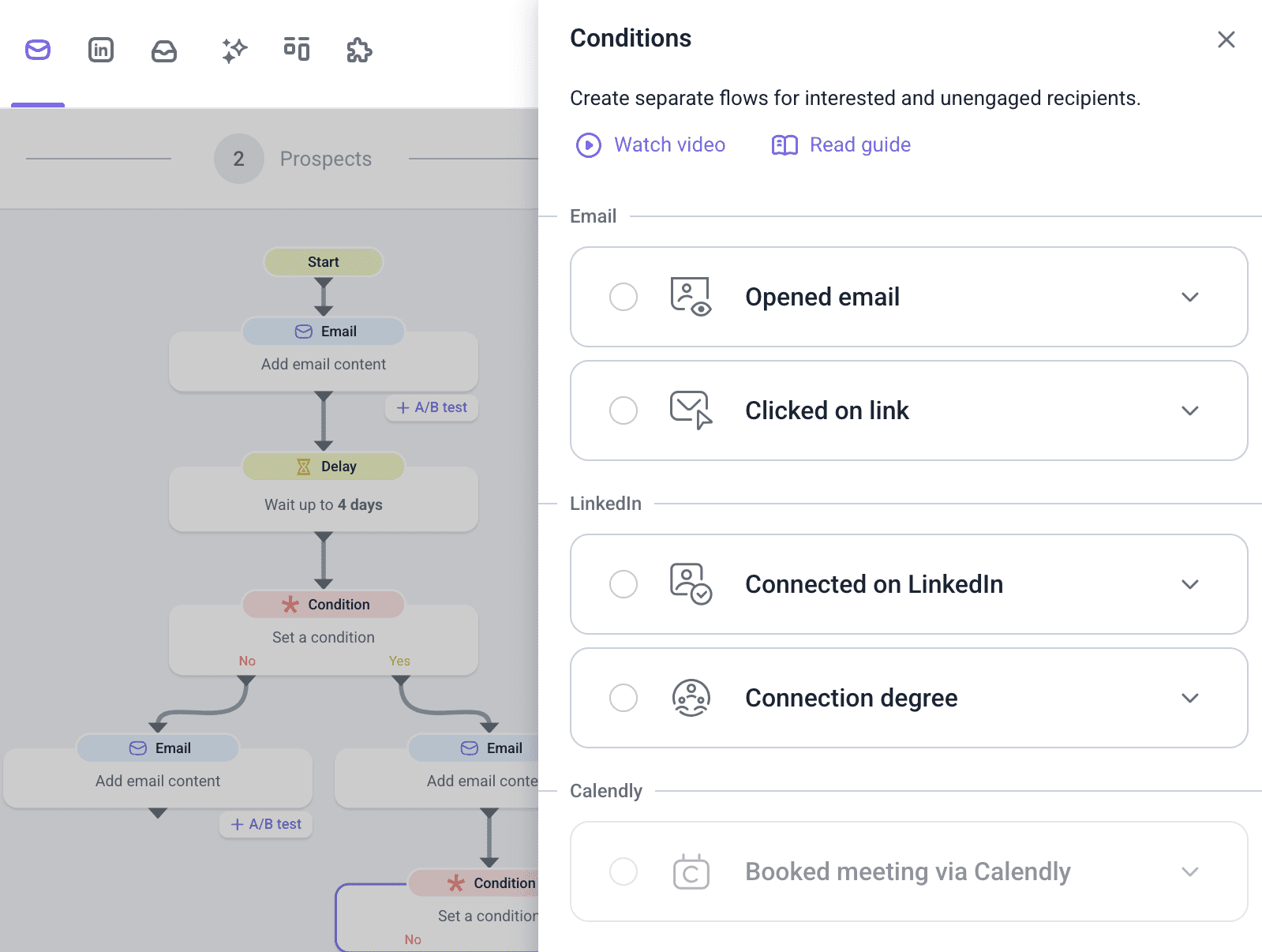
Snov.io will automatically send emails and follow-ups according to the workflow you’ve created.
Step 6: Re-verify your email list regularly
Always keep in mind that your email list won’t stay accurate forever. People change jobs, companies switch domains, and old mailboxes become inactive.
Unfortunately, 4 in 10 email senders seldom or never clean their email lists. Meanwhile, Regular verification helps protect your sender reputation, maintain good deliverability, and prevent outdated contacts from dragging down performance.
It’s natural that email lists decay. You can’t control it. What you can control, however, is how often you verify your email list to keep the number of invalid contacts to a minimum. I recommend that users clean their lists every 3-6 months to maintain strong email deliverability.
Email Deliverability Specialist
Regular email verification is a habit that gives you an edge, and doing it is not as hard as it may seem. Below is a quick overview of how easily you can verify your email lists:
Best practices for sending campaigns to catch-all emails
Before we wrap up, I’d like to share a few additional tips that can help you work with catch-all email addresses more confidently.
Prioritize verified email addresses
When launching a campaign, start with contacts marked as valid. Since these addresses have a higher confidence level, they’re generally the safest audience for your initial outreach.
Send to catch-all emails in smaller batches
Don’t lump catch-all emails in with your verified contacts; give them their own campaign.
Smaller batches make it easier to watch your bounce rates and engagement. That way, if something goes wrong, it won’t drag down your main campaign as well.
Warm up your sending domain
If you’re planning to contact catch-all domains, get your sending domain’s reputation in good shape first. I’d recommend using Snov.io Email Warm-up. The tool automatically exchanges emails with a trusted network of inboxes, generating positive engagement signals that help build your sender reputation and improve inbox placement.
Monitor campaign performance
Keep an eye on the numbers that matter:
- bounce rate
- open rate
- reply rate
- spam complaints
If your catch-all segment is doing way worse than your verified list, stop and take another look at your targeting before you send any more.
Check deliverability
Keep monitoring your sender reputation and email deliverability throughout. By running deliverability tests regularly, you catch issues early.
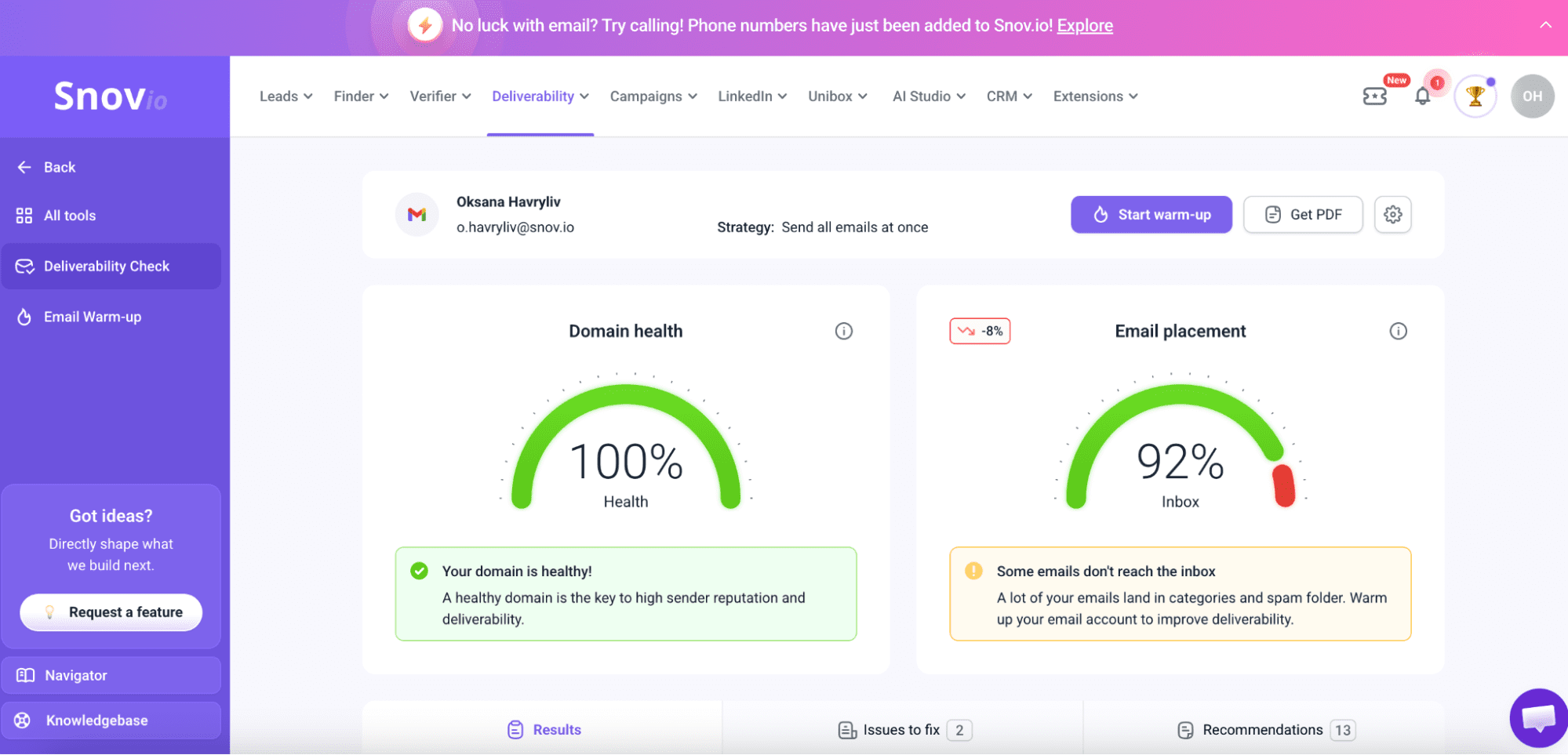
When you run one of these checks, here’s what to aim for:
- Domain health score: 75 to 100%
- Spam rate: below 2%
- Email placement: 90% or higher
If your numbers come in below that, something’s probably off. Sort it out before you launch any full-scale campaigns.

Key takeaways
Catch-all emails don’t have to be a blind spot in your outreach. Sure, no verifier can promise you that every mailbox behind a catch-all domain is real; that’s just not how it works. But verification still gives you a much clearer picture of the risk.
So don’t write off every catch-all email as a lost cause. Verify your list, segment your contacts, and lean on verified addresses first. Also, pair that with regular list cleaning, and you’ll see fewer bounces and better deliverability, with a little help from Snov.io along the way.