
TL;DR: Proven methods to find a Gmail email address
Whether you want to look up a single Gmail address or capture them in bulk, I rounded up the most realistic and useful ways to do that, which I explored firsthand.
So, here’s how to search for a Gmail address depending on your use case.
| If you need to | Use this method |
|---|---|
| Find the address of someone you’ve already communicated with via Gmail | Gmail’s native search or autocomplete |
| Look up a colleague’s, freelancer’s, or business owner’s contact info | Public profiles on a website, community page, blog, or “Meet the team” or “About us” page |
| Reach the user actively “living” on social media | Social media profiles (LinkedIn, Twitter/X, Facebook, etc.) |
| Search the web with a precise keyword or phrase | Google’s advanced search operators |
| Identify a personal or work email when you know the user’s name and the company | Publicly used email patterns |
| Find Gmail email addresses in bulk | Email lookup services, aka email finders, like Snov.io’s Email Finder, Apollo, Hunter, Skrapp.io, etc. |
| Grab a Gmail address while browsing a web page or LinkedIn | Email-finding browser extensions |
| Confirm an address is valid before you send | Google account recovery page, mouse-hovering over the email and profile picture inside Gmail’s Compose window, or an email verifier |
Continue reading the blog article for the peculiarities of each method as well as my “how-to” instructions on how to use them effectively.
Almost reaching 2 billion monthly active users worldwide, Gmail dominates the American market in particular, with 75% of US users choosing it over other mailbox providers for email communications.
But how do you look up someone’s Gmail address? This guide will help you find your target contacts – whether you’re a recruiter or sales representative who needs to reach a specific person or several people using Gmail.
How can you look up a Gmail address?
You can find someone’s Gmail address manually or automatically as long as it’s publicly accessible somewhere on the web (social media platforms, official websites, portfolios, professional directories, databases, etc.).
In particular, here’s a quick breakdown of what you can and can’t do when searching for a Gmail address.
| What you can | What you can’t |
|---|---|
| ✅ Look up a Gmail address by name, company, social media profile, or other details | ❌ Find private Gmail addresses that were never disclosed on the web |
| ✅ Find a personal Gmail account ending in @gmail.com or @googlemail.com (mostly in old European accounts, particularly in the UK and Germany) | ❌ Identify protected Gmail account info, such as passwords, recovery emails, or recovery phone numbers |
| ✅ Find corporate email addresses ending in @gmail.com or custom business domains like @company.com | ❌ See the insides of someone’s inbox (messages, drafts, labels, attachments, and so on) |
| ✅ Check email validity and verify the discovered Gmail address | ❌ Access the user’s Google Contacts list by their Gmail address |
Gmail doesn’t offer a searchable directory of its users with a list of their email addresses. Google services like Gmail respect privacy and strictly protect it, including emails. So, you can either try to identify a typical email pattern (literally guess it) or find only the address the email owner (or their employer) has preferred to make public.
Also, keep in mind that buying leaked private data and email lists exposes you to legal risks. It runs against the legal requirements (GDPR, CAN-SPAM Act, CCPA, or other regulations) in most regions around how you’re allowed to collect and use someone’s personal information.
Now, let’s get into the practical side of looking up a Gmail address.
How to find someone’s Gmail address manually
The following 5 methods don’t cost you a dime and help with a single Gmail address search. Yet they do take time (minutes to hours) because they require manual effort.
Gmail’s native email lookup features — best if you’ve already exchanged contacts
This is one of the simplest ways to look up a Gmail address, but it has one huge limitation. It only works if you have already sent emails to the person or received messages from them before.
Here’s how to look up a Gmail address by name using the native features like the search bar and “To” field autocomplete.
Gmail’s search
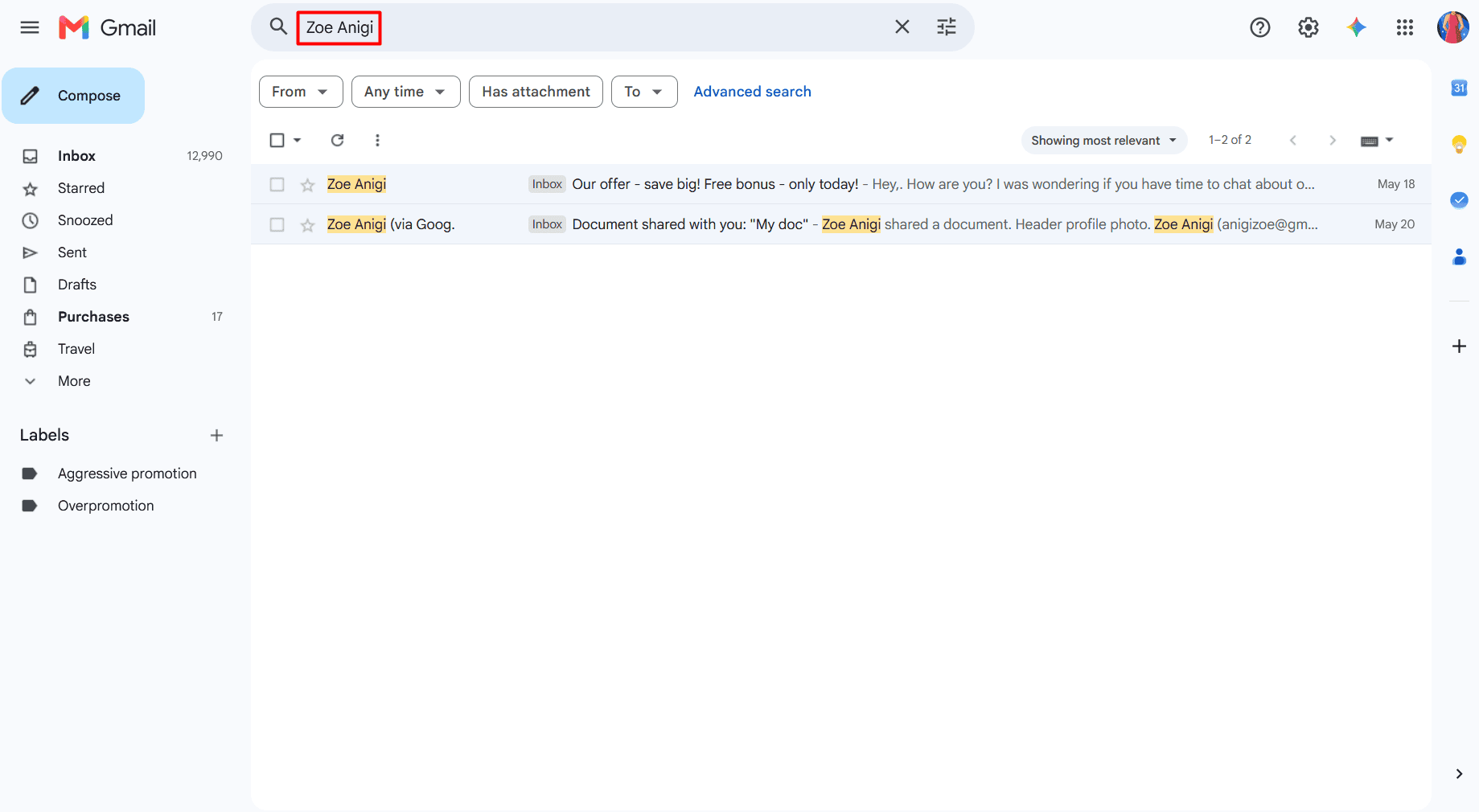
Sign in to your Gmail account, type the full name into the search bar, and press ‘Enter’ to see all the messages to or from the person.
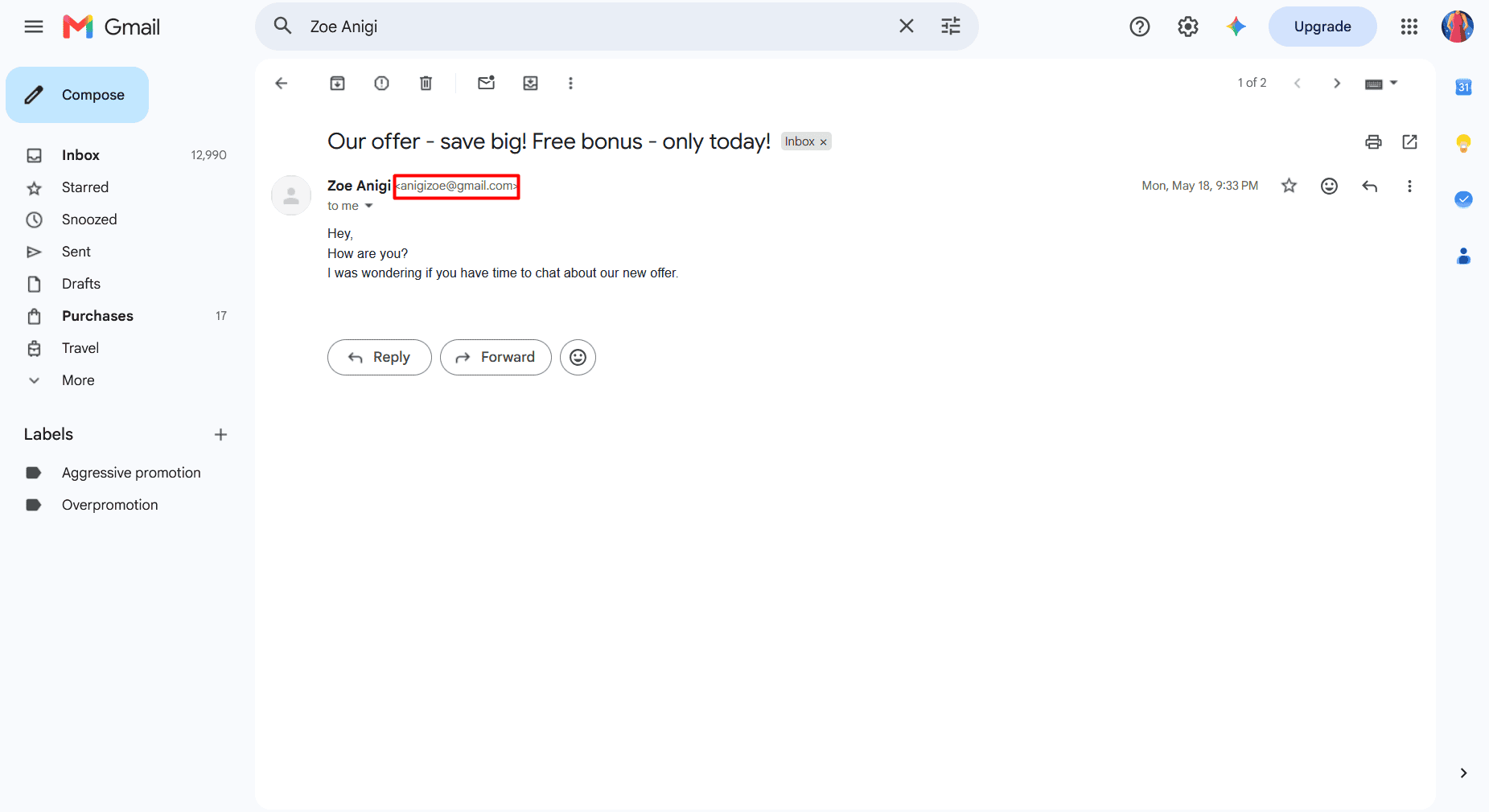
Open any of them to see their Gmail address in the “To” or “From” section, respectively.
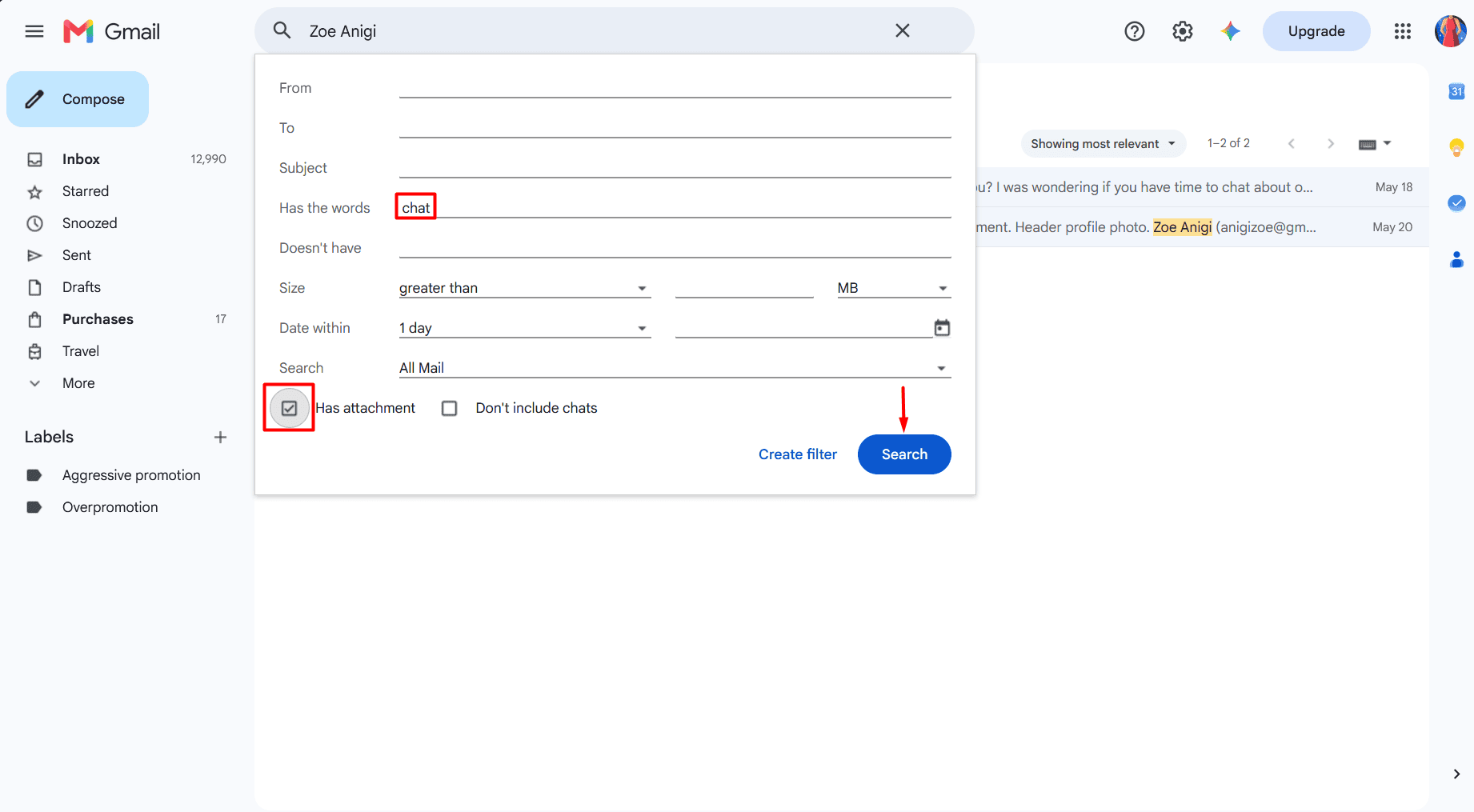
Thanks to a more extensive search (“Show search options” icon at the right side of the search bar), you can also apply “Subject,” “Has the words,” “Has attachment,” or other filtering criteria to narrow down your email search and find a Gmail address faster.
Gmail’s “To” field autocomplete
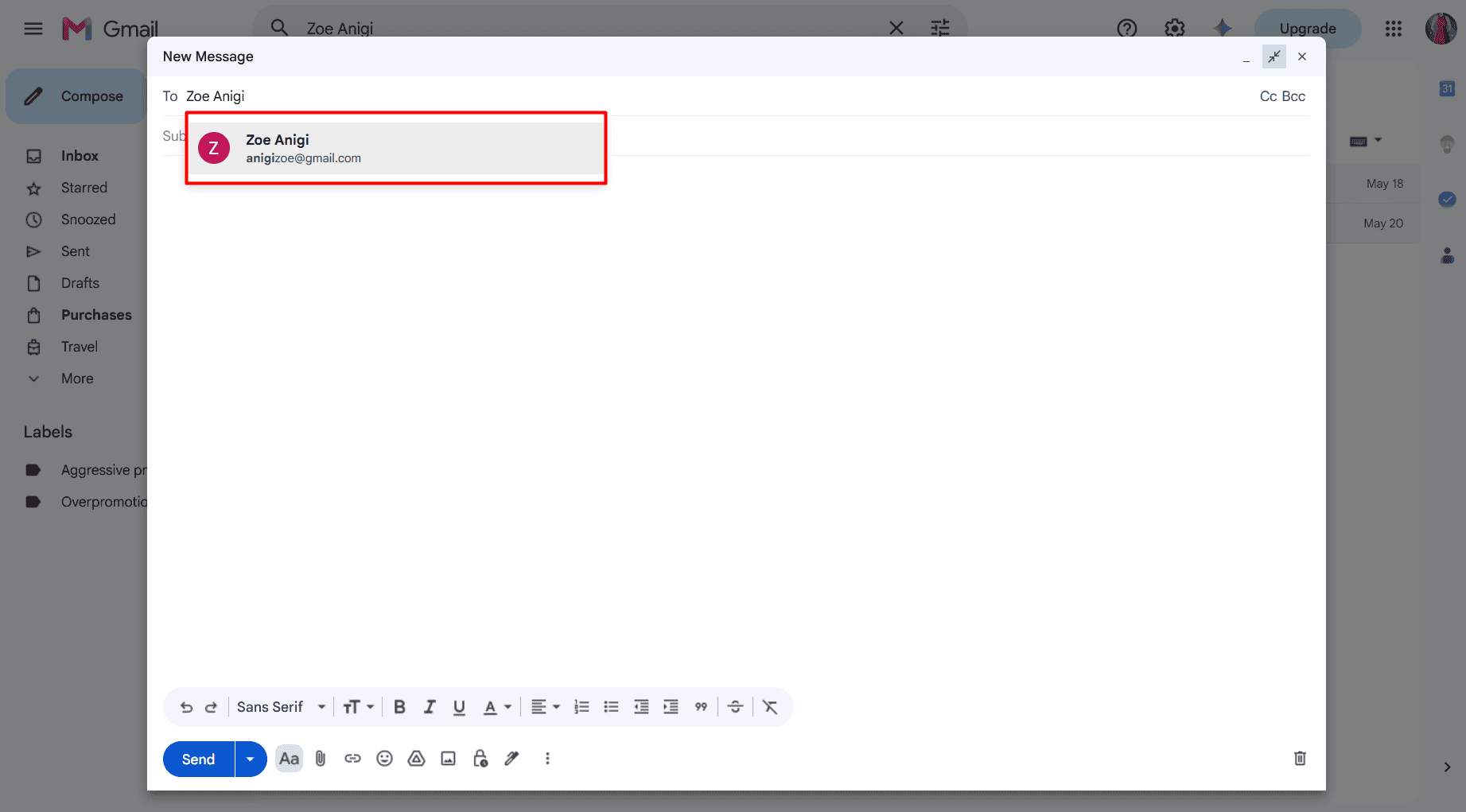
Log in to your Gmail account, click ‘Compose’ as if you were about to write an email as usual, and start typing the name into the “To” field.
Gmail will auto-suggest their Gmail address.
Additionally, take a peek into your Google Contacts. Go to your Contacts list and search for Gmail addresses by typing people’s first and last names into the search bar. If you’ve added the person as your contact, their Gmail address will show up.
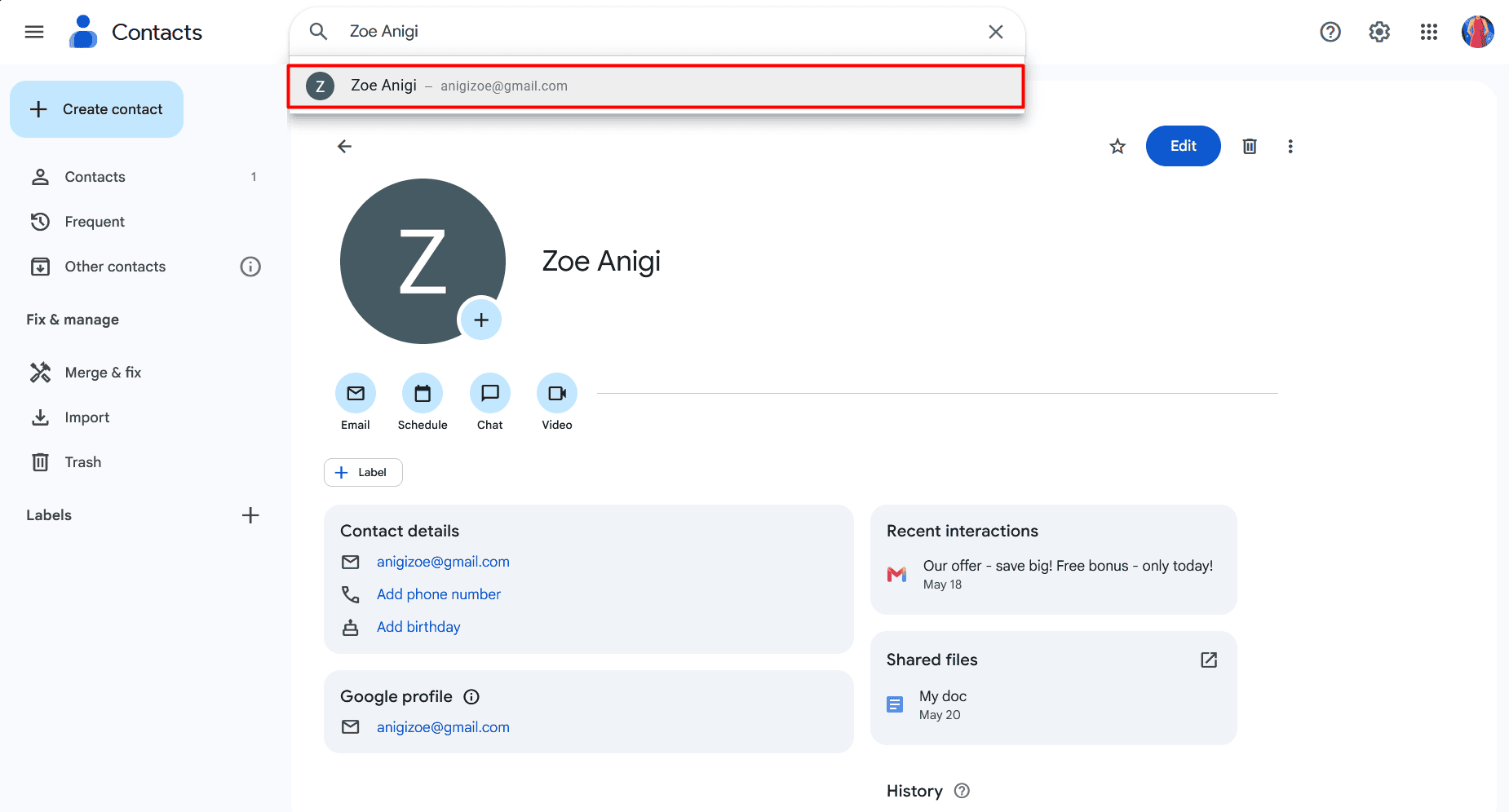
It may also be accompanied by other details you’ve saved (e.g., phone number or birthday) or custom labels you’ve added.


Public profiles — Best for finding freelancers or business contacts
Another manual free search method is to check whether the email owner (or their employer) has published their address on personal or corporate web pages.
So, visit these digital spots first to discover people’s public profiles where they may share emails:
- Personal sites or portfolios (Best places: “Contact Me” page or the homepage footer)
- Corporate web pages (Best places: “Our Team” or “About Us” pages; or the“Author” page on the blog)
- Specialized community platforms or forums (Best places: User signatures, “About me” sections, or posts)
- Content publishing hubs like Medium or Substack (Best places: “Bio” or “About” sections)
- Online platforms like GitHub, Product Hunt, or others (Best places: User profiles, bios, product pages)
For example:
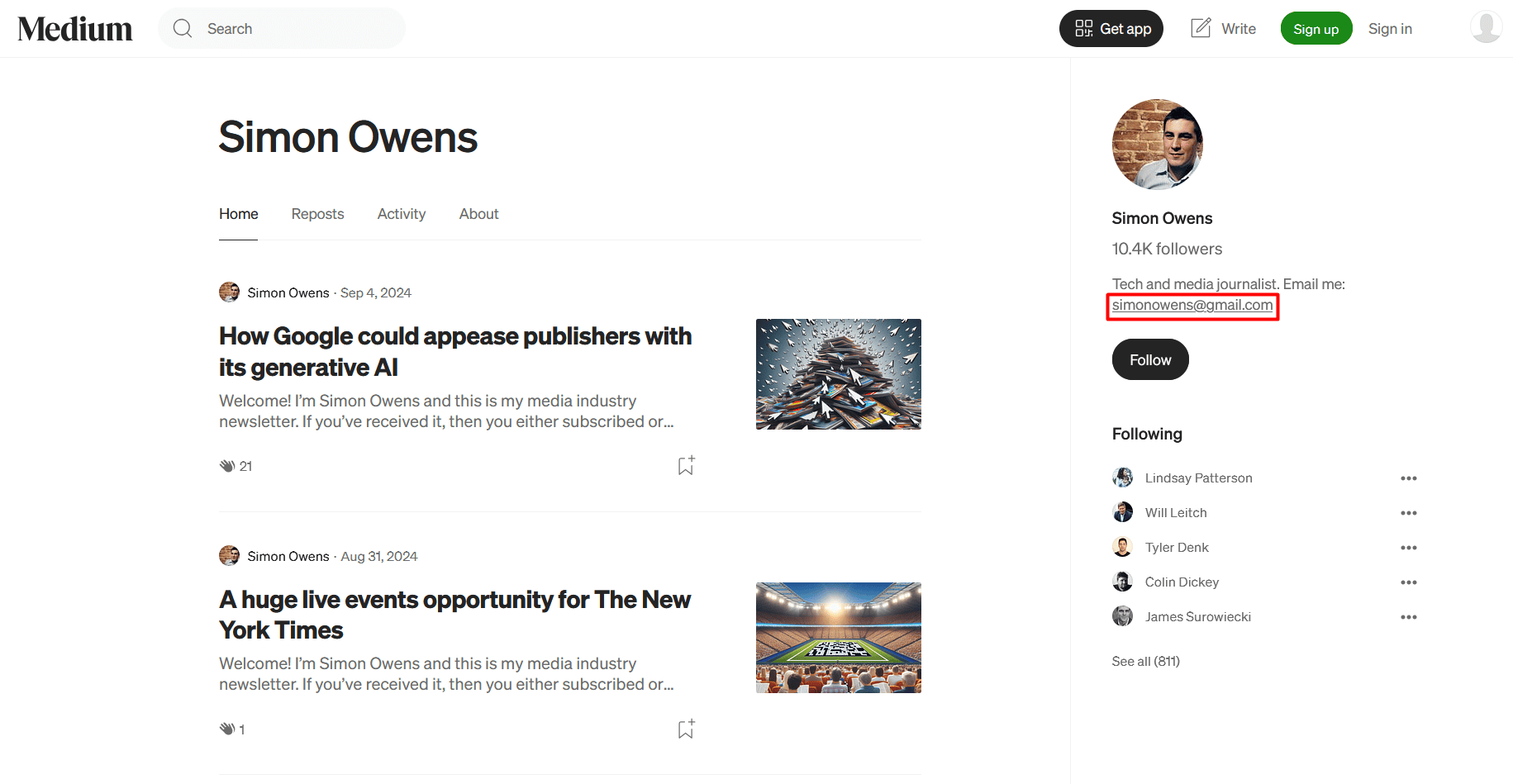
Here’s what a personal Gmail email address may look like in the profile bio on Medium.
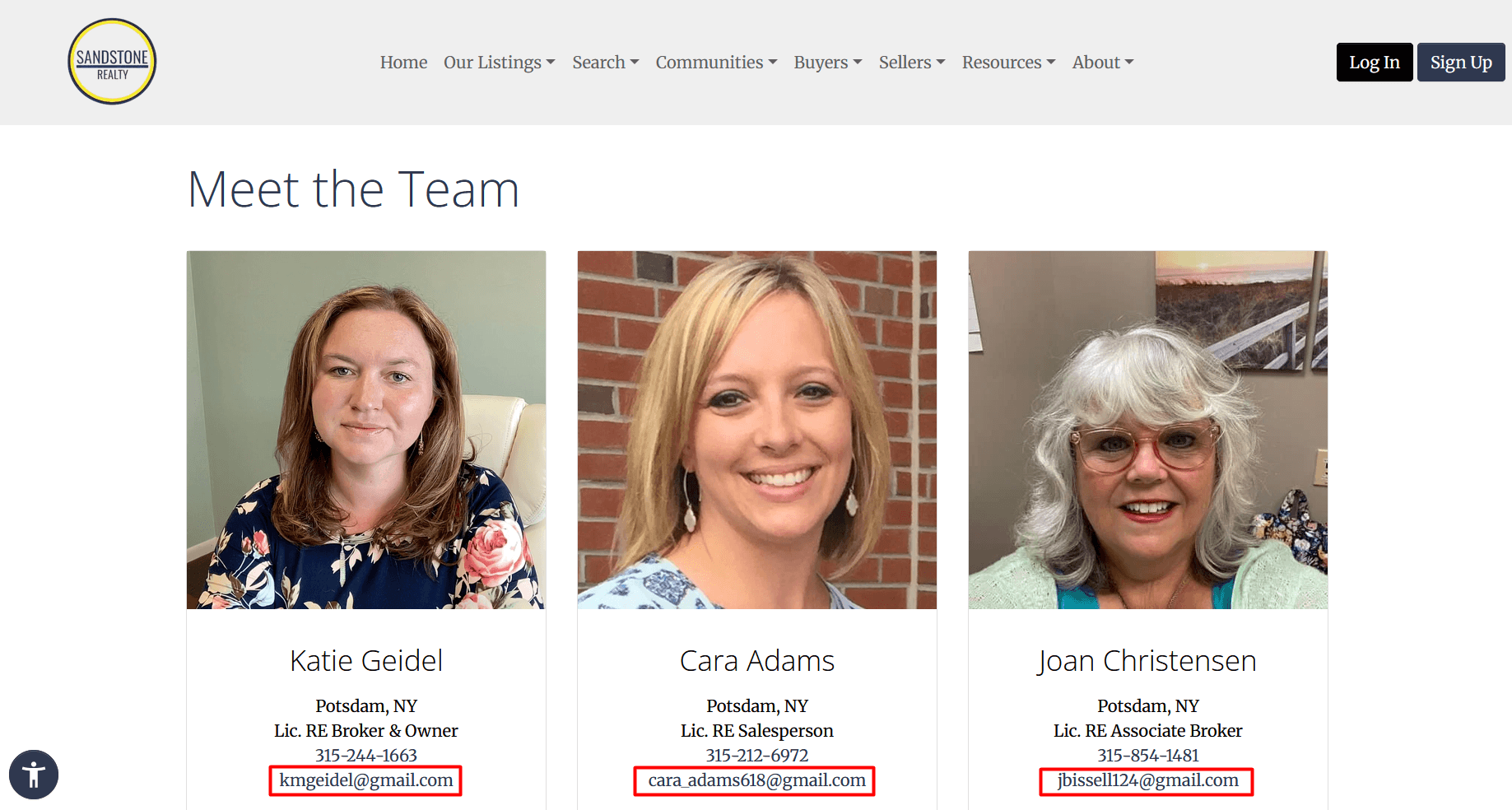
While searching for corporate Gmail addresses specifically, I went to the company’s official site and found employees’ contact info, including emails, on the website’s “Meet the team” page.
Social media profiles — Best for finding Gmail emails of social-first people
Some people treat their social media profiles as public business cards and gladly share contact info like email addresses or phone numbers there. The major downside? The best places to find a Gmail email address across social media platforms may differ greatly.
So you don’t have to scroll through each profile from top to bottom, I compiled a quick-reference table on where to spot Gmail addresses.
| Social media channel | Top places to find a Gmail address | Notes and limitations |
|---|---|---|
| “Contact info” and “About” sections | Often hidden unless the user chooses to display it; easier to find Gmail addresses of 1st-degree connections | |
| Twitter/X | Bios and pinned posts | Business accounts are more likely to publish emails in their bio |
| Bios and link-in-bios | Business/creator accounts usually don’t expose emails directly but via link-in-bio pages like Linktree or solo.to | |
| “Contact info” and pinned posts | Frequently hidden on personal profiles; higher availability on Business Pages | |
| YouTube | Channel “Description” and “More info” sections | You need to click “View email address” to reveal it in the “More info” section |
| TikTok | Link-in-bios and “Email” buttons | Rarely direct; more often via link-in-bios |
Now, let’s zoom in on the top 3 channels for B2B email discovery — LinkedIn, Twitter, and Facebook — and review the most common and rarest places to look.
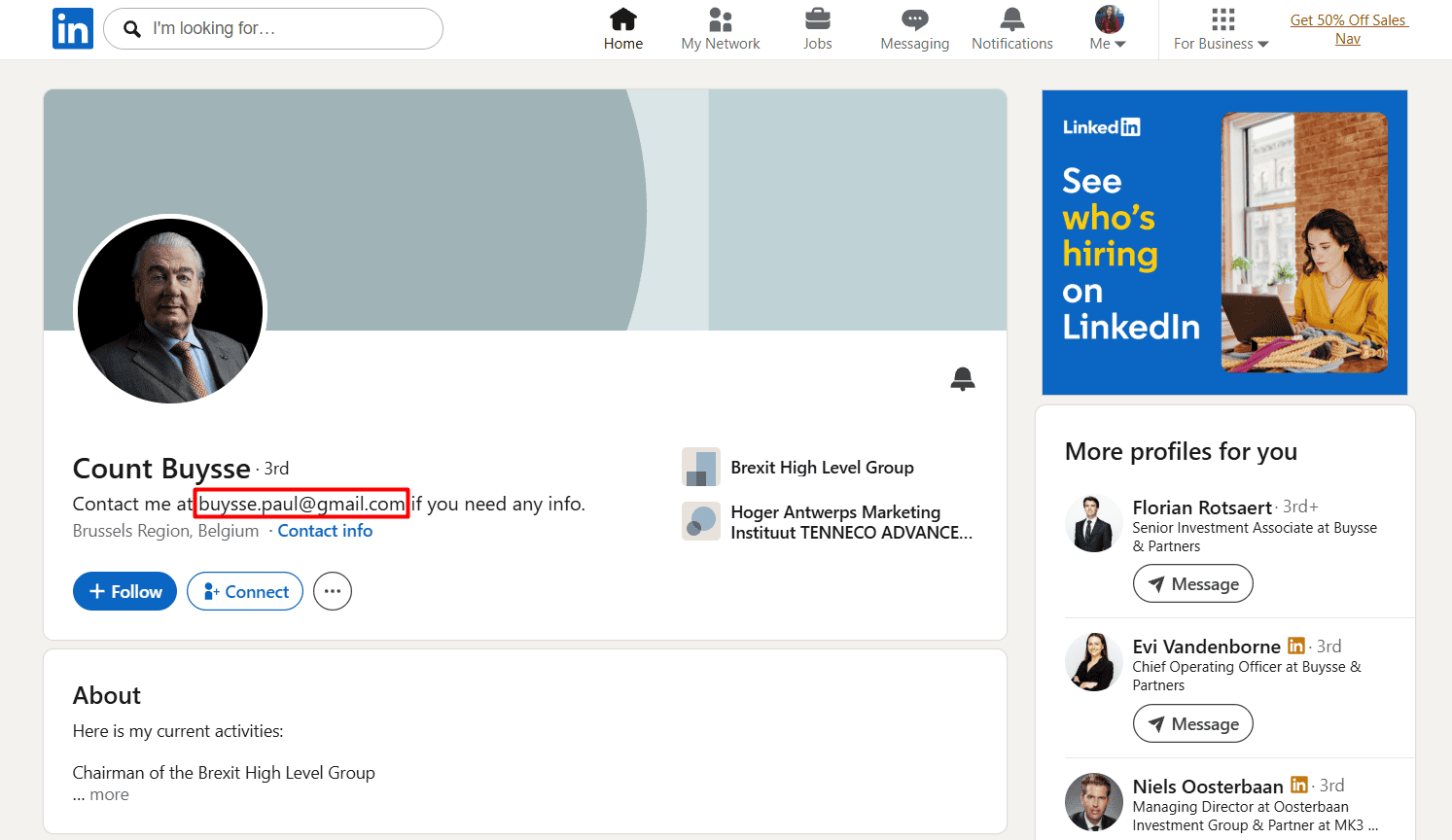
Where to find emails on LinkedIn, the #1 channel for B2B lead generation, driving 80% of B2B prospects:
- “Contact info” section
- Profile headline
- “About” section
- “Experience” section (often overlooked but quite a popular place for emails)
- More rarely: LinkedIn articles, posts, or comments
For example:
🔷Twitter/X
To find emails on Twitter (now X), look in:
- Twitter/X bio
- Pinned post
- “Business inquiries” or “Contact” button (if any) on business profiles
- More rarely: Regular posts (but don’t overlook updates like “my new email address” or “I’ve changed my email address”)
For example:
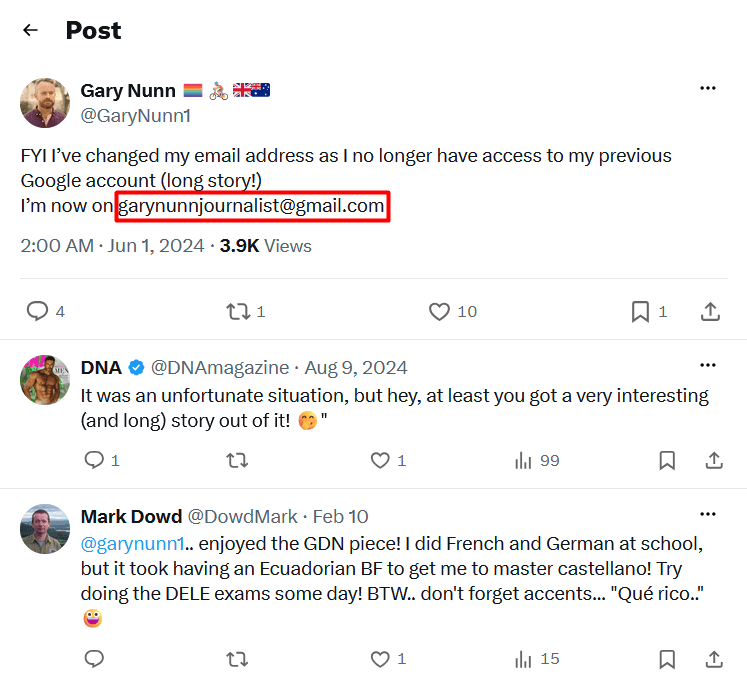
To find emails on Facebook, go through:
- “About” tab → “Contact and basic info” → “Contact info”
- “Intro” section
- Pinned post
- More rarely: Regular posts or comments
For example:
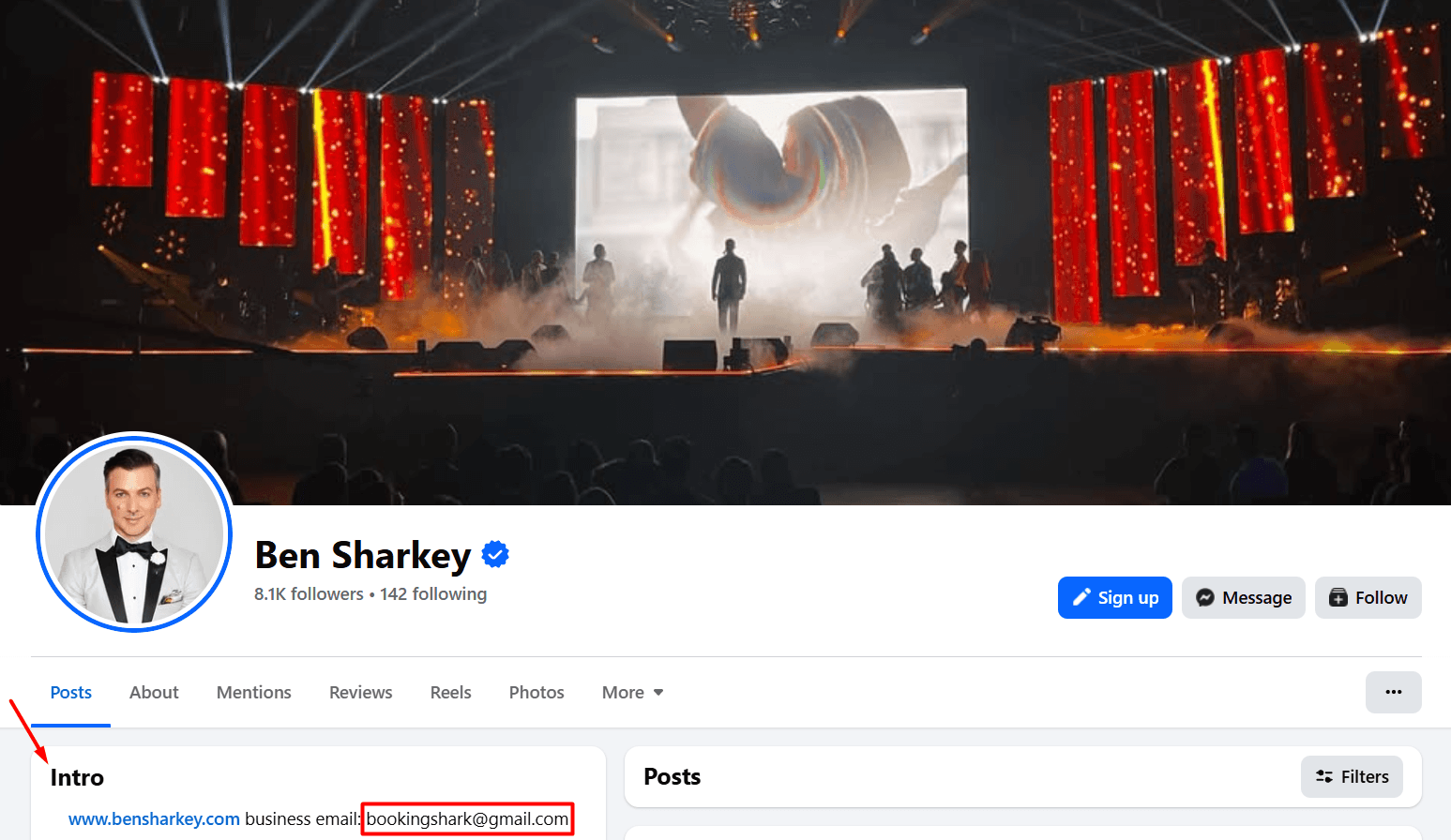
Google search with operators — Best for narrowing down an exact result
When you already know the user’s name, job title, company, or social media profile handle/username, a simple search engine query is just a waste of time.
Instead, use advanced search operators like site: or quotation marks to make Google look exactly where and what you want, across the open web, without endlessly browsing through tons of irrelevant pages.
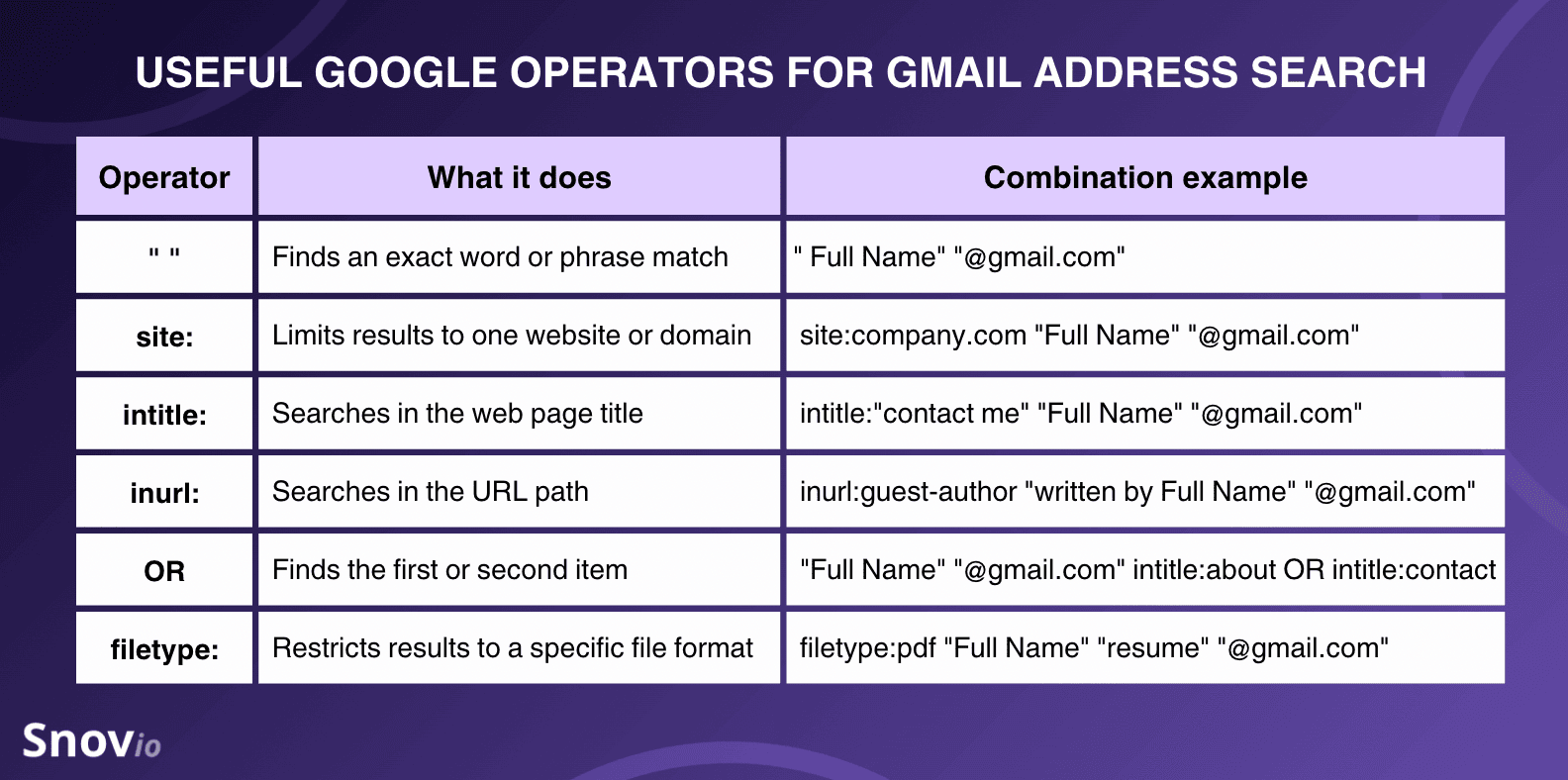
Depending on your needs, pick the right combination of operators from the table below.
| If you need to… | Combination example |
|---|---|
| Look up a Gmail address by name only | “Full Name” “@gmail.com” intitle:about OR intitle:contact |
| Search by name + website | site:website.com “Full Name” “@gmail.com” |
| Search by name + other details like location, position, company, etc. | “Full Name” “Job Title” “City” “@gmail.com” |
| Find someone’s Gmail address by their LinkedIn profile | site:linkedin.com/in/profile-slug “@gmail.com” |
| Search for business email addresses on LinkedIn | site:linkedin.com “my work email” OR “my business email” “@gmail.com” OR “@company.com” |
| Find a Gmail email address on any social media profiles | site:socialmediachannel.com “contact me at” OR “email me at” “@gmail.com” |
| Look up addresses in resume or CV PDFs | filetype:pdf “Full Name” “resume” “@gmail.com” |
| Search for Gmail email addresses in publicly shared Google Sheets or Docs | site:docs.google.com OR site:drive.google.com “Full Name” “@gmail.com” |
| Get addresses from blog articles or guest posts | inurl:blog OR inurl:guest-post “written by Full Name” OR “author” “@gmail.com” |
Follow these instructions on how to search for a Gmail address with Google’s operators:
- Choose the proper combination or compile search operators for your specific needs.
- Type your query into Google’s search bar and press Enter.
- Scan all the snippets to find a Gmail email address.
- Copy and save it.
For example:
When using the combination “Full Name” “Job Title” “email” “@gmail.com,” I found the user’s Gmail address in the AI Overview. And the first snippet confirmed it, too.
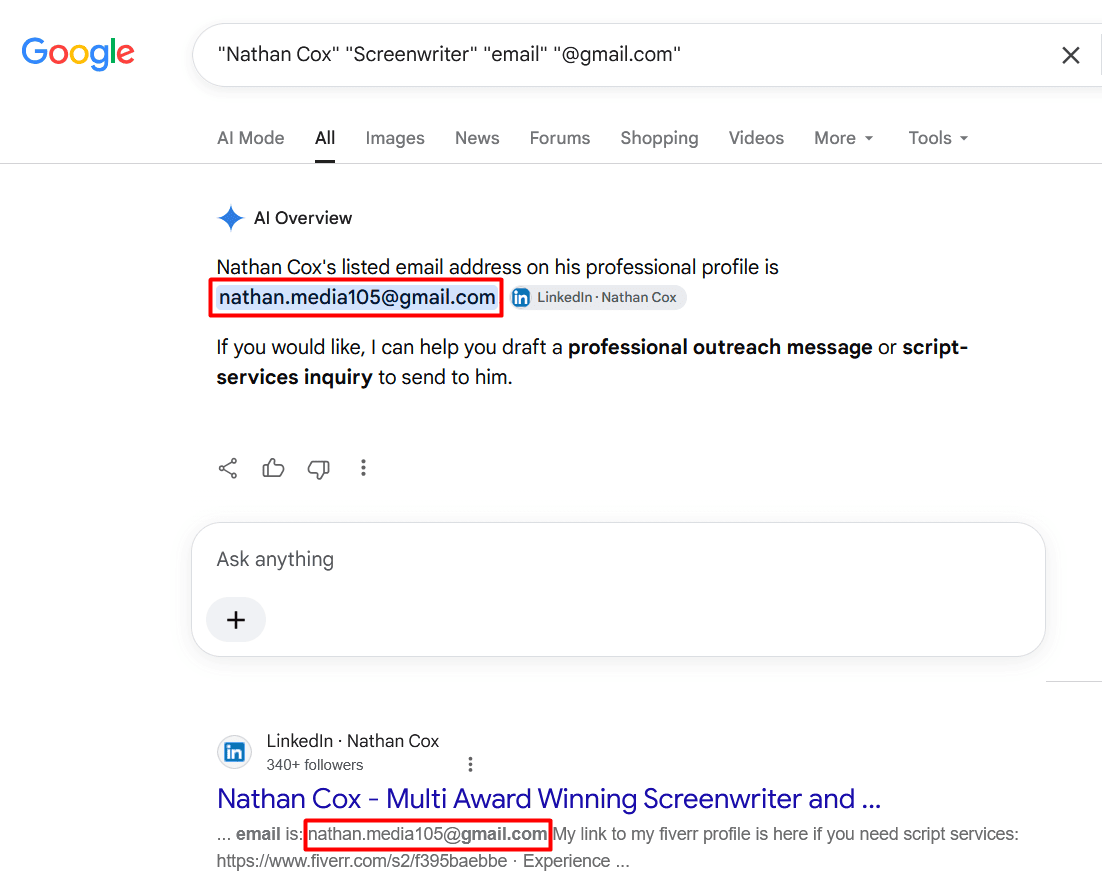
However, I wasn’t that lucky with other emails and spent at least half an hour trying different combinations.
Email patterns — Best for identifying and validating an email format
I put this manual method last on the list because it presupposes some guesswork. But I still found it highly useful for pinpointing a Gmail email pattern, especially if it’s a corporate or job-related address.
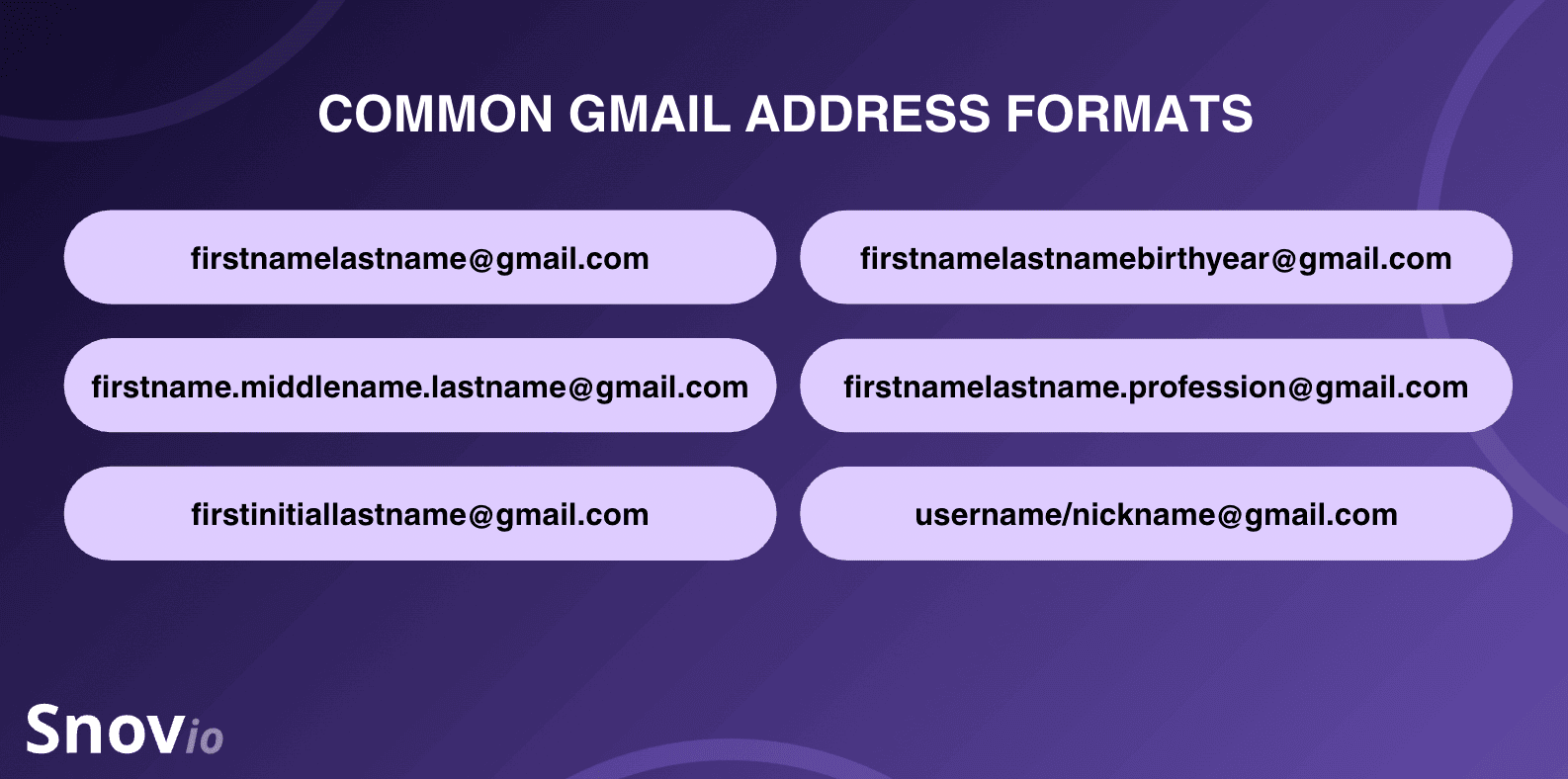
Most people rely on one of the email formats, such as these:
- firstnamelastname@gmail.com (e.g., samsmith@gmail.com)
- firstname.middlename.lastname@gmail.com (e.g., john.lucas.martin@gmail.com)
- firstinitiallastname@gmail.com (e.g., s.garcia@gmail.com)
- firstnamelastname+birthyear@gmail.com (e.g., janesmith1992@gmail.com or janesmith92@gmail.com)
- firstnamelastname+profession@gmail.com (e.g., lisadoetattoo@gmail.com or mayapatel.art@gmail.com)
- Social media username/nickname@gmail.com (e.g., barewolf666@gmail.com)
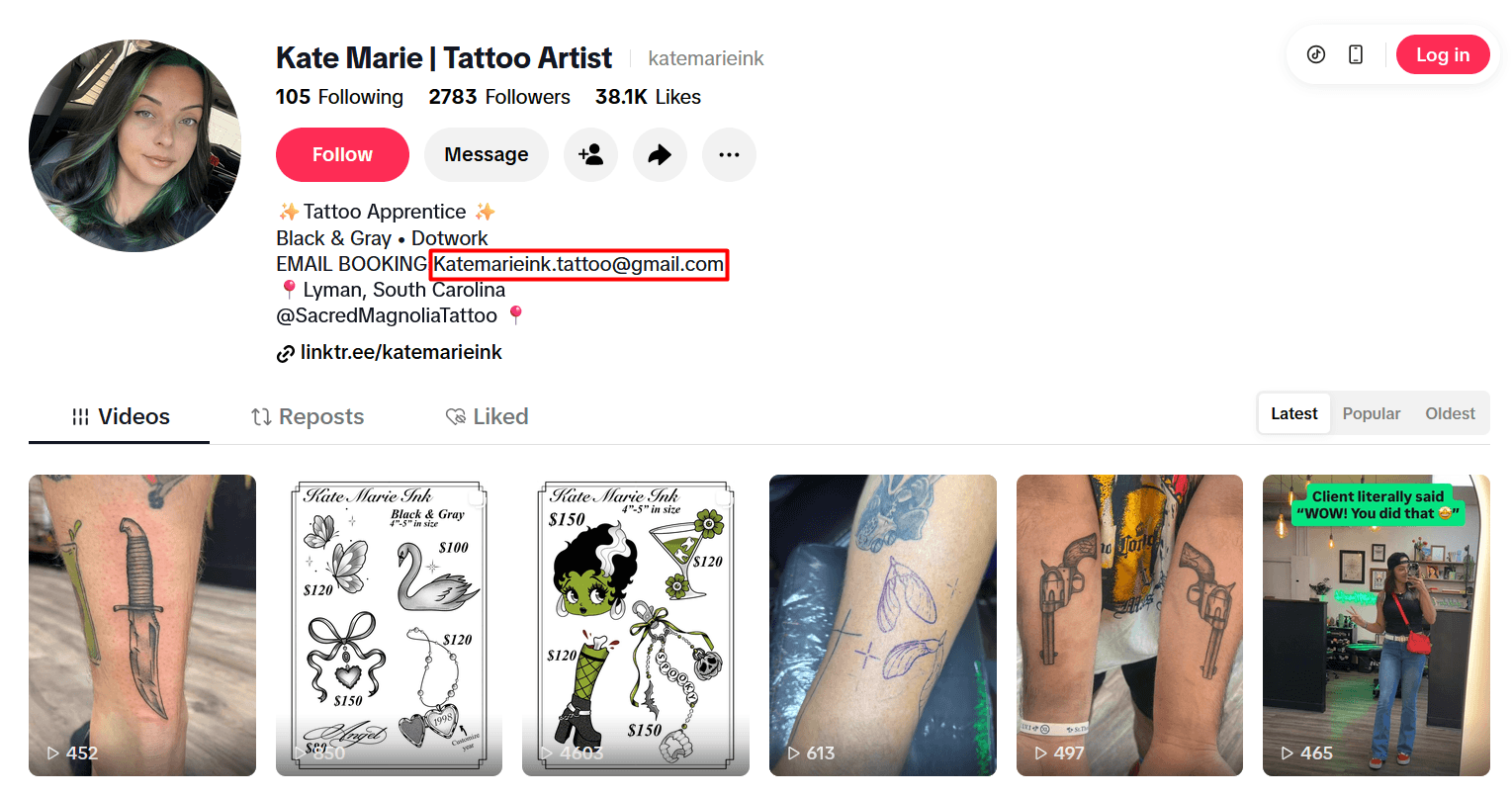
For example:
When I tried to find emails on TikTok, I came across dozens of profession- or hobby-driven Gmail email addresses like this.
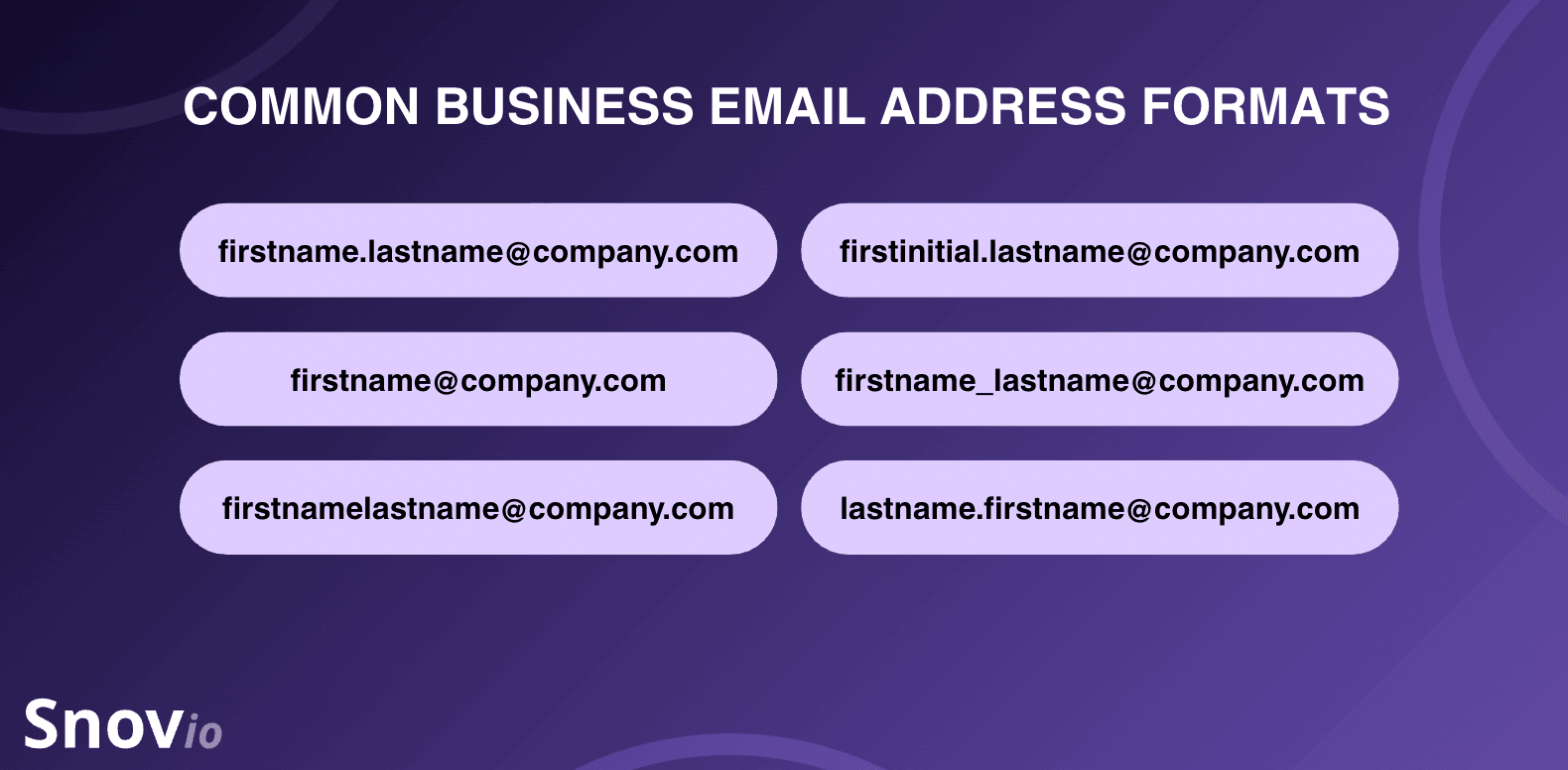
Companies usually standardize employees’ email addresses in the same format with a custom corporate domain like @company.com, while using a Google Workspace subscription and Gmail as their email service provider (ESP).
For instance, if you know one person’s address at a specific company, you can guess everyone else’s by applying the same pattern. Explore the most common business email patterns in the following infographic.
Don’t forget to validate the email pattern you identified. Pay attention to the correct email address format and syntax to ensure it doesn’t have a space between elements, a missing @ character, or a mistyped domain like gnail.com.

How to look up a Gmail address automatically
Bare-handed email digging works, but the major drawback is that it cannot help you find Gmail addresses quickly and in bulk.
These 2 automatic methods do the heavy lifting: a dedicated email lookup tool and an email-finding browser extension.
Email finder tool — Best for searching Gmail addresses fast and at scale
Email finders offer the fastest email lookup services, especially if you want bulk searches with minimal time spent. They’re ideal for quick lead generation as they fetch results in just a few seconds. The limitation? As a rule, they require a paid subscription for high-volume email discovery, although they do offer free trials first.
Here’s how to use them for finding a Gmail address:
- Select a reliable email lookup tool: Pick one of the best email finders like Snov.io’s Email Finder, Hunter, Apollo, Skrapp.io, or Anymail Finder.
- Sign up for a free trial or register a paid account: Free trials are best for one-off searches. If you need a larger email volume, choose a paid tier.
- Decide on the search method: You can typically find a Gmail address by name, domain, location, or even the user’s LinkedIn profile URL.
- Start your email lookup process: For instance, if you know the person’s name, type it into the tool’s search bar and apply additional filters if needed.
- Save or export the result: Most finders let you download results as a CSV file or export them straight to your CRM or Google Sheets.
For example:
I searched for Gmail addresses, both single and bulk, with the Snov.io Email Finder.
Single Gmail address search example:
To find the prospect’s business contact, I used single Email Search to look up a Gmail address by name and domain.
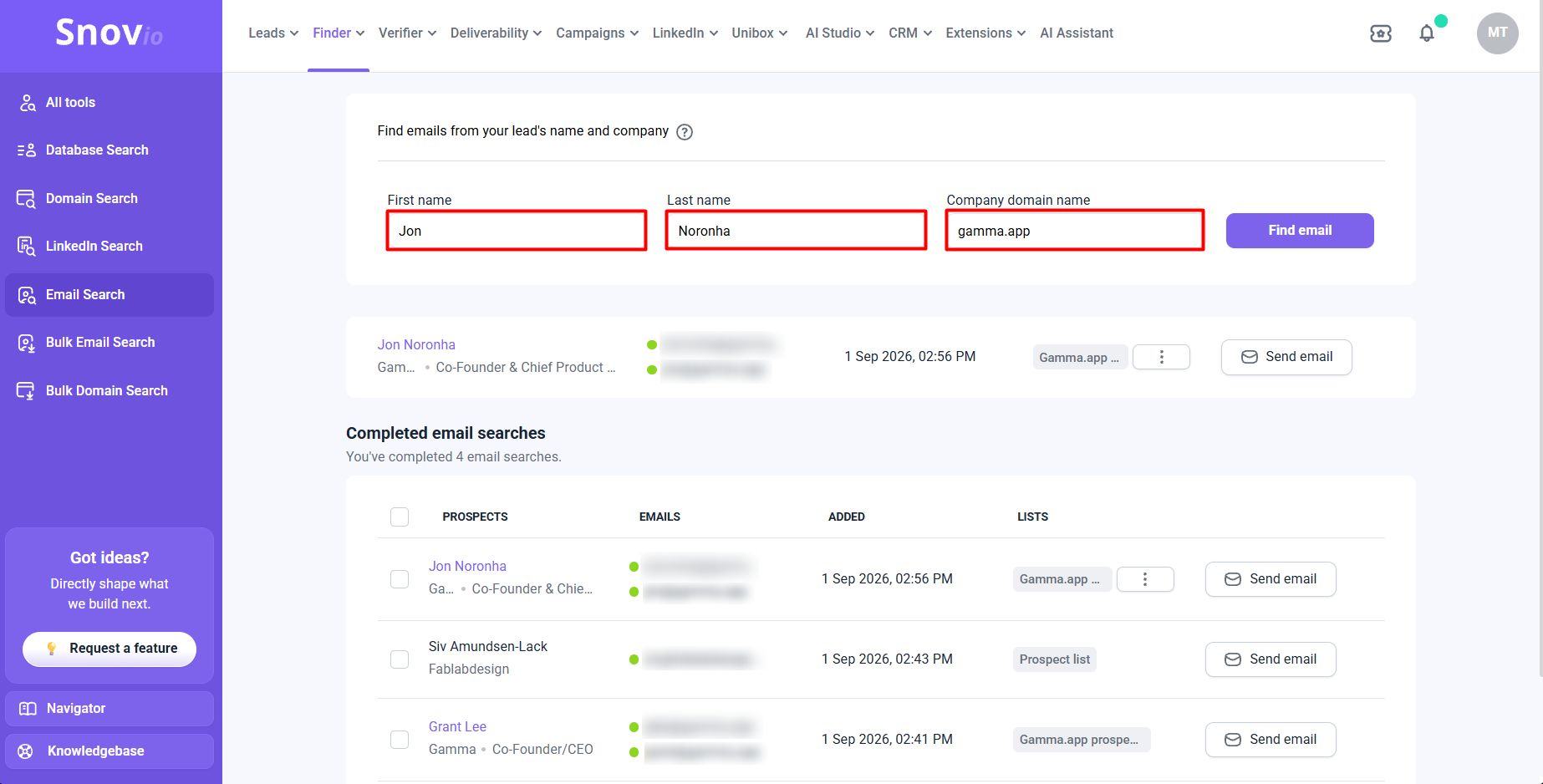
After several successful searches, I saved leads with corporate Gmail addresses to my prospect lists.
Snov.io also pre-verifies emails, helping you save only valid ones (green status), and identifies ESPs automatically once you add them to a prospect list within the app. Even if users prefer custom business domains, you can see small icons representing mailbox providers next to each email address and sort by provider, if needed.
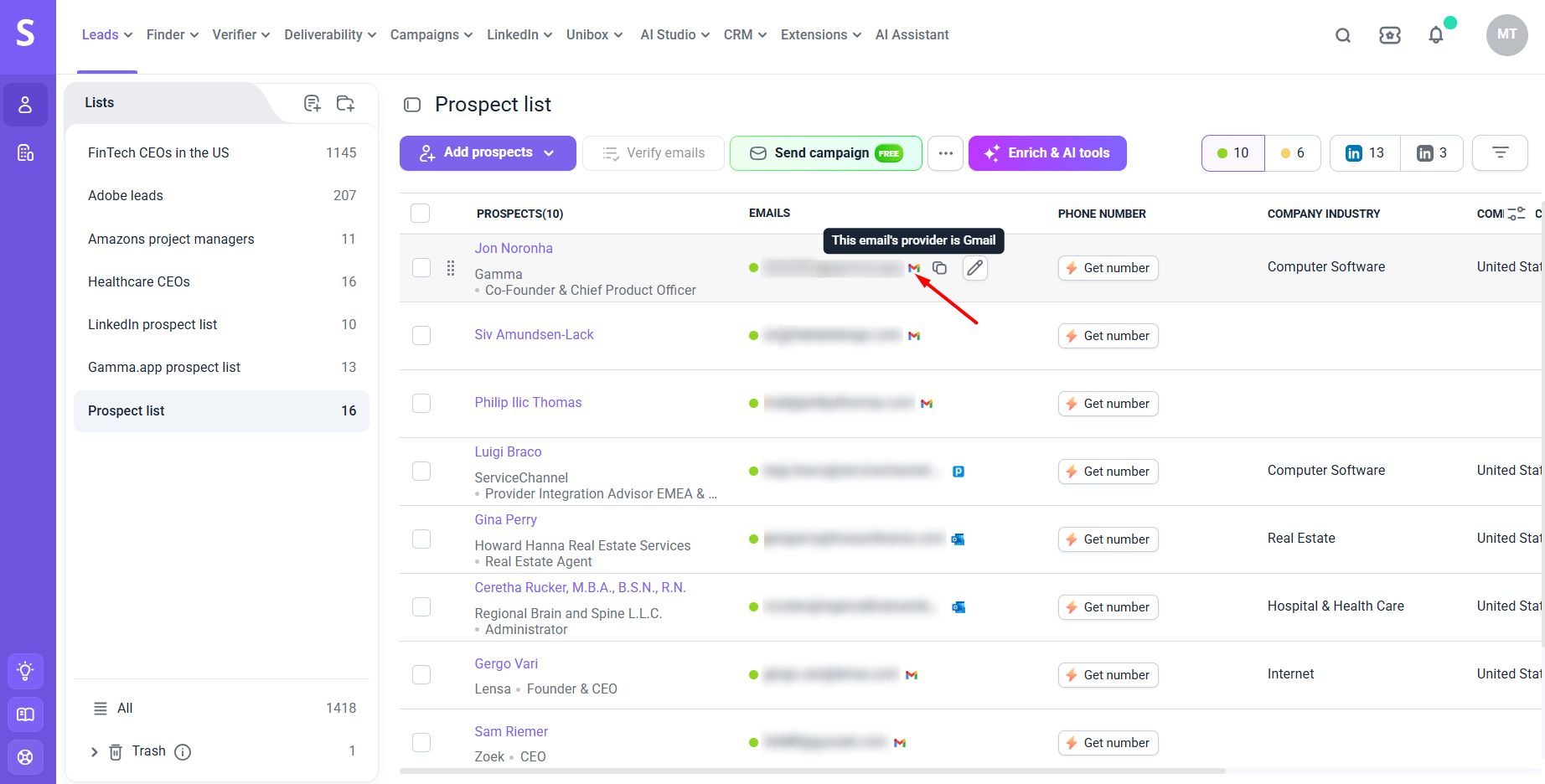
Bulk Gmail address search example:
For bulk email discovery, I used Snov.io’s AI-powered Database Search to find “FinTech CEOs in the US with the company size of 1–10 employees” in bulk.
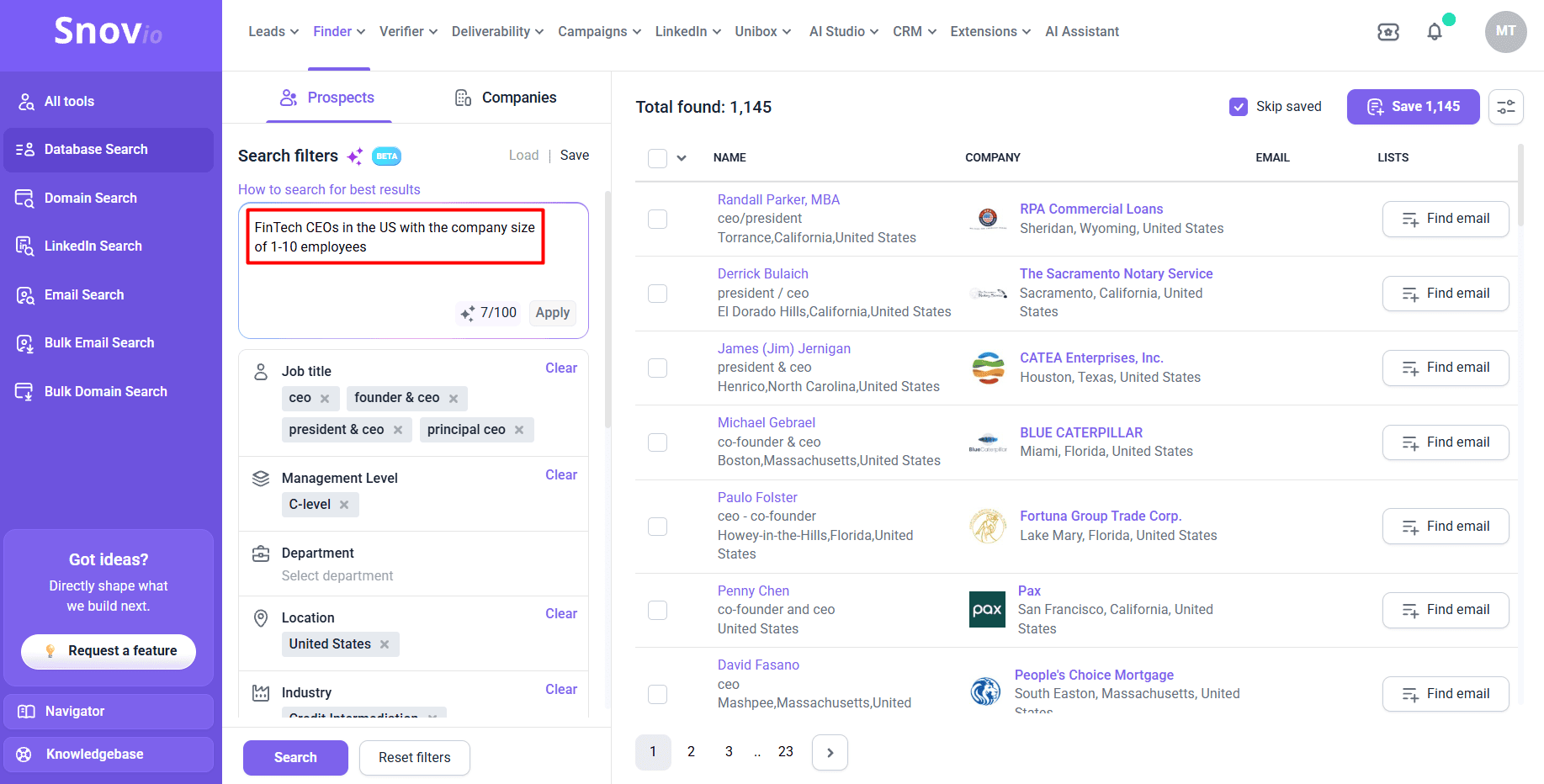
When I saved the targeted leads to my prospect list, I filtered them by “Valid emails” only and email provider — Gmail.
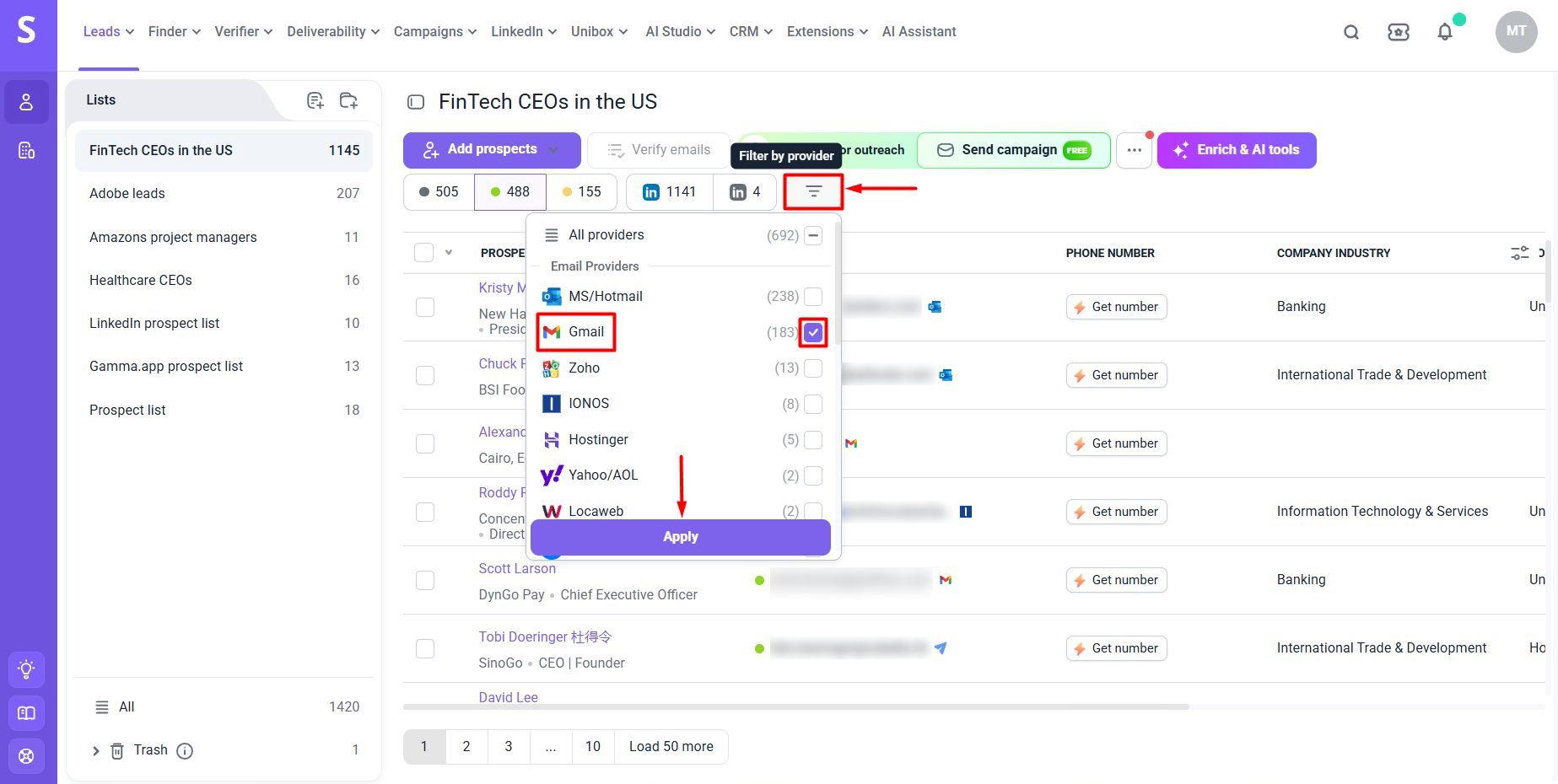
As a result, I got a Gmail-only lead list ready for sending a cold email campaign.
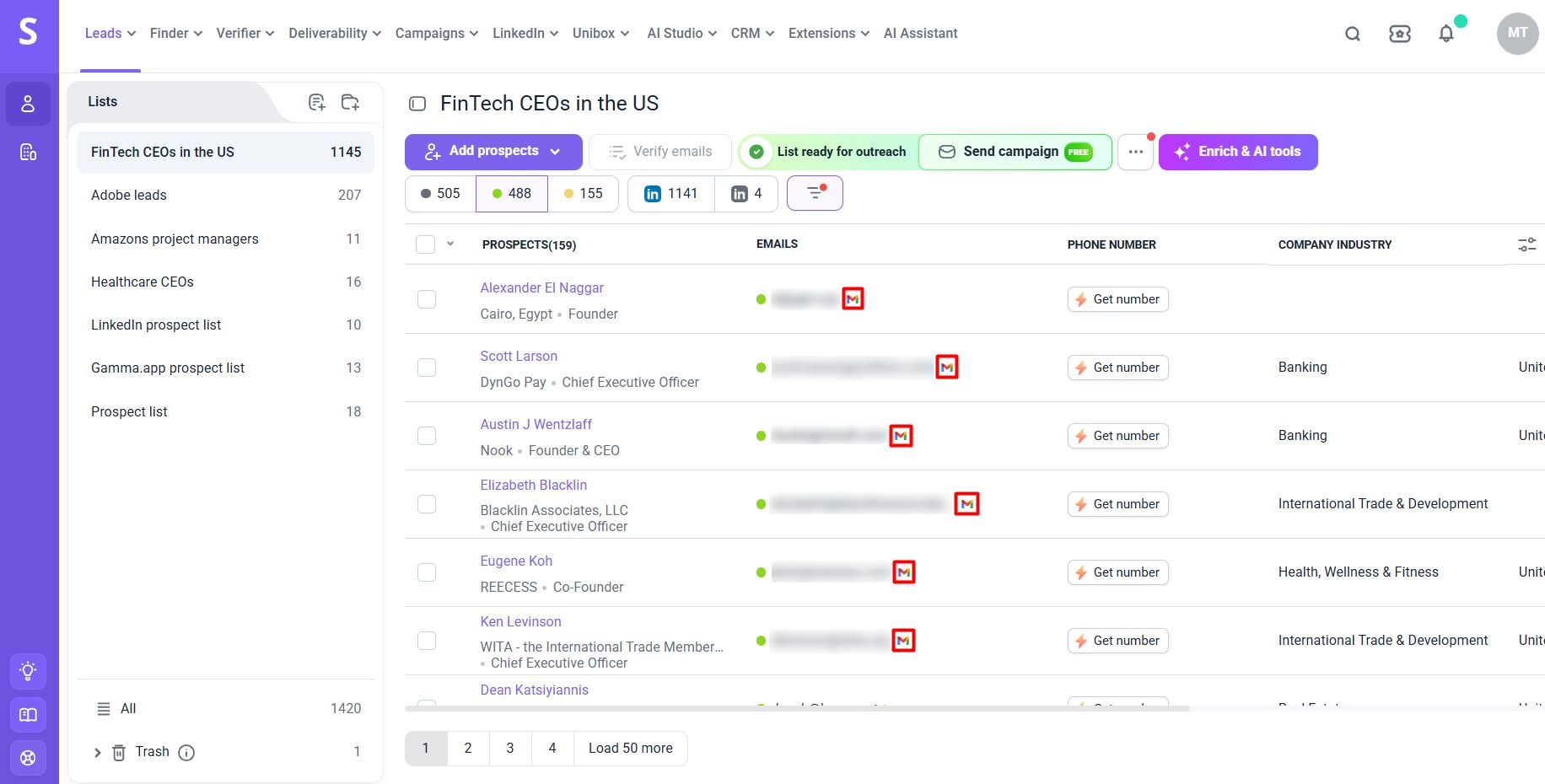
With Snov.io, you can also collect Gmail emails in bulk by uploading a list of lead names and company domains (Bulk Email Search), LinkedIn profile URLs (LinkedIn Search), or explore other lookup options in detail.
Email-finding extension — Best for capturing Gmail addresses on the fly
Email-finding extensions do almost the same job as finders but right on the spot, where you’re already browsing, whether it’s a personal or company website, a Google search results page, or a social media profile.
Most email finders additionally offer browser extensions to find emails.
Here’s how to look up a Gmail address with Snov.io’s Email Finder extension:
- Install it from the Chrome Web Store.
- Once installed, log in or sign up for a Snov.io account (the extension needs an active account to track your searches and save leads to your prospect lists).
- Open any website or Google’s search results page.
- Launch the extension from your browser’s “Extensions” list and let it capture a Gmail address (or several addresses) from the page.
- Save the result(s) to your prospect list within the platform.
For example:
I opened the “About us” page of the targeted website, launched the extension, and saved all the business Gmail addresses to my prospect list without ever leaving the tab.
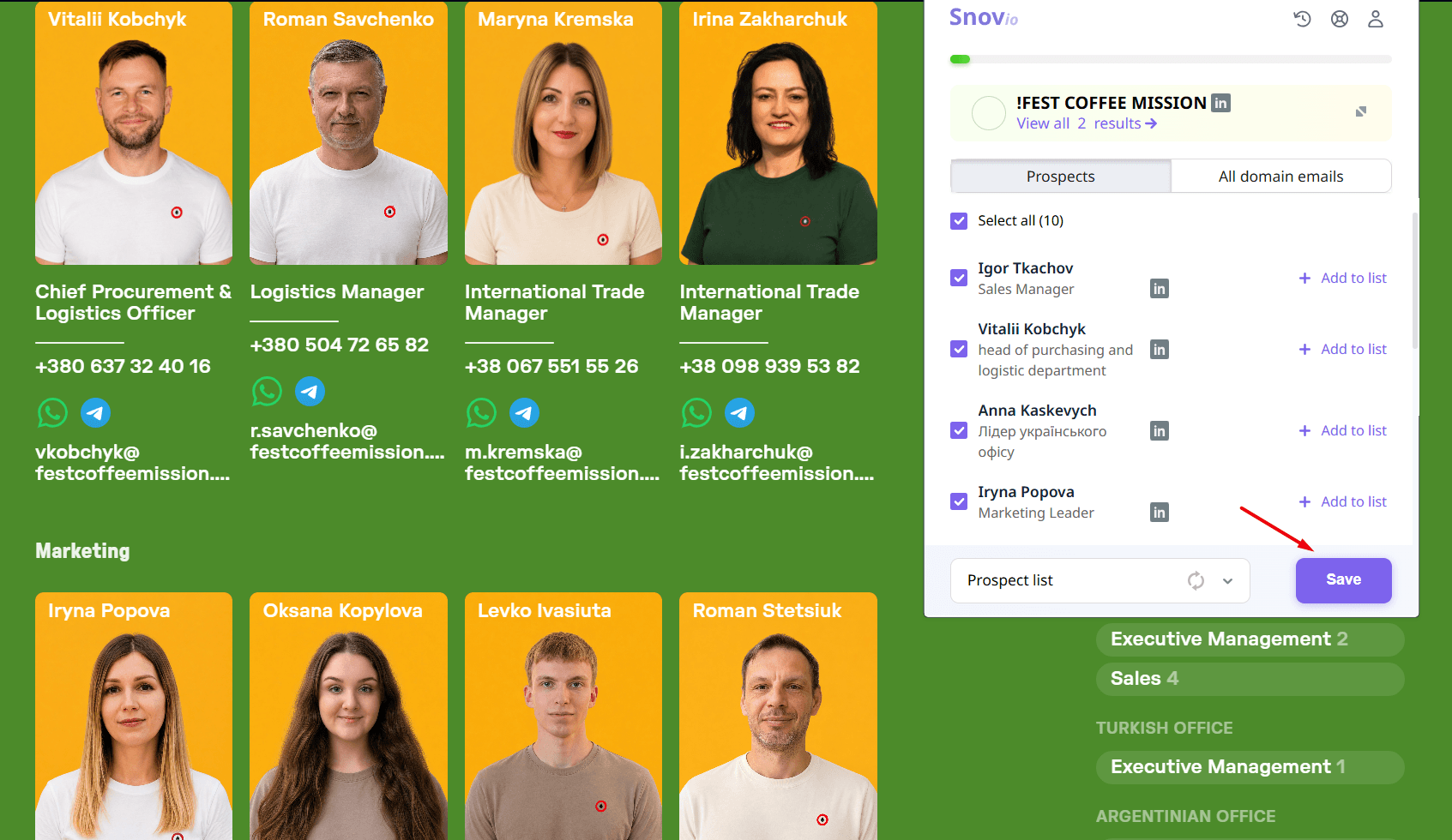
Then, I could open the list in the app and manage (filter, enrich, send an email campaign, etc.) or export it as CSV, XLSX, or Google Sheets.
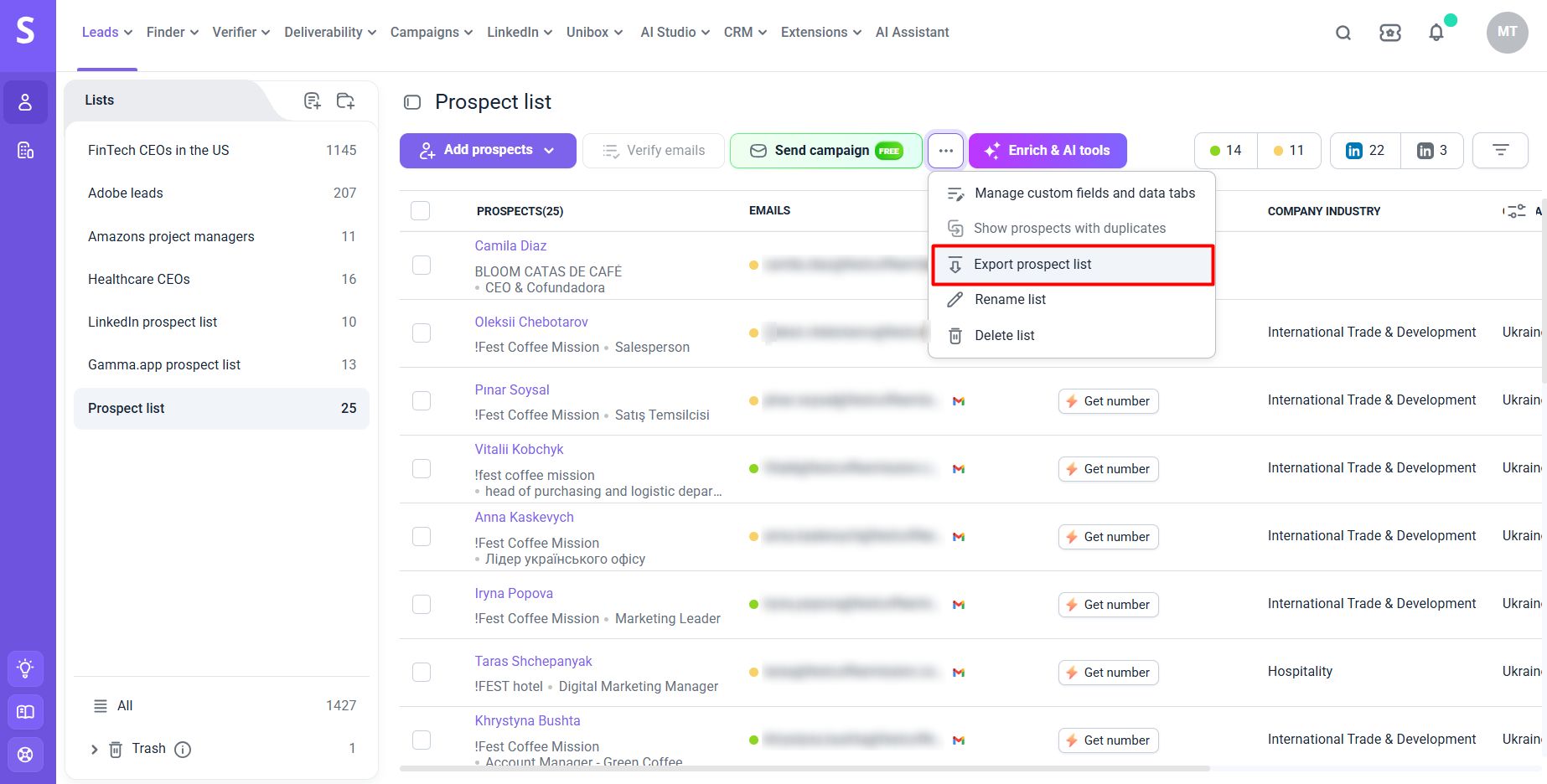
Now, here’s how to find someone’s Gmail address with Snov.io’s LinkedIn Email Finder extension:
- Install the extension from the Chrome Web Store.
- Once done, sign up or log in to your Snov.io account (this extension likewise requires an active account).
- Open any personal profile, company profile, or search results page on LinkedIn.
- Launch the extension and let it find a Gmail address (or several addresses) from LinkedIn.
- Save the result(s).
For example:
I followed these steps to get a Gmail address from a LinkedIn user’s profile and save it directly to my prospect list.
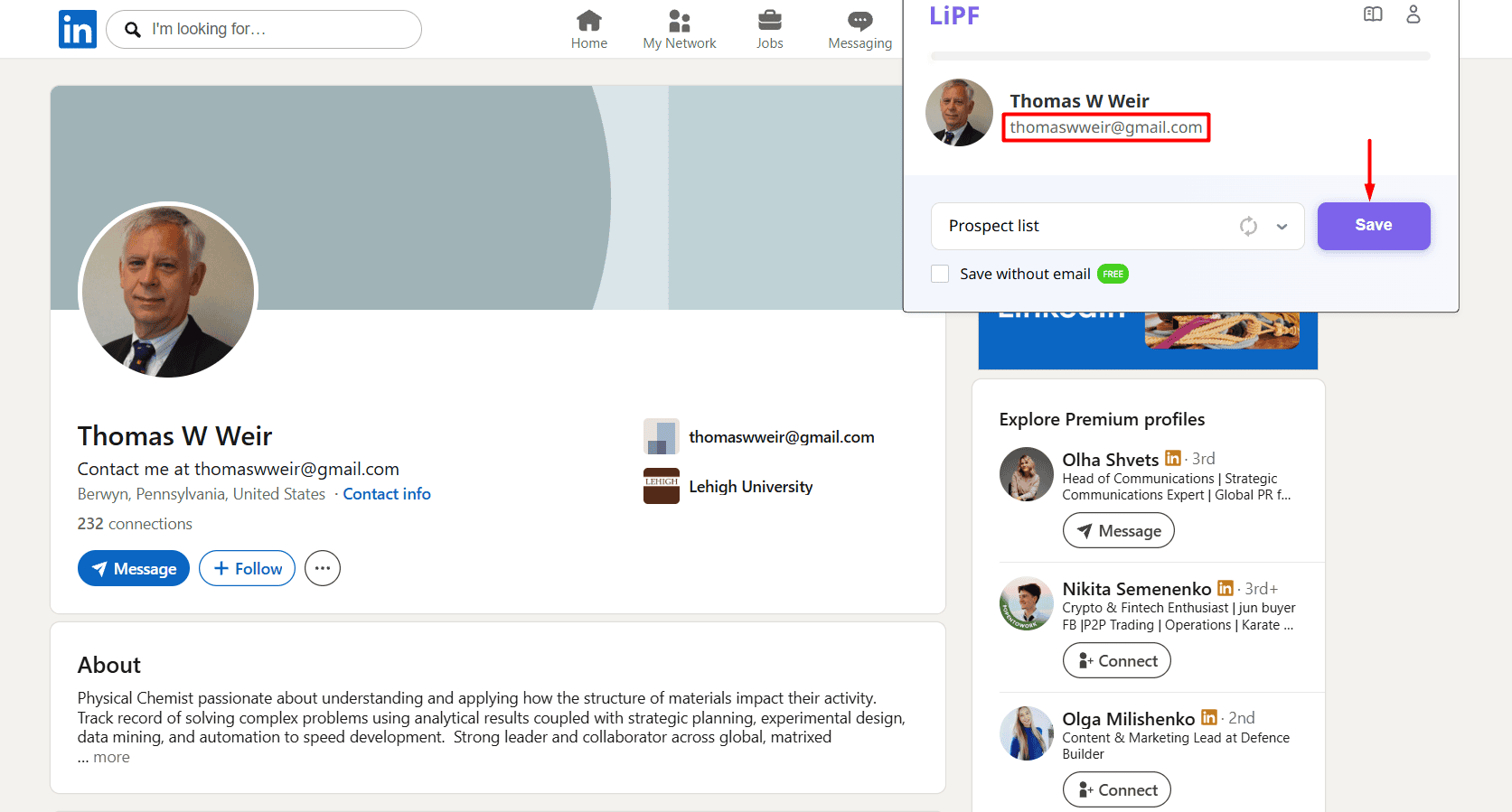
It also works smoothly with LinkedIn Sales Navigator, so you may generate Gmail leads on the fly — no need to break your flow.
Here’s one of my go-to workflows with Snov.io. I search for leads via Sales Navigator, then use the LinkedIn extension to scrape data and import it into the Snov.io prospect list. After that, I connect the list to email and LinkedIn campaigns, and when I receive replies, I start tracking deals in the native CRM.
General Manager at Salestech



How to search for a Gmail address more effectively: Manually or automatically?
After trying both approaches, I benchmarked them against each other using criteria like speed, cost, accuracy, advantages, and limitations in the following table.
| Factor | Manual methods | Automatic methods |
|---|---|---|
| Best for | One-off lookup | High-volume lookup |
| Who benefits from it most | Individuals looking for someone’s personal Gmail address | Sales teams, lead-gen agencies, recruiters, or others collecting Gmail addresses in bulk |
| Speed | Slow — 1 email at a time | Fast — hundreds or even thousands at once |
| Cost | Free | Free trial or plan; then paid tier for bulk lookups |
| Accuracy | Depends on when the contact info was updated last | Typically pre-verified, highly accurate results |
| Key advantages | Absolutely free search; full transparency on where exactly each Gmail address comes from; works even for niche or hard-to-find people if you’re persistent enough | Huge time-saving potential; most email finders also perform a verification step on top of finding; some also enrich profiles with job titles, social media profiles, or phone numbers alongside emails |
| Key limitations | Very time-draining; don’t scale past a couple of contacts; results heavily depend on your luck and persistence | Free-tier credits run out fast; may fail to find newly published or niche-specific Gmail addresses; may be expensive for solo users |
Which way is more effective?
My honest verdict: The one that fits your unique situation best. If you only need a single Gmail address, start with a manual lookup. But if you’re building a larger list and need it fast, an automatic email finder saves hours and boosts productivity.
Moreover, these approaches aren’t contradictory or mutually exclusive. You can use them in a combo. For instance, start your search with Google’s advanced search operators and collect emails from snippets with an email-finding extension.
How to check if a Gmail address is valid — 3 methods compared
What does a valid Gmail address mean in the first place?
A valid Gmail address generally has the following credibility markers:
- Correct format markers: The part before the “@” is 6–30 characters long; ends in @gmail.com (more rarely, @googlemail.com) or a custom domain if the company is on a paid Google Workspace plan; no typos or missing characters
- Technical/deliverability markers: Domain has valid MX records; the mail server accepts the Gmail address during an SMTP handshake; an email verifier returns a “valid” status, not “unknown” or “unverifiable”
- Behavioral markers: Recent user activity associated with that address elsewhere (e.g., an active social media profile, community or forum posts, blog articles, etc.)
During my search, I tried the 3 best techniques for checking whether a Gmail address is valid. See a quick comparison table below with the pros and cons of each.
| Method | Manual or automatic? | Best suited for | Pros | Cons |
|---|---|---|---|---|
| Google account recovery page | Manual | Checking one specific personal address before outreach | Completely free; no extra tool needed; fast for a one-off check | Doesn’t identify the email owner’s name; several checks in a row can trigger reCAPTCHA verifications and security alerts; not practical for many addresses |
| Native hover verification | Manual | Confirming an address you already know inside Gmail, Google Docs, or Google Sheets | Instant check; built right into Google’s services; shows the first and last name or username if available | Time-consuming for bulk email validation; requires extra attentiveness |
| Third-party email verifier | Automatic | Verifying and cleaning a list of addresses before sending an email campaign | Bulk-checks several addresses simultaneously; pinpoints disposable or risky addresses; helps reduce the bounce rate and spam complaints | Free trial/plan is limited; can’t always be 100% accurate, especially about “catch-all” emails |
Further on, I’ll explain how each works in detail. So, let’s get into the specifics.
Google account recovery page (manual)
This is actually the page Google uses to help someone recover their account by email or phone number. However, you can repurpose it as a lightweight check.
Here’s how to do it:
- Go to the Google account recovery page.
- Type the Gmail address you want to validate into the input field.
- Press Enter and wait for the result.
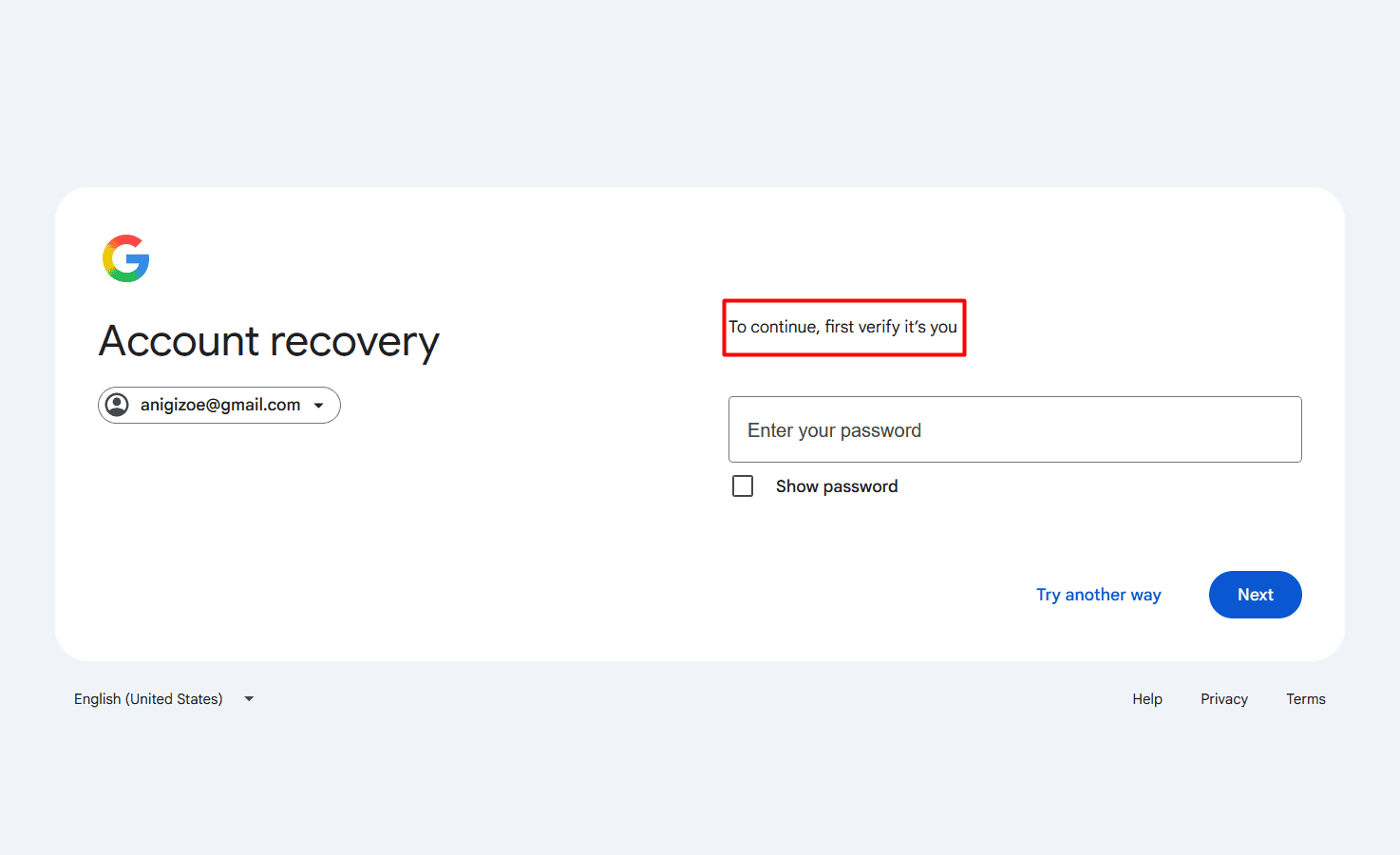
If Google takes you to a password identification step and asks, “To continue, verify it’s you,” the address is valid and linked to an existing account.
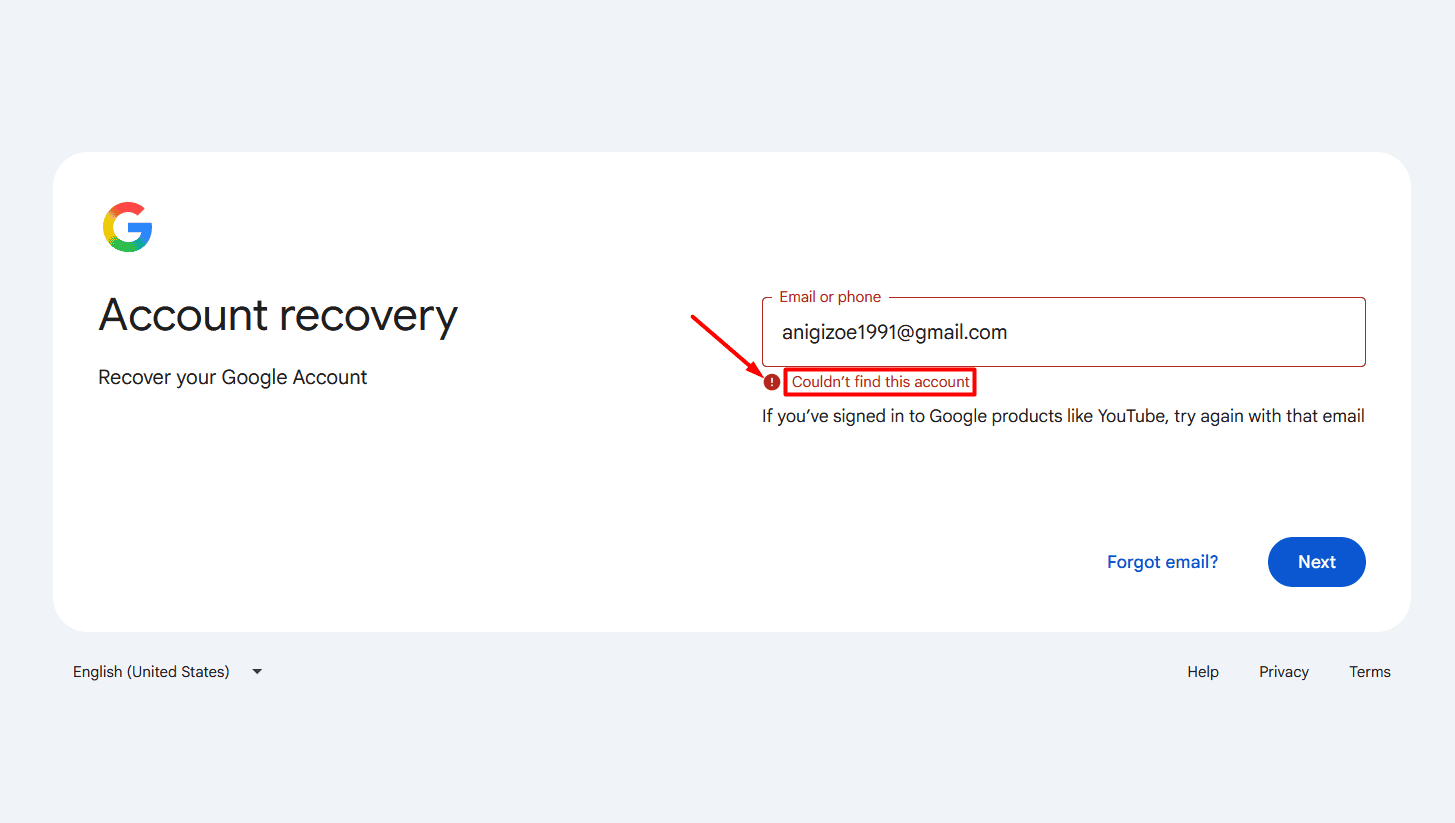
If Google can’t find the account and returns an error like “Couldn’t find this account,” it either doesn’t exist or was deleted.
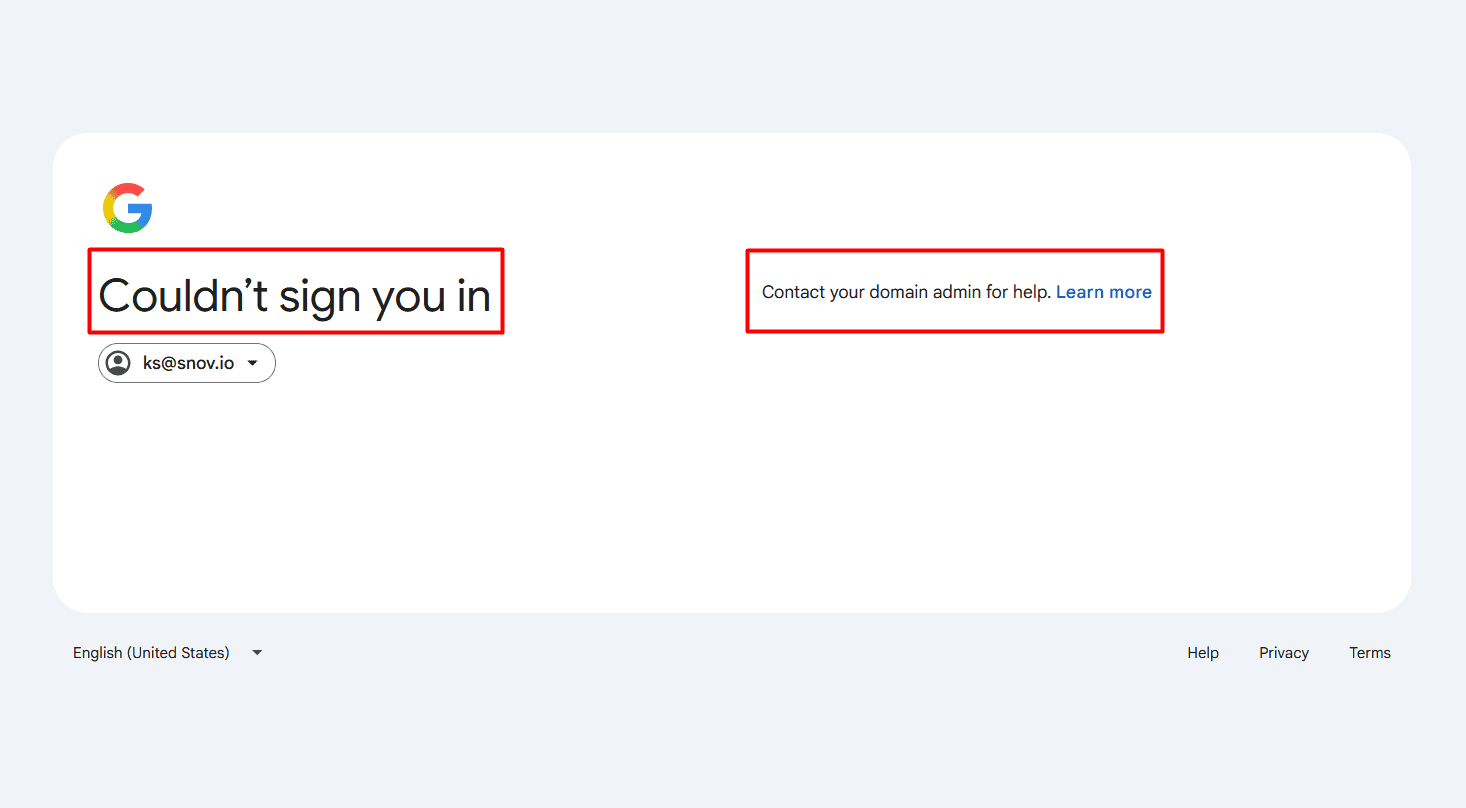
If the company uses a Google Workspace corporate environment and their admin has disabled personal password resets for employees’ Gmail addresses, it will return the message: “Couldn’t sign you in. Contact your domain admin for help. Learn more.”
Native hover verification (manual)
This is another manual method I tested to check Gmail address validity.
Here’s how to use this technique:
- Sign in to your Gmail account.
- Click “Compose” and type or paste the Gmail address into the “To” field.
- Hover the mouse over it.
- A small preview card should pop up showing the profile photo or the initial letter of the user’s name if it’s a real, active Gmail account.
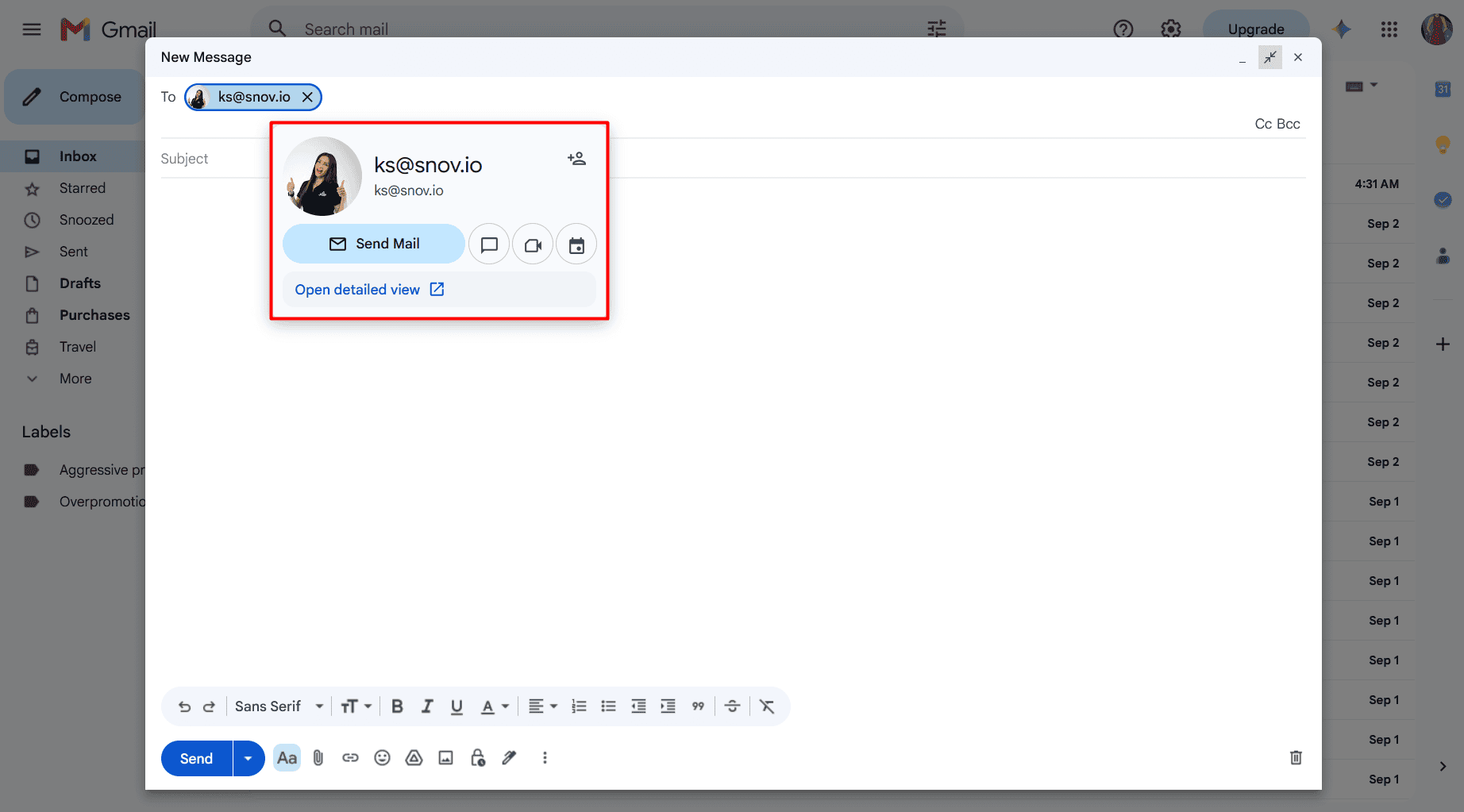
Even if there’s no photo or Google fails to generate the initial letter, it shows a generic blue human silhouette. If valid, it also displays the text “From user’s Google profile” when you hover over it.
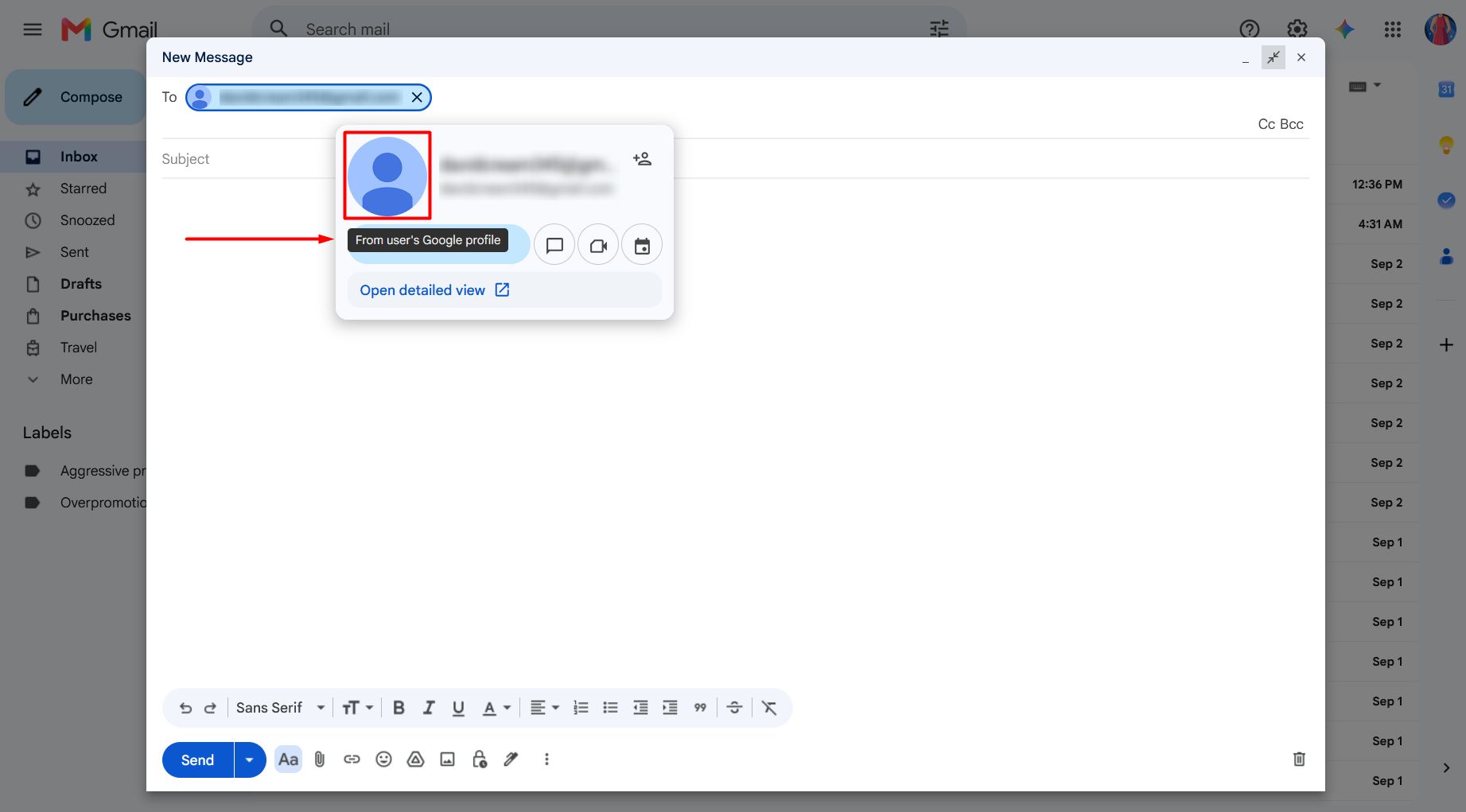
If not, it’s an invalid email from a non-existent Gmail account.
For example: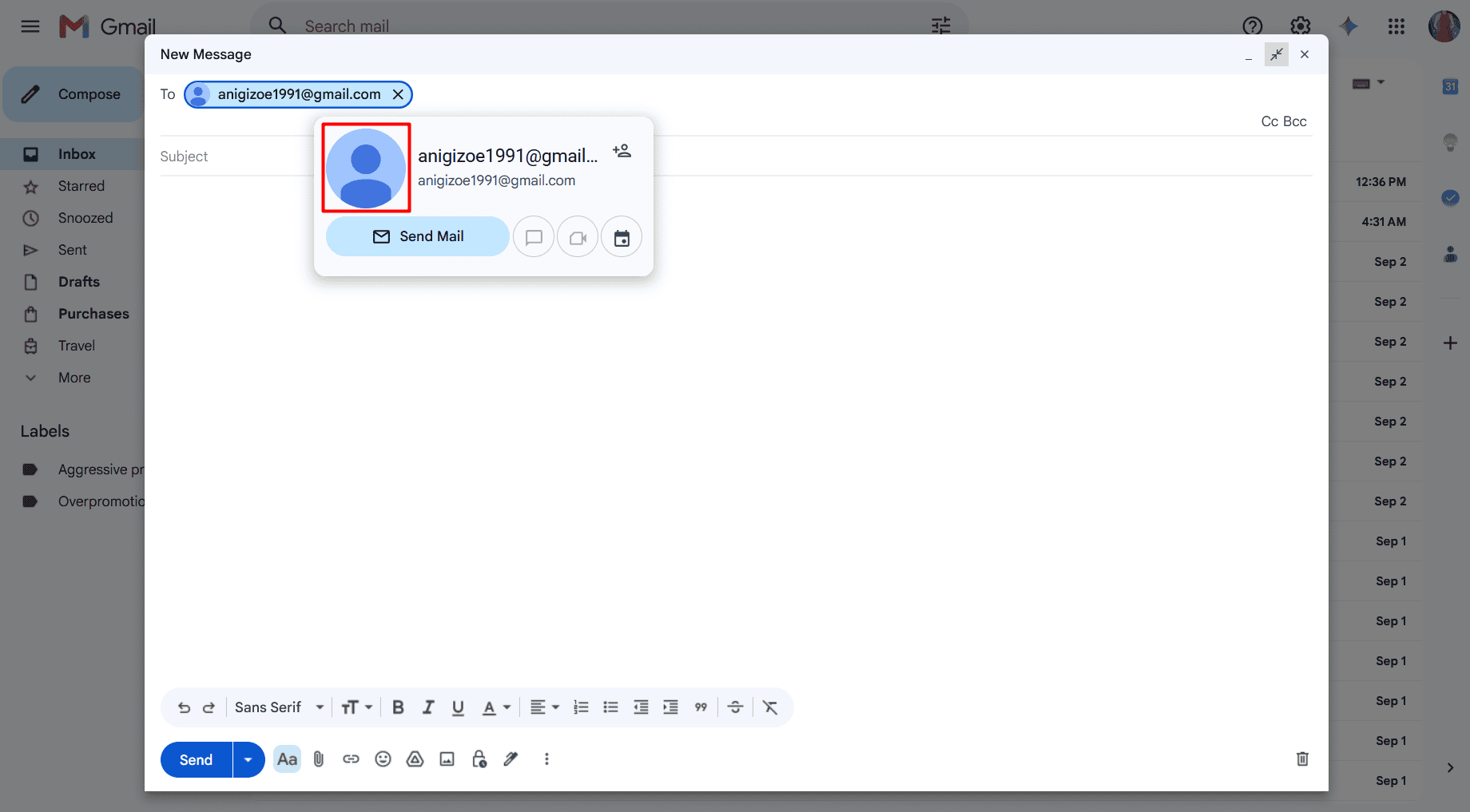
As you can see, there’s no “From user’s Google profile” note displayed.
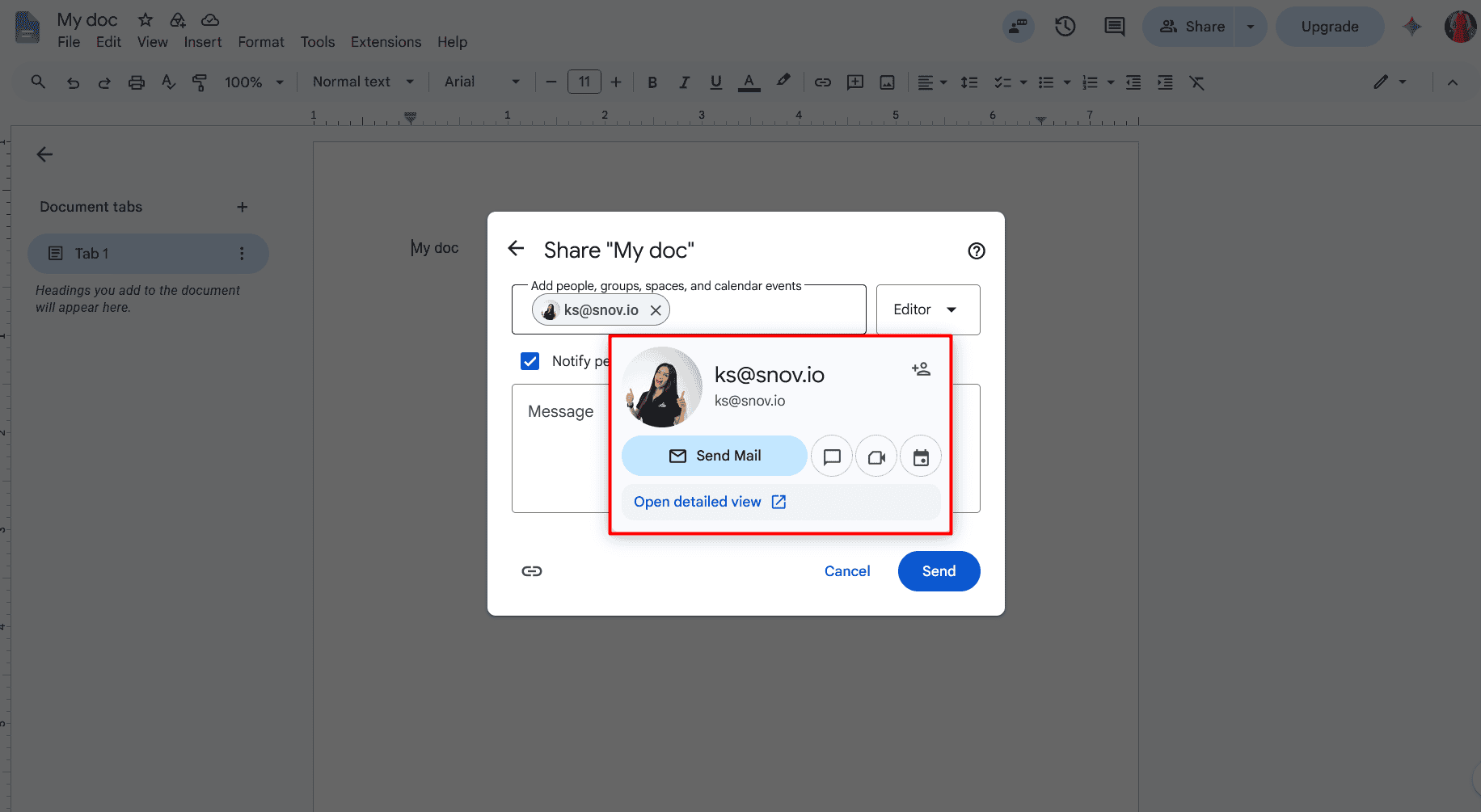
This hover verification method also works in all the other Google services like Docs or Google Sheets. When sharing a Google Doc or Sheet with someone, enter their email address in the pop-up bar (“Add people, groups, spaces, and calendar events”), then hover over it to see the preview card with the user’s name and profile image.
Third-party email verifier (automatic)
Compared to manual methods, email verifiers provide automatic email validation services that check more than just a correct email format and serve as huge time-savers, especially for bulk verifications.
For example, take Snov.io’s Email Verifier, which offers a 7-layer validation process with guaranteed 98% accuracy, including:
- Mailbox existence check
- Domain check
- Email server check (SMTP)
- MX record check
- Syntax check
- Gibberish check
- Catch-all check
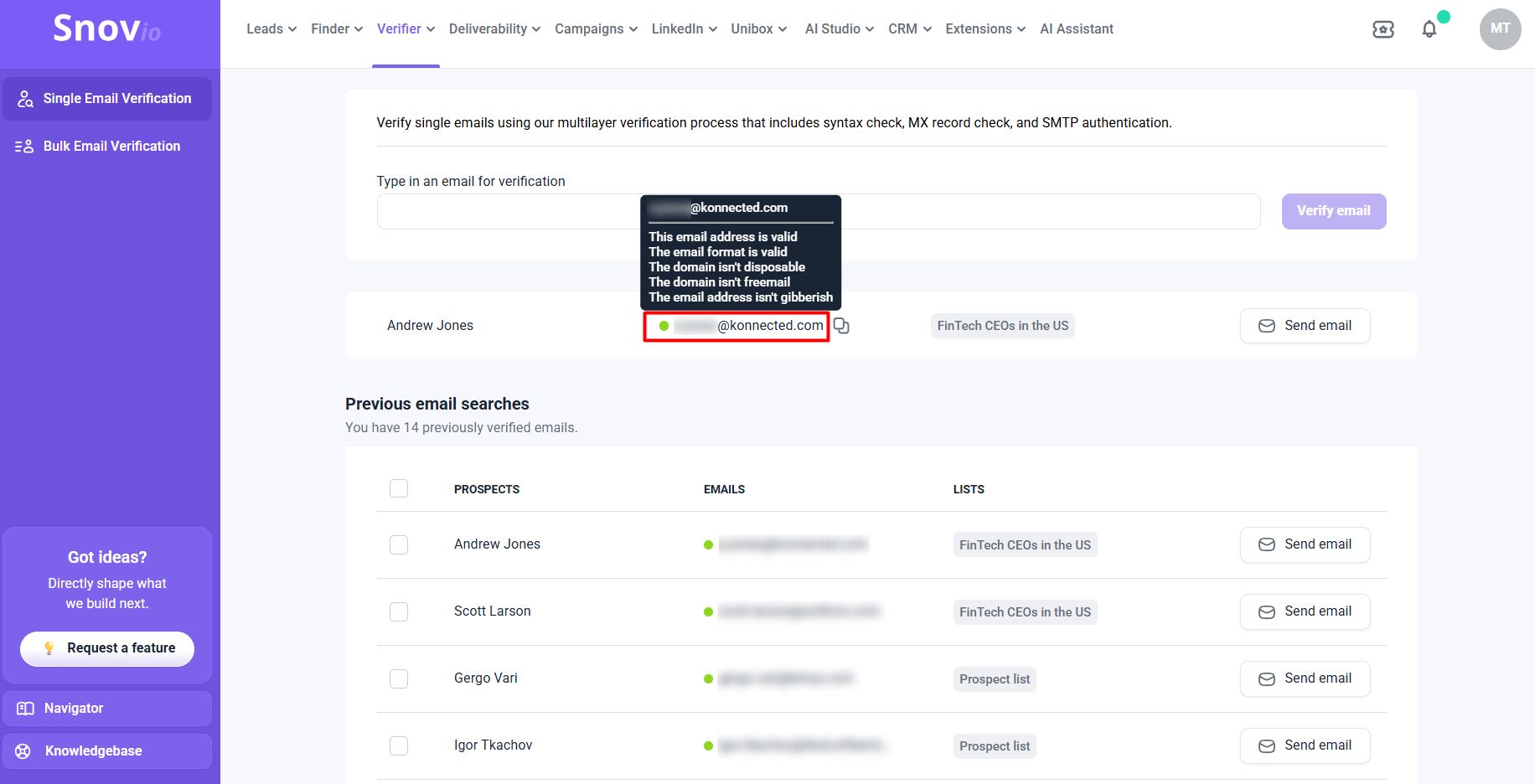
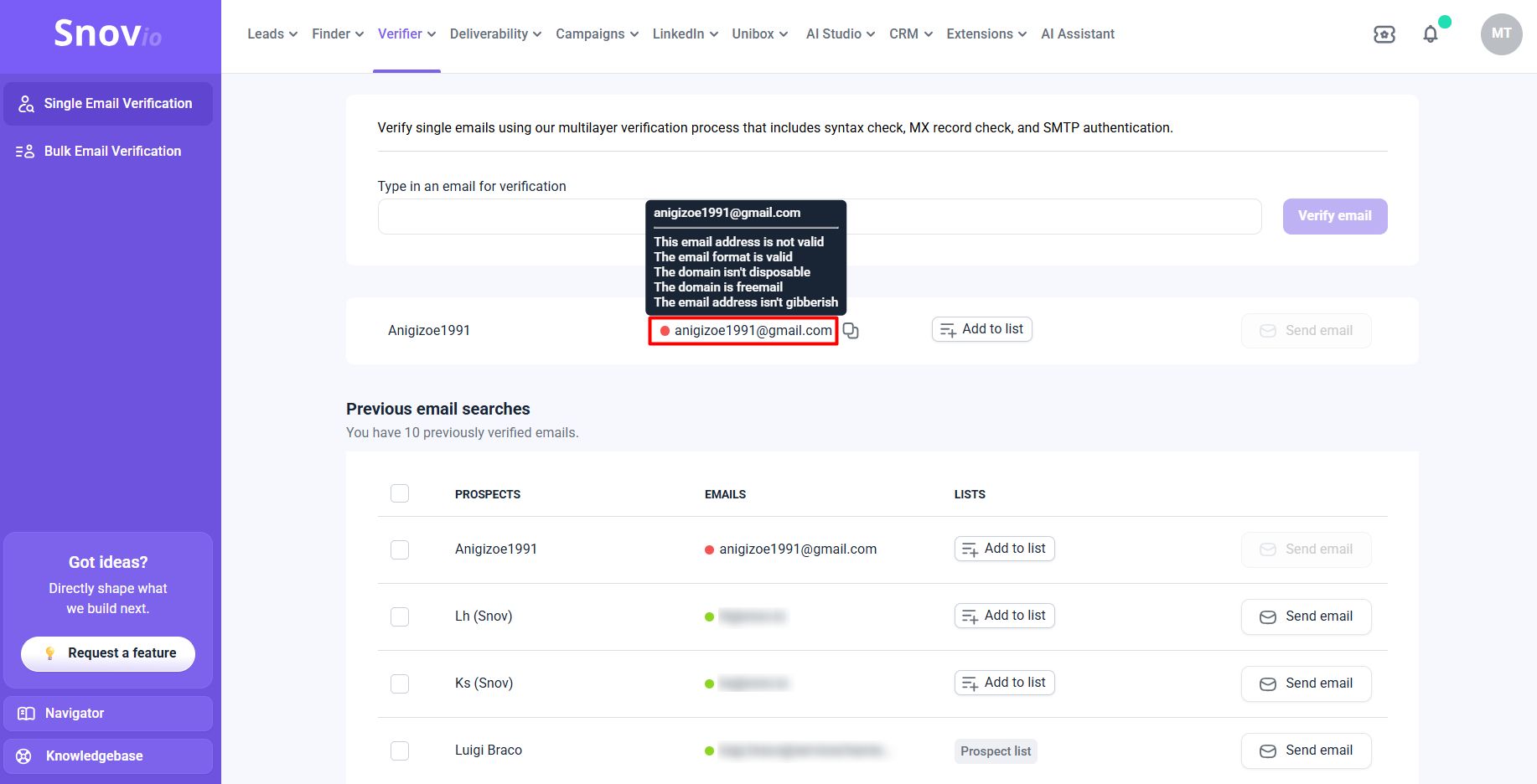
After checking an email address, it shows one of the three statuses: green (valid), yellow (unverifiable), and red (invalid).

For example:
I typed in an email for verification, clicked “Verify email,” and saw a valid corporate Gmail address with the green status in less than a second.
And here’s an invalid one that I tried to guess by applying the popular email format with the birth year: anigizoe1991@gmail.com.
The bulk email verification feature is even more useful when you have a list of Gmail addresses to verify, whether for cold outreach or other purposes. You can add them manually or upload/drop a file with up to 100,000 lines per verification.
Gmail boasts the highest deliverability rate among the major mailbox providers. It’s a fact. But only if you send your campaign to valid and active Gmail addresses. Sending to invalid and inactive ones ruins your sender reputation, and you risk your sending domain being flagged as spam. Best practice is to verify every Gmail address you find and re-verify and clean your email list before launching new campaigns, especially if it’s been over 2 weeks since the last verification.
Email Deliverability Specialist at Snov.io



Key takeaways
Since Gmail doesn’t share a list of its users’ email addresses, you can find and verify only those that are publicly available or searchable.
Here’s how:
- Manual lookup methods → Gmail search/autocomplete, public profiles, social media accounts, Google operators, and email format identification are free and ideal for one-off lookups but eat up too much time
- Automatic lookup methods → Email finders and browser extensions are fast and easily scalable for bulk searches but require paid subscriptions with free trials for a couple of test searches
- Verification methods → Google’s account recovery page, Gmail’s native hover verification, and email verifier can help you check if a Gmail address is valid
Whenever you’re ready to start looking for Gmail addresses at scale, try Snov.io’s Email Finder and Verifier for free. Search, validate, and export leads in just a few clicks or reach out to them right there, on the spot, from one platform.