TL;DR:
Renting an email list means paying another company to send your message to their existing audience. It promises fast reach but comes with legal, deliverability, and ROI risks. See how it compares to building your own contact base in a table below:
If you’re deciding whether to rent an email list or build your own, read this article first. It will help you choose the smarter option.

Buying or renting contact information for cold outreach was popular years ago, but I still see some businesses do it. In this article, I’ll uncover the nuances of email list rental, explain why I don’t recommend it, and offer better alternatives for your successful campaigns.
Key points:
- What is email list rental?
- Email list rental vs. lease vs. purchase: what’s the difference?
- Pros and cons of email list rental
- How much does email list rental cost?
- How to choose email list marketplaces and providers
- Better alternatives to email list rental
- How to build your own email list with Snov.io
What is email list rental?
Email list rental is a marketing arrangement where you pay to access an audience owned by another company. In most cases, it doesn’t mean receiving the raw collection of addresses. Instead, the provider sends an outreach campaign on your behalf.
This type of third-party contact sharing is used in very specific circumstances, such as event promotions, product launches, and one-off B2B announcements.
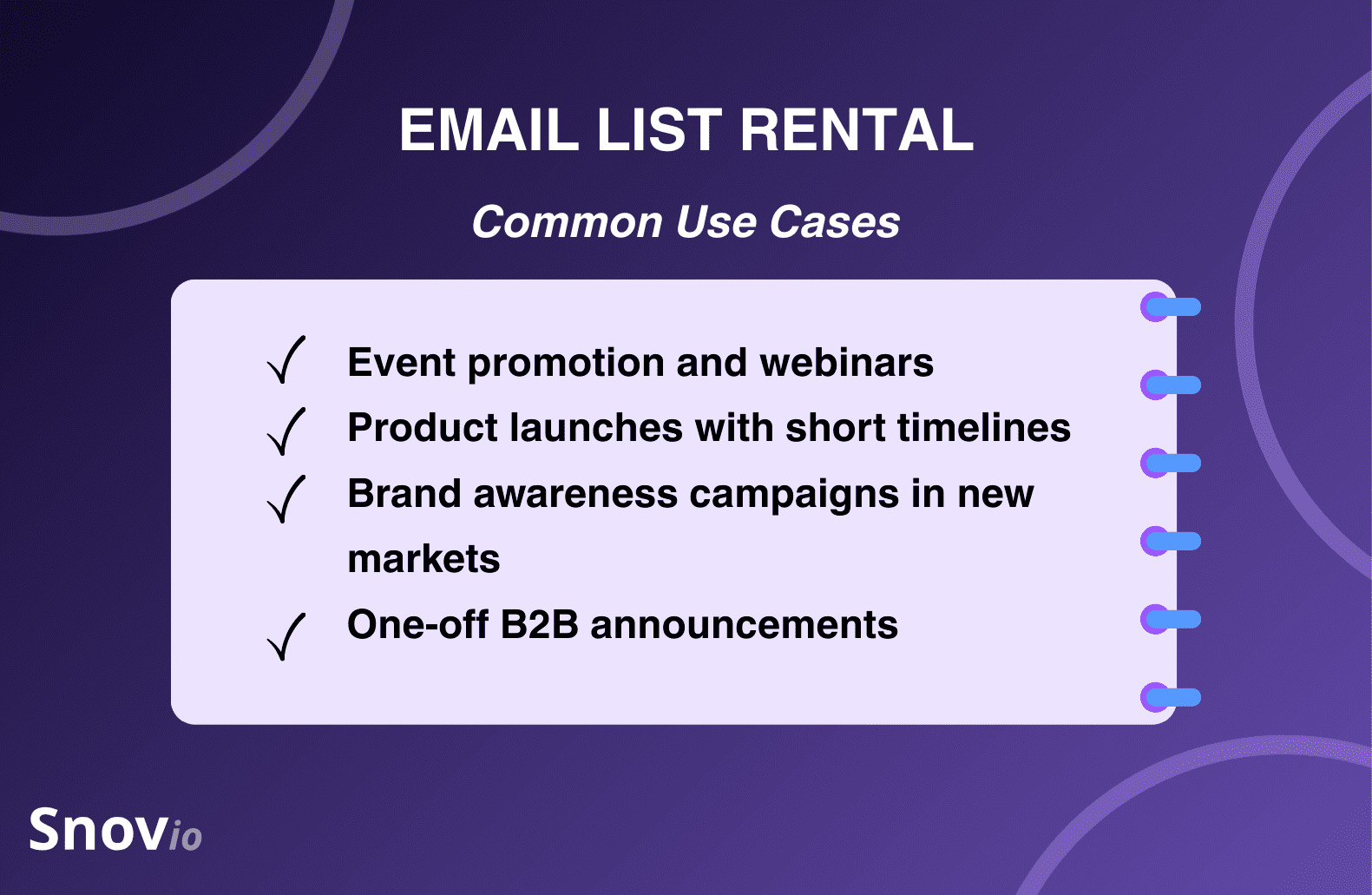
If you’re looking for email list rental services outside the above use cases, there aren’t many options available. And even if you find providers willing to share their audience, the results of such collaboration are unpredictable. We’ll discuss why in more detail below.
Email list rental vs. lease vs. purchase: what’s the difference?
Email list rental differs from email purchase or lease, though these terms are often mixed. Let’s draw the line between them:
- Email list rental means you pay for one or more sends to third-party contacts. You never own the data.
- Email list lease presupposes that you get temporary access to the third-party contacts under strict conditions. This arrangement is rare and risky.
- Email list purchase means you buy the data and upload it to your ESP. This is the highest-risk option, as purchased lead data is often non-compliant with modern regulations.
In 2026, reputable email list marketplaces rarely sell data outright. Most position their offers as rentals to reduce liability.
Pros and cons of email list rental
Let’s take a closer look at why people rent email lists and why I don’t recommend doing so except in very specific cases.
Advantages of renting email lists
Sales and marketing specialists often use email list rental services to get the short-term benefits. In particular, this approach:
- Provides fast access to real contacts
- Doesn’t require setting up infrastructure upfront
- Can be useful for testing new markets or messages
These can look appealing, especially for teams under time pressure.
Disadvantages of renting email lists
As mentioned, though, there are plenty of downsides to borrowing someone else’s audience, which are associated with the following risks:
- Deliverability risks. When using email list rental services, you inherit the sender reputation of its owner. If it’s quite low, your campaign won’t have much success.
- Compliance risks. Email list rental services fall into the grey legal zone. Recipients’ consent is often indirect or unclear, while GDPR and CAN-SPAM violations carry real penalties.
- Quality risks. The contact information you’re renting may be outdated or overused, yielding low engagement. Additionally, the audience may just not be relevant to your business.
- Reputation risks. Once your brand has been spotted using email list rental services, your reputation might take a hit.
These factors often result in low marketing and sales ROI.
💡Learn more about why email deliverability matters for your outreach campaigns’ success and, ultimately, for your ROI:
In addition to these risks, you should be prepared to deal with other constraints when you rent email lists.
In terms of access duration, you’ll likely be able to rent an email list for either a single send or a limited number of sends within a short window, with no option to reuse it.
In terms of segmentation, it depends on the provider. Some offer highly segmented lists, filtering contacts by industry, company size, job title, and other attributes. But the more granular the targeting, the more expensive the rental will be.
Costs of email list rental
Email list rental services aren’t cheap. Plus, pricing varies widely. The common pricing model for email list rentals is CPM (cost per thousand sends), but some providers can charge a flat fee per campaign.
Rates usually start around $100 and can reach $300 or more. In many cases, providers also set minimum spending thresholds, meaning you’d need to spend $250 per month or more to have access to data.
The range is so broad because the price of the particular collection of contacts depends on its freshness, targeting depth, sources, the type of audience, and its historical engagement rates. In practice, high-quality lists are expensive, and cheap ones rarely perform well.

How to choose email list marketplaces and providers
Email list rental services usually fall into three groups:
- Media companies monetizing newsletters
- Event organizers renting attendee lists
- Dedicated email list marketplaces acting as brokers
The quality of rented contacts rarely depends on the specific category the provider belongs to. So, when evaluating a provider, focus on:
- How the list was built
- What “opt-in” actually meant for the recipients
- What engagement metrics the recent sends have shown
- Whether the provider shares delivery results transparently
As you know this information, you can compare it to your strategy. Ask yourself: “How would you go about building a contact list? Which metrics would you measure, and what benchmarks would you set?” If your answers don’t align with the provider’s policy, skip them.
💡Legal tip:
Using someone else’s audience is a grey zone in most parts of the world. Pay close attention to the relevant legal frameworks based on the locations you’re targeting. Those can include GDPR (in the EU), CAN-SPAM (in the US), or CASL (in Canada).
For example, under GDPR, consent must be:
- Explicit
- Informed
- Given for a specific purpose
Generic consent to “partner offers” is risky. Non-compliance can result in fines, blacklisting by the mailing service providers, permanent account suspension, and more.
Best practices for compliance when opting for email list rental include:
- Reviewing vendor contracts carefully
- Confirming how and when consent was collected
- Ensuring clear opt-out mechanisms
- Maintaining records of consent and campaign details
Following these practices helps reduce legal consequences and ensures your campaigns remain transparent and compliant.
But let’s be honest: risks still exist. So if your sales rely on consistent cold outreach, I’d recommend you find alternative options to renting email lists.
Better alternatives to email list rental
To create a safer, more reliable lead generation process, I recommend building your own outreach systems.
Get prospects organically
Opt-in email lists consistently outperform rented ones. They drive higher engagement from leads (because they are already interested), give you full control over messaging, and remain in your directory for as long as you need.
There are three most common methods of organic prospecting:
- Website signup forms
- Gated content and lead magnets
- Product demos and free trials
For a growing business, of course, these methods are not enough to deliver a steady stream of leads. That’s where modern prospecting tools come in.
Get leads with prospecting tools
Apart from the above-mentioned methods, you can go outbound to double your lead generation power. Prospecting tools like the Snov.io Email Finder help you get interested leads in minutes.
Key benefits of using prospecting tools as opposed to renting addresses on the email list marketplace include:
- No need to rely on someone else’s judgment or segmentation accuracy. You can quickly segment your contacts into different groups based on role, company, and industry.
- Leads are discovered based on live contact information rather than static data that may be outdated or oversold.
- You can enrich your data as deeply as you need, follow signals, and reach out to contacts that weren’t ready to buy before but might be ready in time.
- No dependency on third-party sending practices. You send from your own domain, warm it up properly, and maintain a clean sender reputation. Prospects hear from you directly, which builds trust.
- You have full control over outreach messages. Whether you want to use already tried-and-true templates, conduct testing, or change your tone of voice, you can do it.
- The total control of how contacts are sourced, contacted, and unsubscribed simplifies GDPR and CAN-SPAM alignment. Meaning, your brand never comes up in shady practices.
But there’s more flexibility, too.
When you find prospects using an email finder and database search, you’re not constrained by one-off access. You can filter leads, enrich them, and reach out multiple times without paying extra. The targeting gets better as your data and campaigns become mature, not more expensive.
With Snov.io, we can segment websites thematically and have 200+ messages sent at once with an attention-grabbing pitch relevant to the website. It has had a huge impact on my team’s link-building efforts and has increased our results significantly: with properly prepared campaigns, the response rate is incredible, usually at 75-80%,
CTO at Neadoo

Plus, when you’re discovering prospects or running campaigns with Snov.io, your account is protected by the platform’s robust security measures, such as database protection, encryption in transit, data recovery, GDPR and CCPA compliance, etc.
How to build your own email list with Snov.io
If you want to avoid risks and high costs associated with email list rental services, building contact lists with such prospecting tools as Snov.io is the best option you can try.
For convenience, I’m sharing this quick step-by-step guide on creating your prospect list with this tool.
-
Define your ICP
Snov.io AI ICP and Buyer Persona Generator helps you define your ideal customers by analyzing your product information, target market characteristics, and common buyer pain points for more targeted lead generation.
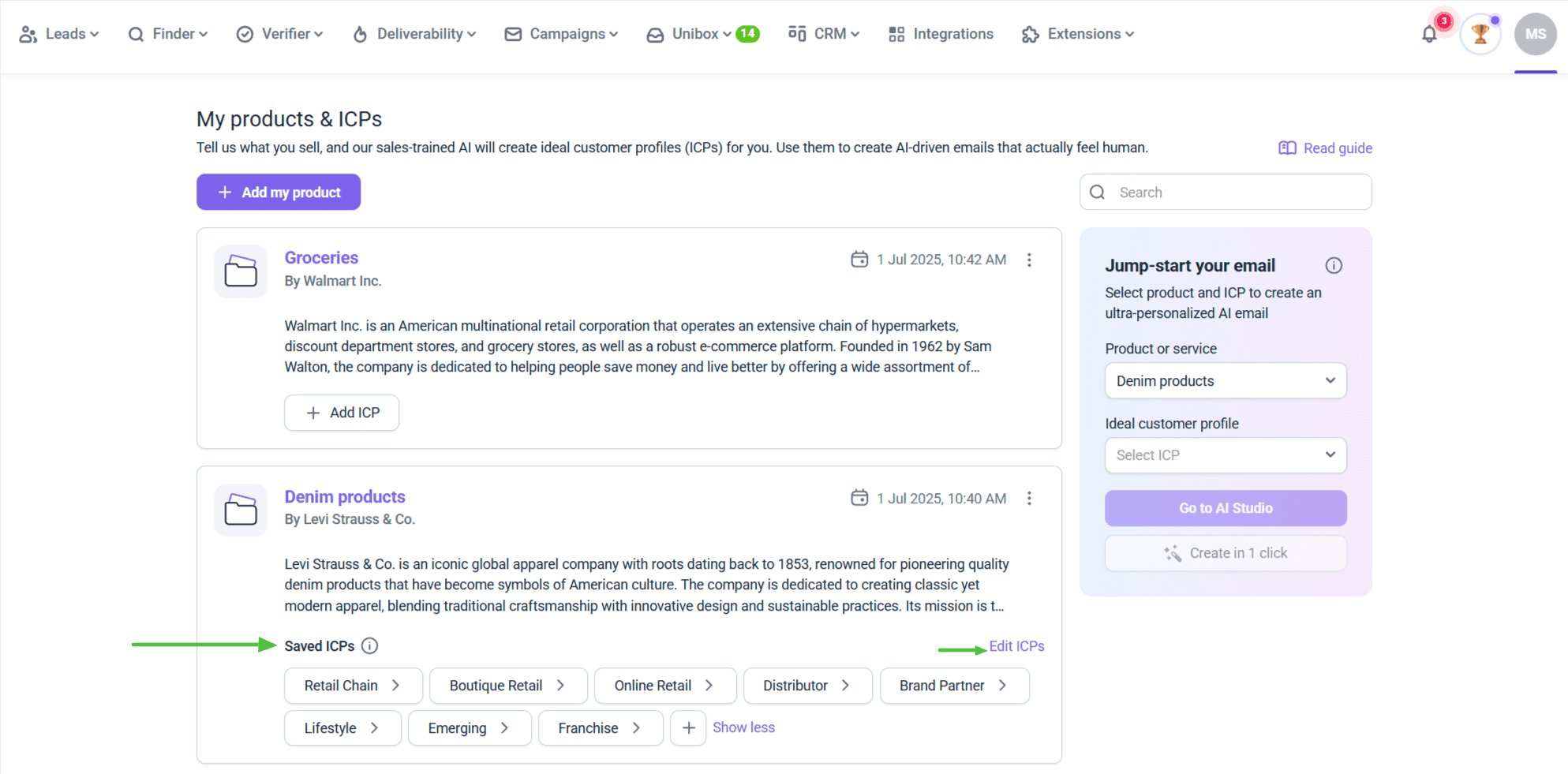
Now, you can use the generated ICP for contact discovery and automated email building.
-
Find relevant companies
Use the Snov.io database search to discover companies that align with your ICP. The database contains more than 50 million business contacts, so you’ll have plenty to choose from.
Then extract the contact details of decision-makers from each company.
-
Enrich data from other sources
If you already have the list of decision makers in targeted companies, you can use Snov.io’s Email Finder Tool to find their work emails. Options range from in-app single or bulk email lookup to lead discovery from company websites or LinkedIn with the help of Snov.io’s extensions.
As soon as you find prospects, just add them to the Snov.io app. Now, you’ve got a desired list of contacts safely stored in your personal workspace.
-
Verify the contact information
If you’ve just found prospects solely through Snov.io, you can skip this step – Snov.io’s Email Finder Tool provides automatically verified addresses. But for more dated contact lists, you need to ensure all email addresses are still valid.
You can regularly check your email validity with Snov.io’s Verifier Tool, which runs verification of both single and bulk emails.
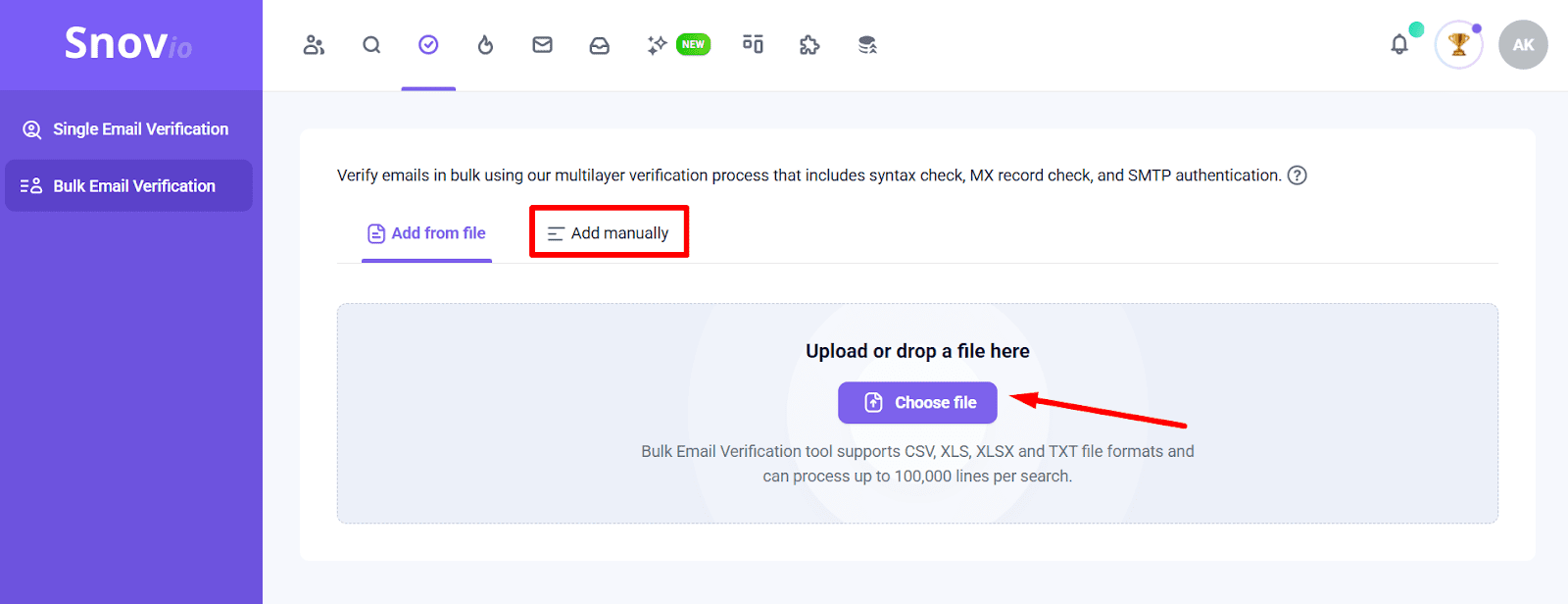
This tool helps you stay clean of risky addresses, protecting your deliverability and sender reputation.
-
Segment your list
At Snov.io, you can split your list by persona and intent signals (job title, tech stack, region, trigger events) and organize contacts into folders to tailor your offer to the needs of a specific segment.
Now, you’re ready to build your email campaign without leaving your workspace.
-
Launch personalized campaigns
Start with a focused segment, creating a multi-step cold outreach campaign with the help of Snov.io’s easy drag-and-drop editor. You can add both email and LinkedIn elements to your sequence if, for instance, you’d love to contact your targeted lead through both channels.
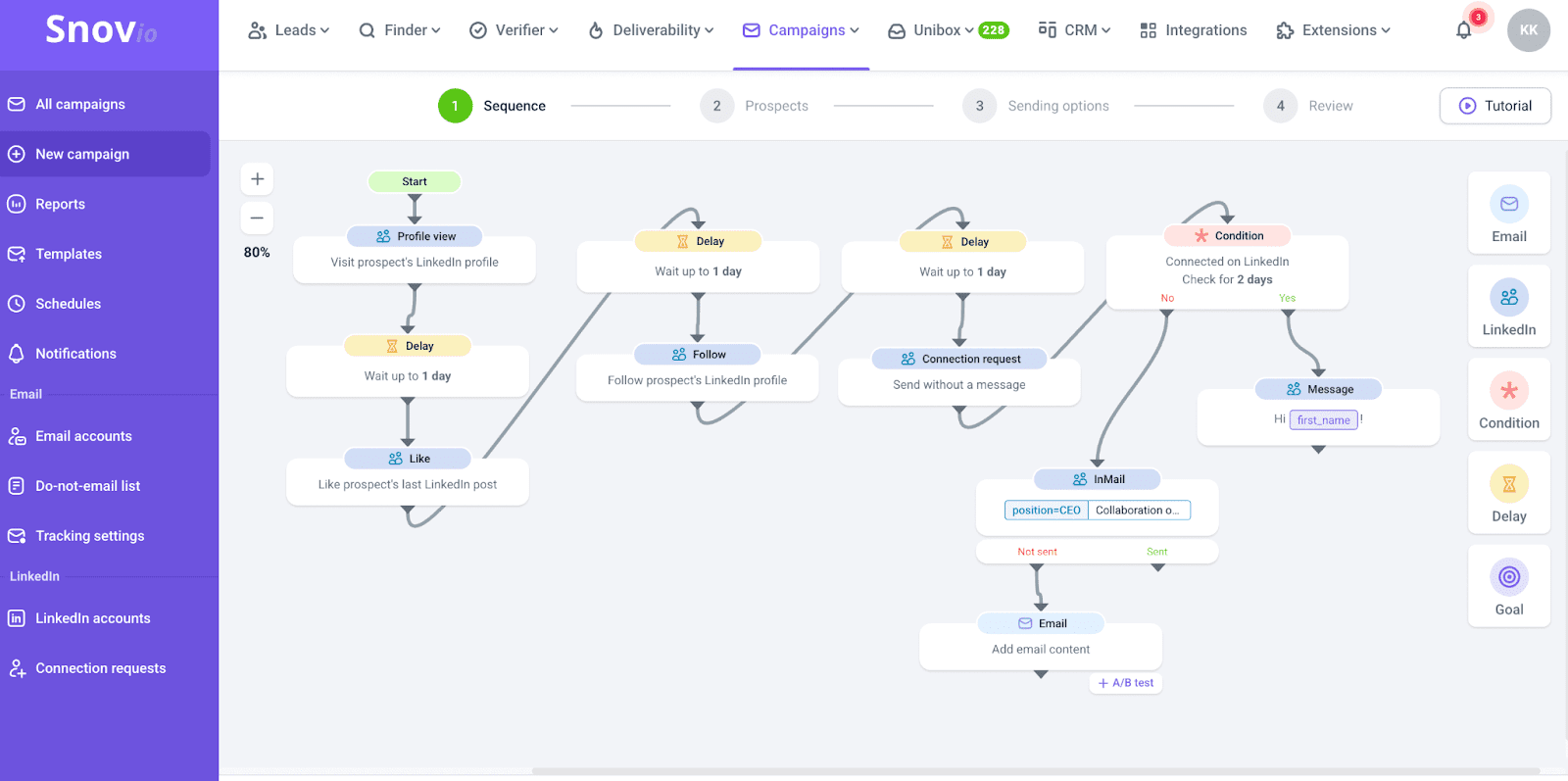
You can A/B test various elements of your email, personalize messages by adding custom and dynamic variables, use Snov.io’s AI Email Builder to create a message for you based on your input or buyer persona, use the platform’s rich library of ready-made templates, etc. Options for personalization are endless.
To monitor how your campaigns perform, you can access Snov.io’s user-friendly reports and gain fresh insights on the aspects of your outreach that should be improved.
For a deeper look into your deliverability metrics, Snov.io offers a quick but informative Deliverability Check.

And if your inbox placement rate is far from good, you can always run a warm-up campaign without even switching the platform – Snov.io automates this process too.
I’m not here to persuade or promote, but, frankly, if you compare how much a prospecting tool may do for you at a price that is thrice lower than renting an email list (the minimal Snov.io plan will cost you about $39/month or even lower if billed annually), it’s obvious which option is more cost-effective.

Should you rent email lists?
My final thoughts are that email list rental is only effective for short-term gains or specific circumstances. It costs a lot, may not yield good results, and might damage your reputation.
For most B2B teams in 2026, owning your prospecting process is the safer and more effective growth path. Building your own prospect collection with tools like Snov.io gives you full control over data quality, compliance, and outreach performance while delivering stronger results over time.