TL;DR
These simple steps show how to warm up a new email domain:
Picture launching cold email campaigns with confidence, knowing your messages will actually land in inboxes. That’s the power of a proper domain warm up. Meanwhile, if you skip this step, your best-crafted messages risk getting flagged as spam before anyone reads them.
To avoid a deliverability disaster, we’ve created this guide so you know all the nuances of how to warm up a new email domain most effectively and set your outreach up for success.
Outline:
- What is email domain warm, and why is it critical to cold outreach?
- How long does it take to warm up an email domain?
- How to warm up a new email domain manually
- Better way to warm up new domains: use Snov.io’s DFY cold email infrastructure
- Common email warm-up mistakes to avoid
- Email warm-up best practices (with or without DFY)
- How to scale outreach safely: Bonus tips to maintain high email deliverability
What is email domain warm, and why is it critical to cold outreach?
Email domain warm up is the process of gradually increasing the sending volume to establish trust and a positive sending reputation with mailbox providers like Gmail, Outlook, and Yahoo.
In other words, to warm up new domains means to introduce yourself to email service providers (ESPs) and prove you’re a legitimate sender.
Warm-up suits all scenarios:
- Brand new domain with no sending history? Don’t even think about skipping the warm-up.
- Existing domain with a good reputation? Still needs warming as soon as you’re going to send it on a large scale.
- Dropped deliverability? Warming up is absolutely critical to restoring your sender reputation.
You have two options for email domain warm up: manual or automated. The former route takes time, patience, and consistency. An automated process presupposes the use of specialized email warm-up tools, such as Snov.io. It handles the tedious work instead of you, helping your domain gain trust and improve deliverability without extra effort.
And if you pair the process with Snov.io’s DFY cold email setup, you’ll get a solid, efficient infrastructure to support your outreach campaigns.
Why the email warm-up process matters
Here are some key benefits you’ll get from an email domain warm up:
- Strong email sender reputation
By gradually increasing the number of messages, you’ll build a better sender reputation with ESPs. It makes the foundation for successful campaigns.
- Higher email deliverability
Here’s a sobering fact: a significant portion of emails never reaches the inbox. Warm-up helps improve cold email deliverability, so your messages aren’t lost somewhere in spam folders or blocked entirely.
- Account safety
Email providers are quick to flag suspicious activity, while sending large volumes of messages from a brand-new domain looks exactly like spammer behavior. When you warm up new domains, you avoid unnecessary risks.
- Better campaign results
When emails consistently reach inboxes, open and response rates rise significantly. This engagement boost strengthens the sender’s reputation further, creating a positive cycle that fuels all your future campaigns.
I’ve been working in cold outreach for many years, and I can say with certainty that the basic technical setup for new domains is the absolute foundation on which your future reputation is built.
My experience shows that no matter which tool you choose or how powerful it is, without proper configuration, warmup, and DNS records, your emails simply won’t reach your recipients’ inboxes.
Snov.io has now simplified the registration and setup of domains and mailboxes, which minimizes the chance of error.
Outbound outreach expert at Snov.io

What is the 30/30/50 rule for cold emails, and how does it pertain to email warm up?
It’s important to see where email domain warm up fits into your overall cold email success. The 30/30/50 rule provides a helpful framework for understanding what actually drives results in cold outreach.
Here’s how it breaks down:
- 30% of your results stem from subject line personalization
- 30% depends on how well you’ll optimize email deliverability
- 50% depends on your follow-up strategy
It means you should allocate one-third of your effort to improving email deliverability, as no other aspects matter if your messages never reach the inbox in the first place. This is exactly why learning how to warm up a new email domain is absolutely crucial – it is your first step to ensuring a high inbox placement rate.
How long does it take to warm up an email domain?
The short answer: obviously, everything depends on your current domain situation and sending goals.
But one thing is certain: when it comes to a new email domain warm up, patience is your best friend. So keep in mind that the longer it lasts, the better your results will be.
At Snov.io, we recommend at least a 30-day warm-up period if you’re starting from scratch. This gives ESPs enough time to see consistent, natural sending patterns and recognize you as a trustworthy sender.
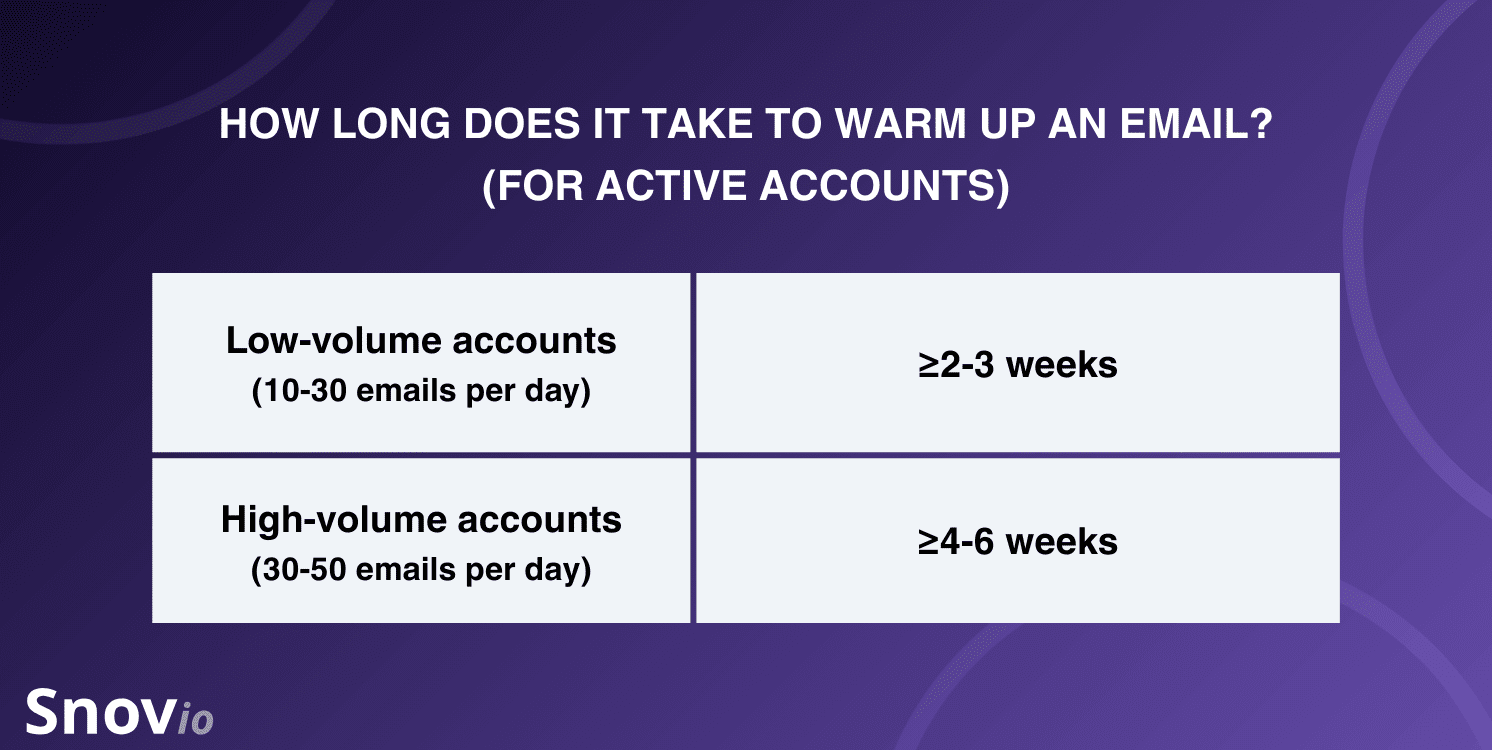
Your planned sending volume also matters in this case. For active accounts with low-volume outreach (10-30 emails per day), warm up for 2-3 weeks. For higher volumes of 30-50 emails per day, extend the warm-up to 4-6 weeks or longer.
Another crucial aspect is monitoring key metrics when you warm up new domains. Watch your bounce rates, spam complaints, and engagement levels to gauge how well you’re doing.
How to warm up a new email domain manually
For those whose outreach volume isn’t yet large enough to warrant an email warm-up tool, figuring out how to warm up a new email domain manually may still be a good idea. It gives you complete control over the process and saves your team’s budget on tasks that matter most.
Here are the key steps that will help you warm up a new domain efficiently:
-
Configure your domain DNS
Before you send a single email, you need to set up proper email authentication. This step is crucial for proving to ESPs that you’re a legitimate sender.
Email authentication protects against spoofing and phishing, which are common ways scammers try to bypass spam filters. There exist several authentication methods, with SPF, DKIM, and DMARC being the most widely used:
- SPF, or Sender Policy Framework, specifies which mail servers ‘have right’ to send emails on behalf of your domain.
- DKIM, or DomainKeys Identified Mail, verifies the sender by placing a cryptographic signature in the email header.
- DMARC, or Domain-based Message Authentication, Reporting, and Conformance, ties SPF and DKIM together and instructs the recipient’s mail server on how to treat emails that fail authentication.
Setting up these records ensures your messages reach their recipients and reduces the risk of being flagged as spam.
→ Learn how to set SPF, DKIM, and DMARC with less effort from this Snov.io guide.
-
Set up a mailbox and create a sending schedule
Once your authentication is in place, it’s high time to set up mailboxes and create a sending schedule. Make sure each mailbox is properly configured with your sending domain, validated, and tested before you begin real outreach.
Now you’re ready for the actual email domain warm up. Begin with a very low volume of sends, gradually increasing each day or each week to build your domain’s reputation.
At Snov.io, we recommend starting with a schedule like this:
- Week 1: Send 2-4 messages per day
- Week 2: Increase to 2-4 messages per day
- After 1 month: Ramp up to 20-30 messages per day
- After a few months: Reach 50+ messages per day
It’s also important that you set up a system for monitoring engagement. Install a tracking tool that shows you how many people opened your messages, clicked links, and replied.
These metrics are crucial because they reveal how well your emails are being delivered. Low open rates may signal spam issues, while a lack of replies could point to content or credibility problems. Tracking this data helps you react quickly, adjust your strategy, and maintain sender reputation.
-
Send emails with increasing volume
Now comes the execution phase. Start sending those emails according to your schedule, gradually increasing volume as you progress through the weeks.
The key is consistency. Send emails every day during the warm-up period, not just sporadically. This establishes a predictable pattern that ESPs recognize as normal behavior.
During this phase, focus on natural engagement. Also, send messages to real people who are likely to open and respond (your acquaintances, friends, or colleagues). Avoid purchasing email lists or sending to unverified addresses. Remember that every bounce and spam complaint damages your reputation.
In contrast, positive signals — like replies, opens, and interactions — accelerate your reputation-building and show ESPs that you’re a legitimate sender worth trusting.
-
Monitor deliverability and domain reputation
The work doesn’t stop once you hit send; you need to keep a close eye on how your emails are performing throughout the warm-up process. That’s why we recommend running deliverability tests on a regular basis to catch issues early.
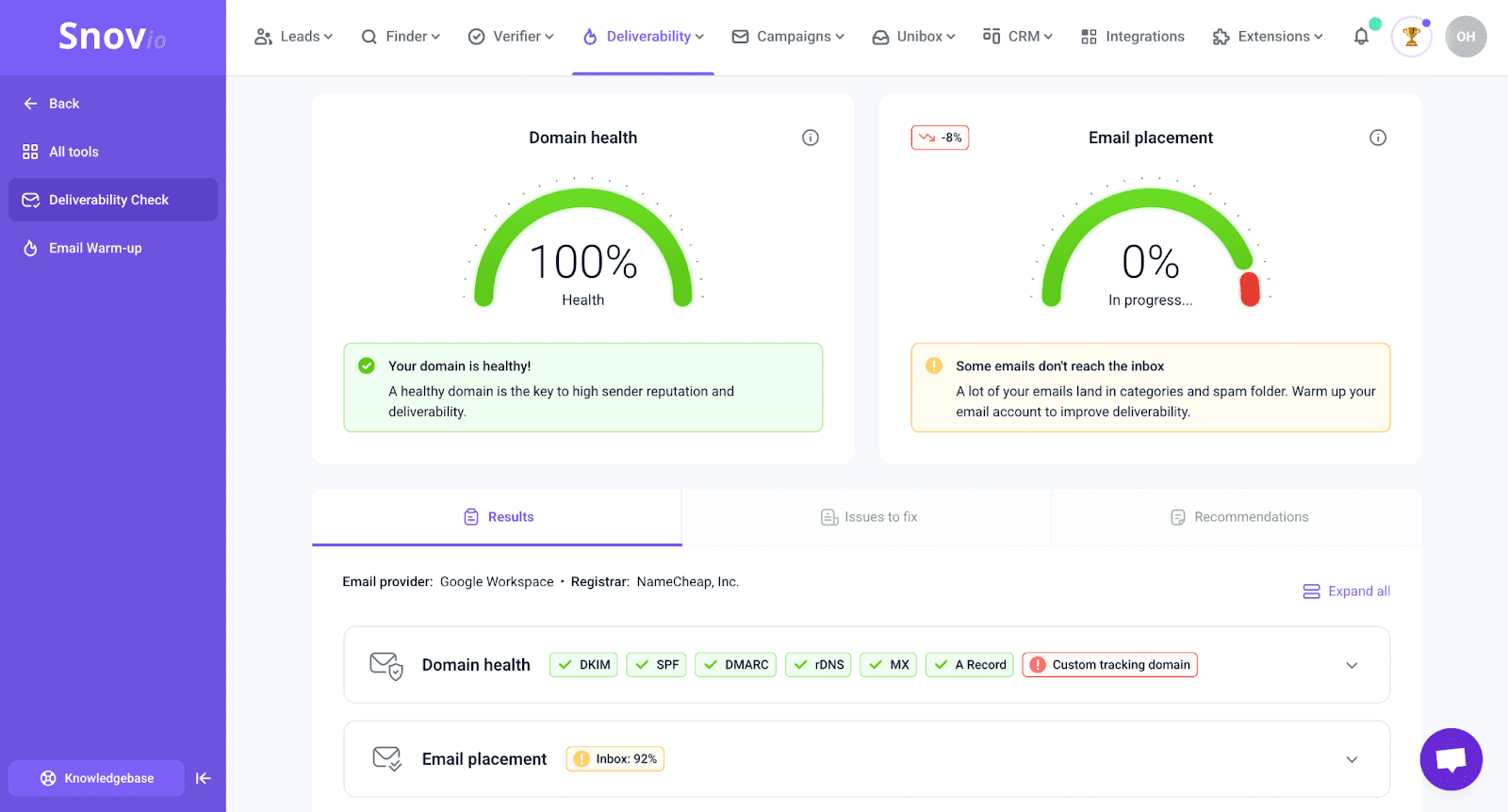
When running a deliverability check, here are some healthy benchmarks to aim for:
- Domain health score: 75-100%
- Spam rate: Below 2%
- Email placement: 90%+
If your results fall below these thresholds, it could indicate deeper issues. Make sure to address them before launching full-scale campaigns.
Better way to warm up new domains: use Snov.io’s DFY cold email infrastructure
Manual warm-up works, but let’s be honest: it’s time-consuming and requires constant attention to technical details. What if you could skip all these headaches and get straight to sending messages?
Good news! It’s all possible with Snov.io’s done-for-you email infrastructure.
What is Snov.io’s DFY infrastructure?
It’s literally a complete email-sending solution with a DFY cold email setup. Instead of spending hours setting up domains, configuring DNS records, and creating mailboxes one by one, you can purchase pre-configured domains and mailboxes directly from your Snov.io dashboard.
Here’s what makes it special: all domains and mailboxes come completely pre-configured. That means SPF, DKIM, DMARC, and custom tracking domains are automatically set up. No technical skills needed, no DNS struggles, and no room for errors that could hurt deliverability.
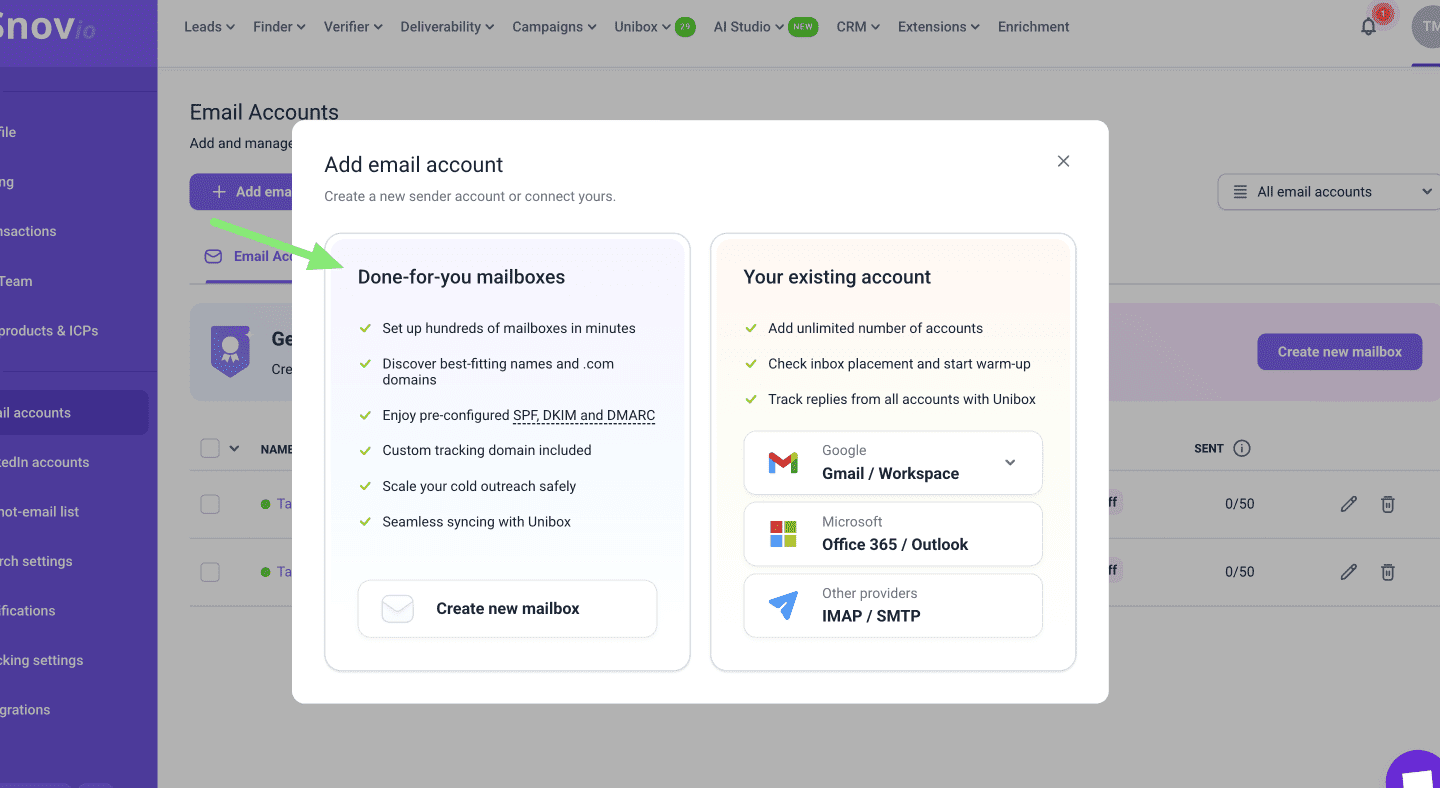
You simply choose your domains, create mailboxes, and begin your email domain warm up immediately. Quick, automated, straightforward.
How Snov.io’s DFY cold email setup works
Snov.io’s DFY cold email setup presupposes that you:
- Buy domains directly.
No need to use a separate domain registrar; you can purchase everything from a single central dashboard.
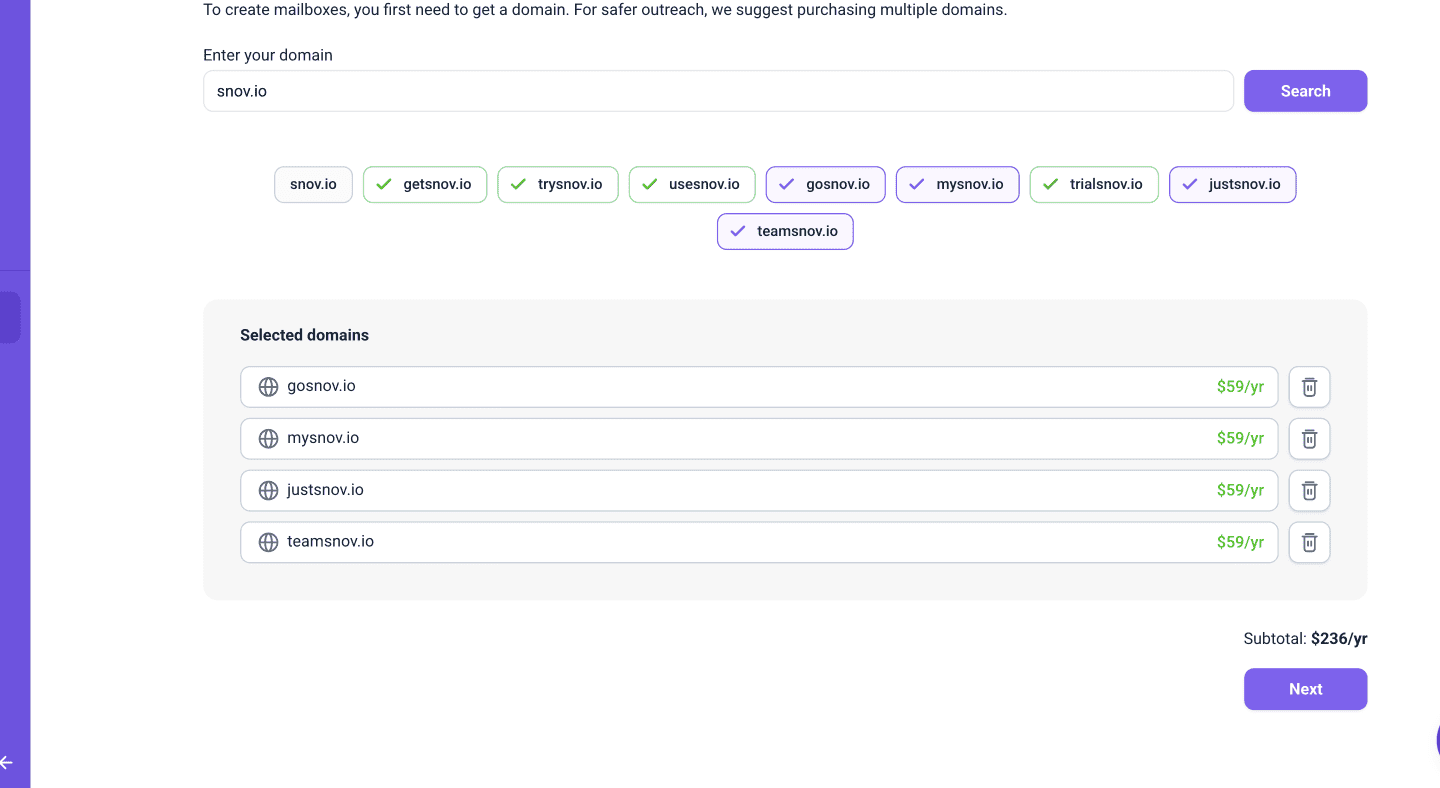
Snov.io supports a wide range of domains. You can view the complete list here.
- Create mailboxes in bulk.
You can set up multiple email accounts simultaneously across different domains, making it perfect for outreach scaling.
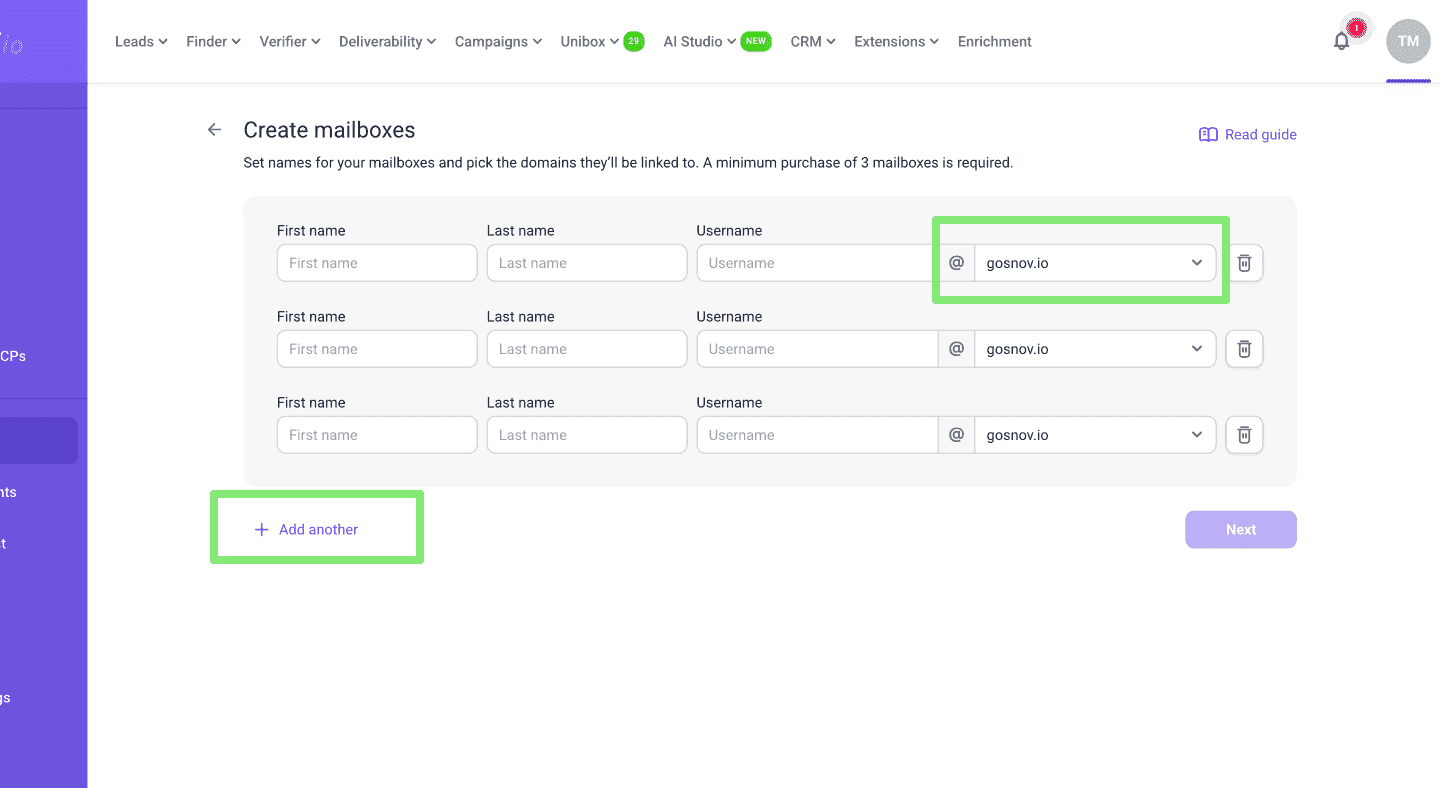
We recommend adding no more than 5 mailboxes to your domain. Otherwise, your ESP may consider your activity as spam, which in turn will hurt your deliverability.
- Get your SPF/DKIM/DMARC setup automated.
Your authentication is configured correctly on autopilot, ensuring maximum deliverability without technical hassles.
- Get custom tracking and redirects included.
You can track performance and automatically redirect prospects to your main website when they click links.
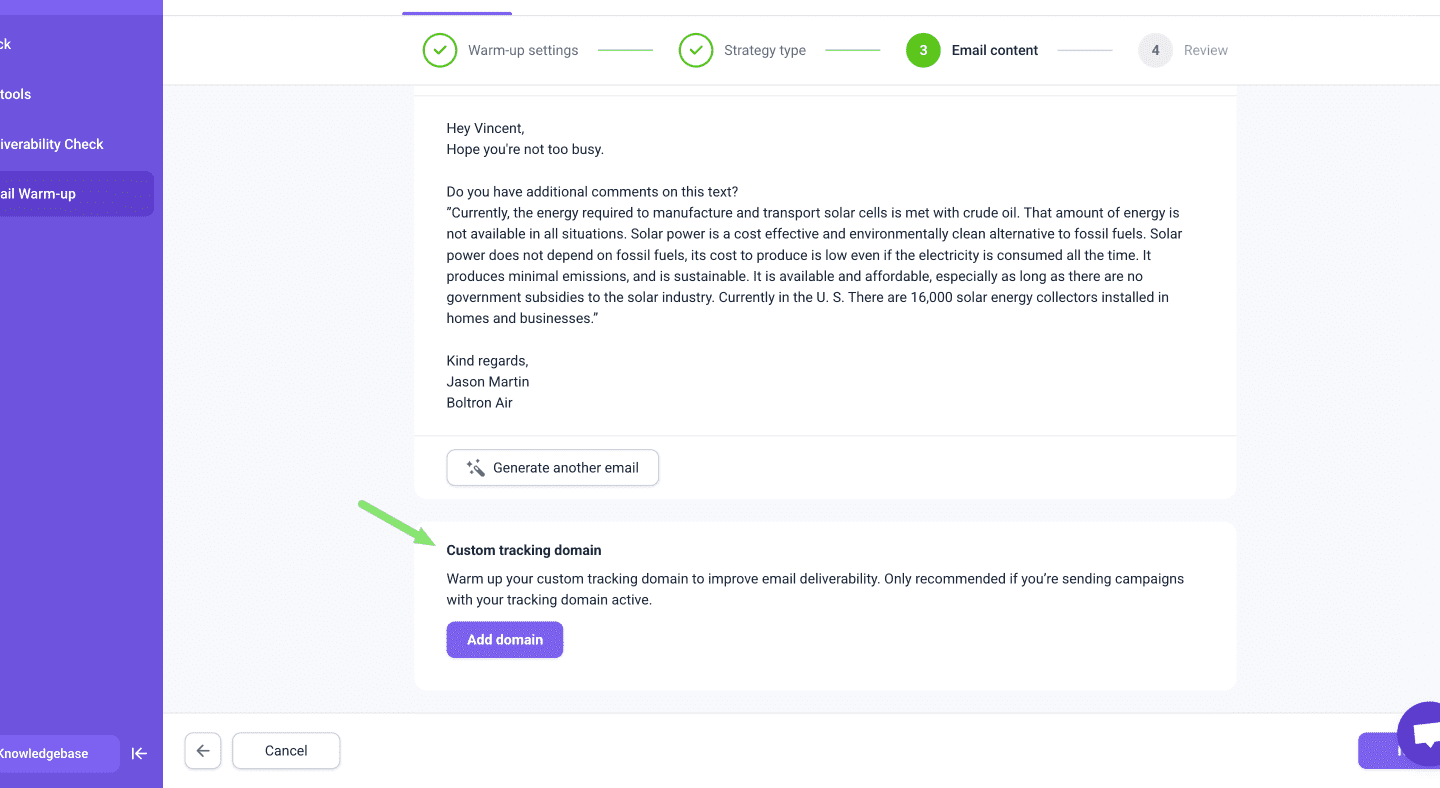
Once you purchase domains, your accounts are set up within minutes and prepared for the warm-up process.
Warm-up setup tips for Snov.io DFY accounts
DFY domains and mailboxes are optimized for deliverability, but as they have no sending history, launching campaigns right away can hurt results.
To build a strong sender reputation and maximize deliverability, start by warming up new domains. You can enable it directly on each mailbox from the Email Accounts list – the process is very simple.
Here are some additional recommendations when using the Snov.io email warm-up tool:
Opt for a progressive warm-up strategy
For new accounts, a progressive approach works best. It implies gradually increasing the number of emails sent until reaching your target limit.
- Begin with 2–5 emails per day
- Gradually increase to 30 emails per day
Make the warm-up period long enough; building a strong sender reputation takes weeks, even with warm-up, so it’s best to plan for it. Set your warm-up period and daily limit close to the number of emails you plan for each campaign to achieve smoother scaling.
Combine warm-up with active campaigns smartly
Avoid launching campaigns during the initial warm-up phase. Doing so too early can harm the performance of both warm-up and campaign sends.
Once the initial warm-up is complete, it can run alongside campaigns. But keep the total sending volume within safe limits. For example, if you’re sending 40–45 campaign emails/day, keep warm-up messages at 5–10/day.
Adjust the warm-up based on sending performance
Pause it when outreach is performing well, and if results drop, reduce sending volume while increasing warm-up activity until sender reputation recovers.
Warm up backup accounts
Keep backup domains being warmed up in the background while the main domains are active. This ensures ready-to-use accounts for scaling or replacing blocked senders.
Set up tracking properly
DFY accounts include custom tracking domains. Limit open/click tracking, as excessive use can harm deliverability. For accounts using tracking, enable warm-up on the custom tracking domain.
Set daily email sending limits
Before launching campaigns, adjust each account’s daily sending limit:
- Optimal limit: 20–30 emails/day
- Default Snov.io limit: 50 emails/day
- The maximum limit (100 emails/day) is risky and not recommended, especially after setup
All in all, we recommend starting outreach at the optimal daily limit and gradually growing toward the suggested maximum. This way, you increase volume while maintaining deliverability and steadily building sender reputation.
Common email warm-up mistakes to avoid
A warm-up is key to building a strong sender reputation, but doing it the wrong way can still hurt your deliverability. Even with the best intentions, many senders make critical errors that undermine their entire email warm-up process.
Below, we’ve listed the most common mistakes you can avoid when you warm up new domains.
❌ Sending too many emails too quickly
Trying to speed things up by sending a large number of emails early on can trigger spam filters immediately. ESPs see your sudden email blasts as a very suspicious behavior, so your reputation as a sender gets down from day one.
❌ Inconsistent sending patterns
Sending emails at random times or skipping days makes it harder for inbox providers to trust your activity. ESPs are looking for predictable, natural behavior from legitimate senders.If you send 50 messages on Monday, none on Tuesday and Wednesday, and then 100 on Thursday, that erratic pattern raises red flags.
❌ Spammy or irrelevant content
Using salesy language, numerous links, or excessive images early on is a direct path to spam folders. Even if your technical setup is perfect, low-quality content will sink deliverability. Once your content is labeled as spammy or promotional, it becomes difficult to rebuild trust with ESPs.
❌ Not monitoring performance
Many people overlook key metrics — such as bounce rates, reply rates, and spam complaints — when they warm up new domains. But these are strong indicators of how inbox providers view your activities.
❌ Treating warm-up as a one-time task
Warming up isn’t something you do just once. Any time you launch a new campaign, switch domains, or recover from deliverability issues, you need to warm up again, especially if you’re using a new tool or strategy.

Email warm-up best practices (with or without DFY)
Whether you’re using a DFY cold email setup or an email warm-up tool to ramp up your own domains, the following best practices will help you solve the common mistakes described above and build a solid sender reputation.
✅ Complete the initial warm-up period before sending campaigns
This is the golden rule: launching outreach campaigns before you warm up a new domain can set your progress back. Warm-ups generate positive interactions, while real campaigns sometimes bring in negatives, like bounces and spam reports.
✅ Set realistic warm-up limits
Start with a low volume, then gradually increase day by day until you reach your target. Progressive warm-up strategies offered by automation tools work best in these cases. Scaling smoothly step by step builds trust with ESPs much faster than jumping to high volumes immediately.
✅ Maintain your email list hygiene
Warm-up efforts can be completely undermined by stale lists, which contain invalid addresses. Regularly remove contacts that haven’t engaged with your messages for a while, as well as those who have unsubscribed or marked your messages as spam.
High bounce rates and spam complaints destroy sender reputation faster than anything else. Before launching campaigns, verify the validity of addresses in contact lists using an email verification tool.

Don’t forget that regular list cleaning should be a part of your routine, not a one-time task.
✅ Run deliverability tests on a regular basis
Even the finest content won’t yield results if it lands in spam or isn’t delivered at all. Running regular deliverability tests gives you detailed insights into domain health, inbox placement, and spam rates. By regularly monitoring these key metrics, you’ll be able to address any issues before launching or continuing campaigns.
✅ Use warm-up strategically during campaigns
Your reputation can be affected during a real campaign as well. Someone might report your email as spam, you may get bounces, and engagement can fluctuate. Be ready to mitigate the negative effects of cold outreach with an email domain warm up.
If you’re satisfied with campaign results, you may not need to warm up your account right away. However, if you notice that engagement rates are decreasing, it’s time to restore your reputation with a warm-up campaign.
13 Best Email Deliverability Tools In 2026: Reviewed And Compared
February 13 2026

13 Best Email Warm-Up Tools (Tested And Compared)
February 13 2026
How to scale outreach safely: Bonus tips to maintain high email deliverability
Inbox placement rate is like fire in the chimney. You should keep it burning, and this process should be consistent. That’s why, apart from regular email warm-up, we’ve prepared these evergreen guidelines on how to scale cold outreach safely without damaging your sender reputation:
Add more infrastructure, not more volume per mailbox
Here’s the thing: you can’t just dump all your email volume onto a single domain expecting good results. ESPs will flag that as suspicious behavior in the blink of an eye.
So what’s the smarter strategy? Spread sending activity across several domains and mailboxes to keep deliverability strong while expanding outreach efforts.
To help you plan your infrastructure, we’ve put together a clear breakdown by sending volume. The table below shows how many domains and mailboxes you need to hit your daily targets safely.
Notice the pattern? We always recommend having backup domains ready. If one of your active senders faces issues, you’ll have a ready-to-use sender to replace it without disrupting your campaigns.
Never exceed 5 mailboxes per domain
While adding more is technically possible, providers may view it as spam-like behavior. Staying within the recommended limit helps maintain strong deliverability.
At Snov.io, we recommend 3 to 5 mailboxes per domain to strike the best balance between scalability and maintenance costs. This sweet spot gives you enough sending capacity without triggering spam filters.
Scale gradually over time
Don’t jump from 200-1000 emails per day overnight. Allow the infrastructure enough time for building trust at each level before advancing further.
Monitor performance at every stage
Watch bounce rates, spam complaints, and engagement metrics closely as you scale. If you see any red flags, pause and address the issues before continuing.
❗Every new domain and mailbox needs a proper warm-up period before joining active rotation.
Key takeaways
If you want your campaigns to land in real inboxes, learning how to warm up a new email domain is non-negotiable. Setting up SPF, DKIM, and DMARC gives your domain instant credibility, but reputation grows only through consistent sending. Start small, increase volume gradually, and keep an eye on engagement signals to understand how mailbox providers see you.
You can warm up new domains manually and track every step, or use an email warm-up tool to handle the routine automatically. For teams that prefer to move fast, try Snov.io’s DFY cold email setup, which offers a shortcut: domains and mailboxes are fully authenticated and ready to warm up, so you can start sending without dealing with DNS or deliverability issues.