
Every Snov.io plan comes with monthly quotas: credits, recipients, enrichment tokens, and email warm-up. This article explains how much each plan includes and how each quota works. It will help you pick the plan that fits your workload.
Each higher plan comes with bigger quotas. Your billing option doesn't change the size of your quotas, only the price: the more months you pay for at once, the bigger your discount, and annual billing saves the most. For prices, see Which Snov.io plan is right for you. For the tools in each plan, see What you can do with Snov.io: all tools and features.
In this article:
Quotas by plan
How to choose the right amount
Trial limits
Credits · Recipients · Email warm-up · Enrichment tokens · AI notetaker · LinkedIn slots
Renewal and rollover
When you run out
Quotas by plan

LinkedIn slots are sold separately and work with any plan, including Trial.
Same on every plan, including Trial
- Unlimited prospect storage, uploaded contacts, campaigns, sender email accounts, and follow-ups per recipient. You can import contact lists of any size from a file.
- Emails per day depend on your email provider.
- Sales CRM with 20 pipelines (up to 100 stages each), 10,000 active deals, and 200 custom data fields. CRM is free and doesn’t use credits or recipients.
On every paid plan: unlimited monthly emails. Your monthly recipients are the only limit on outreach.
How to choose the right amount
Think about what takes up most of your outreach work, or where you want it to grow. Then find the quota that supports it.
| If you mainly | Check | What a bigger quota gives you |
|---|---|---|
| Find and verify leads | Credits | More searches and verifications each month. On paid plans, unused credits roll over, so a quiet month doesn’t go to waste. |
| Send email or multichannel campaigns | Recipients | More new leads to contact each month. Follow-ups don’t use recipients, so count only the new leads you plan to reach. |
| Send at higher volume from several mailboxes | Warm-up accounts and daily warm-up emails | You can warm up every mailbox you send from, and each one sends more warm-up emails per day. The more warm-up messages, the more prepared a mailbox is for larger campaigns. |
| Check deliverability before campaigns | Credits | Each check costs 50 credits. More credits let you run a check before every campaign or batch of emails. |
| Enrich prospects with phone numbers, AI research, or personalized messages | Enrichment tokens | More prospects enriched each month. If you only need extra now and then, a token package may cover it. |
| Record and analyze calls | AI notetaker minutes and seats | More call time to record and analyze, and more people on your team who can use the notetaker. |
Still not sure? Pick the plan for the quota you expect to run out of first. You can upgrade at any time. See how your quotas carry over when you upgrade.
Trial limits
The free Trial plan lets you test the key features. Its limits are listed here once, so all other sections below describe paid plans.
- Credits: reset every month. They don’t roll over.
- Enrichment tokens: 25 tokens, given once. They don’t renew.
- Email warm-up: 1 account, sending 15 warm-up emails per day. You get a one-time quota of 450 warm-up emails on sign-up, which lasts about 30 days. Once it’s used up, warm-up stops until you upgrade.
- Prospect and company database: you can open the first 20 prospects.
- Outreach: up to 100 recipients a month, with unlimited follow-ups to them.
- Bulk search and bulk verification: not included. This includes uploading a file of LinkedIn profile links. You can still find emails from LinkedIn one profile at a time with your Trial credits.
- Data export: exporting prospects to CSV or XLSX isn’t included.
- AI Studio: 3 generations each in Unique Selling Point Explorer and Persona-driven Email Builder. AI Buyer Persona Generator is included without a limit.
- AI notetaker: 3,000 Jevu meeting minutes a month (50 hours), with no Jevu seats. Teamwork in Jevu starts on paid plans.
- Team members: not included.
How each quota works
Credits
Credits are shared between the search and verification tools. You decide how to spend them and can mix tools freely.
Your monthly credits equal the number of searches or verifications you can run. For example, Starter’s 1,000 credits cover up to 1,000 Domain Searches, 1,000 Email Searches, or 1,000 email verifications, in any mix.
Tools that use credits:
- Database Search
- Domain Search
- Bulk Domain Search
- Email Search
- LinkedIn email search
- 7-tier email verification
- Bulk verification
- Deliverability check
Good to know about credit costs
- Database Search: the search itself is free. You pay for saving prospects and viewing collected company leads.
- Bulk Domain Search: 2 credits per domain where emails are found. For example, 1,000 credits get you emails from 500 domains.
- LinkedIn email search: 1 credit per prospect with a found and verified email.
- LinkedIn Search in LinkedIn Automation: free. It collects LinkedIn profile data only, without email lookup, so it doesn’t use credits. It’s available on every plan, including Trial.
- Bulk verification: checks up to 100,000 emails per file or list.
- Deliverability check: 50 credits per check. One check includes a domain health check and an email placement test.
Learn more: What is a credit?
Recipients
A recipient is a lead you contact. Recipients cover email campaigns, multichannel campaigns, and messages you send from a prospect’s profile.
- Each lead you contact costs 1 recipient, and only once a month.
- You pay only for the first email to a lead. Follow-ups to that lead are free and unlimited until your recipients renew.
Learn more: What is a recipient limit
Email warm-up
Your plan sets two warm-up limits:
- Warm-up accounts: how many email accounts you can warm up at the same time.
- Warm-up emails per day: how many warm-up messages each account sends daily.
On Starter, your 3 warm-up slots aren’t tied to specific accounts. You can switch which accounts you warm up at any time, at no extra cost.
Learn more: Warm-up slots and volume limits
Enrichment tokens
Tokens pay for enrichment and AI tools in your Prospects lists. With them, you can add data such as phone numbers, get insights through AI research, and create messages for more relevant outreach.
- Plan tokens: included in every Sales Suite plan. They reset every 30 days and don’t roll over.
- Purchased tokens: one-time packages you buy in Billing. They roll over and add up on your balance, and each package is valid for 90 days.
Snov.io always spends the tokens that expire first. Plan tokens usually expire sooner, so they go before your purchased ones.
When you change plans, unused plan tokens don’t carry over. You get your new plan’s token amount right away, and tokens you bought separately aren’t affected.
Learn more: What are enrichment tokens
AI notetaker
Jevu is an AI sales notetaker. It joins your calls and gives you a summary, key points, and action items after each call. You can sync the results to your Snov.io deals. To use it, sign in to Jevu and connect it to your Snov.io account.
Your Snov.io plan sets how many meeting minutes and Jevu seats your Jevu workspace gets.
- Meeting minutes are shared by your whole Jevu workspace and renew every 30 days.
- Jevu seats are separate from your Snov.io team seats. Paid Snov.io plans include unlimited team seats, but the number of Jevu seats depends on your plan.
Learn more: How to connect Jevu to Snov.io
LinkedIn slots
LinkedIn slots connect your LinkedIn accounts for LinkedIn and multichannel campaigns. You buy them separately, at any time. You don’t need an active subscription.
- One slot connects one LinkedIn account.
- To run several accounts at once across campaigns, you need one slot per account.
Your price per slot depends on the number of active slots in your account. The discount starts at 2 slots and grows with each tier. To get a volume discount, pick the number of slots you need with the slider. Your discount level and price per slot show right away.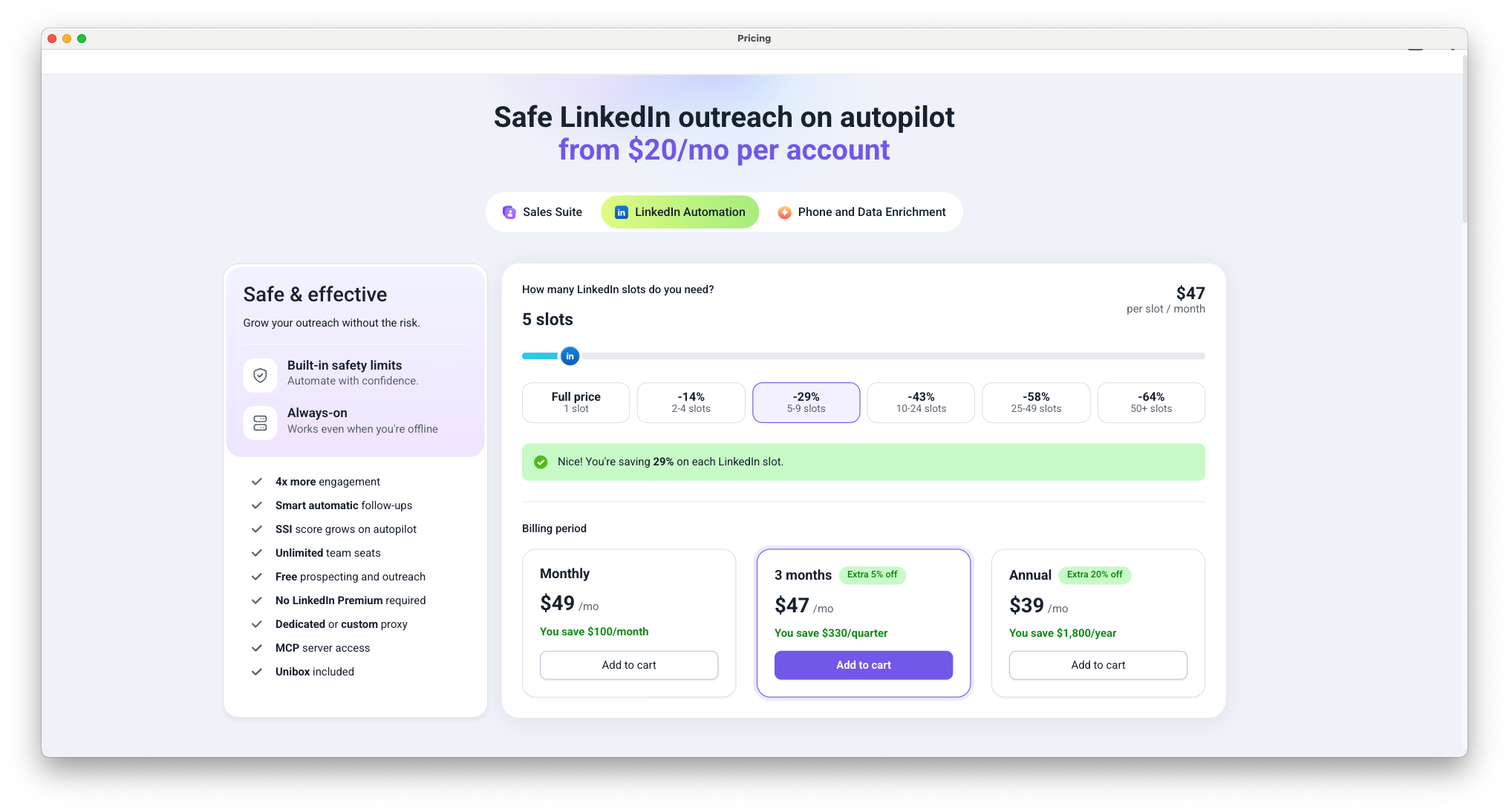
| Active slots | Discount per slot |
|---|---|
| 1 | Full price |
| 2–4 | 14% |
| 5–9 | 29% |
| 10–24 | 43% |
| 25–49 | 58% |
| 50+ | 64% |
Combine it with a longer billing period for an extra discount. Before you pay, check the price breakdown at checkout. It shows your volume slot discount and your billing period discount separately.
Learn more: LinkedIn slots billing FAQ
Renewal and rollover
This table covers paid plans. For Trial, see Trial limits.
| Quota | When it renews | What happens to unused amounts |
|---|---|---|
| Credits | Every 30 days from your purchase date | Roll over to the next month if auto-renewal is on or you have an annual plan. On 3-month and 6-month plans, they roll over until the end of your 3 or 6 months. |
| Recipients | Every 30 days | Expire. They don’t roll over. |
| Plan tokens | Every 30 days while your subscription is active | Expire. They don’t roll over. |
| Token packages | Don’t renew | Stay valid for 90 days from purchase. |
| Jevu meeting minutes | Every 30 days | Shared by your whole Jevu workspace. |
On annual, 6-month, and 3-month plans, you get your quotas in monthly portions every 30 days, not all at once.
When you run out
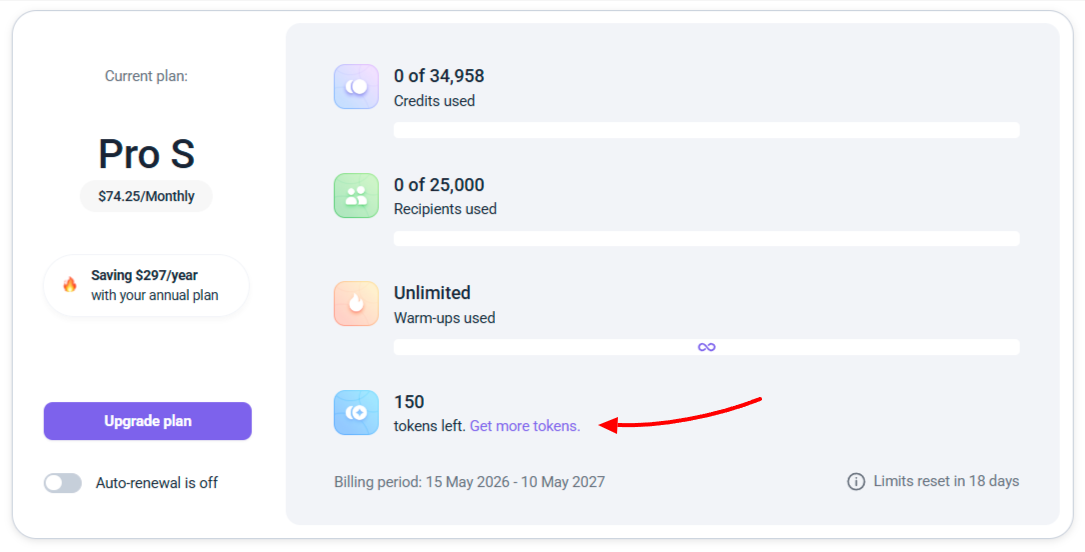
Running low usually means your outreach is gaining pace. Everything you need to keep it going is on your Billing page. There you can see what’s left on your balance, when your limits reset, and how to get more.
| You’re out of | What you can do in Billing |
|---|---|
| Credits or recipients | Check Limits reset in to see when your balance renews. Need more sooner? Click Upgrade plan. |
| Tokens | Click Get more tokens next to your token balance. To top up automatically, open the Auto-refill tokens tab. |
| LinkedIn slots | Open the LinkedIn accounts tab and click Add LinkedIn slots. You can add them at any time, on any plan. |
Have a question we didn’t cover? Our Customer Care team is happy to help. Write to help@snov.io or reach us through live chat.
Related articles


Sorry about that 😢
How can we improve it?