TL;DR:
LinkedIn QR code is a unique scannable code generated by the platform for personal profiles.
- To access this feature, you need the LinkedIn mobile app.
- Using LinkedIn QR codes in outreach or marketing strategy helps streamline networking and prospecting.
- You can add your LinkedIn QR code in both digital and printed content to bridge online and offline lead generation efforts.
- Wherever you add a QR code, always ensure it’s visible and easily scannable.
Once you connect on LinkedIn, you can use automation tools like Snov.io to ensure seamless engagement with your leads and convert them into customers.
Despite being one of the most overlooked features, the LinkedIn QR code is a modern and easy way to connect with prospects, clients, and peers. Just think: instead of searching for a profile (and hoping you don’t misspell the name), you simply scan and connect instantly.
LinkedIn QR code can become a powerful tool for building a strong network, generating leads, and accelerating sales. The key is to use it strategically. Let’s explore how to integrate LinkedIn QR codes into networking or sales strategy and turn connections into real business opportunities.
What is a LinkedIn QR code?
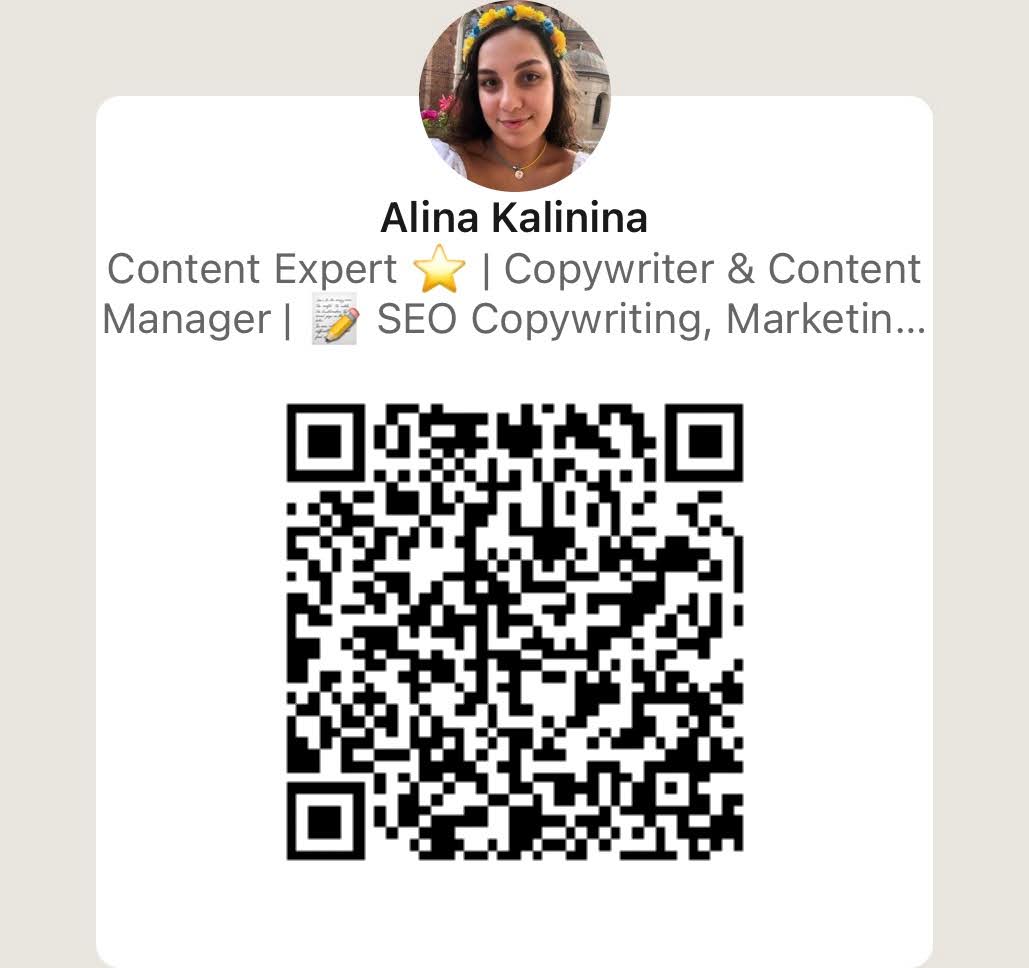
A LinkedIn QR code is a scannable personalized code that links directly to your profile. Each user has their own unique code automatically generated by the platform.
How a LinkedIn QR code works
Once scanned, the code automatically opens your LinkedIn profile in the app. Instead of searching for your name, a person can simply scan this QR code with their smartphone and instantly view your professional background, connect with you, or follow you.
LinkedIn QR code automatically updates whenever any changes are made to your profile or contact details. Thus, your connections always see the latest information.
Please note this feature works specifically for personal profiles, not for business pages.
Before sharing your LinkedIn QR code with someone, make sure your profile is well-optimized. Does your profile image look professional? Is your headline clear and capturing? Your LinkedIn profile should communicate your value at first sight to increase the likelihood of meaningful connections.
Fill in the summary section, highlighting your key strengths and expertise. Also, ensure that all information you mention is up-to-date and aligns with your overall marketing strategy.
👉 Need an extra boost? Check out our free guide on how to optimize your LinkedIn profile and turn it into a strong lead capture tool.
Top benefits of using LinkedIn QR codes
Once we’ve figured out what LinkedIn QR codes are, let’s explore why you should use them. Here are the key benefits of implementing QR codes into a networking or marketing strategy:
- Faster and error-free connections: No more hassle with manual searching and typing names. Prospects, peers, or sales leads can connect with you on LinkedIn with just one scan. Plus, unlike the manual search, LinkedIn QR codes eliminate any chance of errors, ensuring smoother connections and reducing the risk of miscommunication.
- Smart business card: LinkedIn QR code is a great alternative to traditional business cards, which can get lost or damaged. Thus, you also stay in tune with digital trends and ensure people always have access to your most up-to-date professional information. No more worrying about reprints every time you make a change.
- Enhanced professional branding: When sharing a LinkedIn QR code, you give people immediate access to your work experience, skills, achievements, and more. This makes it easier to showcase your value and position yourself as a trusted professional.
- Better accessibility. Whether you’re at a conference, networking event, or simply having a coffee with a potential partner, you can easily share your profile within seconds. Besides, your LinkedIn QR code is an instant way for others to connect with you anytime and anywhere.
Trackable engagement. When using LinkedIn QR codes, you also receive extra insights into your networking efforts. For example, you can track how often and where this code is scanned. This helps you understand what’s working and what needs improvement for better outreach results.
How to find and share a LinkedIn QR code
The thing you should know is that the platform doesn’t currently support this feature for desktop users. So, for LinkedIn QR code functionality, you’ll need the mobile app. Follow these simple steps to get started:
- Open the LinkedIn app on a mobile device.
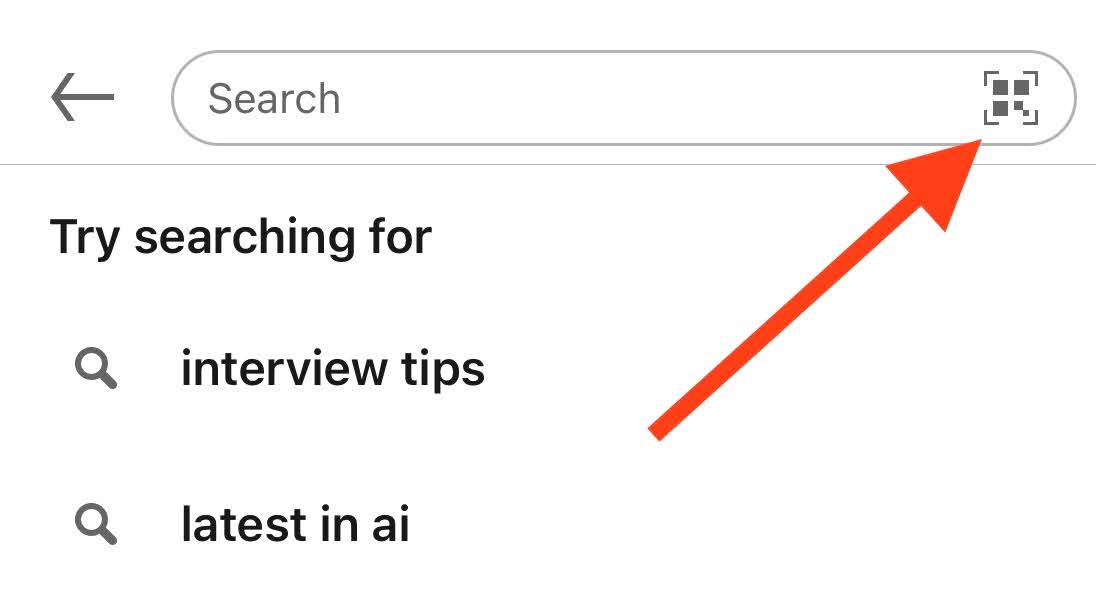
- Tap on the search bar at the top of your screen. You can access the search bar from the Home and My Network pages.
- Click on the QR code icon located in the right corner of the search bar.
Then, you’ll be automatically directed to the QR code feature.
You can see your unique QR code ready for sharing in the My Code tab.
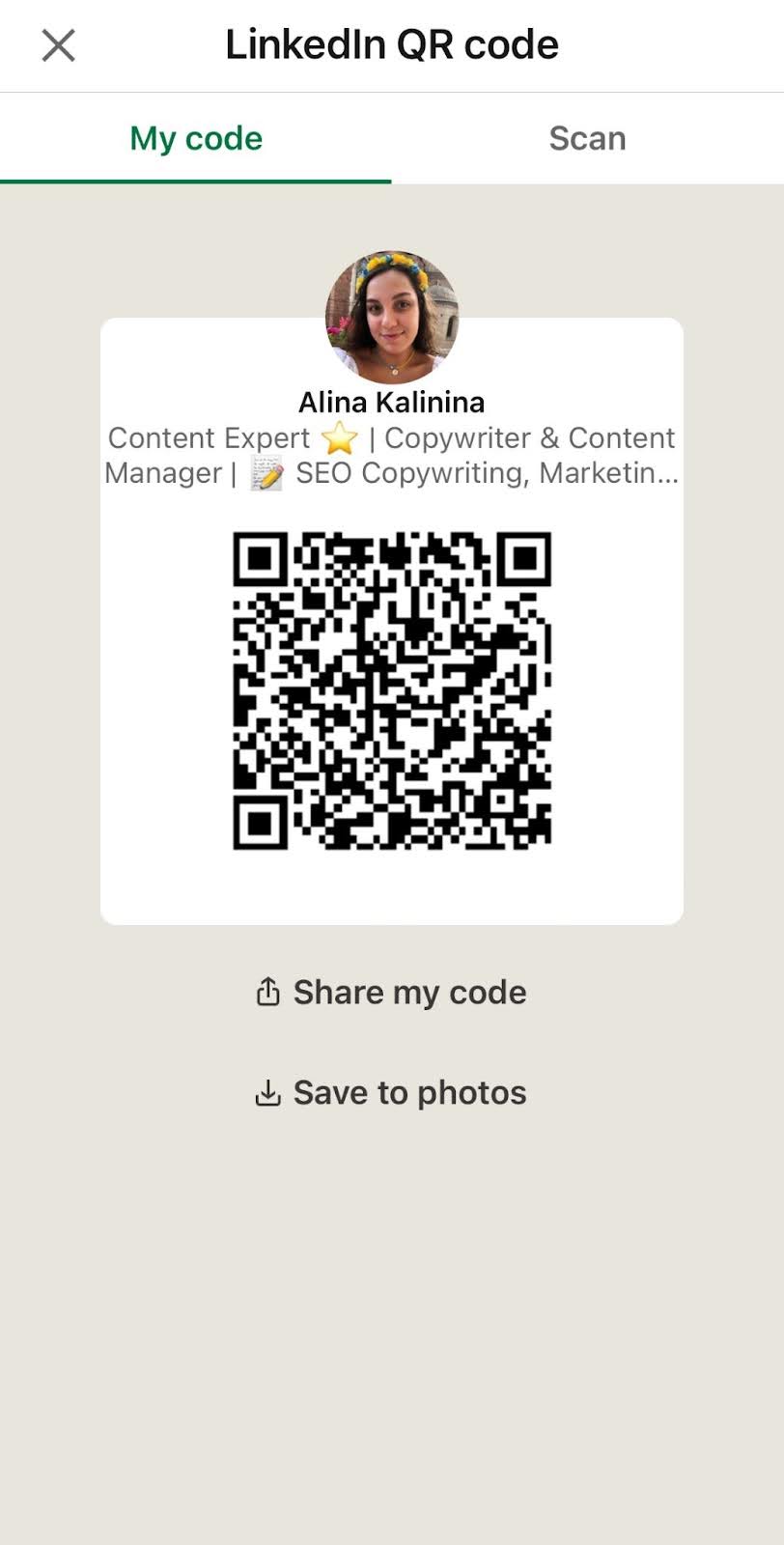
Once you’ve got the QR code, there are several ways to share it:
- Show the screen with the QR code so that the person you want to share it with can scan it.
- Tap on “Share my code” to share it via messages, emails, or other third-party apps.
You can also share your code with the photo by selecting this option from the drop-down menu.
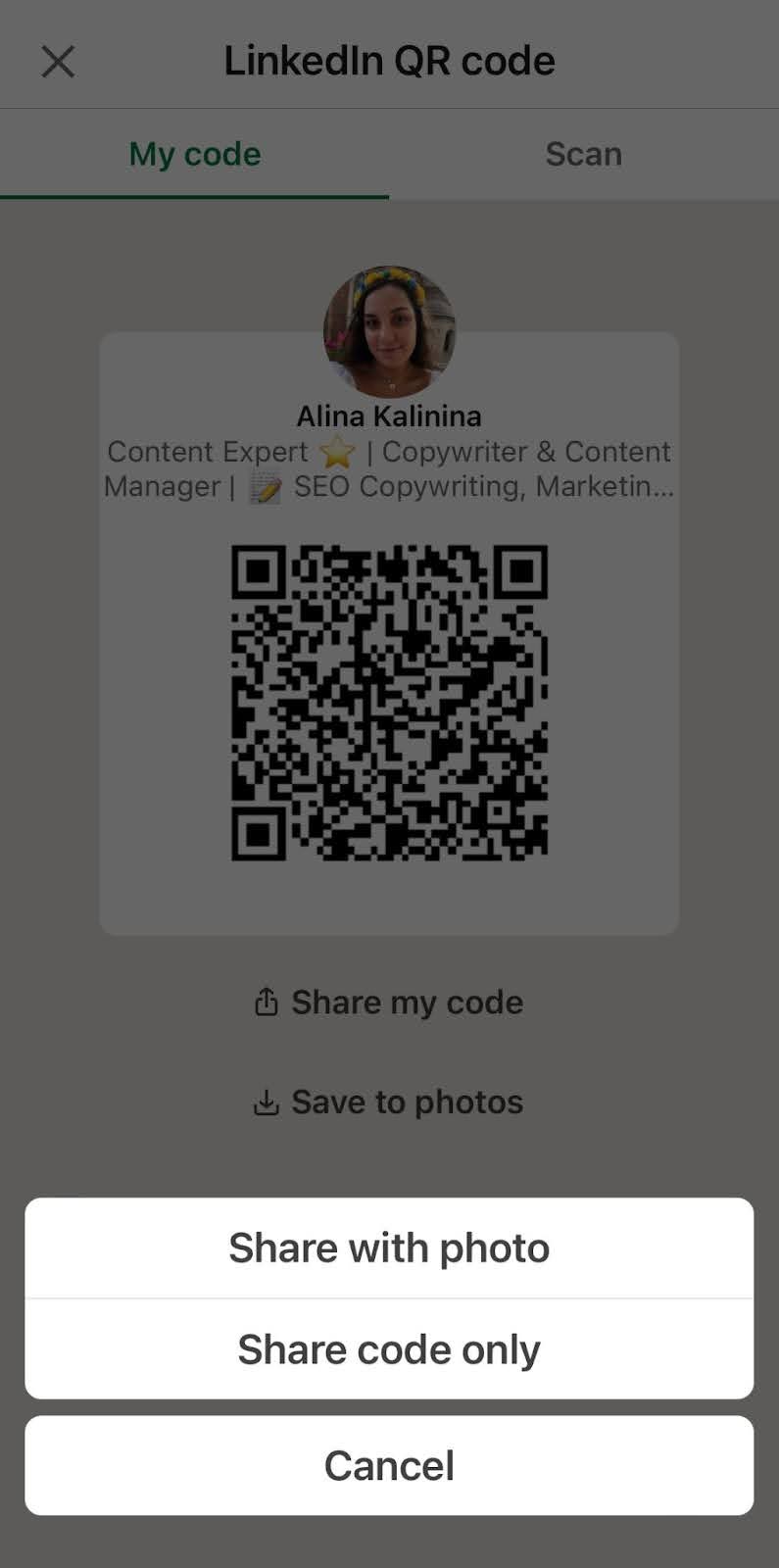
Click on “Save to photos” to download your LinkedIn QR code as an image, which you can then share through drip campaigns, presentations, printed materials, and other marketing channels.

How to use a LinkedIn QR code to boost lead generation
Making the connection process seamless and immediate, a LinkedIn QR code opens up multiple opportunities to grow your network and generate leads.
Let’s explore some practical strategies and networking tips on how to use LinkedIn QR codes to accelerate lead generation.
Add to digital campaigns
Incorporate your LinkedIn QR code into digital campaigns to enhance lead generation. You can use this code in email drip campaigns, paid ads, or social media posts. Thus, you provide prospects with a seamless way to connect on LinkedIn. This not only streamlines lead generation but also makes outreach feel more personal and accessible.
Follow up after the connection Once you connect on LinkedIn, start nurturing leads by engaging with them on the platform. Thank them for connecting with a personalized message.
Engage with their content by liking, commenting, or sharing their posts, conveying genuine interest. This keeps you top of mind and helps secure relationships that can drive real value.
To optimize lead nurturing, leverage the Snov.io LinkedIn automation tool. In this app, you can create personalized LinkedIn sequences and fully automatically engage with leads on the platform.
To double results, create multichannel sequences in Snov.io. Combine personalized emails with LinkedIn actions and warm up leads even faster.
Share at networking events
Networking events, whether they are virtual or offline, are an excellent opportunity to build new connections. And here is where the LinkedIn QR code comes in handy, as it makes the connection process fast and simple. Display it on digital slides, posters, or printed handouts to encourage attendees to scan it and connect on LinkedIn.
You can also share your QR code in the chat section, providing a short but compelling message on why you’re worth connecting with. During events, people are more open to communication. That’s why giving them a simple way to communicate with you right away increases the chances of building relationships with prospective leads.
👉 Find top LinkedIn networking tips for building meaningful relationships
Incorporate into the outreach strategy
Adding LinkedIn QR codes to your outreach strategy can make initial content more efficient. Include your QR code in cold emails to gently invite prospects to visit your profile and learn more about you or your business. Thus, you can warm up your outreach by moving conversations to a more personal channel.
Besides, by providing a LinkedIn QR code, you make it clear for recipients how to engage with you further, increasing the chances of immediate responses. Whether you’re reaching out to potential clients, industry peers, or collaborators, your QR code can encourage them to act sooner and help foster more personalized communication.
Include on your online resources
Do you have a website, professional blog, shareable eBook, or other resources? They are the perfect place to include your LinkedIn QR code. By integrating this QR code into your content, you make it simple for your audience to connect with you directly. This way, you can easily drive more connections and expand your professional network.
Besides, people who come from your content are already interested in your expertise, which makes them more likely to convert into warm leads. So, including QR codes on your online resources can enhance LinkedIn prospecting, bringing high-value connections.
Leverage in printed marketing materials
Combine online and offline networking efforts by integrating your LinkedIn QR code in physical marketing materials. This can be business cards, flyers, brochures, or other promotional items. Make sure your QR code is visible and well-printed so it can be effortlessly scanned.
You can also add an appropriate call-to-action to encourage the reader to scan and connect on LinkedIn. Using LinkedIn QR codes in printed materials helps streamline lead generation, allowing you to transition offline prospective leads to online communication easily.
Use in your email signature
Create a modern and informative email signature by including your LinkedIn QR code. Thus, you ensure ongoing opportunities for expanding your professional network and driving new connections with every email you send.
This is especially useful for professional emails where you are regularly communicating with colleagues, clients, or potential leads. By including the QR code in the email signature, you make it easy to get in touch with you. Plus, this way, you provide easy access to your up-to-date profile information, making you look credible and trustworthy.
Collect emails from LinkedIn profiles you’re interested in using LinkedIn Email Finder. This way, you can start engaging with your leads through email outreach and foster the foundation for stronger relationships before connecting.
You can gather emails from LinkedIn profiles, companies, or search result pages in seconds. The best part is that no extra email verification is needed because all email addresses are already verified.
This video will explain how to collect emails from personal profiles step-by-step:
Pro tips to maximize your LinkedIn QR code results
Although LinkedIn QR codes can make lead generation easier, you should use them strategically to maximize effectiveness. Here are the best practices and LinkedIn networking tips prepared by our outreach specialists to help you boost professional connections:
Consider optimal placement
To drive real results with your LinkedIn QR code, you need to place it in a visible area. Whether it’s on digital content or printed materials, ensure the code is easily noticeable and scannable.
I recommend placing it in a prominent area with enough clear space around it. Thus, you ensure it doesn’t compete with other information and remains easy to spot and scan.
Choose the right size
The size of the QR code is also important. If it’s too small, then it may be difficult (or sometimes even impossible) to scan it. However, by making your QR code large, you may overwhelm the whole design of your email, LinkedIn business card, flyer, or other marketing material.
The minimum size for a QR code recommended for printed materials is 2 x 2 cm (0.8 x 0.8 inches). Anything under this size risks running a scan failure. For digital content, a safe minimum size is 240 by 240 pixels with a minimum of 72 DPI resolution.
Following these recommendations, you ensure good scannability by most smartphones. However, always test how your LinkedIn QR code works before finalizing the design.
Leverage the power of design
Make your QR code more captivating by experimenting with its design. Change the background color or customize your code using your branding palette or color themes. You can also round the corners or insert a logo inside to make it more visually appealing. Don’t limit yourself to classic black ones.
Whatever ideas you apply, ensure there’s enough contrast for scanning. Although creative design helps catch the eye, remember the primary purpose: your LinkedIn QR code should be easily scannable.
Add a CTA
Include a friendly but compelling call-to-action alongside your LinkedIn QR code to increase engagement. Make sure your CTA is concise and clear. For example, phrases like “Scan to connect with me” or “Let’s connect on LinkedIn” encourage the action and explain to people what they’ll get by scanning.

Empower the LinkedIn QR code with a message
Add a brief and friendly note when sharing the QR code, making your outreach more personal and relevant. Personalized messages help foster a deeper connection right from the start. Briefly explain who you are and why you want to connect, or provide a reason to stay in touch.
You can mention knowledge sharing, collaboration opportunities, or other benefits your recipient may gain from connecting with you. By adding such personalized notes, you make your LinkedIn QR code feel more like an invitation, encouraging people to take action.
You can use automation outreach tools to generate custom messages for this purpose with minimum effort. Opt for services that offer customization features, enabling personalizing messages in bulk. In Snov.io, you can effortlessly tailor outreach messaging at scale using Variables, Dynamic content, or the Spintax feature.
Whatever outreach tools you use for B2B lead generation, make sure they are safe. A good tool should prioritize data privacy and comply with LinkedIn guidelines.
For example, using Snov.io, you get high-level security provided by built-in proxies for each LinkedIn account and cloud-based servers. Also, our automation tools simulate human behavior with smart delays and safety limits.
In Snov.io, you can also monitor pending requests and withdraw them in bulk to avoid any potential restrictions. With smart automated outreach, you not only keep your account safe but also grow your Social Selling Index on LinkedIn.
Key takeaways
LinkedIn QR code offers an easy and efficient way to connect and expand the professional network.
- To maximize results, you should place your LinkedIn QR code where your audience is most likely to engage, such as on your website, email signature, business cards, and other materials.
- Wherever you add your QR code, follow best design practices to ensure it’s easily noticeable and scannable.
- To truly boost LinkedIn prospecting and lead generation, follow up after the connection by interacting with your leads’ profiles.
Outreach tools like Snov.io help you ensure seamless and personalized engagement with your LinkedIn leads while saving time and effort for other business tasks.