TL;DR:
The Snov.io marketing experts offer advice for anyone who wants to start generating leads on LinkedIn. In this article, we’ll explain how to optimize your profile to attract more potential clients, gather their contact details, and reach out to your leads en masse.
We’ll also guide you through each step of LinkedIn outreach automation with actionable tips to help you save time and protect your account from LinkedIn ban.
LinkedIn is widely regarded as the top social networking platform for B2B lead generation. Anyone looking to expand their sales efforts simply must seize this opportunity.
Suppose you’re new to social selling, though; diving into such a competitive space could be scary. It’s easy to get lost among competitors if you aren’t familiar with the LinkedIn outreach best practices for B2B sales. But don’t worry. It’s never too late to learn, and it’s not as complicated as it may seem.
Take a deep breath and let us walk you through the main steps on the way to a successful LinkedIn prospecting.
Outline:
Optimize your profile for LinkedIn outreach success
Your LinkedIn profile is an advanced business card. It is the first thing people see when you send them invitations to connect. It should reflect who you are, what expertise you possess, and what your business has to offer.
There are several key ways to optimize your profile for a more successful LinkedIn sales outreach:
- Make sure it is complete.
The LinkedIn algorithm will show your profile to more users if you’ve completed all of the main sections. Keep your essential profile details, such as location, job title, skills, education, industry, and summary, up to date. This will ensure that your profile appears when users search for experts in a specific niche.
- Set a profile photo and page cover.
People want to know who is sending them messages on social media.
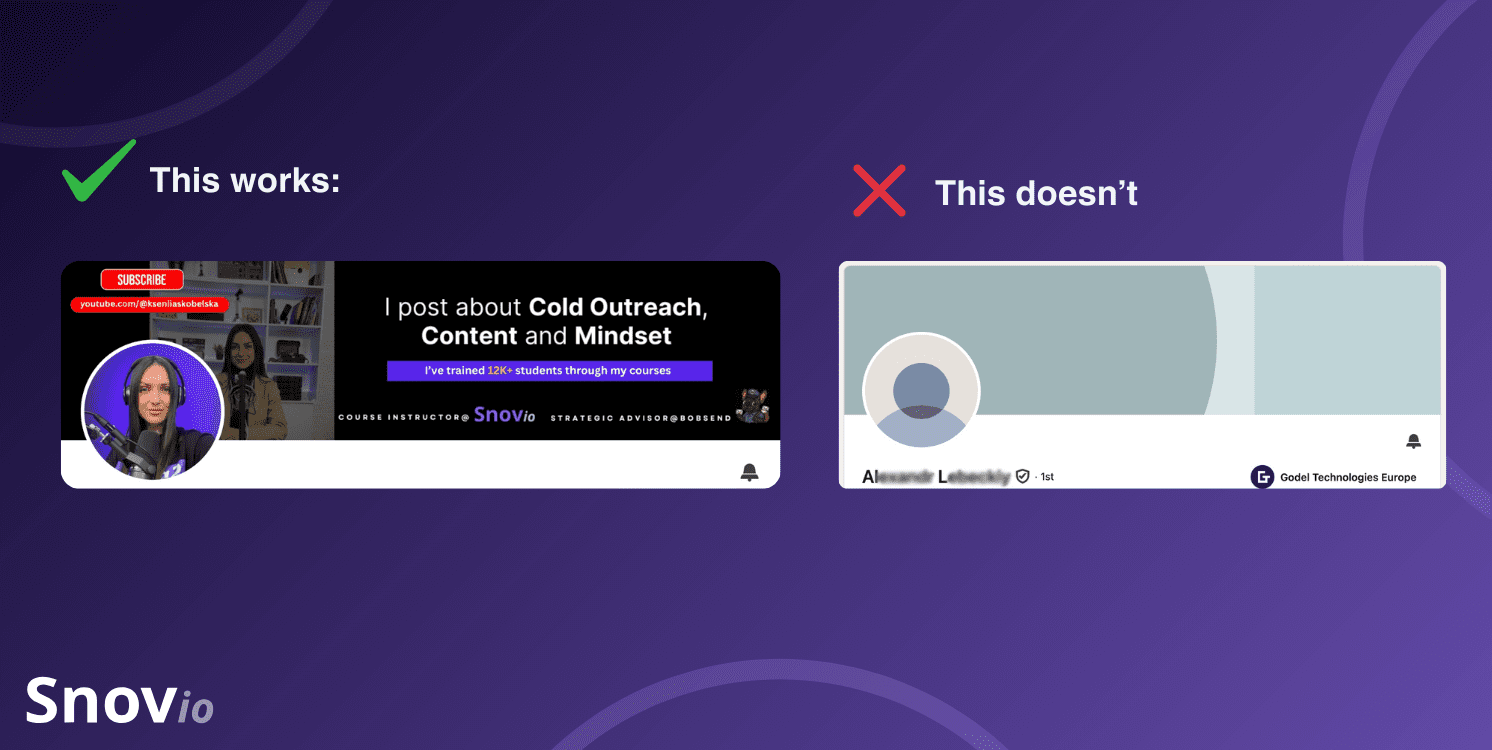
Use a clear and professional photo of yourself that invokes trust. At the same time, utilize your page cover picture as a place for brand logo, slogan, or offering.
- Write a catchy LinkedIn headline.
It should make your prospects want to know more about you and your business. Be precise and straightforward, so anyone visiting your page understands immediately what it is you do.
- Personalize your LinkedIn page URL.
A custom URL looks cleaner, more professional, and is easier for your leads to remember. Also, if you include a niche-specific keyword or your brand name in the URL, your target audience is more likely to find you.
- Go into detail in the About section.
While the headline grabs your visitors’ attention, the About section is where they should find your value proposition. List all the benefits clients receive from cooperation with you, and don’t forget to add proof.
- Optimize for LinkedIn SEO.
Research which keywords are prominent in your niche. Use them organically in your headline, summary, and experience sections. This way, your profile will show up higher in search results. Meaning, more people from your target audience will discover the value you bring.
💡 Don’t stop at the basics! Watch this video to learn more LinkedIn profile optimization hacks that will increase your visibility for prospects and boost your sales:
How to get started with LinkedIn outreach
Now that your profile looks polished and informative, it’s time to get into social selling. LinkedIn is a perfect platform for this, thanks to its business-oriented user base and capabilities. But it’s too early to send sales messages just yet.
Start by defining your ideal customer portrait (ICP). Create one or a few ICPs to understand who you’ll be looking for on LinkedIn. Then, utilize the most powerful free feature of this social platform – its search engine.
Suppose you want to find at least 500 customers for your new product, which is a rental property management mobile app. This means your target audience will likely include mostly real estate agents. Simply type this job title into the LinkedIn search bar and start looking for leads.
See the person who fits your buyer’s profile? Hit that “Connect” button.
What should I write in the connection request?
Remember, LinkedIn connection requests for sales outreach should look natural. Imagine it as if you’re walking up to someone and introducing yourself at a party. Describe who you are, what you do, and why you’re reaching out. Keep your message short and to the point. After all, LinkedIn limits connection request messages to 200 characters for free accounts.
Connecting on LinkedIn is like meeting someone at an event — be real, be clear, and offer value. Explain why you’re reaching out, keep it simple, and show you’re a real person, not just another sales agent.
Marketing Specialist at Snov.io

Personalization is key here. Make sure you don’t use generic, impersonal messages, even if it saves time.
Instead, it would be great to share how you know your lead, mention something significant they did, or include a reference to a common connection. This is how your invitation note would look in the ideal world:
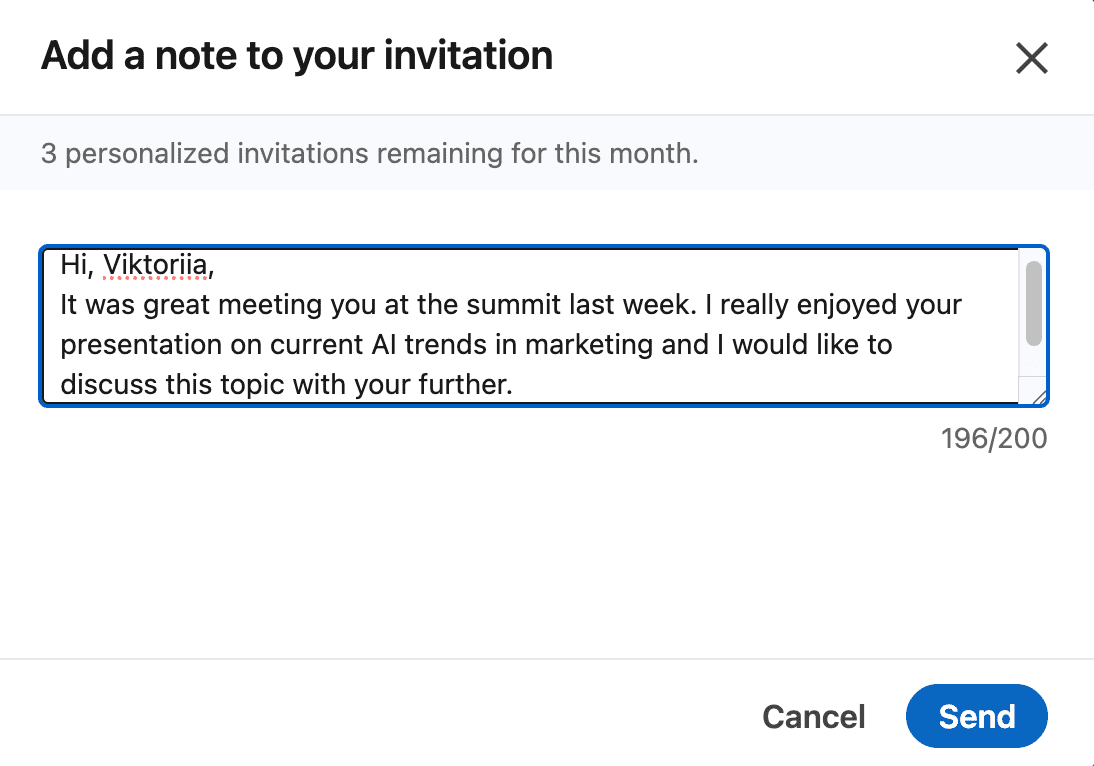
💡 Pro-tip: Of course, the best scenario is knowing the person you want to connect with. But let’s be realistic: how many prospects did you meet in person or even at online gatherings? Not so many. That’s why you have to cook up an invitation message that even a stranger will accept.
Don’t worry if you’re out of ideas. We’ve already done it for you and gathered all of the most effective connection request messages in this free guide.
The first step is made. Messages are sent. Now, wait for your connection requests to be accepted. Not all, but a large number of people will accept your invitation, and you can move on to building business relationships, carefully leading to a sale.
But be careful! LinkedIn doesn’t like the sudden surges of activity. If you haven’t actively used this social media platform to contact other users, don’t start sending hundreds of invites every day. This can lead you straight into the LinkedIn jail. Begin slow, with maybe a thirty or so connection requests, and gradually build up your LinkedIn outreach.
Sounds slow and tiresome? There is also an alternative way.
Enhance your outreach strategy with LinkedIn Premium
Once you start actively using LinkedIn for free, the platform will offer you the opportunity to buy a premium account. It provides more data, advanced search capabilities, and easy access to the people you’re looking for.
Notice that plans for entrepreneurs, recruiters, and job seekers differ in capabilities and price.
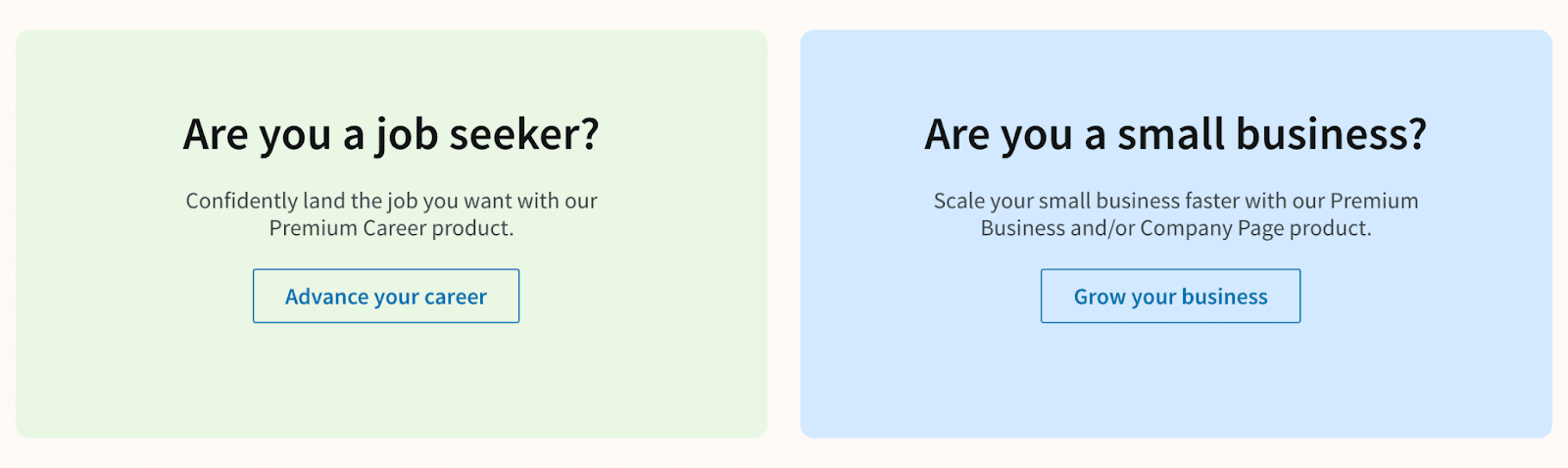
Premium account for business is the best option for users who already have a company page. If you’re just starting a social selling journey, consider LinkedIn Sales Navigator first. Its Core package includes most of the features you might need:
- Advanced search: use 20+ advanced search filters based on your sales preferences (e.g., industry, geolocation, company size, etc.).
- Job change notifications: get notified of people who’ve recently changed jobs.
- Lead recommendations: find customers based on your search history and interactions.
- LinkedIn groups: start interacting with your leads inside suitable target audience groups.
- Tagging prospects: add tags and notes for each prospect in your feed.
- Boolean search: find leads by combining keywords with operators such as AND, NOT, and OR.
But the most attractive feature of all is the access to LinkedIn InMail. With it, you can reach your potential customers who aren’t yet on your contact list. Catch them like a spider under glass, one by one, but keep in mind that there are some limitations.
InMail: the best option for high-touch outreach
Salespeople often pay for LinkedIn Sales Navigator because of InMail’s high open and reply rates. For example, its reply rate is 4.6 times higher than that of a cold email. Unfortunately, LinkedIn Sales Navigator limits its users to 50 InMails per month. LinkedIn Business Premium package includes even fewer InMail credits – only 15 per month.
Though LinkedIn doesn’t list exact prices for its premium plans, users report a comparatively high cost of InMails. What’s even worse, they should be sent one at a time. It’s pretty time-consuming! Thus, InMail-based LinkedIn outreach isn’t effective for large-scale marketing campaigns. Utilize it for high-touch outreach to hook decision-makers who are not likely to connect and respond to you otherwise.
🔎 Too busy to come up with the original message for your cold LinkedIn outreach? InMail templates that are proven to work are waiting to be copied, pasted, and adjusted.
How to make LinkedIn outreach less time-consuming with Snov.io
So, how do you scale LinkedIn outreach efforts to cover more ground? Enter LinkedIn automation tools for lead generation. These tools are designed to streamline repetitive work you would otherwise have to do manually on the platform. Utilize them to deliver a powerful messaging blow and quickly generate as many leads as you need.
Let’s use the Snov.io solution as an example to explore what such tools are capable of.
- Source leads. Instead of contacting prospects you find on LinkedIn one by one, use software to download their contacts into your prospect lists.
You can later use these lists to contact multiple LinkedIn-sourced leads once.
We recommend adding the LinkedIn Email Finder Extension to your browser. Now you can gather contact information directly from the company, personal, or search page.
Simply search for LinkedIn users who fit into your ICP, run LinkedIn Email Finder, and check which leads to save to your list.
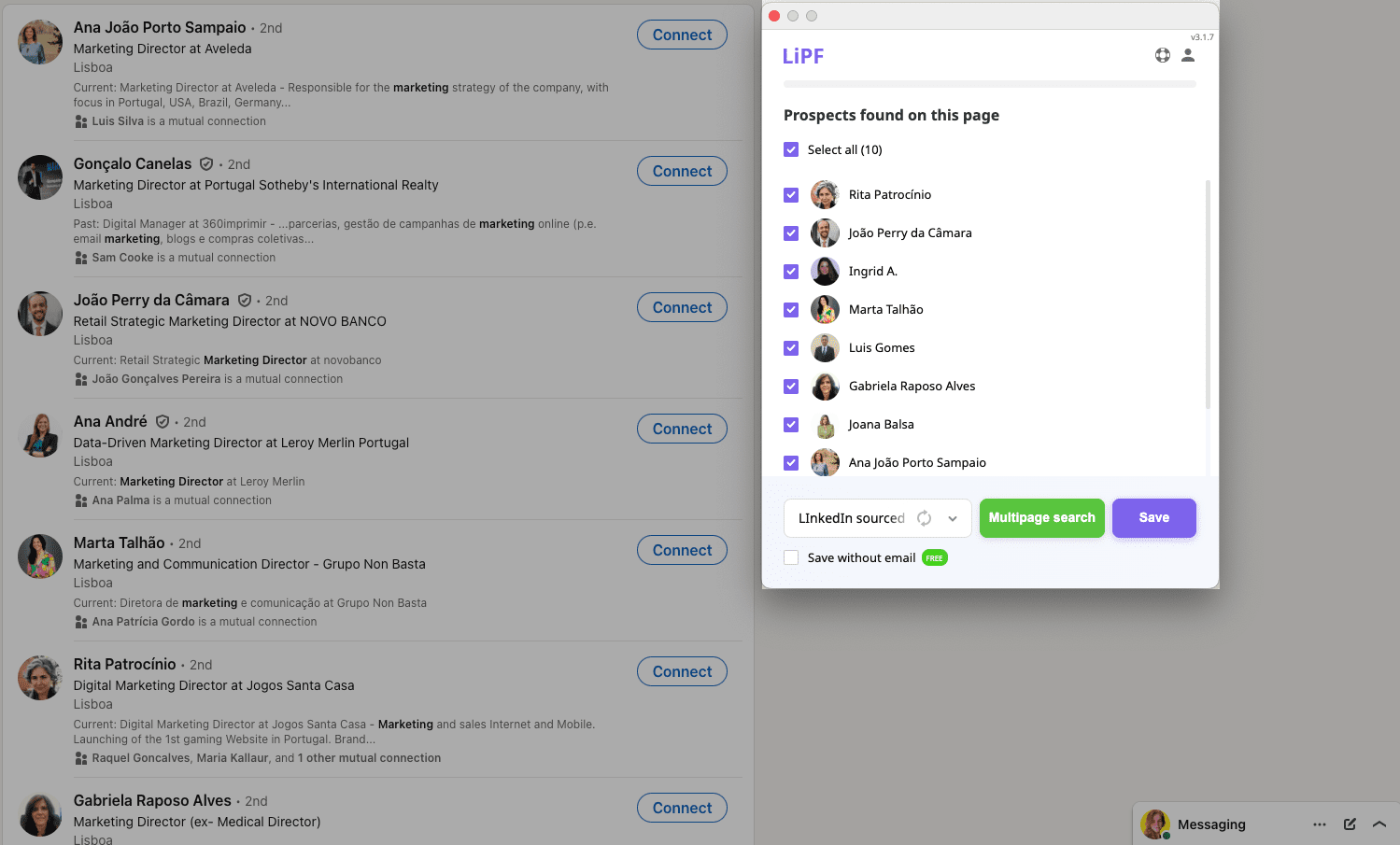
Alternatively, you can use LinkedIn search in the Snov.io app. It offers two different ways to find prospects:
- by the URL with search results
Go to LinkedIn, enter your search query, and apply the needed filters.
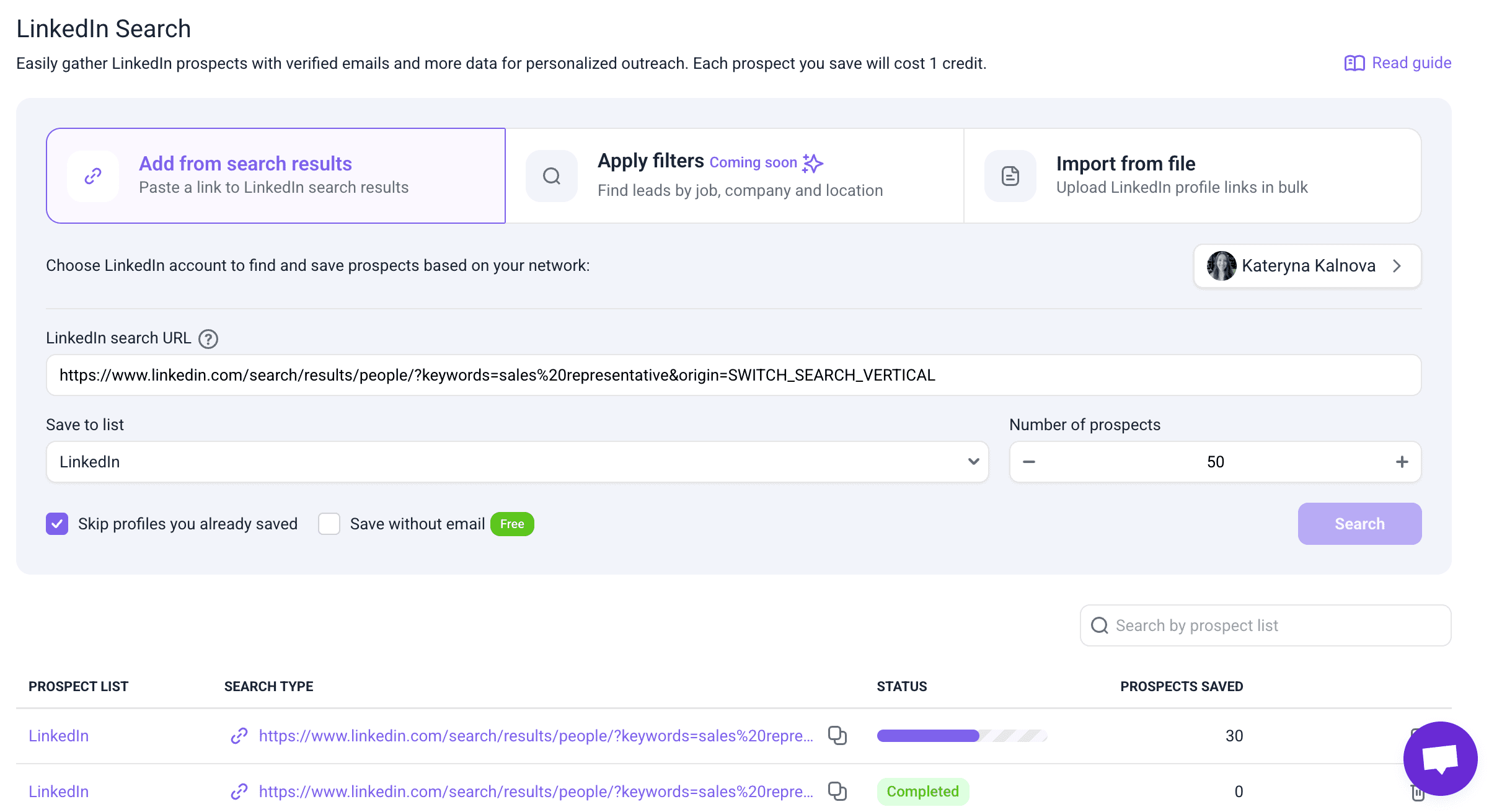
Copy the page URL and paste it into the LinkedIn search URL field in the Snov.io app.
- by the URL of a specific profile
Upload a CSV or TXT file with LinkedIn profile links.
Then, you can create a new prospect list and build your LinkedIn outreach campaign.
- Build rapport with your target audience. It’s usually best to appear on your prospect’s radar before sending a connection request. This means viewing their profile, following them, and liking their post.
Try doing this manually, and you’ll spend an entire day on social media. Better delegate this activity to software.
We recommend using the LinkedIn Automation Tool to engage with other users. Just include actions like views, likes, and follows into your sales outreach sequence – and you’re set.
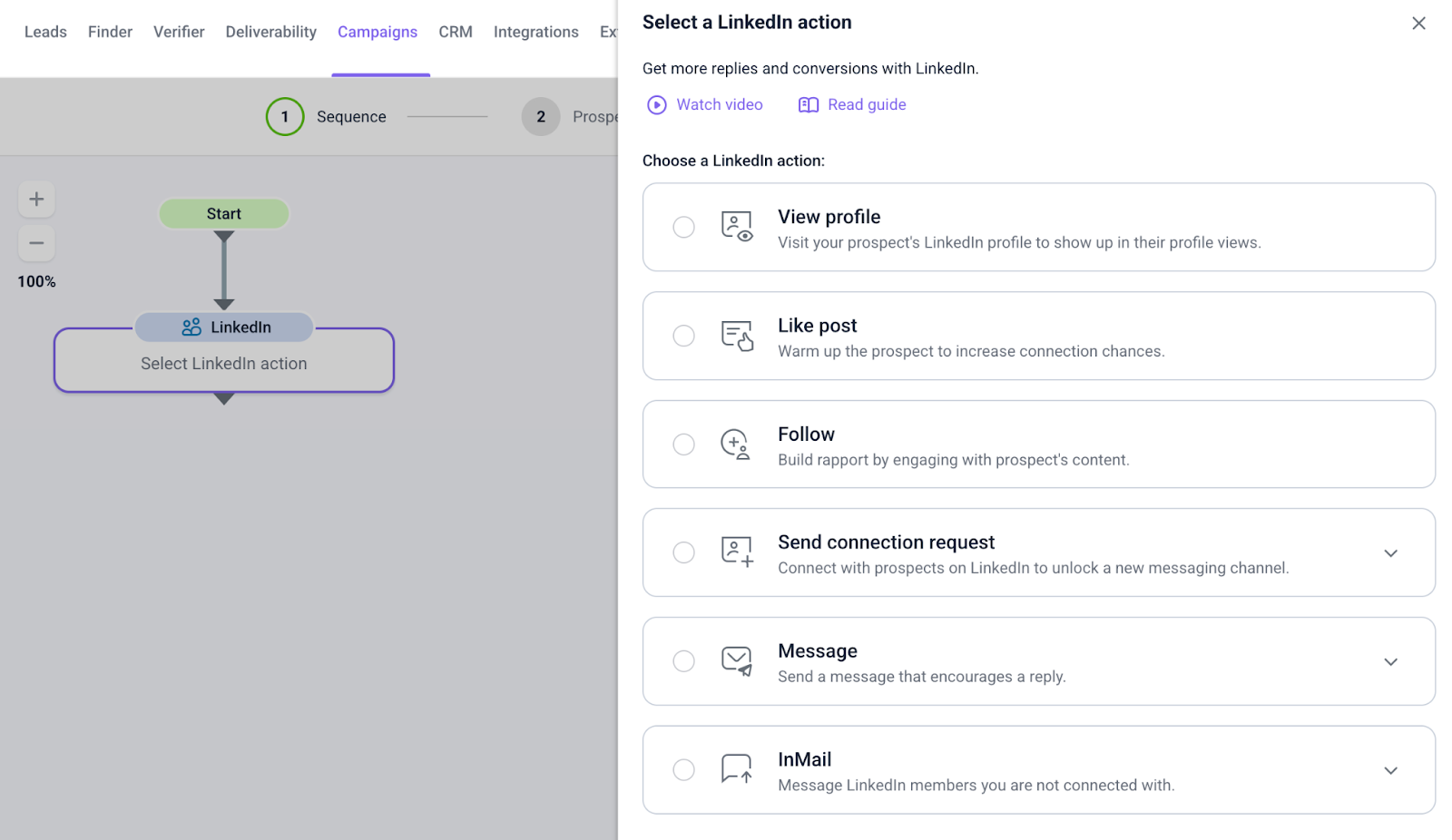
Our software will perform them for you. The best part? It will mimic human behavior and act from a location-based proxy to avoid the LinkedIn outreach ban.
-
- Launch a LinkedIn outreach campaign. The social platform itself won’t let you mass message other users. Sending sales messages one by one takes a long time – it won’t help you get ahead of the competitors.
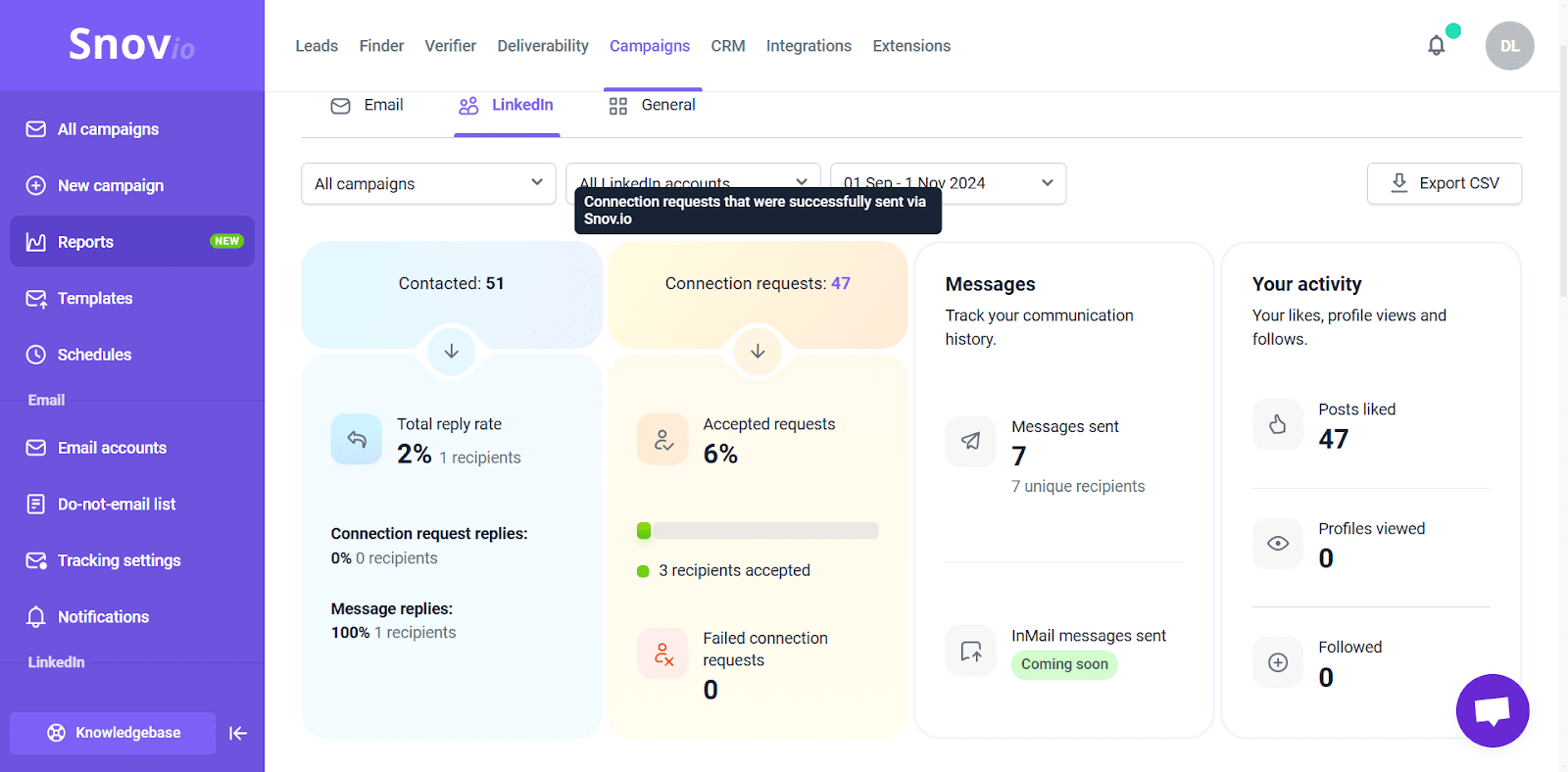
- Analyze and optimize your efforts. Track open and reply rates for your campaign with specialized software. LinkedIn itself doesn’t offer these capabilities to free account users. Reviewing analytical insights will help you craft more successful sales messages next time.
🤝 When using the Snov.io LinkedIn Automation Tool, pay attention to the Statistics dashboard. It provides an overview of your outreach campaign’s key performance indicators (KPIs).

How to use LinkedIn automation safely
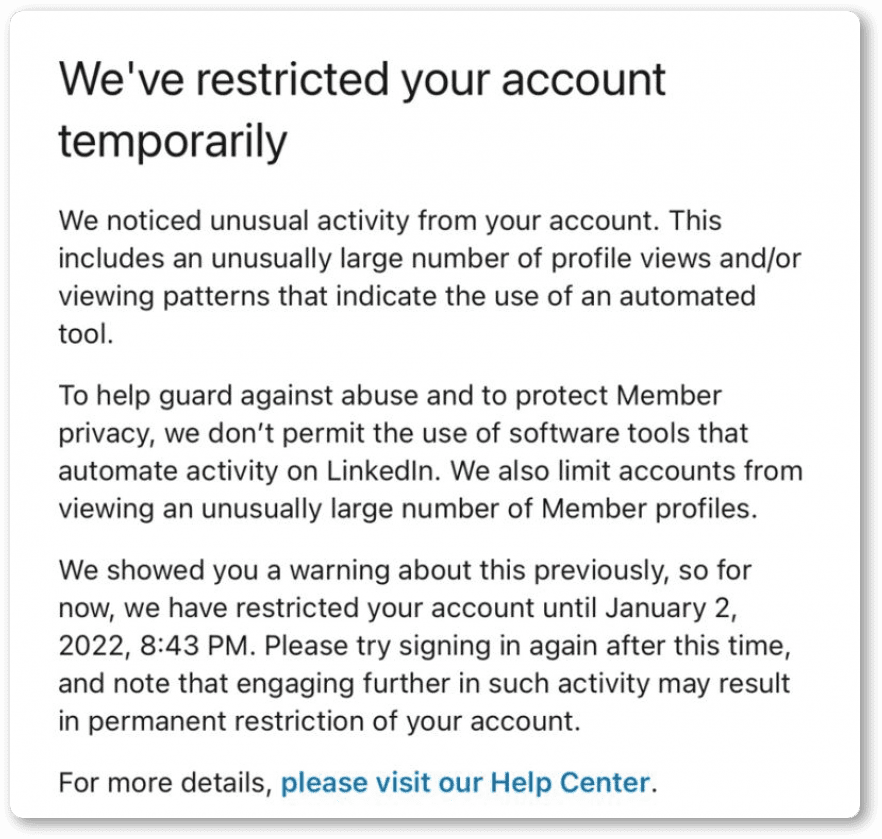
While using LinkedIn automation saves time, doing it carelessly can damage your sales. LinkedIn can spot unusual activity from your account and flag it as a potential spammer.
This happens if a dormant user suddenly starts visiting tons of pages in one day. Or if someone sends similar messages to many other users within minutes. In such cases, users receive a warning — a notice saying “We’ve restricted your account temporarily.”
For marketing and sales professionals, it’s like getting a blow below the belt.
Did this already happen to you? No worries if so! This isn’t a complete disaster yet, just a warning. Your account will be restored shortly. However, if you continue with the suspicious activity, LinkedIn won’t keep you waiting long and will permanently ban your account.
That’s why it’s essential to use LinkedIn outreach tools or automation software that allow you to warm up your LinkedIn account first. The exact warming-up procedure depends on your current Social Selling Index (SSI).
If you’ve never warmed up your account before, we recommend sticking to the following schedule:
- Week 1 – 10 connection requests per day
- Week 2 – 15 connection requests per day
- Week 3-8 – 20 connection requests per day
- Once you have 1,000+ connections – 30 connection requests per day.
Additionally, choose software that keeps outreach activity from your account human-like. This means performing delays between messages and logging into LinkedIn from the same IP address, among other things.
The latter is achieved by assigning a proxy to your account. If you’re using Snov.io, you can do it yourself or use our built-in proxy for convenience.

How to Find Someone’s Email on LinkedIn in 2026
March 25 2026

How to use LinkedIn data for multichannel outreach
Another way to quickly scale your outreach without risking being flagged by the algorithm is to take your campaign outside LinkedIn. Try adding another channel like cold calls or emails to your sales and marketing mix.
You can gather email addresses with LinkedIn Prospect Finder while searching for leads on LinkedIn. Use them to make your sales outreach campaign more effective and safer. Reach out to leads through a combination of channels instead of focusing exclusively on LinkedIn.
For example, don’t send a LinkedIn message at all if you’ve exhausted your outreach limit for the day. Following up via email will help you continue the conversation with existing leads without missing the chance to contact new ones.
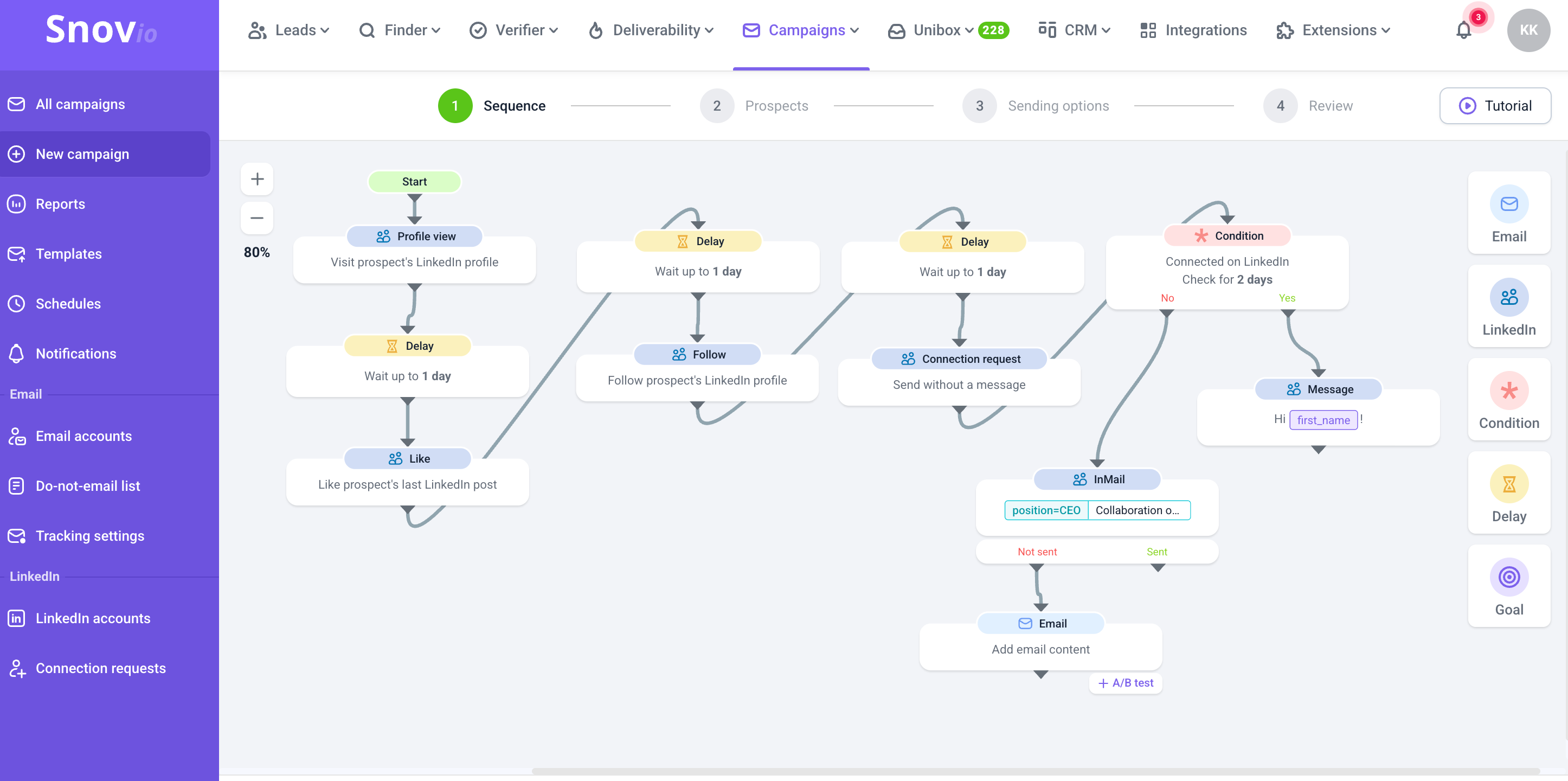
A multichannel approach won’t only help you keep out of the algorithm’s wrath. It’s also a great way to reach users who don’t check their social media regularly. Take advantage of the Snov.io Multichannel Outreach Tool to configure a sequence that covers your entire prospect base.
Key takeaways
LinkedIn is a bottomless well of sales opportunities. Don’t ignore its riches even when harsh limitations seem to slow down your outreach efforts. Clearly define who you’re looking for and sift through the data to find perfect leads.
Employ quality LinkedIn automation software to save time on routine tasks, but never underestimate the power of personalization. Connect with other users on a personal level, keep your messages real, and focus on providing value. Test different outreach channels and phrasing, see which messages get the best response, and tweak your strategy as you go.
Want to learn more than social selling basics? Join Snov.io Academy and discover more handy tips on using social media as a lead-generating machine.