TL;DR
LinkedIn cold outreach works when it’s strategic, personalized, and value-driven—not mass-sent and generic.
Choose your way to cold message on LinkedIn based on your constraints and needs:
- Free messaging: Perfect for the testing phase or tight budgets.
- InMail: For those ready to invest in direct access, expect 10-25% response rates with 65% replying within 24 hours.
- Email extraction + automation: Essential when you need volume beyond LinkedIn’s limits or managing team outreach.
- Solutions like Snov.io LinkedIn Automation Tool help scale outreach safely with lead discovery, safe multichannel automation, and AI-powered insights.
- Personalization drives results. Reference their latest posts, mention shared connections, or open with genuine industry insights.
Bottom line: Strategic LinkedIn outreach, backed by smart automation, turns cold messages into real conversations, leads, and opportunities.
Some LinkedIn cold messages generate immediate responses while others get ignored completely. The difference? Strategy and execution.
Most professionals take the wrong approach: they blast generic messages to hundreds of contacts, then wonder why their response rates are low.
Successful outreach starts with preparation, and in this article, we’ll guide you through every essential step.
What is LinkedIn outreach?
Cold LinkedIn outreach involves finding and connecting with potential clients, partners, or industry leaders through personalized messages. When crafted well, these efforts typically get responses from 10 to 25% of recipients.
Most people use this approach for generating leads, building their network, and growing their business. But cold messaging is not just for sales; It is also powerful for connecting with recruiters or potential employers who can help advance your career.
By connecting with professionals in industries or fields of interest, you can expand your network, increase your visibility on LinkedIn, and uncover new opportunities.
But before you can enjoy these benefits, it is essential to learn how to cold message someone effectively on LinkedIn.
What is the best way to cold message on LinkedIn?
You can use the following methods for your cold outreach:
- Try free LinkedIn messaging
- Use InMail (LinkedIn’s Premium feature)
- Find leads on LinkedIn and switch to an email automation tool.
Each option has its own set of advantages and drawbacks. Let’s explore them.
Start to cold message on LinkedIn for free
A free LinkedIn message requires you to first connect with people. Since messaging is limited to your network, personalized connection requests become the gateway. The key lies in making it compelling enough for prospects to accept.
Here are some creative workarounds for free accounts:
- Maximize connection messages: Use the 200–300 characters wisely. Mention something specific from their post or share a quick insight they’ll find useful.
- Engage first: Leave thoughtful comments on their content before sending requests so they recognize you.
- Join groups: Join communities where your target audience is active. This step makes your request feel more natural.
Pros:
- Cost-effectiveness: Starting does not require a LinkedIn subscription
- Authentic engagement: If potential leads accept connections, they already show some interest in your service or industry
Cons:
- Limited reach: You can only send messages to people in your network, which constrains your outreach potential
- No advanced features: The free version lacks sophisticated tools and analytics that can help refine your strategy
These factors should be weighed against your overall outreach goals.
|
💡Expert tip When sending LinkedIn connection requests, sudden increases in activity may raise red flags, causing restrictions. For safety, build up your outreach gradually during the first few weeks. At Snov.io, we recommend these connection request limits: Safe: 5–10 per day Moderate: 20–30 per day Risky: 40–50 per day |
Be cautious about cold outreach on LinkedIn. To keep your account safe, check out our guide on how to bypass LinkedIn limits.
Use InMail, the LinkedIn Premium feature
LinkedIn InMail is a Premium feature that lets you contact someone who isn’t part of your direct network. These cold messages are limited to 2,000 characters in the main body and 200 characters for the subject line.
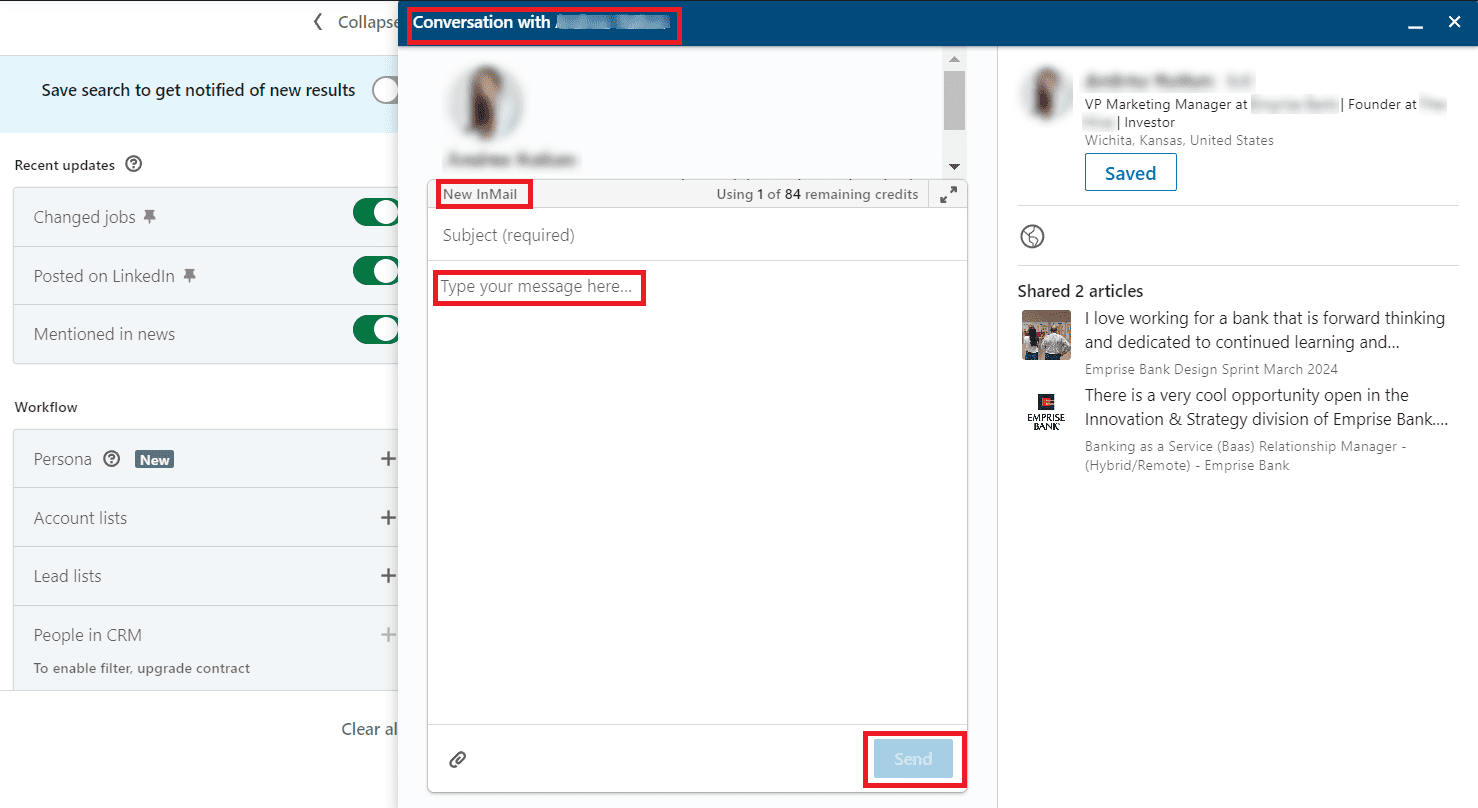
The feature is available through LinkedIn Premium, Sales Navigator, and Recruiter (Lite) plans. So, try this option if you want to take it up a notch and are ready to invest resources in cold messaging.
Once you’ve upgraded, LinkedIn allocates you some amount of InMail credits depending on your account type:
- Premium Career: 5 InMail credits
- Premium Business: 15 InMail credits
- Sales Navigator: 50 InMail credits
- Recruiter Lite: 30 InMail credits
We recommend using InMails when you want to reach promising leads directly, grab their attention, and increase your chances of moving deals forward. They also work well for recruitment when you need strong first impressions. Since they show up as “InMail” in recipients’ inboxes, they naturally stand out more than regular messages.
These messages get replies quickly. More specifically, 65% come within 24 hours, and 90% within seven days. When your message is clear and personalized, you can expect response rates between 10% and 25%.
Pros:
- Wider reach: You can directly contact anyone on LinkedIn, significantly expanding your cold outreach efforts
- Higher visibility: Cold messages sent via InMail often have priority in recipients’ inboxes, increasing the chances of getting replies
Cons:
- Cost: This is a Premium feature. Upgrading to paid plans involves ongoing investment, which might not be suitable for some, especially those just starting
- Risk of being unnoticed: Just because you can contact anyone doesn’t guarantee responses. Plus, people can opt out of receiving InMails in their message preferences settings
Overall, InMail offers greater reach and visibility, but its cost and limitations mean it works best when used strategically.
|
💡Expert tip Here’s something interesting: viewing someone’s LinkedIn profile before messaging them can improve your success rate by up to 78%. The best part? Actions like this, plus engaging with their posts, can all be automated on a larger scale. |
We recommend trying Snov.io’s LinkedIn lead generation tools to handle profile visits, post interactions, and cold outreach messages without doing everything manually. See the full breakdown below.
Find leads on LinkedIn and switch to an email automation tool
Another way to message someone on LinkedIn is by finding prospects, extracting their emails, and then contacting them through outreach automation platforms.
We firmly believe that this is the best way to scale lead generation and achieve significant results in a shorter period of time.
Let’s see in action:
Suppose the goal is to create a list of prospects for people working as product designers in the United States.
First, install the LinkedIn Email Finder extension. Next, go to LinkedIn, enter the keywords in the search bar, then press Enter.
Now, apply any necessary filters, and then click on the LI Prospect Finder icon in the upper right corner.. Click the Save button to move the contact list to Snov.io.
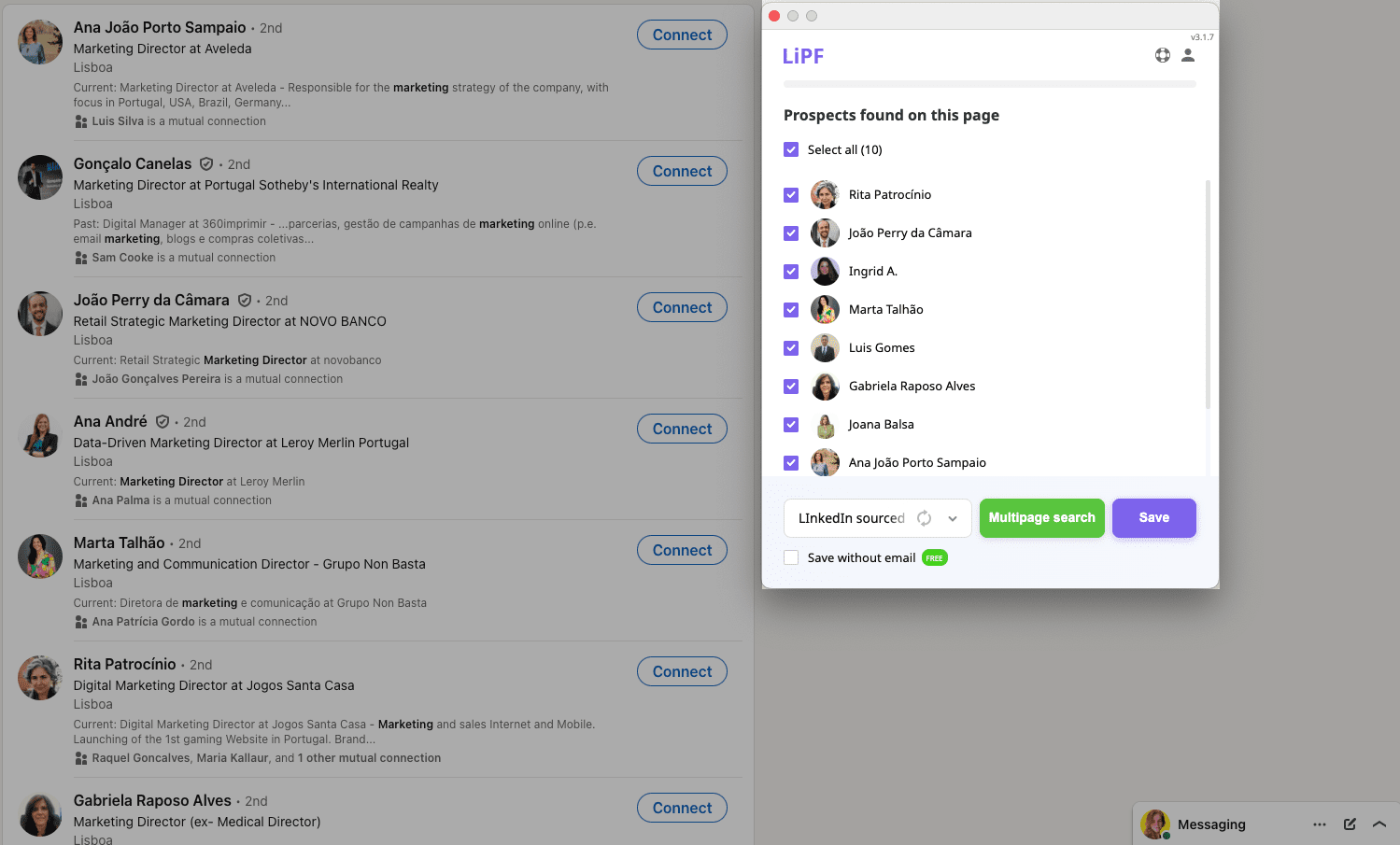
Alternatively, you can use the LinkedIn Search feature inside the Snov.io app.
Go to the Finder tab and click on LinkedIn Search from the left-hand menu. Then, select your LinkedIn account.
Now, go to LinkedIn and input your search query with the necessary filters. Copy the URL and paste it into the LinkedIn search URL field in the Snov.io app.
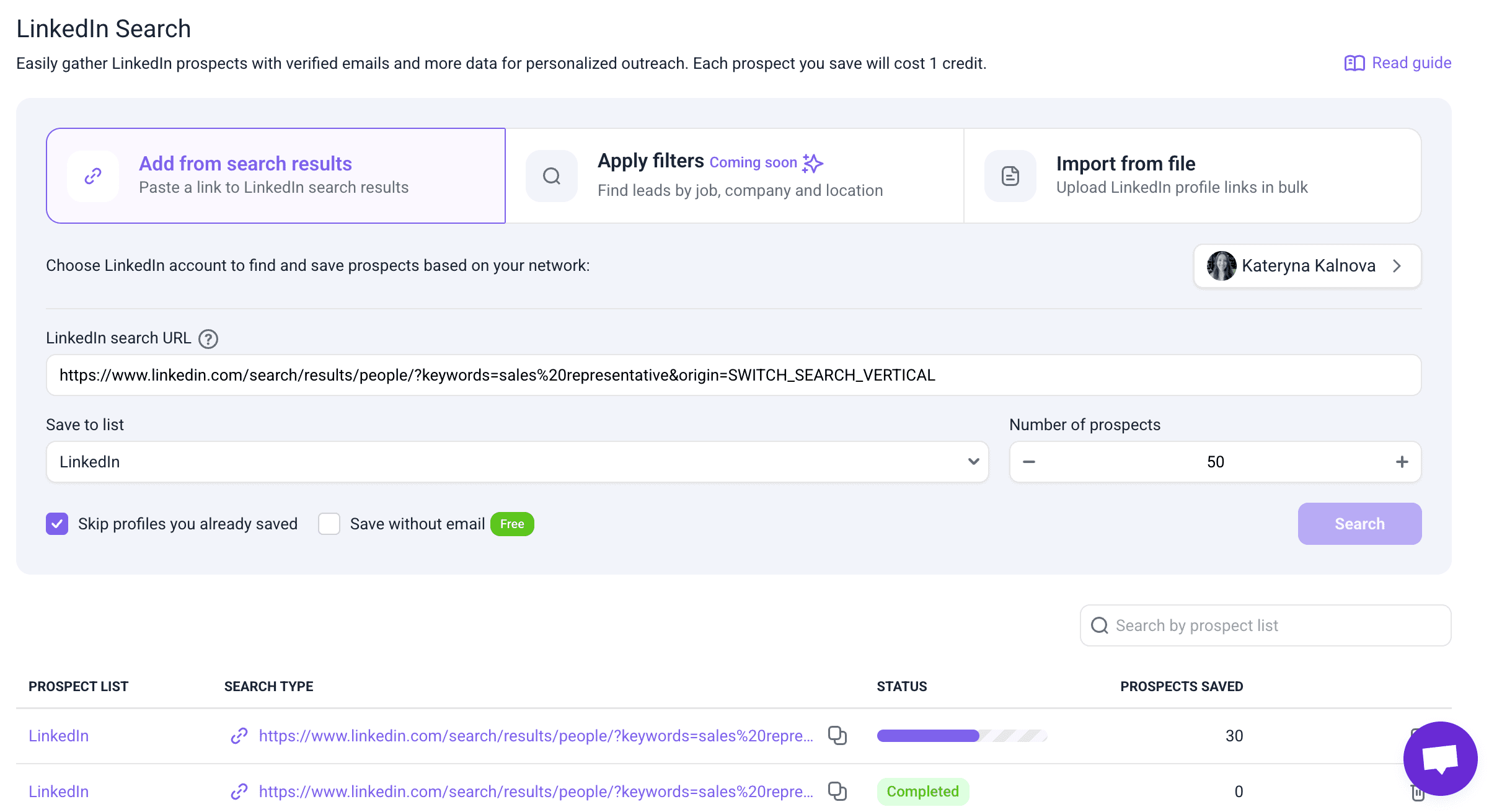
Save the prospects to your list. This is it!
The next step involves launching a multichannel email drip campaign, adding automated actions like LinkedIn visits, post likes, connection requests, personalized messages, and InMails.
You can modify campaigns as you want by switching conditions, Spintax variables, and automated actions. You can also track necessary metrics and manage leads in the CRM to enhance performance over time.
Here’s how Snov.io compares with other tools:
This approach has clear strengths, but it also comes with some small trade-offs:
Pros:
- Expanded prospecting: You can find leads and their email addresses on the platform to further cold email LinkedIn users in bulk
- Multichannel outreach: You can bypass LinkedIn’s connection and messaging limits while maintaining professional context
- Better scalability: Email platforms don’t impose the same restrictive daily limits as LinkedIn
Cons:
- Extra steps: Involves getting acquainted with new tools.
While it requires some setup, this method offers a scalable and flexible way to grow outreach.

7 Ways to Message Someone on LinkedIn Without Premium
March 16 2026

Automate LinkedIn Messages: How To Do It Safely In 2026
March 17 2026
How to cold message on LinkedIn: Detailed guide
Effective cold messaging on LinkedIn extends far beyond simply hitting “send.” The focus is on building meaningful professional relationships through thoughtful, targeted outreach that invites real responses.

The process becomes easier than it seems when following the rules below.
Polish your LinkedIn account
Your LinkedIn account needs to work for you 24/7, making the right impression even when you’re not online.
We recommend optimizing your profile as your career progresses. Every new role, key project, or skills belong on your page.
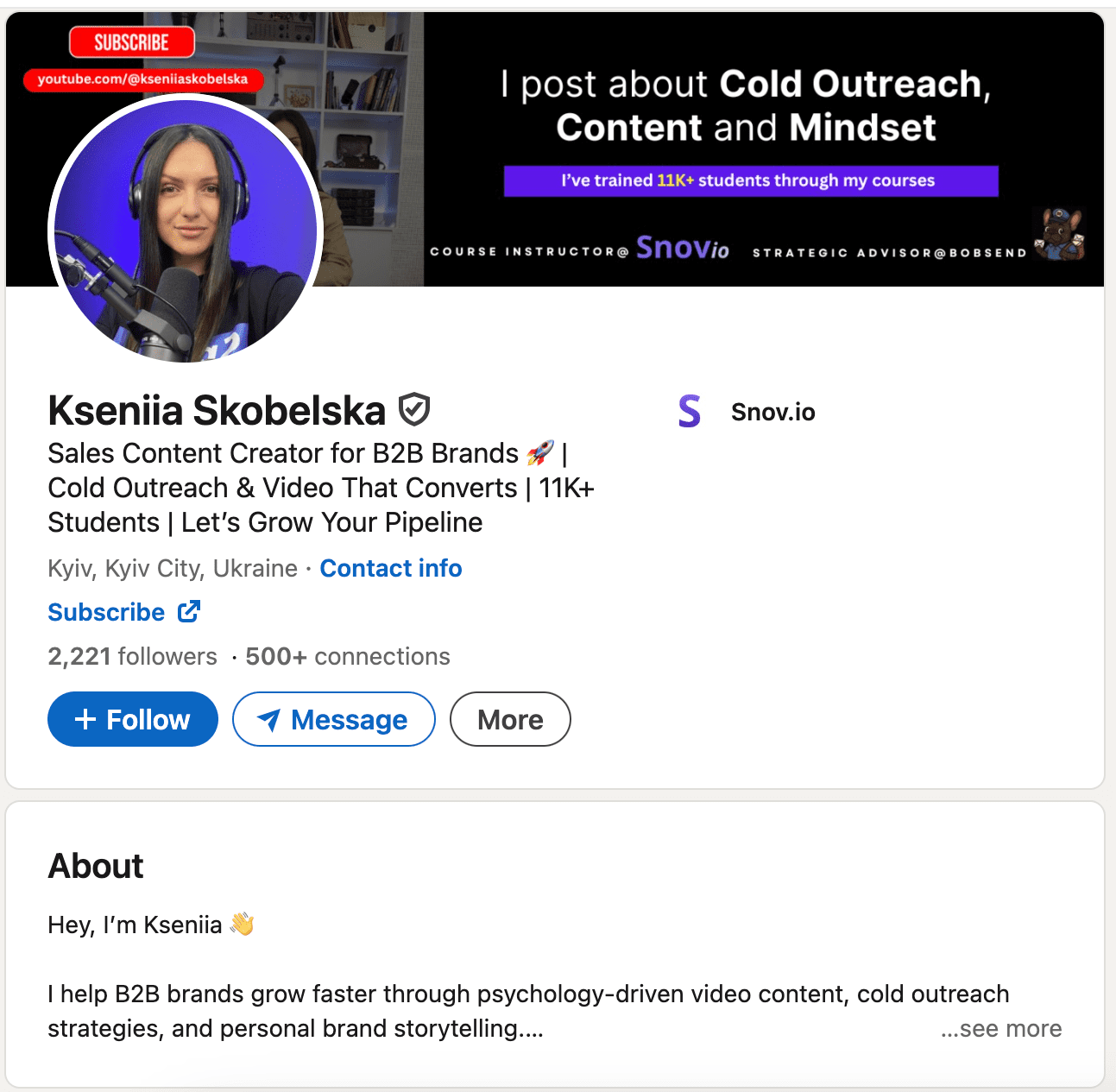
So, before you start outreach, take a close look at your current LinkedIn account. Ask yourself questions like these:
- Does it clearly communicate what you do and why it matters?
- Are your photos professional?
- Does the experience section show actual accomplishments or just job descriptions? The profiles that work best don’t just list responsibilities; they highlight results and impact. They give visitors a clear sense of your expertise and why connecting with you would be worthwhile.
👉 Refine your LinkedIn profile with our comprehensive guide!
Develop a cold message strategy
A systematic approach to LinkedIn messaging helps you stay consistent, save time, and boost response rates across all types of outreach. Without a clear framework, you risk sending random cold messages that feel unfocused and rarely get results.
To build an effective process:
- Define your objective (networking, sales, partnerships, hiring)
- Create tailored message templates for each use case
- Plan your follow-up sequence (no more than 3–4 touchpoints)
- Set daily or weekly outreach limits to avoid looking spammy
Remember, your LinkedIn cold messaging approach should align with your specific goals and industry. For example:
Job seekers: Focus on informational interviews and industry insights
“Hi [Name], I noticed your career transition from consulting to tech. As someone exploring a similar path, I’d love to hear about that experience, particularly how you positioned yourself for product management roles.”
SDRs (Sales Development Reps): Lead with value, not pitch
“Hi [Name], I saw your recent post about scaling customer success teams. We helped [Similar Company] reduce churn by 23% using a similar approach. Mind if I share what worked?”
Business owners: Establish thought leadership first
“Hi [Name], your insights on remote team management really resonated. I’ve been implementing similar frameworks with distributed teams and would love to exchange ideas.”
A clear, cold messaging strategy ensures every message is not only purposeful but also personalized.
Define your ideal customer profile (ICP)
Before sending your first email or LinkedIn message, take a step back and clarify exactly who you are reaching out to. Outreach often fails when it is based on vague assumptions, and you end up speaking to everyone but persuading no one.
Your target persona is the person who will get the most value from what you offer. Start by identifying the basics, such as job titles, industries, and roles that align with your solution, the pain points you can solve, etc. Also, look at your existing customers as well by reviewing product usage, feedback, and insights from your marketing team to spot patterns.
This is essentially your Ideal Customer Profile or ICP. A clear ICP makes your outreach focused, relevant, and much more likely to get a response.
Once you know your ICP, research individual prospects to personalize your approach. Check recent LinkedIn activity, company news, mutual connections, and professional wins. These insights double as conversation starters, making messages feel authentic.
To speed things up, you can use the AI ICP and Buyer Persona Generator.
Simply add your company and product details, and the AI will create accurate ICPs you can use for targeted outreach.
Use LinkedIn filters to find relevant people
LinkedIn’s filters let you search through millions of profiles to find prospects who match your exact criteria. The secret lies in applying filters in layers rather than capturing everyone at once.
Here’s how to layer your filters effectively:
- Start broad, then gradually narrow down
- Combine filters, like location + industry + role
- Prioritize activity by using the “Posted on LinkedIn” filter to identify active users. Interestingly, those who have posted at least once in the past three months are 45 percent more likely to accept your message
Also, explore our Boolean guide and master LinkedIn search operators to get even more precise results.
Create a prospect database
You wouldn’t organize an event without a guest list, right? The same thing goes for organizing an effective cold outreach campaign.
Your marketing or sales team can begin by gathering all potential contacts into a spreadsheet. Include columns for their name, company, position, geographic location, and mutual connections or interests. This will help you personalize each cold message.
But if you, like us, think spreadsheets are a bit outdated, you can modernize your approach with the help of the sales CRM ecosystem built by Snov.io.
Write a personalized cold LinkedIn message
96% of marketers report that personalized experiences boost sales, and real personalization goes far beyond just using their first name.
This is where research pays off. A cold message that mentions their latest article on AI adoption or highlights a challenge in their industry is more likely to be read, while generic outreach is more likely to be deleted.
Follow up on LinkedIn
Don’t be discouraged if you don’t get a reply right away—this is an integral part of cold LinkedIn outreach. A gentle follow-up can remind your prospect about the initial cold message you sent.
Understanding both when and how often to follow up can significantly impact your response rates:
- Mondays consistently show the highest response rates for LinkedIn messaging, making them ideal for launching new outreach campaigns.
- Sunday through Thursday generally perform well, with relatively consistent engagement levels across these weekdays.
- Fridays show 4% below average response rates due to people winding down for the weekend.
- Saturdays are the least effective day, with response rates dropping 8% below average.
With this timing in mind, here’s an optimal follow-up approach:
- Wait about a week after your initial cold message. Schedule it during high-performing days (Monday through Thursday). This period respects recipients’ time to digest while maximizing your chances of engagement.
- If they haven’t responded, send your first follow-up message after another week. Again, time it strategically when professionals are most active.
- If the first follow-up doesn’t get a reply, try once or twice more. Space each additional message by another week, maintaining your strategic timing.
- Make sure your follow-up messages provide additional value. Offer new information that could benefit the recipient rather than simply repeating your original request.
Remember, well-timed follow-ups with added value turn cold messages into real opportunities.
Measure and analyze your data
You can’t improve what you don’t measure. Whether you’re tracking manually or using automation tools, focus on metrics that directly impact your results:
- Invitations sent versus accepted
- Response rates
- Positive responses that become your highest-value leads
- Neutral responses worth nurturing over time
- Negative responses that provide valuable improvement data
- Leads that actually progress to meetings
Make it a habit to review your data weekly, focusing on patterns. If you’re seeing low acceptance rates, that usually means your connection requests need work. High acceptance rates but poor responses? Your messaging is probably at fault.
|
💡Bonus tip Utilize tools like Snov.io to streamline your tracking process. Plus, we recommend using AI Sentiment Analysis, which automatically categorizes responses for you: 💚 Interested (ready to engage further) 💛 Maybe (need follow-up nurturing) ❤️ Not interested (time to move on) This way, you don’t waste time guessing who deserves your attention. |
Now, let’s review the best ways to perform cold outreach on LinkedIn.
Best practices and psychology behind high-reply LinkedIn messages
Busy decision-makers often have overflowing inboxes and limited time—so how can you ensure they pause to read your LinkedIn cold message? Here’s what we recommend:
Leverage something you have in common
Starting with something you genuinely share creates an instant icebreaker. It could be the same university, common industry challenges, or even hobbies.
People are naturally drawn to those who remind them of themselves. When a prospect spots that shared thread, their guard comes down, and your chances of getting a reply go up.
For example, a content creator reaching out to a fellow marketer might mention their mutual battle with constant algorithm changes.
Here’s a LinkedIn message template that can help you start a conversation based on common ground:
Hi [Name],
I noticed we both share a passion for [Industry/Interest]. I’m really impressed by your work with [Company/Project], especially your insights on [specific detail].
It’d be great to exchange ideas. Can we connect?
[Name]
Keep it human, not corporate
Nobody likes feeling like they’ve been dropped into someone’s sales funnel. And nothing shuts conversations down faster than sounding like a press release in human form.
LinkedIn might have a business context, but it’s still people talking to people. So, frame your message like you’re starting a chat with someone, not pitching to a boardroom.
To get responses:
- Talk like a real person
- Show genuine curiosity about their work
- Share something useful without expecting anything back
- Ask questions that show you actually care about their answer
Here’s a cold LinkedIn message template that feels genuine:
Hi [Name],
My name is [Name], and I’m a [Role] at [Company].
At [Company], we help businesses overcome challenges related to [area of expertise]. In our experience, [brief solution tip about the group discussion].
I’d be happy to connect and discuss your specific situation in more detail if you’re interested.
Best,
[Name]
Mention a mutual connection
Mentioning someone you both know is like having a friend introduce you. It immediately establishes trust and gives context for why you’re reaching out.
When you reference a shared connection, you’re borrowing their credibility to open the door. It transforms you from “random person in my inbox” to “someone my colleague thinks is worth knowing.”
And here’s a template you can use for your LinkedIn cold message:
Hello [Name],
I see we’re both connected to [Mutual connection]. Having worked with [Him/Her/Them] on [Project], I’ve heard great things about your role in [Industry/Project].
I’d love to connect and discuss how we can drive mutual value to develop in our field.
Looking forward to hearing from you,
[Name]
See if a mutual connection can introduce you
A warm introduction carries instant credibility because it is backed by a person they already trust. It is like when a friend says, “You have to try this place, it is amazing.” You are already interested before even looking at the menu.
Grab the following LinkedIn cold message template to ask a mutual contact for an introduction:
Hi [Mutual connection],
I noticed you’re connected with [Name]. If it’s not too much trouble, could you introduce me to [him/her/them]? I have some ideas in [Area] that I think would be of mutual interest, and I’d be happy to discuss them.
Thanks!
[Name]
Give them a clear next step
Ending a cold LinkedIn message without a clear next step is like telling a great story and then walking out mid-sentence. You have their attention, so guide them on what to do next.
Your call-to-action should feel like the natural next part of the conversation. Keep it light and low-pressure, but clear enough that they know exactly what you are asking.
Here are some CTA guidelines that work:
- Offer flexible options (quick call, chat, even just a message back)
- Suggest realistic timeframes
- Keep the ask small and achievable
- Make saying “yes” super easy
Template with smooth next steps:
Hi [Name],
Thanks for connecting! I saw your recent post about [specific topic] and it really resonated with my work in [your area].
Would you be open to a quick 15-minute call to exchange insights about [mutual interest]? Happy to do a LinkedIn audio call at your convenience.
No worries if now isn’t the right time!
Best,
[Name]
So, here’s a short checklist on how to cold message on LinkedIn:
Before you hit that send button, make sure your message passes this quick test:
✅ Sounds like you – Would you actually say this in person at a networking event?
✅ Shows you did homework – Reference something specific about them or their work
✅ Offers genuine value – What’s in it for them beyond helping you?
✅ Has a clear but low-pressure ask – Easy to understand, easy to say yes to
✅ Feels conversational – More coffee chat, less corporate email
✅ Includes your personality – Let them get a sense of who you actually are
Yesterday, I got a connection request and a message from someone who went straight for the one thing every sales pro can get triggered by – reply rates.
Why this works: Relevance – for me (and probably you too), reply rate is a core metric. Well-chosen audience – they clearly knew who to ask (anyone running cold outreach). Straight to the point – no fluff, just the question that matters.
Outbound outreach expert at Snov.io

Cold message templates for job seekers, interns, and referrals
LinkedIn cold outreach isn’t just for social selling. Let’s remember that the professional platform was once created for job seekers and recruiters.
Whether you’re reaching out to land a job, connect with hiring managers, ask for referrals, or secure an internship, having the right template can make all the difference. Here are some examples for each of these scenarios:
How to cold message on LinkedIn for job applications
To increase the chances of landing a job, you can contact people who work there and demonstrate your initiative and interest in this role.
Here’s what you can do:
- Start by thoroughly researching the company to include relevant details in the message.
- Identify the right person to contact, such as the hiring manager or recruiter.
- Express your interest to the employer.
- Personalize the message and highlight the experience most relevant to the job posting.
- Include a clear call to action, such as requesting a meeting, a call, or a link to your CV.
If you wonder how to cold message recruiters on LinkedIn effectively, feel free to use the following template:
How to cold message on LinkedIn for an internship request
By reaching out directly, you can get your name and qualifications in front of the right people and demonstrate your proactiveness, qualities that employers value.
Here’s what we recommend:
- Briefly introduce yourself, highlighting your academic background, relevant skills, and any pertinent experience.
- Explain why you’re interested in the company and the specific internship opportunity.
- Express enthusiasm for the internship and how it aligns with your career goals.
- Politely inquire about available internship opportunities.
- Include a call to action, such as requesting a meeting or additional information.
The template below may come in handy:
Hi [Name],
My name is [Name]. I’m a [year] student at [university], majoring in [major] with a strong interest in [relevant field].
I am deeply impressed by [Company’s] innovation in [Industry] and want to express my interest in the [specific position]. With a solid track record in [related field or skill], I am enthusiastic about the opportunity to contribute to your team.
Let’s connect and discuss internship opportunities at [company name] in more detail. Would you be open to a brief chat about how my skills can benefit your project?
Kind regards,
[Name]
How to cold message on LinkedIn for a referral request
Referrals from trusted connections can considerably increase your chances of getting noticed by the hiring manager. To write compelling cold messages, follow these steps:
- Identify a company that can refer you.
- Personalize messages by mentioning shared connections or common interests.
- Clearly state the purpose for contacting them. Be upfront about seeking a referral for a specific job opportunity. Provide a link to the job posting or your resume.
- Highlight the skills and experience relevant to the job you’re applying for. Keep it concise.
- Instead of directly requesting a referral, express interest in learning more and getting their support.
The following template can be useful:
Hi [Name],
My name is [ Name]. Your experience at [Company Name] has caught my eye, and I noticed we both share an interest in [Industry Topic].
I’m currently a [Title] at [Company] with [X years] of experience in [ Industry]. I’m particularly interested in the [Job Title] position that recently opened at [Company Name] as my skills in [relevant skill 1] and [relevant skill 2] align well with the requirements.
I’d be grateful if you could share any insights about [Company Name] or the [Job Title] role. Could you recommend someone at the company who might be a good resource?
Thank you in advance,
[Name]
Here is a template you can use for this purpose:
Keep all your cold message templates in one document to make your LinkedIn outreach more efficient. Or, if you’re using LinkedIn’s paid plan, you can create up to 500 templates right within your account.
Key takeaways
Making each contact count with precision and personalization is a true mastery of cold outreach on LinkedIn. It is essential for anyone in sales, recruitment, and beyond.
With the right approach, you can turn LinkedIn cold messaging into a potent strategy for generating leads and building valuable professional relationships. To streamline this process and maximize results, try Snov.io, your lead generation automation tool for smarter personalization, seamless automation, and more effective outreach.